صغر حجم الشركة المصنعة طابعة نفث الحبر

Erasmart UV Printer لطباعة السيراميك
UV printing makes it possible to print full-color graphics, white ink and decorative varnish effects directly onto many suitable ceramic surfaces.
For custom print shops, gift businesses, interior décor companies and personalized-product studios, common ceramic applications include:
- بلاط السيراميك
- photo tiles
- اللوحات الزخرفية
- الوقايات
- QR code tiles
- قطع الزفاف والمناسبات
- wall-art tiles
- multi-tile murals
- branded hospitality décor
However, ceramic is not one uniform printing surface.
A smooth glazed tile, an unglazed porous tile, a matte decorative ceramic piece and a sublimation-coated blank can all behave differently with UV ink.
For professional production, the correct question is not simply:
Can a UV printer print ceramic?
السؤال الأفضل هو:
How does this exact ceramic surface behave with the ink, white layer, primer and final application?
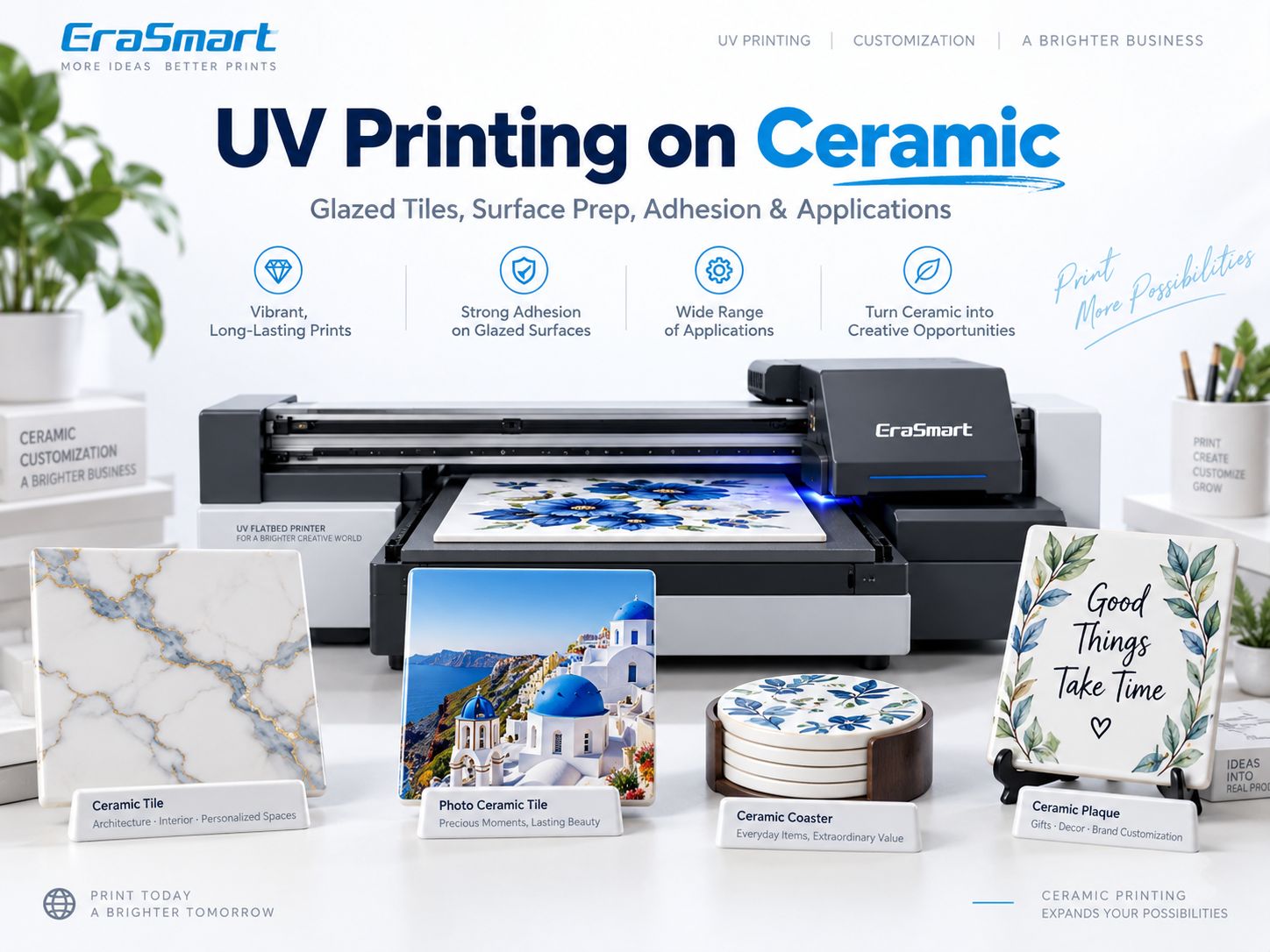
EraSmart classifies ceramic as a material that is suitable for UV printing بعد الاختبار, with surface glaze, curvature and adhesion among the main considerations.
The recommended production logic is:
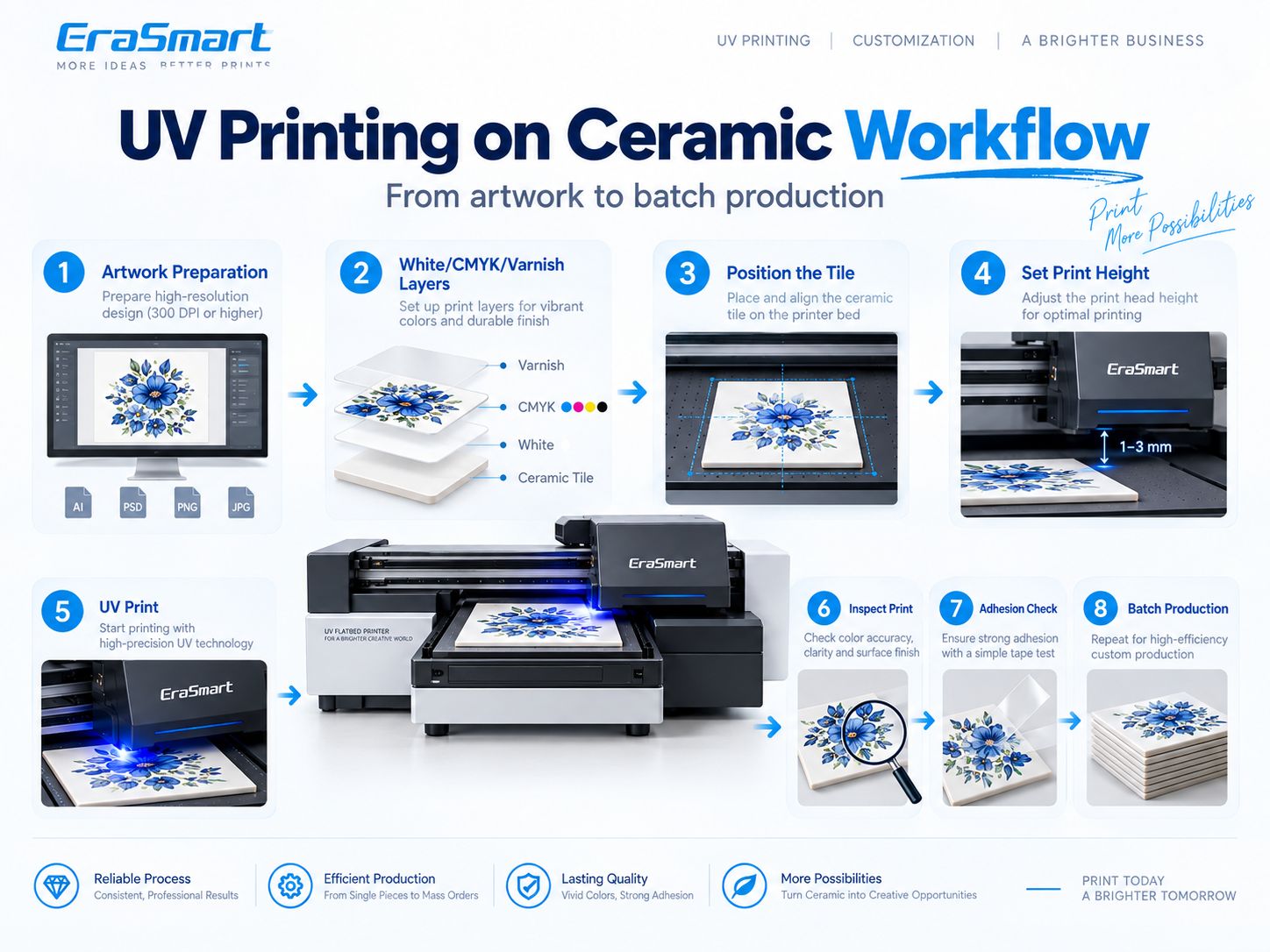
Identify the ceramic → Clean → Prepare the artwork → Select CMYK / White / Varnish layers → Print a sample → Test adhesion → Standardize the setup → Begin production
Quick Answer: Can a UV Printer Print on Ceramic?
نعم.
UV flatbed printers can print directly onto many suitable ceramic tiles, plaques and decorative pieces.
| سؤال | الإجابة العملية |
|---|---|
| Can UV printers print ceramic? | نعم بعد الاختبار |
| Best shape for flatbed printing | Flat tiles and plaques |
| التحدي الرئيسي | التصاق |
| حبر أبيض | Useful on colored or dark ceramic |
| التمهيدي | Depends on the surface |
| الصحافة الحرارية | لا |
| Glazed ceramic | Printable after adhesion testing |
| Unglazed ceramic | Printable, but texture and porosity affect results |
| أكواب السيراميك | Better evaluated with UV DTF, rotary UV or other suitable workflow |
| Typical applications | Tiles, plaques, coasters, photo products, décor |
A flat white ceramic tile may be one of the easier ceramic products to customize.
A glossy curved mug is a very different production problem.
How Does UV Printing on Ceramic Work?
الطباعة بالأشعة فوق البنفسجية هي عملية طباعة رقمية مباشرة.
سير العمل الأساسي هو:
- تحضير العمل الفني.
- Process the design in RIP software.
- Define CMYK, white and varnish layers.
- Place the ceramic item on the print platform.
- Set the correct printing height.
- نفث الحبر القابل للمعالجة بالأشعة فوق البنفسجية على السطح.
- UV LED light cures the ink during printing.
- فحص العينة.
- اختبار التصاق قبل الإنتاج.
Unlike sublimation, direct UV printing does not require transfer paper or a heat press.
For a deeper explanation of the ink itself, see ما هو حبر الأشعة فوق البنفسجية؟.
For the relationship between color, white ink and varnish, see the دليل حبر الأشعة فوق البنفسجية: CMYK والأبيض والورنيش.
What Types of Ceramic Can You UV Print?
The finish of the ceramic surface strongly affects the printing result.
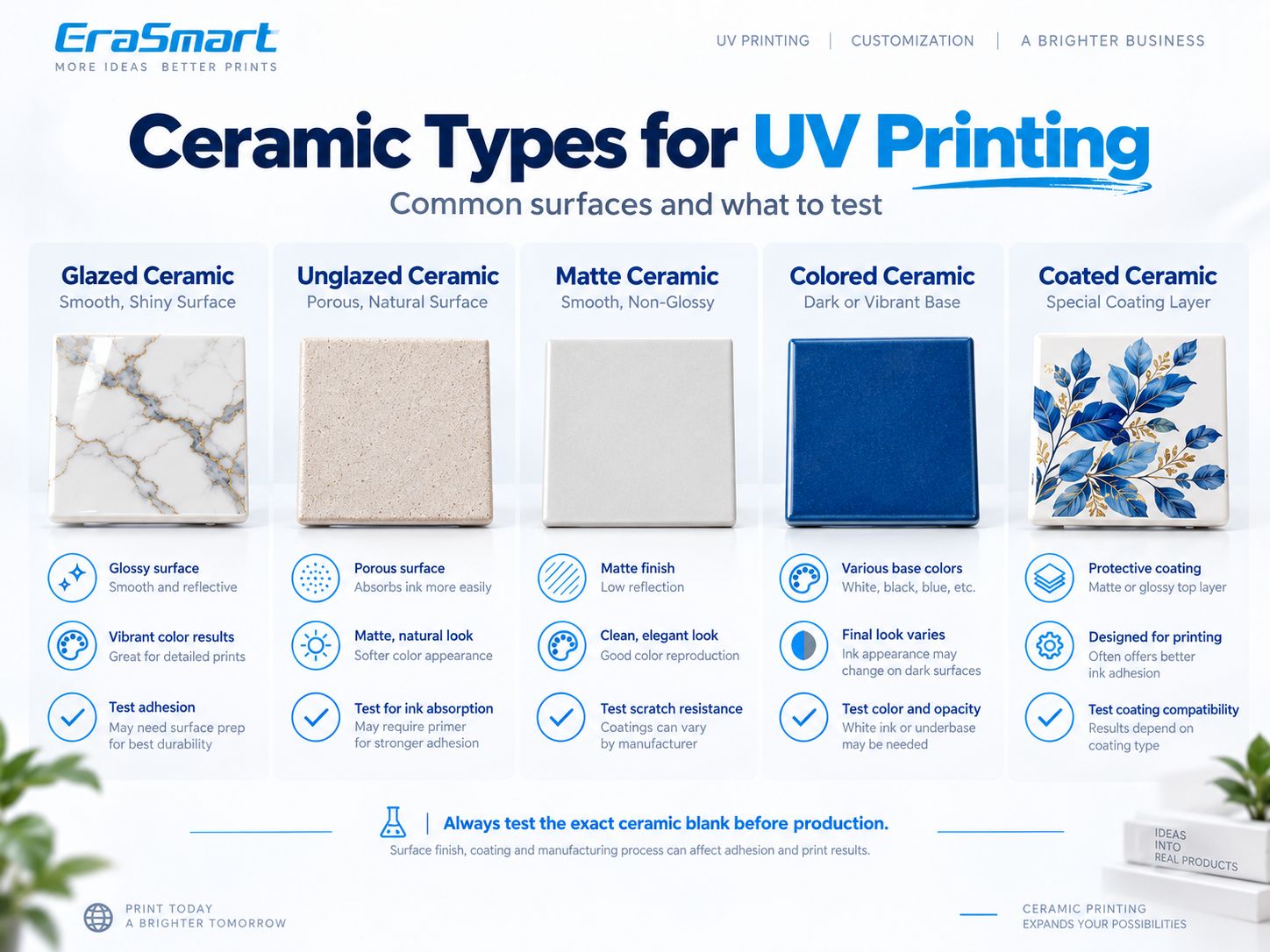
تشمل الفئات الشائعة ما يلي:
- glazed ceramic
- unglazed ceramic
- matte ceramic
- colored ceramic
- coated ceramic
Glazed Ceramic
Glazed ceramic has a smooth, sealed surface.
Typical examples include:
- glazed tiles
- اللوحات الزخرفية
- glossy ceramic blanks
المزايا:
- clean premium appearance
- smooth detail
- good surface for photos and graphics
Main challenge:
التصاق
Because the glaze is smooth and non-porous, UV ink remains on the surface.
Depending on the glaze, proper cleaning or a compatible adhesion promoter may be necessary.
Always test the actual blank.
Unglazed Ceramic
Unglazed ceramic has a more natural and porous surface.
This can include:
- unfinished tiles
- matte pottery
- porous decorative ceramics
المزايا المحتملة:
- more textured handmade look
- less glossy surface
- different visual interaction with ink
Possible challenges:
- inconsistent absorption
- نَسِيج
- تراب
- variable detail reproduction
Do not assume unglazed ceramic automatically gives better adhesion.
The surface still needs testing.
Matte Ceramic
Matte ceramic sits somewhere between rough unglazed material and glossy glazed products.
It can work well for:
- decorative tiles
- لوحات الصور
- interior décor
But matte finishes may come from different manufacturing processes.
Two matte tiles can therefore behave differently.
Colored Ceramic
Dark or colored ceramic changes the way CMYK appears.
For example, printing a light blue image directly onto a dark navy tile without white ink will not produce the same appearance as printing it on white ceramic.
White underbase is often useful for:
- strong brand colors
- صور فوتوغرافية
- نص جيد
- الرسوم التوضيحية
- light-colored graphics
Coated Ceramic
Some ceramic products have a separate surface coating.
تشمل الأمثلة ما يلي:
- sublimation-coated tiles
- treated decorative blanks
- specialty ceramic products
In this case, the UV ink is interacting with the طلاء, not just the ceramic underneath.
The coating therefore becomes part of the adhesion system.
Test the exact blank before production.
Glazed vs Unglazed Ceramic: What Is the Difference for UV Printing?
| عامل | Glazed Ceramic | Unglazed Ceramic |
|---|---|---|
| سطح | Smooth, sealed | More porous / textured |
| مظهر | Glossy or satin | Natural / matte |
| امتصاص الحبر | Very low | أعلى |
| التفاصيل | Often sharper | Depends on texture |
| الخطر الرئيسي | التصاق | Texture / porosity |
| التمهيدي | May be useful | Depends on surface |
| حبر أبيض | Depends on color | Depends on color |
| أفضل استخدام | Signs, photo tiles, décor | Rustic / decorative pieces |
Neither is automatically better.
The right choice depends on:
- تصميم
- surface quality
- required adhesion
- intended use
- اتساق الإنتاج
How to Prepare Ceramic Before UV Printing
Preparation is one of the most important parts of ceramic UV printing.
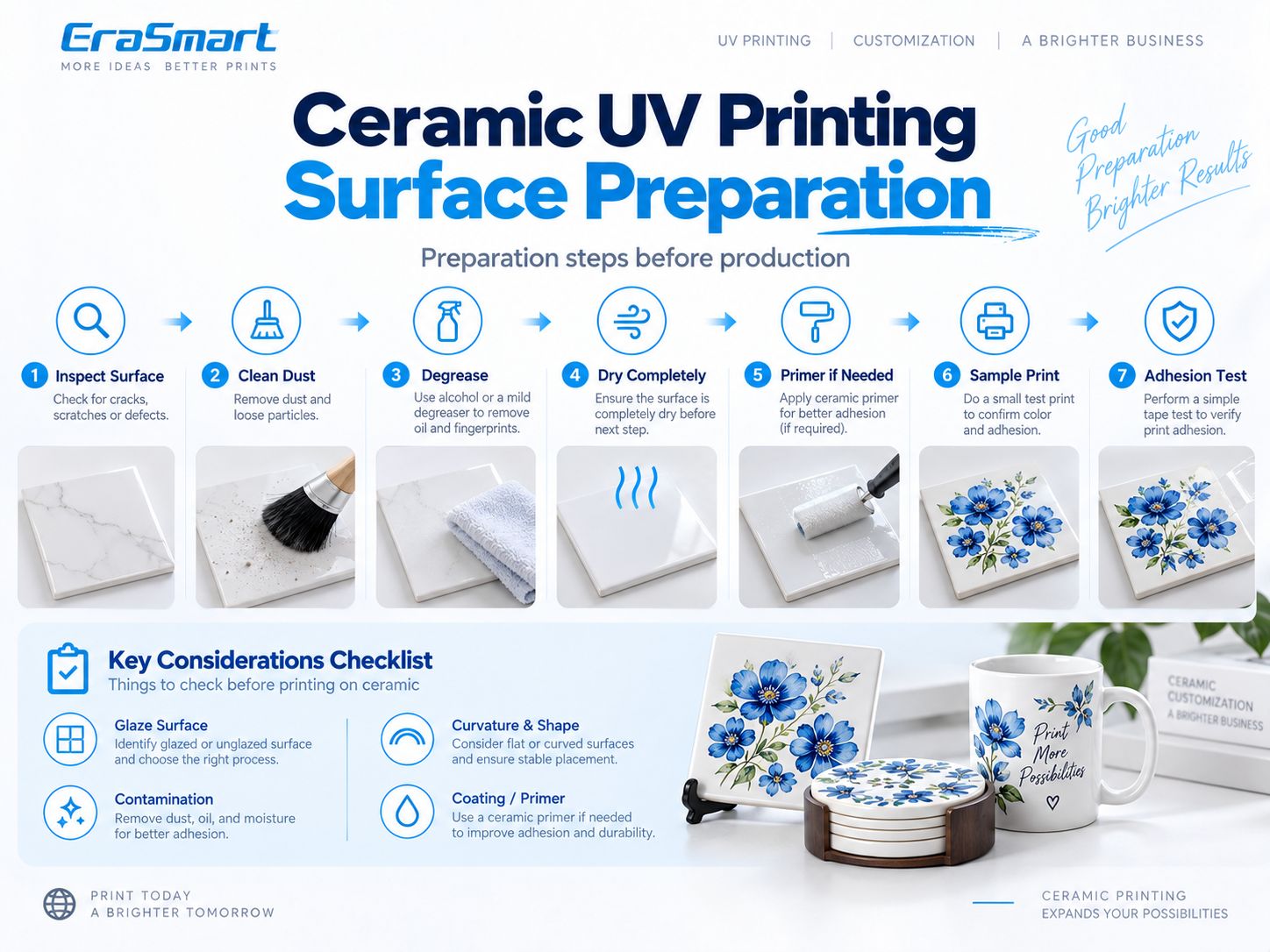
Step 1: Inspect the Surface
تحقق من:
- الشقوق
- رقائق
- خدوش
- glaze defects
- تراب
- زيت
- فيلم واقية
- coating differences
- تزييفها
Do not expect printing to hide substrate defects.
Step 2: Remove Dust
Ceramic tiles may collect dust during:
- تخزين
- قطع
- التعبئة والتغليف
- transportation
Use an appropriate lint-free cleaning method.
الخطوة 3: إزالة الشحوم
Fingerprints, polishing residue and manufacturing contamination can affect adhesion.
Use a compatible cleaning method for the specific ceramic surface.
Step 4: Dry Completely
Do not print on a damp surface.
Residual moisture or cleaning fluid can affect the result.
الخطوة 5: تقييم التمهيدي أو مروج الالتصاق
Some glazed surfaces may benefit from a compatible ceramic or glass-type adhesion promoter.
But primer should not automatically be applied to every ceramic product.
Use this process:
Clean → Print Sample → Test Adhesion → Add Compatible Pretreatment If Needed → Retest
الخطوة 6: طباعة عينة
Use the same:
- ceramic blank
- عمل فني
- طبقة بيضاء
- طبقة الورنيش
- تكوين ريب
that you intend to use for the full job.
الخطوة 7: اختبار الالتصاق
Do not judge the material only by appearance.
A print can look perfect but still be unsuitable for the intended handling or cleaning conditions.
Do You Need Primer for UV Printing on Ceramic?
أحيانا.
The answer depends on:
- ceramic glaze
- surface coating
- حبر للأشعة فوق البنفسجية
- المتانة المطلوبة
- end use
- التعرض للتنظيف
- تردد التعامل
A decorative wall tile has different requirements from a frequently handled coaster.
A smooth glossy glazed tile may require a different process from an unglazed matte plaque.
لذلك:
Do not assume primer is always required.
And:
Do not assume primer is never required.
Test first.
White Ink on Ceramic: When Do You Need It?
White ceramic is already a naturally useful background for CMYK.
Colored ceramic is different.
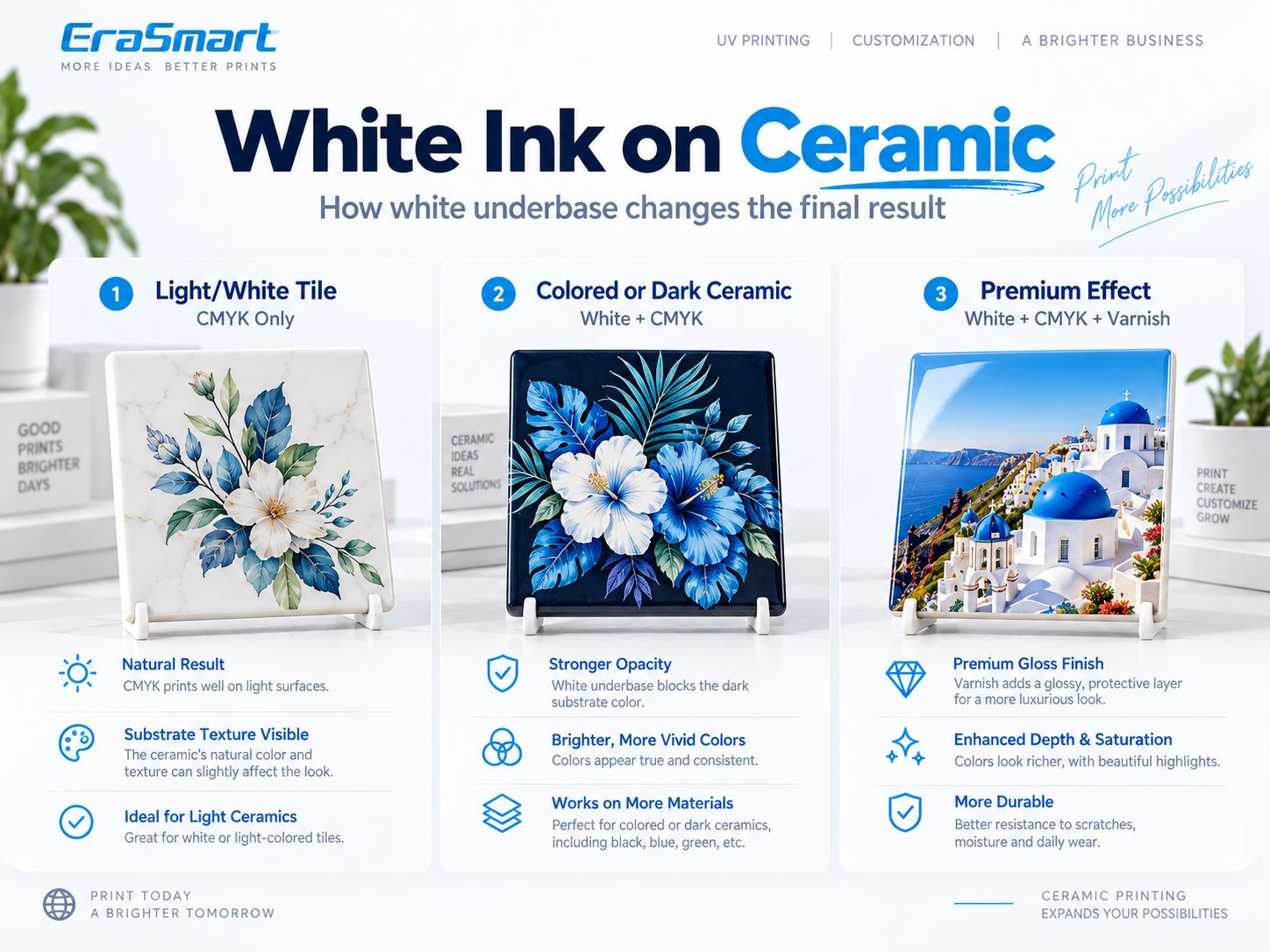
There are three common approaches.
Option 1: CMYK Only on Light or White Ceramic
On white ceramic, CMYK can produce strong color without requiring a complete white underbase.
وهذا مفيد ل:
- photo tiles
- تصاميم الأزهار
- الرسوم التوضيحية
- الشعارات
- اللوحات الزخرفية
The existing white ceramic surface acts as the visual background.
Option 2: White + CMYK on Colored Ceramic
Dark and colored ceramic can interfere with CMYK.
A white underbase helps produce:
- stronger opacity
- brighter colors
- clearer photographs
- شعارات أكثر قابلية للتنبؤ بها
- readable light-colored text
وهذا مهم بشكل خاص ل:
- dark blue tiles
- black ceramic
- colored decorative blanks
Option 3: White + CMYK + Varnish
On compatible EraSmart configurations, varnish can be added selectively.
تشمل التأثيرات المحتملة ما يلي:
- لمعان البقعة
- تفاصيل مرفوعة
- highlighted logos
- نَسِيج
- premium decorative accents
Use varnish as a design element rather than coating every surface automatically.
Varnish should also not be treated as a universal protective coating for heavy-use applications.
How to UV Print on Ceramic Step by Step
Once the ceramic blank and surface treatment have been approved, build a repeatable workflow.
الخطوة 1: تحضير العمل الفني
يتأكد:
- الأبعاد النهائية
- جودة الصورة
- توجيه
- ينزف
- هوامش آمنة
- نص
- الشعارات
- التخصيص
Use vector artwork where possible for:
- نص
- الشعارات
- رموز الاستجابة السريعة
- رسومات خطية
For raster artwork viewed from close range, around 300 DPI at final size is a practical starting point.
Step 2: Prepare White / CMYK / Varnish Layers
Choose between:
- كميك فقط
- أبيض + كميك
- أبيض انتقائي + CMYK
- أبيض + CMYK + ورنيش
according to the product.
Step 3: Position the Ceramic Tile
Place the tile securely on the printer bed.
For repeat production, use:
- الرقص
- تركيبات
- corner references
- قوالب
- fixed X/Y coordinates
Step 4: Set the Print Height
Correct printhead clearance helps maintain:
- sharp detail
- consistent jetting
- safer operation
Do not rely on one universal printhead-gap number for every ceramic product.
Follow the printer setup and actual substrate thickness.
Step 5: Print One Sample
Before running a batch, inspect:
- لون
- العتامة البيضاء
- تنسيق
- ورنيش
- نص صغير
- surface appearance
Step 6: Inspect the Print
بحث:
- النطاقات
- عيوب الفوهة
- تراب
- layer misregistration
- incorrect positioning
- substrate defects
الخطوة 7: اختبار الالتصاق
Check the finished sample according to the actual product use.
Step 8: Standardize the Workflow
بمجرد الموافقة:
- احفظ إعداد RIP المسبق
- record the ceramic blank
- record the cleaning method
- lock the jig position
- save white / varnish settings
Step 9: Begin Batch Production
Repeat the approved setup and perform periodic QC.
How to Test UV Ink Adhesion on Ceramic
Adhesion testing should match the final product.
فحص فرك الأساسي
مفيد لتحديد فشل الالتصاق الواضح.
فحص داخلي قائم على الشريط
A controlled tape test can help compare samples.
If a customer requires a formal recognized standard, follow the exact test method and conditions rather than relying on a simple shop test.
تقييم الخدش/ التآكل
Important for:
- الوقايات
- frequently handled tiles
- hospitality products
- منتجات الهدايا
مقاومة التنظيف
If the product will be wiped or cleaned regularly, test using realistic cleaning conditions.
التعرض للرطوبة
Products used in kitchens, bathrooms or hospitality environments may experience humidity or splashing.
Test the complete printed product before making durability claims.
Ceramic Tiles vs Ceramic Mugs
These products should not be treated as the same printing workflow.
Flat Ceramic Tiles
Flat tiles are well suited to UV flatbed printing because they provide:
- flat placement
- repeatable positioning
- easy fixture design
- predictable print height
المنتجات النموذجية:
- photo tiles
- wall art
- علامات
- QR tiles
- لوحات زخرفية
Ceramic Mugs
Mugs are strongly curved.
A standard flatbed UV printer is not automatically a full 360° mug printer.
For curved ceramic products, evaluate:
- الأشعة فوق البنفسجية دي تي إف
- appropriate rotary UV printing
- تسامي
- another dedicated cylindrical workflow
For many small businesses, الطباعة بالأشعة فوق البنفسجية DTF can be a practical option for decorating compatible curved ceramic products.
Direct UV Printing vs UV DTF for Ceramic
| منتج | Better Starting Direction |
|---|---|
| Flat ceramic tile | مسطحة للأشعة فوق البنفسجية |
| Photo tile | مسطحة للأشعة فوق البنفسجية |
| Ceramic plaque | مسطحة للأشعة فوق البنفسجية |
| Flat coaster | مسطحة للأشعة فوق البنفسجية |
| Large flat tile | مسطحة للأشعة فوق البنفسجية |
| Mug | UV DTF / rotary / sublimation |
| Curved cup | UV DTF / rotary |
| Irregular ceramic object | Evaluate UV DTF |
The correct workflow depends primarily on geometry.
UV Printing vs Sublimation on Ceramic
Both are useful, but they solve different production problems.
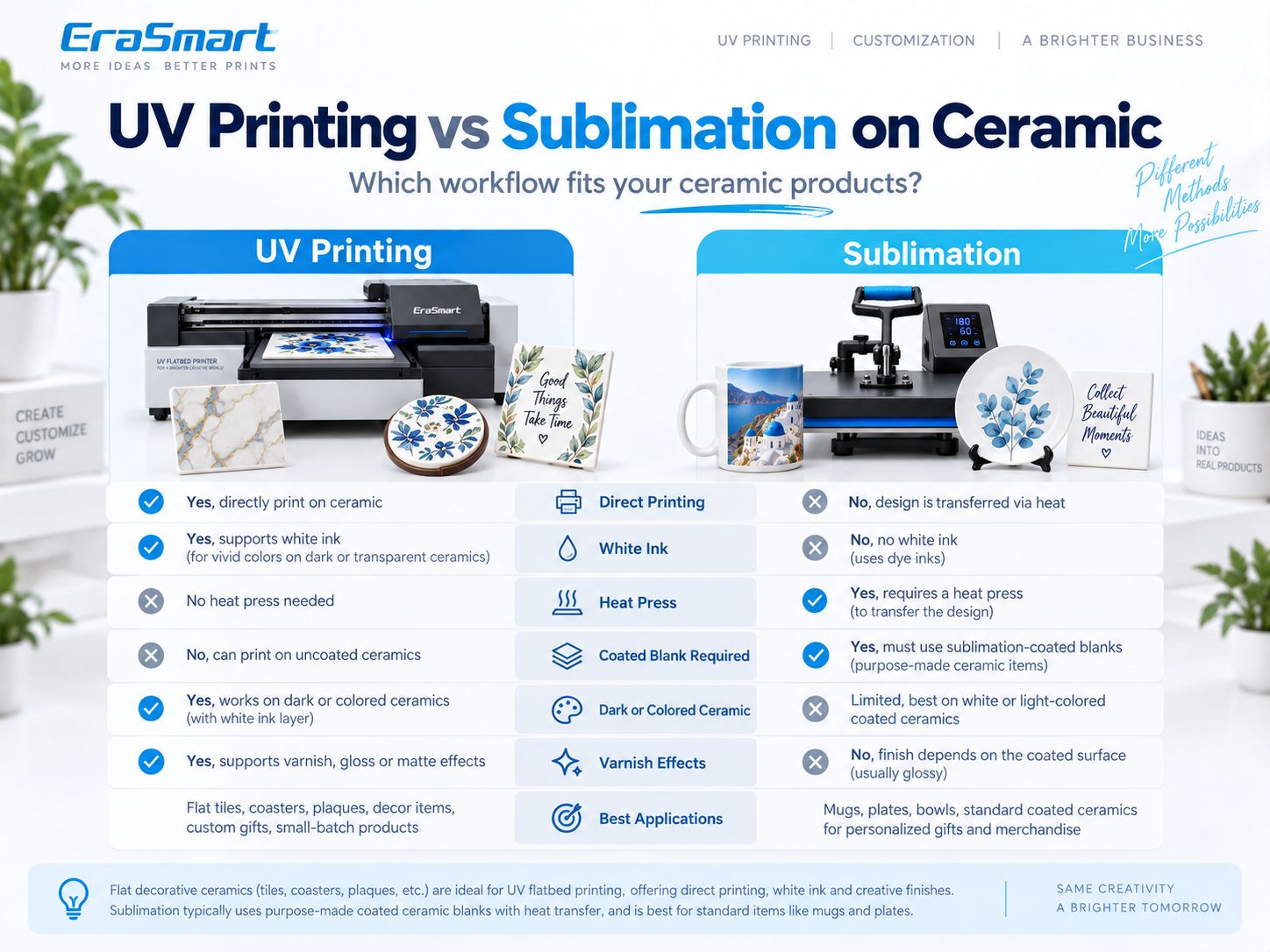
| ميزة | الطباعة بالأشعة فوق البنفسجية | تسامي |
|---|---|---|
| الطباعة المباشرة | نعم | لا |
| الصحافة الحرارية | لا | نعم |
| طلاء التسامي الخاص | Not inherently required | مطلوب |
| حبر أبيض | نعم | لا |
| Dark ceramic | White underbase possible | صعب |
| الورنيش | متوفر على الأنظمة المدعومة | لا |
| Flat ceramic tiles | جيد بعد الاختبار | Good with coated blanks |
| Standard mugs | Flatbed not ideal | Very common workflow |
| التخصيص على المدى القصير | ممتاز | ممتاز |
| التحدي الرئيسي | التصاق | طلاء + نقل الحرارة |
When UV Printing Makes More Sense
Choose UV printing when you need:
- الطباعة المباشرة
- حبر أبيض
- colored or dark ceramic
- ورنيش
- flat tiles
- variable small-batch products
- mixed material production
When Sublimation Makes More Sense
Sublimation remains a strong option for:
- standard coated mugs
- purpose-made sublimation tiles
- polyester-coated ceramic blanks
- established heat-transfer workflows
Neither technology is universally better.
Choose according to the product.
How to Print a Multi-Tile Ceramic Mural
One interesting commercial ceramic application is splitting one large image across multiple tiles.
For example, one artwork can be divided into:
- 2 × 2 tiles
- 3 × 3 tiles
- 4 × 4 tiles
to create a larger installation.
Step 1: Define the Finished Mural Size
Start with the final wall dimensions.
Step 2: Divide the Artwork Into a Grid
Split the design according to the tile size.
Step 3: Keep Tile Orientation Consistent
Label each tile:
- أ1
- A2
- B1
- B2
or use another clear grid system.
Step 4: Use Tiles From the Same Batch
Small differences in:
- white tone
- glaze
- أبعاد
- surface finish
can become visible when tiles sit next to each other.
Step 5: Use a Repeatable Jig
Keep every tile aligned in the same print position.
Step 6: Check Seam Alignment
Important visual elements should line up correctly from tile to tile.
Step 7: Create an Installation Map
Provide the correct tile sequence when the mural is packed.
This reduces installation errors.
Ceramic Products You Can Print with a UV Printer
Ceramic offers many commercial product opportunities.
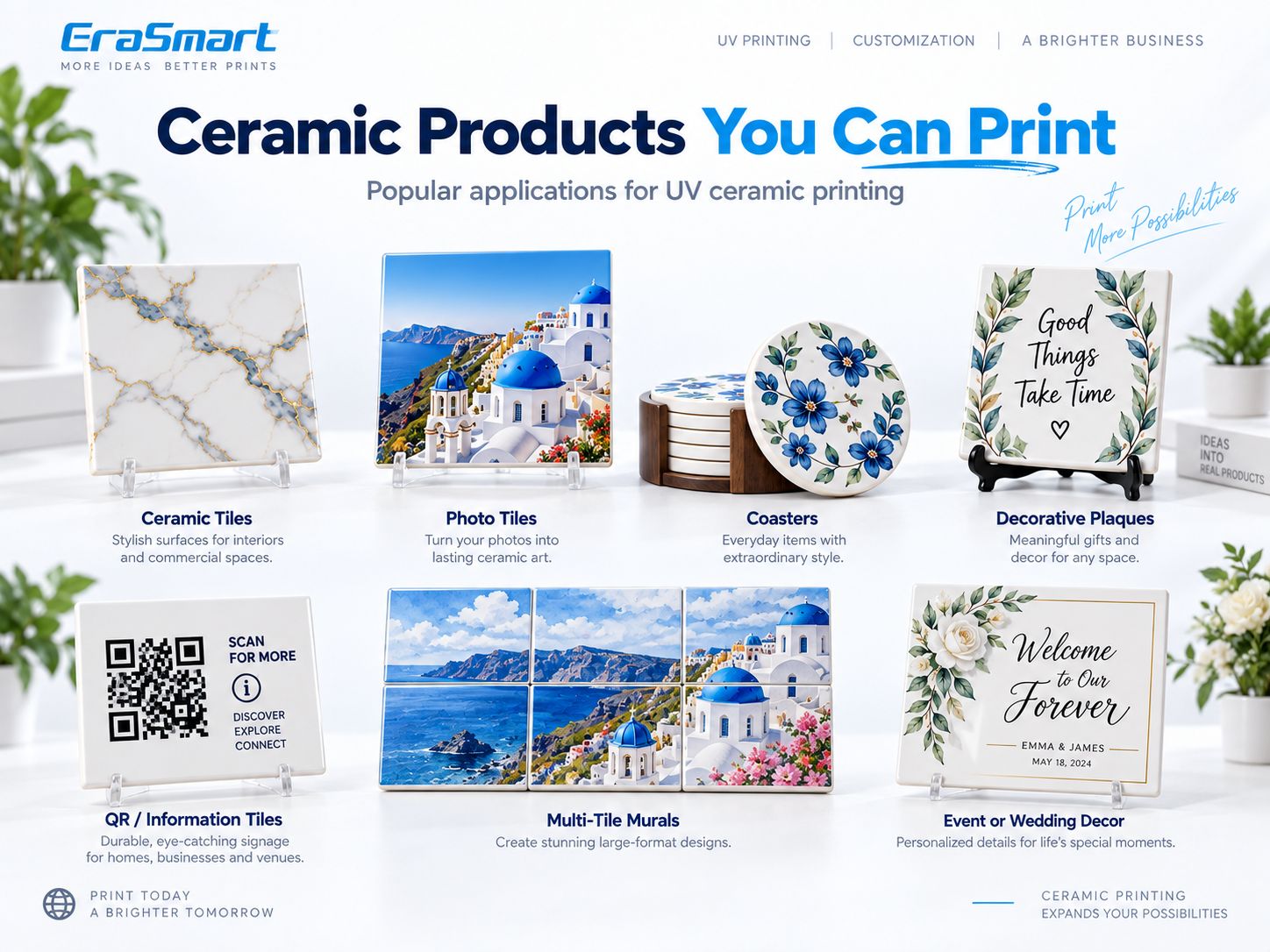
1. Decorative Ceramic Tiles
تشمل التطبيقات:
- ديكور المطبخ
- wall art
- interior design
- hospitality décor
- branded spaces
2. Photo Tiles
Popular for:
- family photography
- حفلات الزفاف
- travel photos
- pet photos
- المنتجات التذكارية
3. Ceramic Coasters
مناسبة ل:
- الهدايا
- المقاهي
- hotels
- wedding favors
- البضائع ذات العلامات التجارية
Because coasters are handled frequently, test abrasion and moisture resistance according to their intended use.
4. Ceramic Plaques
Possible uses:
- decorative signs
- personalized messages
- الجوائز
- ديكور المنزل
- المنتجات التذكارية
5. QR Code Tiles
Ceramic QR products can be used for:
- hotel information
- restaurant menus
- المراجعات
- Wi-Fi
- booking links
- tourism information
Always scan the finished physical QR code before delivery.
6. Multi-Tile Murals
مفيدة ل:
- interior decoration
- المطاعم
- hotels
- art installations
- branded spaces
7. Wedding and Event Décor
أمثلة:
- welcome pieces
- table décor
- commemorative tiles
- custom plaques
- منتجات الصور
8. Retail and Hospitality Branding
Ceramic can support:
- logo tiles
- decorative signs
- branded table pieces
- display items
Which EraSmart UV Printer Is Suitable for Ceramic?
The right machine depends on product size and production volume.
طابعة EraSmart A3 PRO UV — Dual XP600
ال طابعة EraSmart الرقمية النافثة للحبر A3 UV - Dual XP600 is designed for personalized customization and small-batch production.
المواصفات الرئيسية تشمل:
| مواصفة | A3 PRO |
|---|---|
| رؤوس الطباعة | المزدوج XP600 |
| منطقة الطباعة | 350 × 450 ملم |
| ارتفاع الطباعة | 0-130 ملم |
| دقة | تصل إلى 1440 نقطة في البوصة |
| تكوين الحبر | CMYK + WW + VVVVVV |
| تداول الحبر الأبيض | نعم |
| توقيت التنظيف التلقائي | نعم |
| منصة الشفط | نعم |
| قياس الارتفاع | الأشعة تحت الحمراء |
| قطع | رين / برايفت ريب |
Ceramic is officially included among its supported materials.
The A3 PRO is suitable for products such as:
- smaller ceramic tiles
- photo tiles
- لويحات
- الوقايات
- decorative ceramic pieces
طابعة ايرا سمارت A2 للأشعة فوق البنفسجية
For larger ceramic pieces or larger batch layouts, the طابعة ايرا سمارت A2 للأشعة فوق البنفسجية يوفر منصة أكبر.
المواصفات الرئيسية تشمل:
- رؤوس طباعة مزدوجة XP600
- 420 × 600 mm printing area
- 0–130 mm printing height
- CMYK + WW + VVVVVV
- ما يصل إلى 1440 نقطة في البوصة
- منصة الشفط
- التنظيف التلقائي
- رين / برايفت ريب
Ceramics are also listed among the supported materials.
The larger area is useful for:
- larger ceramic panels
- decorative tiles
- multiple small tiles in one layout
- mural production
- higher batch efficiency
Choose the printer according to your actual product dimensions.
Why Fixtures Matter for Ceramic Batch Printing
Suppose a customer orders 60 identical photo tiles.
Manually positioning each tile by eye creates unnecessary variation.
A better process is:
- Build a fixed jig.
- Use the same tile size.
- قفل إحداثيات X/Y.
- احفظ إعداد RIP المسبق.
- طباعة عينة واحدة معتمدة.
- Repeat the same setup.
- Check quality at intervals.
Fixtures help improve:
- تسجيل
- speed
- تناسق
- التحكم في النفايات
For personalized tiles, the blank position can stay the same while names or images change digitally.
Common Problems When UV Printing on Ceramic
Ink Scratches Off the Glaze
تشمل الأسباب المحتملة ما يلي:
- بصمات الأصابع
- زيت
- incompatible glaze
- تنظيف غير كاف
- التصاق غير كاف
- المعالجة المسبقة غير مناسبة
Focus on the substrate first.
Color Looks Weak on Dark Ceramic
Use a white underbase where stronger opacity is needed.
Small Text Looks Blurry
يفحص:
- عمل فني
- printhead clearance
- surface texture
- tile flatness
- حالة الفوهة
Vector text is preferable.
الحبر الأبيض يبدو غير متساوٍ
يفحص:
- تداول الحبر الأبيض
- حالة الفوهة
- إعدادات RIP البيضاء
- حالة الصيانة
الورنيش يبدو غير متساوي
يفحص:
- varnish mask
- substrate flatness
- حالة رأس الطباعة
- تكوين طبقة RIP
Tile Position Changes Between Prints
يستخدم:
- jig
- template
- fixed corner stops
- الإحداثيات المحفوظة
instead of manual placement.
Tile Surface Color Varies Between Batches
Ceramic blanks from different production batches may have small differences.
For mural or high-end orders, try to use blanks from the same batch.
حدود السلامة والتطبيق
UV printing a ceramic object does not automatically make it suitable for every end use.
الاتصال الغذائي
Do not assume standard UV ink is approved for direct food-contact surfaces.
Avoid making food-safety claims unless the complete ink/substrate/product system has been tested and certified for the intended use.
Drinking Rims
For cups or mugs, do not place standard decorative UV ink in direct mouth-contact areas unless the system is specifically qualified for that application.
Dishwasher Resistance
Do not automatically claim:
آمنة للاستخدام في غسالة الأطباق
unless the complete printed product has passed appropriate testing.
Flooring
A printed tile being visually attractive does not automatically make it suitable for high-traffic flooring.
Floor tiles may require specific:
- abrasion resistance
- slip resistance
- wear testing
- coating systems
الاستخدام الخارجي
Outdoor performance depends on:
- السيراميك
- حبر
- تحضير السطح
- التمهيدي
- exposure
- رُطُوبَة
- تنظيف
اختبر المنتج النهائي قبل تقديم مطالبات مدى الحياة في الهواء الطلق.
How to Choose a UV Printer for Ceramic
Before buying a printer, answer these questions.
What Ceramic Products Will You Sell?
Tiles?
Photo plaques?
Coasters?
Mugs?
The shape determines the workflow.
What Is the Largest Flat Product?
This determines the required print bed.
Is the Ceramic Glazed?
If yes, adhesion testing becomes especially important.
Is the Ceramic Dark or Colored?
If yes, white ink may be necessary.
هل تحتاج إلى الورنيش؟
Varnish is useful for premium effects but is not necessary for every product.
Is the Product Flat or Curved?
Flat products fit UV flatbed printing naturally.
Curved mugs may require:
- الأشعة فوق البنفسجية دي تي إف
- rotary UV printing
- تسامي
How Many Pieces Will You Produce?
For repeat orders, consider:
- تركيبات
- إعدادات RIP المسبقة المحفوظة
- الفراغات موحدة
- دفعة مراقبة الجودة
Final Answer: Is UV Printing Good for Ceramic?
نعم.
UV printing is a practical digital customization method for many suitable ceramic products, especially:
- flat tiles
- photo tiles
- لويحات
- الوقايات
- QR tiles
- لوحات زخرفية
- event pieces
But ceramic should not be treated as one uniform material.
The main production variables are:
surface glaze + cleanliness + adhesion + curvature + white ink strategy
يستخدم:
- كميك فقط on white or light ceramic when sufficient
- أبيض + كميك for dark or colored ceramic
- الورنيش for selected decorative effects
- الطباعة المسطحة بالأشعة فوق البنفسجية for flat tiles and plaques
- UV DTF / rotary / sublimation when the product is strongly curved
The most reliable workflow is:
الفحص ← التنظيف ← الاختبار ← طباعة العينة ← التحقق من الالتصاق ← الموافقة ← التوحيد ← إنتاج الدُفعات
For flat ceramic products, explore the طابعة إيراسمارت للأشعة فوق البنفسجية يتراوح.
For curved ceramic products, evaluate whether an طابعة EraSmart UV DTF is a better fit.
التعليمات
Can a UV printer print directly on ceramic?
Yes. UV flatbed printers can print directly onto many suitable ceramic tiles, plaques and decorative pieces after material testing.
Can you UV print glazed ceramic?
Yes, but glazed ceramic is smooth and non-porous, so cleaning and adhesion testing are particularly important.
Can you UV print unglazed ceramic?
Yes. Unglazed ceramic can be printed, but surface texture and porosity can affect detail and consistency.
Do you need primer for UV printing ceramic?
Not always. Primer depends on the glaze, coating, ink and required adhesion. Test the exact blank first.
Do I need white ink on ceramic?
ليس دائما.
White ceramic may not need a full white underbase.
Dark or colored ceramic often benefits from white under CMYK.
Can you print photos on ceramic tiles?
Yes. Ceramic photo tiles are a suitable UV flatbed application when the surface and adhesion have been tested.
Can UV printers print ceramic mugs?
A standard flatbed is best suited to flat surfaces. Curved mugs usually require an appropriate rotary workflow, UV DTF or another suitable printing method.
Is UV printing better than sublimation for ceramic?
Neither is universally better. UV printing offers direct printing, white ink and varnish, while sublimation is very well suited to standard coated mugs and tiles.
Can UV-printed ceramic go in a dishwasher?
Do not assume so. Dishwasher resistance depends on the ceramic, coating, ink, adhesion and complete finished-product testing.
Can UV-printed ceramic be used for food contact?
Do not assume standard decorative UV ink is suitable for direct food-contact surfaces unless the finished product system is specifically tested and certified.
Can I print QR codes on ceramic tiles?
Yes. Use high-contrast artwork and physically scan the finished tile before delivery.
Which EraSmart UV printer is suitable for ceramic tiles?
ال ايرا سمارت A3 برو المزدوج XP600 provides a 350 × 450 mm working area, while the طابعة ايرا سمارت A2 للأشعة فوق البنفسجية يوفر منصة أكبر 420 × 600 مم.
Build a Reliable Ceramic Printing Workflow
If you are evaluating a UV printer for ceramic products, tell EraSmart:
- ceramic type
- أبعاد المنتج
- glazed / unglazed / matte surface
- product color
- ما إذا كان الحبر الأبيض مطلوبًا
- ما إذا كان الورنيش مطلوبًا
- شكل مسطح أو منحني
- الحجم الشهري المتوقع
- intended use
يمكن لفريقنا مساعدتك في المقارنة الصحيحة طابعة إيراسمارت للأشعة فوق البنفسجية أو طابعة UV DTF سير العمل لمنتجاتك الفعلية.
قد تكون كما تفعل أيضا

حقوق الطبع والنشر 2020 © Erasmart. | خريطة sitemap