صغر حجم الشركة المصنعة طابعة نفث الحبر

86-18566233796 [email protected]

مدونة What Is an Inkjet Printer and How Does It Work? A Practical Guide for Custom Printing Businesses

What Is an Inkjet Printer and How Does It Work? A Practical Guide for Custom Printing Businesses

June 17, 2026 مدونة

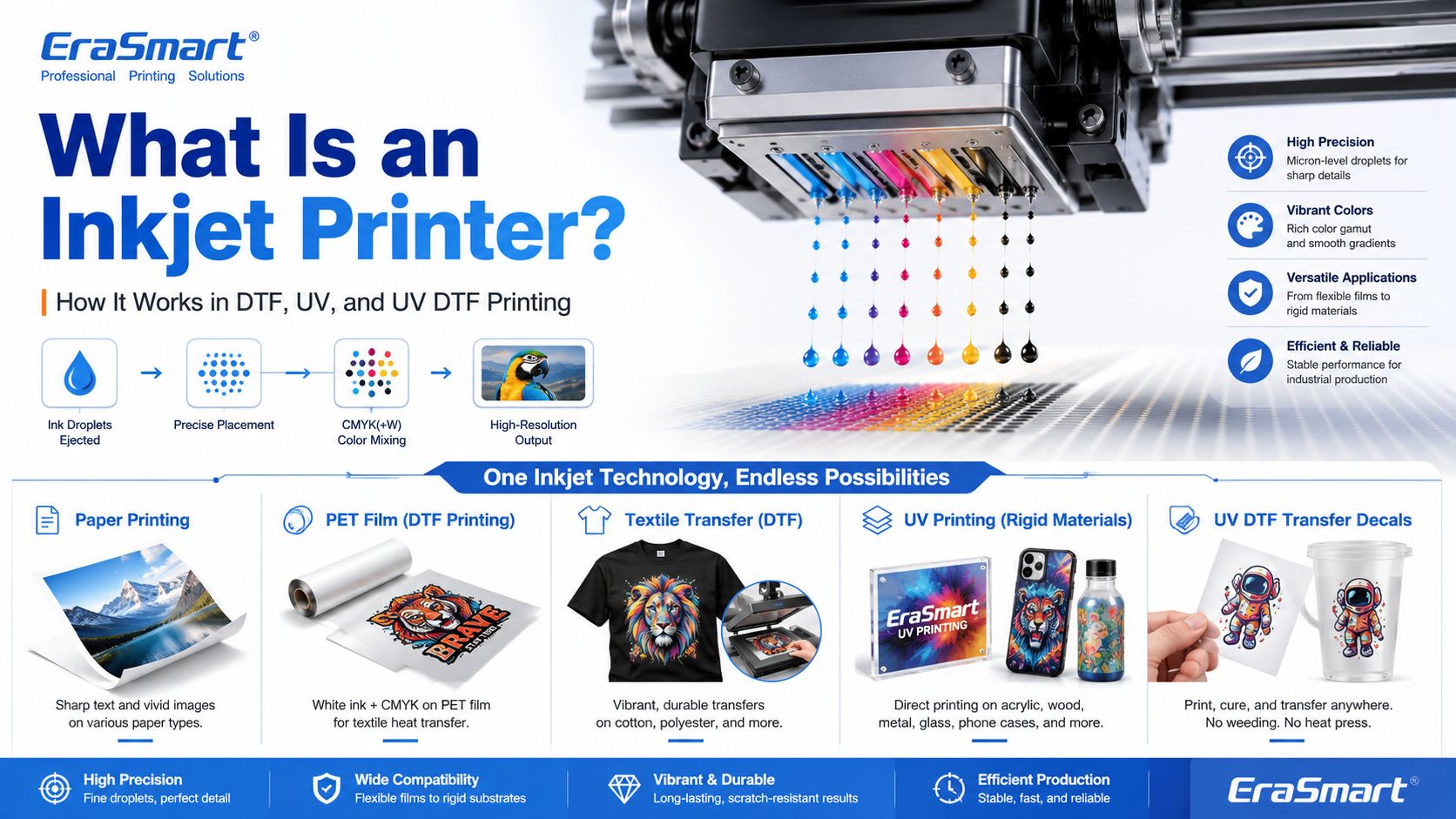
An inkjet printer is a digital printing device that creates images by ejecting tiny droplets of ink onto a surface. Instead of using plates, screens, or physical stencils, an inkjet printer receives digital image data and places controlled ink droplets in precise positions to form text, graphics, photos, labels, transfers, or product decoration.

Most people first know inkjet printers from office or home photo printing. But inkjet technology is much broader than desktop paper printing. Today, inkjet systems are used in DTF printing, UV flatbed printing, UV DTF transfers, packaging samples, product labels, signage, promotional products, textile decoration, industrial marking, and custom product manufacturing.

For EraSmart customers, this topic matters because many modern custom printing machines are built on inkjet principles. A طابعة DTF uses inkjet technology to print garment designs onto transfer film. A طابعة للأشعة فوق البنفسجية uses inkjet technology to print UV-curable ink directly onto rigid materials. A طابعة UV DTF uses inkjet printing to create hard-surface decals and transfers on A/B film.

In simple terms, inkjet printing is the foundation. DTF, UV, and UV DTF are specialized business workflows built around that foundation.

Quick Answer: What Is an Inkjet Printer?

An inkjet printer is a printer that sprays or ejects tiny droplets of liquid ink through microscopic nozzles to create a printed image.

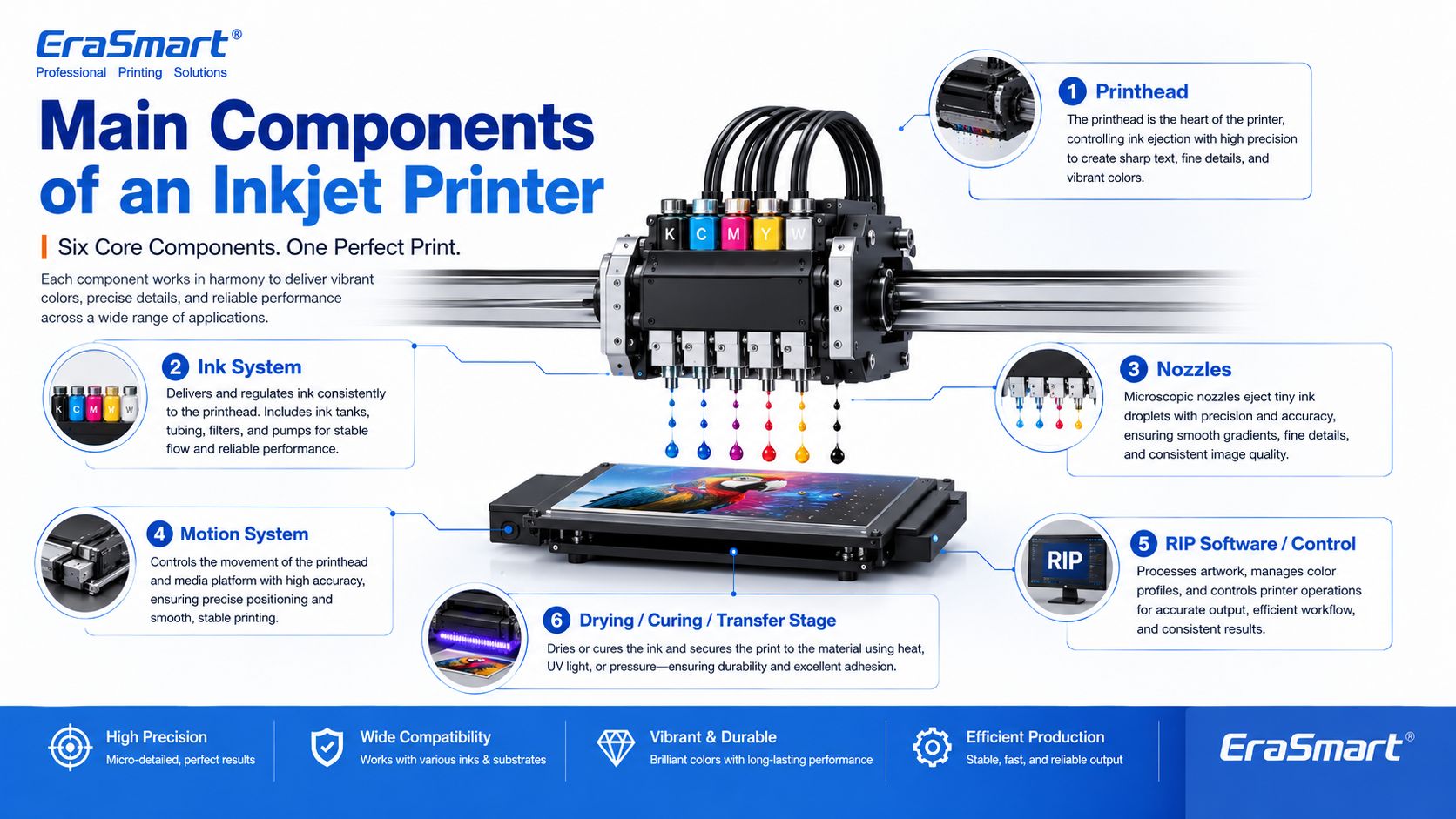
A basic inkjet printing system includes:

  • digital artwork file
  • RIP or printer control software
  • ink supply system
  • printhead
  • microscopic nozzles
  • movement system
  • printable surface
  • drying, curing, or transfer process

The printhead is the key component. It controls where ink droplets land, how much ink is ejected, and how accurately the image is formed.

How Does an Inkjet Printer Work?

Inkjet printing may look simple from the outside, but inside the printer there is a precise digital control process.

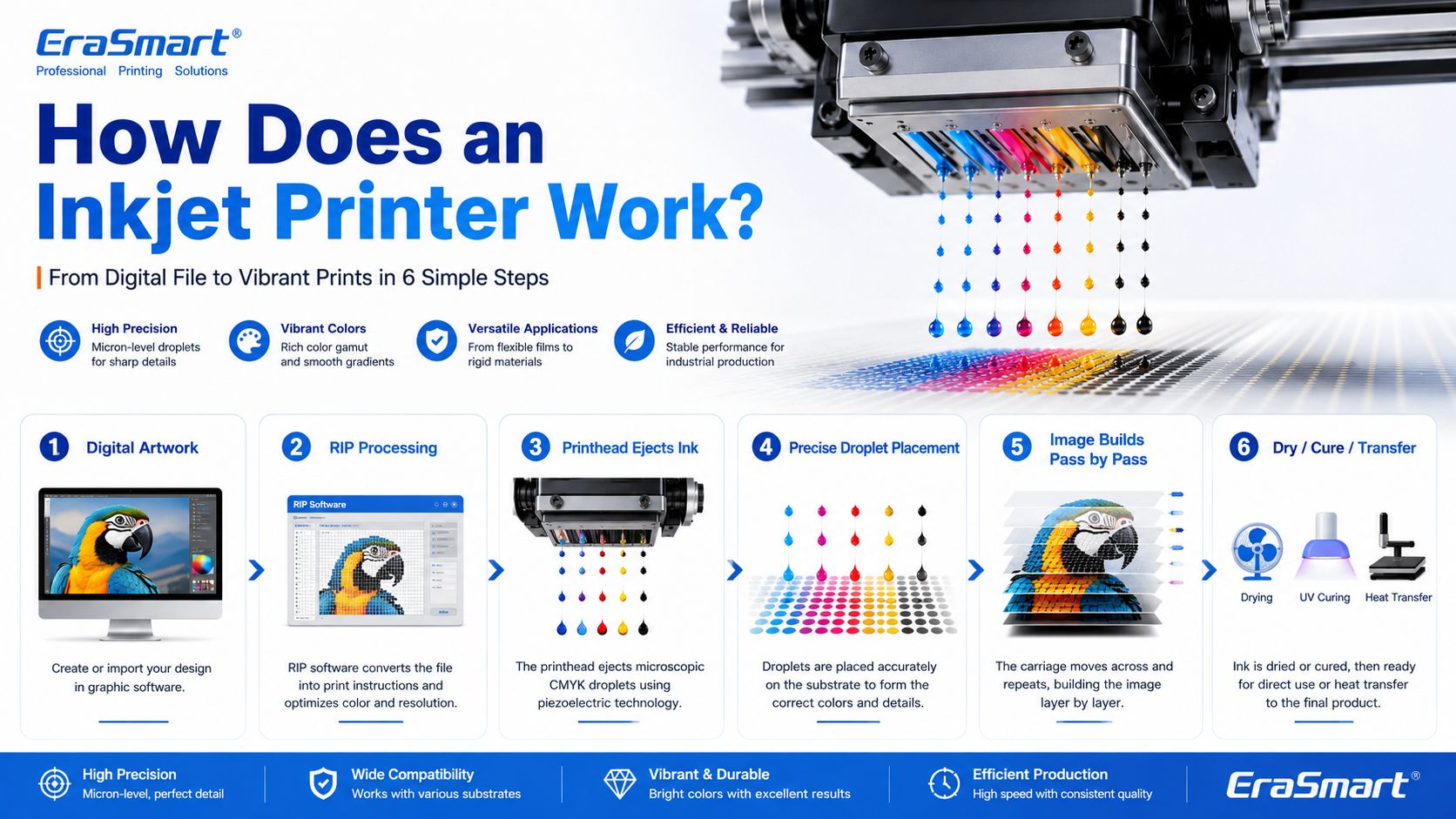
A simplified workflow looks like this:

  1. The computer sends image data to the printer.
  2. The printer software processes the file into printable dot information.
  3. The printer moves the printhead or material into position.
  4. The printhead ejects tiny droplets of ink through nozzles.
  5. The droplets land on the target surface in controlled positions.
  6. The printer builds the image line by line or pass by pass.
  7. The ink dries, cures, absorbs, or transfers depending on the printing method.

In an office inkjet printer, ink is usually printed onto paper and dries or absorbs into the paper surface. In an industrial or custom printing system, the process may be more specialized. For example, UV ink is cured by UV light, while DTF ink is printed onto PET film and later heat transferred onto fabric.

Main Components of an Inkjet Printer

1. Printhead

The printhead is the most important part of an inkjet printer. It contains many tiny nozzles that eject ink droplets. The printhead determines much of the printer’s resolution, droplet control, speed, and print quality.

In custom printing, printhead condition directly affects:

  • sharpness
  • color consistency
  • line accuracy
  • white ink quality
  • nozzle stability
  • production reliability
  • maintenance requirements

This is why printer maintenance is so important in DTF and UV printing. If the printhead nozzles are clogged or unstable, the final print may show banding, missing lines, weak colors, or poor detail.

For apparel printing users, EraSmart’s دليل صيانة الطابعة DTF is a useful resource for understanding why nozzle checks, cleaning, white ink circulation, and daily care matter.

2. Ink System

The ink system stores and delivers ink to the printhead. Different inkjet printers use different types of ink depending on the application.

Common ink types include:

  • dye ink
  • pigment ink
  • sublimation ink
  • textile ink
  • حبر DTF
  • حبر قابل للمعالجة بالأشعة فوق البنفسجية
  • solvent or eco-solvent ink
  • industrial marking ink

For EraSmart customers, the most relevant ink systems are DTF ink, UV ink, white ink, and varnish.

أ طابعة DTF commonly uses CMYK ink plus white ink. The white ink helps designs appear clearly on dark garments. A طابعة للأشعة فوق البنفسجية may use CMYK, white ink, and varnish to print on hard surfaces such as acrylic, glass, metal, wood, plastic, leather, and packaging materials.

If you want to understand how CMYK, white ink, and varnish work together in product customization, see EraSmart’s UV Ink Guide: CMYK, White Ink, and Varnish.

3. Nozzles

Nozzles are microscopic openings in the printhead. They eject ink droplets in controlled patterns.

Nozzle performance affects:

  • print resolution
  • detail clarity
  • ink density
  • دقة الألوان
  • التدرجات السلسة
  • edge sharpness
  • production stability

Nozzles can become clogged if ink dries, settles, or becomes contaminated. This is especially important for white ink systems because white ink contains heavier pigment particles and needs proper circulation and maintenance.

4. Motion System

Inkjet printers need accurate motion control. Either the printhead moves across the material, the material moves under the printhead, or both are coordinated.

The motion system affects:

  • print alignment
  • image registration
  • repeatability
  • production speed
  • print size accuracy
  • multi-pass quality

In UV flatbed printing, the platform and printhead movement must be stable so the image lands accurately on rigid objects. In DTF printing, film feeding must be smooth so the transfer image remains consistent.

5. RIP Software and Print Control

RIP software converts artwork into printer-ready instructions. It controls color output, resolution, ink layering, white ink channels, varnish layers, print passes, and other production settings.

For custom printing businesses, RIP setup is important because it affects:

  • color performance
  • white ink underbase
  • image sharpness
  • ink usage
  • سرعة الطباعة
  • material compatibility
  • repeatability

A good printer is only part of the system. Correct artwork preparation and RIP settings are also necessary for professional results.

6. Drying, Curing, or Transfer System

Inkjet printing is not finished when ink leaves the nozzle. The ink must also become stable on the final product.

Different workflows use different finishing methods:

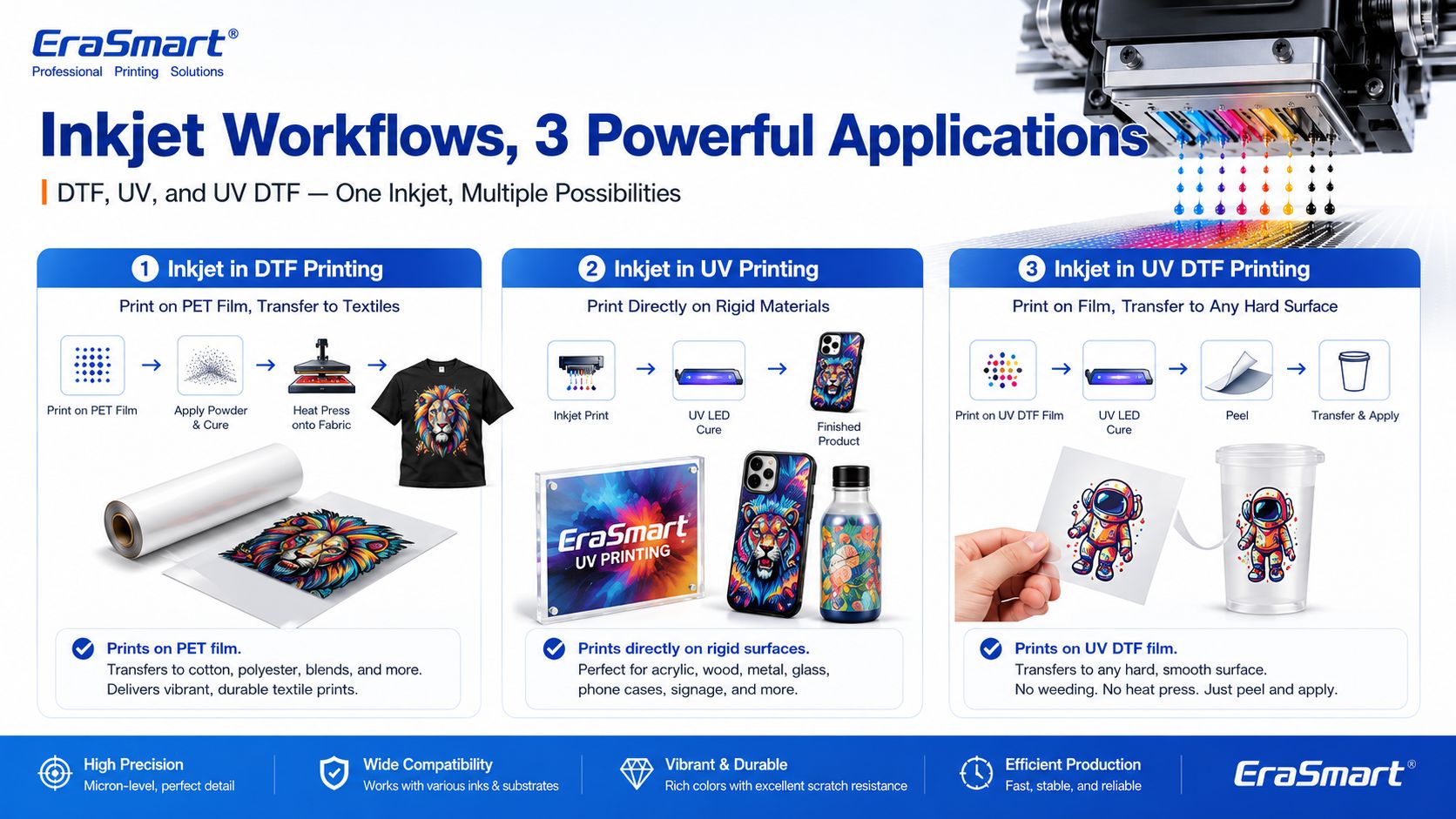
Inkjet WorkflowWhat Happens After Printing
Office inkjetInk dries or absorbs into paper
طباعة دي تي إفPowder is applied, cured, then heat pressed onto fabric
الطباعة بالأشعة فوق البنفسجيةUV light cures the ink almost instantly
الطباعة بالأشعة فوق البنفسجية DTFUV ink is printed on film, laminated, then applied as a transfer
تساميPrinted transfer is heat pressed into polyester or coated blanks

This is why inkjet technology can support many industries. The core droplet technology is similar, but the finishing process changes based on the product.

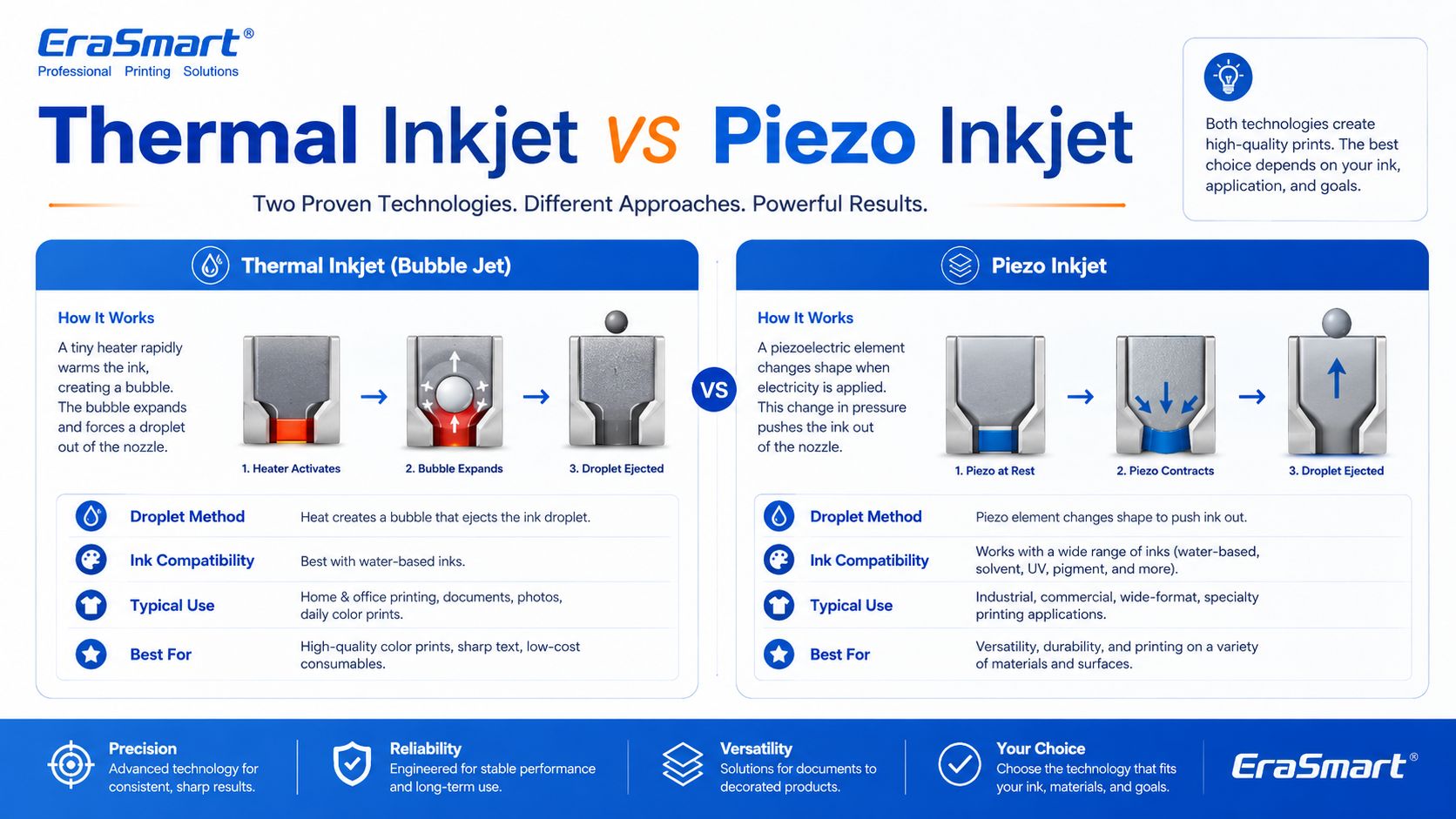
Thermal Inkjet vs Piezo Inkjet

There are two major inkjet technologies: thermal inkjet and piezo inkjet.

Thermal Inkjet

Thermal inkjet uses heat to create a vapor bubble inside the ink chamber. The pressure from this bubble pushes a droplet of ink out of the nozzle.

Thermal inkjet is common in many desktop and office printers. It can produce high-quality prints on paper, but the ink must be compatible with heat-based ejection.

Piezo Inkjet

Piezo inkjet uses a piezoelectric element that changes shape when voltage is applied. This mechanical movement creates pressure and ejects ink droplets through the nozzle.

Piezo inkjet is widely used in many professional and industrial printing systems because it can work with a broader range of inks. Since the ink is not heated for ejection, piezo technology is suitable for inks that may not perform well in thermal systems, including many specialty inks used in industrial and custom printing.

For DTF, UV, and UV DTF applications, piezo-style inkjet technology is especially important because these workflows require precise ink control and compatibility with specialized ink types.

Drop-on-Demand vs Continuous Inkjet

Inkjet printing can also be divided by how ink is delivered.

Drop-on-Demand Inkjet

Drop-on-demand means ink droplets are ejected only when needed. This is common in many graphic and custom printing applications because it offers precise control and efficient ink use.

DTF, UV, and UV DTF printers generally operate around controlled digital droplet placement, which is why they can reproduce detailed designs and full-color artwork.

Continuous Inkjet

Continuous inkjet ejects a continuous stream of ink droplets. Some droplets are directed to the surface, while others may be recycled. This method is often used in industrial coding and marking, such as printing dates, batch codes, and product identification on packaging lines.

For EraSmart customers, drop-on-demand inkjet is the more relevant concept because custom apparel and product printing require accurate image reproduction rather than simple coding.

Inkjet Printing in DTF Printers

A DTF printer is a specialized inkjet printer for garment transfer production. Instead of printing directly onto a shirt, it prints the design onto PET transfer film.

The typical DTF process includes:

  1. Print CMYK and white ink onto PET film
  2. ضع مسحوق لاصق يذوب بالحرارة
  3. علاج المسحوق
  4. اضغط بالحرارة على النقل على القماش
  5. قشر الفيلم
  6. قم بإنهاء الضغط إذا لزم الأمر

This process is useful for custom apparel because it supports:

  • عمل فني بالألوان الكاملة
  • الملابس الداكنة
  • small-batch orders
  • personalized designs
  • القطن، والبوليستر، والمزيج، وأكثر من ذلك
  • إنتاج الطباعة حسب الطلب

If you are interested in building an apparel business, EraSmart’s طابعة DTF category includes different models for startups, small studios, growing shops, and higher-volume production. You can also read the سير عمل إنتاج DTF to understand the full process from artwork to finished garment.

Inkjet Printing in UV Printers

A UV printer is another specialized inkjet system. Instead of using standard paper ink, it uses UV-curable ink. The printer ejects ink onto the material surface, and UV light cures the ink almost immediately.

UV printing is suitable for many hard and semi-rigid materials, such as:

  • أكريليك
  • زجاج
  • معدن
  • خشب
  • بلاستيك
  • ceramic
  • جلد
  • حالات الهاتف
  • عينات التعبئة والتغليف
  • المنتجات الترويجية

The advantage of UV printing is direct-to-object customization. You can print full-color designs, white ink layers, and varnish effects on many product surfaces.

ايرا سمارت طابعة الأشعة فوق البنفسجية category is designed for businesses that want to create custom gifts, signs, phone cases, packaging samples, acrylic products, and hard-surface promotional items. For material selection, see the دليل مواد طابعة الأشعة فوق البنفسجية.

Inkjet Printing in UV DTF Printers

UV DTF printing combines UV inkjet printing with a transfer workflow. The printer prints UV ink onto A film, laminates it with B film, and creates a transfer decal that can be applied to hard surfaces.

UV DTF is useful for:

  • ملصقات
  • decals
  • يلتف الكأس
  • bottle labels
  • ملصقات تغليف مستحضرات التجميل
  • gadget skins
  • زخرفة الزجاج
  • acrylic decals
  • العلامات المعدنية
  • العلامات التجارية للمنتج

Unlike textile DTF, UV DTF is mainly for hard-surface transfers, not garments. It is a good choice for businesses that want to sell premium stickers, decals, labels, and cup wraps.

ايرا سمارت طابعة UV DTF is suitable for hard-surface transfer applications, while the A/B Film for UV DTF Printing guide explains how the film system works in the transfer process.

Why Inkjet Technology Is Important for Custom Printing

Inkjet printing is important because it allows digital, flexible, short-run production. Unlike traditional methods that require screens, plates, or molds, inkjet printing can print directly from a digital file.

This creates major advantages for custom businesses:

  • lower setup barriers
  • faster design changes
  • easier personalization
  • full-color printing
  • short-run production
  • lower inventory pressure
  • product variety
  • print-on-demand flexibility

For example, a DTF apparel business can print different names, numbers, and graphics without preparing new screens. A UV printing business can print different logos on phone cases, acrylic signs, glass gifts, or packaging samples. A UV DTF business can produce custom decals and labels for many small brands.

This is why inkjet technology is no longer only about office printing. It is now a core technology for modern customization businesses.

Advantages of Inkjet Printing

1. Digital Flexibility

Inkjet printing works directly from digital files. This makes it easy to change designs, personalize products, and produce short runs.

2. Full-Color Output

Inkjet printers can reproduce complex color images, gradients, photos, and illustrations. This is useful for apparel graphics, product decoration, stickers, and packaging samples.

3. Short-Run Production

Inkjet does not require plates or screens, so it is suitable for low-MOQ custom orders and on-demand production.

4. Variable Data Printing

Each print can be different. This is useful for names, numbers, QR codes, serialized labels, personalized gifts, and custom designs.

5. Wide Application Range

Inkjet technology can be adapted to many surfaces and workflows, including paper, textiles, film, rigid materials, packaging, labels, and transfers.

6. Scalable Business Model

A business can start with small orders and upgrade equipment as demand grows. This is why inkjet-based DTF, UV, and UV DTF systems are attractive to startups and growing shops.

Limitations of Inkjet Printing

1. Printhead Maintenance Is Important

Inkjet printers need regular maintenance. If nozzles clog, print quality declines. This is especially important for white ink, UV ink, and other specialty ink systems.

2. Ink Compatibility Matters

Not every ink works with every printhead or material. Ink viscosity, pigment size, curing method, and surface compatibility all matter.

3. Material Preparation May Be Needed

Some surfaces need cleaning, primer, coating, or testing before printing. This is especially common in UV printing on glass, metal, plastic, and other hard materials.

4. Color Management Requires Testing

Screen colors and printed colors are not always identical. Professional results require color profiles, test prints, correct RIP settings, and stable consumables.

5. Production Speed Depends on Quality Settings

Higher resolution, more passes, white ink layers, and varnish effects may improve quality but increase printing time.

6. Workflow Control Matters

In DTF printing, powdering, curing, and heat pressing affect durability. In UV DTF, lamination and application affect transfer quality. In UV printing, curing and adhesion affect final product quality.

Common Inkjet Printer Problems

1. Clogged Nozzles

This is one of the most common inkjet problems. It can be caused by dried ink, settled pigment, poor maintenance, incompatible ink, or long idle time.

2. Banding

Banding appears as unwanted horizontal or vertical lines. It can be caused by clogged nozzles, incorrect feed settings, poor calibration, or unstable ink flow.

3. Color Difference

Colors may look different from the screen because of material surface, ink type, printer profile, white ink layer, or lighting conditions.

4. Poor Adhesion

In UV printing, poor adhesion can happen if the surface is oily, dusty, incompatible, or not treated correctly.

5. Weak White Ink

In DTF and UV printing, white ink must be managed carefully. Weak white ink can reduce color brightness, opacity, and dark-surface performance.

6. Ink Smearing or Poor Curing

If ink is not dried, cured, or transferred correctly, the final product may smear, peel, crack, or lose durability.

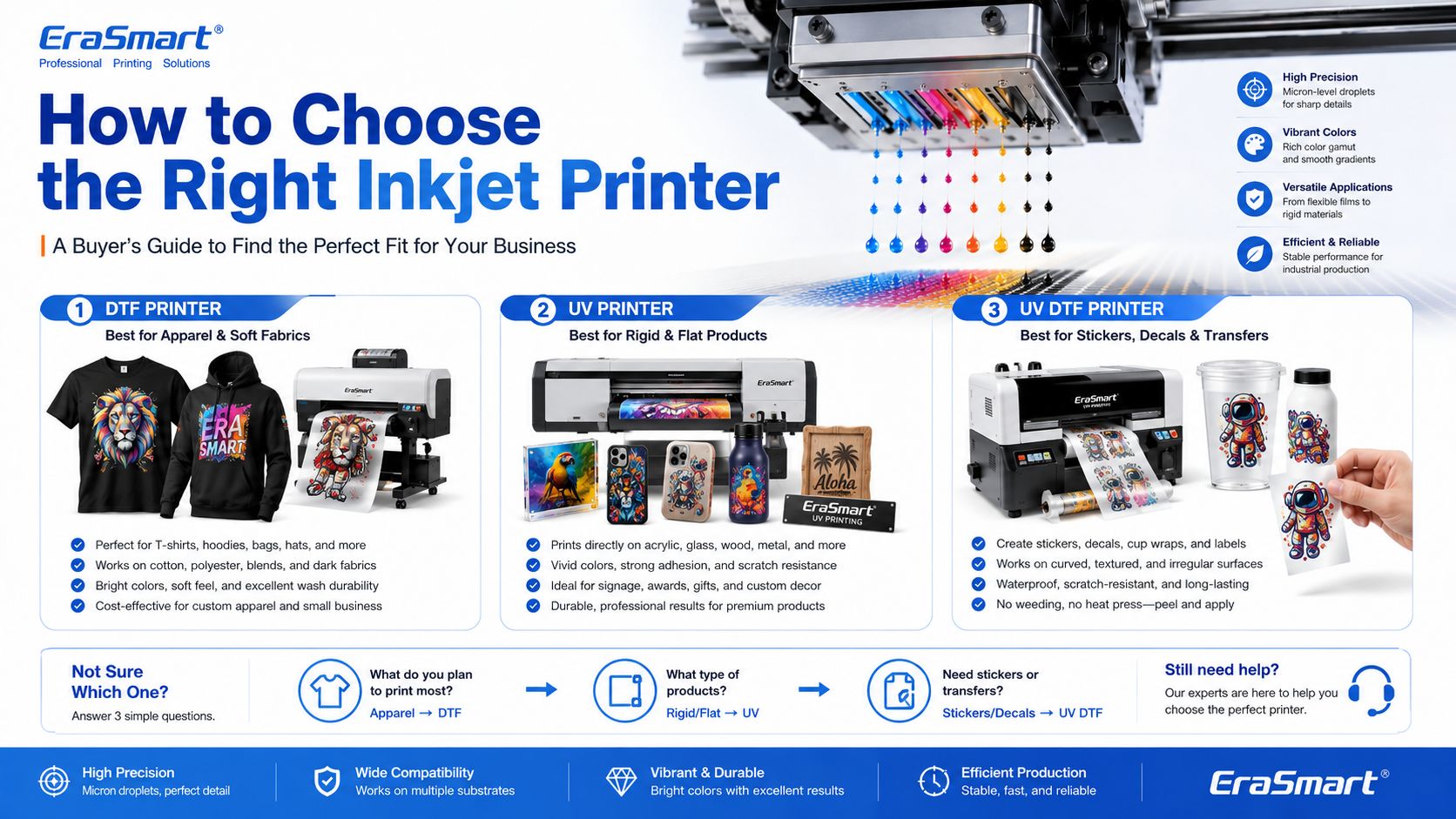
How to Choose the Right Inkjet Printer for Your Business

The right inkjet printer depends on what you want to sell.

Choose a DTF Printer If You Want to Print Apparel

اختر أ طابعة DTF if your business focuses on:

  • قمصان
  • هوديس
  • حمل الحقائب
  • الزي الرسمي
  • ملابس رياضية
  • رسومات الموضة
  • الملابس الداكنة
  • small-batch custom apparel
  • print-on-demand clothing

For machine selection, read EraSmart’s كيفية اختيار طابعة DTF و قائمة مراجعة شراء طابعة DTF.

للاستخدام الشخصي والاستوديو الشخصي

الإعداد المضغوط على مستوى الدخول

• تخصيص دفعة صغيرة
• اختبار التصميم
• انخفاض عبء الدخول

الأفضل للهواة والاستوديوهات الشخصية

إذا كان هدفك هو البدء صغيرًا، واختبار سير العمل، والتعامل مع التخصيص الشخصي أو الاستخدام التجاري الخفيف، فإن الخيار الأكثر عملية هو إعداد مدمج بتكلفة يمكن التحكم فيها وتشغيل يومي بسيط.

يعمل هذا النوع من الماكينات بشكل جيد للمبدعين والمشترين لأول مرة والاستوديوهات الشخصية التي تحتاج إلى نقطة دخول موثوقة دون القفز إلى معدات إنتاج أكبر مقاس A3 أو A1 مبكرًا.

للاستوديوهات الصغيرة والشركات الناشئة

إعداد تجاري مرن للدخول مقاس A3

• الطلبات المخصصة المحلية
• الملابس دفعة صغيرة
• سير عمل ملائم لبدء التشغيل

الأفضل للاستوديوهات الصغيرة والعلامات التجارية الجديدة والمتاجر الناشئة

إذا كانت لديك بالفعل فكرة عمل، أو تتلقى طلبات مخصصة محلية، أو تدير استوديوًا صغيرًا يحتاج إلى مرونة أكبر من ماكينات الإدخال A4، فإن الانتقال إلى مجموعة A3 عادةً ما يؤدي إلى إنشاء سير عمل تجاري أكثر عملية.

تعد هذه النماذج أكثر ملاءمة للعلامات التجارية الناشئة، ومشغلي الاستوديوهات، والمحلات التجارية في المراحل المبكرة التي تريد نطاق إنتاج أقوى دون الانتقال مباشرة إلى المعدات الصناعية ذات الإنتاج العالي.

للتجارة الإلكترونية والمصممين

التفاصيل واللون ودوران التصميم السريع

• رسومات غنية بالتصميم
• قطرات جديدة متكررة
• عرض مرئي متميز

الأفضل لرواد الأعمال في مجال التجارة الإلكترونية واستوديوهات المصممين

عندما يعتمد عملك على تغييرات التصميم المتكررة، والأعمال الفنية الغنية بالألوان، والصور التفصيلية، واختبار المنتج بشكل أسرع عبر الإنترنت، فمن المنطقي اختيار النماذج التي تقدم عرضًا أقوى للصور ومرونة تجارية أكثر سلاسة.

تعتبر هذه المجموعة مناسبة تمامًا للبائعين عبر الإنترنت، والعلامات التجارية التي يقودها المصممون، والفرق الإبداعية، والمحلات التجارية حيث يكون العرض المرئي وإطلاق التصميمات الجديدة أمرًا أساسيًا في نموذج الأعمال.

النماذج الموصى بها

للشركات الصغيرة

إنتاج تجاري يومي ثابت

• الطلبات اليومية
• إيقاع إنتاج أفضل
• إنتاج تجاري أكثر استقرارا

الأفضل للشركات الصغيرة المتخصصة في صناعة الملابس والإنتاج اليومي الثابت

بمجرد أن يتجاوز عملك الطلبات العرضية ويبدأ في الاعتماد على الإنتاج اليومي الثابت، يصبح من المهم اختيار الآلات التي تدعم سير عمل أكثر سلاسة واتساقًا أقوى وإيقاع إنتاج أفضل.

هذا المستوى هو عادةً المكان الذي يجب على المشترين التوقف فيه عن التفكير فقط في سعر الدخول والبدء في التفكير بجدية أكبر حول استقرار الإنتاج وكفاءة سير العمل والتطبيق العملي للتشغيل على المدى الطويل.

للأتمتة

زيادة الإنتاجية وترقية سير العمل

• سير عمل أسرع
• انخفاض العبء اليدوي
• استمرارية إنتاج أفضل

الأفضل للمحلات التجارية التي تقوم بالترقية نحو المزيد من سير العمل الآلي

إذا كانت شركتك تتجه إلى ما هو أبعد من الإنتاج اليدوي الأساسي وتريد عملية أكثر سلاسة وأكثر استعدادًا للإنتاج، فمن المنطقي التفكير في نماذج تدعم تكاملًا أقوى لسير العمل وتوقعات إنتاجية أعلى.

يعد هذا الاتجاه مناسبًا بشكل خاص للمحلات التجارية التي لديها بالفعل طلبات ثابتة وترغب في تقليل احتكاك الإنتاج وتحسين التكرار والاستعداد لأحجام تشغيل يومية أكبر.

للإنتاج على نطاق واسع

اتجاه صناعي واسع النطاق

• هدف أعلى للإنتاج
• عرض طباعة أوسع
• إيقاع الإنتاج الصناعي

الأفضل للتصنيع واسع النطاق وفرق الإنتاج الأعلى

عندما يحتاج عملك إلى عرض طباعة أوسع وسقف إنتاج أقوى واتجاه إنتاج صناعي أكثر جدية، تصبح سلسلة A1 هي الفئة المناسبة للتقييم. يعتبر هذا المستوى أكثر ملاءمة للشركات حيث تعد استمرارية الإنتاج وانخفاض تكلفة الانقطاع من الأولويات التشغيلية المهمة.

اختر طبقة رأس الطباعة استنادًا إلى مدى قوة هدف الإنتاج الخاص بك ومقدار القيمة التي تضعها على إنتاجية أقوى.

Choose a UV Printer If You Want to Print Hard Products

اختر أ طابعة للأشعة فوق البنفسجية if your business focuses on:

  • حالات الهاتف
  • لوحات الاكريليك
  • الهدايا الزجاجية
  • علامات معدنية
  • wood products
  • بلاط السيراميك
  • عينات التعبئة والتغليف
  • المنتجات الترويجية
  • product decoration

For material planning, read EraSmart’s دليل مواد طابعة الأشعة فوق البنفسجية و How to Choose a UV Printer.

المشاريع الصغيرة المبتدئة

مناسبة للمنتجات المخصصة صغيرة الحجم والعينات والهدايا المدمجة والمستخدمين الذين يرغبون في بدء الطباعة بالأشعة فوق البنفسجية بمساحة أصغر.

استخدام الأعمال المدمجة

خيار عملي لحافظات الهواتف والإكسسوارات ومنتجات الأكريليك الصغيرة والهدايا الشخصية وإنتاج الأعمال الصغيرة.

مرونة المنتج A3

خيار أقوى للمستخدمين الذين يحتاجون إلى نظام أساسي أكبر وتغطية أكبر للمنتجات وإنتاج أكثر مرونة بكميات صغيرة.

إنتاج تنسيق أكبر

مناسب لللافتات واللوحات واللوحات المخصصة وفرق الإنتاج الأكبر حجمًا التي تحتاج إلى مساحة طباعة أوسع وقابلية تطوير أقوى.

الأعمال حالة الهاتف

مصمم لتخصيص حافظة الهاتف وإنتاج المنتجات المخصصة بسرعة من خلال مسار تطبيق أكثر تركيزًا.

الشارات وأغلفة الكأس

أفضل لملصقات الأشعة فوق البنفسجية DTF، والملصقات الكريستالية، ولفائف الأكواب، والزجاجات، وملصقات نقل الأسطح الصلبة.

Choose a UV DTF Printer If You Want to Print Decals and Transfers

اختر أ طابعة UV DTF if your business focuses on:

  • ملصقات
  • decals
  • يلتف الكأس
  • labels
  • cosmetic packaging transfers
  • bottle decoration
  • gadget skins
  • hard-surface branding

To understand the film workflow, read EraSmart’s A/B Film for UV DTF Printing.

توصية شراء EraSmart

Inkjet printing is not one single business model. It is a technology foundation. The right machine depends on your target products.

A simple buying direction looks like this:

هدف الأعمالRecommended EraSmart Direction
Custom T-shirts, hoodies, apparelطابعة DTF
Acrylic, glass, metal, wood, phone casesطابعة الأشعة فوق البنفسجية
Stickers, cup wraps, labels, decalsطابعة UV DTF
Apparel startupA4 / A3 DTF Printer
Growing apparel shopA3 MAX DTF / shaker workflow
Custom product studioA4 / A3 UV Printer
Hard-surface transfer businessطابعة A3 UV DTF

If your business is apparel-first, start with EraSmart’s طابعة DTF lineup. If your business is hard-product customization, compare the طابعة الأشعة فوق البنفسجية range. If your business is stickers, decals, labels, and cup wraps, start with the طابعة UV DTF.

Final Answer: What Is an Inkjet Printer?

An inkjet printer is a digital printer that creates images by ejecting tiny ink droplets through microscopic nozzles onto a surface.

In basic office printing, that surface is usually paper. In custom printing, the surface may be PET film, transfer film, acrylic, glass, metal, wood, plastic, packaging board, fabric, or product blanks.

The most important point is this: inkjet printing is not only for documents and photos. It is the core technology behind many modern custom printing systems, including DTF printers, UV printers, and UV DTF printers.

For small businesses, inkjet technology makes it possible to print full-color designs, personalize products, produce short runs, reduce setup cost, and build flexible custom printing workflows.

Need help choosing the right inkjet-based printing system for your business? Share your target products, material type, print size, expected daily order volume, and budget range with EraSmart.

Our team can help you choose the right طابعة DTFو طابعة للأشعة فوق البنفسجية، أو طابعة UV DTF for your custom printing business.


قد تكون كما تفعل أيضا

  • طابعة Erasmart

    طابعة الأشعة فوق البنفسجية
    طابعة DTF
    طابعة DTG
    آلة الصحافة الحرارية
    طابعة الإعلان

  • أدوات الطابعة

    DTF الفرن
    الصحافة الساخنة
    آلة نحت
    نقل الحرارة القدح
    آلة التصفيح

  • المواد الاستهلاكية

    طباعة الحبر
    حالة الهاتف المحمول
    منتج زجاجي
    سائل التنظيف
    مسحة القطن

  • اتصل بنا

    WhatsApp : +8618566233796
    WeChat : +8618566233796
    Mobile : +8618566233796
    الويب :www.erasmart.com
    محل:www.erasmartmall.com

  • اطلب عرض أسعار

    ما عليك سوى تقديم بعض التفاصيل وسنساعدك في الحصول على عروض أسعار سريعة!