تولید کننده چاپگر جوهر افشان به اندازه کوچک

چاپ UV روی شیشه: آماده سازی سطح، جوهر سفید، چسبندگی و کاربردها
UV printing can produce full-color graphics, white ink and decorative varnish effects directly on many suitable glass surfaces.
For custom printing businesses, common applications include:
- glass signs
- جوایز
- پانل های عکس
- کد QR نمایش داده می شود
- پلاک های تزئینی
- قطعات عروسی و مراسم
- retail displays
- branded glass products
Glass also offers something that opaque materials cannot: شفافیتبشر
By controlling CMYK, white ink and the side of the glass you print on, you can create everything from translucent graphics to fully opaque images and reverse-printed designs viewed through the glass.
But glass also presents a major production challenge:
adhesion.
Unlike paper or porous wood, glass is smooth and non-porous. Ink cures on the surface rather than soaking into the material. Fingerprints, oil, dust, factory coatings and incorrect pretreatment can therefore affect adhesion significantly.
The professional workflow is:
Identify the glass → Clean → Prepare White/CMYK Layers → Print a Sample → Test Adhesion → Standardize the Setup → Begin Production
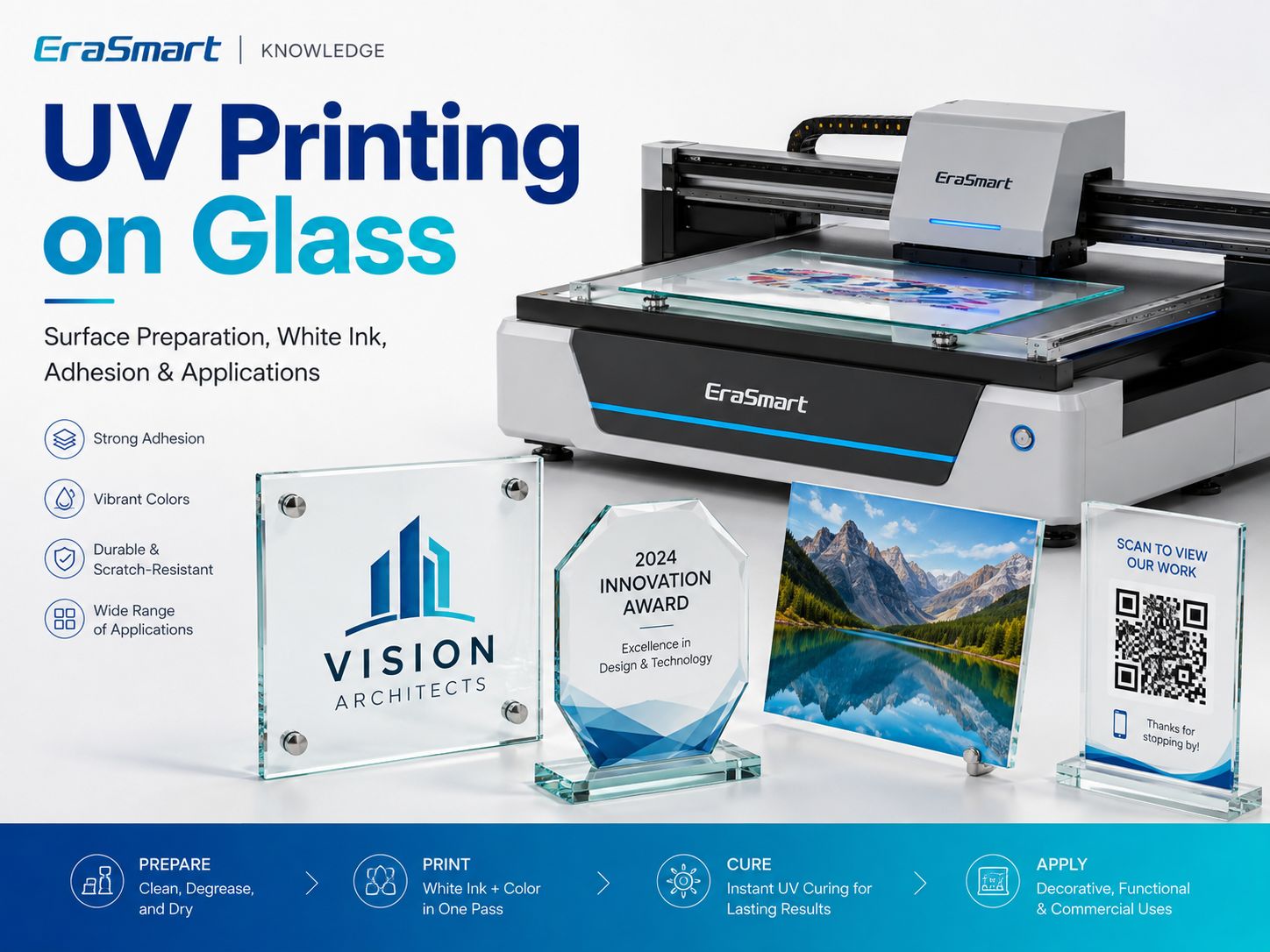
EraSmart currently classifies glass as a material that is suitable for UV printing پس از آزمایش, with surface cleanliness and adhesion identified as the main considerations.
Quick Answer: Can You UV Print on Glass?
بله
A UV flatbed printer can print directly onto many suitable glass products, especially flat panels, plaques, awards and display pieces.
However, successful production depends on the exact glass and surface treatment.
| سوال | پاسخ عملی |
|---|---|
| Can a UV printer print directly on glass? | بله بعد از تست |
| چالش اصلی | چسبندگی |
| جوهر سفید | Often important on transparent glass |
| پرایمر | Depends on the glass and application |
| پرس حرارتی | هیچ |
| چاپ مستقیم | بله |
| Best flatbed products | Flat glass panels, plaques, awards and signs |
| Bottles / curved glass | Consider UV DTF or an appropriate rotary workflow |
| Main preparation | Clean, degrease, test, then standardize |
Do not assume that two pieces of glass that look identical will behave exactly the same.
Surface coatings and treatments matter.
How Does UV Printing on Glass Work?
چاپ UV یک فرآیند چاپ دیجیتال مستقیم است.
گردش کار اصلی این است:
- کار هنری را آماده کنید.
- Import the design into RIP software.
- Create CMYK, white and varnish layers where needed.
- Position the glass on the printer bed.
- ارتفاع چاپ صحیح را تنظیم کنید.
- جوهر قابل درمان با اشعه ماوراء بنفش جت را روی سطح بریزید.
- نور ماوراء بنفش جوهر را در حین چاپ خشک می کند.
- Inspect and test the finished sample.
Unlike conventional inks that rely mainly on absorption or evaporation, UV ink cures through a light-triggered polymerization process.
For a deeper explanation, see جوهر UV چیست؟بشر
If you want to understand how CMYK, white ink and varnish work together, read the راهنمای جوهر UV: CMYK، سفید و لاکبشر
What Types of Glass Can You UV Print?
The word “glass” covers many different products and surface conditions.
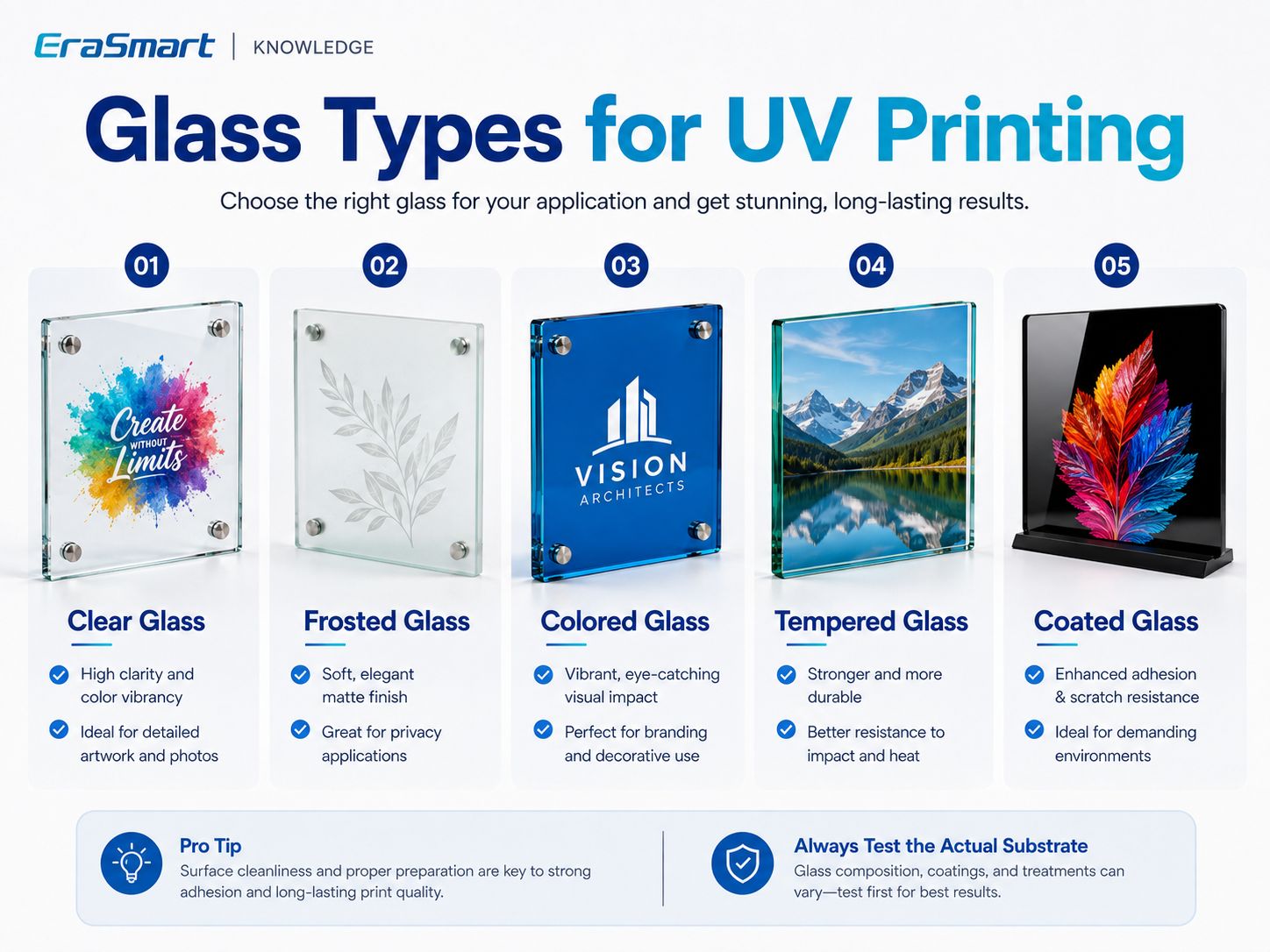
دسته بندی های رایج عبارتند از:
- clear glass
- frosted glass
- colored glass
- tempered glass
- coated glass
Clear Glass
Clear glass is one of the most interesting UV printing substrates because the transparent background can become part of the design.
It is suitable for products such as:
- نشانه ها
- جوایز
- پلاک ها
- photo displays
- wedding décor
- retail displays
The main design question is:
How much transparency do you want to keep?
That determines whether you use:
- فقط CMYK
- سفید + CMYK
- سفید انتخابی
Frosted Glass
Frosted glass creates a softer, more diffused appearance.
It is attractive for:
- تابلوهای اداری
- premium awards
- محصولات عروسی
- decorative displays
- privacy-oriented branding
However, the term “frosted” can refer to different manufacturing processes or surface treatments.
The exact blank should still be tested.
Colored Glass
Colored glass changes the visual appearance of printed CMYK.
A dark blue or green substrate will influence the printed color unless a white underbase is used.
White ink therefore becomes especially useful when you need:
- accurate branding
- bright graphics
- متن خواندنی
- strong contrast
Tempered Glass
Tempered glass can be used for appropriate UV printing applications, but the exact surface should be evaluated before production.
Tempered glass products may also have:
- پوشش ها
- anti-fingerprint treatments
- protective layers
- specialty finishes
These can affect adhesion.
Do not assume that “tempered” automatically means the surface behaves like untreated clear glass.
Coated Glass
Coated glass deserves special attention.
If glass has a surface coating, UV ink is effectively interacting with that coating.
The question becomes:
Is the coating compatible with the UV ink and the required durability?
A coating may improve printability in one product and reduce adhesion in another.
همیشه تست کنید
Why Is Glass More Difficult to Print Than Wood?
Wood and glass behave very differently.
چوب
Wood may have:
- pores
- grain
- fibers
- surface absorption
شیشه ای
Glass is generally:
- smooth
- non-porous
- شفاف
- prone to fingerprints
- sensitive to surface contamination
That means a UV print can look excellent while still having insufficient adhesion for the intended use.
With glass, appearance alone is not enough.
You need to test the finished product.
How to Prepare Glass Before UV Printing
Surface preparation is one of the most important steps in professional glass printing.
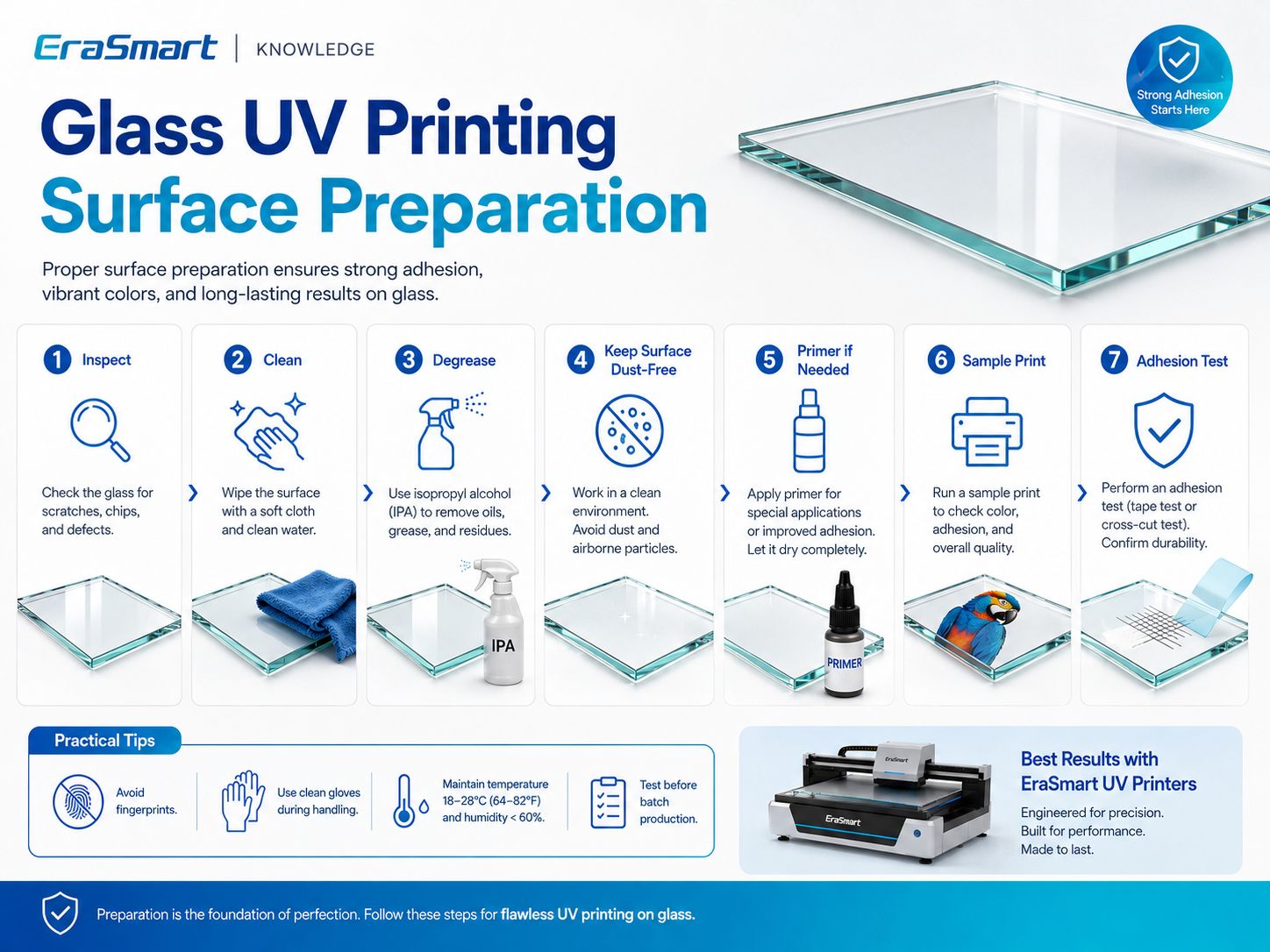
Step 1: Inspect the Glass
بررسی کنید:
- خراش
- چیپس
- ترک ها
- فیلم محافظ
- پوشش ها
- اثر انگشت
- روغن
- packaging residue
- گرد و غبار
Do not print a defective blank and expect printing to hide the problem.
مرحله 2: سطح را تمیز کنید
Remove visible contamination using a cleaning method compatible with the glass and any coating.
The printable area should be:
- تمیز کردن
- خشک
- عاری از گرد و غبار
- free from grease
مرحله 3: چربی زدایی
Fingerprints are especially common on glass.
After cleaning, avoid touching the printable surface directly.
Use suitable clean handling practices when possible.
Step 4: Let the Surface Dry Completely
Do not print over residual cleaning fluid or moisture.
مرحله 5: پرایمر یا تقویت کننده چسبندگی را ارزیابی کنید
Some glass applications may benefit from a compatible adhesion promoter.
But primer is not automatically required for every glass product.
رویکرد صحیح این است:
Clean → Print Test → Check Adhesion → Add Compatible Pretreatment If Needed → Retest
مرحله 6: یک نمونه چاپ کنید
Use the actual:
- شیشه ای
- پوشش
- جوهر
- لایه سفید
- varnish setup
- حالت چاپ
that will be used in production.
مرحله 7: تست چسبندگی
Only approve the substrate after the sample performs adequately for the intended application.
Do You Need Primer for UV Printing on Glass?
گاهی اوقات.
هیچ پاسخ جهانی وجود ندارد.
الزامات پرایمر به موارد زیر بستگی دارد:
- glass type
- درمان سطح
- پوشش
- فرمولاسیون جوهر UV
- دوام مورد نیاز
- دست زدن
- قرار گرفتن در معرض تمیز کردن
- درخواست نهایی
A decorative glass plaque displayed indoors does not have the same durability requirements as a frequently handled or regularly cleaned object.
Do not automatically apply primer to every glass product.
And do not assume glass never needs pretreatment.
بستر دقیق را آزمایش کنید.
White Ink on Clear Glass: Why It Matters
Transparent materials change the way CMYK appears.
CMYK inks are not normally designed to create the same opaque background that white paper provides.
This makes white ink one of the most useful tools in glass UV printing.
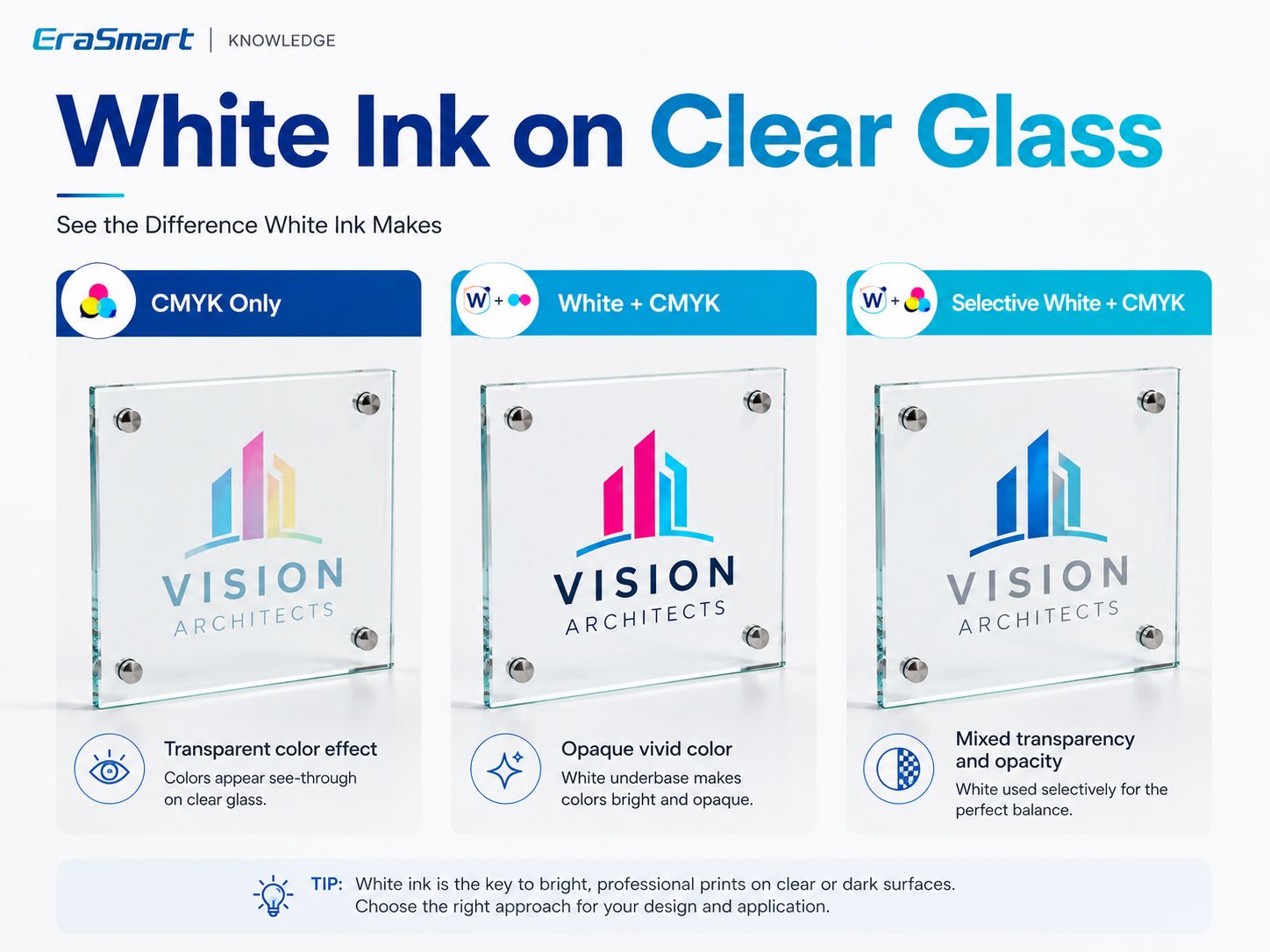
سه رویکرد عملی وجود دارد.
گزینه 1: فقط CMYK
CMYK printed directly on clear glass creates a more transparent effect.
The background behind the glass remains visible.
This can work well for:
- artistic graphics
- decorative transparency
- stained-glass-style effects
- minimalist signs
- intentionally translucent designs
The trade-off is lower opacity.
Light colors may look weaker depending on what is behind the glass.
گزینه 2: سفید + CMYK
A white underbase creates a more opaque foundation.
این تولید می کند:
- رنگ قوی تر
- greater contrast
- لوگوهای قابل پیش بینی تر
- عکس های روشن تر
- improved text visibility
این برای:
- corporate signage
- پانل های عکس
- product displays
- جوایز
- colorful branding
گزینه 3: انتخابی سفید + CMYK
Selective white is often the most visually interesting option.
White is printed only where opacity is required.
به عنوان مثال:
- white behind the company logo
- no white in transparent background areas
- white behind flowers
- clear glass visible between design elements
This gives you both:
transparency + vivid color
in the same product.
CMYK + سفید + لاک
On compatible EraSmart UV configurations, varnish can be added for selected effects such as:
- براق کننده نقطه ای
- جزئیات را مطرح کرد
- نکات برجسته لوگو
- بافت تزئینی
Use varnish selectively when it improves the design.
Do not treat varnish as an automatic substitute for an industrial protective coating.
Front-Surface Printing vs Reverse Printing on Glass
Glass gives UV printing another important design option:
printing on the back and viewing the image through the glass.
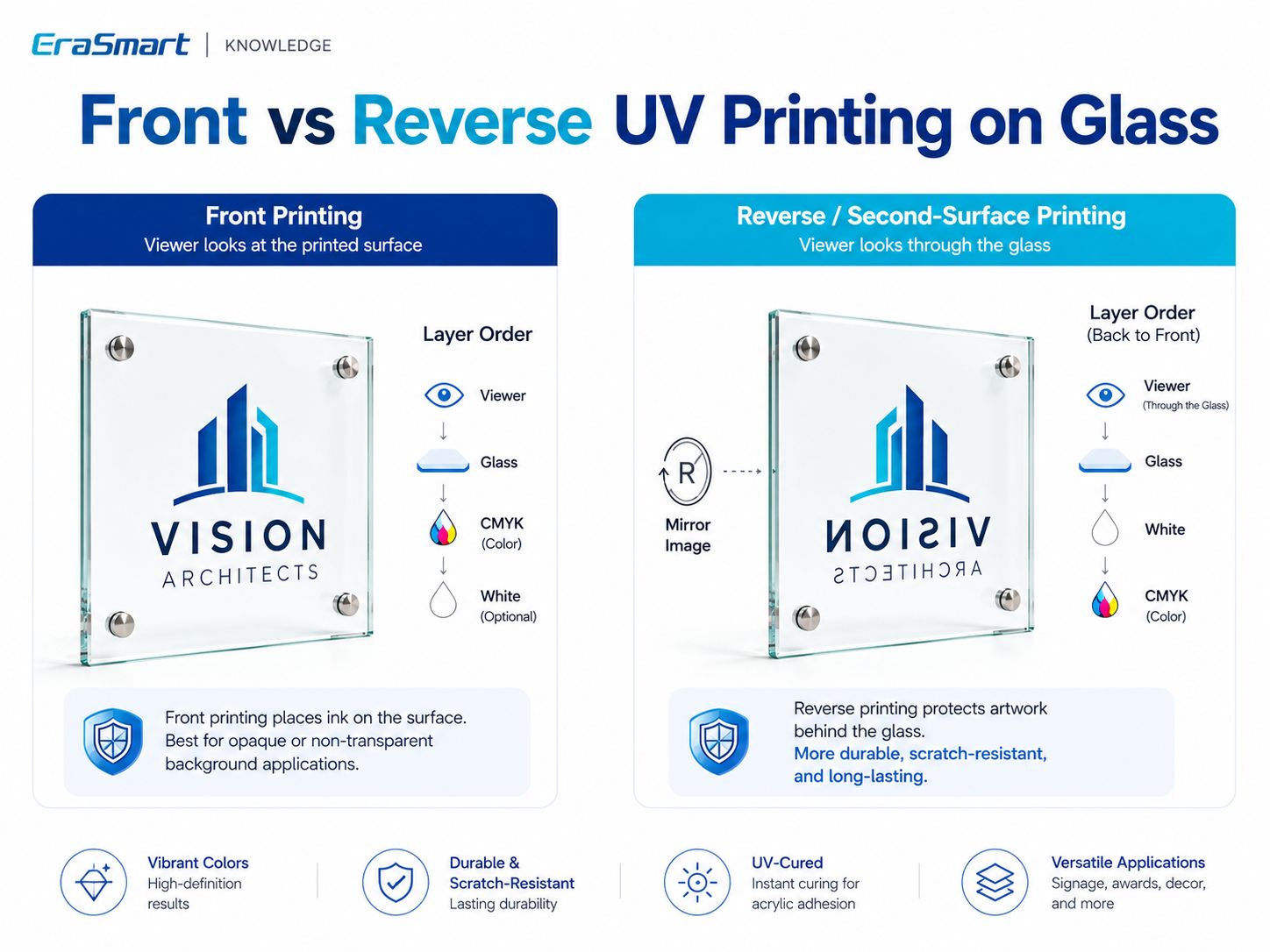
چاپ سطح جلو
The artwork is printed on the side facing the viewer.
A common layer strategy is:
Glass → White Underbase → CMYK
when opaque color is required.
مزایا:
- straightforward setup
- suitable for many decorative products
- easy to combine with varnish effects
- useful when the printed surface itself is part of the design
The ink layer remains exposed on the viewing side.
Reverse / Second-Surface Printing
The artwork is printed onto the back side of clear glass and viewed through the glass from the opposite side.
The artwork normally needs to be mirrored.
For an opaque reverse-printed image, a common concept is:
Glass → CMYK → White backing
when viewed through the glass.
The exact RIP layer sequence depends on the printer setup, so always confirm with a physical sample.
مزایا عبارتند از:
- clean front surface
- glass between the viewer and printed artwork
- premium signage appearance
- strong use in photo panels and decorative displays
Reverse printing is one of the main reasons clear glass can produce visually distinctive UV-printed products.
When Should You Use Front vs Reverse Printing?
| کاربرد | Suggested Direction |
|---|---|
| Raised varnish effect | Front printing |
| بافت سطح | Front printing |
| Clear sign with exposed decorative graphics | Front or reverse |
| Premium photo panel | Reverse often attractive |
| Logo viewed through glass | معکوس |
| Product needing tactile varnish | Front |
| Printed layer protected behind glass | معکوس |
هیچ برنده جهانی وجود ندارد.
Choose according to the desired finish.
How to UV Print on Glass Step by Step
Once the glass and ink configuration have been tested, create a repeatable production workflow.
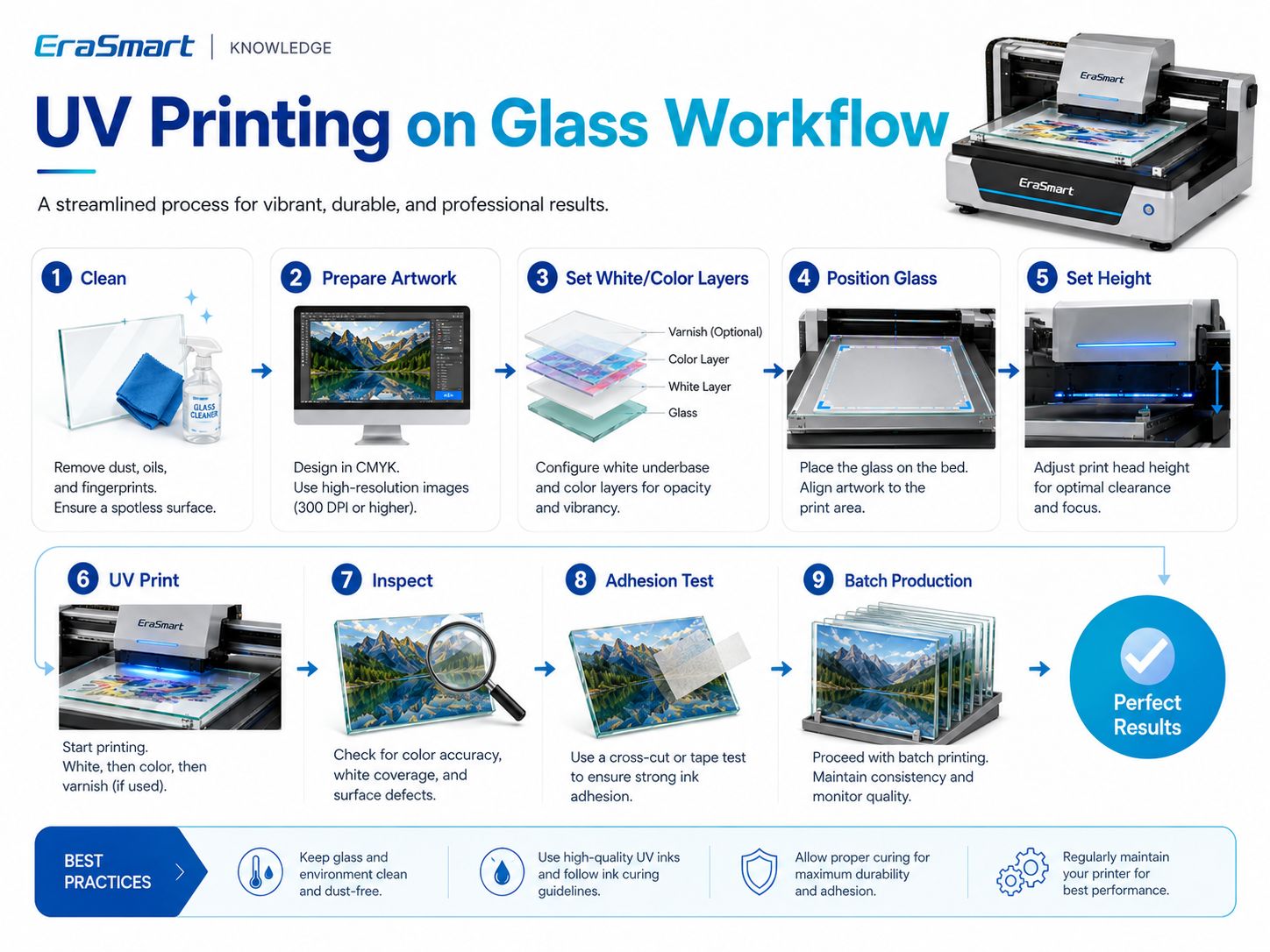
Step 1: Clean the Glass
حذف:
- گرد و غبار
- روغن
- اثر انگشت
- residue
مرحله 2: کار هنری را آماده کنید
تایید کنید:
- ابعاد نهایی
- وضوح تصویر
- متن
- آرم ها
- خونریزی
- حاشیه امن
Use vector artwork for:
- آرم ها
- متن
- کدهای QR
- fine line graphics
Around 300 DPI at final print size is a practical starting point for close-view raster artwork.
Step 3: Decide Front or Reverse Printing
For reverse printing:
- mirror the artwork
- confirm the layer order
- test how the design looks through the glass
Step 4: Set CMYK, White and Varnish Layers
انتخاب کنید:
- فقط CMYK
- سفید + CMYK
- انتخابی سفید + CMYK
- CMYK + سفید + لاک
based on the finished visual effect.
Step 5: Position the Glass
استفاده کنید:
- ارجاعات لبه
- جیگ
- وسایل
- قالب ها
for repeat orders.
مرحله 6: ارتفاع چاپ را تنظیم کنید
Glass must be positioned safely and sufficiently flat.
Correct clearance helps maintain consistent print quality and reduces printhead risk.
مرحله 7: یک نمونه را چاپ کنید
Do not start a large batch immediately.
بررسی کنید:
- رنگ
- کدورت سفید
- هم ترازی
- متن کوچک
- image position
- لاک زدن
- شفافیت
Step 8: Inspect the Finished Print
به دنبال:
- گرد و غبار
- باندبندی
- نقص نازل
- layer registration problems
- عیوب لبه
- coating issues
Step 9: Test Adhesion
Check that the ink performs adequately for the actual end use.
Step 10: Standardize the Job
پس از تایید:
- RIP از پیش تعیین شده را ذخیره کنید
- record the glass type
- فرآیند تمیز کردن را ثبت کنید
- جیگ را قفل کنید
- record front/reverse orientation
- save the white-layer setup
Step 11: Start Batch Production
Repeat the approved workflow and perform periodic QC.
How to Test UV Ink Adhesion on Glass
The appropriate test depends on how the finished product will be used.
بررسی اولیه مالش
برای شناسایی شکست چسبندگی آشکار مفید است.
If the ink lifts easily during basic handling, review:
- تمیز کردن
- surface contamination
- coating compatibility
- پیش درمان
بررسی داخلی مبتنی بر نوار
A controlled tape test can help compare samples during internal production testing.
If a customer requires a recognized testing standard, follow that specific standard and its complete procedure.
ارزیابی خراش / سایش
This is more important for frequently handled products such as:
- نمایشگر شمارنده
- علائم QR
- جوایز
- محصولات هدیه
than for protected decorative panels.
مقاومت پاکسازی
If the glass will be cleaned regularly, test it using conditions representative of real use.
قرار گرفتن در معرض رطوبت
For glass products used in humid environments, test the complete printed product according to the actual environment.
Do not make blanket claims such as:
- قابل شستشو در ماشین ظرفشویی
- مقاوم در برابر مواد شیمیایی
- outdoor permanent
- food safe
unless the finished product has actually been tested and qualified for that use.
Direct UV Printing vs UV DTF for Glass
EraSmart هر دو را ارائه می دهد چاپگرهای تخت UV وت پرینترهای UV DTFبشر
They serve different product shapes.
چاپ مستقیم UV تخت
بهترین مناسب برای:
- پانل های شیشه ای
- پلاک ها
- flat awards
- پانل های عکس
- flat signs
- نمایش QR
- flat decorative pieces
The product itself is placed onto the printer bed.
UV DTF
UV DTF may be more practical for:
- glass bottles
- کوزه ها
- فنجان ها
- irregular finished products
- difficult-to-position areas
- curved products
The graphic is printed onto UV DTF film and then transferred to the compatible object.
این تمایز مهم است:
a standard UV flatbed printer should not automatically be treated as a full 360° bottle printer.
For cylindrical direct printing, an appropriate rotary workflow is needed.
EraSmart’s current UV printing guide likewise distinguishes flatbed UV, UV DTF and rotary UV workflows according to product shape.
UV Printing vs Sublimation on Glass
Both technologies can be used for customized products, but their workflows differ.
| نشان | چاپ UV | تصویب |
|---|---|---|
| چاپ مستقیم | بله | هیچ |
| پوشش ویژه سابلیمیشن | Not inherently | معمولا مورد نیاز است |
| جوهر سفید | بله | هیچ |
| پرس حرارتی | هیچ | بله |
| Clear glass effects | Strong flexibility | Depends on compatible coated blank |
| لاک الود | در سیستم های UV پشتیبانی شده موجود است | هیچ |
| Flat rigid panels | خوب | Requires compatible blank |
| چالش اصلی | چسبندگی | پوشش + انتقال حرارت |
Sublimation remains useful for purpose-made coated blanks.
UV printing is attractive when you need:
- چاپ مستقیم
- جوهر سفید
- transparency control
- لاک زدن
- short-run personalization
Glass Products You Can Print with a UV Printer
Glass can support both consumer and B2B customization.
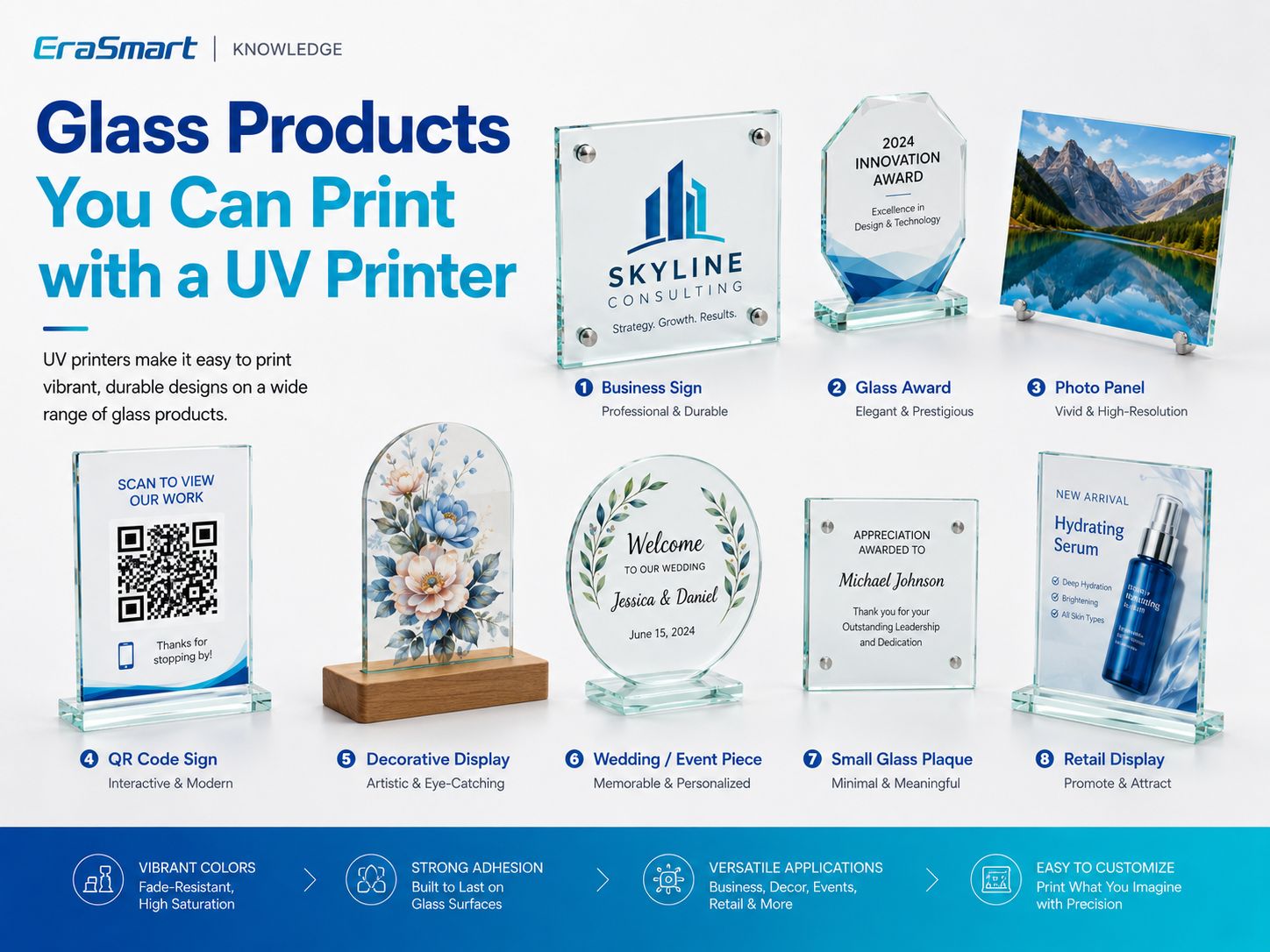
1. Business Signs
مثالها عبارتند از:
- لوگوهای شرکت
- office plaques
- reception signs
- directional displays
2. Glass Awards
چاپ UV می تواند اضافه کند:
- نام ها
- آرم ها
- event information
- colorful graphics
- جوهر سفید
- decorative varnish
to compatible flat award pieces.
3. Photo Panels
Reverse printing can be especially attractive for:
- family photos
- wedding photos
- travel photography
- محصولات یادبود
- اثر هنری
4. QR Code Signs
Glass QR signs can be used for:
- منوها
- صفحات رزرو
- بررسی ها
- وای فای
- رسانه های اجتماعی
- اطلاعات محصول
Always physically scan the finished QR code before delivery.
5. Wedding and Event Pieces
محصولات احتمالی عبارتند از:
- اعداد جدول
- small welcome signs
- پلاک های عکس
- personalized event décor
- guest information displays
For acrylic-based wedding stationery, you can also read our guide to DIY Wedding Invitations and UV Printingبشر
6. Decorative Displays
Glass can be used for:
- آثار هنری گل
- abstract graphics
- دکوراسیون منزل
- branded displays
7. Small Glass Plaques
مناسب برای:
- employee recognition
- هدایای تشکر
- قطعات مارک دار
- محصولات یادبود
8. Retail Displays
Retailers may use glass panels for:
- product promotions
- گرافیک برند
- small countertop displays
- launch signage
Why Jigs Matter for Batch Glass Printing
Suppose a customer orders 50 identical glass QR signs.
Manually repositioning each piece by eye is inefficient.
در عوض:
- Create a positioning fixture.
- Define fixed X/Y coordinates.
- Use the same glass dimensions.
- RIP از پیش تعیین شده را ذخیره کنید.
- یک نمونه تایید شده را چاپ کنید.
- Repeat the same positioning.
This helps improve:
- قوام
- سرعت تولید
- هم ترازی
- کنترل زباله
For personalized products, the blank can remain in the same fixture while the artwork changes digitally.
Which EraSmart UV Printer Is Suitable for Glass Printing?
Printer selection should follow your actual glass dimensions and production needs.
چاپگر UV EraSmart A3 PRO — Dual XP600
در چاپگر دیجیتال جوهر افشان EraSmart A3 UV — Dual XP600 is an A3-class UV flatbed designed for personalized customization and small-batch production.
مشخصات کلیدی عبارتند از:
| مشخصات | A3 PRO |
|---|---|
| هدهای چاپ | دوتایی XP600 |
| منطقه چاپ | 350 × 450 میلی متر |
| ارتفاع چاپی | 0-130 میلی متر |
| قطعنامه | حداکثر 1440 نقطه در اینچ |
| پیکربندی جوهر | CMYK + WW + VVVVVV |
| گردش جوهر سفید | بله |
| تمیز کردن خودکار | بله |
| بستر مکش | بله |
| اندازه گیری قد | مادون قرمز |
| RIP | Riin / PrivateRip |
EraSmart currently lists glass among the supported materials for this model, together with acrylic, metal, wood, ceramic, PVC and other substrates.
This format is suitable for products such as:
- glass plaques
- پانل های عکس
- جوایز
- نشانه ها
- نمایش QR
- small decorative pieces
چاپگر UV EraSmart A2
For larger flat glass products, the چاپگر UV EraSmart A2 پلت فرم بزرگتری را فراهم می کند.
مشخصات کلیدی عبارتند از:
- دو هد چاپ XP600
- 420 × 600 mm print area
- 0–130 mm adjustable print height
- CMYK + WW + VVVVVV
- تا 1440 dpi
- بستر مکش
- تمیز کردن خودکار
Glass is also listed among its supported materials.
The larger working area can help with:
- larger panels
- larger plaques
- علامت گذاری
- multiple smaller pieces in one print layout
Choose the printer according to your most common products—not simply according to the largest available machine.
Common Problems When UV Printing on Glass
جوهر UV به راحتی خراشیده می شود
علل احتمالی:
- اثر انگشت
- روغن
- پوشش ناسازگار
- تمیز کردن ناکافی
- چسبندگی ناکافی
- پیش درمانی نامناسب
Do not start by changing resolution.
First check the substrate.
Colors Look Too Transparent
This is common when CMYK is printed directly onto clear glass.
امتحان کنید:
- سفید + CMYK
- سفید انتخابی
- reverse printing with white backing
depending on the desired effect.
جوهر سفید ناهموار به نظر می رسد
بررسی کنید:
- گردش جوهر سفید
- وضعیت نازل
- تنظیمات RIP
- layer density
- شرایط نگهداری
White UV ink contains heavier pigments and requires appropriate circulation and maintenance.
White and CMYK Are Misaligned
بررسی کنید:
- printhead calibration
- پیکربندی لایه RIP
- وضعیت نازل
- ثبت نام
Dust Appears Under the Print
Glass makes dust particularly visible.
Improve:
- تمیز کردن
- workspace cleanliness
- دست زدن
- storage before printing
Small Text Is Hard to Read
علل احتمالی:
- بدون پایه سفید
- پس زمینه شفاف
- آثار هنری با وضوح پایین
- text too small
Use vector artwork and physically inspect the finished sample.
Batch Position Changes
استفاده کنید:
- جیگ
- قالب ها
- ارجاعات لبه
- مختصات ذخیره شده
instead of manually positioning every piece.
ایمنی و محدودیت های کاربردی
A UV printer being able to print on glass does not mean every glass application is automatically appropriate.
Drinking Glasses
Avoid making assumptions about:
- drinking rims
- food-contact areas
- dishwasher resistance
unless the complete ink/substrate/product system is certified or tested for that use.
Outdoor Glass
دوام در فضای باز به موارد زیر بستگی دارد:
- جوهر UV
- glass coating
- آماده سازی سطح
- قرار گرفتن در معرض محیطی
- تمیز کردن
- weather
Do not promise universal outdoor lifetime without testing.
Structural Glass
UV printing should not be presented as changing or certifying the structural safety characteristics of architectural glass.
If a product is subject to construction, safety or other regulatory requirements, evaluate the finished product according to the applicable standards.
How to Choose a UV Printer for Glass
Before selecting a machine, answer these questions.
What Is Your Largest Glass Product?
Printer bed size should follow your real product dimensions.
Are Your Products Flat?
محصولات تخت برای چاپ تخت UV مناسب هستند.
آیا به جوهر سفید نیاز دارید؟
White is particularly important for:
- clear glass
- colored glass
- آرم ها
- عکس ها
- متن کوچک
Do You Need Reverse Printing?
Make sure your RIP workflow supports the required mirrored artwork and layer structure.
آیا به لاک نیاز دارید؟
Varnish can increase perceived value for selected products but is not necessary for every job.
Will You Print Bottles or Jars?
If curved products are central to your business, evaluate:
- UV DTF
- appropriate rotary printing
instead of assuming a standard flatbed workflow is sufficient.
What Is Your Monthly Volume?
Higher repeat volume makes:
- وسایل
- از پیش تنظیمات RIP ذخیره شده است
- جاهای خالی استاندارد شده
- QC دسته ای
more important.
Final Answer: Is UV Printing Good for Glass?
بله
UV printing is a flexible solution for producing:
- glass signs
- جوایز
- پانل های عکس
- نمایش QR
- پلاک های تزئینی
- محصولات عروسی
- retail displays
But glass should not be treated as a universally easy substrate.
The most important production factors are:
surface cleanliness + adhesion + white ink strategy + print orientation
استفاده کنید:
- فقط CMYK for transparent color effects
- سفید + CMYK for stronger opacity
- انتخابی سفید + CMYK for mixed transparent and opaque designs
- چاپ معکوس when you want the artwork viewed through the glass
- لاک الود for selected premium effects
And follow this production logic:
بازرسی ← تمیز ← آزمایش ← نمونه چاپ ← بررسی چسبندگی ← تایید ← استانداردسازی → تولید دسته ای
For flat glass products, explore the چاپگر UV EraSmart محدوده
For bottles, jars and other curved finished products, consider whether an چاپگر UV DTF EraSmart provides a more practical workflow.
سوالات متداول
Can UV printers print directly on glass?
Yes. UV flatbed printers can print directly on many suitable glass surfaces, but adhesion and surface cleanliness should be tested before production.
Does UV ink stick to glass?
It can, but adhesion depends on the exact glass, surface coating, cleanliness, ink and pretreatment. Do not assume all glass behaves the same.
Do I need primer before UV printing glass?
Not always. Some surfaces may print adequately after proper cleaning, while others may benefit from a compatible adhesion promoter. Test first.
Do I need white ink on clear glass?
نه همیشه.
Use CMYK only when you want transparency.
Use white beneath or behind CMYK when you want stronger opacity and brighter color.
Can I print on clear glass?
Yes. Clear glass is particularly useful for transparent graphics, white ink effects and reverse printing.
Can you UV print on frosted glass?
Yes, depending on how the frosted finish was produced and how the surface behaves with the ink. Test the exact product.
Can UV printers print on tempered glass?
Potentially, yes. The actual surface treatment and coating should be tested before production.
What is reverse printing on glass?
Reverse or second-surface printing places the artwork on the back of clear glass and allows the viewer to see it through the glass from the front.
Does reverse glass printing require mirrored artwork?
Usually yes. The artwork normally needs to be mirrored before printing on the back side.
Can UV printers print glass bottles?
Direct flatbed printing is best suited to flat surfaces. Cylindrical bottles require an appropriate rotary workflow, or UV DTF may be a more practical alternative.
Can UV-printed glass go in a dishwasher?
Do not assume so. Dishwasher resistance depends on the ink, adhesion, glass, pretreatment and complete finished-product testing.
Can UV printers print photographs on glass?
Yes. White ink and reverse printing can both be used to create premium photo-panel effects.
Which EraSmart UV printer can print glass?
در EraSmart A3 PRO Dual XP600 supports a 350 × 450 mm print area, while the چاپگر UV EraSmart A2 یک پلت فرم بزرگتر 420 × 600 میلی متر را فراهم می کند.
Build a Reliable Glass Printing Workflow
If you are evaluating a UV printer for glass products, tell EraSmart:
- glass type
- ابعاد محصول
- clear / frosted / colored surface
- coating information
- آیا به جوهر سفید نیاز دارید
- whether you want front or reverse printing
- expected production volume
- whether the product is flat or curved
We can help you compare the right چاپگر UV EraSmart یا چاپگر UV DTF گردش کار برای محصولات واقعی شما
Clean the surface. Control the white layer. Test adhesion. Then scale production.
ممکن است شما هم باشید

کپی رایت 2020 © Erasmart. | نقشه سایت