تولید کننده چاپگر جوهر افشان به اندازه کوچک

86-18566233796 [email protected]

وبلاگ What Is an Inkjet Printer and How Does It Work? A Practical Guide for Custom Printing Businesses

What Is an Inkjet Printer and How Does It Work? A Practical Guide for Custom Printing Businesses

June 17, 2026 وبلاگ

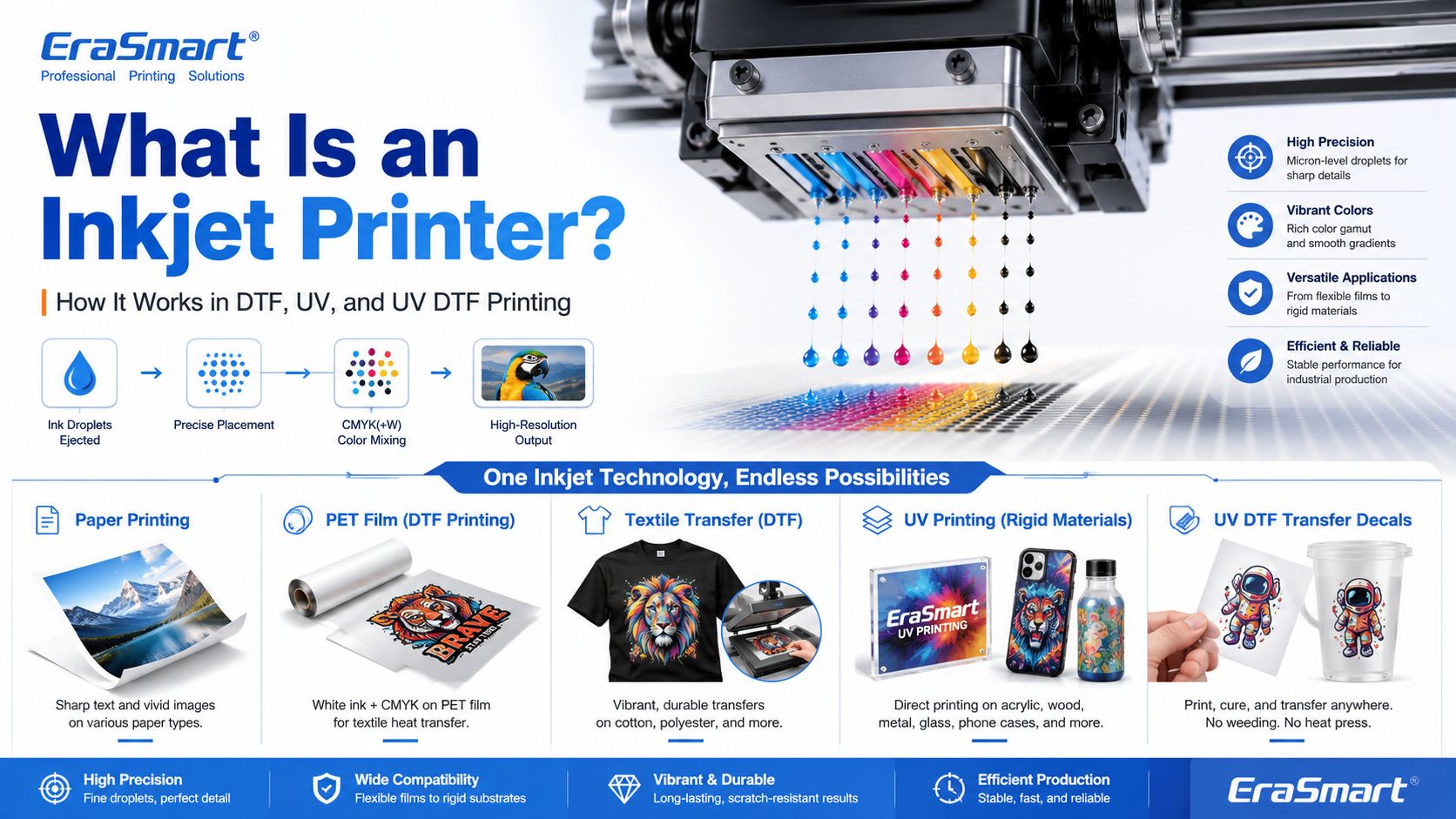
An inkjet printer is a digital printing device that creates images by ejecting tiny droplets of ink onto a surface. Instead of using plates, screens, or physical stencils, an inkjet printer receives digital image data and places controlled ink droplets in precise positions to form text, graphics, photos, labels, transfers, or product decoration.

Most people first know inkjet printers from office or home photo printing. But inkjet technology is much broader than desktop paper printing. Today, inkjet systems are used in DTF printing, UV flatbed printing, UV DTF transfers, packaging samples, product labels, signage, promotional products, textile decoration, industrial marking, and custom product manufacturing.

For EraSmart customers, this topic matters because many modern custom printing machines are built on inkjet principles. A چاپگر DTF uses inkjet technology to print garment designs onto transfer film. A چاپگر UV uses inkjet technology to print UV-curable ink directly onto rigid materials. A چاپگر UV DTF uses inkjet printing to create hard-surface decals and transfers on A/B film.

In simple terms, inkjet printing is the foundation. DTF, UV, and UV DTF are specialized business workflows built around that foundation.

Quick Answer: What Is an Inkjet Printer?

An inkjet printer is a printer that sprays or ejects tiny droplets of liquid ink through microscopic nozzles to create a printed image.

A basic inkjet printing system includes:

  • digital artwork file
  • RIP or printer control software
  • ink supply system
  • printhead
  • microscopic nozzles
  • movement system
  • printable surface
  • drying, curing, or transfer process

The printhead is the key component. It controls where ink droplets land, how much ink is ejected, and how accurately the image is formed.

How Does an Inkjet Printer Work?

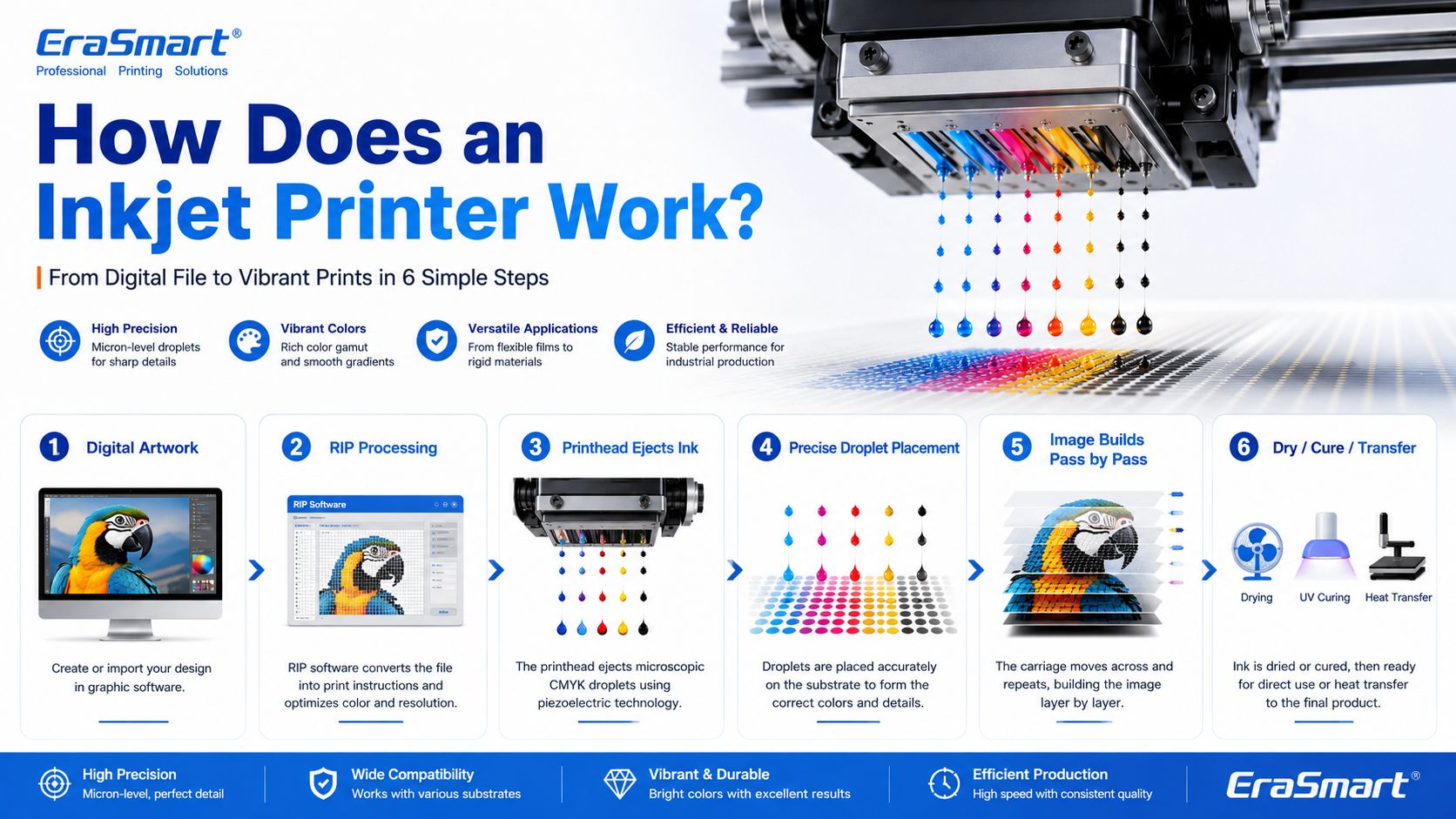
Inkjet printing may look simple from the outside, but inside the printer there is a precise digital control process.

A simplified workflow looks like this:

  1. The computer sends image data to the printer.
  2. The printer software processes the file into printable dot information.
  3. The printer moves the printhead or material into position.
  4. The printhead ejects tiny droplets of ink through nozzles.
  5. The droplets land on the target surface in controlled positions.
  6. The printer builds the image line by line or pass by pass.
  7. The ink dries, cures, absorbs, or transfers depending on the printing method.

In an office inkjet printer, ink is usually printed onto paper and dries or absorbs into the paper surface. In an industrial or custom printing system, the process may be more specialized. For example, UV ink is cured by UV light, while DTF ink is printed onto PET film and later heat transferred onto fabric.

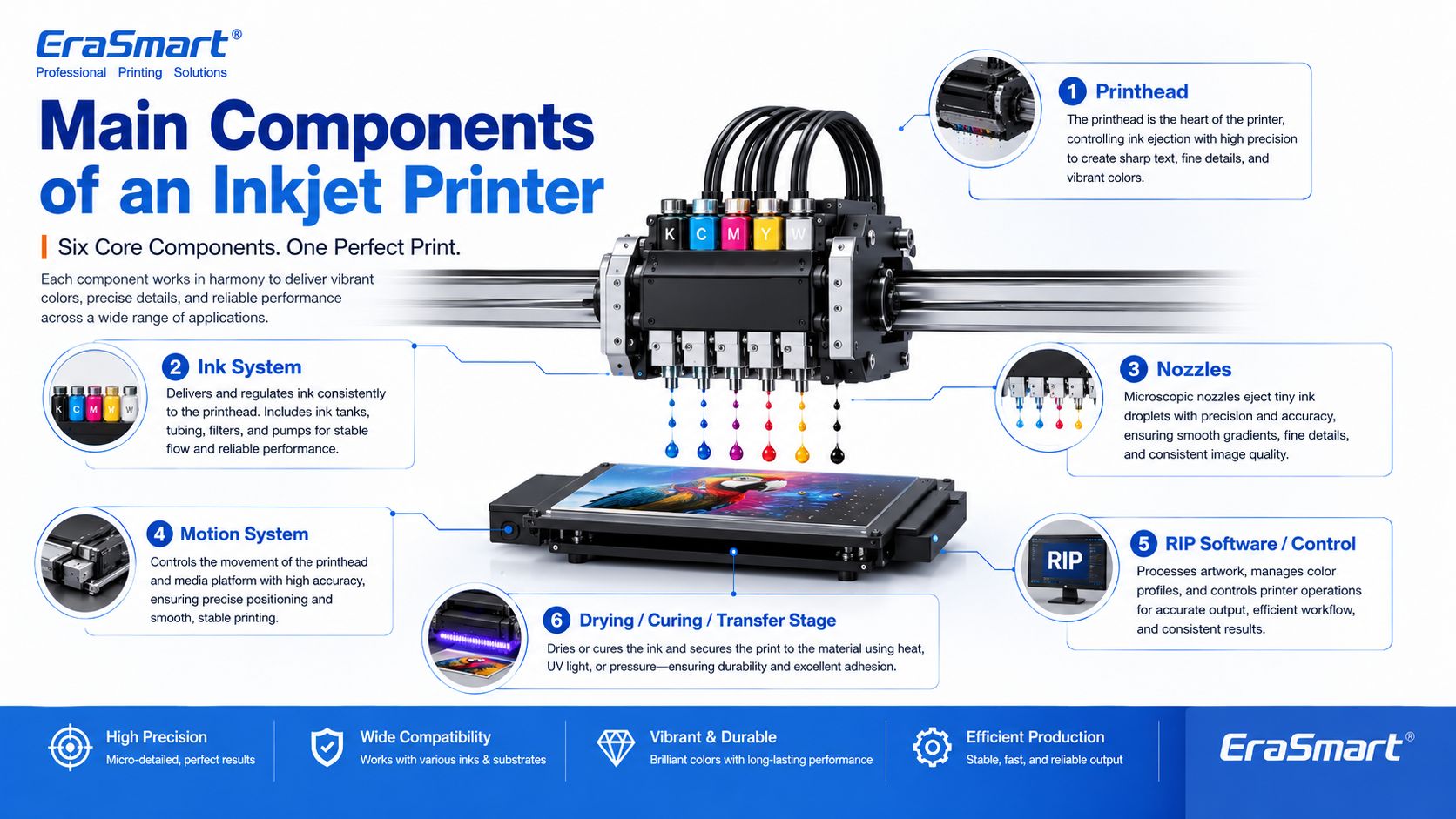
Main Components of an Inkjet Printer

1. Printhead

The printhead is the most important part of an inkjet printer. It contains many tiny nozzles that eject ink droplets. The printhead determines much of the printer’s resolution, droplet control, speed, and print quality.

In custom printing, printhead condition directly affects:

  • sharpness
  • color consistency
  • line accuracy
  • white ink quality
  • nozzle stability
  • production reliability
  • maintenance requirements

This is why printer maintenance is so important in DTF and UV printing. If the printhead nozzles are clogged or unstable, the final print may show banding, missing lines, weak colors, or poor detail.

For apparel printing users, EraSmart’s راهنمای تعمیر و نگهداری چاپگر DTF is a useful resource for understanding why nozzle checks, cleaning, white ink circulation, and daily care matter.

2. Ink System

The ink system stores and delivers ink to the printhead. Different inkjet printers use different types of ink depending on the application.

Common ink types include:

  • dye ink
  • pigment ink
  • sublimation ink
  • textile ink
  • جوهر DTF
  • جوهر قابل درمان با اشعه ماوراء بنفش
  • solvent or eco-solvent ink
  • industrial marking ink

For EraSmart customers, the most relevant ink systems are DTF ink, UV ink, white ink, and varnish.

بوها چاپگر DTF commonly uses CMYK ink plus white ink. The white ink helps designs appear clearly on dark garments. A چاپگر UV may use CMYK, white ink, and varnish to print on hard surfaces such as acrylic, glass, metal, wood, plastic, leather, and packaging materials.

If you want to understand how CMYK, white ink, and varnish work together in product customization, see EraSmart’s UV Ink Guide: CMYK, White Ink, and Varnishبشر

3. Nozzles

Nozzles are microscopic openings in the printhead. They eject ink droplets in controlled patterns.

Nozzle performance affects:

  • print resolution
  • detail clarity
  • ink density
  • دقت رنگ
  • شیب های صاف
  • edge sharpness
  • production stability

Nozzles can become clogged if ink dries, settles, or becomes contaminated. This is especially important for white ink systems because white ink contains heavier pigment particles and needs proper circulation and maintenance.

4. Motion System

Inkjet printers need accurate motion control. Either the printhead moves across the material, the material moves under the printhead, or both are coordinated.

The motion system affects:

  • print alignment
  • image registration
  • repeatability
  • production speed
  • print size accuracy
  • multi-pass quality

In UV flatbed printing, the platform and printhead movement must be stable so the image lands accurately on rigid objects. In DTF printing, film feeding must be smooth so the transfer image remains consistent.

5. RIP Software and Print Control

RIP software converts artwork into printer-ready instructions. It controls color output, resolution, ink layering, white ink channels, varnish layers, print passes, and other production settings.

For custom printing businesses, RIP setup is important because it affects:

  • color performance
  • white ink underbase
  • image sharpness
  • ink usage
  • سرعت چاپ
  • material compatibility
  • repeatability

A good printer is only part of the system. Correct artwork preparation and RIP settings are also necessary for professional results.

6. Drying, Curing, or Transfer System

Inkjet printing is not finished when ink leaves the nozzle. The ink must also become stable on the final product.

Different workflows use different finishing methods:

Inkjet WorkflowWhat Happens After Printing
Office inkjetInk dries or absorbs into paper
چاپ DTFPowder is applied, cured, then heat pressed onto fabric
چاپ UVUV light cures the ink almost instantly
چاپ UV DTFUV ink is printed on film, laminated, then applied as a transfer
تصویبPrinted transfer is heat pressed into polyester or coated blanks

This is why inkjet technology can support many industries. The core droplet technology is similar, but the finishing process changes based on the product.

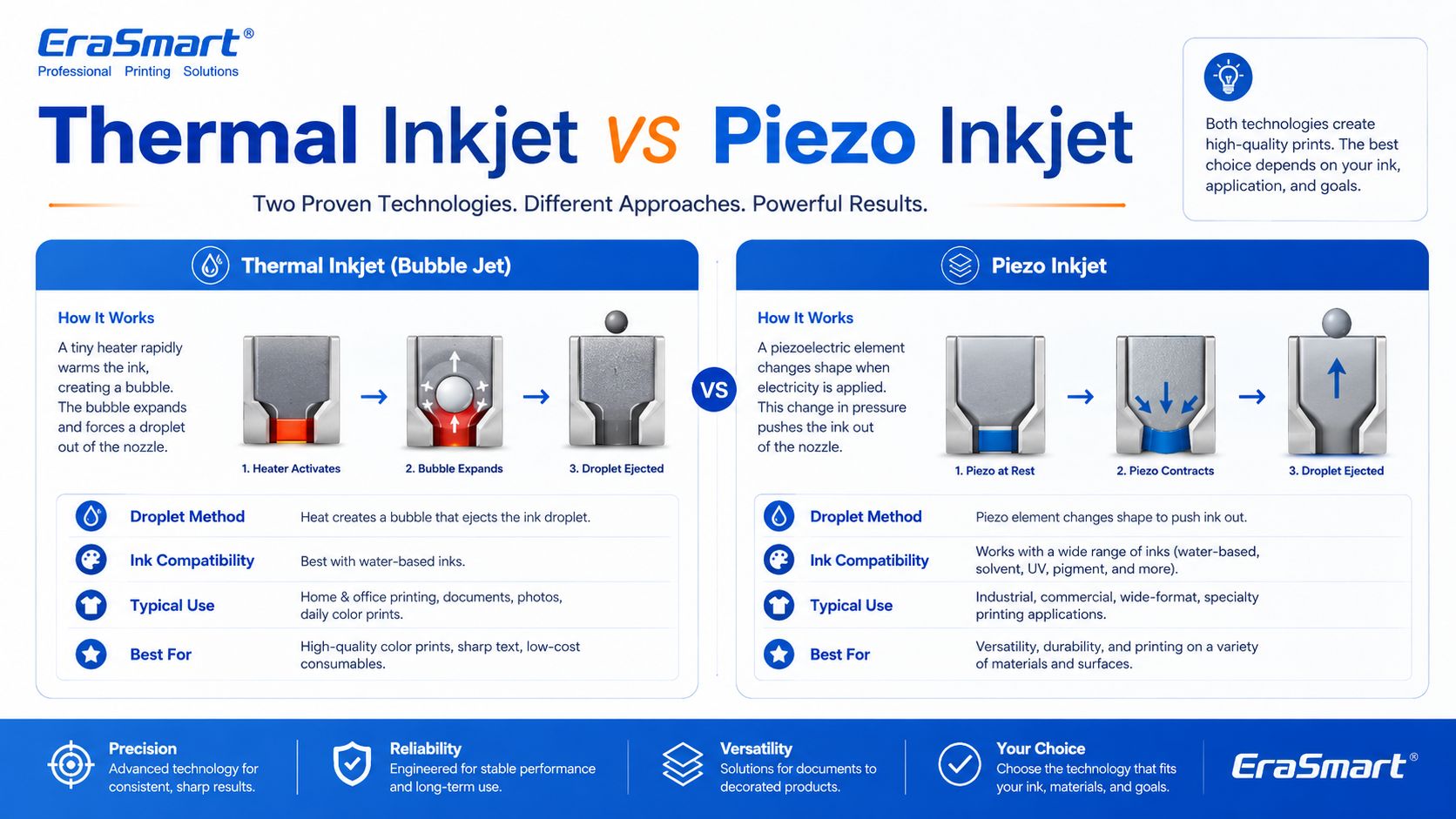
Thermal Inkjet vs Piezo Inkjet

There are two major inkjet technologies: thermal inkjet and piezo inkjet.

Thermal Inkjet

Thermal inkjet uses heat to create a vapor bubble inside the ink chamber. The pressure from this bubble pushes a droplet of ink out of the nozzle.

Thermal inkjet is common in many desktop and office printers. It can produce high-quality prints on paper, but the ink must be compatible with heat-based ejection.

Piezo Inkjet

Piezo inkjet uses a piezoelectric element that changes shape when voltage is applied. This mechanical movement creates pressure and ejects ink droplets through the nozzle.

Piezo inkjet is widely used in many professional and industrial printing systems because it can work with a broader range of inks. Since the ink is not heated for ejection, piezo technology is suitable for inks that may not perform well in thermal systems, including many specialty inks used in industrial and custom printing.

For DTF, UV, and UV DTF applications, piezo-style inkjet technology is especially important because these workflows require precise ink control and compatibility with specialized ink types.

Drop-on-Demand vs Continuous Inkjet

Inkjet printing can also be divided by how ink is delivered.

Drop-on-Demand Inkjet

Drop-on-demand means ink droplets are ejected only when needed. This is common in many graphic and custom printing applications because it offers precise control and efficient ink use.

DTF, UV, and UV DTF printers generally operate around controlled digital droplet placement, which is why they can reproduce detailed designs and full-color artwork.

Continuous Inkjet

Continuous inkjet ejects a continuous stream of ink droplets. Some droplets are directed to the surface, while others may be recycled. This method is often used in industrial coding and marking, such as printing dates, batch codes, and product identification on packaging lines.

For EraSmart customers, drop-on-demand inkjet is the more relevant concept because custom apparel and product printing require accurate image reproduction rather than simple coding.

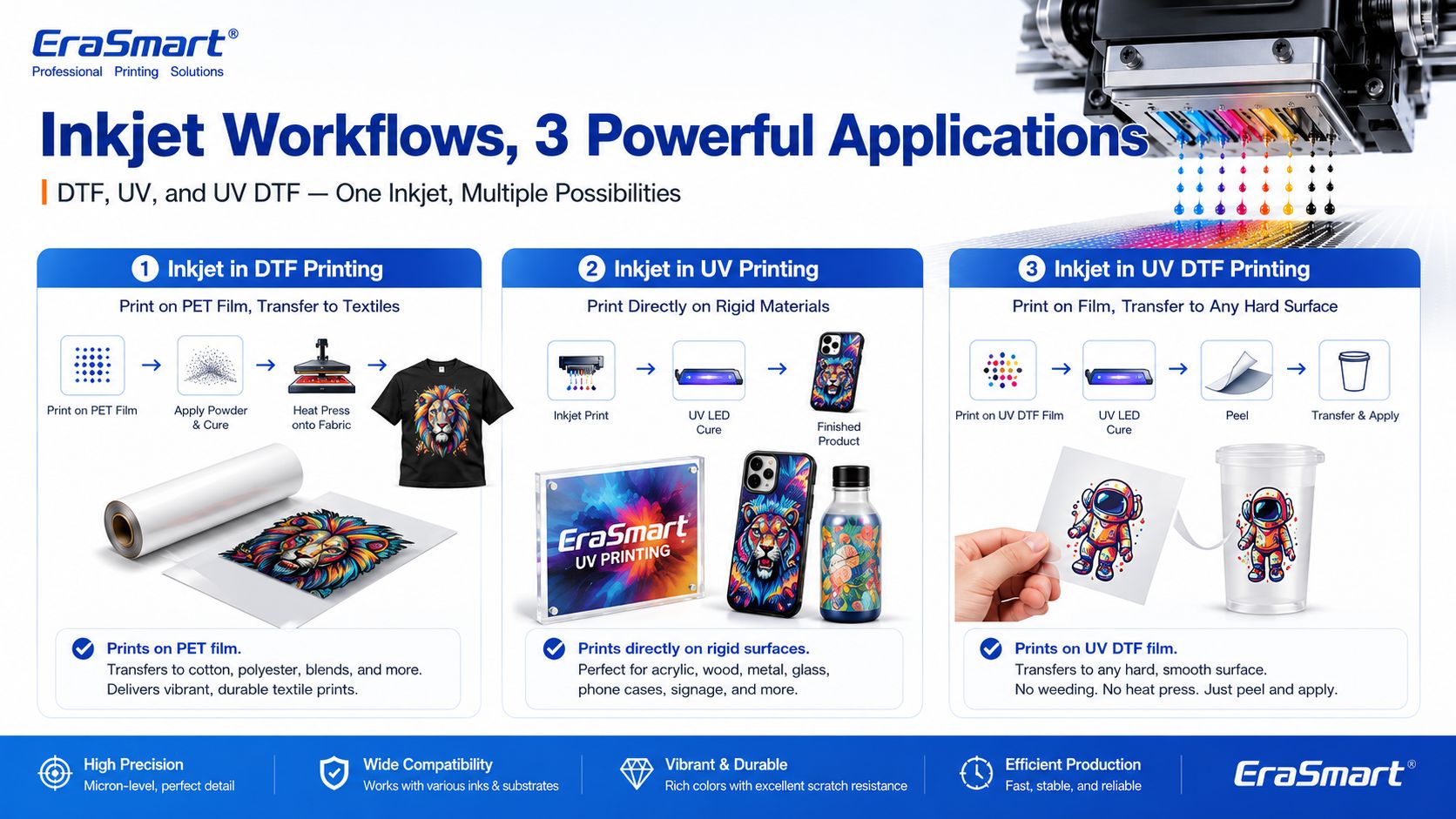
Inkjet Printing in DTF Printers

A DTF printer is a specialized inkjet printer for garment transfer production. Instead of printing directly onto a shirt, it prints the design onto PET transfer film.

The typical DTF process includes:

  1. Print CMYK and white ink onto PET film
  2. پودر چسب گرم ذوب را اعمال کنید
  3. پودر را درمان کنید
  4. انتقال حرارت را روی پارچه فشار دهید
  5. فیلم را جدا کنید
  6. در صورت نیاز فشار را تمام کنید

This process is useful for custom apparel because it supports:

  • آثار هنری تمام رنگی
  • لباس های تیره
  • small-batch orders
  • personalized designs
  • پنبه، پلی استر، مخلوط، و بیشتر
  • تولید چاپ بر اساس تقاضا

If you are interested in building an apparel business, EraSmart’s چاپگر DTF category includes different models for startups, small studios, growing shops, and higher-volume production. You can also read the گردش کار تولید DTF to understand the full process from artwork to finished garment.

Inkjet Printing in UV Printers

A UV printer is another specialized inkjet system. Instead of using standard paper ink, it uses UV-curable ink. The printer ejects ink onto the material surface, and UV light cures the ink almost immediately.

UV printing is suitable for many hard and semi-rigid materials, such as:

  • اکریلیک
  • شیشه ای
  • فلزی
  • چوب
  • پلاستیک
  • ceramic
  • چرم
  • قاب های گوشی
  • نمونه های بسته بندی
  • محصولات تبلیغاتی

The advantage of UV printing is direct-to-object customization. You can print full-color designs, white ink layers, and varnish effects on many product surfaces.

EraSmart چاپگر اشعه ماوراء بنفش category is designed for businesses that want to create custom gifts, signs, phone cases, packaging samples, acrylic products, and hard-surface promotional items. For material selection, see the راهنمای مواد چاپگر UVبشر

Inkjet Printing in UV DTF Printers

UV DTF printing combines UV inkjet printing with a transfer workflow. The printer prints UV ink onto A film, laminates it with B film, and creates a transfer decal that can be applied to hard surfaces.

UV DTF is useful for:

  • برچسب ها
  • decals
  • بسته بندی های فنجانی
  • bottle labels
  • برچسب های بسته بندی لوازم آرایشی و بهداشتی
  • gadget skins
  • دکوراسیون شیشه ای
  • acrylic decals
  • برچسب های فلزی
  • برندسازی محصول

Unlike textile DTF, UV DTF is mainly for hard-surface transfers, not garments. It is a good choice for businesses that want to sell premium stickers, decals, labels, and cup wraps.

EraSmart چاپگر UV DTF is suitable for hard-surface transfer applications, while the A/B Film for UV DTF Printing guide explains how the film system works in the transfer process.

Why Inkjet Technology Is Important for Custom Printing

Inkjet printing is important because it allows digital, flexible, short-run production. Unlike traditional methods that require screens, plates, or molds, inkjet printing can print directly from a digital file.

This creates major advantages for custom businesses:

  • lower setup barriers
  • faster design changes
  • easier personalization
  • full-color printing
  • short-run production
  • lower inventory pressure
  • product variety
  • print-on-demand flexibility

For example, a DTF apparel business can print different names, numbers, and graphics without preparing new screens. A UV printing business can print different logos on phone cases, acrylic signs, glass gifts, or packaging samples. A UV DTF business can produce custom decals and labels for many small brands.

This is why inkjet technology is no longer only about office printing. It is now a core technology for modern customization businesses.

Advantages of Inkjet Printing

1. Digital Flexibility

Inkjet printing works directly from digital files. This makes it easy to change designs, personalize products, and produce short runs.

2. Full-Color Output

Inkjet printers can reproduce complex color images, gradients, photos, and illustrations. This is useful for apparel graphics, product decoration, stickers, and packaging samples.

3. Short-Run Production

Inkjet does not require plates or screens, so it is suitable for low-MOQ custom orders and on-demand production.

4. Variable Data Printing

Each print can be different. This is useful for names, numbers, QR codes, serialized labels, personalized gifts, and custom designs.

5. Wide Application Range

Inkjet technology can be adapted to many surfaces and workflows, including paper, textiles, film, rigid materials, packaging, labels, and transfers.

6. Scalable Business Model

A business can start with small orders and upgrade equipment as demand grows. This is why inkjet-based DTF, UV, and UV DTF systems are attractive to startups and growing shops.

Limitations of Inkjet Printing

1. Printhead Maintenance Is Important

Inkjet printers need regular maintenance. If nozzles clog, print quality declines. This is especially important for white ink, UV ink, and other specialty ink systems.

2. Ink Compatibility Matters

Not every ink works with every printhead or material. Ink viscosity, pigment size, curing method, and surface compatibility all matter.

3. Material Preparation May Be Needed

Some surfaces need cleaning, primer, coating, or testing before printing. This is especially common in UV printing on glass, metal, plastic, and other hard materials.

4. Color Management Requires Testing

Screen colors and printed colors are not always identical. Professional results require color profiles, test prints, correct RIP settings, and stable consumables.

5. Production Speed Depends on Quality Settings

Higher resolution, more passes, white ink layers, and varnish effects may improve quality but increase printing time.

6. Workflow Control Matters

In DTF printing, powdering, curing, and heat pressing affect durability. In UV DTF, lamination and application affect transfer quality. In UV printing, curing and adhesion affect final product quality.

Common Inkjet Printer Problems

1. Clogged Nozzles

This is one of the most common inkjet problems. It can be caused by dried ink, settled pigment, poor maintenance, incompatible ink, or long idle time.

2. Banding

Banding appears as unwanted horizontal or vertical lines. It can be caused by clogged nozzles, incorrect feed settings, poor calibration, or unstable ink flow.

3. Color Difference

Colors may look different from the screen because of material surface, ink type, printer profile, white ink layer, or lighting conditions.

4. Poor Adhesion

In UV printing, poor adhesion can happen if the surface is oily, dusty, incompatible, or not treated correctly.

5. Weak White Ink

In DTF and UV printing, white ink must be managed carefully. Weak white ink can reduce color brightness, opacity, and dark-surface performance.

6. Ink Smearing or Poor Curing

If ink is not dried, cured, or transferred correctly, the final product may smear, peel, crack, or lose durability.

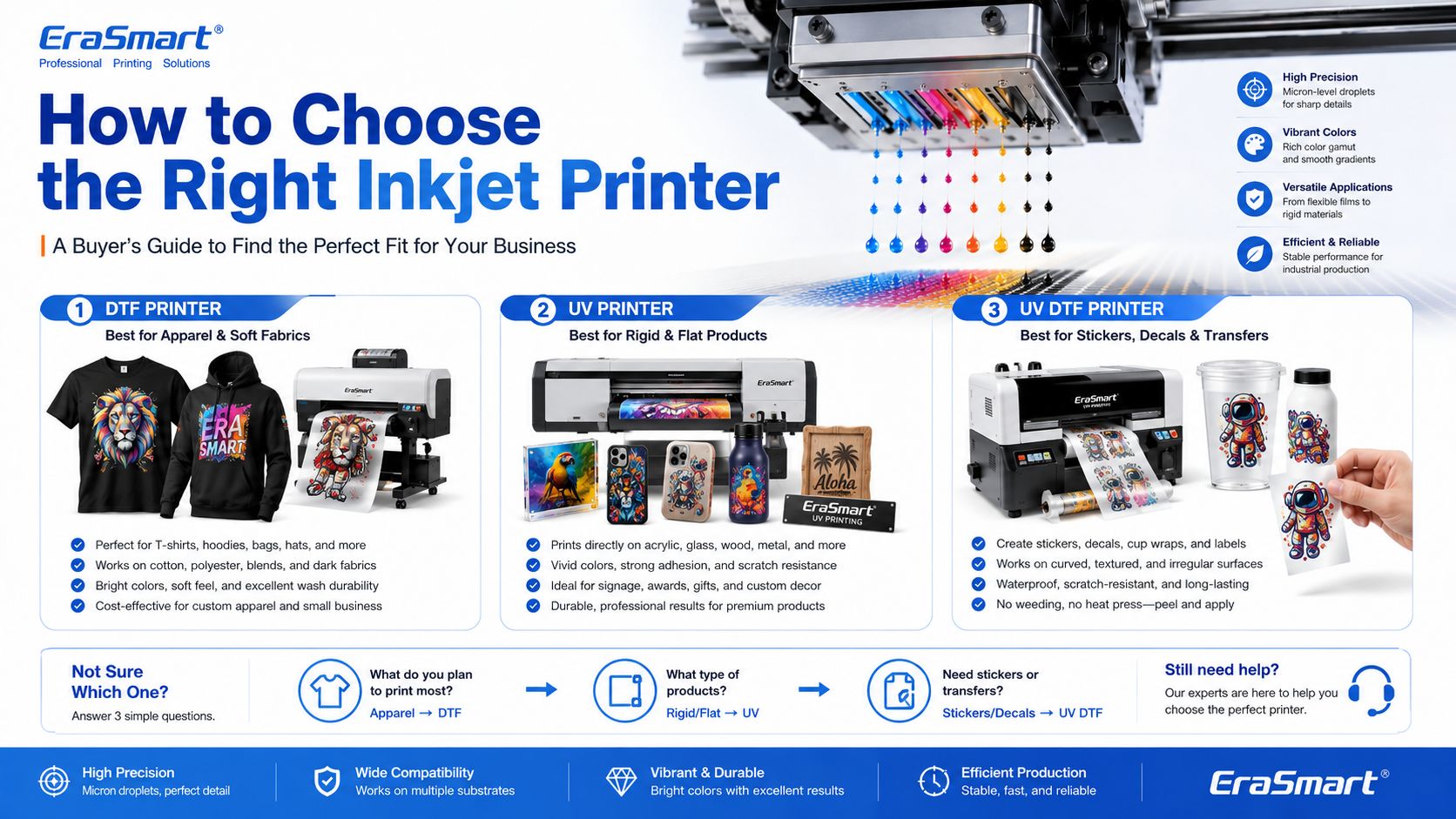
How to Choose the Right Inkjet Printer for Your Business

The right inkjet printer depends on what you want to sell.

Choose a DTF Printer If You Want to Print Apparel

a را انتخاب کنید چاپگر DTF if your business focuses on:

  • تی شرت
  • هودی
  • کیف های حمل بار
  • لباس فرم
  • لباس ورزشی
  • گرافیک مد
  • لباس های تیره
  • small-batch custom apparel
  • print-on-demand clothing

For machine selection, read EraSmart’s نحوه انتخاب چاپگر DTF وت چک لیست خرید چاپگر DTFبشر

برای استودیو DIY و شخصی

راه اندازی فشرده در سطح ورودی

• سفارشی سازی دسته ای کوچک
• تست طراحی
• بار ورودی کم

بهترین برای سرگرمی های DIY و استودیوهای شخصی

اگر هدف شما شروع کوچک، آزمایش گردش کار و مدیریت شخصی سازی شخصی یا استفاده تجاری سبک است، عملی ترین انتخاب یک راه اندازی فشرده با هزینه قابل کنترل و کارکرد ساده روزانه است.

این نوع ماشین برای سازندگان، خریداران برای اولین بار و استودیوهای شخصی که نیاز به یک نقطه ورودی قابل اعتماد دارند، بدون اینکه زود به تجهیزات تولید بزرگتر A3 یا A1 بپرند، به خوبی کار می کند.

برای استودیوهای کوچک و استارتاپ ها

تنظیم تجاری ورودی A3 انعطاف پذیر

• سفارشات سفارشی محلی
• پوشاک دسته کوچک
• گردش کار مناسب برای راه اندازی

بهترین برای استودیوهای کوچک، برندهای جدید، و فروشگاه های نوپا

اگر از قبل یک ایده تجاری دارید، سفارش‌های سفارشی محلی را دریافت می‌کنید یا یک استودیوی کوچک را اداره می‌کنید که به انعطاف‌پذیری بیشتری نسبت به دستگاه‌های ورودی A4 نیاز دارد، حرکت به محدوده A3 معمولاً گردش کار تجاری عملی‌تری ایجاد می‌کند.

این مدل‌ها برای مارک‌های راه‌اندازی، اپراتورهای استودیویی و فروشگاه‌های در مراحل اولیه که خواهان محدوده خروجی قوی‌تر هستند، بدون اینکه مستقیماً به تجهیزات صنعتی با خروجی بالاتر حرکت کنند، مناسب‌تر هستند.

برای تجارت الکترونیک و طراحان

جزئیات، رنگ، و چرخش سریع طراحی

• گرافیک غنی از طراحی
• قطرات جدید مکرر
• ارائه بصری ممتاز

بهترین برای کارآفرینان تجارت الکترونیک و استودیوهای طراح

هنگامی که کسب و کار شما به تغییرات مکرر طراحی، آثار هنری غنی از رنگ، تصاویر دقیق و آزمایش سریعتر محصول آنلاین بستگی دارد، انتخاب مدل هایی که ارائه تصویر قوی تر و انعطاف پذیری تجاری نرم تری ارائه می دهند منطقی است.

این گروه برای فروشندگان آنلاین، برندهای تحت رهبری طراحان، تیم‌های خلاق، و فروشگاه‌هایی که ارائه بصری و راه‌اندازی طراحی جدید در مدل کسب‌وکار مرکزی هستند، مناسب است.

مدل های پیشنهادی

برای مشاغل کوچک

تولید تجاری روزانه ثابت

• سفارشات روزانه
• ریتم تولید بهتر
• خروجی تجاری پایدارتر

بهترین برای مشاغل کوچک پوشاک و تولید روزانه ثابت

هنگامی که کسب و کار شما فراتر از سفارشات گاه به گاه حرکت می کند و شروع به وابستگی به بازده روزانه ثابت تر می کند، انتخاب ماشین هایی که از گردش کار روان تر، ثبات قوی تر و ریتم تولید بهتر پشتیبانی می کنند، اهمیت بیشتری پیدا می کند.

این سطح معمولاً جایی است که خریداران باید فقط به قیمت ورودی فکر نکنند و به طور جدی تری در مورد ثبات خروجی، کارایی گردش کار و عملی بودن عملیات طولانی مدت فکر کنند.

برای اتوماسیون

ارتقاء توان عملیاتی و گردش کار بالاتر

• گردش کار سریعتر
• بار دستی کمتر
• تداوم تولید بهتر

بهترین برای فروشگاه هایی که به سمت گردش کار خودکار بیشتر ارتقا می یابند

اگر کسب‌وکار شما فراتر از تولید دستی اولیه است و می‌خواهد فرآیندی روان‌تر و آماده‌تر برای تولید داشته باشد، منطقی است مدل‌هایی را در نظر بگیرید که از یکپارچگی جریان کار قوی‌تر و انتظارات توان عملیاتی بالاتر پشتیبانی می‌کنند.

این جهت مخصوصاً برای مغازه‌هایی که از قبل سفارش‌های ثابت دارند و می‌خواهند اصطکاک تولید را کاهش دهند، تکرارپذیری را بهبود بخشند و برای حجم‌های عملیات روزانه بزرگ‌تر آماده شوند، مرتبط است.

برای تولید در مقیاس بزرگ

جهت صنعتی فرمت گسترده

• هدف خروجی بالاتر
• عرض چاپ بیشتر
• ریتم تولید صنعتی

بهترین برای تیم های تولیدی در مقیاس بزرگ و بازدهی بالاتر

زمانی که کسب و کار شما به عرض چاپ بیشتر، سقف خروجی قوی‌تر و جهت تولید صنعتی جدی‌تر نیاز دارد، سری A1 به دسته مناسبی برای ارزیابی تبدیل می‌شود. این سطح برای مشاغلی که تداوم خروجی و هزینه وقفه کمتر از اولویت‌های عملیاتی مهم هستند، مناسب‌تر است.

بر اساس میزان تهاجمی هدف تولید خود و میزان ارزشی که برای بهره وری بیشتر قائل هستید، ردیف هد چاپ را انتخاب کنید.

Choose a UV Printer If You Want to Print Hard Products

a را انتخاب کنید چاپگر UV if your business focuses on:

  • قاب های گوشی
  • پلاک های اکریلیک
  • هدایای شیشه ای
  • تابلوهای فلزی
  • wood products
  • کاشی و سرامیک
  • نمونه های بسته بندی
  • محصولات تبلیغاتی
  • product decoration

For material planning, read EraSmart’s راهنمای مواد چاپگر UV وت How to Choose a UV Printerبشر

پروژه های شروع کوچک

مناسب برای محصولات سفارشی با فرمت کوچک، نمونه ها، هدایای فشرده و کاربرانی که می خواهند چاپ UV را با ردپای کوچکتر شروع کنند.

استفاده فشرده تجاری

گزینه ای کاربردی برای قاب گوشی، لوازم جانبی، محصولات اکریلیک کوچک، هدایای شخصی و تولید مشاغل کوچک.

انعطاف پذیری محصول A3

یک انتخاب قوی تر برای کاربرانی که به پلتفرم بزرگتر، پوشش محصول بیشتر و تولید دسته کوچک انعطاف پذیرتر نیاز دارند.

تولید با فرمت بزرگتر

مناسب برای تابلوهای بزرگتر، پانل‌ها، تابلوهای سفارشی و تیم‌های تولیدی که به منطقه چاپ وسیع‌تر و مقیاس‌پذیری قوی‌تر نیاز دارند.

کسب و کار کیس تلفن

طراحی شده برای سفارشی سازی قاب گوشی و تولید سریع محصول شخصی سازی شده با یک مسیر کاربردی متمرکزتر.

عکس برگردان و روکش لیوانی

برای برچسب‌های UV DTF، برچسب‌های کریستالی، روکش‌های فنجانی، بطری‌ها و برچسب‌های انتقال سطح سخت بهتر است.

Choose a UV DTF Printer If You Want to Print Decals and Transfers

a را انتخاب کنید چاپگر UV DTF if your business focuses on:

  • برچسب ها
  • decals
  • بسته بندی های فنجانی
  • labels
  • cosmetic packaging transfers
  • bottle decoration
  • gadget skins
  • hard-surface branding

To understand the film workflow, read EraSmart’s A/B Film for UV DTF Printingبشر

توصیه خرید EraSmart

Inkjet printing is not one single business model. It is a technology foundation. The right machine depends on your target products.

A simple buying direction looks like this:

هدف تجاریRecommended EraSmart Direction
Custom T-shirts, hoodies, apparelچاپگر DTF
Acrylic, glass, metal, wood, phone casesچاپگر اشعه ماوراء بنفش
Stickers, cup wraps, labels, decalsچاپگر UV DTF
Apparel startupA4 / A3 DTF Printer
Growing apparel shopA3 MAX DTF / shaker workflow
Custom product studioA4 / A3 UV Printer
Hard-surface transfer businessچاپگر A3 UV DTF

If your business is apparel-first, start with EraSmart’s چاپگر DTF lineup. If your business is hard-product customization, compare the چاپگر اشعه ماوراء بنفش range. If your business is stickers, decals, labels, and cup wraps, start with the چاپگر UV DTFبشر

Final Answer: What Is an Inkjet Printer?

An inkjet printer is a digital printer that creates images by ejecting tiny ink droplets through microscopic nozzles onto a surface.

In basic office printing, that surface is usually paper. In custom printing, the surface may be PET film, transfer film, acrylic, glass, metal, wood, plastic, packaging board, fabric, or product blanks.

The most important point is this: inkjet printing is not only for documents and photos. It is the core technology behind many modern custom printing systems, including DTF printers, UV printers, and UV DTF printers.

For small businesses, inkjet technology makes it possible to print full-color designs, personalize products, produce short runs, reduce setup cost, and build flexible custom printing workflows.

Need help choosing the right inkjet-based printing system for your business? Share your target products, material type, print size, expected daily order volume, and budget range with EraSmart.

Our team can help you choose the right چاپگر DTFبا چاپگر UV، یا چاپگر UV DTF for your custom printing business.


ممکن است شما هم باشید

  • چاپگر اراسمارت

    چاپگر اشعه ماوراء بنفش
    چاپگر DTF
    چاپگر DTG
    دستگاه فشار خون
    چاپگر تبلیغاتی

  • ابزارهای چاپی

    فر DTF
    مطبوعات داغ
    دستگاه حک شده
    انتقال حرارت لیوان
    دستگاه لمینت

  • مواد مخدر

    جوهر چاپ
    پرونده تلفن همراه
    کالای شیشه ای
    مایع تمیز کننده
    پنبه

  • با ما تماس بگیرید

    WhatsApp : +8618566233796
    WeChat : +8618566233796
    موبایل : +8618566233796
    وبwww.erasmart.com
    فروشگاهwww.erasmartmall.com

  • درخواست نقل قول

    فقط چند جزئیات را ارائه دهید و ما به شما کمک خواهیم کرد تا سریع نقل قول کنید!