Produttore di stampanti a getto

Stampa UV su vetro: preparazione della superficie, inchiostro bianco, adesione e applicazioni
UV printing can produce full-color graphics, white ink and decorative varnish effects directly on many suitable glass surfaces.
For custom printing businesses, common applications include:
- glass signs
- premi
- pannelli fotografici
- Viene visualizzato il codice QR
- targhe decorative
- pezzi per matrimoni ed eventi
- retail displays
- branded glass products
Glass also offers something that opaque materials cannot: trasparenza.
By controlling CMYK, white ink and the side of the glass you print on, you can create everything from translucent graphics to fully opaque images and reverse-printed designs viewed through the glass.
But glass also presents a major production challenge:
adhesion.
Unlike paper or porous wood, glass is smooth and non-porous. Ink cures on the surface rather than soaking into the material. Fingerprints, oil, dust, factory coatings and incorrect pretreatment can therefore affect adhesion significantly.
The professional workflow is:
Identify the glass → Clean → Prepare White/CMYK Layers → Print a Sample → Test Adhesion → Standardize the Setup → Begin Production
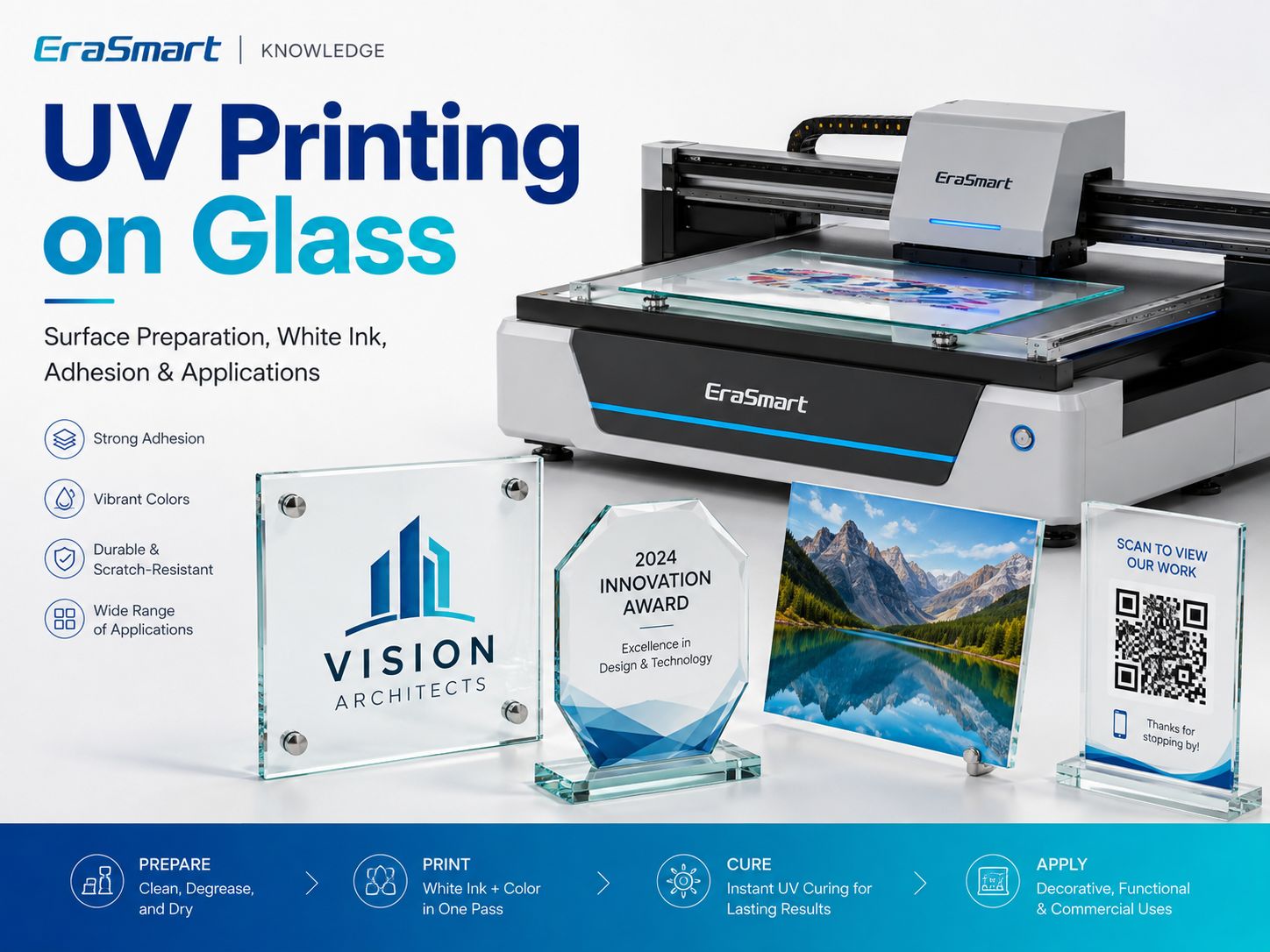
EraSmart currently classifies glass as a material that is suitable for UV printing dopo il test, with surface cleanliness and adhesion identified as the main considerations.
Quick Answer: Can You UV Print on Glass?
SÌ.
A UV flatbed printer can print directly onto many suitable glass products, especially flat panels, plaques, awards and display pieces.
However, successful production depends on the exact glass and surface treatment.
| Domanda | Risposta pratica |
|---|---|
| Can a UV printer print directly on glass? | Sì, dopo il test |
| La sfida principale | Adesione |
| Inchiostro bianco | Often important on transparent glass |
| Primer | Depends on the glass and application |
| Pressa a caldo | NO |
| Stampa diretta | SÌ |
| Best flatbed products | Flat glass panels, plaques, awards and signs |
| Bottles / curved glass | Consider UV DTF or an appropriate rotary workflow |
| Main preparation | Clean, degrease, test, then standardize |
Do not assume that two pieces of glass that look identical will behave exactly the same.
Surface coatings and treatments matter.
How Does UV Printing on Glass Work?
La stampa UV è un processo di stampa digitale diretta.
Il flusso di lavoro di base è:
- Prepara l'opera d'arte.
- Import the design into RIP software.
- Create CMYK, white and varnish layers where needed.
- Position the glass on the printer bed.
- Impostare l'altezza di stampa corretta.
- Spruzzare inchiostro UV sulla superficie.
- La luce UV polimerizza l'inchiostro durante la stampa.
- Inspect and test the finished sample.
Unlike conventional inks that rely mainly on absorption or evaporation, UV ink cures through a light-triggered polymerization process.
For a deeper explanation, see Cos'è l'inchiostro UV?.
If you want to understand how CMYK, white ink and varnish work together, read the Guida agli inchiostri UV: CMYK, bianco e vernice.
What Types of Glass Can You UV Print?
The word “glass” covers many different products and surface conditions.
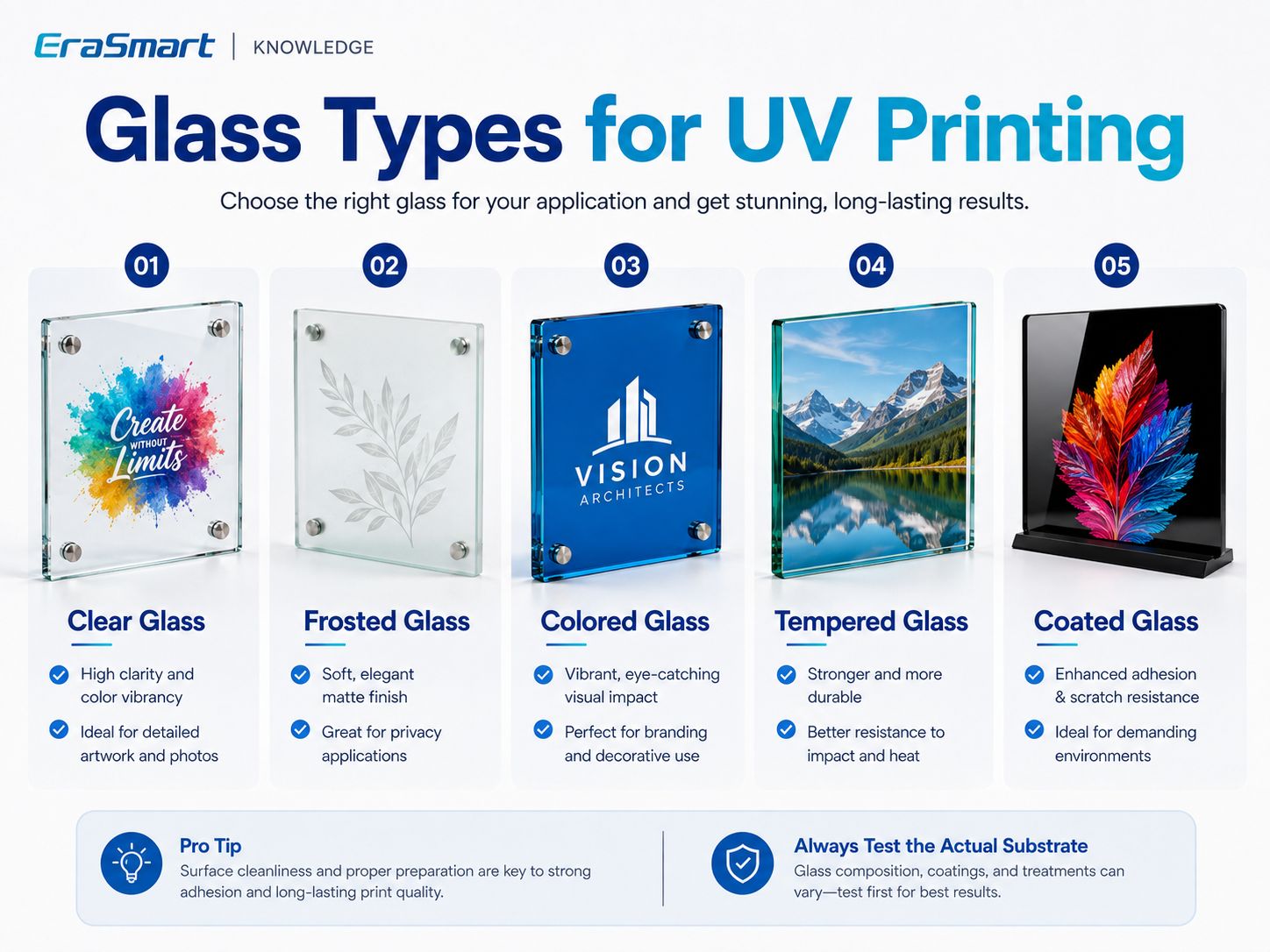
Le categorie comuni includono:
- clear glass
- frosted glass
- colored glass
- tempered glass
- coated glass
Clear Glass
Clear glass is one of the most interesting UV printing substrates because the transparent background can become part of the design.
It is suitable for products such as:
- segni
- premi
- placche
- photo displays
- wedding décor
- retail displays
The main design question is:
How much transparency do you want to keep?
That determines whether you use:
- Solo CMYK
- Bianco + CMYK
- bianco selettivo
Frosted Glass
Frosted glass creates a softer, more diffused appearance.
It is attractive for:
- segnaletica per uffici
- premium awards
- prodotti per matrimoni
- decorative displays
- privacy-oriented branding
However, the term “frosted” can refer to different manufacturing processes or surface treatments.
The exact blank should still be tested.
Colored Glass
Colored glass changes the visual appearance of printed CMYK.
A dark blue or green substrate will influence the printed color unless a white underbase is used.
White ink therefore becomes especially useful when you need:
- accurate branding
- bright graphics
- testo leggibile
- strong contrast
Tempered Glass
Tempered glass can be used for appropriate UV printing applications, but the exact surface should be evaluated before production.
Tempered glass products may also have:
- rivestimenti
- anti-fingerprint treatments
- protective layers
- specialty finishes
These can affect adhesion.
Do not assume that “tempered” automatically means the surface behaves like untreated clear glass.
Coated Glass
Coated glass deserves special attention.
If glass has a surface coating, UV ink is effectively interacting with that coating.
The question becomes:
Is the coating compatible with the UV ink and the required durability?
A coating may improve printability in one product and reduce adhesion in another.
Prova sempre.
Why Is Glass More Difficult to Print Than Wood?
Wood and glass behave very differently.
Legna
Wood may have:
- pores
- grain
- fibers
- surface absorption
Bicchiere
Glass is generally:
- smooth
- non-porous
- trasparente
- prone to fingerprints
- sensitive to surface contamination
That means a UV print can look excellent while still having insufficient adhesion for the intended use.
With glass, appearance alone is not enough.
You need to test the finished product.
How to Prepare Glass Before UV Printing
Surface preparation is one of the most important steps in professional glass printing.
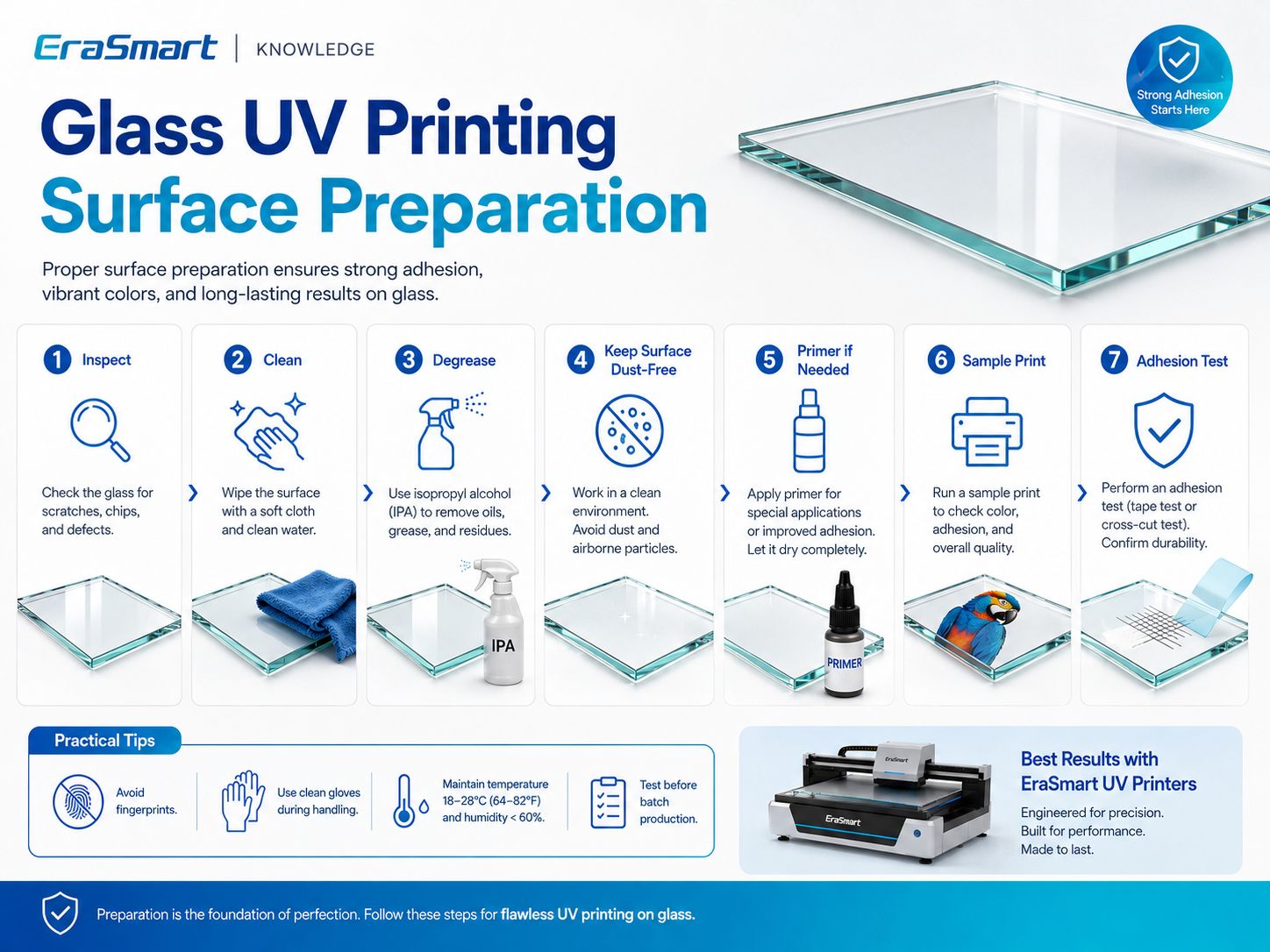
Step 1: Inspect the Glass
Controlla:
- graffi
- patatine
- crepe
- pellicola protettiva
- rivestimenti
- impronte digitali
- olio
- packaging residue
- polvere
Do not print a defective blank and expect printing to hide the problem.
Passaggio 2: pulire la superficie
Remove visible contamination using a cleaning method compatible with the glass and any coating.
The printable area should be:
- pulito
- Asciutto
- esente da polvere
- free from grease
Passaggio 3: sgrassare
Fingerprints are especially common on glass.
After cleaning, avoid touching the printable surface directly.
Use suitable clean handling practices when possible.
Step 4: Let the Surface Dry Completely
Do not print over residual cleaning fluid or moisture.
Passaggio 5: valutare il primer o il promotore di adesione
Some glass applications may benefit from a compatible adhesion promoter.
But primer is not automatically required for every glass product.
L'approccio corretto è:
Clean → Print Test → Check Adhesion → Add Compatible Pretreatment If Needed → Retest
Passaggio 6: stampare un campione
Use the actual:
- bicchiere
- rivestimento
- inchiostro
- strato bianco
- varnish setup
- modalità di stampa
that will be used in production.
Passaggio 7: testare l'adesione
Only approve the substrate after the sample performs adequately for the intended application.
Do You Need Primer for UV Printing on Glass?
A volte.
Non esiste una risposta universale.
I requisiti del primer dipendono da:
- glass type
- trattamento superficiale
- rivestimento
- Formulazione di inchiostri UV
- durabilità richiesta
- gestione
- esposizione alla pulizia
- applicazione finale
A decorative glass plaque displayed indoors does not have the same durability requirements as a frequently handled or regularly cleaned object.
Do not automatically apply primer to every glass product.
And do not assume glass never needs pretreatment.
Testare il substrato esatto.
White Ink on Clear Glass: Why It Matters
Transparent materials change the way CMYK appears.
CMYK inks are not normally designed to create the same opaque background that white paper provides.
This makes white ink one of the most useful tools in glass UV printing.
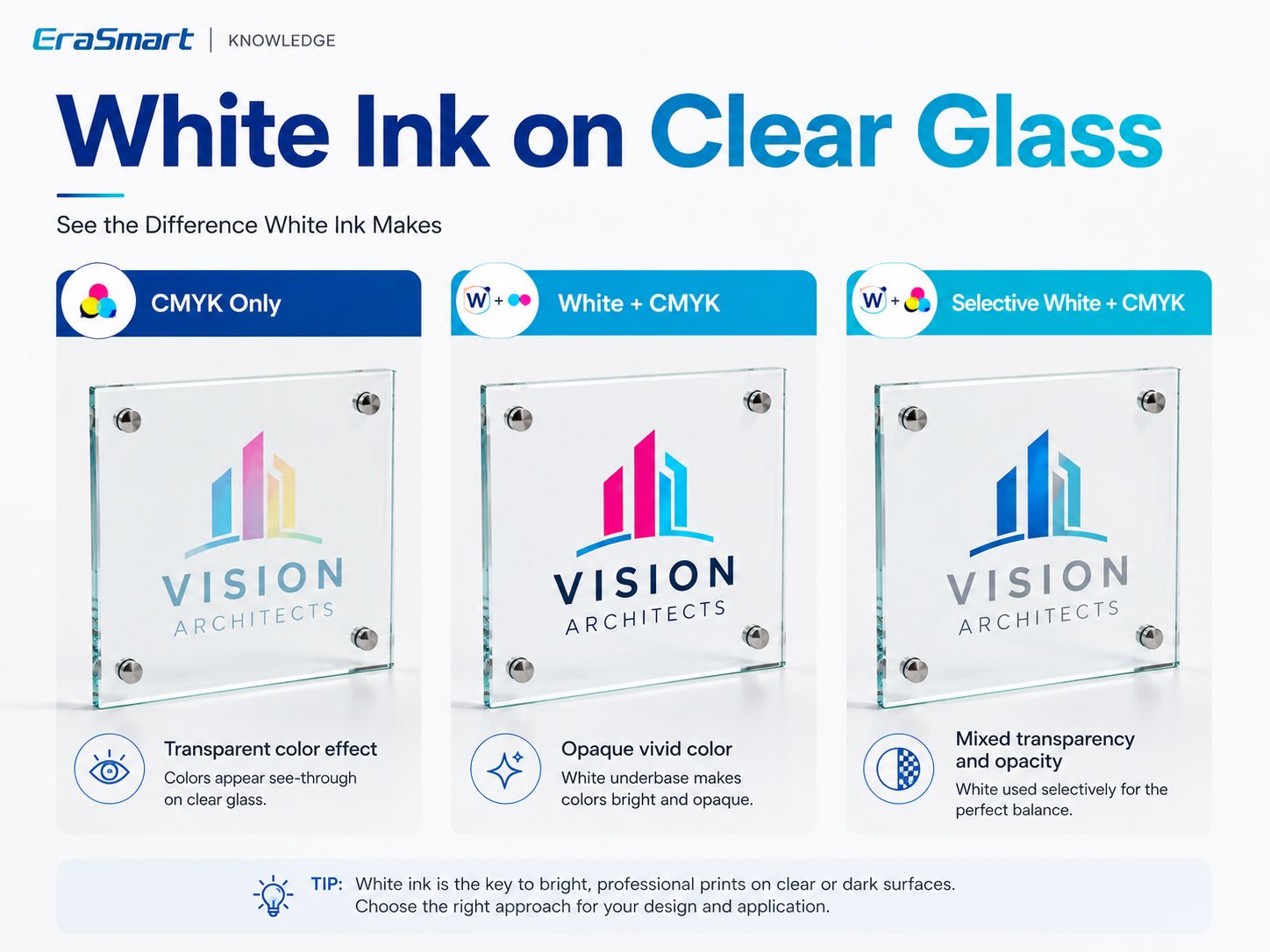
Esistono tre approcci pratici.
Opzione 1: solo CMYK
CMYK printed directly on clear glass creates a more transparent effect.
The background behind the glass remains visible.
This can work well for:
- artistic graphics
- decorative transparency
- stained-glass-style effects
- minimalist signs
- intentionally translucent designs
The trade-off is lower opacity.
Light colors may look weaker depending on what is behind the glass.
Opzione 2: bianco + CMYK
A white underbase creates a more opaque foundation.
Questo produce:
- colore più forte
- greater contrast
- loghi più prevedibili
- foto più luminose
- improved text visibility
Questo è utile per:
- corporate signage
- pannelli fotografici
- product displays
- premi
- colorful branding
Opzione 3: Bianco selettivo + CMYK
Selective white is often the most visually interesting option.
White is printed only where opacity is required.
Per esempio:
- white behind the company logo
- no white in transparent background areas
- white behind flowers
- clear glass visible between design elements
This gives you both:
transparency + vivid color
in the same product.
CMYK + Bianco + Vernice
On compatible EraSmart UV configurations, varnish can be added for selected effects such as:
- lucentezza spot
- dettagli in rilievo
- evidenziazioni del logo
- trama decorativa
Use varnish selectively when it improves the design.
Do not treat varnish as an automatic substitute for an industrial protective coating.
Front-Surface Printing vs Reverse Printing on Glass
Glass gives UV printing another important design option:
printing on the back and viewing the image through the glass.
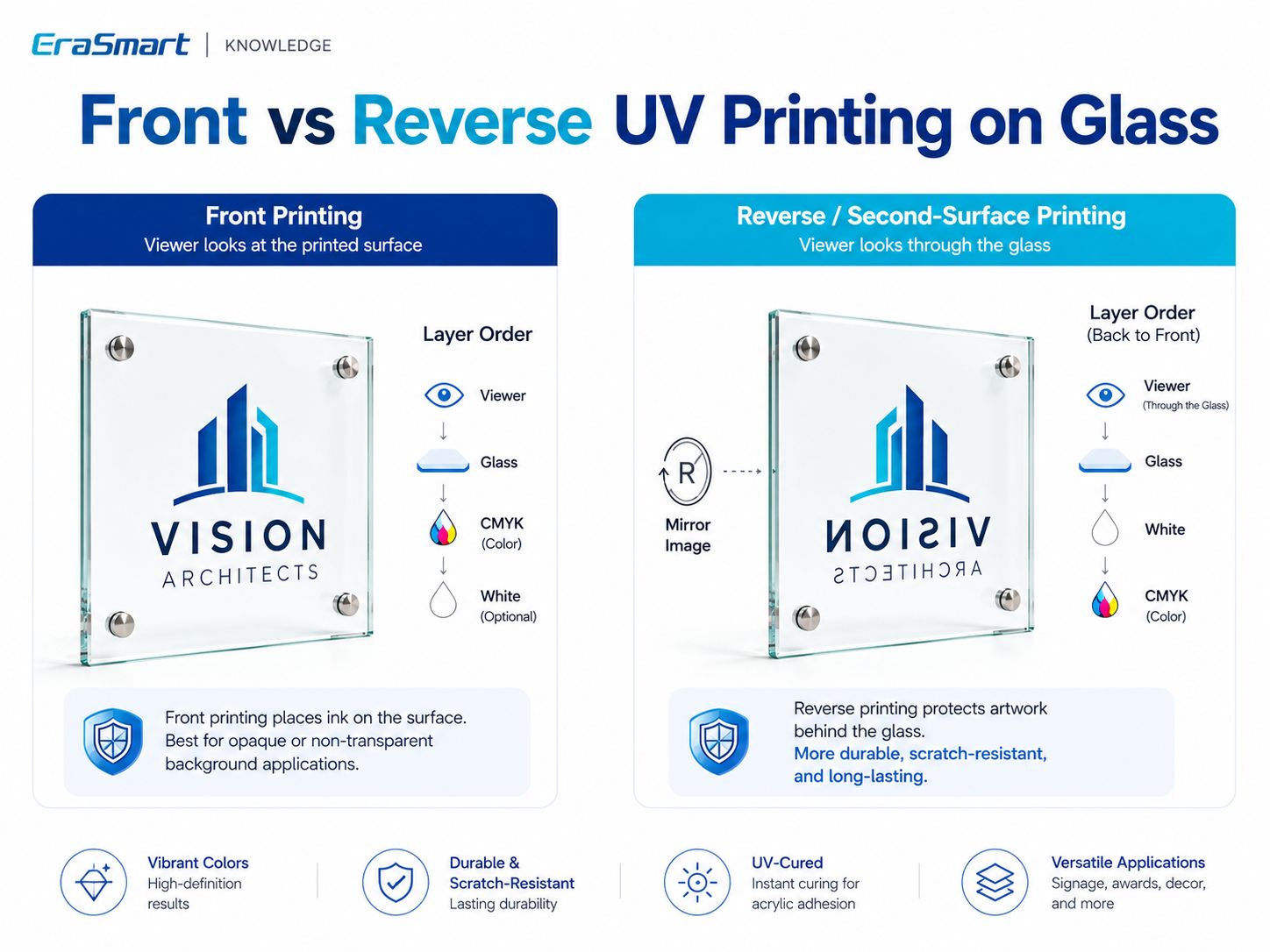
Stampa sulla superficie anteriore
The artwork is printed on the side facing the viewer.
A common layer strategy is:
Glass → White Underbase → CMYK
when opaque color is required.
Vantaggi:
- straightforward setup
- suitable for many decorative products
- easy to combine with varnish effects
- useful when the printed surface itself is part of the design
The ink layer remains exposed on the viewing side.
Reverse / Second-Surface Printing
The artwork is printed onto the back side of clear glass and viewed through the glass from the opposite side.
The artwork normally needs to be mirrored.
For an opaque reverse-printed image, a common concept is:
Glass → CMYK → White backing
when viewed through the glass.
The exact RIP layer sequence depends on the printer setup, so always confirm with a physical sample.
I vantaggi includono:
- clean front surface
- glass between the viewer and printed artwork
- premium signage appearance
- strong use in photo panels and decorative displays
Reverse printing is one of the main reasons clear glass can produce visually distinctive UV-printed products.
When Should You Use Front vs Reverse Printing?
| Applicazione | Suggested Direction |
|---|---|
| Raised varnish effect | Front printing |
| Struttura della superficie | Front printing |
| Clear sign with exposed decorative graphics | Front or reverse |
| Premium photo panel | Reverse often attractive |
| Logo viewed through glass | Inversione |
| Product needing tactile varnish | Front |
| Printed layer protected behind glass | Inversione |
Non esiste un vincitore universale.
Choose according to the desired finish.
How to UV Print on Glass Step by Step
Once the glass and ink configuration have been tested, create a repeatable production workflow.
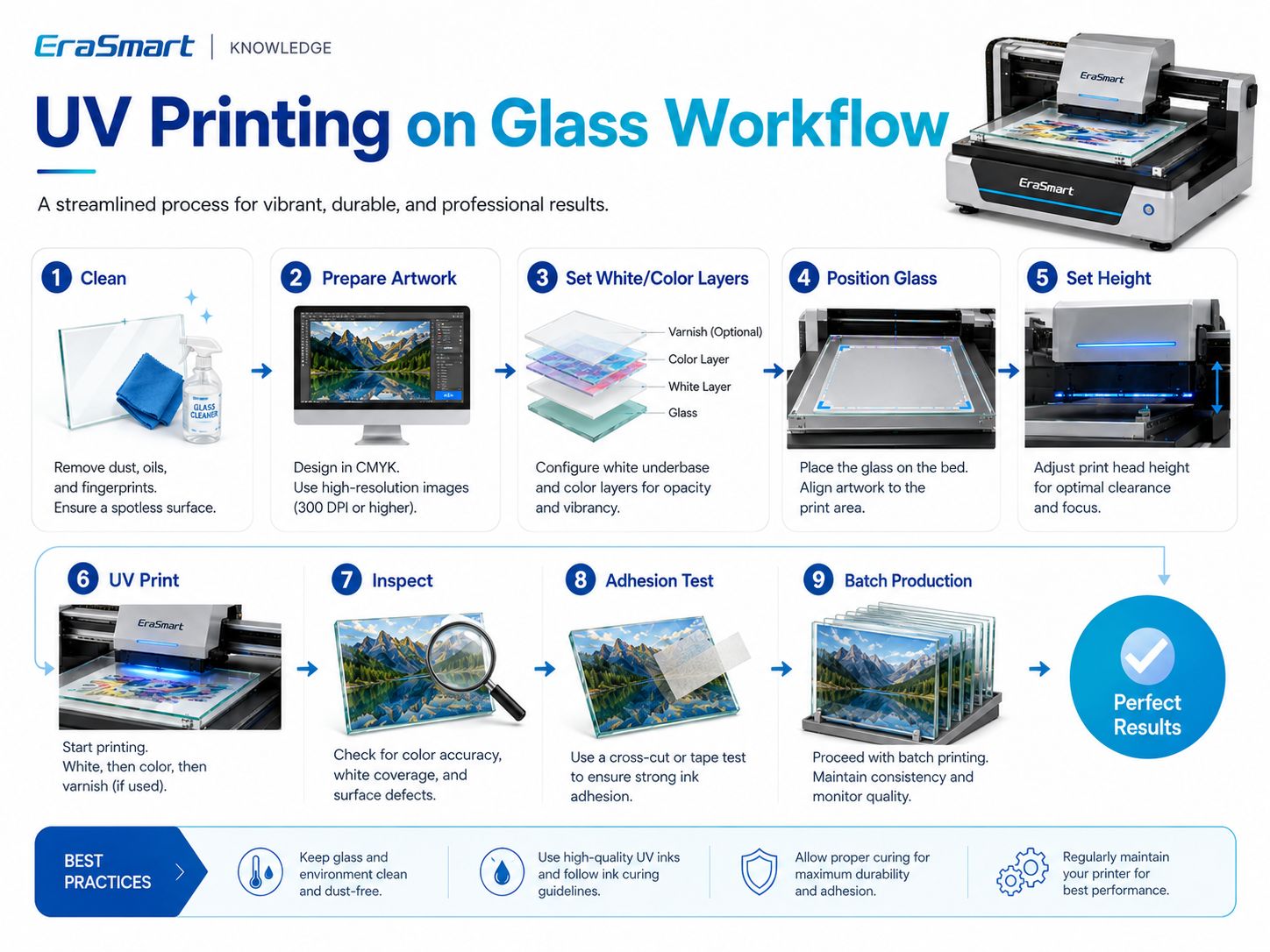
Step 1: Clean the Glass
Rimuovere:
- polvere
- olio
- impronte digitali
- residue
Passaggio 2: preparare la grafica
Confermare:
- dimensioni finali
- risoluzione dell'immagine
- testo
- loghi
- sanguinare
- margini sicuri
Use vector artwork for:
- loghi
- testo
- Codici QR
- fine line graphics
Around 300 DPI at final print size is a practical starting point for close-view raster artwork.
Step 3: Decide Front or Reverse Printing
For reverse printing:
- mirror the artwork
- confirm the layer order
- test how the design looks through the glass
Step 4: Set CMYK, White and Varnish Layers
Scegliere:
- Solo CMYK
- Bianco + CMYK
- Bianco selettivo + CMYK
- CMYK + Bianco + Vernice
based on the finished visual effect.
Step 5: Position the Glass
Utilizzo:
- riferimenti ai bordi
- maschere
- infissi
- modelli
for repeat orders.
Passaggio 6: impostare l'altezza di stampa
Glass must be positioned safely and sufficiently flat.
Correct clearance helps maintain consistent print quality and reduces printhead risk.
Passaggio 7: stampa un campione
Do not start a large batch immediately.
Controllo:
- colore
- opacità bianca
- allineamento
- piccolo testo
- image position
- vernice
- trasparenza
Step 8: Inspect the Finished Print
Cercare:
- polvere
- fasciatura
- difetti degli ugelli
- layer registration problems
- difetti dei bordi
- coating issues
Step 9: Test Adhesion
Check that the ink performs adequately for the actual end use.
Step 10: Standardize the Job
Una volta approvato:
- salvare la preimpostazione RIP
- record the glass type
- registrare il processo di pulizia
- bloccare la maschera
- record front/reverse orientation
- save the white-layer setup
Step 11: Start Batch Production
Repeat the approved workflow and perform periodic QC.
How to Test UV Ink Adhesion on Glass
The appropriate test depends on how the finished product will be used.
Controllo iniziale dello sfregamento
Utile per identificare evidenti difetti di adesione.
If the ink lifts easily during basic handling, review:
- pulizia
- surface contamination
- coating compatibility
- pretrattamento
Controllo interno basato su nastro
A controlled tape test can help compare samples during internal production testing.
If a customer requires a recognized testing standard, follow that specific standard and its complete procedure.
Valutazione di graffi/abrasione
This is more important for frequently handled products such as:
- espositori da banco
- Segni QR
- premi
- prodotti da regalo
than for protected decorative panels.
Resistenza alla pulizia
If the glass will be cleaned regularly, test it using conditions representative of real use.
Esposizione all'umidità
For glass products used in humid environments, test the complete printed product according to the actual environment.
Do not make blanket claims such as:
- lavabile in lavastoviglie
- resistente agli agenti chimici
- outdoor permanent
- food safe
unless the finished product has actually been tested and qualified for that use.
Direct UV Printing vs UV DTF for Glass
EraSmart offre entrambi Stampanti flatbed UV E Stampanti DTF UV.
They serve different product shapes.
Stampa piana UV diretta
Più adatto a:
- pannelli di vetro
- placche
- flat awards
- pannelli fotografici
- flat signs
- Visualizzazioni QR
- flat decorative pieces
The product itself is placed onto the printer bed.
DTF UV
UV DTF may be more practical for:
- glass bottles
- barattoli
- tazze
- irregular finished products
- difficult-to-position areas
- curved products
The graphic is printed onto UV DTF film and then transferred to the compatible object.
Questa distinzione è importante:
a standard UV flatbed printer should not automatically be treated as a full 360° bottle printer.
For cylindrical direct printing, an appropriate rotary workflow is needed.
EraSmart’s current UV printing guide likewise distinguishes flatbed UV, UV DTF and rotary UV workflows according to product shape.
UV Printing vs Sublimation on Glass
Both technologies can be used for customized products, but their workflows differ.
| Caratteristica | Stampa UV | Sublimazione |
|---|---|---|
| Stampa diretta | SÌ | NO |
| Rivestimento speciale per sublimazione | Not inherently | Solitamente richiesto |
| Inchiostro bianco | SÌ | NO |
| Pressa a caldo | NO | SÌ |
| Clear glass effects | Strong flexibility | Depends on compatible coated blank |
| Vernice | Disponibile sui sistemi UV supportati | NO |
| Flat rigid panels | Bene | Requires compatible blank |
| La sfida principale | Adesione | Rivestimento + trasferimento di calore |
Sublimation remains useful for purpose-made coated blanks.
UV printing is attractive when you need:
- stampa diretta
- inchiostro bianco
- transparency control
- vernice
- short-run personalization
Glass Products You Can Print with a UV Printer
Glass can support both consumer and B2B customization.
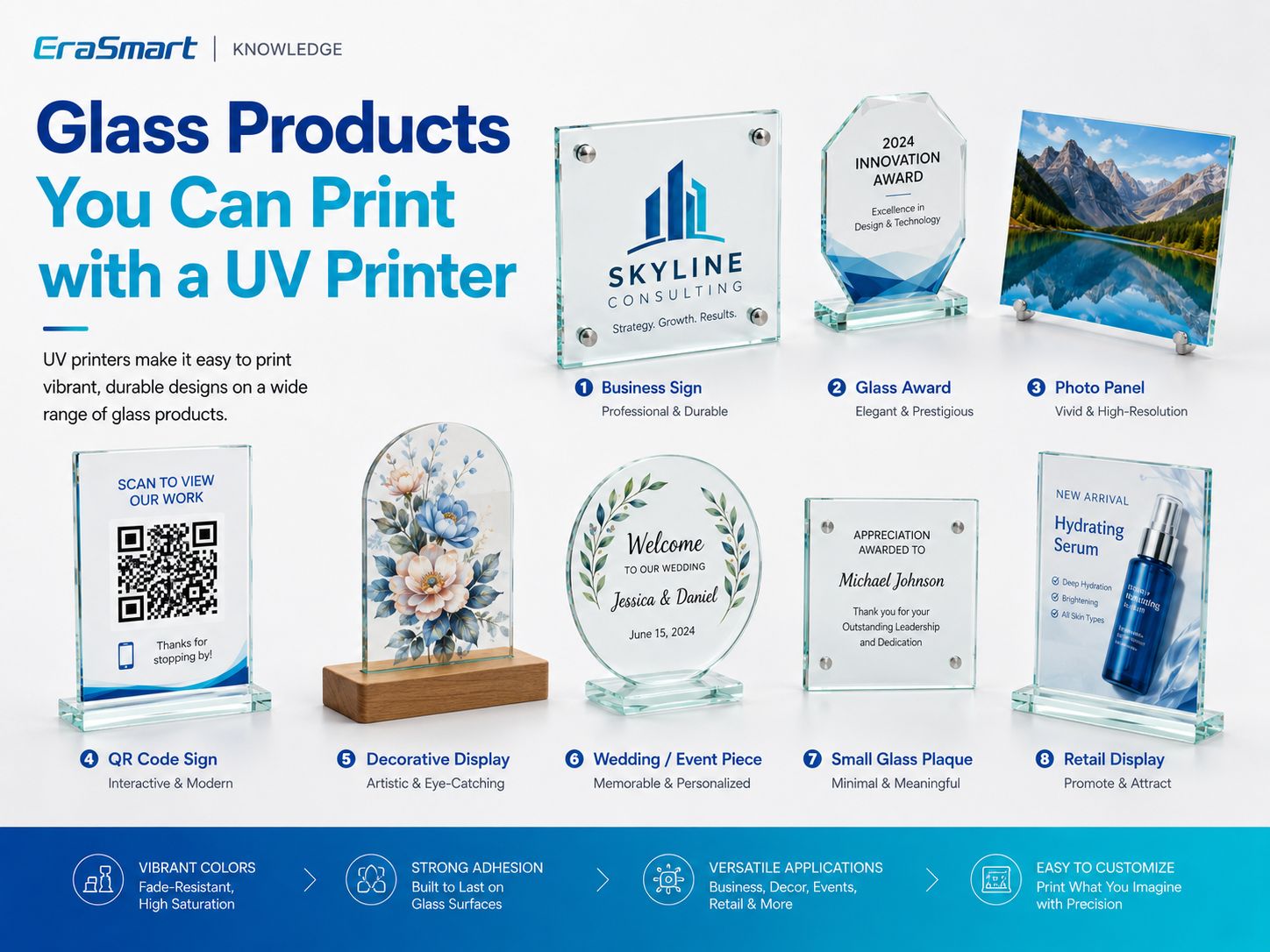
1. Business Signs
Gli esempi includono:
- loghi aziendali
- office plaques
- reception signs
- directional displays
2. Glass Awards
La stampa UV può aggiungere:
- nomi
- loghi
- event information
- colorful graphics
- inchiostro bianco
- decorative varnish
to compatible flat award pieces.
3. Photo Panels
Reverse printing can be especially attractive for:
- family photos
- wedding photos
- travel photography
- prodotti commemorativi
- opera d'arte
4. QR Code Signs
Glass QR signs can be used for:
- menu
- pagine di prenotazione
- recensioni
- Wifi
- mezzi di comunicazione sociale
- informazioni sul prodotto
Always physically scan the finished QR code before delivery.
5. Wedding and Event Pieces
I possibili prodotti includono:
- numeri di tabella
- small welcome signs
- targhe fotografiche
- personalized event décor
- guest information displays
For acrylic-based wedding stationery, you can also read our guide to DIY Wedding Invitations and UV Printing.
6. Decorative Displays
Glass can be used for:
- opere d'arte floreali
- abstract graphics
- arredamento della casa
- branded displays
7. Small Glass Plaques
Adatto per:
- employee recognition
- regali di ringraziamento
- pezzi di marca
- prodotti commemorativi
8. Retail Displays
Retailers may use glass panels for:
- product promotions
- grafica del marchio
- small countertop displays
- launch signage
Why Jigs Matter for Batch Glass Printing
Suppose a customer orders 50 identical glass QR signs.
Manually repositioning each piece by eye is inefficient.
Invece:
- Create a positioning fixture.
- Define fixed X/Y coordinates.
- Use the same glass dimensions.
- Salva la preimpostazione RIP.
- Stampa un campione approvato.
- Repeat the same positioning.
This helps improve:
- coerenza
- velocità di produzione
- allineamento
- controllo dei rifiuti
For personalized products, the blank can remain in the same fixture while the artwork changes digitally.
Which EraSmart UV Printer Is Suitable for Glass Printing?
Printer selection should follow your actual glass dimensions and production needs.
Stampante UV EraSmart A3 PRO: doppia XP600
IL Stampante UV A3 a getto d'inchiostro digitale EraSmart - Doppia XP600 is an A3-class UV flatbed designed for personalized customization and small-batch production.
Le specifiche chiave includono:
| Specifiche | A3 PRO |
|---|---|
| Testine di stampa | Doppio XP600 |
| Area di stampa | 350×450 mm |
| Altezza di stampa | 0–130 mm |
| Risoluzione | Fino a 1440 dpi |
| Configurazione dell'inchiostro | CMYK + WW + VVVVVV |
| Circolazione dell'inchiostro bianco | SÌ |
| Pulizia automatica | SÌ |
| Piattaforma di aspirazione | SÌ |
| Misurazione dell'altezza | Infrarossi |
| RIP | Riin/PrivateRip |
EraSmart currently lists glass among the supported materials for this model, together with acrylic, metal, wood, ceramic, PVC and other substrates.
This format is suitable for products such as:
- glass plaques
- pannelli fotografici
- premi
- segni
- Visualizzazioni QR
- small decorative pieces
Stampante UV EraSmart A2
For larger flat glass products, the Stampante UV EraSmart A2 fornisce una piattaforma più ampia.
Le specifiche chiave includono:
- Doppie testine di stampa XP600
- 420 × 600 mm print area
- 0–130 mm adjustable print height
- CMYK + WW + VVVVVV
- fino a 1440 dpi
- piattaforma di aspirazione
- pulizia automatica
Glass is also listed among its supported materials.
The larger working area can help with:
- larger panels
- larger plaques
- segnaletica
- multiple smaller pieces in one print layout
Choose the printer according to your most common products—not simply according to the largest available machine.
Common Problems When UV Printing on Glass
L'inchiostro UV si graffia facilmente
Possibili cause:
- impronte digitali
- olio
- rivestimento incompatibile
- pulizia inadeguata
- adesione insufficiente
- pretrattamento inadeguato
Do not start by changing resolution.
First check the substrate.
Colors Look Too Transparent
This is common when CMYK is printed directly onto clear glass.
Tentativo:
- Bianco + CMYK
- bianco selettivo
- reverse printing with white backing
depending on the desired effect.
L'inchiostro bianco appare irregolare
Controllo:
- Circolazione dell'inchiostro bianco
- stato degli ugelli
- Impostazioni RIP
- layer density
- condizione di manutenzione
White UV ink contains heavier pigments and requires appropriate circulation and maintenance.
White and CMYK Are Misaligned
Controllo:
- printhead calibration
- Configurazione del livello RIP
- condizione dell'ugello
- registrazione
Dust Appears Under the Print
Glass makes dust particularly visible.
Improve:
- pulizia
- workspace cleanliness
- gestione
- storage before printing
Small Text Is Hard to Read
Possibili cause:
- nessun sottobase bianco
- sfondo trasparente
- grafica a bassa risoluzione
- text too small
Use vector artwork and physically inspect the finished sample.
Batch Position Changes
Utilizzo:
- maschere
- modelli
- riferimenti ai bordi
- coordinate salvate
instead of manually positioning every piece.
Limiti di sicurezza e di applicazione
A UV printer being able to print on glass does not mean every glass application is automatically appropriate.
Drinking Glasses
Avoid making assumptions about:
- drinking rims
- food-contact areas
- dishwasher resistance
unless the complete ink/substrate/product system is certified or tested for that use.
Outdoor Glass
La durabilità all'esterno dipende da:
- Inchiostro UV
- glass coating
- preparazione della superficie
- esposizione ambientale
- pulizia
- weather
Do not promise universal outdoor lifetime without testing.
Structural Glass
UV printing should not be presented as changing or certifying the structural safety characteristics of architectural glass.
If a product is subject to construction, safety or other regulatory requirements, evaluate the finished product according to the applicable standards.
How to Choose a UV Printer for Glass
Before selecting a machine, answer these questions.
What Is Your Largest Glass Product?
Printer bed size should follow your real product dimensions.
Are Your Products Flat?
I prodotti piatti sono la soluzione naturale per la stampa flatbed UV.
Hai bisogno di inchiostro bianco?
White is particularly important for:
- clear glass
- colored glass
- loghi
- fotografie
- piccolo testo
Do You Need Reverse Printing?
Make sure your RIP workflow supports the required mirrored artwork and layer structure.
Hai bisogno di vernice?
Varnish can increase perceived value for selected products but is not necessary for every job.
Will You Print Bottles or Jars?
If curved products are central to your business, evaluate:
- DTF UV
- appropriate rotary printing
instead of assuming a standard flatbed workflow is sufficient.
What Is Your Monthly Volume?
Higher repeat volume makes:
- infissi
- preimpostazioni RIP salvate
- grezzi standardizzati
- controllo di qualità in batch
more important.
Final Answer: Is UV Printing Good for Glass?
SÌ.
UV printing is a flexible solution for producing:
- glass signs
- premi
- pannelli fotografici
- Visualizzazioni QR
- targhe decorative
- prodotti per matrimoni
- retail displays
But glass should not be treated as a universally easy substrate.
The most important production factors are:
surface cleanliness + adhesion + white ink strategy + print orientation
Utilizzo:
- Solo CMYK for transparent color effects
- Bianco + CMYK for stronger opacity
- Bianco selettivo + CMYK for mixed transparent and opaque designs
- Stampa inversa when you want the artwork viewed through the glass
- Vernice for selected premium effects
And follow this production logic:
Ispeziona → Pulisci → Prova → Stampa campione → Verifica adesione → Approva → Standardizza → Produci in batch
For flat glass products, explore the Stampante UV EraSmart allineare.
For bottles, jars and other curved finished products, consider whether an Stampante DTF EraSmart UV provides a more practical workflow.
FAQ
Can UV printers print directly on glass?
Yes. UV flatbed printers can print directly on many suitable glass surfaces, but adhesion and surface cleanliness should be tested before production.
Does UV ink stick to glass?
It can, but adhesion depends on the exact glass, surface coating, cleanliness, ink and pretreatment. Do not assume all glass behaves the same.
Do I need primer before UV printing glass?
Not always. Some surfaces may print adequately after proper cleaning, while others may benefit from a compatible adhesion promoter. Test first.
Do I need white ink on clear glass?
Non sempre.
Use CMYK only when you want transparency.
Use white beneath or behind CMYK when you want stronger opacity and brighter color.
Can I print on clear glass?
Yes. Clear glass is particularly useful for transparent graphics, white ink effects and reverse printing.
Can you UV print on frosted glass?
Yes, depending on how the frosted finish was produced and how the surface behaves with the ink. Test the exact product.
Can UV printers print on tempered glass?
Potentially, yes. The actual surface treatment and coating should be tested before production.
What is reverse printing on glass?
Reverse or second-surface printing places the artwork on the back of clear glass and allows the viewer to see it through the glass from the front.
Does reverse glass printing require mirrored artwork?
Usually yes. The artwork normally needs to be mirrored before printing on the back side.
Can UV printers print glass bottles?
Direct flatbed printing is best suited to flat surfaces. Cylindrical bottles require an appropriate rotary workflow, or UV DTF may be a more practical alternative.
Can UV-printed glass go in a dishwasher?
Do not assume so. Dishwasher resistance depends on the ink, adhesion, glass, pretreatment and complete finished-product testing.
Can UV printers print photographs on glass?
Yes. White ink and reverse printing can both be used to create premium photo-panel effects.
Which EraSmart UV printer can print glass?
IL EraSmart A3 PRO Doppio XP600 supports a 350 × 450 mm print area, while the Stampante UV EraSmart A2 fornisce una piattaforma più ampia da 420×600 mm.
Build a Reliable Glass Printing Workflow
If you are evaluating a UV printer for glass products, tell EraSmart:
- glass type
- dimensioni del prodotto
- clear / frosted / colored surface
- coating information
- se hai bisogno di inchiostro bianco
- whether you want front or reverse printing
- expected production volume
- whether the product is flat or curved
We can help you compare the right Stampante UV EraSmart O Stampante DTF UV flusso di lavoro per i tuoi prodotti reali.
Clean the surface. Control the white layer. Test adhesion. Then scale production.
Potresti essere anche a te come

Copyright 2020 © Erastart. | Sitemap