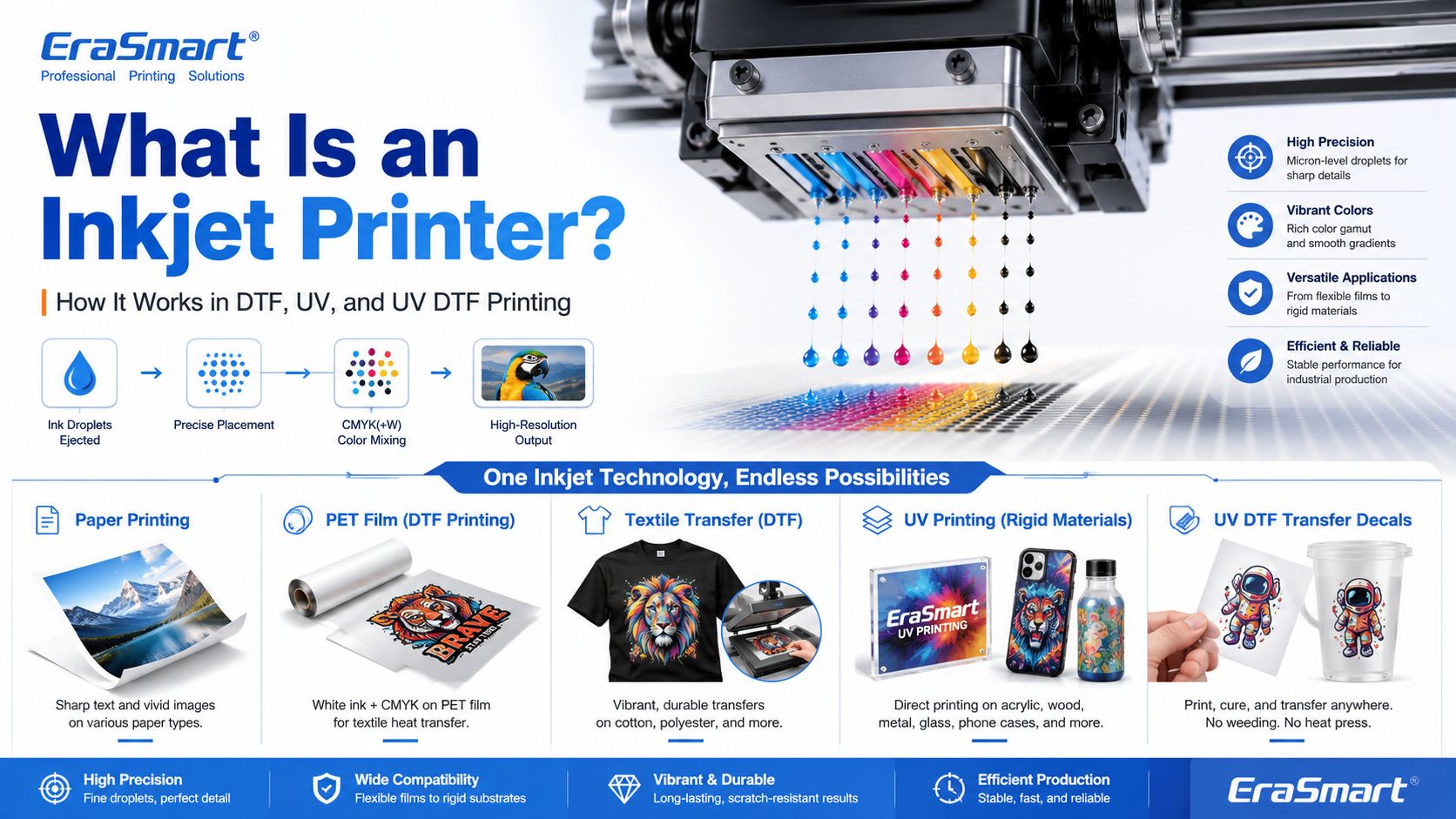
An inkjet printer is a digital printing device that creates images by ejecting tiny droplets of ink onto a surface. Instead of using plates, screens, or physical stencils, an inkjet printer receives digital image data and places controlled ink droplets in precise positions to form text, graphics, photos, labels, transfers, or product decoration.
Most people first know inkjet printers from office or home photo printing. But inkjet technology is much broader than desktop paper printing. Today, inkjet systems are used in DTF printing, UV flatbed printing, UV DTF transfers, packaging samples, product labels, signage, promotional products, textile decoration, industrial marking, and custom product manufacturing.
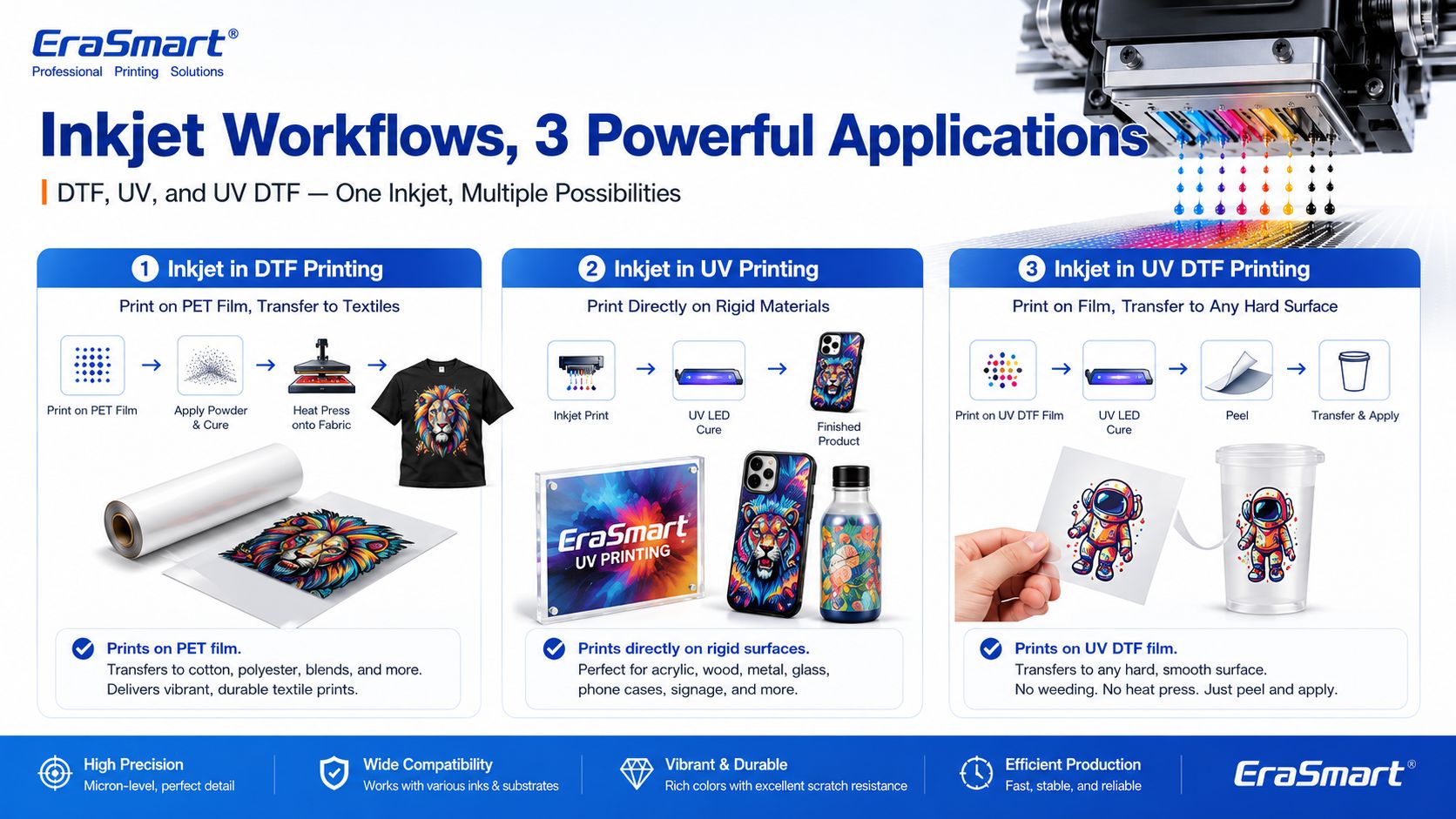
For EraSmart customers, this topic matters because many modern custom printing machines are built on inkjet principles. A Stampante DTF uses inkjet technology to print garment designs onto transfer film. A Stampante UV uses inkjet technology to print UV-curable ink directly onto rigid materials. A Stampante DTF UV uses inkjet printing to create hard-surface decals and transfers on A/B film.
In simple terms, inkjet printing is the foundation. DTF, UV, and UV DTF are specialized business workflows built around that foundation.
An inkjet printer is a printer that sprays or ejects tiny droplets of liquid ink through microscopic nozzles to create a printed image.
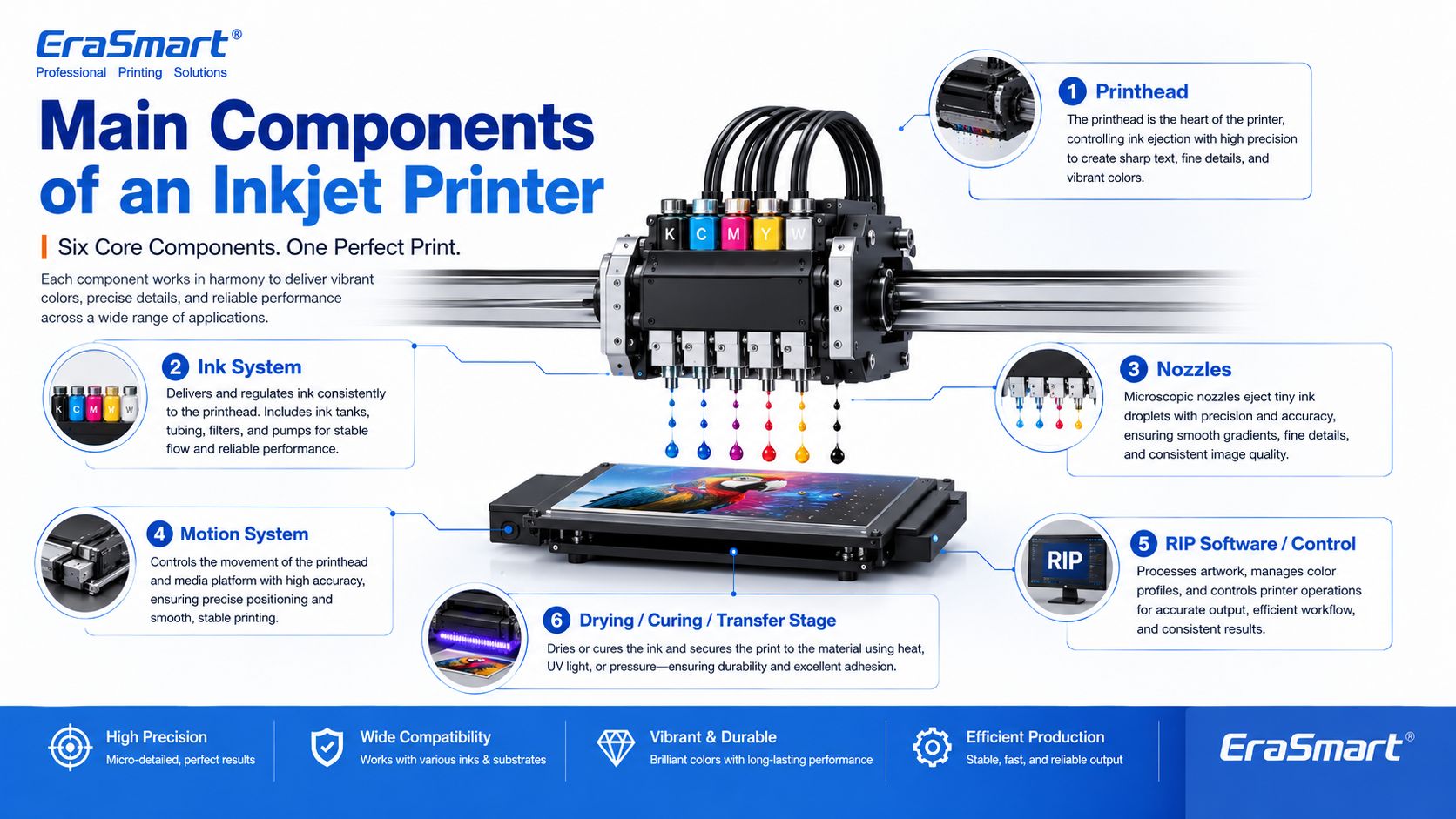
A basic inkjet printing system includes:
The printhead is the key component. It controls where ink droplets land, how much ink is ejected, and how accurately the image is formed.

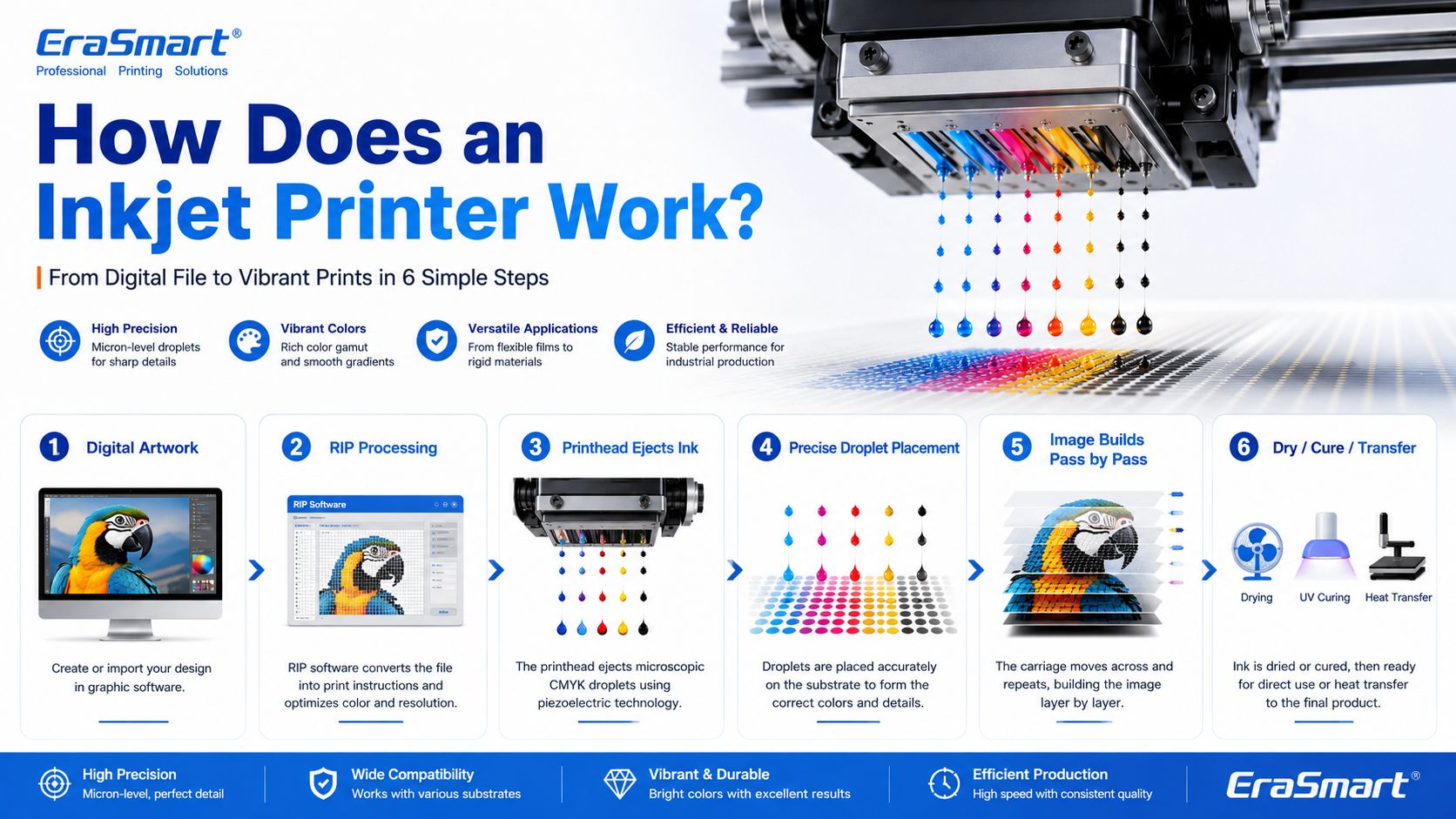
Inkjet printing may look simple from the outside, but inside the printer there is a precise digital control process.
A simplified workflow looks like this:
In an office inkjet printer, ink is usually printed onto paper and dries or absorbs into the paper surface. In an industrial or custom printing system, the process may be more specialized. For example, UV ink is cured by UV light, while DTF ink is printed onto PET film and later heat transferred onto fabric.

The printhead is the most important part of an inkjet printer. It contains many tiny nozzles that eject ink droplets. The printhead determines much of the printer’s resolution, droplet control, speed, and print quality.
In custom printing, printhead condition directly affects:
This is why printer maintenance is so important in DTF and UV printing. If the printhead nozzles are clogged or unstable, the final print may show banding, missing lines, weak colors, or poor detail.
For apparel printing users, EraSmart’s Guida alla manutenzione della stampante DTF is a useful resource for understanding why nozzle checks, cleaning, white ink circulation, and daily care matter.
The ink system stores and delivers ink to the printhead. Different inkjet printers use different types of ink depending on the application.
Common ink types include:
For EraSmart customers, the most relevant ink systems are DTF ink, UV ink, white ink, and varnish.
UN Stampante DTF commonly uses CMYK ink plus white ink. The white ink helps designs appear clearly on dark garments. A Stampante UV may use CMYK, white ink, and varnish to print on hard surfaces such as acrylic, glass, metal, wood, plastic, leather, and packaging materials.
If you want to understand how CMYK, white ink, and varnish work together in product customization, see EraSmart’s UV Ink Guide: CMYK, White Ink, and Varnish.
Nozzles are microscopic openings in the printhead. They eject ink droplets in controlled patterns.
Nozzle performance affects:
Nozzles can become clogged if ink dries, settles, or becomes contaminated. This is especially important for white ink systems because white ink contains heavier pigment particles and needs proper circulation and maintenance.
Inkjet printers need accurate motion control. Either the printhead moves across the material, the material moves under the printhead, or both are coordinated.
The motion system affects:
In UV flatbed printing, the platform and printhead movement must be stable so the image lands accurately on rigid objects. In DTF printing, film feeding must be smooth so the transfer image remains consistent.
RIP software converts artwork into printer-ready instructions. It controls color output, resolution, ink layering, white ink channels, varnish layers, print passes, and other production settings.
For custom printing businesses, RIP setup is important because it affects:
A good printer is only part of the system. Correct artwork preparation and RIP settings are also necessary for professional results.

Inkjet printing is not finished when ink leaves the nozzle. The ink must also become stable on the final product.
Different workflows use different finishing methods:
| Inkjet Workflow | What Happens After Printing |
|---|---|
| Office inkjet | Ink dries or absorbs into paper |
| Stampa DTF | Powder is applied, cured, then heat pressed onto fabric |
| Stampa UV | UV light cures the ink almost instantly |
| Stampa DTF UV | UV ink is printed on film, laminated, then applied as a transfer |
| Sublimazione | Printed transfer is heat pressed into polyester or coated blanks |
This is why inkjet technology can support many industries. The core droplet technology is similar, but the finishing process changes based on the product.

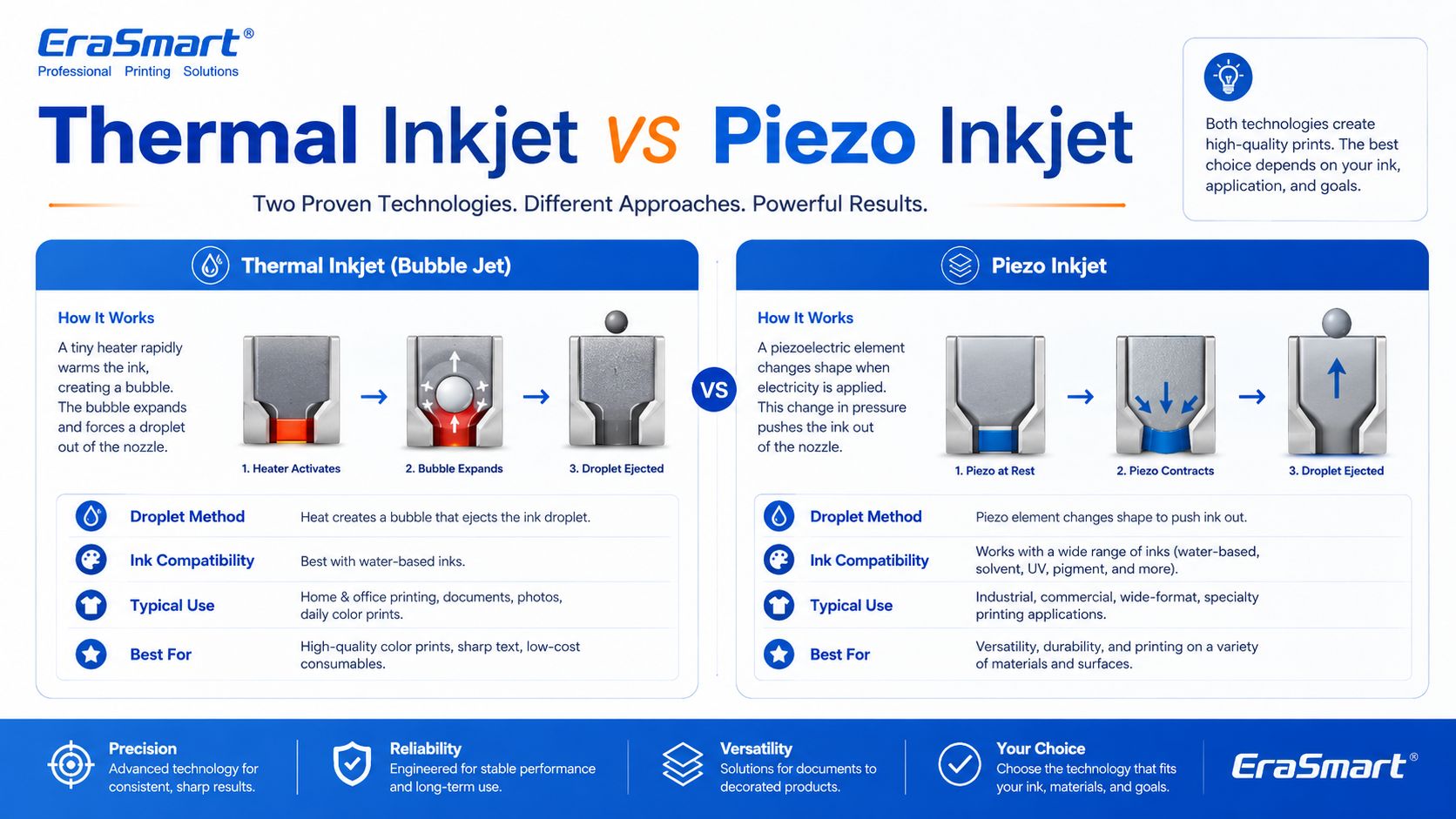
There are two major inkjet technologies: thermal inkjet and piezo inkjet.
Thermal inkjet uses heat to create a vapor bubble inside the ink chamber. The pressure from this bubble pushes a droplet of ink out of the nozzle.
Thermal inkjet is common in many desktop and office printers. It can produce high-quality prints on paper, but the ink must be compatible with heat-based ejection.
Piezo inkjet uses a piezoelectric element that changes shape when voltage is applied. This mechanical movement creates pressure and ejects ink droplets through the nozzle.
Piezo inkjet is widely used in many professional and industrial printing systems because it can work with a broader range of inks. Since the ink is not heated for ejection, piezo technology is suitable for inks that may not perform well in thermal systems, including many specialty inks used in industrial and custom printing.
For DTF, UV, and UV DTF applications, piezo-style inkjet technology is especially important because these workflows require precise ink control and compatibility with specialized ink types.
Inkjet printing can also be divided by how ink is delivered.
Drop-on-demand means ink droplets are ejected only when needed. This is common in many graphic and custom printing applications because it offers precise control and efficient ink use.
DTF, UV, and UV DTF printers generally operate around controlled digital droplet placement, which is why they can reproduce detailed designs and full-color artwork.
Continuous inkjet ejects a continuous stream of ink droplets. Some droplets are directed to the surface, while others may be recycled. This method is often used in industrial coding and marking, such as printing dates, batch codes, and product identification on packaging lines.
For EraSmart customers, drop-on-demand inkjet is the more relevant concept because custom apparel and product printing require accurate image reproduction rather than simple coding.
A DTF printer is a specialized inkjet printer for garment transfer production. Instead of printing directly onto a shirt, it prints the design onto PET transfer film.
The typical DTF process includes:
This process is useful for custom apparel because it supports:
If you are interested in building an apparel business, EraSmart’s Stampante DTF category includes different models for startups, small studios, growing shops, and higher-volume production. You can also read the Flusso di lavoro di produzione DTF to understand the full process from artwork to finished garment.
A UV printer is another specialized inkjet system. Instead of using standard paper ink, it uses UV-curable ink. The printer ejects ink onto the material surface, and UV light cures the ink almost immediately.
UV printing is suitable for many hard and semi-rigid materials, such as:
The advantage of UV printing is direct-to-object customization. You can print full-color designs, white ink layers, and varnish effects on many product surfaces.
EraSmart Stampante UV category is designed for businesses that want to create custom gifts, signs, phone cases, packaging samples, acrylic products, and hard-surface promotional items. For material selection, see the Guida ai materiali della stampante UV.
UV DTF printing combines UV inkjet printing with a transfer workflow. The printer prints UV ink onto A film, laminates it with B film, and creates a transfer decal that can be applied to hard surfaces.
UV DTF is useful for:
Unlike textile DTF, UV DTF is mainly for hard-surface transfers, not garments. It is a good choice for businesses that want to sell premium stickers, decals, labels, and cup wraps.
EraSmart Stampante DTF UV is suitable for hard-surface transfer applications, while the A/B Film for UV DTF Printing guide explains how the film system works in the transfer process.
Inkjet printing is important because it allows digital, flexible, short-run production. Unlike traditional methods that require screens, plates, or molds, inkjet printing can print directly from a digital file.
This creates major advantages for custom businesses:
For example, a DTF apparel business can print different names, numbers, and graphics without preparing new screens. A UV printing business can print different logos on phone cases, acrylic signs, glass gifts, or packaging samples. A UV DTF business can produce custom decals and labels for many small brands.
This is why inkjet technology is no longer only about office printing. It is now a core technology for modern customization businesses.
Inkjet printing works directly from digital files. This makes it easy to change designs, personalize products, and produce short runs.
Inkjet printers can reproduce complex color images, gradients, photos, and illustrations. This is useful for apparel graphics, product decoration, stickers, and packaging samples.
Inkjet does not require plates or screens, so it is suitable for low-MOQ custom orders and on-demand production.
Each print can be different. This is useful for names, numbers, QR codes, serialized labels, personalized gifts, and custom designs.
Inkjet technology can be adapted to many surfaces and workflows, including paper, textiles, film, rigid materials, packaging, labels, and transfers.
A business can start with small orders and upgrade equipment as demand grows. This is why inkjet-based DTF, UV, and UV DTF systems are attractive to startups and growing shops.
Inkjet printers need regular maintenance. If nozzles clog, print quality declines. This is especially important for white ink, UV ink, and other specialty ink systems.
Not every ink works with every printhead or material. Ink viscosity, pigment size, curing method, and surface compatibility all matter.
Some surfaces need cleaning, primer, coating, or testing before printing. This is especially common in UV printing on glass, metal, plastic, and other hard materials.
Screen colors and printed colors are not always identical. Professional results require color profiles, test prints, correct RIP settings, and stable consumables.
Higher resolution, more passes, white ink layers, and varnish effects may improve quality but increase printing time.
In DTF printing, powdering, curing, and heat pressing affect durability. In UV DTF, lamination and application affect transfer quality. In UV printing, curing and adhesion affect final product quality.
This is one of the most common inkjet problems. It can be caused by dried ink, settled pigment, poor maintenance, incompatible ink, or long idle time.
Banding appears as unwanted horizontal or vertical lines. It can be caused by clogged nozzles, incorrect feed settings, poor calibration, or unstable ink flow.
Colors may look different from the screen because of material surface, ink type, printer profile, white ink layer, or lighting conditions.
In UV printing, poor adhesion can happen if the surface is oily, dusty, incompatible, or not treated correctly.
In DTF and UV printing, white ink must be managed carefully. Weak white ink can reduce color brightness, opacity, and dark-surface performance.
If ink is not dried, cured, or transferred correctly, the final product may smear, peel, crack, or lose durability.

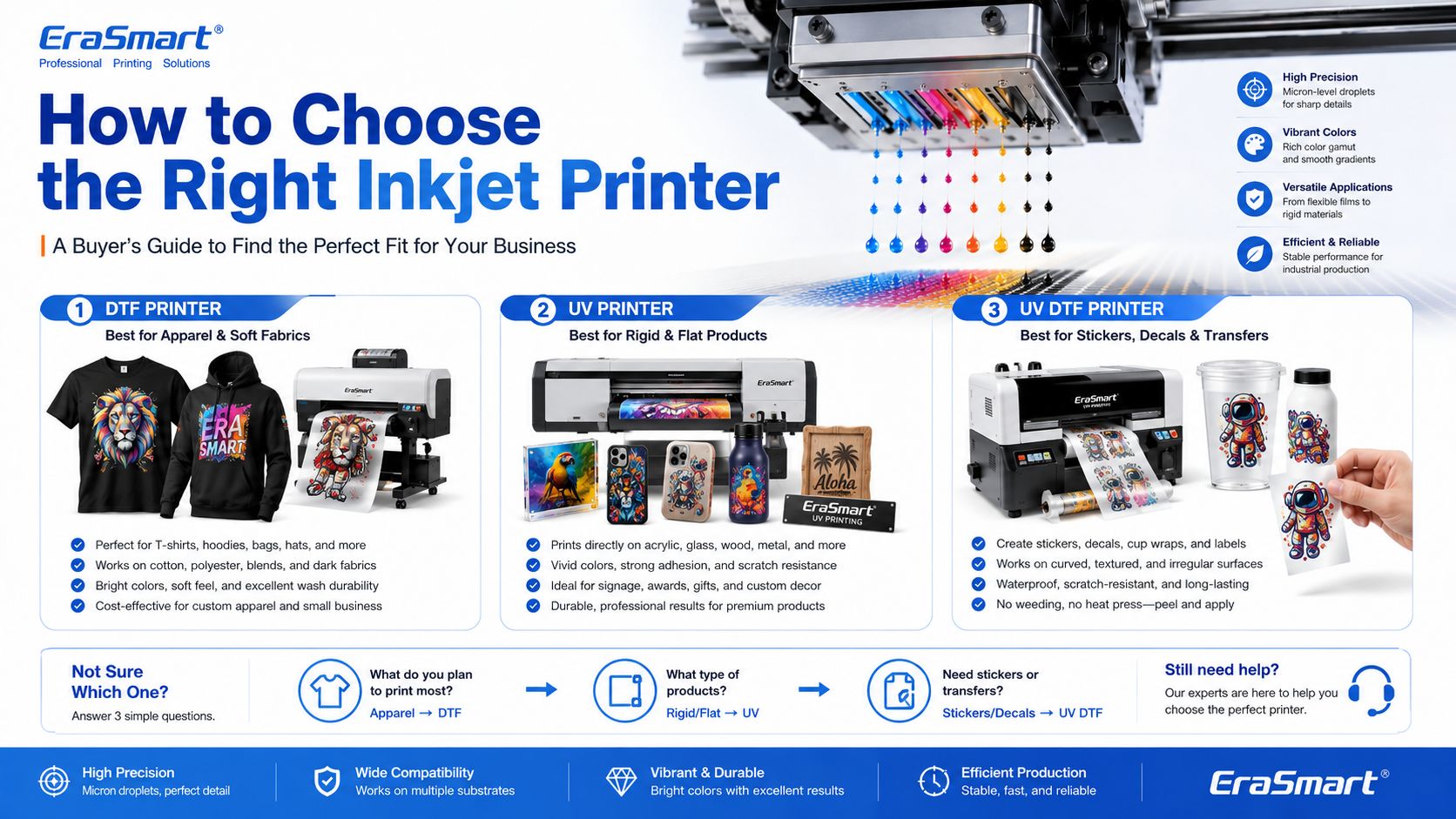
The right inkjet printer depends on what you want to sell.
Scegli un Stampante DTF if your business focuses on:
For machine selection, read EraSmart’s Come scegliere una stampante DTF E Lista di controllo per l'acquisto di stampanti DTF.
• Personalizzazione di piccoli lotti
• Test di progettazione
• Basso onere di ingresso
Se il tuo obiettivo è iniziare in piccolo, testare il flusso di lavoro e gestire la personalizzazione personale o l'uso commerciale leggero, la scelta più pratica è una configurazione compatta con costi gestibili e operazioni quotidiane semplici.
Questo tipo di macchina funziona bene per creatori, acquirenti alle prime armi e studi personali che necessitano di un punto di ingresso affidabile senza passare troppo presto a apparecchiature di produzione A3 o A1 più grandi.
• Ordini personalizzati locali
• Abbigliamento in piccole serie
• Flusso di lavoro intuitivo per l'avvio
Se hai già un'idea imprenditoriale, accetti ordini personalizzati locali o gestisci un piccolo studio che necessita di maggiore flessibilità rispetto alle macchine A4, il passaggio alla gamma A3 di solito crea un flusso di lavoro commerciale più pratico.
Questi modelli sono più adatti ai marchi in fase di avvio, agli operatori di studio e ai negozi in fase iniziale che desiderano una gamma di output più ampia senza passare direttamente ad apparecchiature industriali a rendimento più elevato.
• Grafica ricca di design
• Frequenti nuove gocce
• Presentazione visiva premium
Quando la tua attività dipende da frequenti modifiche alla progettazione, grafica ricca di colori, immagini dettagliate e test di prodotto online più rapidi, ha senso scegliere modelli che offrono una presentazione delle immagini più forte e una flessibilità commerciale più fluida.
Questo gruppo è particolarmente adatto per venditori online, marchi guidati da designer, team creativi e negozi in cui la presentazione visiva e il lancio di nuovi design sono fondamentali per il modello di business.
• Ordini giornalieri
• Miglior ritmo di produzione
• Produzione commerciale più stabile
Una volta che la tua attività va oltre gli ordini occasionali e inizia a dipendere da una produzione giornaliera più stabile, diventa più importante scegliere macchine che supportino un flusso di lavoro più fluido, una maggiore coerenza e un ritmo di produzione migliore.
Questo livello è solitamente il punto in cui gli acquirenti dovrebbero smettere di pensare solo al prezzo di entrata e iniziare a pensare più seriamente alla stabilità dell’output, all’efficienza del flusso di lavoro e alla praticità operativa a lungo termine.
• Flusso di lavoro più veloce
• Riduzione del carico manuale
• Migliore continuità produttiva
Se la tua azienda sta andando oltre la produzione manuale di base e desidera un processo più fluido e pronto per la produzione, è opportuno prendere in considerazione modelli che supportino una maggiore integrazione del flusso di lavoro e aspettative di produttività più elevate.
Questa direzione è particolarmente rilevante per le officine che hanno già ordini stabili e desiderano ridurre gli attriti nella produzione, migliorare la ripetibilità e prepararsi per volumi operativi giornalieri maggiori.
• Obiettivo di output più elevato
• Larghezza di stampa più ampia
• Ritmo della produzione industriale
Quando la tua azienda ha bisogno di una larghezza di stampa più ampia, di un limite di produzione più elevato e di una direzione di produzione industriale più seria, la serie A1 diventa la categoria giusta da valutare. Questo livello è più adatto alle aziende in cui la continuità dell'output e i minori costi di interruzione sono importanti priorità operative.
Scegli il livello della testina di stampa in base a quanto è aggressivo il tuo obiettivo di produzione e al valore che attribuisci a una maggiore produttività.
Scegli un Stampante UV if your business focuses on:
For material planning, read EraSmart’s Guida ai materiali della stampante UV E How to Choose a UV Printer.
Adatta a prodotti personalizzati di piccolo formato, campioni, regali compatti e utenti che desiderano iniziare la stampa UV con un ingombro ridotto.
Un'opzione pratica per custodie per telefoni, accessori, piccoli prodotti in acrilico, regali personalizzati e produzione per piccole imprese.
Una scelta più forte per gli utenti che necessitano di una piattaforma più ampia, di una maggiore copertura del prodotto e di una produzione in piccoli lotti più flessibile.
Adatto per insegne, pannelli, pannelli personalizzati e team di produzione più grandi che necessitano di un'area di stampa più ampia e di una maggiore scalabilità.
Progettato per la personalizzazione delle custodie del telefono e la produzione rapida di prodotti personalizzati con un percorso applicativo più mirato.
Ideale per adesivi UV DTF, etichette in cristallo, involucri per tazze, bottiglie e decalcomanie per trasferimento su superfici dure.
Scegli un Stampante DTF UV if your business focuses on:
To understand the film workflow, read EraSmart’s A/B Film for UV DTF Printing.
Inkjet printing is not one single business model. It is a technology foundation. The right machine depends on your target products.
A simple buying direction looks like this:
| Obiettivo aziendale | Recommended EraSmart Direction |
|---|---|
| Custom T-shirts, hoodies, apparel | Stampante DTF |
| Acrylic, glass, metal, wood, phone cases | Stampante UV |
| Stickers, cup wraps, labels, decals | Stampante DTF UV |
| Apparel startup | A4 / A3 DTF Printer |
| Growing apparel shop | A3 MAX DTF / shaker workflow |
| Custom product studio | A4 / A3 UV Printer |
| Hard-surface transfer business | Stampante A3 UV DTF |
If your business is apparel-first, start with EraSmart’s Stampante DTF lineup. If your business is hard-product customization, compare the Stampante UV range. If your business is stickers, decals, labels, and cup wraps, start with the Stampante DTF UV.
An inkjet printer is a digital printer that creates images by ejecting tiny ink droplets through microscopic nozzles onto a surface.
In basic office printing, that surface is usually paper. In custom printing, the surface may be PET film, transfer film, acrylic, glass, metal, wood, plastic, packaging board, fabric, or product blanks.
The most important point is this: inkjet printing is not only for documents and photos. It is the core technology behind many modern custom printing systems, including DTF printers, UV printers, and UV DTF printers.
For small businesses, inkjet technology makes it possible to print full-color designs, personalize products, produce short runs, reduce setup cost, and build flexible custom printing workflows.
Need help choosing the right inkjet-based printing system for your business? Share your target products, material type, print size, expected daily order volume, and budget range with EraSmart.
Our team can help you choose the right Stampante DTF, Stampante UV, O Stampante DTF UV for your custom printing business.
stampante UV
Stampante DTF
Stampante DTG
Macchina per pressione di calore
Stampante pubblicitaria
Forno DTF
Pressa calda
Macchina intagliata
Trasferimento di calore della tazza
Macchina per laminazione
Inchiostro da stampa
Custodia per cellulare
Prodotto di vetro
Fluido di pulizia
Tampone di cotone
WhatsApp : +8618566233796
WeChat : +8618566233796
Mobile : +8618566233796
Web :www.erasmart.com
Negozio:www.erasmartmall.com
Scrivici su WhatsApp
Fornisci solo alcuni dettagli e ti aiuteremo a ottenere citazioni veloci!