
UV インク ガイド: UV 印刷用の CMYK、白インク、ワニスの説明
UV プリンタのパフォーマンスは、マシン、プリントヘッド、プラットフォームだけでなく、インク システムにも依存します。 CMYK はフルカラーのグラフィックスを作成し、白インクは暗いマテリアルと透明なマテリアルをサポートし、ワニスは光沢、質感、高級仕上げ効果を追加します。このガイドでは、各インク層がどのように機能するか、および製品に適切な構成を選択する方法について説明します。
インクシステムの概要
cmyk
ホワイトインク
ワニス
RIP層制御
CMYKを理解する
CMYK は、写真、ロゴ、グラフィック、製品アートワークなどのメイン画像を作成します。
白インクを正しく使う
白インクは、透明、暗い、色付きの素材の色の強度を向上させます。
ワニス効果を追加する
ワニスは、光沢、ハイライト、スポットコーティング、隆起した装飾効果を追加します。
インクの安定性を維持する
白インクの循環、ノズルチェック、クリーニングワークフローにより、毎日の出力が保護されます。
UVインクの基本
UV インク構成が重要な理由
UV 印刷では、インクの構成によって、どのような製品を作成できるか、どのような素材を扱うことができるか、どのような視覚効果を販売できるかが決まります。白または明るい色の素材に単純にプリントする場合は、基本色のみのセットアップで十分な場合があります。ただし、ほとんどの商用 UV 印刷アプリケーションでは、基本的な CMYK 出力以上のものが必要です。
白インクは、透明、暗色、または色の付いた素材に印刷する場合に不可欠です。ワニスは、光沢、スポットコーティング、隆起した質感、装飾仕上げを通じて、優れた表面価値を追加できます。購入者にとって、CMYK、白インク、ワニスを理解することは、一見手頃に見えても、実際に販売したい製品をサポートできないプリンタを選択することを避けるのに役立ちます。
購入者は、素材が印刷できるかどうかだけを尋ねるべきではありません。また、印刷結果が安定していて、耐久性があり、再現性があり、商業的に実用的であるかどうかも尋ねる必要があります。単一のサンプルでは機能する材料であっても、表面が不均一であったり、曲がっていたり、ほこりや油が付着していたり、位置決めが困難であったりすると、日常の生産では依然として問題が発生する可能性があります。
シンプルなルール
白や淡い色の平面素材のみに印刷したい場合は、CMYKで十分かもしれません。アクリル、ガラス、色の濃い製品、透明なアイテム、または高級ギフトに印刷したい場合は、白インクとニスがより重要になります。
マスターテーブル
UV 印刷における CMYK vs 白インク vs ワニス
この表を使用すると、各 UV インク レイヤが何を行うか、いつ必要になるかをすぐに理解できます。
| インク層 | 主な機能 | 必要なときに | 代表的な材質 | 重要な購入ポイント |
|---|---|---|---|---|
| cmyk | フルカラー画像出力を作成します | ほぼすべての UV 印刷ジョブ | 白色アクリル、軽量プラスチック、看板、ギフト、電話ケース | 色の安定性、RIP設定、印刷モードを確認します。 |
| ホワイトインク | アンダーベースを作成し、不透明度をサポートします | 透明、暗い、色付きのマテリアル | 透明なアクリル、ガラス、ダーク色の電話ケース、カラー基板 | 循環、撹拌、キャッピング、メンテナンスのワークフローを確認する |
| ワニス | 光沢、スポットコーティング、盛り上がった効果を追加します。 | プレミアムな製品と装飾仕上げ | アクリルサイン、ギフト、ブランドアイテム、装飾パネル | 層の制御、硬化効果、ソフトウェアのサポートを確認する |
インクレイヤー1
UV印刷におけるCMYKインクとは何ですか?
CMYKインクはUV印刷の基礎です。シアン、マゼンタ、イエロー、ブラックを使用して、フルカラーの画像、ロゴ、テキスト、パターン、写真デザインを作成します。多くの白または明るい色のマテリアルでは、CMYK だけで鮮明で鮮やかな結果が得られる場合があります。
ただし、CMYK だけでは必ずしも十分とは限りません。透明な素材では光が素地を通過するため、色が弱く見える場合があります。暗いマテリアルでは、背景が最終的な外観に影響を与えるため、色の明るさが失われる可能性があります。そのため、プロの UV 印刷では白インクが CMYK とともによく使用されます。
ベストユース
白、明るい色の、またはすでに不透明な表面上のフルカラーのグラフィックス。
主な利点
ロゴ、写真、テキスト、装飾アートワークの標準カラー出力を生成します。
主な制限事項
白インクを使用しないと、透明な素材や濃い素材、色の濃い素材では色が薄く見える場合があります。
インクレイヤー2
UV印刷での白インクは何に使われますか?
白インクは、プロ仕様の UV プリンターの最も重要な部品の 1 つです。カラー印刷前の下地層としてよく使用されます。この白いアンダーベースは背景素材の影響をブロックし、CMYK カラーがより明るく、より強く、より正確に表示されるようにします。
白インクは、透明なアクリル、ガラス、透明なプラスチック、暗い色の電話ケース、色付きのギフトアイテム、および多くの装飾品にとって特に重要です。白インクを使用しないと、印刷された色が透けたり、くすんだり、見づらくなったりすることがあります。
| 重要な状況 | 白インクなし | 白インクあり | おすすめ |
|---|---|---|---|
| 透明アクリル | 色が透けたり弱く見えたりする場合があります | 色が強くなり、より目立つようになります | ほとんどの商用作品では白いアンダーベースを使用してください |
| ガラス | デザインの不透明度が不足している可能性があります | 印刷された画像はより鮮明でしっかりとしたものになります | 白い層と接着力をテストします |
| ダークカラーのスマホケース | 背景により色が隠れる場合があります | 色がより鮮やかに見える | 鮮やかなアートワークには白インクを使用してください |
| 着色基材 | 背景色はアートワークに影響します | アートワークがより正確に見える | 色の精度が重要な場合は白インクを使用してください |
白インクのメンテナンスのお知らせ
白インクには重い顔料が含まれているため、購入者は白インクの循環、撹拌、ノズルの保護、日常のメンテナンスに細心の注意を払う必要があります。優れた白インク システムは、沈殿物、詰まりのリスク、および不安定な出力を軽減します。
インクレイヤー3
UV印刷におけるワニスとは何ですか?
ワニスは、光沢のあるハイライト、スポット コーティング、装飾的な質感、隆起効果を作成するために使用される透明な UV 硬化型インク層です。印刷製品をより高級に見せ、企業がより価値の高いカスタムアイテムを販売するのに役立ちます。
ワニスは、アクリル看板、ギフト製品、装飾パネル、パッケージサンプル、ロゴ、ネームプレート、ブランドアイテムなどによく使用されます。すべての仕事に必要なわけではありませんが、顧客がより高級な外観や触感を求める場合には価値があります。
光沢効果
選択した領域または印刷面全体に輝きを加えます。
スポットワニス
ロゴ、パターン、テキスト、またはデザインの詳細を強調表示します。
盛り上がったテクスチャー
ワニス層を構築することで触感効果を生み出します。
プレミアム仕上げ
カスタムギフトやサインの知覚価値を向上させます。
レイヤーモード
白インクにさらなる注意が必要な理由
白インクは、UV プリンターで処理できるマテリアルと効果の範囲を広げるため、貴重です。ただし、通常のカラーインクよりも丁寧なメンテナンスが必要です。インクシステムのメンテナンスが不十分な場合、白インク中の重い顔料が沈降する可能性があります。
UV プリンタを購入する前に、ユーザーはそのマシンが白インクの循環、撹拌、キャッピング、ノズルのクリーニング、および長時間のアイドル状態からの保護をどのように処理するかを尋ねる必要があります。これらの詳細は、日常の信頼性と長期的なプリントヘッドの保護に影響します。
| メンテナンスエリア | なぜそれが重要なのか | 尋ねるべき質問 |
|---|---|---|
| 白インク循環 | 沈殿物や不均一な白出力を軽減します。 | プリンターは白インクの循環をサポートしていますか? |
| インクの撹拌 | 色素の分散を維持するのに役立ちます | インクタンクに撹拌機能はありますか? |
| キャッピングステーション | 非印刷時にプリントヘッドを保護します。 | キャッピング ステーションはどの程度密閉されていますか? |
| ノズルチェックルーチン | 生産前に詰まりを検出するのに役立ちます | 毎日どのようなノズルチェックプロセスが推奨されますか? |
| 長時間アイドル保護 | プリンターを何日も使用しない場合に重要 | マシンがアイドル状態になる前にユーザーは何をすべきでしょうか? |
ソフトウェアとレイヤー制御
ホワイトインクとワニスにRIPソフトウェアが重要な理由
UV 印刷では多くの場合、複数のレイヤーが必要になります。ユーザーは、カラーの下に白インク、カラーの上にニス、または特定のスポット ニス領域を必要とする場合があります。 RIP ソフトウェアは、これらのレイヤーがどのように生成、配置、印刷されるかを制御します。
レイヤーを適切に制御しないと、白のカバレッジが弱く、ニスの位置が間違っていたり、カラー出力が正しくなかったり、レジストレーションが不十分であったり、ワークフローが非効率的であったりする可能性があります。購入者は、RIP ソフトウェアをプリンタ ハードウェアと一緒に評価する必要があります。
白インク層制御
ソフトウェアは、暗いマテリアルまたは透明なマテリアルの白いアンダーベースの生成と配置をサポートする必要があります。
ワニス層の制御
ソフトウェアを使用すると、ユーザーは選択した領域にワニスを適用したり、層状の装飾効果を作成したりできる必要があります。
パスモードと品質
さまざまなパス モードにより、印刷品質、生産速度、インクの厚さ、表面の結果のバランスをとることができます。
色と材質の設定
推奨プロファイルと設定により、ユーザーはさまざまな素材でより再現性の高い結果を得ることができます。
トラブルシューティング
一般的な UV インクの問題とその一般的な意味
インク関連の問題は、多くの場合、材料の準備、インク システムの状態、RIP 設定、硬化強度、メンテナンス習慣の組み合わせによって発生します。以下の表は、一般的な問題をまとめたものです。
| 問題 | 考えられる原因 | 最初に確認すること | 関連ガイド |
|---|---|---|---|
| クリア素材だと色が薄く見える | 白い下地がない、または白い層が弱い | 白インク層の設定と印刷順序 | マテリアルガイド |
| 白インクがムラになって見える | 沈殿物、ノズルの問題、または循環不良 | 白インクの循環とノズルチェック | メンテナンスガイド |
| ワニスの光沢が足りない | 層の厚さ、硬化設定、または表面の問題 | ワニス層とUV硬化強度 | トラブルシューティングガイド |
| インクが削れてしまう | 接着力が不十分または材料の準備が間違っている | 表面の洗浄と材料の適合性 | マテリアルガイド |
| 縞模様または線の欠落 | ノズルの詰まりまたはプリントヘッドの状態 | ノズルのテストと清掃ルーチン | トラブルシューティングガイド |
購入のヒント
プリンターを購入する前に尋ねるべき UV インクの質問
| 問題 | 考えられる原因 | 最初に確認すること | 関連ガイド |
|---|---|---|---|
| クリア素材だと色が薄く見える | 白い下地がない、または白い層が弱い | 白インク層の設定と印刷順序 | マテリアルガイド |
| 白インクがムラになって見える | 沈殿物、ノズルの問題、または循環不良 | 白インクの循環とノズルチェック | メンテナンスガイド |
| ワニスの光沢が足りない | 層の厚さ、硬化設定、または表面の問題 | ワニス層とUV硬化強度 | トラブルシューティングガイド |
| インクが削れてしまう | 接着力が不十分または材料の準備が間違っている | 表面の洗浄と材料の適合性 | マテリアルガイド |
| 縞模様または線の欠落 | ノズルの詰まりまたはプリントヘッドの状態 | ノズルのテストと清掃ルーチン | トラブルシューティングガイド |
EraSmart モデル パス
どの UV プリンタ構成を検討する必要がありますか?
EraSmart UV プリンタを比較する場合は、対象の素材、白インクが必要かどうか、ワニス効果が製品価値の一部であるかどうか、製品に必要なプリント サイズを考慮してください。
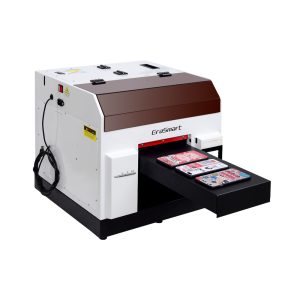
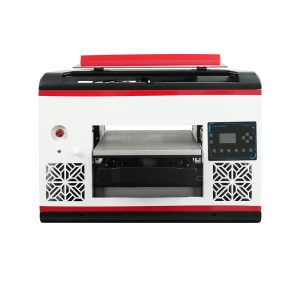
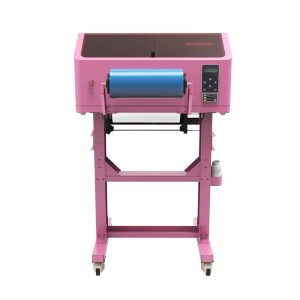
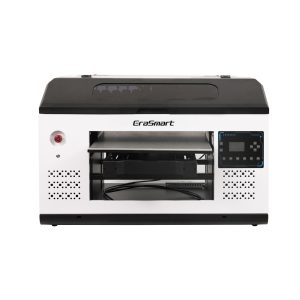
よくある間違い
UV インクで避けるべき間違い
白インクのメンテナンスを無視する
白インクは強力ですが、メンテナンスに注意が必要です。購入者はそれを通常の CMYK インクと同じように扱うべきではありません。
白インクを使わずに透明素材を印刷する
適切な白い下地がないと、透明なアクリルやガラス上では色が弱く見えたり、透明になったりすることがあります。
ワニスは単なる装飾であると仮定する
ワニスは、スポット光沢、質感、高級仕上げに使用すると、製品の価値を高めることができます。
RIP レイヤ制御をチェックしない
白インクとワニスには正確な層制御が必要です。ハードウェアだけでは十分ではありません。
よくある質問
-
1。 UVプリンターで使用するインクは何ですか?
UV プリンターは、印刷プロセス中に UV 光によって硬化する UV 硬化型インクを使用します。一般的なインク チャネルには、CMYK、白インク、ワニスが含まれます。
-
2。 UV印刷におけるCMYKとは何ですか?
CMYK は、フルカラーの画像、ロゴ、グラフィック、テキストの作成に使用されるシアン、マゼンタ、イエロー、黒のインクを指します。
-
3。 UV プリンターに白インクが必要なのはなぜですか?
白インクは、濃い色、色付き、または透明なマテリアルの下地として使用されます。 CMYK カラーがより明るく、より正確に表示されるようになります。
-
4。 UV印刷におけるニスとは何ですか?
ワニスは、光沢、スポット コーティング、隆起効果、および高級な表面テクスチャを作成するために使用される透明な UV 硬化可能な層です。
-
5。 白インクは必ず必要ですか?
いつもではありません。通常、白インクは透明、濃い色、または色付きのマテリアルに必要ですが、白または明るい色のマテリアルの場合はオプションである場合があります。
-
6。 ニスは必ず必要ですか?
いいえ。ワニスはオプションですが、顧客が光沢、質感、スポット効果、またはより高級な仕上げを望む場合、製品の価値を高めることができます。
-
7。 なぜ白インクはメンテナンスが難しいのでしょうか?
白インクには重い顔料が含まれているため、安定した出力を維持するには、適切な循環、撹拌、ノズル チェック、およびプリントヘッドの保護が必要です。
-
8。 UVインクはアクリルやガラスにも印刷できますか?
はい、ただし、アクリルとガラスでは、色を強くするために白インクが必要になることが多く、接着力を高めるために慎重な表面処理が必要になります。
EraSmart プリンター シリーズ


High-quality UV Printers for metal, acrylic, glass, wood & more. Instant curing, vivid 1440dpi prints, versatile for diverse materials.

**CMYK + ホワイト + ワニス**を使用して、鮮やかな盛り上がったデカールを 1 パスで印刷します。粉末はありません。オーブンはありません。剥がして平らなアイテムや湾曲したアイテムに数分で貼り付けられます。
適切なガイドが見つかりませんでしたか?今すぐ無料のテクニカルサポートを受けてください!
いくつかの詳細を提供するだけで、簡単な見積もりを手に入れるのに役立ちます!
プリンターツール
DTFオーブン
ホットプレス
カービングマシン
マグ熱伝達
ラミネートマシン
消耗品
印刷インク
携帯電話ケース
ガラス製品
液体の洗浄
綿棒
お問い合わせ
WhatsApp:+8618566233796
WeChat:+8618566233796
モバイル:+8618566233796
ウェブ:www.erasmart.com
店:www.erasmartmall.com
見積もりをリクエストしてください
いくつかの詳細を提供するだけで、簡単な見積もりを手に入れるのに役立ちます!
ダウンロンドン
メールを残して、ダウンロードURLをメールに送信してください。
プリンターの価格が必要ですか?
印刷のニーズをお聞かせください。私たちのチームが 24 時間以内に返信いたします。