Производитель малогабаритных планшетных струйных принтеров

How to Print Custom Phone Cases with a UV Printer | EraSmart
Printing custom phone cases is one of the most practical ways to turn digital artwork, photographs, logos and personalized designs into physical products.
With a UV printer, you can print directly onto compatible phone case surfaces without relying on conventional paper transfers or textile heat presses.
A customer might want a phone case featuring:
- A family or pet photograph
- Personalized names and initials
- Original illustrations
- Логотипы компании
- Travel memories
- Floral and abstract designs
- Event branding
- Limited-edition artwork
UV printing makes short-run customization possible, including one-off orders and repeat designs.
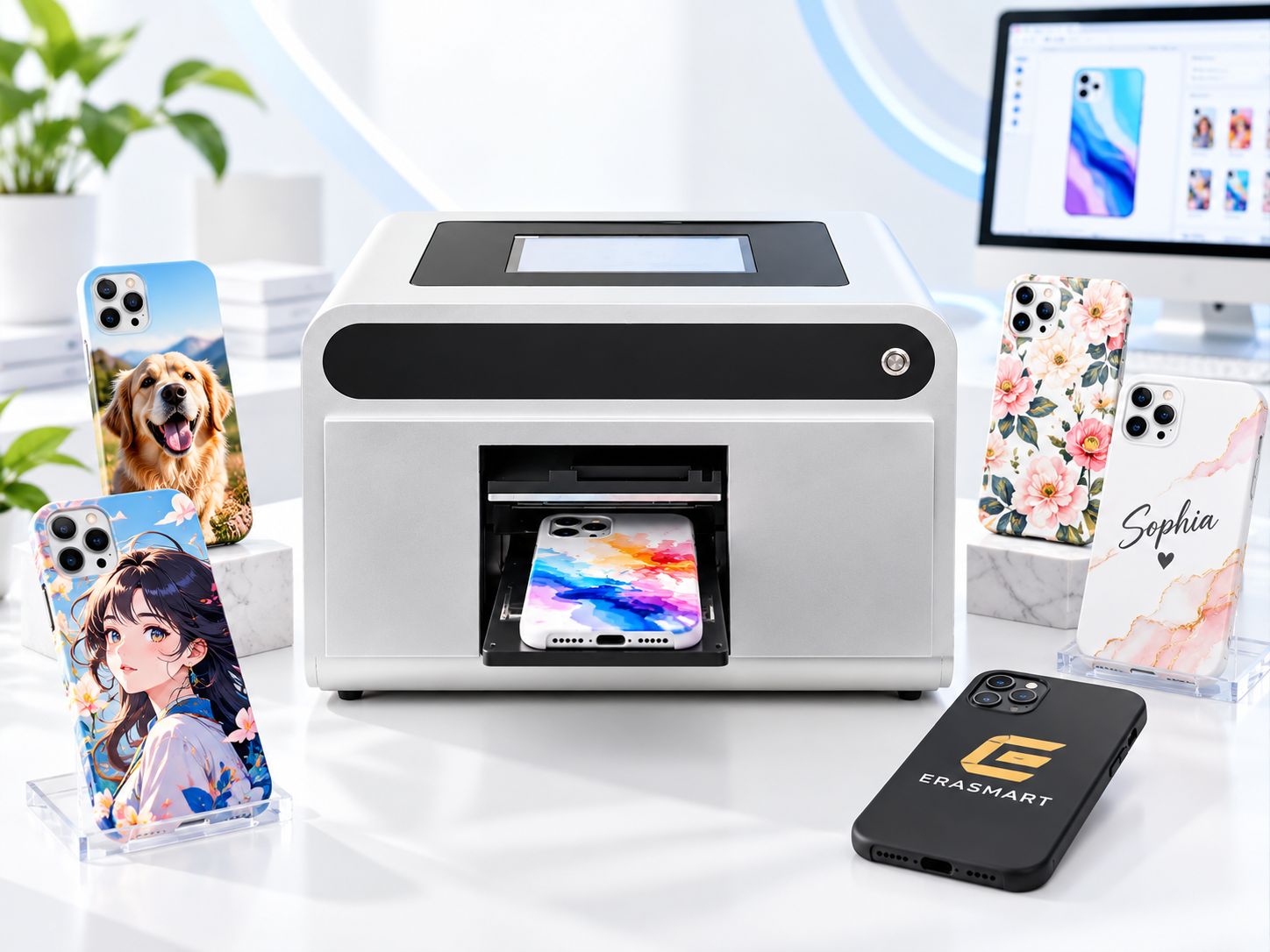
However, producing a professional phone case involves more than placing a blank inside a printer.
The material must be suitable, the artwork needs to fit the correct phone model, the case must be positioned securely, and the finished print must have adequate adhesion for its intended use.
Основной рабочий процесс:
Choose a phone case → Prepare artwork → Clean the surface → Position the case → Configure white and CMYK → UV print → Inspect → Test adhesion
This guide explains each step and shows how an EraSmart A5 UV Phone Case Printer can support a personalized phone case printing business.
Quick Answer: How Do You Print Custom Phone Cases?
To print a custom phone case with a UV printer:
- Select a compatible blank phone case.
- Prepare the design using the correct phone model template.
- Clean and dry the printable surface.
- Place the case securely in the printing area or positioning jig.
- Import the artwork into the printing software.
- Configure CMYK and white ink where required.
- Confirm positioning and print height.
- Run a nozzle check and print a sample.
- Allow the UV system to cure the ink during printing.
- Inspect the finished case and test adhesion.
- Save the approved settings for repeat production.
A suitable UV printer can print directly onto compatible rigid and some prepared flexible phone cases.
Но not every phone case material or coating will provide the same adhesionПолем
Always test the actual blank before offering it for sale.
What Equipment Do You Need to Print Phone Cases?
A phone case printing setup requires the printer, compatible consumables and a reliable positioning process.
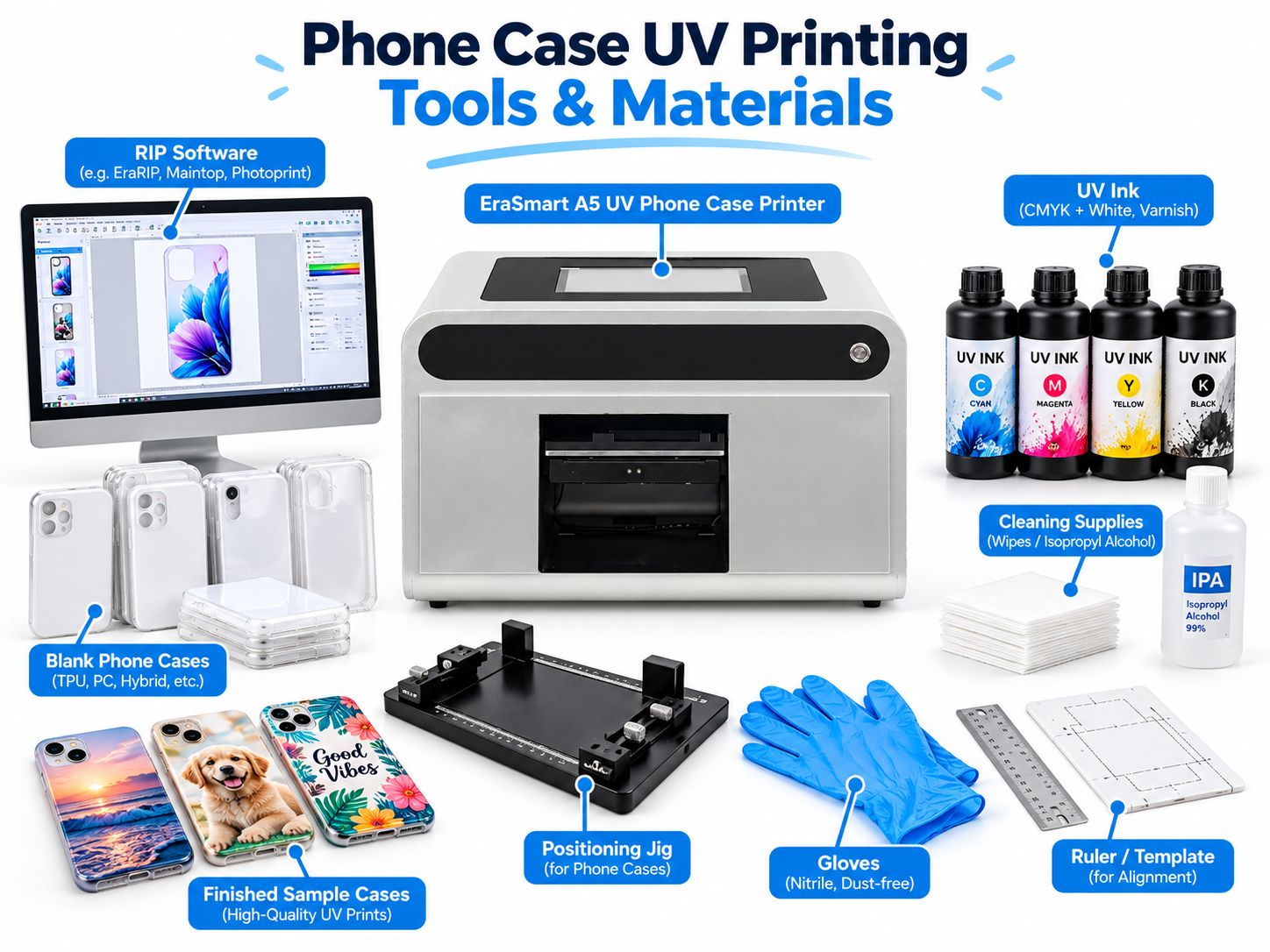
| Оборудование | Цель |
|---|---|
| УФ-принтер | Prints directly onto compatible phone cases |
| УФ-чернила | Creates the printed artwork |
| Белые УФ-чернила | Provides opacity on dark or transparent cases |
| Printing Software / RIP | Controls design position, color and ink output |
| Blank Phone Cases | Products to customize |
| Positioning Jig | Holds cases in repeatable positions |
| Чистящие средства | Removes dust, fingerprints and surface contamination |
| Design Templates | Matches artwork to specific phone models |
| Inspection Tools | Helps check positioning and print quality |
UV Phone Case Printer
The printer is the center of the workflow.
For stores focused primarily on phone cases, a dedicated compact machine can simplify production.
В EraSmart A5 UV Phone Case Printer with Cloud Design & Printing System is designed for personalized phone case printing and compact custom products.
Its official configuration includes:
- Одна печатающая головка XP600
- Конфигурация чернил CMYK + WW
- A5 printing format
- Разрешение до 1440 точек на дюйм
- 0–50 mm supported printing height
- Embedded 10.1-inch Windows computer
- Local file printing
- Optional cloud-connected design and order workflow
- Automatic printhead cleaning
The cloud workflow allows customers to prepare designs online and send approved print tasks to the store-side system.
This can be useful for phone case shops, personalization counters and on-demand businesses.
Compatible UV Ink
Use the UV ink system specified for your machine.
The EraSmart A5 phone case model uses CMYK + WWПолем
Its standard listed specification does not include a dedicated varnish channel. Varnish effects discussed in general UV printing guides should therefore only be considered on a printer configuration that actually supports them.
Blank Phone Cases
Choose blanks that match the customer’s exact phone model and have an appropriate printable surface.
Positioning Jig
A jig prevents the case from shifting and helps keep designs aligned with:
- Camera openings
- Case edges
- Кнопки
- Cutouts
- Artwork margins
Чистящие средства
Use lint-free cleaning materials and a cleaner approved for the particular case surface.
Not every plastic or coating tolerates the same solvent.
Which Phone Case Materials Can Be UV Printed?
Choosing the right phone case material is one of the most important steps.
Phone cases may look similar but be manufactured from different polymers, surface coatings and material combinations.
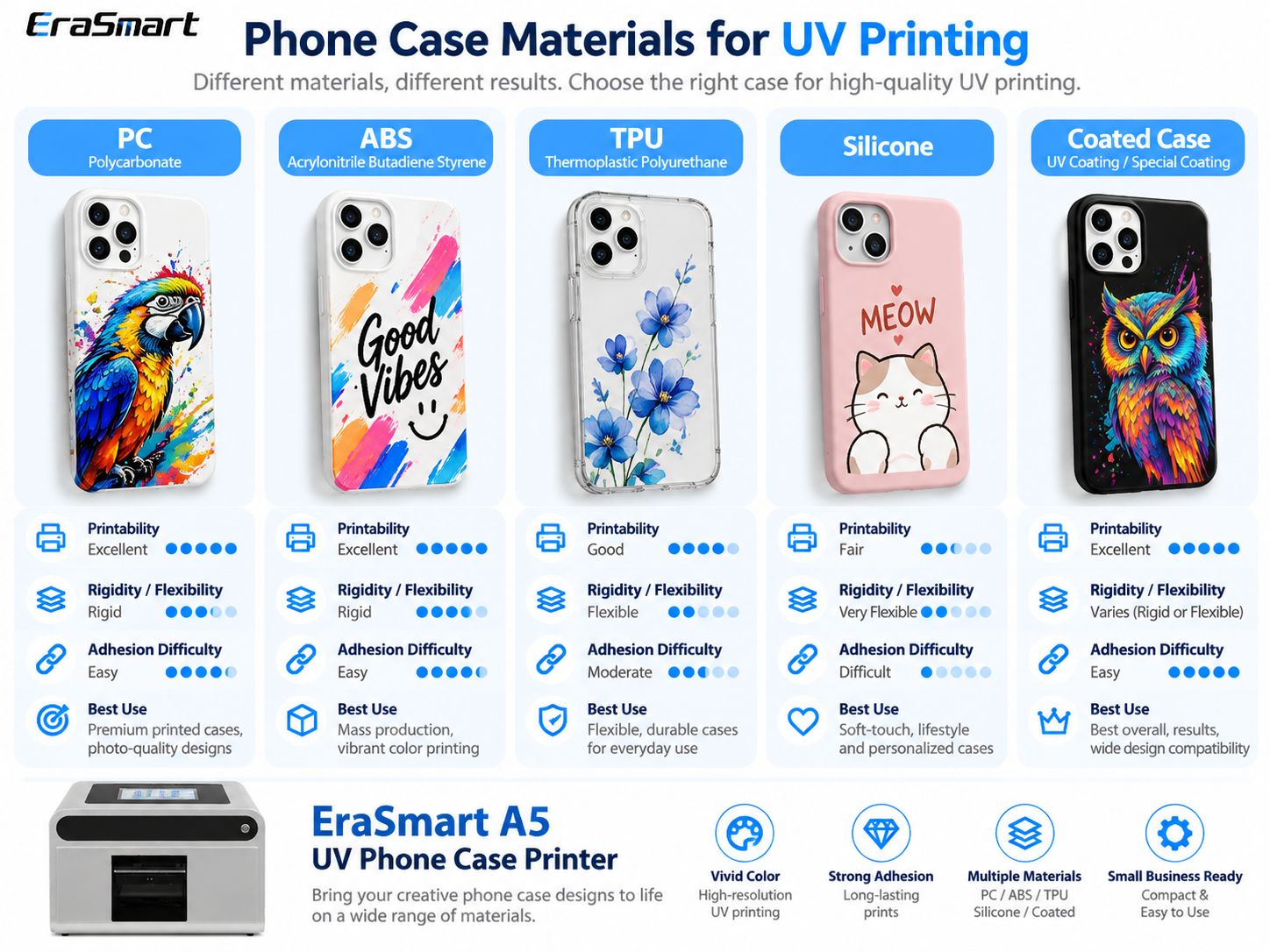
| Материал | UV Printing Consideration | Основной риск |
|---|---|---|
| Polycarbonate (PC) | Often suitable for evaluation | Coating and surface contamination |
| АБС | Often workable with compatible ink | Mold-release residue and coating |
| ТПУ | Possible on suitable products | Bending and ink-film cracking |
| Силикон | Difficult without a specialized validated process | Low surface energy and high flexibility |
| UV-printable coated case | Often a practical choice | Actual coating compatibility |
| Hybrid PC + TPU | Depends on which area is printed | Different behavior across materials |
Polycarbonate (PC)
Polycarbonate is commonly used for rigid phone cases and protective shells.
It is a practical material to evaluate for UV customization.
Advantages can include:
- Rigid printable backing
- Stable positioning
- Suitable flat surface areas
- Good detail reproduction with a compatible ink system
However, many cases have additional coatings.
Always test the exact product.
АБС
ABS is often used in rigid consumer products and protective housings.
It can be suitable for UV printing when the surface is compatible.
Before printing, check for:
- Manufacturing residue
- Поверхностные покрытия
- Отпечатки пальцев
- Mold-release agents
- Incompatible finishes
ТПУ
TPU is widely used for flexible phone cases.
EraSmart’s A5 UV Phone Case Printer includes suitable TPU among the materials that can be evaluated for printing.
However, TPU introduces an important challenge:
Flexibility.
A print may look excellent while the case lies flat, but repeated bending can stress the cured ink layer.
For TPU cases, test:
- Адгезия
- Bending
- сгибание
- Подъем края
- Normal handling
Do not assume that successful initial printing guarantees long-term resistance to repeated stretching.
Силикон
Silicone phone cases can be particularly challenging for conventional UV printing.
Their low surface energy and flexibility can make reliable adhesion difficult.
Do not treat ordinary silicone cases as automatically compatible with standard UV ink.
Use a specially validated ink, coating or surface-treatment system where applicable, and test before production.
Coated Phone Cases
A purpose-made UV-printable case can simplify production.
The printable coating may provide a more consistent surface, but that compatibility still needs to be verified with your ink system.
For a deeper explanation of different polymers and adhesion, read our УФ-печать на пластиковой направляющейПолем
Step 1: Choose the Right Blank Phone Case
Before preparing artwork, identify the exact phone model.
Different models may have different:
- Case dimensions
- Camera opening positions
- Button arrangements
- Back-panel shapes
- Raised camera protection
- Surface curvature
A design prepared for one phone model may not align correctly with another.
Check the Printable Area
Do not assume the entire back of the case is printable.
Искать:
- Raised camera rims
- Curved edges
- Decorative ridges
- Recessed sections
- Uneven coatings
For straightforward flatbed production, prioritize cases with a sufficiently flat, accessible back panel.
Confirm Material Compatibility
Start with a small quantity of approved blanks.
Do not buy a large batch solely because the supplier describes a case as “plastic” or “UV compatible.”
Step 2: Prepare the Phone Case Artwork
Artwork preparation directly affects print quality and positioning.
Use the Correct Template
The artwork template should match the exact phone model.
It should include:
- Case outline
- Camera opening
- Printable area
- Safe margins
- Alignment references
Do not position important graphics too close to cutouts or curved edges.
Prepare Artwork at Final Size
For close-view raster artwork, approximately 300 DPI at the final printed size is a practical starting point.
For logos, text and line graphics, vector artwork is preferable.
Avoid enlarging low-resolution images beyond their useful dimensions.
Keep Important Details Inside Safe Margins
Names, faces, logos and QR codes should not cross:
- Camera openings
- Case edges
- Raised surfaces
- Areas that cannot be reached reliably by the printer
Prepare the White Layer
If printing on a black or transparent case, determine whether the artwork requires a white underbase.
A white image in the design file does not automatically mean the printer will output physical white ink.
The white channel must be configured appropriately.
For a complete explanation, see our White Ink Printing GuideПолем
Step 3: Clean and Prepare the Phone Case
UV ink adhesion depends partly on the actual condition of the surface.
Перед печатью:
- Inspect the case for damage.
- Remove visible dust.
- Remove fingerprints and oil with a compatible cleaner.
- Allow the surface to dry completely.
- Avoid touching the printable area afterward.
Do You Need Primer?
Иногда.
Требования к грунтовке зависят от:
- Материал корпуса
- Покрытие поверхности
- УФ -чернила
- Required adhesion
- Intended use
A compatible printable coating or primer may help when direct printing does not provide adequate adhesion.
But primer is not automatically necessary for every phone case.
Правильный подход:
Clean → Print Sample → Test Adhesion → Evaluate Primer If Needed → Retest
Do not use an arbitrary solvent or surface treatment on an unfamiliar plastic case.
Some cleaning chemicals can damage the coating or cause plastic surfaces to haze or crack.
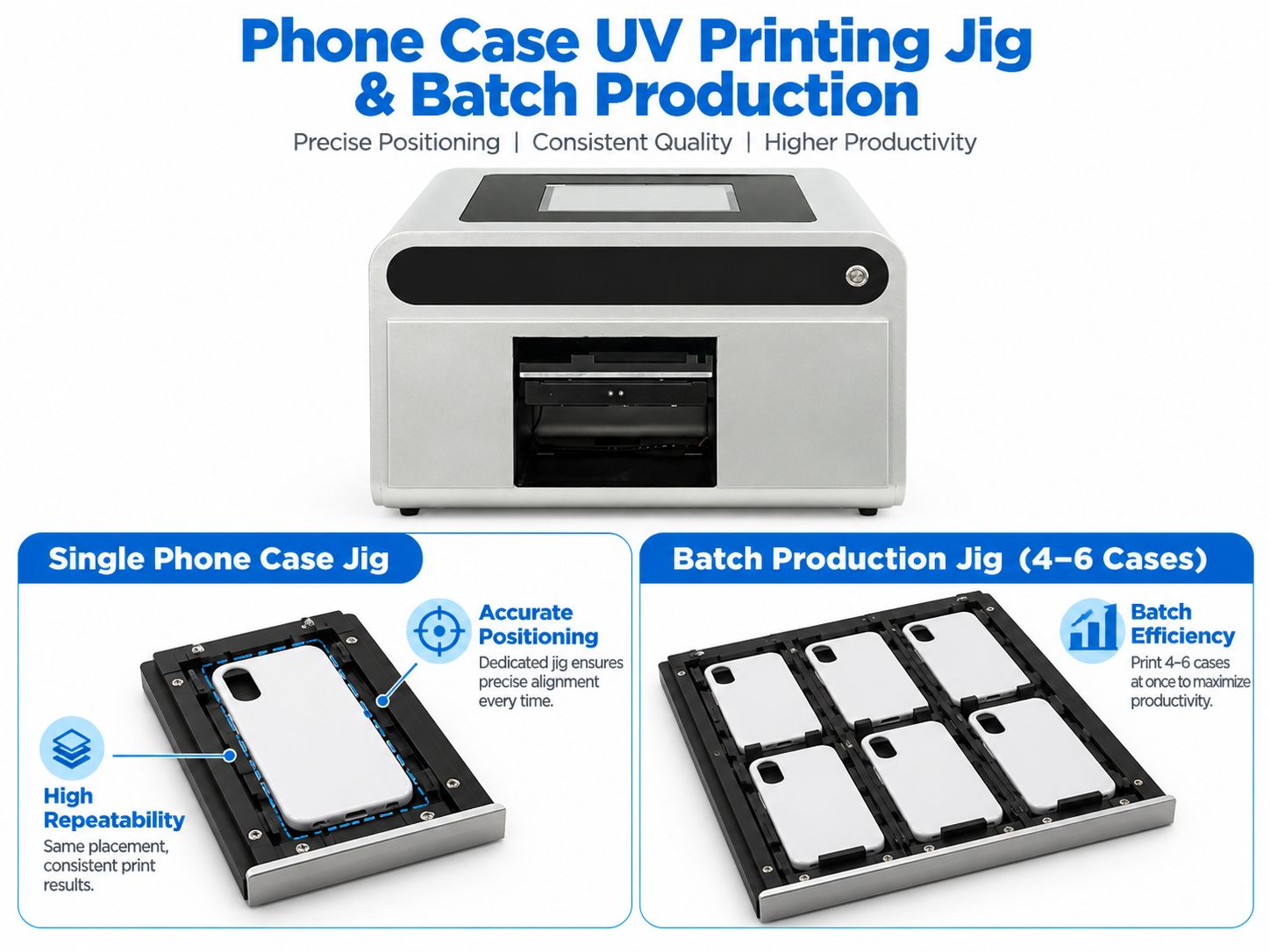
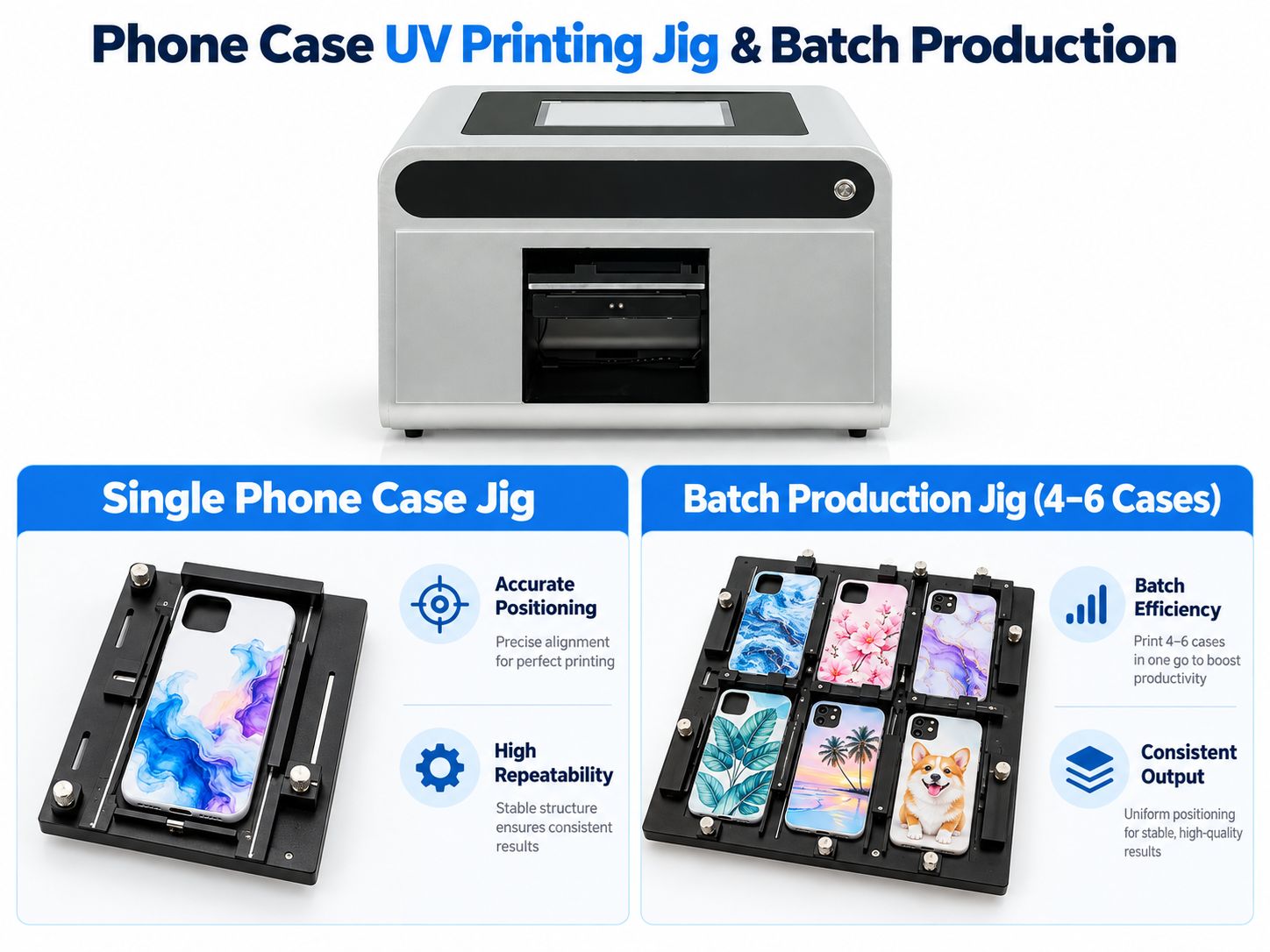
Step 4: Use a Phone Case Printing Jig
Positioning is essential for accurate and repeatable production.
A jig is a fixture that holds the phone case in a known position.
It may use:
- Edge stops
- Adjustable guides
- Model-specific cutouts
- Clamps
- Positioning references
Why Use a Jig?
Without a jig, small positioning differences can cause:
- Misaligned designs
- Images too close to camera openings
- Неправильное размещение
- Inconsistent repeat orders
- Wasted cases
With a suitable jig, the operator can place the case in a more repeatable position.
Single-Case Printing
Это особенно полезно для:
- Walk-in customers
- Персонализированные подарки
- Single-piece orders
- Small retail stores
- Design samples
Multi-Case Printing
A larger compatible UV flatbed and an appropriately designed jig may allow several cases to be positioned in one production layout.
However, the number of cases depends on:
- Actual print area
- Case dimensions
- Spacing
- Fixture design
- Printer clearance
The multi-case jig illustration is a workflow example, not a verified 4–6-case-per-cycle specification for the EraSmart A5 printer.
For an A5 phone case printer, follow the machine’s actual working area and approved fixture configuration.
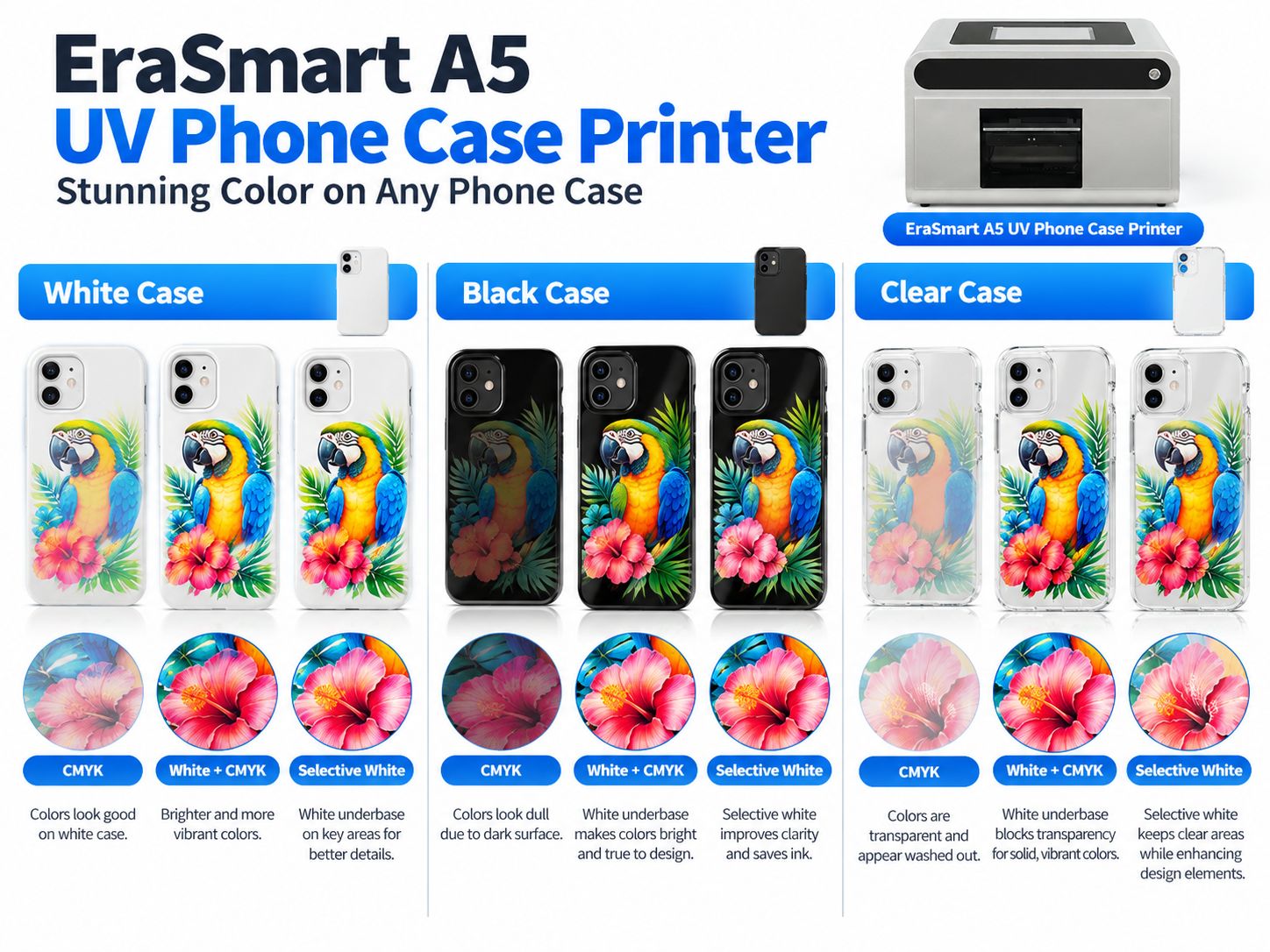
Step 5: Configure CMYK and White Ink
Белые чернила особенно важны при печати на черных, темных или прозрачных корпусах телефонов.
Белые чехлы для телефонов
Белый корпус уже обеспечивает нейтральный фон.
Для многих дизайнов:
Белый корпус → CMYK
может быть достаточно.
Полноценное белое основание не является обязательным автоматически.
Черные чехлы для телефонов
В черных футлярах прозрачные триадные цвета могут выглядеть тусклыми или почти невидимыми.
Типичное решение:
Черный корпус → Белое нижнее основание → CMYK
Белый слой помогает обеспечить:
- Более сильная непрозрачность
- Более яркие цвета
- Лучший контраст
- Более предсказуемый внешний вид логотипа
Прозрачные чехлы для телефонов
Прозрачные чехлы предлагают больше творческих возможностей.
Вы можете использовать:
только CMYK
для полупрозрачного вида.
Белый + CMYK
для большей непрозрачности.
Выборочный белый + CMYK
чтобы сохранить некоторые области прозрачными, но при этом сделать основной рисунок более заметным.
Do Not Use More White Ink Than Necessary
Excessive white coverage is not automatically better.
It may increase ink usage, production time and layer thickness.
Use settings that have been tested for the specific case material and artwork.
Step 6: Position the Artwork and Set Printing Height
After preparing the phone case and artwork, configure the job in the printer software.
Confirm Orientation
Check that:
- The design faces the correct direction.
- The camera cutout matches the template.
- Text is not accidentally mirrored.
- The printed area fits the physical case.
Set the Correct Print Height
Printhead clearance must match the actual product height and machine configuration.
A phone case may have:
- Raised edges
- Camera protection
- Decorative surface features
- Different thicknesses
Incorrect clearance can cause:
- Размытая печать
- Плохое расположение точек
- Ошибки регистрации
- Столкновение печатающих головок
Никогда не копируйте одно универсальное значение зазора для каждого случая.
Следуйте инструкциям по эксплуатации вашей машины.
Запустите проверку дюз
Прежде чем печатать продукт клиента, убедитесь, что каналы подачи чернил работают правильно.
Обратите особое внимание на белые чернила, когда они необходимы для дизайна.
Шаг 7. Распечатайте чехол для телефона
Как только материал, рисунок и оборудование будут готовы, начните с одного утвержденного образца.
Полный рабочий процесс:
Работа → Подготовка поверхности → Размещение → Настройка RIP → УФ-печать → Проверка
Во время печати
УФ-печатающая головка наносит чернила на корпус телефона.
УФ-светодиодный свет отверждает чернила в процессе печати.
В отличие от текстильного DTF, этот рабочий процесс не требует:
- ПИСЬ ПЕРВАЯ ПИСЬМА
- Клей-расплав порошковый
- Печь для отверждения текстиля
- Термопресс для одежды
Проверьте первый образец
Осмотрите:
- Цвет
- Sharpness
- Белая непрозрачность
- Design alignment
- Camera opening clearance
- Края
- Состояние поверхности
The print should also be checked for adhesion before being approved for customer production.
A visually attractive print is not automatically a durable print.
Step 8: Inspect the Finished Phone Case
Quality control is important because a phone case is handled frequently.
Check Printing Position
Confirm that the graphic is centered or otherwise correctly aligned.
Check the Camera Opening
The artwork should not overlap functional camera or sensor openings.
Check Color
Compare the final print with the approved sample.
For professional color management, read Как печатать правильные цветаПолем
Check White Ink Registration
Watch for visible white outlines extending beyond the CMYK artwork.
Проверьте адгезию
Perform suitable internal adhesion tests according to the case material and intended use.
Check Flexibility
Для ТПУ и других гибких изделий проверьте репрезентативные изгибы и манипуляции.
Проверьте повреждение поверхности
Убедитесь, что сам корпус не деформирован, не поврежден и не подвергся воздействию условий чистки или сушки.
Шаг 9: Проверьте адгезию перед продажей
Чехлы для телефонов часто бывают:
- Взял
- Положите в карманы
- Втирается в поверхность
- Удален с телефонов
- Работать масляными или влажными пальцами
По этой причине испытание на адгезию должно быть частью утверждения продукта.
В зависимости от предполагаемого использования учитывайте:
- Базовая проверка на предмет трения
- Сравнительное тестирование на основе ленты
- Оценка царапин и истирания
- Гибкое тестирование для гибких случаев
- Тестирование на устойчивость к чистке
Если клиент указывает формальный стандарт тестирования, следуйте полному стандарту, а не рассматривайте простые испытания в мастерской как сертификацию.
Не обещайте универсальную стойкость к царапинам, химическую стойкость или постоянную долговечность, основываясь только на одном успешном образце.
Как более эффективно печатать несколько чехлов для телефонов
После проверки сочетания конструкции и материалов сосредоточьтесь на повторяемости.
Стандартизируйте заготовки для гильз
Старайтесь использовать постоянного поставщика и документально подтвержденный материал корпуса.
Сохранение шаблонов моделей телефонов
Организуйте шаблоны по:
- Марка
- Модель
- Вырез для камеры
- Размеры для печати
Сохранение утвержденных настроек печати
Ведите записи:
- Субстрат
- Размер произведения искусства
- Режим белых чернил
- Позиционирование
- Настройки печати
- Тестирование на адгезию
Используйте повторяющиеся приспособления
Для более крупных рабочих процессов, совместимых с планшетными УФ-излучателями, многопозиционные приспособления могут сократить время ручного позиционирования.
Фактическое количество коробок, напечатанных за цикл, должно рассчитываться на основе полезной площади машины и размеров коробок.
Отделение утверждения дизайна от производства
Do not begin printing until the customer has approved:
- Name spelling
- Photo crop
- Цвета
- Layout
- Phone model
This helps reduce avoidable reprints.
Local Printing vs Cloud Design-to-Print
One interesting feature of the EraSmart A5 UV Phone Case Printer is its cloud-connected design workflow.
For small stores, handling customer artwork can take nearly as much time as the printing itself.
Traditional Local Workflow
A customer:
- Sends an image.
- Confirms the phone model.
- Requests design changes.
- Approves the final artwork.
The operator then imports the approved file and prepares the job.
EraSmart Cloud Workflow
The A5 cloud system can support a different workflow:
- Customer opens the online design interface.
- Customer selects a phone model/template.
- Customer uploads a photo or adds text.
- Customer previews the design.
- Customer submits the approved task.
- Store-side software receives the task.
- Operator prepares the physical case.
- Printer completes the approved job.
This can help reduce repeated file handling and manual order sorting.
The A5 also supports local file workflows through its integrated Windows computer.
See the complete EraSmart A5 UV Phone Case Printer with Cloud Design & Printing SystemПолем
UV Printing vs UV DTF vs Sublimation for Phone Cases
Not every phone case printing method uses the same workflow.
| Особенность | Прямая УФ-печать | УФ ДТФ | Сублимация |
|---|---|---|---|
| Метод печати | Directly on case | Print transfer, then apply | Heat-transfer process |
| Основное оборудование | УФ-принтер | УФ-принтер DTF | Sublimation printer and suitable press |
| Белые чернила | Доступно на поддерживаемых УФ-принтерах. | Общий | Not part of conventional dye sublimation |
| Case requirements | Compatible printable surface | Compatible adhesive surface | Sublimation-coated blank |
| Тепловой пресс | Не обязательно | Not normally required | Необходимый |
| Основное преимущество | Direct digital customization | Decorate suitable finished surfaces | Established workflow for coated blanks |
| Основное ограничение | Surface geometry and adhesion | Адгезия и долговечность переноса | Покрытие и тепловая совместимость |
Выбирайте прямую УФ-печать, когда
Вы хотите печатать непосредственно на подходящих заготовках чехлов для телефонов.
Выбирайте UV DTF, когда
Вы хотите нанести отдельно созданную графику на совместимые продукты с твердой поверхностью.
Выбирайте сублимацию, когда
Вы уже работаете с подходящими заготовками корпусов с сублимационным покрытием и проверенным процессом теплопередачи.
Для получения дополнительной информации изучите УФ-DTF-принтер EraSmart диапазон.
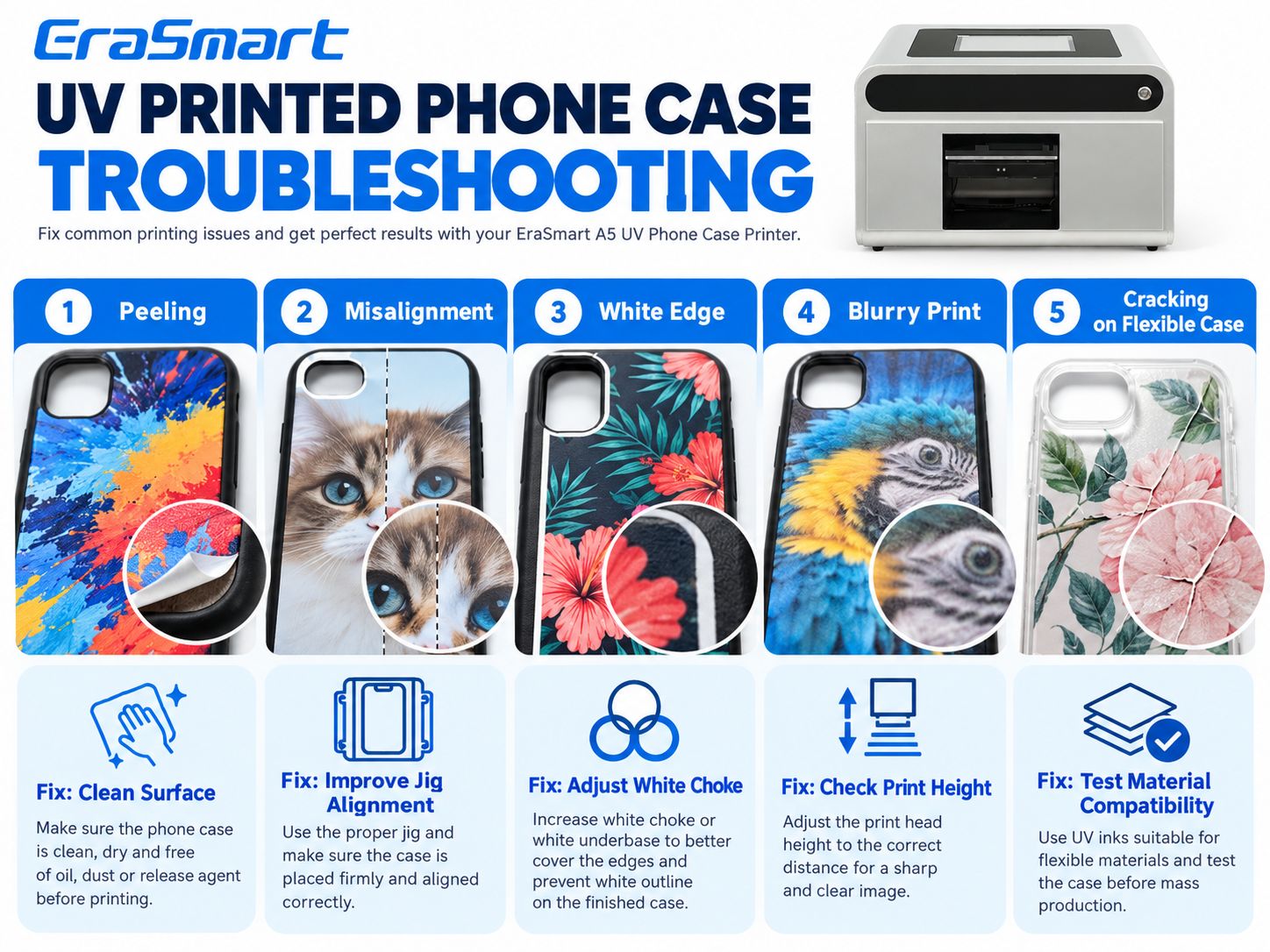
Распространенные проблемы и способы устранения УФ-печати на чехлах для телефонов
Устранение неисправности следует начинать с видимого симптома.
| Проблема | Возможная причина | Что проверить |
|---|---|---|
| Отслаивание чернил | Загрязнение или несовместимость | Материал, очистка, адгезия |
| Неровное изображение | Неправильный шаблон или перемещение корпуса | Шаблон и приспособление |
| Видимая белая граница | Проблема с регистрацией белого слоя | Белая маска RIP и калибровка |
| Размытая печать | Проблема с зазором или форсункой | Проверка высоты печати и дюз |
| Трещина на гибком корпусе | Красочная пленка не терпит сгибания. | Испытания материалов и гибкости |
| Тусклые цвета | Слабое белое основание или цветовая гамма | Белая непрозрачность и RIP |
| Не хватает мелких деталей | Проблема с изображением или соплом | Разрешение и состояние сопла |
Проблема 1: чернила отслаиваются от корпуса
Проверять:
- Загрязнение поверхности
- Покрытие корпуса
- Совместимость материалов
- Метод очистки
- Предварительная обработка
- Настройки УФ-отверждения
Не думайте, что дополнительное УФ-облучение само по себе устранит плохую адгезию подложки.
Проблема 2: дизайн смещен
Возможные причины:
- Неправильный шаблон модели телефона
- Движение корпуса
- Выравнивание приспособления
- Неправильные программные координаты
Исправьте процесс позиционирования, прежде чем неоднократно менять изображение.
Проблема 3: вокруг дизайна появляется белая рамка
Это может указывать на то, что белая нижняя основа больше изображения CMYK или что слои неправильно совмещены.
Проверять:
- Размер белой маски
- Настройки дросселирования/распространения RIP
- Выравнивание печатающей головки
- Расположение произведения искусства
Use a calibrated test to determine the correct setting.
Problem 4: The Print Looks Blurry
Проверять:
- Зазор печатающей головки
- Состояние сопла
- Artwork quality
- Case stability
- Режим печати
Problem 5: The Print Cracks When the Case Bends
This is particularly important for TPU.
Возможные причины:
- Excessive bending
- Ink-film flexibility mismatch
- Плохая адгезия
- Incompatible surface or coating
A different printable blank or validated flexible ink system may be necessary.
Problem 6: Colors Look Dull on Black Cases
The white underbase may be missing or insufficient.
Check the white channel and RIP configuration.
For additional troubleshooting, see the UV Printer Troubleshooting GuideПолем
Which EraSmart UV Printer Should You Choose for Phone Cases?
EraSmart offers different UV printer configurations for different business models.
EraSmart A5 UV Phone Case Printer
Лучше всего для: Dedicated phone case personalization, store-based custom orders and compact products.
Ключевые особенности включают в себя:
| Спецификация | EraSmart A5 UV Phone Case Printer |
|---|---|
| печатающая головка | Одиночный XP600 |
| Printing Format | A5 |
| Высота печати | 0–50 мм |
| Цветовая конфигурация | CMYK + WW |
| Maximum Resolution | До 1440 т/д |
| Встроенный компьютер | 10.1-inch Windows |
| Memory / Storage | 8GB RAM / 256GB |
| Форматы файлов | TIFF, JPG, PNG, PDF |
| Printing Software | РЕЙН |
| Связь | Local / Cloud |
| Автоматическая очистка | да |
| Recommended Operating Temperature | 15–30°С |
| Рекомендуемая относительная влажность | 40–60% |
Actual output time varies according to artwork, print mode, material and settings.
Explore EraSmart A5 UV Phone Case Printer
УФ-принтер EraSmart A4
Лучше всего для: Businesses that want to print phone cases along with other small customized products.
Типичные области применения включают в себя:
- Чехлы для телефонов
- Acrylic gifts
- Small signage
- Декоративные предметы
- Рекламная продукция
УФ-принтер EraSmart A3
Лучше всего для: Studios that want a larger work area and greater product flexibility.
Потенциальные приложения включают в себя:
- Чехлы для телефонов
- Акриловые панели
- Plastic accessories
- Металлические пластины
- Рекламная продукция
- Small signage
For a buying-focused comparison, see the EraSmart Phone Case Printer GuideПолем
Can You Start a Phone Case Printing Business from Home?
Potentially, yes—provided you have a suitable workspace, equipment, ventilation, safe UV ink handling and a reliable production process.
A small operation can begin with:
- One printer
- Ограниченный ассортимент протестированных заготовок гильз
- Коллекция оригинальных дизайнов.
- Небольшой выбор моделей телефонов.
- Последовательная процедура очистки и печати
- Базовая упаковка и управление заказами
Обычно легче обеспечить стабильное качество, используя меньший ассортимент проверенных продуктов, прежде чем расширять его, используя множество материалов и моделей телефонов.
Популярные категории чехлов для телефонов на заказ
Возможные направления продукции:
- Портреты домашних животных
- Семейные фотографии
- Свадебные и парные дизайны
- Персонализация имени
- Логотипы малого бизнеса
- Товары для мероприятий
- Сотрудничество художников
- Оригинальные коллекции иллюстраций
Не печатайте символы, защищенные авторским правом, логотипы третьих сторон или изображения, предоставленные клиентом, без необходимых разрешений.
Как сократить отходы при производстве чехлов для телефонов на заказ
Потери могут возникать не только в результате неудачной печати.
Общие причины включают в себя:
- Неправильная модель телефона
- Неправильные размеры произведения искусства
- Ошибки одобрения клиентов
- Плохая очистка поверхности.
- Неправильное позиционирование
- Слабые белые чернила
- Неудачная адгезия
- Дефектные заготовки корпусов
Практическая стратегия сокращения отходов заключается в следующем:
- Подтвердите модель телефона перед дизайном.
- Утвердите иллюстрацию клиента.
- Используйте проверенного поставщика заготовок.
- Подготовьте дело, используя стандартную процедуру.
- Проверьте принтер перед началом производства.
- Распечатайте один образец для новых материалов.
- Запишите успешные настройки.
- Проверяйте готовую продукцию перед упаковкой.
Это особенно важно при производстве множества небольших индивидуальных заказов, а не одной большой идентичной партии.
Сколько стоит распечатать чехол для телефона на заказ?
Стоимость зависит не только от УФ-чернил.
Реалистичный расчет для каждого случая должен включать:
Пустой ящик + УФ-чернила + Труд + Упаковка + Распределение средств на техническое обслуживание + Ожидаемые отходы + Прочие накладные расходы
For a cloud-connected or multi-store workflow, software and service costs may also need to be included.
Do not estimate profitability only from the amount of ink deposited on one case.
The most useful approach is to record real material usage, job times and reprint rates during a small production trial.
Final Answer: How Do You Print Custom Phone Cases Professionally?
Professional custom phone case UV printing is a repeatable production workflow—not simply printing a photograph on plastic.
The most important steps are:
1. Choose the right blank.
The material, coating and surface geometry must be compatible.
2. Prepare the correct design.
Use accurate phone model templates and high-quality artwork.
3. Clean the surface.
Remove contamination before printing.
4. Control positioning.
Use appropriate case fixtures and accurate layout settings.
5. Configure white ink correctly.
White ink is particularly useful for dark and transparent cases.
6. Confirm print height and output.
Protect the printhead and check the nozzle condition.
7. Validate the final result.
Inspect print quality, adhesion and flexibility where applicable.
For small stores focused on personalized phone cases, the EraSmart A5 UV Phone Case Printer offers a dedicated CMYK + WW workflow with embedded computer operation and optional cloud-based customer design and task management.
For businesses seeking a broader range of custom products, explore the complete УФ-принтер EraSmart collection.
Часто задаваемые вопросы
Can you print directly onto a phone case?
Yes. A compatible UV printer can print directly onto suitable phone case blanks. Surface material and coating compatibility should be tested before commercial production.
What type of printer is used for custom phone cases?
A UV flatbed printer or dedicated UV phone case printer is a common choice for direct customization.
Can you print phone cases at home?
Yes, with an appropriate workspace, safe operating procedures, compatible blanks and a suitable UV printer.
Can UV printers print on TPU phone cases?
Some suitable TPU cases can be printed, but adhesion and bending performance must be tested.
Can you UV print silicone phone cases?
Conventional UV printing on untreated silicone is challenging. Use a specialized validated process rather than assuming compatibility.
Can UV printers print on clear phone cases?
Yes, depending on the material. White or selective white ink can help control opacity and preserve transparent areas.
Do you need white ink for black phone cases?
Usually, white ink is helpful when you want bright, opaque CMYK artwork on a black surface.
Can you print a photo on a phone case?
Yes. Use a suitable high-resolution image and an accurate phone model template.
Do you need a heat press for UV phone case printing?
No. Direct UV printing uses UV curing rather than textile heat-transfer pressing.
How do you prevent UV ink from peeling off a phone case?
Choose a compatible surface, clean it correctly, use validated pretreatment if necessary, follow suitable curing settings and test adhesion before production.
What is a phone case printing jig?
A jig is a positioning fixture that holds the case in a repeatable location for accurate printing.
Can you print several phone cases at once?
Some UV flatbed workflows can accommodate multi-case jigs. The number depends on the actual printable area, case size and fixture configuration. It should not be assumed for every machine.
Can the EraSmart A5 Phone Case Printer print white ink?
Yes. The EraSmart A5 UV Phone Case Printer has an official CMYK + WW configuration.
Does the EraSmart A5 Phone Case Printer support varnish?
The standard A5 cloud-connected model is listed with CMYK + WW. A separate varnish channel is not included in that published configuration.
Can customers design phone cases online with EraSmart?
Yes. The A5 model supports an optional cloud-connected workflow in which customers can prepare designs online and submit tasks to the store.
Can a UV phone case printer be used for a small business?
Yes. It can support on-demand customization, personalized gifts, retail stores and e-commerce production, provided the complete production process is suitable for the expected order volume.
Start Your Custom Phone Case Printing Business with EraSmart
If you are planning to start or expand a phone case customization business, tell us:
- Your target phone models
- Phone case materials
- Expected daily order volume
- Whether you need local or cloud printing
- Whether you want single-piece customization or broader production
- Your country and business type
- Хотите ли вы также распечатать другие персонализированные продукты
Мы поможем вам сравнить EraSmart A5 UV Phone Case Printer, другой Решения для печати на чехлах для телефонов и полный Линейка УФ-принтеров EraSmartПолем
Может быть, вам тоже нравится
Copyright 2020 © Erasmart. | Карта сайта