Kích thước nhỏ nhà sản xuất máy in phun phẳng

How to Print on Golf Balls with a UV Printer | EraSmart
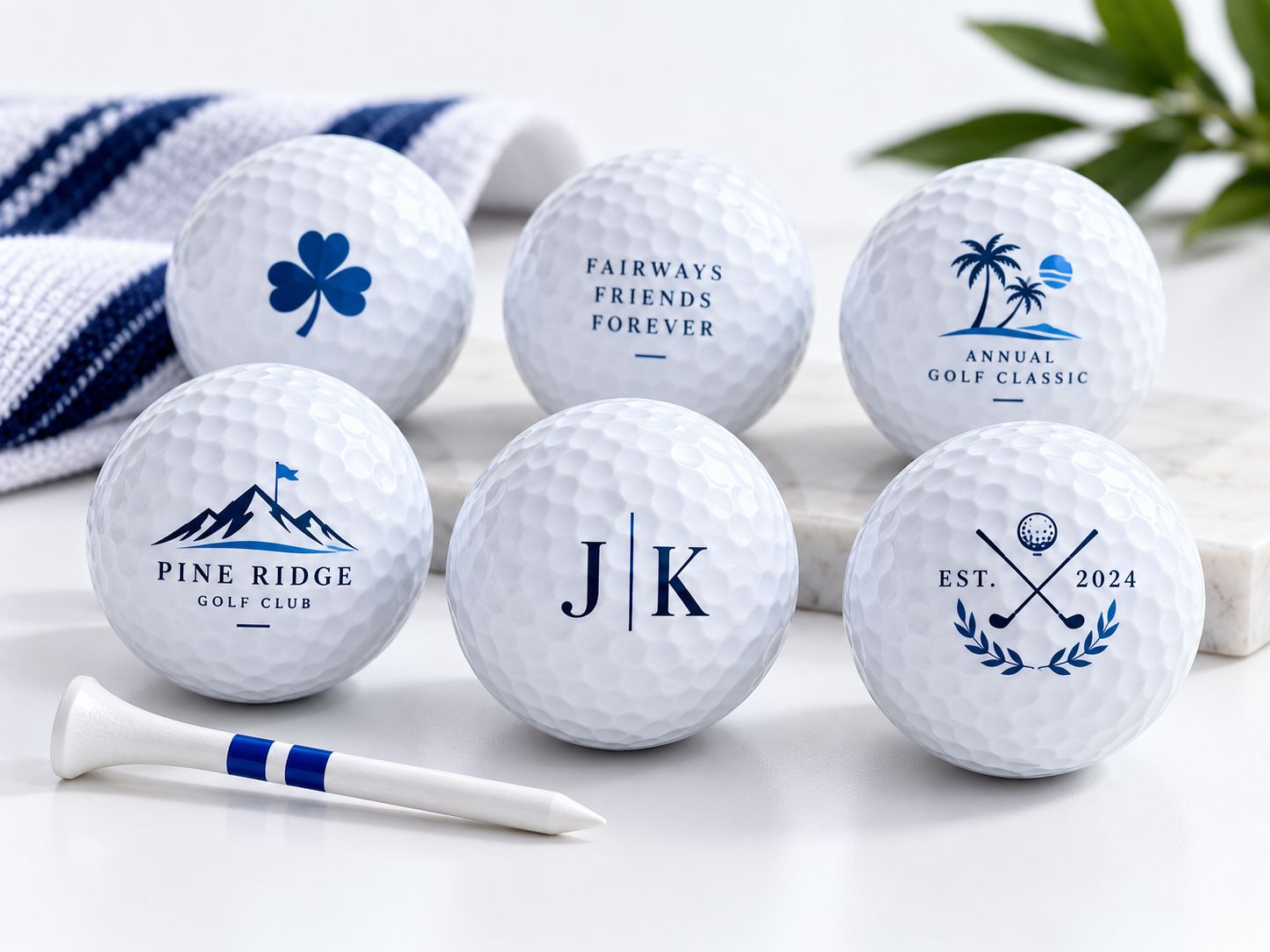
Custom golf ball printing turns an everyday sporting product into a personalized gift, branded promotional item, or commemorative collectible.
Businesses use printed golf balls for:
- Corporate promotional gifts
- Golf tournaments and charity events
- Golf club merchandise
- Personalized birthday and holiday gifts
- ủng hộ đám cưới
- Company logos and event branding
- Golf academy merchandise
- Limited-edition souvenir products
A company might want its logo printed on a small batch of golf balls. A golf club may need customized tournament gifts, while an online seller may offer personalized initials or names.
UV printing is one technology worth evaluating for this application because it can reproduce colorful graphics without preparing a conventional printing plate for each design.
Tuy nhiên, printing on golf balls is significantly more challenging than printing on a flat acrylic panel or phone case.
A golf ball has a spherical surface, hundreds of dimples, and an exterior finish designed for sporting performance.
These characteristics affect:
- Khoảng trống đầu in
- Ink droplet placement
- Logo dimensions
- Thiết kế lịch thi đấu
- Độ bám dính bề mặt
- Print registration
- Finished-print durability
A compatible UV printing system may be able to decorate a limited region near the top of a securely positioned golf ball, but the printing process must be validated for the exact ball, fixture, printer, and ink system.
This guide explains how golf ball UV printing works, what equipment is required, how to prepare the surface, and how to evaluate printing quality before commercial production.
Quick Answer: How Do You Print on Golf Balls?
A typical small-area direct UV golf ball printing workflow involves:
- Selecting a suitable golf ball.
- Inspecting its surface material and coating.
- Cleaning the intended printing area.
- Preparing a small logo or graphic.
- Securing the ball inside a compatible printing jig.
- Verifying its position, height, and printhead clearance.
- Configuring artwork and supported UV ink settings.
- Printing a test design.
- Inspecting image quality and ink adhesion.
- Performing durability testing before approving production.
The simplified workflow is:
Select Ball → Clean → Prepare Artwork → Position in Jig → Check Height → UV Print → Inspect → Test
The most important limitation is the curved surface.
A standard UV flatbed printer does not automatically support full-sphere or 360-degree golf ball printing.
The practical printing area, fixture design, and printhead movement must be evaluated with the actual machine.
Can You UV Print on Golf Balls?
Yes, golf balls can be decorated using compatible industrial printing processes, including certain specialized or validated UV printing setups.
However, this does not mean that every UV printer is suitable.
What Can Direct UV Printing Offer?
With a suitable setup, direct UV printing may offer:
- Digital logo customization
- Cá nhân hóa hàng loạt nhỏ
- Tác phẩm nghệ thuật đầy màu sắc
- Sản xuất ngắn hạn
- Repeatable designs using fixtures
- Reduced need for conventional plate preparation
These advantages make UV printing interesting for businesses that receive many different artwork requests.
What Are the Limitations?
Golf balls are not flat substrates.
As the printhead moves horizontally over the ball, the distance between the printhead and the surface changes.
The further the printing position moves away from the highest point of the sphere, the more difficult it becomes to maintain consistent droplet placement and image sharpness.
Therefore, a conventional flatbed setup may only be suitable for a limited upper printing region after testing.
Can You Print Around the Entire Golf Ball?
Not with an ordinary fixed-position flatbed workflow.
Full-surface or multi-position decoration requires specialized handling and validated equipment.
A fixture that holds the ball securely is not automatically a rotary printing system.
The ability to rotate a ball, synchronize rotation with printing, and maintain suitable printhead clearance is a separate machine capability.
Why Is Golf Ball UV Printing Difficult?
Four characteristics make golf balls a challenging substrate.

1. Spherical Curvature
A flat object presents a relatively consistent printing plane.
A golf ball presents a changing surface height.
This can affect:
- Ink droplet placement
- Độ sắc nét của cạnh
- Văn bản đẹp
- Sự đăng ký
- Printing consistency
As a result, the usable printing region must be established through physical testing.
2. Surface Dimples
Golf ball dimples are essential features of the product’s aerodynamic design.
But for printing, they create an uneven surface.
Ink must interact with both the raised areas and the recessed portions of the surface.
This makes it harder to achieve a perfectly uniform logo compared with printing on a smooth flat material.
Small text and fine lines may be particularly sensitive to the surface geometry.
3. Exterior Coatings
Golf balls may have specialized exterior finishes.
These can differ between manufacturers and product models.
A coating that performs well during normal sporting use may not automatically provide sufficient adhesion for a particular UV-curable ink.
Surface compatibility must be evaluated.
4. Limited Practical Printing Area
The complete visible half of a golf ball is not necessarily printable with a fixed flatbed printhead.
A smaller design positioned near the uppermost surface may be easier to reproduce accurately.
Large graphics extending toward the sides can become distorted or lose edge clarity.
The exact usable area depends on the printer, jig, ball geometry, and validated settings.
Which Golf Ball Materials Are Suitable for UV Printing?
Golf balls use different cover constructions and finishes.
Common cover-material families include:
- Ionomer-based covers, often associated with Surlyn-type materials
- Urethane-based covers
- Other engineered polymer formulations
- Exterior paints and clear coatings
Ionomer / Surlyn-Type Golf Ball Covers
Ionomer-based covers are used in many golf ball designs.
Their surface properties and any additional coatings can influence UV ink adhesion.
A successful print on one ionomer-covered ball does not guarantee the same result on a different ball model.
Urethane Golf Ball Covers
Urethane-covered golf balls are used in many performance-oriented products.
The finished surface may include coatings or treatments that affect print behavior.
Before production, confirm compatibility with the actual ball.
Coatings May Matter More Than the Cover Name
The material listed in a golf ball’s product description does not necessarily describe the outermost printable surface.
For UV printing, the final surface finish is often the immediate point of contact for the ink.
That is why sample testing is more reliable than selecting a ball based only on whether its cover is described as urethane or ionomer.
For a broader explanation of polymer compatibility, read the EraSmart UV Printing on Plastic Guide.
What Equipment Do You Need for Golf Ball UV Printing?
The exact setup depends on the selected printer and production method.
For a direct UV workflow, the basic equipment may include:
| Thiết bị | Mục đích |
|---|---|
| Compatible UV Printer | Produces the printed image |
| Golf Ball Positioning Jig | Prevents movement and controls alignment |
| Mực UV tương thích | Creates the graphic |
| Phần mềm RIP | Processes artwork and printing settings |
| Phần mềm thiết kế | Prepares logos, names, and illustrations |
| Dụng cụ vệ sinh | Removes surface contamination |
| Height Measurement Method | Helps establish safe printhead clearance |
| Test Golf Balls | Used for printing and durability evaluation |
| Công cụ kiểm tra | Helps check artwork quality and alignment |
Máy in UV
A compatible UV printer must provide sufficient physical clearance and appropriate control for the intended printing area.
However, maximum printable object height is only one requirement.
The actual application also depends on:
- Khoảng trống đầu in
- Fixture compatibility
- Object positioning
- Độ bám dính của mực
- Chế độ in
- Curing conditions
Đồ gá định vị
A golf ball cannot simply be placed loose on a printing platform.
A jig or fixture must prevent the ball from rolling or shifting during printing.
The fixture must also be compatible with the printer’s working area and moving components.
RIP and Artwork Software
The printing software must position the logo correctly within the validated printable region.
Artwork preparation should account for the limited available printing area and the ball’s curvature.
Step 1: Select and Prepare the Golf Ball
Begin with a small sample batch rather than immediately purchasing a large quantity of blanks.
Choose golf balls with consistent:
- Người mẫu
- Bề mặt hoàn thiện
- Exterior coating
- Màu sắc
- Dimensions
- Manufacturing condition
Avoid mixing multiple golf ball models during the first printing test because differences between surfaces can make it harder to identify the cause of a failed print.
Inspect the Surface
Hãy tìm:
- Vết xước
- Existing damage
- Dirt
- Dầu
- Residue
- khuyết tật lớp phủ
- Uneven finishes
Clean the Intended Printing Area
Use a cleaning process compatible with the actual ball surface.
Remove dust, fingerprints, and other contaminants, then allow the surface to dry completely.
Do not assume that strong solvents or aggressive abrasion are safe.
They may damage the cover or exterior coating.
Bạn có cần sơn lót không?
Possibly.
Some difficult surfaces may require a suitable primer or approved pretreatment.
However, a primer should not be selected without checking its compatibility with:
- Golf ball coating
- Mực UV
- Intended end use
- Quá trình đóng rắn
The correct approach is to compare untreated and appropriately treated samples.
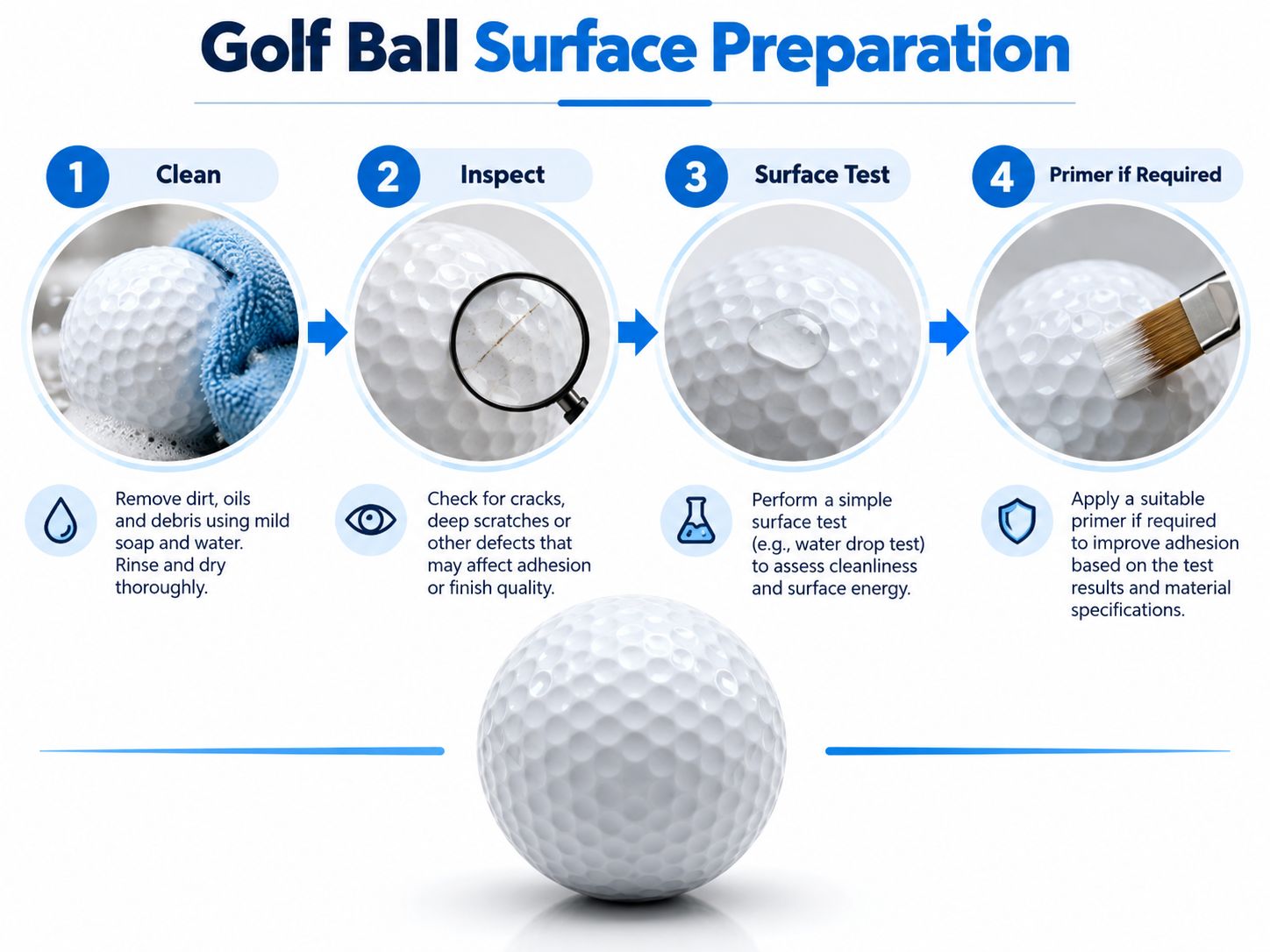
A useful preparation sequence is:
Clean → Inspect → Evaluate Surface Compatibility → Use Approved Pretreatment If Required
A simple water-droplet observation may provide preliminary information about wetting behavior, but it does not establish quantitative surface energy or prove UV ink adhesion.
Actual print and adhesion testing remain necessary.
Step 2: Secure the Ball with a Printing Jig
The positioning jig is one of the most important parts of the workflow.
Without a stable fixture, the ball may move during printing.
Even small movements can cause:
- Blurred artwork
- Misaligned logos
- Incorrect image position
- Lỗi đăng ký
- Wasted products

What Should a Golf Ball Jig Do?
A suitable fixture should:
- Hold the ball securely.
- Prevent unwanted rotation.
- Establish a repeatable printing position.
- Maintain a consistent reference height.
- Avoid interfering with moving machine components.
- Support accurate repeat positioning.
Single-Ball Jig
A single-position jig can be useful for:
- Kiểm tra
- Sample preparation
- Đơn đặt hàng được cá nhân hóa
- Số lượng nhỏ
It also simplifies troubleshooting because only one product position needs to be evaluated.
Multi-Ball Jig
For suitable printers, a fixture may hold multiple balls.
This can improve setup efficiency when printing repeat designs.
However, the actual quantity depends on:
- Effective print area
- Jig dimensions
- Ball spacing
- Printhead travel
- Safe clearance
- Printing configuration
The 12-position fixture illustrated above is a conceptual example, not a verified production capacity for an EraSmart model.
Why Consistent Height Matters
If balls sit at different heights, each position may produce different print quality.
For batch production, the upper printing surfaces should be positioned consistently within the printer’s validated operating conditions.
Step 3: Prepare the Golf Ball Logo or Artwork
Golf ball artwork should be designed for a small, curved surface.
The most suitable designs often include:
- Club logos
- Corporate symbols
- Player initials
- Tên
- Tournament branding
- Simple illustrations
- Compact event graphics
Use Vector Artwork When Possible
Vector files are useful for:
- Logo
- Chữ
- Icons
- Geometric designs
They allow artwork to be resized without the same pixelation issues associated with enlarging low-resolution images.
Avoid Excessive Detail
A design may look excellent on a computer monitor but become difficult to reproduce on the dimpled surface of a golf ball.
Consider simplifying:
- Very fine text
- Complex background details
- Đường mỏng
- Dense patterns
Choose an Appropriate Logo Size
There is no universal logo size that works for every UV printer and golf ball.
The usable dimension depends on the validated top-side printing region.
Start with a conservative design size and expand only after successful sample testing.
Leave Clear Margins
Do not position critical text at the extreme edges of the tested printing area.
This can help reduce problems caused by curvature and alignment variation.
Step 4: Set Print Position and Height
After preparing the artwork, secure the ball in the fixture and verify the printing position.
Confirm the Uppermost Printing Area
Locate the intended print region according to the fixture and machine setup.
Check Printhead Clearance
A golf ball’s highest point is not the same as its edges.
Printhead clearance must be evaluated across the complete intended printing path.
Incorrect clearance can result in:
- Blurred printing
- Poor droplet placement
- Unexpected collision risk
- Inconsistent image quality
Confirm Jig Clearance
The fixture itself must not interfere with the printhead carriage or other moving parts.
Use the printer’s approved height-setting and object-positioning procedure.
Run a Positioning Test
Before production, use a supported positioning or test workflow to confirm:
- Artwork placement
- Căn chỉnh Jig
- Safe printing area
- Correct image orientation
Do not assume that changing a RIP offset can compensate for an incompatible printing geometry.
Step 5: Configure UV Ink and Print
Once the fixture, surface, artwork, and height setup have been validated, prepare a small test print.

Quá trình này là:
Artwork → Jig → Height Check → UV Print → Inspect
In CMYK
CMYK can reproduce colorful logos and illustrations.
The output should be evaluated for:
- Độ sắc nét của cạnh
- Tính nhất quán của màu sắc
- Định vị hình ảnh
- Uneven coverage across dimples
Mực trắng
On a white golf ball, a complete white underbase may not be necessary.
On colored golf balls, white ink may help improve opacity where the printer configuration supports it.
However, additional ink layers can increase the thickness of the finished graphic.
For performance-use products, the effect of added material must be considered and tested.
Sơn bóng
Some UV printing systems support varnish effects.
Do not assume all UV printers have this capability.
For example, the EraSmart A4 UV Printer XP600’s published configuration is CMYK + WW and does not list a separate varnish channel.
Chữa UV
UV-curable ink is fixed using an appropriate UV curing system.
The curing process must match the ink and printer configuration.
A print that looks acceptable immediately after production may still require adhesion and durability testing.
Does the Ball Rotate During Printing?
Not in a normal fixed-position UV flatbed workflow.
The ball remains secured while the printer decorates the validated region.
A genuinely rotating golf ball system requires specialized, synchronized handling and printing capabilities.
The workflow illustration above is conceptual and should not be interpreted as a verified rotary feature of any particular EraSmart UV printer.
Step 6: Inspect and Test the Printed Golf Ball
Do not approve production solely because the logo looks attractive.
Inspect the finished ball from multiple angles.
Image Quality
Kiểm tra:
- Logo sharpness
- Fine text readability
- Tính nhất quán của màu sắc
- Shape distortion
- Dimple-related irregularities
Positioning Accuracy
Confirm that the design appears in the intended location.
For multi-position fixtures, compare the consistency between balls.
Surface Adhesion
Test how the ink behaves on the selected coating.
Suitable internal evaluations may include:
- Gentle handling
- Rub testing
- Tape-based comparative adhesion testing
- Abrasion testing
- Exposure to relevant environmental conditions
The test method should match the intended use and should not be represented as formal certification unless the appropriate standard has actually been followed.
Sporting-Use Durability
Golf balls used in play may experience impacts and abrasion.
A print intended for a commemorative display item has a different performance requirement from a ball expected to be used repeatedly on a golf course.
Do not claim that a custom UV print is permanently impact-resistant without actual testing.
UV Printing vs Pad Printing vs UV DTF for Golf Balls
There are several ways to decorate golf balls, but each method has different strengths and limitations.
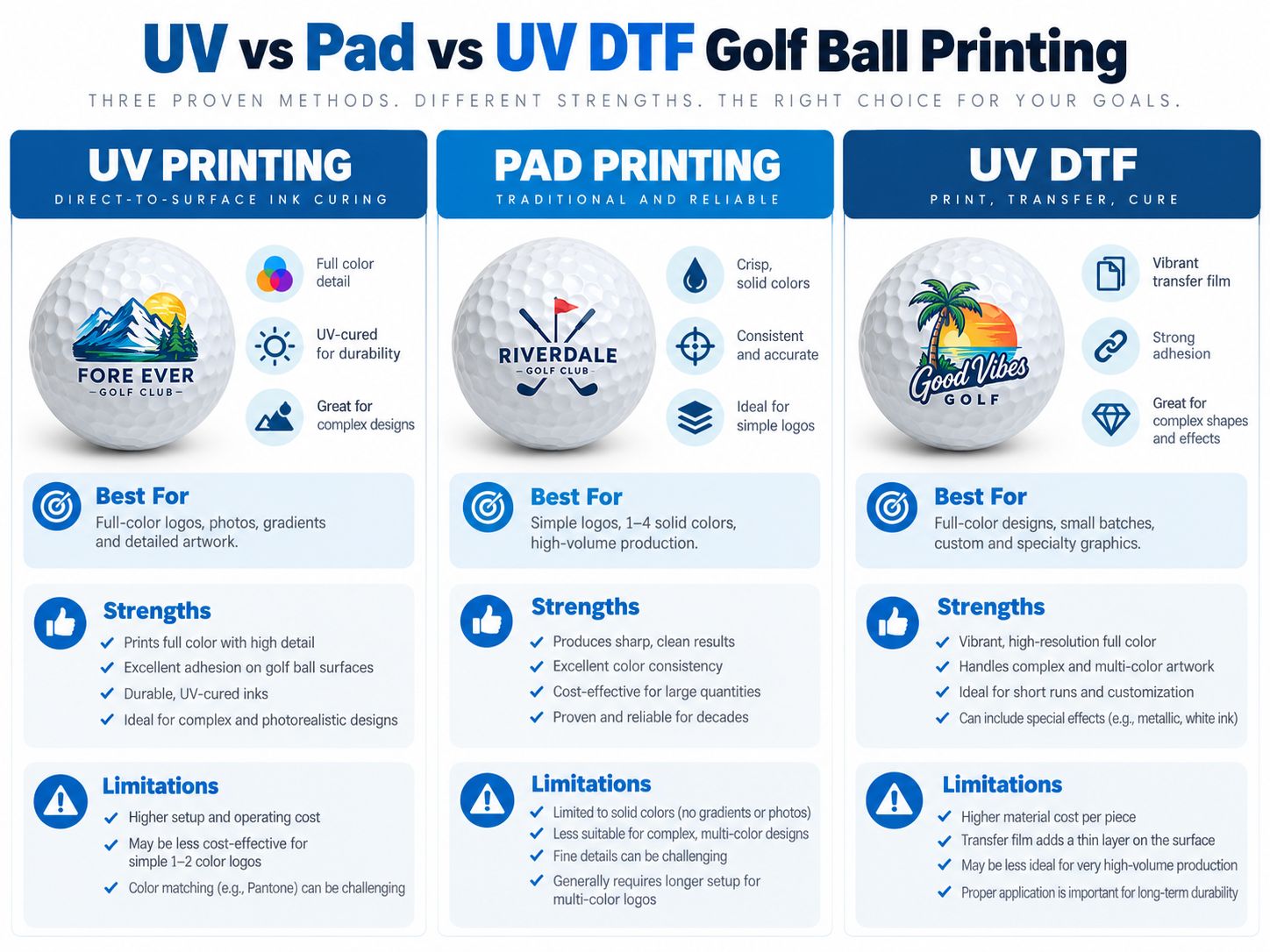
| Phương pháp | Quy trình làm việc chính | Potential Advantages | Main Limitations |
|---|---|---|---|
| In UV trực tiếp | Digital ink printed directly on ball | Artwork flexibility, multi-color designs, small-batch potential | Curvature, dimples, fixture, printhead clearance, adhesion |
| Pad Printing | Ink transferred by a flexible silicone pad | Established process for small curved objects and repeat logos | Plate/setup requirements, color registration, process-dependent image complexity |
| UV DTF | Graphic printed on film and transferred | Separates graphic production from final application | Dimple contact, adhesive conformity, lifting, thickness and durability |
In UV trực tiếp
Direct UV printing is worth evaluating when customers require multiple custom designs or frequent artwork changes.
The process may reduce conventional artwork setup compared with plate-based systems.
However, the final application depends on a compatible printer and validated golf ball fixture.
Pad Printing
Pad printing is a conventional industrial decoration method.
It transfers ink from a prepared image plate onto an object using a flexible pad.
This makes it particularly suitable for many small and curved components.
Pad printing can be a strong choice for repetitive logo production, especially where the complete ink and printing process has already been validated.
UV DTF
UV DTF prints the graphic onto transfer film before applying it to the finished object.
This is useful for many compatible hard surfaces.
However, golf balls have a strongly curved and dimpled exterior, which makes transfer application more challenging.
Possible concerns include:
- Incomplete contact
- Air pockets
- Nâng cạnh
- Adhesive incompatibility
- Transfer distortion
- Limited impact resistance
For this reason, UV DTF should not automatically be treated as an equivalent substitute for a validated direct-print or pad-print golf ball process.
Learn more about the general technology in the EraSmart UV DTF Printer Guide.
How to Print Multiple Golf Balls Efficiently
Batch production requires repeatability.
The goal is not only to print several balls at once but to maintain consistent output.
Standardize the Blank
Use the same golf ball model and coating within a production batch whenever possible.
Standardize the Fixture
Each position should hold the ball consistently.
Standardize the Artwork
Create repeatable templates for:
- Logo công ty
- Club branding
- Tournament graphics
- Personalized initials
Use an Approved Print Area
Maintain the validated image size and placement for that particular golf ball and fixture combination.
Check the First Batch
Inspect representative balls from different fixture positions.
Record Production Conditions
Lưu giữ hồ sơ về:
- Golf ball model and batch
- Fixture type
- Ink system
- Kích thước tác phẩm nghệ thuật
- Cài đặt RIP
- Curing conditions
- Adhesion test results
- Inspection findings
If the golf ball model or coating changes, reassess the printing process before full production.
Common Golf Ball Printing Problems and How to Fix Them
Golf ball UV printing may produce several distinctive faults.

Problem 1: Blurry Printing
Nguyên nhân có thể:
- Inconsistent printhead distance
- Curved surface geometry
- Missing or poorly performing nozzles
- Inappropriate artwork size
- Unsupported printing position
What to check:
- Giải phóng mặt bằng máy in
- Printhead nozzle condition
- Vị trí đồ gá
- Practical printable region
- Kích thước tác phẩm nghệ thuật
Do not assume that increasing resolution alone will overcome the limitations of a curved surface.
Problem 2: Misaligned Logo
Nguyên nhân có thể:
- Ball movement
- Incorrect fixture position
- Định vị tác phẩm nghệ thuật
- Inconsistent ball seating
- Incorrect repeat-job coordinates
What to check:
- Fixture stability
- Tham chiếu căn chỉnh
- Layout coordinates
- Consistent ball position
Problem 3: Poor Ink Adhesion
Nguyên nhân có thể:
- Ô nhiễm bề mặt
- Incompatible golf ball coating
- Unsuitable ink
- Chữa không đầy đủ
- Insufficient or incompatible pretreatment
What to check:
- Cleaning procedure
- Surface compatibility
- Ink and curing settings
- Approved primer, if required
- Physical adhesion test results
Problem 4: Distorted Logo
Nguyên nhân có thể:
- Artwork extending too far from the top of the sphere
- Curvature-related placement errors
- Incorrect artwork dimensions
- Inappropriate projection or positioning settings
What to check:
- Logo size
- Image placement
- Printable-region limits
- Comparison against a validated sample
Problem 5: Uneven Color or Coverage
Nguyên nhân có thể:
- Dimple geometry
- Ink deposition variation
- Curvature
- Tình trạng bề mặt
- Print-mode differences
What to check:
- Small-area sample output
- Surface preparation
- Độ phức tạp của tác phẩm nghệ thuật
- Ink settings
- Printing consistency
Golf Ball Printing Troubleshooting Chart
| Triệu chứng | Nguyên nhân có thể | Kiểm tra đầu tiên |
|---|---|---|
| Blurry logo | Surface curvature or clearance | Printhead distance and print region |
| Logo off-center | Poor positioning | Jig and artwork coordinates |
| Ink rubs off | Adhesion or coating issue | Surface, ink and curing |
| Distorted graphic | Excessive image area | Logo size and placement |
| Màu sắc không nhất quán | Dimple geometry or print variation | Nozzle and surface testing |
| Batch inconsistency | Fixture height or seating variation | Position-to-position comparison |
| Surface scratching | Insufficient wear resistance | End-use durability testing |
Is UV Printing on Golf Balls Durable?
Durability depends on several factors:
- Golf ball coating
- UV ink chemistry
- Surface preparation
- Tiền xử lý
- chữa bệnh
- Ink thickness
- Mục đích sử dụng
- Mechanical impact and abrasion
A printed decorative golf ball may meet the requirements of a gift or display item while being unsuitable for repeated sporting use.
Decorative Golf Balls
Các ứng dụng có thể bao gồm:
- Display gifts
- Giải thưởng doanh nghiệp
- Collectibles
- Presentation sets
The primary quality requirements may emphasize appearance and handling durability.
Golf Balls Intended for Play
These require more demanding evaluation.
The print may experience:
- Club impacts
- Ground contact
- mài mòn
- Độ ẩm
- Outdoor conditions
A ball printed for decorative purposes should not automatically be marketed as having the same performance characteristics as a manufacturer-validated playing ball.
For organized competition, consider the applicable golf-ball conformity and equipment rules. The R&A Rules of Golf — Rule 4.2 addresses conforming balls and deliberately altered performance characteristics.
Ordinary identification markings and changes that affect ball performance are not the same thing; suitability depends on the actual marking and applicable rules.
Personalized Golf Ball Printing Business Ideas
Golf ball customization can support several specialized business models.
Corporate Promotional Gifts
Print company branding onto golf balls intended for promotional packs, client gifts, or business events.
Golf Tournament Merchandise
Create designs for:
- Charity tournaments
- Corporate golf days
- Club competitions
- Special events
Golf Club Souvenirs
Golf clubs may offer branded products featuring their original logos or approved artwork.
Personalized Gift Sets
Combine printed golf balls with:
- Golf tees
- Hộp quà tặng
- Towels
- Phụ kiện
Wedding and Event Favors
Personalized initials, event dates, and decorative designs can create golf-themed keepsakes.
Golf Academy Products
Golf schools and instructors may offer merchandise featuring their own branding.
Custom Online Orders
An online store could offer limited personalization such as:
- Tên
- Initials
- Simple logos
- Event messages
For commercial use, make sure the customer owns or has permission to use any submitted brand graphics.
How to Calculate Golf Ball Printing Costs
The total cost depends on more than the ink used.
A practical model is:
Golf Ball Cost + Ink + Fixture Setup + Labor + Equipment Allocation + Quality Testing + Packaging + Waste
Consider the difference between:
One personalized ball
Và
A repeat order of 200 identical balls
The first may involve more artwork and setup time per unit.
The second may benefit from repeated positioning and an established production workflow.
However, cost efficiency depends on the validated printing method, actual cycle time, and failure rate.
Avoid using generic UV printing speed figures to estimate golf ball output without real production tests.
Which EraSmart UV Printer Should You Choose for Golf Ball Printing?
Selecting a printer for golf balls requires more than choosing a machine with sufficient maximum object height.
You must also confirm:
- Effective printing area
- Khoảng trống đầu in
- Jig support
- Printing position
- Cấu hình mực
- Chữa tia cực tím
- Ball surface compatibility
- Production repeatability
EraSmart A4 UV Printer XP600
Các EraSmart A4 UV Printer XP600 is a compact UV flatbed model that may be considered during equipment evaluation.
Its published specifications include:
| Đặc điểm kỹ thuật | EraSmart A4 UV Printer XP600 |
|---|---|
| Printhead | XP600 đơn |
| Cấu hình mực | CMYK + WW |
| Vùng in hiệu quả | 180 × 290 mm |
| Print Platform | 210 × 300 mm |
| Listed Printing Height | 0–125 mm |
| Listed Resolution | 720 × 1440 dpi |
| Phần mềm in ấn | RHINE |
| Loại mực | Mực UV |
These are general machine specifications.
They do not constitute confirmation that the printer can safely or reliably print golf balls in its standard configuration.
Golf ball production requires separate verification of geometry, fixture clearance, printing area, ink adhesion, and durability.
Should You Choose a Larger UV Printer?
A larger flatbed can provide more physical platform space for potential fixtures.
However, a larger print area does not automatically solve:
- Ball curvature
- Dimple coverage
- Độ bám dính của mực
- Khoảng trống đầu in
- Sporting-use durability
A larger printer is only beneficial if its full workflow is suitable for the intended products.
What Should You Ask Before Buying?
Provide the printer supplier with:
- Golf ball brand and model.
- Ball dimensions and surface construction.
- Intended logo dimensions.
- Artwork examples.
- Required quantity per order.
- Expected daily production.
- Whether the balls are for gifts or actual play.
- Adhesion and durability requirements.
- Whether a validated jig is available.
- Sample-printing requirements.
For a broader equipment evaluation, see the EraSmart UV Printer Buying Checklist.
Final Answer: What’s the Best Way to Print on Golf Balls?
The best golf ball printing method depends on the artwork, production quantity, surface requirements, and intended use.
In UV trực tiếp
Worth evaluating for custom graphics and flexible artwork production when a compatible printer, fixture, and ink system have been validated.
Pad Printing
An established method for decorating small curved products, particularly in repeat production.
UV DTF
A possible transfer-based approach for selected applications, but golf ball curvature, dimples, adhesion, and durability make it necessary to conduct careful physical testing.
For direct UV printing, the critical process is:
Select Ball → Prepare Surface → Position in Jig → Set Artwork → Confirm Clearance → Print → Inspect → Test
Do not assume a standard flatbed printer can print the full golf ball surface.
Do not promise impact resistance without testing.
And do not purchase equipment for commercial golf ball production based only on maximum printing height or a sample image.
The most reliable approach is to validate the exact golf ball, ink, printer, and fixture combination before scaling production.
Câu hỏi thường gặp
Can you UV print directly on golf balls?
Yes, suitable UV printing systems may be used for small-area decoration after testing. Printer clearance, fixture design, surface compatibility, and adhesion must all be validated.
Can any UV printer print golf balls?
No. A printer’s stated material height does not prove compatibility with golf ball geometry or surface coatings.
What is the best printer for golf balls?
The best equipment depends on the required image quality, order quantity, and intended use. Direct UV, pad printing, and other specialized systems should be evaluated for the actual production requirements.
Can an A4 UV printer print golf balls?
Some A4-format UV setups may be candidates for testing, but the specific printer must be verified for fixture clearance, curved-surface printing, and adhesion. Standard A4 specifications alone are insufficient.
Why are golf balls difficult to print?
Their spherical shape, dimples, exterior coatings, and limited practical printable area make positioning, image quality, and adhesion more challenging.
Do you need a jig for golf ball printing?
A stable positioning fixture is generally necessary for a fixed-position direct UV printing workflow. The design must match the printer and ball geometry.
Can you print multiple golf balls at once?
A suitable multi-position fixture may support batch production, but capacity depends on the printer’s effective area, jig, clearance, and validated workflow.
Can you print a full-color logo on a golf ball?
Potentially, yes, using an appropriate digital printing system. Fine details, image size, curvature, and surface condition can affect the result.
Can UV ink stick to golf ball covers?
Adhesion depends on the actual cover finish or exterior coating, ink, surface preparation, and curing process. A physical test is required.
Do you need primer for golf ball UV printing?
Sometimes. Primer requirements depend on the ball finish and ink system. Use only compatible, approved pretreatment methods.
Can you print on urethane golf balls?
Urethane-covered golf balls may be evaluated, but the final coating and ink compatibility must be tested.
Can you print on Surlyn golf balls?
Ionomer or Surlyn-type covered balls may also be evaluated. Their actual finish and surface condition determine printing suitability.
How big can a printed golf ball logo be?
There is no universal size. The practical logo area depends on ball geometry and the validated printing region of the specific equipment.
Can UV printers print around the entire golf ball?
A conventional fixed-position UV flatbed setup cannot automatically produce full-sphere printing. Specialized handling and printing technology would be required.
Is UV golf ball printing durable?
Durability depends on the ink, ball coating, surface preparation, curing, and use conditions. Do not assume impact resistance or long-term abrasion resistance without testing.
Can customized golf balls be used in tournaments?
Tournament suitability depends on the rules, ball conformity, and the nature of the added markings. Consult the applicable golf rules and equipment guidance.
Is UV DTF suitable for golf balls?
It may be evaluated, but the dimpled surface and strong curvature make reliable adhesive contact and durability more difficult than on smooth hard surfaces.
Is pad printing better than UV printing for golf balls?
Pad printing is an established curved-object printing method and can be efficient for repeat logo production. UV printing may offer more flexible digital artwork changes, but it requires a validated setup.
Can I start a customized golf ball business with a UV printer?
Potentially, after verifying that the equipment can safely produce the required graphics on the selected balls. Test product quality, process consistency, durability, and actual costs before commercial investment.
Explore Custom UV Printing Solutions with EraSmart
Are you planning to customize golf balls, promotional gifts, or other small products?
EraSmart offers UV flatbed printers for a range of compatible customization applications.
Before recommending equipment for golf ball printing, the actual product geometry and surface requirements should be evaluated.
Khám phá:
Danh sách kiểm tra mua máy in UV
When contacting EraSmart, please share:
- The golf ball model and material
- Your artwork or company logo
- Desired printing size
- Expected order volume
- Whether the products are for display or playing use
- Required durability
- Any sample-printing requirements
This information helps determine whether a particular UV printing configuration is suitable for your project.
Có thể bạn cũng thích
Bản quyền 2020 © Erasmart. | SITEMAP