小型平板噴墨打印機製造商
86-18566233796 [email protected]

部落格 How to Print on Wood: A Practical Guide to UV Printing, Preparation & Custom Products

How to Print on Wood: A Practical Guide to UV Printing, Preparation & Custom Products

August 29, 2026 部落格

Yes, you can print directly on wood.

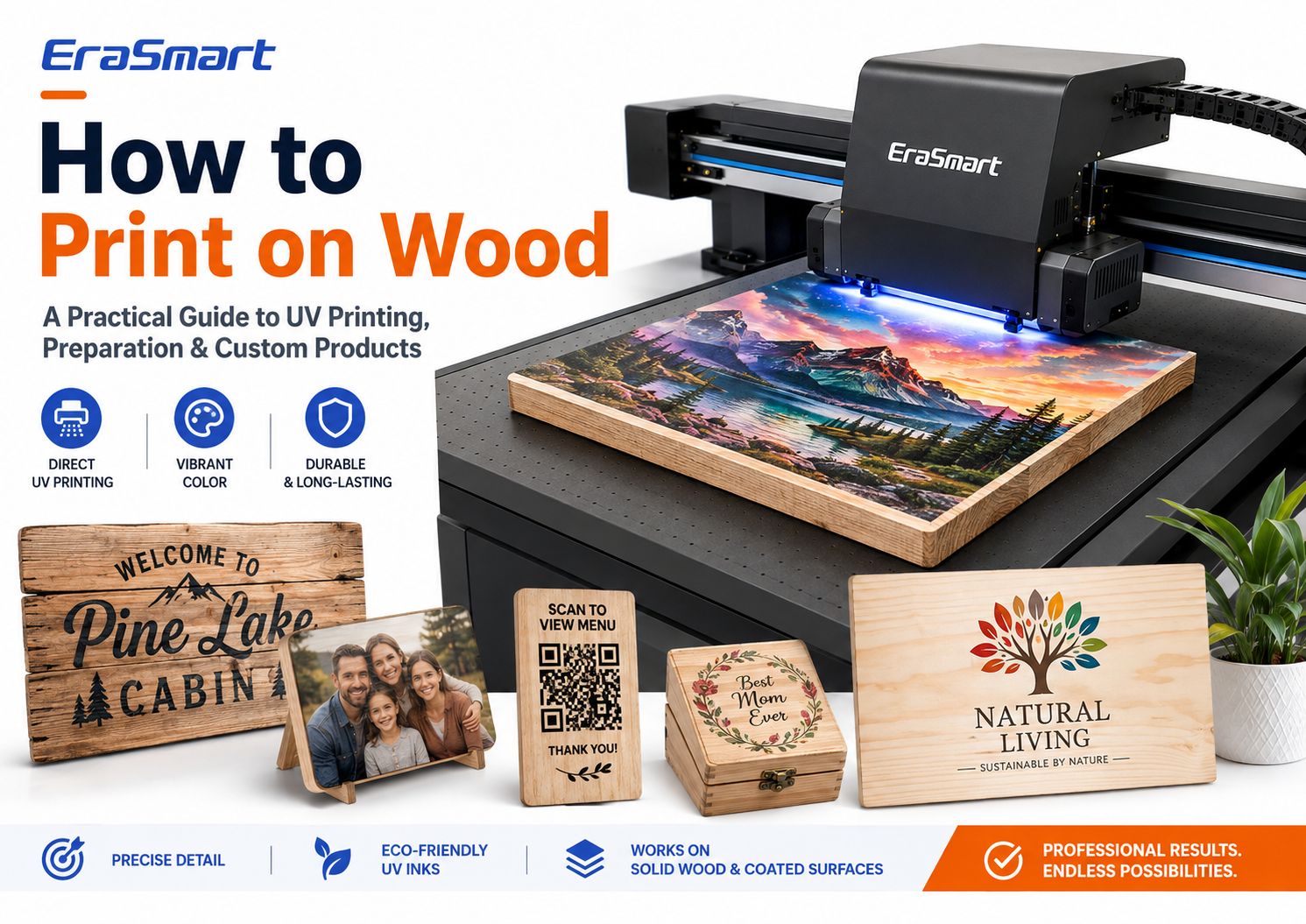
For professional full-color customization, UV flatbed printing is one of the most practical methods because the printer can place CMYK, white ink, and optional varnish directly onto suitable wooden surfaces without transfer paper.

This makes it possible to produce wooden signs, photo plaques, QR code displays, awards, gift boxes, coasters, menu boards, home décor, branded products, and personalized gifts in small or medium batches.

But successful wood printing is not simply a matter of putting a wooden board on a UV printer and pressing Print.

Wood is a natural material. Grain, porosity, dust, moisture, surface coatings, flatness, oils, waxes, and texture can all affect print quality and ink adhesion.

A smooth birch plywood panel may behave very differently from rough pine. A raw bamboo board may behave differently from a lacquered bamboo product. Even two visually similar wood blanks can produce different results if their coatings are different.

The professional approach is therefore:

prepare the surface → test the material → choose the right white ink strategy → print a sample → check adhesion → standardize the workflow

How to Print on Wood with a UV Printer

This guide explains the main ways to print on wood, how direct UV printing works, which wood surfaces are easier to print, how to prepare the material, when to use white ink, how to create a repeatable production workflow, and what products you can build with an EraSmart UV印表機

Quick Answer: What Is the Best Way to Print on Wood?

There is no single best method for every wooden product.

The right method depends on:

  • 木材是原木還是經過塗層處理的
  • whether you need full color
  • whether you need white ink
  • order quantity
  • surface shape
  • design complexity
  • required finish
  • 生產速度
  • whether the product is a DIY craft or commercial product

For commercial full-color customization on flat wooden products, direct UV printing is one of the most flexible options

It allows artwork to be printed directly onto the surface and is especially useful when you need:

  • 全彩圖形
  • 照片
  • 標誌
  • 白墨水
  • 小批量生產
  • 個性化的名字
  • variable designs
  • repeated product templates

However, other methods still have their own uses.

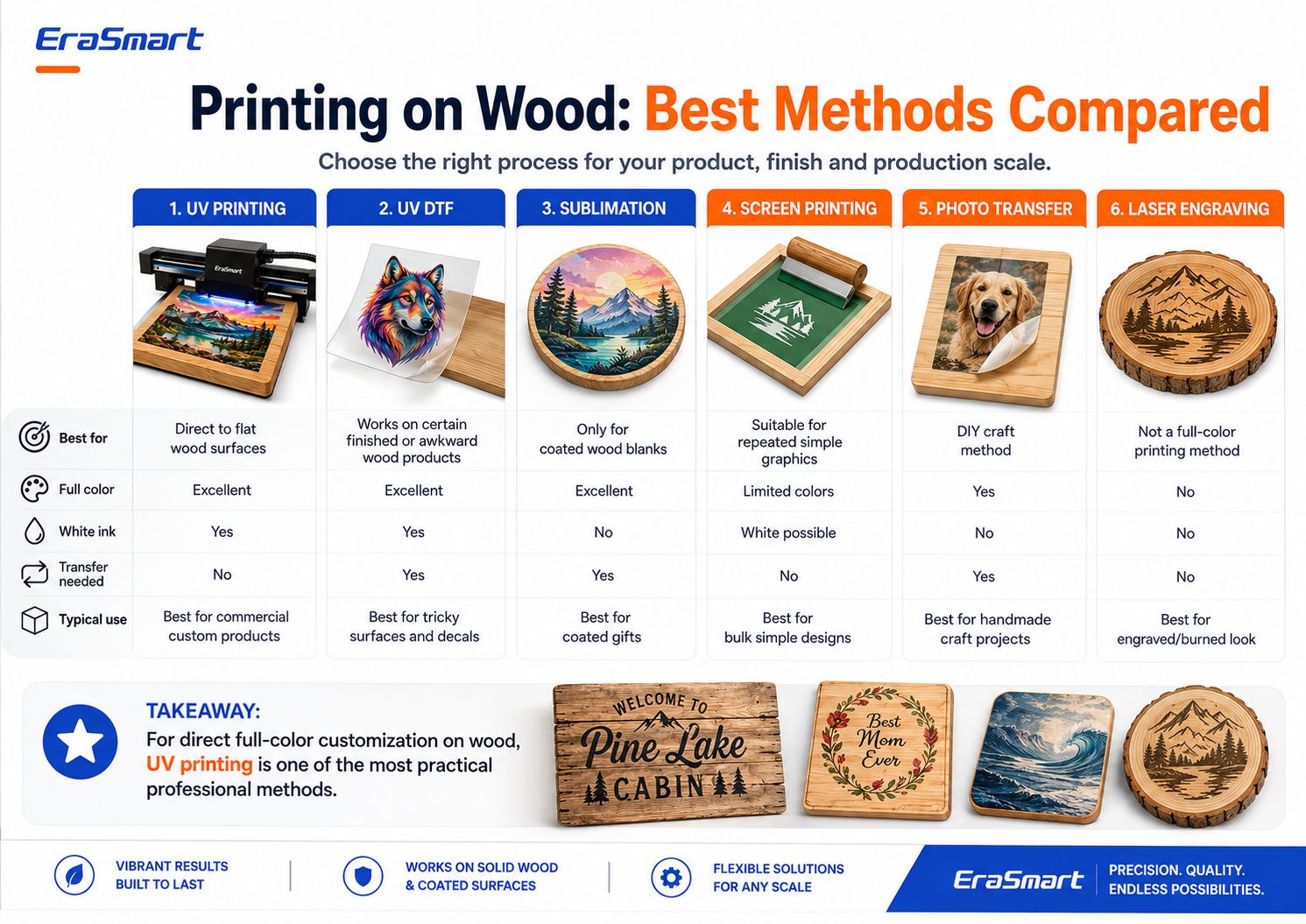
Printing on Wood Methods Comparison

方法Full Color白墨水Transfer Needed最佳使用
紫外線印刷出色的是的Commercial direct wood customization
紫外DTF出色的是的是的Finished or difficult-to-position products
昇華出色的是的Sublimation-coated wood blanks
絲網印刷Limited by setup可能的Repeated simple graphics
Photo Transfer是的是的DIY craft projects
雷射雕刻No full colorBurned or engraved wood effect

The key point is that printing on wood is not one single process.

Choose the method according to the finished product you want to sell.

Why UV Printing Works Well on Wood

A UV printer uses ink that is cured by UV light during the printing process.

Instead of relying on transfer paper, the printer jets ink directly onto the wooden surface.

For suitable wood products, this creates several advantages.

Direct-to-Surface Printing

The artwork is printed directly onto the board.

This can reduce production steps compared with workflows that require:

  • 轉印紙
  • separate adhesive
  • heat transfer
  • manual photo transfer

全彩藝術品

UV printing is suitable for designs such as:

  • 照片
  • colorful illustrations
  • 標誌
  • landscapes
  • 婚禮圖形
  • decorative patterns
  • QR 圖碼
  • 個性化的名字
  • 產品品牌

白墨水

White ink is especially useful on wood because the natural substrate is not white.

You can use white ink to create stronger opacity and more predictable colors.

清漆效果

On compatible UV printer configurations, varnish can be added selectively for:

  • 斑點光澤
  • 凸起細節
  • logo highlights
  • decorative accents
  • 優質表面效果

小批量客製

Digital printing makes it easier to produce:

  • one photo plaque
  • ten different names
  • multiple QR signs
  • short-run gift products
  • personalized wedding pieces
  • local business signage

without creating a separate traditional printing screen or plate for every design.

What Types of Wood Can You UV Print On?

UV printers can work with many wooden and wood-based substrates, but the wood species alone does not determine print quality.

Surface condition is just as important.

Common materials include:

  • birch plywood
  • maple
  • pine
  • bamboo
  • 中密度纖維板
  • 塗層木材
  • painted wood
  • sealed wood
  • prepared hardwood panels

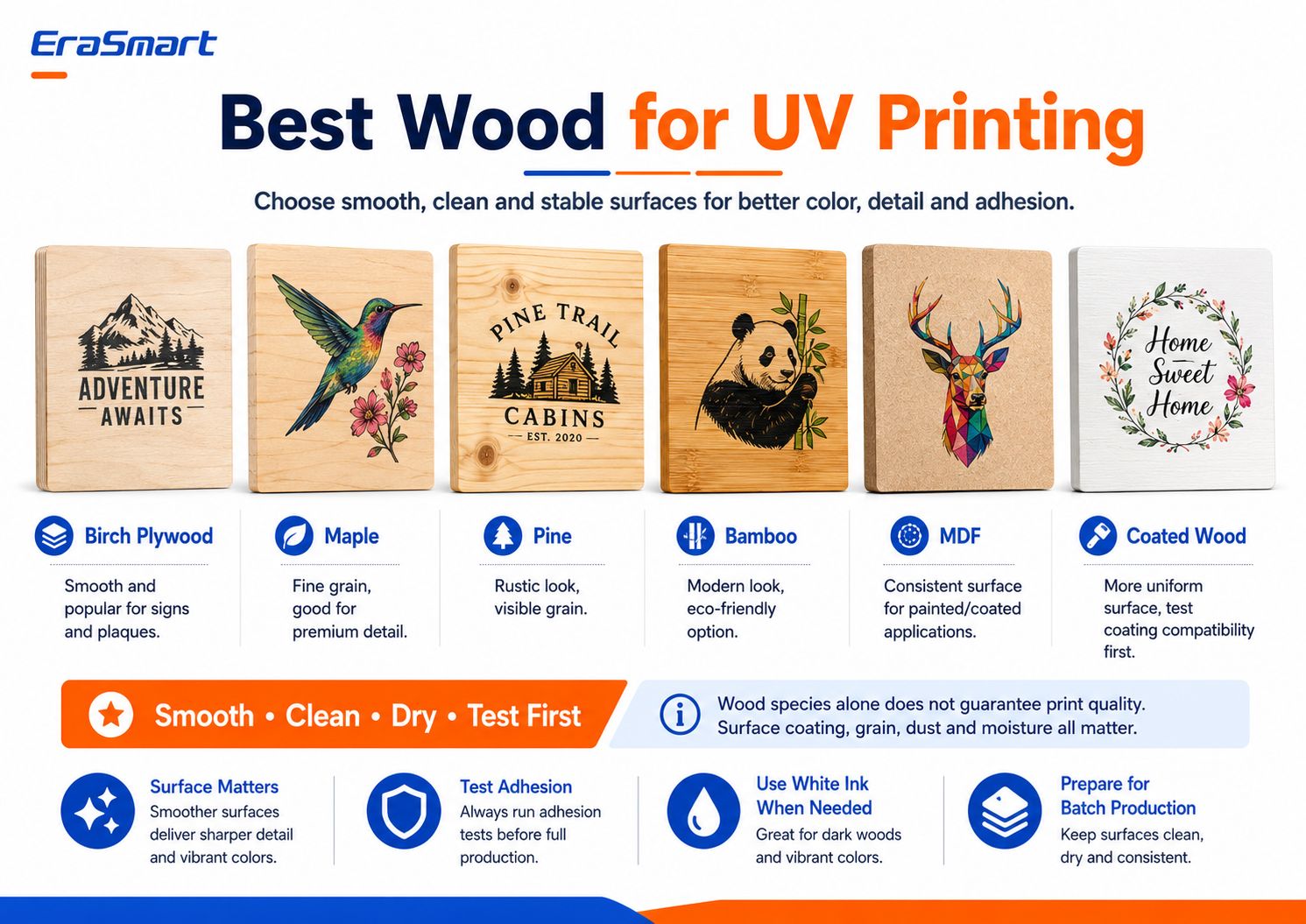
Best Wood for UV Printing

Birch Plywood

Birch plywood is popular for:

  • signs
  • 牌匾
  • decorative pieces
  • 個性化禮物

A smooth plywood surface can provide good detail and predictable positioning.

However, plywood quality varies. Check for warping, surface defects, and veneer consistency.

Maple

Maple has a relatively fine grain and can work well for products where small details matter.

It may be suitable for:

  • premium plaques
  • photo products
  • 小標誌
  • branded gifts

Pine

Pine offers a more rustic appearance.

The visible grain and knots can become part of the design, especially when printing without a full white underbase.

However, rougher pine may need additional sanding and preparation.

Bamboo

Bamboo products are popular for:

  • 禮物
  • décor
  • kitchen accessories
  • 牌匾
  • branded products

Because finished bamboo products may have different surface coatings, test the exact product before production.

中密度纖維板

MDF provides a more uniform manufactured surface than natural wood grain.

它可用於:

  • painted panels
  • 標牌
  • décor
  • display products

Raw MDF is porous, so its surface condition and any coating or sealing process should be evaluated before production.

Coated Wood

Coated or painted wood can offer a more uniform appearance.

However, a coating introduces another variable:

Will the UV ink bond properly to that coating?

A glossy coating, wax, lacquer, paint, sealant, or low-surface-energy finish may affect adhesion.

Always test the actual finished material.

The Most Important Rule: Smooth, Clean, Dry, and Stable

When choosing wood for UV printing, look for four characteristics:

Smooth

A smoother surface generally supports sharper text, cleaner lines, and more consistent image detail.

乾淨的

Dust from sanding or handling can interfere with printing and adhesion.

乾燥

Moisture can affect the surface and long-term product stability.

穩定的

The board should sit flat enough for safe and consistent printhead clearance.

This matters more than simply selecting a species from a list.

For a broader look at UV-compatible substrates, see the EraSmart UV印表機材料指南

Raw Wood vs Coated Wood

Raw and coated wood create different opportunities.

Printing on Raw Wood

Raw wood preserves the natural material character.

This is useful when the grain is intentionally part of the design.

Advantages include:

  • natural appearance
  • rustic effect
  • visible wood texture
  • unique product variation

Challenges may include:

  • greater porosity
  • uneven grain
  • 灰塵
  • surface fibers
  • variable absorption
  • inconsistent adhesion

Raw wood usually benefits from careful sanding and cleaning.

Printing on Coated or Sealed Wood

Coated wood can provide a more uniform visual surface.

Possible advantages:

  • smoother finish
  • more consistent appearance
  • less visible grain
  • more predictable color in some cases

But the coating itself must be compatible with the UV ink.

潛在的問題包括:

  • 附著力弱
  • scratching
  • peeling
  • ink sitting on an incompatible surface

This is why the safest approach is:

never approve a wood material for production based only on its name. Test the exact blank or finished product.

How to Prepare Wood Before UV Printing

Surface preparation is one of the most important parts of the entire process.

Step 1: Inspect the Board

查看:

  • flatness
  • 刮痕
  • dents
  • knots
  • loose fibers
  • coatings
  • warping
  • moisture
  • oils or wax

Do not start printing until you know what surface you are working with.

Step 2: Sand If Necessary

If the board is rough, light sanding may help create a more consistent printing surface.

The goal is not always to remove the natural wood character.

The goal is to eliminate:

  • loose fibers
  • rough high points
  • splinters
  • unwanted surface defects

Fine sanding is usually more appropriate for print preparation than leaving a rough unfinished surface.

Step 3: Remove All Sanding Dust

This step is easy to underestimate.

Wood dust can interfere with:

  • ink placement
  • 邊緣清晰度
  • 附著力
  • 最終出場

Use an appropriate lint-free cleaning method and make sure the surface is clean before printing.

Step 4: Remove Oil and Contamination

Some finished wooden products may contain:

  • oil
  • wax
  • polishing compounds
  • fingerprints
  • manufacturing residue

These can reduce ink adhesion.

Step 5: Check Existing Coatings

If the product is painted, sealed, lacquered, or coated, run an adhesion test.

Do not assume that every painted or sealed wood product is automatically UV printable.

Step 6: Test Before Production

Print a small sample using the same:

  • 木頭
  • surface treatment
  • artwork type
  • white ink strategy
  • curing settings

that you plan to use for the final customer order.

If necessary for a specific substrate, an appropriate primer or pretreatment may improve adhesion.

Do not use primer automatically on every piece of wood.

Use it when testing shows that the material requires it.

Prepare the Artwork for Wood Printing

A good wood print starts before the material reaches the printer.

查看:

  • 最終產品尺寸
  • 藝術品分辨率
  • 標誌
  • text size
  • image quality
  • 白墨層
  • 清漆層
  • transparent areas
  • 流血
  • 安全邊際

Raster Artwork

For photographs and detailed illustrations, around 300 DPI at the final print size is a practical starting point for close-view products.

Vector Artwork

Vector files are preferable for:

  • 標誌
  • QR 圖碼
  • 文字
  • icons
  • line art
  • brand graphics

because they remain sharp when resized.

Design for the Wood, Not Just the Screen

A design prepared on a white computer canvas may look completely different when printed over natural wood.

This is why the white ink decision matters so much.

White Ink vs Natural Wood Grain: Which Should You Choose?

This is one of the most important creative decisions in UV printing on wood.

There are three practical approaches.

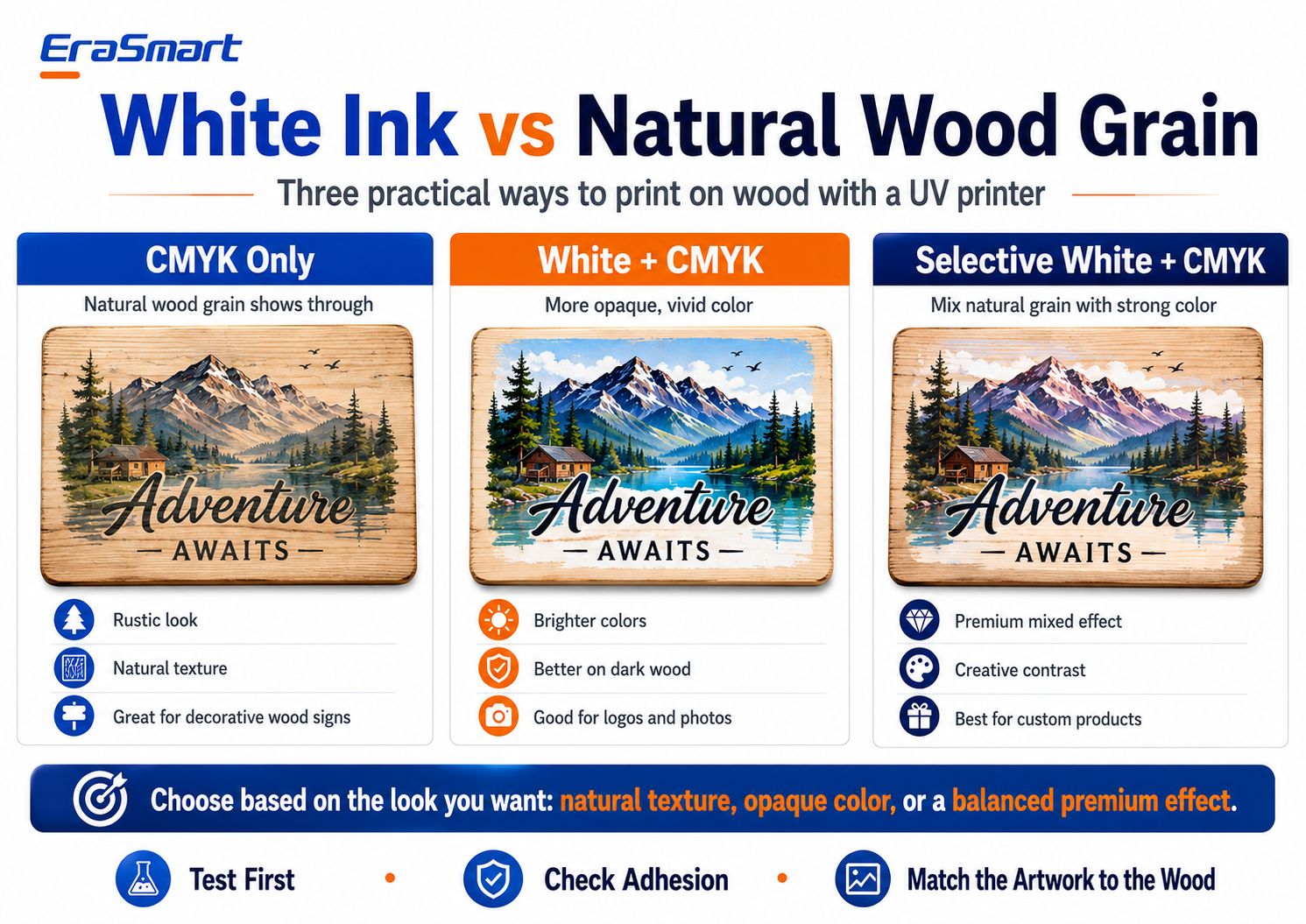
White Ink vs Natural Wood Grain UV Printing

Option 1: CMYK Only

With CMYK-only printing, the natural wood remains visible through lighter parts of the artwork.

This can create a:

  • rustic look
  • vintage appearance
  • natural texture
  • handcrafted feel

It works especially well for designs intentionally created for a wood background.

合適的產品包括:

  • cabin signs
  • 裝飾牌
  • 咖啡館標誌
  • rustic gifts
  • natural home décor

The important limitation is color predictability.

Because the substrate is brown or tan rather than white, the final color will interact with the wood.

Light areas may appear darker or more transparent than they did on screen.

Option 2: White + CMYK

A white underbase creates a more opaque foundation beneath the color artwork.

This is useful when you need:

  • stronger color
  • brighter photos
  • clearer logos
  • more consistent brand colors
  • better visibility on dark wood

典型應用包括:

  • 照片
  • business logos
  • colorful illustrations
  • 產品品牌
  • detailed artwork

White + CMYK reduces the influence of the natural wood color.

Option 3: Selective White + CMYK

Selective white is often the most interesting option for premium wood products.

Instead of printing white under the entire image, use white only where opacity is needed.

例如:

  • white beneath the colorful landscape
  • no white behind background wood areas
  • white beneath the company logo
  • natural grain around decorative elements

This creates a combination of:

natural wood + controlled full color

and can give the finished product a more intentionally designed appearance.

Which White Ink Mode Should You Use?

A simple decision rule:

Want maximum natural texture?
Use CMYK only.

Want more predictable, vivid color?
Use White + CMYK.

Want a premium mixed effect?
Use Selective White + CMYK.

The best option depends on the artwork and product positioning.

How to UV Print on Wood Step by Step

Once the material and artwork are prepared, build a repeatable production process.

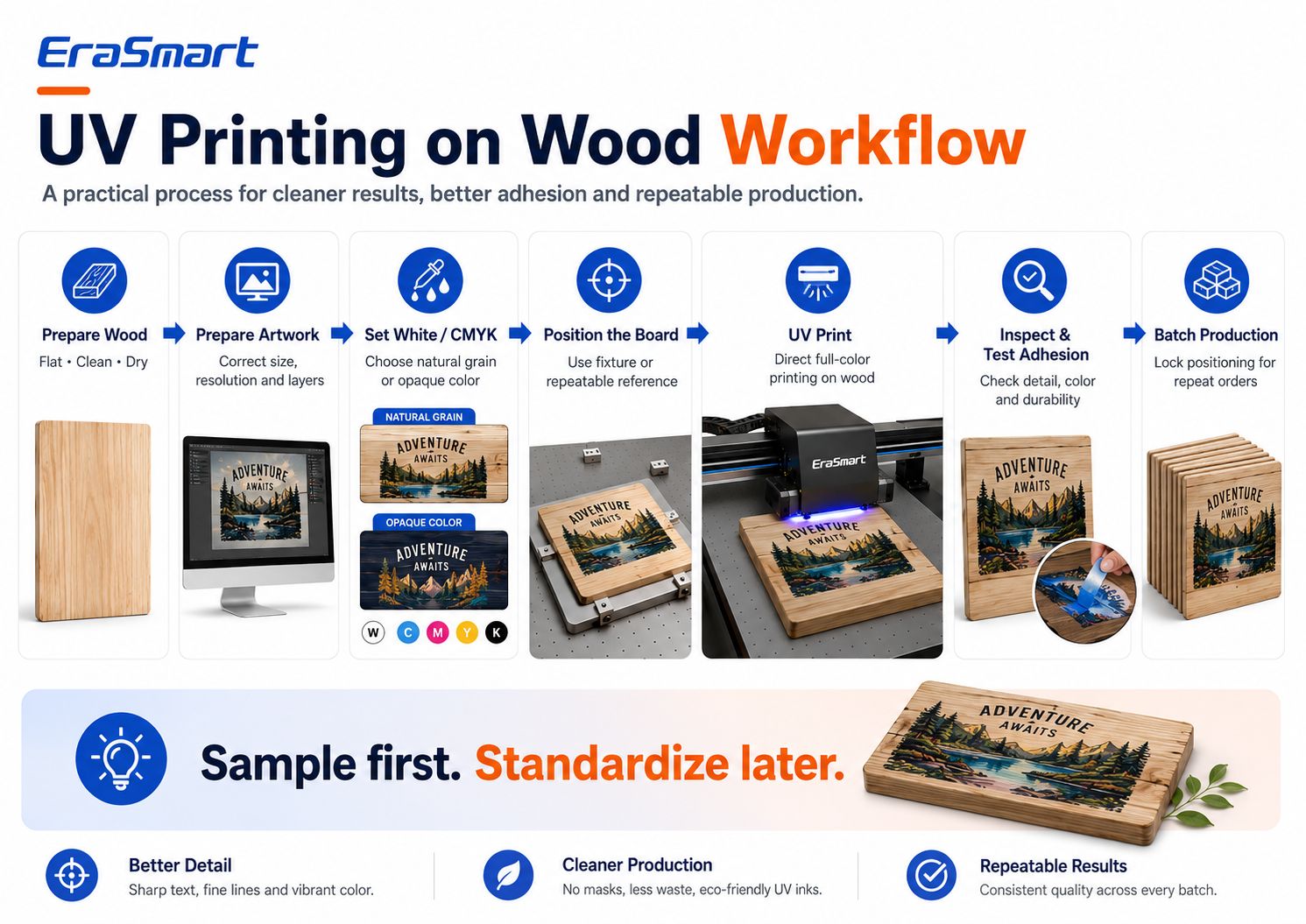
UV Printing on Wood Workflow

Step 1: Prepare the Wood

Make sure the board is:

  • clean
  • dry
  • 平坦的
  • free of dust
  • suitable for testing

第 2 步:準備藝術品

Set:

  • 最終尺寸
  • 影像解析度
  • print position
  • CMYK 圖層
  • white ink layers
  • varnish layers if needed

Step 3: Choose Your White Ink Strategy

Decide between:

  • 僅四色
  • 白色+CMYK
  • Selective White + CMYK

before sending the job to the printer.

Step 4: Position the Board

Place the wood securely on the printing platform.

For repeat products, consider using:

  • positioning marks
  • edge references
  • fixtures
  • jigs
  • templates

This reduces alignment errors.

Step 5: Set the Print Height

Correct printhead clearance is critical.

A surface that is badly warped or positioned too high may create:

  • print quality problems
  • incorrect jetting distance
  • potential printhead risk

Do not use the printer to compensate for severely warped wood.

Use stable, sufficiently flat products.

Step 6: Print One Sample

Do not immediately start a 100-piece batch.

Print one sample first.

查看:

  • 顏色
  • detail
  • 白色墨水對齊
  • print position
  • 附著力
  • 耐刮性
  • overall appearance

Step 7: Test Adhesion

After curing, test whether the ink layer is suitable for the intended application.

The exact test depends on the product.

A decorative indoor plaque has different requirements from an item that will be handled frequently.

Step 8: Lock the Position

Once the sample is approved:

  • save the RIP setup
  • record the X/Y position
  • standardize the fixture
  • document the board size

Step 9: Start Batch Production

Now multiple pieces can be produced with a more repeatable workflow.

Step 10: Final QC

Check each batch for:

  • alignment
  • nozzle defects
  • 刮痕
  • board defects
  • incorrect artwork
  • 顏色變化
  • adhesion problems

This is particularly important for personalized jobs.

Sample First. Standardize Later.

One of the biggest differences between hobby printing and professional production is standardization.

For a single wooden sign, manual positioning may be acceptable.

For 50 identical café QR signs, the goal should be:

same material + same fixture + same RIP preset + same position + same QC

This reduces:

  • setup time
  • misprints
  • wasted blanks
  • customer complaints

How to Position Wood for Repeat Orders

If you regularly print the same wood blank, create a repeatable positioning system.

Possible approaches include:

  • corner stops
  • physical jigs
  • printed templates
  • positioning rulers
  • dedicated fixtures

The goal is to avoid manually guessing the location for every product.

For example, if a customer orders 30 wooden menu signs:

  1. use the same board dimensions
  2. fix the board to the same reference position
  3. lock the RIP coordinates
  4. change only the artwork data where required
  5. inspect at defined intervals

This turns custom wood printing into a production workflow rather than a craft experiment.

Direct UV Printing vs UV DTF on Wood

EraSmart offers both UV flatbed and UV DTF workflows, but they are not the same process.

直接UV列印

Choose a direct UV printer when:

  • the wood surface is flat
  • the object fits the print bed
  • you want direct-to-product printing
  • you need precise positioning
  • you are producing plaques, panels, signs, or gifts
  • you want white and varnish effects directly on the product

紫外DTF

UV DTF can be useful when:

  • the finished product is difficult to place in a flatbed
  • the printing area is awkward
  • you want to make the graphic first and apply it later
  • you are decorating certain finished objects

However, UV DTF adhesion on wood still depends heavily on the surface.

A decal that sticks well to sealed smooth wood may not behave the same on:

  • dusty raw pine
  • heavily textured wood
  • oil-finished timber
  • waxed surfaces

So test before commercial production.

Common Problems When Printing on Wood

Problem 1: Colors Look Dull

Possible reasons:

  • no white underbase
  • dark wood
  • strong natural grain
  • artwork designed for a white background

解決方案

Test White + CMYK or selective white.

Also adjust artwork with the actual wood background in mind.

Problem 2: Ink Adhesion Is Weak

Possible causes:

  • 灰塵
  • oil
  • wax
  • incompatible coating
  • moisture
  • poor surface preparation

解決方案

Clean the exact substrate and run an adhesion test.

If necessary, evaluate an appropriate compatible pretreatment for that material.

Problem 3: Small Text Looks Rough

Possible causes:

  • rough grain
  • loose fibers
  • low-resolution artwork
  • incorrect printhead distance

解決方案

Use smoother wood, improve surface preparation, use vector text, and verify the print height.

Problem 4: Print Position Changes Between Products

Possible cause:

Manual positioning without a repeatable reference.

解決方案

Use a fixture or positioning template.

Problem 5: The Board Is Warped

Warping can create inconsistent distance between the printhead and surface.

解決方案

Use stable, sufficiently flat boards.

A vacuum platform can help secure suitable flat materials, but it should not be expected to correct severe warping.

Problem 6: The Wood Grain Overpowers the Artwork

This is often a design issue rather than a printer problem.

解決方案

Use a white underbase where stronger opacity is required.

Or redesign the artwork intentionally around the natural grain.

Do You Need a Protective Coating After UV Printing?

Not every wood product requires an additional clear finish.

The decision depends on:

  • indoor vs outdoor use
  • handling frequency
  • abrasion
  • moisture exposure
  • 客戶期望
  • wood type
  • printed finish

For decorative indoor products, the UV-cured print may already provide the desired appearance.

For products that will experience heavier wear or specific environmental exposure, additional finishing may be evaluated.

Always test any post-print coating because it may change:

  • 光澤度
  • 色彩外觀
  • 質地
  • 附著力
  • 清漆效果

A Practical EraSmart UV Printer for Wood Printing

For small and medium wood products, an A3-class UV flatbed is a practical production format.

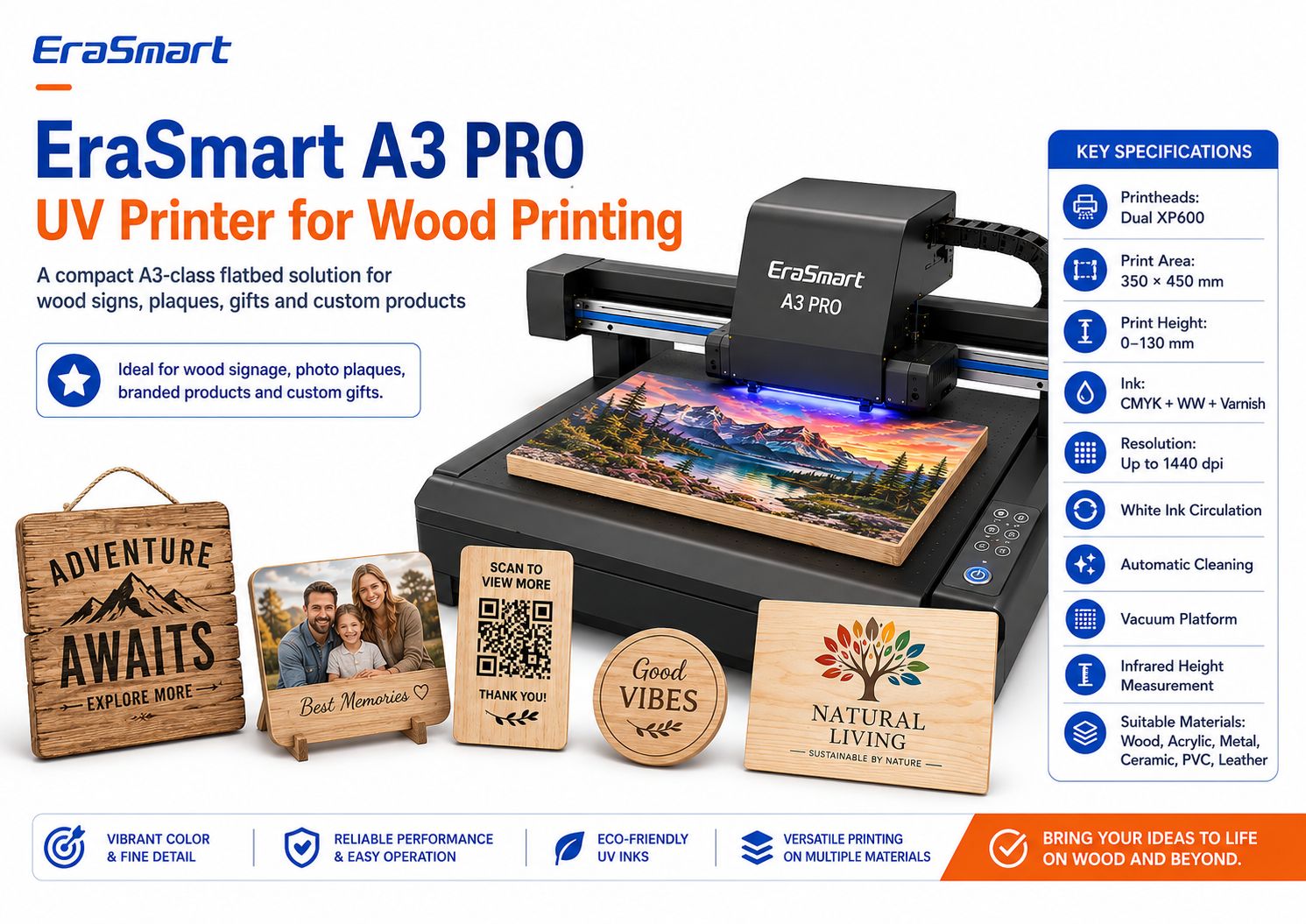
One option is the EraSmart 數位噴墨 A3 UV 印表機 — Dual XP600

EraSmart A3 PRO UV Printer for Wood Printing

EraSmart A3 PRO Key Specifications

規格EraSmart A3 PRO
列印頭雙XP600
列印區350×450毫米
打印高度0–130 毫米
墨水配置CMYK + WW + 光油
解決高達 1440 dpi
白色墨水循環是的
自動清洗是的
真空平台是的
高度測量Infrared
圖像處理軟件Riin / PrivateRip

The printer supports materials including:

  • 木頭
  • 丙烯酸纖維
  • 金屬
  • 陶瓷製品
  • PVC
  • 熱塑性聚氨酯
  • 皮革
  • KT板

For wood applications, the combination of white ink, varnish capability, vacuum platform, and infrared height measurement is particularly useful for small-batch flat product customization.

What Wood Products Fit an A3-Class Workflow?

A 350 × 450 mm print area can accommodate many smaller custom products, depending on the final dimensions.

範例包括:

  • 照片牌
  • QR 圖碼標誌
  • small menu signs
  • 個性化禮物
  • 杯墊
  • 品牌禮品盒
  • wooden awards
  • decorative panels
  • small business signage
  • wedding pieces

For larger wooden panels, signage, or multiple pieces per batch, a larger platform may make more sense.

EraSmart 也提供 A2UV打印機 with a larger working area for businesses whose product dimensions require more space.

Choose printer size according to your products, not simply because a larger machine sounds more professional.

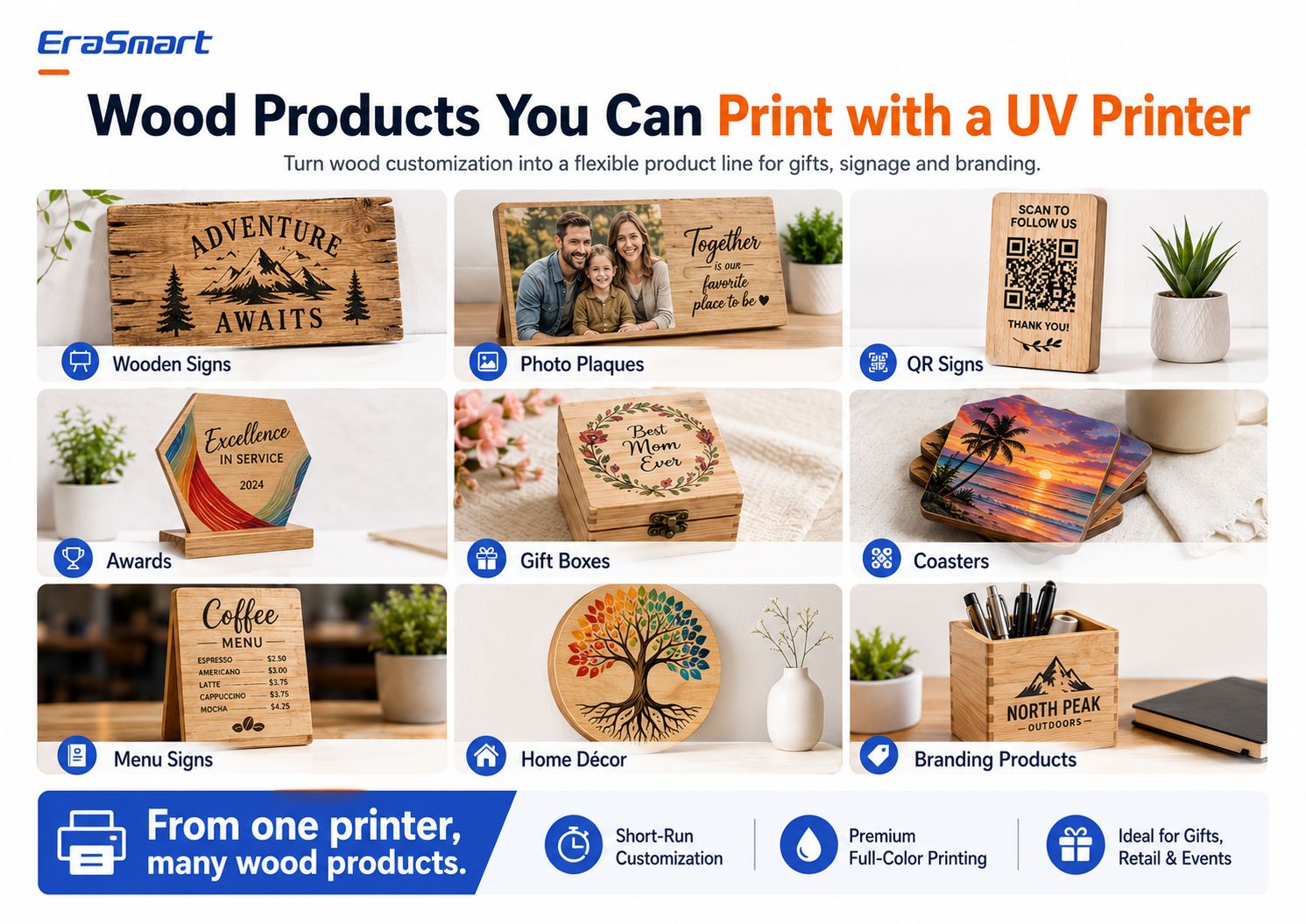
Wood Products You Can Print with a UV Printer

Wood is valuable because it can serve several business markets at once.

Wood Products You Can Print with a UV Printer

1. Wooden Signs

範例:

  • cabin signs
  • family name signs
  • 婚禮標誌
  • 咖啡館標誌
  • store signs
  • directional signs
  • decorative quotes

2. Photo Plaques

Full-color UV printing can turn photos into:

  • family gifts
  • 週年紀念作品
  • memorial plaques
  • 結婚禮物
  • 寵物肖像
  • travel memories

White ink is often useful behind photographic artwork.

3. QR Code Signs

Small businesses increasingly use QR displays for:

  • menus
  • payments
  • reviews
  • Wi-Fi access
  • social media
  • booking pages

Print and physically scan the QR code before delivery.

Do not rely only on the digital preview.

4. Wooden Awards

創造:

  • company awards
  • employee recognition pieces
  • sports awards
  • club plaques
  • branded certificates

5. Gift Boxes

Wood boxes can be customized with:

  • 名字
  • 標誌
  • floral graphics
  • 婚禮日期
  • corporate branding

The exact box geometry must fit safely within the printer’s supported dimensions and clearance.

6. Coasters

Coasters are suitable for:

  • tourism designs
  • art collections
  • cafés
  • 結婚禮物
  • 品牌商品

For products exposed to moisture or repeated abrasion, test the finished product according to its real use.

7. Menu Signs

Wood menus can work for:

  • cafés
  • restaurants
  • bars
  • food trucks
  • weddings
  • events

8. Home Décor

範例:

  • botanical art
  • family names
  • nursery décor
  • landscape panels
  • quote signs
  • holiday décor

9. Branding Products

Businesses may order:

  • counter signs
  • logo plaques
  • 促銷禮品
  • display pieces
  • retail décor
  • branded desk products

B2B orders can be especially valuable because customers may reorder the same template with updated text or different staff names.

How One Wood Design Can Become Multiple Products

A smart customization business can reuse artwork.

For example, one mountain illustration can become:

  • cabin sign
  • coaster set
  • photo-frame background
  • gift box
  • souvenir plaque
  • QR sign
  • branded desk item

The same design does not need to be recreated for every product.

Instead, adapt:

  • dimensions
  • crop
  • 文字
  • white ink mask
  • 產品模板

This increases the value of each artwork file.

Business Ideas for UV Wood Printing

Personalized Gift Shop

賣:

  • 照片牌
  • family signs
  • 結婚禮物
  • pet products
  • personalized boxes

Local Sign Shop

提供:

  • 咖啡館標誌
  • menus
  • QR 圖碼顯示
  • 辦公桌匾
  • business logos

Etsy or Online Seller

創造:

  • rustic signs
  • seasonal décor
  • 個性化禮物
  • coaster sets
  • 婚禮用品

Tourism and Souvenir Business

列印:

  • destination artwork
  • local maps
  • landmark graphics
  • 紀念牌
  • coaster collections

Wedding and Event Business

生產:

  • 歡迎標誌
  • table pieces
  • 恩惠
  • 小斑塊
  • 紀念品

Corporate Gift Supplier

提供:

  • awards
  • branded boxes
  • 辦公桌匾
  • recognition gifts
  • logo merchandise

How to Price Custom Wood Printing

Do not calculate price using only ink and wood.

包括:

  • wood blank
  • 表面處理
  • 墨水
  • 白墨水
  • 試件
  • 列印失敗
  • artwork setup
  • 個人化
  • machine time
  • 勞動
  • finishing
  • 包裝
  • 平台費用
  • 運輸材料
  • 維護
  • profit

Personalization usually creates more value because customers are not buying a generic wooden board.

They are buying a finished custom product.

要避免的常見錯誤

Mistake 1: Assuming All Wood Prints the Same

It does not.

Test the exact material.

Mistake 2: Printing on Dusty Wood

Sanding dust can reduce quality and adhesion.

Mistake 3: Ignoring White Ink

White ink is one of the most important creative tools for controlling color on natural wood.

Mistake 4: Printing the Full Order Without a Sample

Always approve a physical sample first.

Mistake 5: Using Severely Warped Wood

Flatness matters for consistent printhead clearance.

Mistake 6: Ignoring Existing Surface Coatings

Wax, oil, lacquer, paint, and other coatings can affect adhesion.

Mistake 7: Using the Same Artwork for White Paper and Wood

Design for the actual substrate.

Mistake 8: Manually Repositioning Every Product

Build a repeatable fixture for batch production.

Professional Wood Printing Checklist

列印前:

材料

  • wood type confirmed
  • surface clean
  • board dry
  • sufficiently flat
  • coating identified
  • adhesion test planned

藝術品

  • final dimensions correct
  • high-resolution image
  • vector text/logo where possible
  • white ink mask prepared
  • varnish layer prepared if needed

印表機

  • nozzle check complete
  • print height correct
  • vacuum or positioning setup ready
  • RIP preset selected

樣本

  • color checked
  • detail checked
  • white ink checked
  • adhesion checked
  • position approved

生產

  • fixture locked
  • artwork version confirmed
  • batch quantities checked
  • periodic QC performed

精加工

  • scratches checked
  • edges checked
  • packaging prepared
  • final quantity verified

Final Answer: How Do You Print on Wood?

For professional direct printing on suitable wooden products, UV printing provides a flexible workflow for full-color artwork, white ink, varnish effects, personalization, and small-batch production.

The process is:

prepare the wood → prepare the artwork → choose the white ink strategy → position the product → set print height → print a sample → test adhesion → standardize the position → begin batch production

The biggest factor is not maximum printer resolution.

It is surface control

A clean, smooth, stable wooden product with a tested print setup will usually produce more predictable results than an expensive machine printing on an unsuitable, dusty, oily, or badly warped surface.

White ink is the second major factor.

使用:

  • 僅四色 when you want natural wood grain
  • 白色+CMYK when you want stronger opacity
  • Selective White + CMYK when you want to combine natural material character with vivid color

For businesses producing wooden plaques, signs, gifts, QR displays, coasters, awards, boxes, and other flat custom products, the EraSmart A3 PRO UV印表機 provides a 350 × 450 mm A3-class platform with Dual XP600 printheads, white ink, varnish capability, white ink circulation, automatic cleaning, vacuum platform, and infrared height measurement.

The goal is not simply to print on wood.

The goal is to create a workflow that can produce the same quality again and again

常問問題

Can a UV printer print directly on wood?

Yes. UV flatbed printers can print directly on many suitable wooden surfaces. Wood should be clean, stable, sufficiently flat, and tested for adhesion before commercial production.

Do I need to sand wood before UV printing?

Not always. Smooth prepared wood may already be suitable. Rough surfaces, loose fibers, or irregular finishes may benefit from sanding. Always remove sanding dust before printing.

What is the best wood for UV printing?

Smooth, clean, stable wood generally produces the most predictable results. Birch plywood, maple, prepared pine, bamboo, MDF, and coated wood can all be used depending on the surface condition and required finish.

Can you UV print on raw wood?

Yes, but raw wood can be more porous and textured. The result depends on grain, surface smoothness, moisture, dust, and the artwork.

Do I need white ink when printing on wood?

Not always.

Use CMYK only when you want the natural grain to show through.

Use white under CMYK when you need more opaque, vibrant, or predictable colors.

Can UV printing reproduce photos on wood?

Yes. For photographic products, use high-quality artwork and consider a white underbase if you want the image colors to remain stronger and less influenced by the wood tone.

Can I print QR codes on wood?

Yes, but QR codes must remain sufficiently large, sharp, and high contrast. Always test the finished printed code with multiple phones before delivery.

Does every wooden product need primer?

No. Primer requirements depend on the exact wood surface, coating, ink, and adhesion requirement. Test first rather than applying primer automatically.

Can a UV printer print wooden boxes?

Potentially, if the product fits within the printer’s supported dimensions, height, weight, and safe printhead clearance. The printable area must also be sufficiently flat.

What EraSmart printer is suitable for wood printing?

For small and medium flat wood products, the EraSmart 數位噴墨 A3 UV 印表機 — Dual XP600 is one suitable option. For larger wood pieces, review the EraSmart UV印表機 range and select a print area based on your actual product dimensions.

CTA

Want to Build a Custom Wood Printing Business?

告訴時代智慧:

  • what wooden products you want to print
  • your product dimensions
  • wood type
  • whether the surface is raw, painted, or coated
  • expected monthly production
  • whether you need white ink
  • whether you need varnish effects
  • 你的工作空間
  • your future product plans

我們的團隊可以幫助您比較適合的 EraSmart UV印表機 and production workflow for wooden signs, photo plaques, personalized gifts, branded products, QR signs, coasters, boxes, and other custom wood applications.

Prepare the surface. Control the white ink. Test the sample. Then scale the workflow.


也許你也喜歡

  • Erasmart打印機

    UV打印機
    DTF打印機
    DTG打印機
    熱壓機
    廣告打印機

  • 打印機工具

    DTF烤箱
    熱壓
    雕刻機
    杯傳熱
    層壓機

  • 消耗品

    打印墨水
    手機案例
    玻璃產品
    清潔液
    棉籤

  • 聯繫我們

    WhatsApp:+8618566233796
    微信:+8618566233796
    手機:+8618566233796
    網絡:www.erasmart.com
    店鋪:www.erasmartmall.com

  • 需要印表機價格嗎?

    告訴我們您的列印需求。我們的團隊將在 24 小時內回覆。

    請求報價

    只需提供一些細節,我們將幫助您獲得快速報價!