
Guida alla manutenzione della stampante UV: pulizia quotidiana, cura dell'inchiostro bianco e stabilità a lungo termine
Una stampante UV può produrre prodotti personalizzati di alto valore, ma un risultato stabile dipende da una manutenzione regolare. Questa guida spiega la pulizia quotidiana, la circolazione dell'inchiostro bianco, i controlli degli ugelli, la cura della stazione di tappatura, la pulizia della piattaforma, l'ispezione della lampada UV, la protezione dai tempi di inattività prolungati e gli errori comuni di manutenzione che acquirenti e operatori dovrebbero evitare.
Priorità di manutenzione
Prima della stampa
Quotidiano
Settimanale
Inattività prolungata
Proteggi la testina di stampa
I controlli degli ugelli, la cura della stazione di tappatura e le routine di pulizia riducono il rischio di intasamento.
Mantieni inchiostro bianco
L'inchiostro bianco richiede circolazione, agitazione e controlli regolari della stabilità dell'output.
Mantieni la piattaforma pulita
Polvere, residui di inchiostro e posizionamento irregolare possono influire sulla qualità di stampa e sull'adesione.
Previeni danni da inattività prolungata
Lo spegnimento corretto e la manutenzione inattiva aiutano a ridurre i problemi di essiccazione, sedimentazione e avvio.
Nozioni di base sulla manutenzione
Perché la manutenzione della stampante UV è diversa dalla stampa ordinaria
Le stampanti UV utilizzano inchiostro essiccabile ai raggi UV che viene polimerizzato dalla luce UV durante la stampa. Ciò conferisce alla stampa UV una forte flessibilità dei materiali e un rapido potenziale di produzione, ma significa anche che gli operatori devono controllare attentamente le condizioni dell’inchiostro, lo stato degli ugelli, la pulizia della piattaforma, le prestazioni di essiccazione e la preparazione del materiale.
L'inchiostro bianco è particolarmente importante nella stampa UV perché supporta materiali trasparenti, scuri e colorati. Tuttavia, anche l'inchiostro bianco richiede maggiore attenzione perché il pigmento può depositarsi se il sistema di inchiostro non viene mantenuto correttamente. Per un'affidabilità a lungo termine, la manutenzione dovrebbe essere trattata come parte del flusso di lavoro di produzione, non come una fase di riparazione di emergenza.
Regola semplice
Una stampante UV deve essere controllata prima della stampa, pulita dopo la produzione, sottoposta a manutenzione settimanale e protetta attentamente prima di lunghi periodi di inattività. Piccole routine quotidiane di solito prevengono problemi di inattività più grandi.
Programma di manutenzione
Tabella del programma di manutenzione della stampante UV
Utilizzare questo programma di manutenzione come quadro pratico. La routine esatta dovrebbe seguire il manuale della macchina e la configurazione del sistema di inchiostro.
| Frequenza | Compito di manutenzione | Perché è importante | Suggerimento per l'operatore |
|---|---|---|---|
| Prima della stampa | Test ugelli, controllo piattaforma, pulizia superficie materiale, conferma altezza | Previene bande, risultati sfocati, colpi di testa e scarsa adesione | Non avviare la produzione prima di aver controllato la configurazione degli ugelli. |
| Durante la stampa | Monitora il flusso di inchiostro, il colore di output, la stabilità della piattaforma e il risultato dell'essiccazione | Rileva i problemi prima che un lotto intero venga sprecato | Ispeziona il primo pezzo finito prima di continuare la produzione di massa. |
| Dopo la stampa | Pulisci la piattaforma, rimuovi i residui di inchiostro, controlla l'area di copertura, organizza i file | Mantiene la stampante pronta per il lavoro successivo | Non lasciare mai polvere di materiale o parti sciolte sulla piattaforma. |
| Quotidiano | Controllare lo stato dell'inchiostro bianco, il livello dell'inchiostro di scarto, le condizioni degli ugelli e il sigillo del cappuccio | Protegge la stabilità dell'inchiostro bianco e le condizioni della testina di stampa | L'inchiostro bianco deve essere considerato una priorità di manutenzione quotidiana. |
| Settimanale | Pulire la spazzola, la stazione di tappatura, le guide, i sensori e le aree circostanti dell'inchiostro | Riduce i problemi meccanici e legati all'inchiostro | Pianifica la manutenzione settimanale anche quando la produzione è scarsa. |
| Inattività prolungata | Seguire la protezione dallo spegnimento, la cura della testina, la cura del percorso dell'inchiostro e i controlli di riavvio | Previene l'essiccazione, i sedimenti e il fallimento dell'avvio | Non lasciare una stampante UV inattiva senza preparazione. |
Prima della stampa
Elenco di controllo per la manutenzione prestampa
Un lavoro di stampa UV stabile inizia prima che venga premuto il pulsante di stampa. La manutenzione prestampa aiuta a prevenire problemi agli ugelli, scarsa adesione, altezza errata e difetti legati al materiale.
Esegui un controllo degli ugelli
Controllare se i canali CMYK, inchiostro bianco e vernice vengono stampati correttamente prima della produzione. Le linee mancanti possono causare strisce, una debole copertura bianca o una vernice non uniforme.
Pulisci la superficie del materiale
Polvere, olio, impronte digitali e residui di rivestimento possono ridurre l'adesione e rendere il prodotto finito incoerente.
Controlla l'altezza dell'oggetto
Un'altezza errata può causare stampe sfocate, scarsa precisione o collisione della testina di stampa. Confermare la distanza prima di stampare prodotti spessi o irregolari.
Conferma le impostazioni RIP
Controllare l'ordine dei livelli, l'impostazione dell'inchiostro bianco, lo strato di vernice, la modalità passaggio e il profilo del materiale prima di iniziare il lavoro.
Manutenzione giornaliera
Routine quotidiana di manutenzione della stampante UV
La manutenzione quotidiana è l'abitudine più importante per la stabilità della stampante UV. Non è necessario che sia complicato, ma dovrebbe essere coerente. L'obiettivo è mantenere il sistema di inchiostro, la testina di stampa, l'area di copertura, la piattaforma e il flusso di lavoro di movimentazione dei materiali puliti e prevedibili.
| Punto di controllo giornaliero | Cosa fare | Problema che aiuta a prevenire |
|---|---|---|
| Modello di ugelli | Eseguire una stampa di prova e verificare che tutti i canali siano completi | Bande, linee mancanti, colore debole, inchiostro bianco non uniforme |
| Sistema di inchiostro bianco | Controllare la circolazione, l'agitazione e lo stato di uscita dell'inchiostro bianco | Sedimento di inchiostro bianco, intasamento, opacità instabile |
| Stazione di tappatura | Ispezionare l'area di sigillatura e rimuovere i residui visibili | Asciugatura della testina di stampa e scarso recupero dopo i tempi di inattività |
| Piattaforma | Rimuovere polvere, residui, scarti e parti sciolte | Errori di posizionamento, graffi, problemi di altezza |
| Inchiostro di scarto | Controllare il livello della bottiglia per l'inchiostro di scarto o del sistema di scarico | Traboccamento, contaminazione, processo di pulizia instabile |
Cura dell'inchiostro bianco
Manutenzione dell'inchiostro bianco per stampanti UV
L'inchiostro bianco è uno dei motivi principali per cui gli acquirenti scelgono una stampante UV professionale. Consente la stampa su acrilico trasparente, vetro, custodie scure per telefoni, substrati colorati e prodotti premium. Ma l’inchiostro bianco necessita anche di una routine di manutenzione disciplinata perché il pigmento è più pesante dell’inchiostro a colori standard.
Se l'inchiostro bianco non viene fatto circolare, mescolato o stampato regolarmente, può diventare instabile. Ciò può portare a un'opacità debole, alla mancanza di linee bianche, all'ostruzione degli ugelli, a sedimenti o a risultati incoerenti in un batch.
Circolazione
La circolazione dell'inchiostro bianco aiuta a ridurre i sedimenti e mantiene il percorso dell'inchiostro più stabile durante l'uso.
Agitazione
L'agitazione o l'agitazione del serbatoio dell'inchiostro aiuta a mantenere il pigmento distribuito in modo più uniforme.
Uscita regolare
Stampare o controllare regolarmente l'inchiostro bianco aiuta a identificare i problemi prima dell'inizio della produzione.
Protezione della testina di stampa
Manutenzione della testina di stampa, della stazione di tappatura e delle spazzole
La testina di stampa è una delle parti più importanti e sensibili di una stampante UV. Una buona routine di manutenzione protegge la testina di stampa mantenendo la superficie dell'ugello pulita, la stazione di copertura sigillata e l'area di pulizia libera da inchiostro essiccato o detriti.
| Componente | Focus sulla manutenzione | Se ignorato | Consigli dell'operatore |
|---|---|---|---|
| Testina di stampa | Prova degli ugelli, pulizia adeguata, controllo sicuro dell'altezza | Bande, linee mancanti, colpo alla testa, output instabile | Non stampare mai se l'altezza dell'oggetto è incerta. |
| Stazione di tappatura | Condizioni di tenuta, pulizia, protezione dall'umidità | Asciugatura degli ugelli e difficile recupero dopo i tempi di inattività | Controllare se il tappo chiude correttamente quando è inattivo. |
| Tergicristallo | Rimuovere i residui di inchiostro e controllare l'usura | Risultato di pulizia scadente e contaminazione degli ugelli | Mantenere la spazzola pulita e sostituirla quando necessario. |
| Percorso dell'inchiostro | Flusso di inchiostro stabile, nessun problema di aria o sedimenti | Uscita intermittente, colore debole, instabilità dell'ugello | Fare attenzione ai cambiamenti improvvisi della produzione durante la produzione. |
Cura della piattaforma
Pulizia della piattaforma e movimentazione dei materiali
La manutenzione della piattaforma viene spesso trascurata, ma influisce direttamente sulla precisione di posizionamento, sull'altezza di stampa, sulla nitidezza della stampa e sulla sicurezza del prodotto. Polvere, viti, frammenti di pellicola, residui di inchiostro o fissaggi irregolari possono creare difetti di stampa o addirittura aumentare il rischio di collisione della testina di stampa.
Mantenere pulito il piano di scansione
Rimuovere polvere, residui di inchiostro, segni di adesivo e residui di prodotto dopo ogni lavoro. Una piattaforma pulita supporta un posizionamento migliore e una stampa più sicura.
Utilizzare dispositivi stabili
Maschere e modelli possono migliorare la ripetibilità di custodie per telefoni, piccoli regali, etichette e produzione in lotti.
Controlla l'altezza dell'oggetto
Verificare che l'oggetto sia piatto e stabile. Evitare di stampare su prodotti instabili che potrebbero spostarsi o sollevarsi durante la stampa.
Pulisci la superficie del materiale
Impronte digitali, olio, polvere e residui di rivestimento possono ridurre l'adesione e rendere la stampa meno durevole.
Polimerizzazione UV
Manutenzione della lampada UV e della polimerizzazione
La polimerizzazione UV è ciò che trasforma l'inchiostro UV stampato in uno strato solido sulla superficie del materiale. Se l'essiccazione è troppo debole, l'inchiostro potrebbe rimanere morbido o graffiarsi facilmente. Se la polimerizzazione è troppo forte per un materiale o un ambiente specifico, il risultato potrebbe diventare fragile, irregolare o visivamente incoerente.
| Punto di controllo curativo | Cosa guardare | Possibile problema |
|---|---|---|
| Condizioni della lampada UV | Controllare se la polimerizzazione rimane costante durante la produzione | Inchiostro morbido, scarsa adesione, finitura con vernice debole |
| Forza curativa | Adatta la forza di polimerizzazione al materiale e alla modalità di stampa | Finitura eccessiva, insufficiente e irregolare |
| Finitura in vernice | Controllare la lucentezza, la consistenza e la consistenza della superficie | Vernice non sufficientemente lucida o consistenza irregolare |
| Sensibilità al calore del materiale | Alcune materie plastiche o prodotti rivestiti potrebbero reagire in modo diverso | Imbarcazioni, deformazioni, scadente risultato superficiale |
Manutenzione settimanale
Lista di controllo settimanale per la manutenzione della stampante UV
Pulisci le rotaie e le aree in movimento
I residui di polvere e inchiostro possono compromettere la stabilità del movimento e le prestazioni meccaniche a lungo termine.
Ispezionare le parti della copertura e del tergicristallo
Verificare la presenza di inchiostro essiccato, superfici usurate, scarsa tenuta e prestazioni di pulizia.
Controllare il sistema dell'inchiostro di scarto
L'accumulo di inchiostro di scarto può creare contaminazione e problemi di pulizia se ignorato.
Esaminare gli esempi di qualità di stampa
Confronta l'output nel tempo per identificare variazioni di colore, bande, inchiostro bianco debole o cambiamenti di vernice.
Cura a lungo inattivo
Cosa fare se una stampante UV rimane inattiva
Molte piccole imprese non utilizzano una stampante UV ogni giorno. Se la stampante resta inattiva, gli operatori dovrebbero prepararla adeguatamente invece di limitarsi a spegnerla e lasciarla lì. Tempi di inattività prolungati possono aumentare il rischio di essiccazione degli ugelli, sedimenti di inchiostro bianco, scarsa resa all'avvio e difficoltà di ripristino.
| Periodo di inattività | Messa a fuoco consigliata | Rischio se ignorato |
|---|---|---|
| 1 giorno | Pulire la piattaforma, tappare correttamente la testina di stampa e controllare lo stato dell'inchiostro prima dell'uso successivo | Piccoli problemi di avvio se l'area di copertura è sporca |
| 2–3 giorni | Prestare particolare attenzione all'inchiostro bianco, al sigillo del cappuccio e al controllo degli ugelli al riavvio | Instabilità dell'inchiostro bianco e perdita parziale dell'ugello |
| Circa 1 settimana | Seguire la protezione inattiva consigliata dal fornitore e la routine di riavvio | Essiccazione degli ugelli, sedimenti, uscita debole di inchiostro bianco |
| Conservazione più lunga | Utilizzare linee guida formali per l'arresto/immagazzinamento basate sulla macchina e sul sistema di inchiostro | Intasamento grave o recupero difficile |
Avviso importante
Non lasciare una stampante UV inattiva per diversi giorni senza aver compreso il corretto processo di spegnimento e riavvio. L'inchiostro bianco, le condizioni dei cappucci e la protezione degli ugelli sono le principali aree di rischio.
Risoluzione dei problemi di manutenzione
Problemi di manutenzione e cosa significano solitamente
Molti problemi della stampa UV sono legati alla manutenzione. La tabella seguente aiuta gli operatori a collegare i sintomi con le probabili aree di manutenzione.
| Problema | Possibile causa di manutenzione | Cosa controllare prima | Guida correlata |
|---|---|---|---|
| Linee striate o mancanti | Intasamento degli ugelli, scarsa pulizia, flusso di inchiostro instabile | Prova degli ugelli e routine di pulizia | Guida alla risoluzione dei problemi |
| Inchiostro bianco debole | Sedimenti, cattiva circolazione, impostazioni errate dello strato bianco | Circolazione dell'inchiostro bianco e configurazione dello strato RIP | Guida all'inchiostro UV |
| L'inchiostro si graffia | Scarsa pulizia del materiale o mancata corrispondenza della polimerizzazione | Pulizia della superficie e forza di polimerizzazione UV | Guida ai materiali |
| Vernice non lucida | Strato di vernice, polimerizzazione o condizione della superficie errati | Impostazioni della vernice e risultato della polimerizzazione | Guida all'inchiostro UV |
| Immagine sfocata | Altezza errata o posizionamento instabile della piattaforma | Altezza di stampa e stabilità del dispositivo | Guida alla risoluzione dei problemi |
Percorso del modello EraSmart
Quale configurazione della stampante UV dovresti prendere in considerazione?
Quando confronti le stampanti UV EraSmart, considera i materiali di destinazione, se hai bisogno di inchiostro bianco, se gli effetti di vernice fanno parte del valore del tuo prodotto e quale formato di stampa richiede i tuoi prodotti.
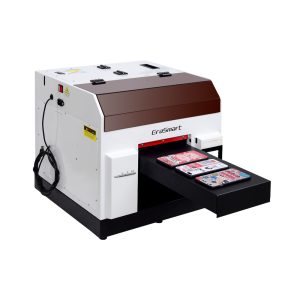
Una scelta pratica per custodie per telefoni, accessori, piccoli prodotti in acrilico e flussi di lavoro per la personalizzazione di regali.
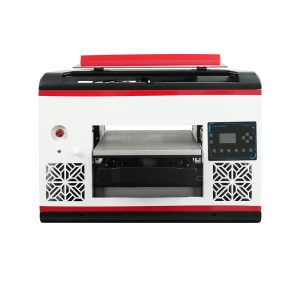
Adatto per gli utenti che necessitano di un'area piana più ampia e di una copertura del materiale più ampia.
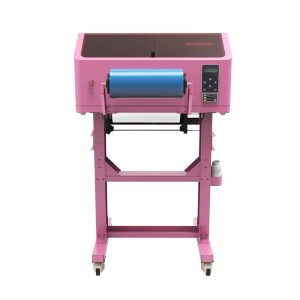
Ideale per decalcomanie UV DTF, involucri per tazze, adesivi, bottiglie e applicazioni di trasferimento su superfici dure.
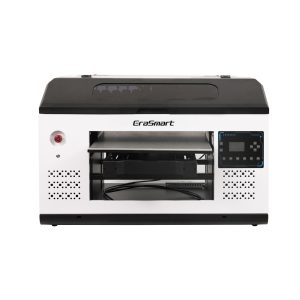
Una soluzione migliore per pannelli, segnaletica, pannelli e team di produzione più grandi che necessitano di più spazio sulla piattaforma.
Errori comuni
Errori di manutenzione della stampante UV da evitare
Stampa senza controllo degli ugelli
Saltare il test degli ugelli può comportare uno spreco di materiale e la produzione di bande, colori mancanti o inchiostro bianco debole.
Ignorare la circolazione dell'inchiostro bianco
L'inchiostro bianco richiede più attenzione dell'inchiostro a colori. Una scarsa cura dell'inchiostro bianco può causare sedimenti e opacità instabile.
Lasciare la piattaforma sporca
Polvere, residui e oggetti sciolti possono influire sul posizionamento, sull'altezza di stampa e sulla sicurezza della testina di stampa.
Lasciare la stampante inattiva senza preparazione
Lunghi periodi di inattività aumentano il rischio di essiccazione e intasamento, soprattutto se la stazione di tappatura o il sistema di inchiostro non sono preparati correttamente.
Domande frequenti sulla manutenzione della stampante UV
-
1. Con quale frequenza devo effettuare la manutenzione di una stampante UV?
Una stampante UV deve essere controllata prima di ogni sessione di stampa, pulita quotidianamente durante l'uso regolare, ispezionata settimanalmente e preparata con cura prima di lunghi periodi di inattività.
-
2. Perché l'inchiostro bianco necessita di una manutenzione speciale?
L'inchiostro bianco contiene pigmenti più pesanti rispetto all'inchiostro a colori standard, quindi necessita di circolazione, agitazione, controlli degli ugelli e copertura adeguata per mantenere un output stabile.
-
3. Devo eseguire un controllo degli ugelli prima di ogni lavoro?
SÌ. Un controllo degli ugelli aiuta a identificare linee mancanti, intasamenti o un'uscita di inchiostro debole prima di sprecare materiali in un lavoro di produzione completo.
-
4. Cosa causa l'ostruzione degli ugelli della stampante UV?
Le cause più comuni includono copertura inadeguata, inchiostro essiccato, pulizia insufficiente, sedimenti di inchiostro bianco, tempi di inattività prolungati e flusso di inchiostro instabile.
-
5. Come posso evitare una scarsa adesione nella stampa UV?
Pulisci la superficie del materiale, testa l'esatto substrato, utilizza le impostazioni di essiccazione adeguate e controlla se il materiale richiede un pretrattamento o un flusso di lavoro diverso.
-
6. Cosa devo fare se una stampante UV non verrà utilizzata per diversi giorni?
Seguire la routine di protezione inattiva consigliata dal fornitore. Prestare particolare attenzione alla copertura della testina di stampa, alla stabilità dell'inchiostro bianco, alle condizioni del percorso dell'inchiostro e riavviare i controlli degli ugelli.
-
7. La manutenzione della stampante UV è difficile?
La manutenzione è gestibile se eseguita in modo coerente. I problemi maggiori solitamente derivano da controlli ugelli saltati, scarsa cura dell'inchiostro bianco, aree di copertura sporche e lunghi periodi di inattività senza preparazione.
-
8. La vernice richiede una manutenzione particolare?
L'uscita della vernice deve essere controllata come gli altri canali dell'inchiostro. Se la vernice diventa irregolare, non lucida o posizionata male, controllare le condizioni dell'ugello, l'impostazione dello strato RIP, la forza di polimerizzazione e la superficie del materiale.
Serie di stampanti EraSmart


High-quality UV Printers for metal, acrylic, glass, wood & more. Instant curing, vivid 1440dpi prints, versatile for diverse materials.

Stampa decalcomanie vivide e in rilievo con **CMYK + Bianco + Vernice** in un unico passaggio. Niente polvere. Niente forno. Stacca e incolla su oggetti piatti o curvi in pochi minuti.
Non hai trovato una guida adatta? Ottieni subito supporto tecnico gratuito!
Fornisci solo alcuni dettagli e ti aiuteremo a ottenere citazioni veloci!
Stampante EraSmart
stampante UV
Stampante DTF
Stampante DTG
Macchina per pressione di calore
Stampante pubblicitaria
Strumenti della stampante
Forno DTF
Pressa calda
Macchina intagliata
Trasferimento di calore della tazza
Macchina per laminazione
Materiali di consumo
Inchiostro da stampa
Custodia per cellulare
Prodotto di vetro
Fluido di pulizia
Tampone di cotone
Contattaci
WhatsApp : +8618566233796
WeChat : +8618566233796
Mobile : +8618566233796
Web :www.erasmart.com
Negozio:www.erasmartmall.com
Scrivici su WhatsApp
Richiedere un preventivo
Fornisci solo alcuni dettagli e ti aiuteremo a ottenere citazioni veloci!
downlon
Lascia la tua email e invia l'URL di download all'email.
Hai bisogno del prezzo della stampante?
Raccontaci le tue esigenze di stampa. Il nostro team risponderà entro 24 ore.