小型サイズのフラットベッドインクジェットプリンターメーカー

86-18566233796 [email protected]

ブログ What Is an Inkjet Printer and How Does It Work? A Practical Guide for Custom Printing Businesses

What Is an Inkjet Printer and How Does It Work? A Practical Guide for Custom Printing Businesses

June 17, 2026 ブログ

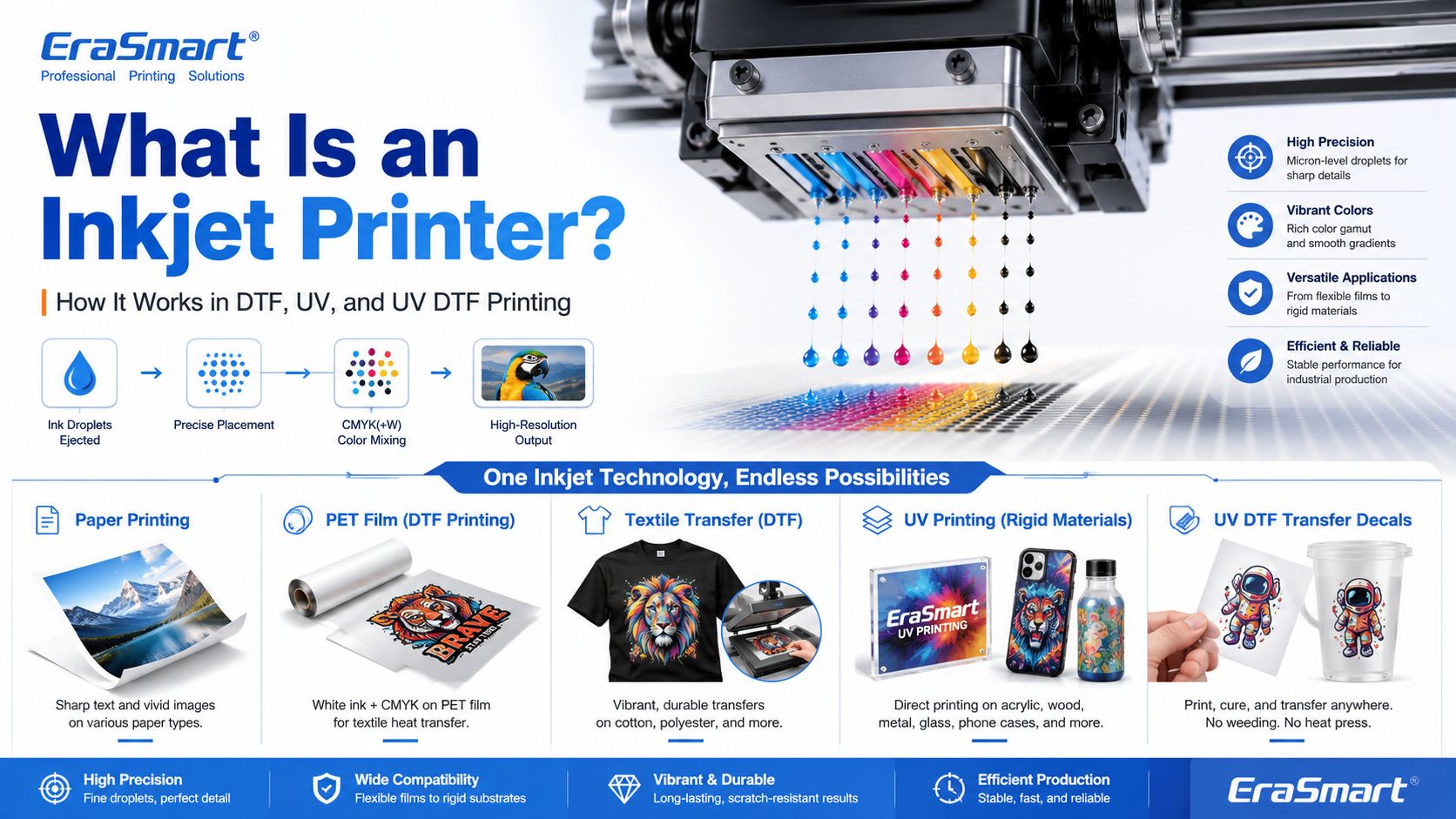
An inkjet printer is a digital printing device that creates images by ejecting tiny droplets of ink onto a surface. Instead of using plates, screens, or physical stencils, an inkjet printer receives digital image data and places controlled ink droplets in precise positions to form text, graphics, photos, labels, transfers, or product decoration.

Most people first know inkjet printers from office or home photo printing. But inkjet technology is much broader than desktop paper printing. Today, inkjet systems are used in DTF printing, UV flatbed printing, UV DTF transfers, packaging samples, product labels, signage, promotional products, textile decoration, industrial marking, and custom product manufacturing.

For EraSmart customers, this topic matters because many modern custom printing machines are built on inkjet principles. A DTFプリンター uses inkjet technology to print garment designs onto transfer film. A UVプリンター uses inkjet technology to print UV-curable ink directly onto rigid materials. A UV DTFプリンター uses inkjet printing to create hard-surface decals and transfers on A/B film.

In simple terms, inkjet printing is the foundation. DTF, UV, and UV DTF are specialized business workflows built around that foundation.

Quick Answer: What Is an Inkjet Printer?

An inkjet printer is a printer that sprays or ejects tiny droplets of liquid ink through microscopic nozzles to create a printed image.

A basic inkjet printing system includes:

  • digital artwork file
  • RIP or printer control software
  • ink supply system
  • printhead
  • microscopic nozzles
  • movement system
  • printable surface
  • drying, curing, or transfer process

The printhead is the key component. It controls where ink droplets land, how much ink is ejected, and how accurately the image is formed.

How Does an Inkjet Printer Work?

Inkjet printing may look simple from the outside, but inside the printer there is a precise digital control process.

A simplified workflow looks like this:

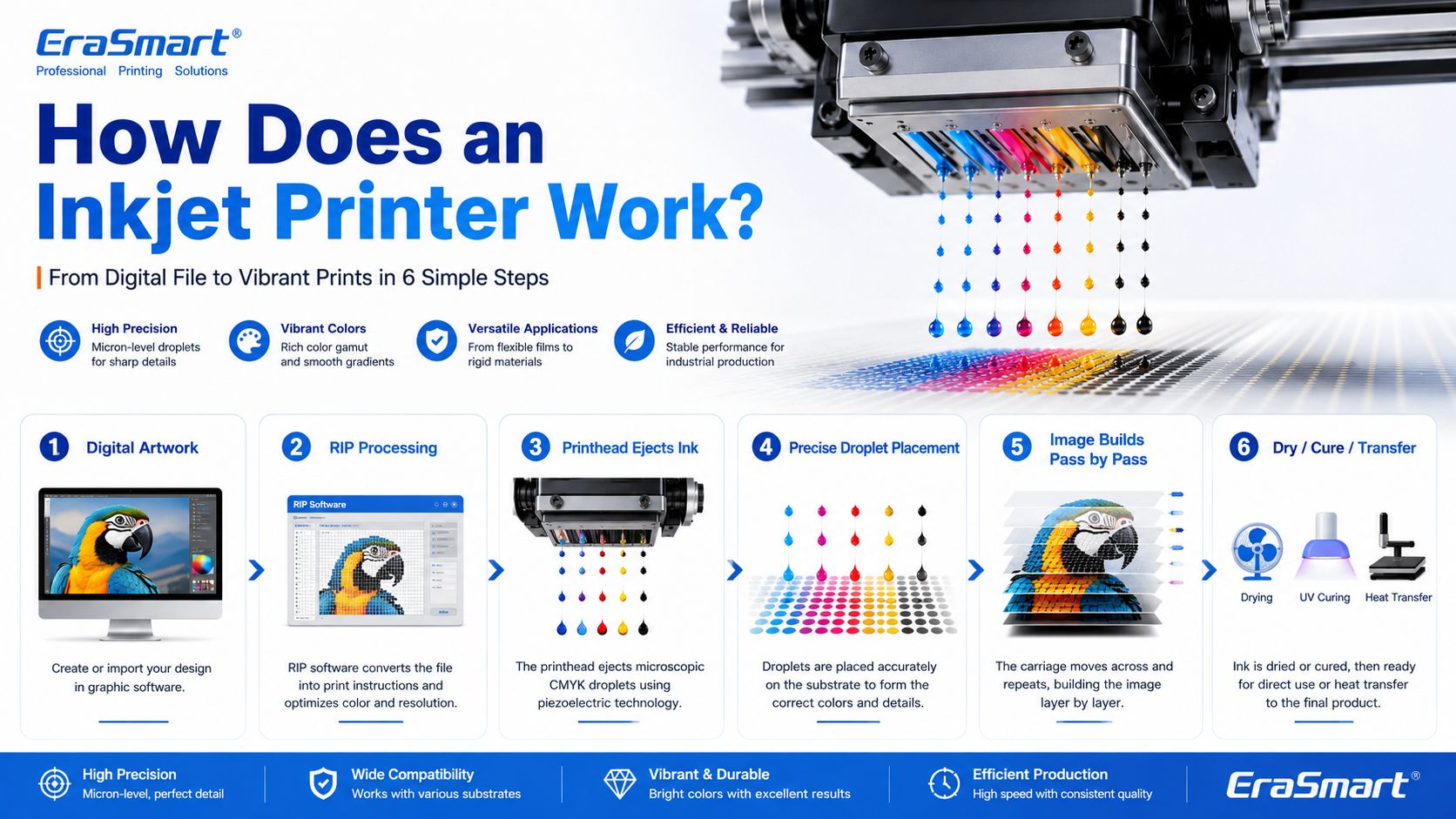
  1. The computer sends image data to the printer.
  2. The printer software processes the file into printable dot information.
  3. The printer moves the printhead or material into position.
  4. The printhead ejects tiny droplets of ink through nozzles.
  5. The droplets land on the target surface in controlled positions.
  6. The printer builds the image line by line or pass by pass.
  7. The ink dries, cures, absorbs, or transfers depending on the printing method.

In an office inkjet printer, ink is usually printed onto paper and dries or absorbs into the paper surface. In an industrial or custom printing system, the process may be more specialized. For example, UV ink is cured by UV light, while DTF ink is printed onto PET film and later heat transferred onto fabric.

Main Components of an Inkjet Printer

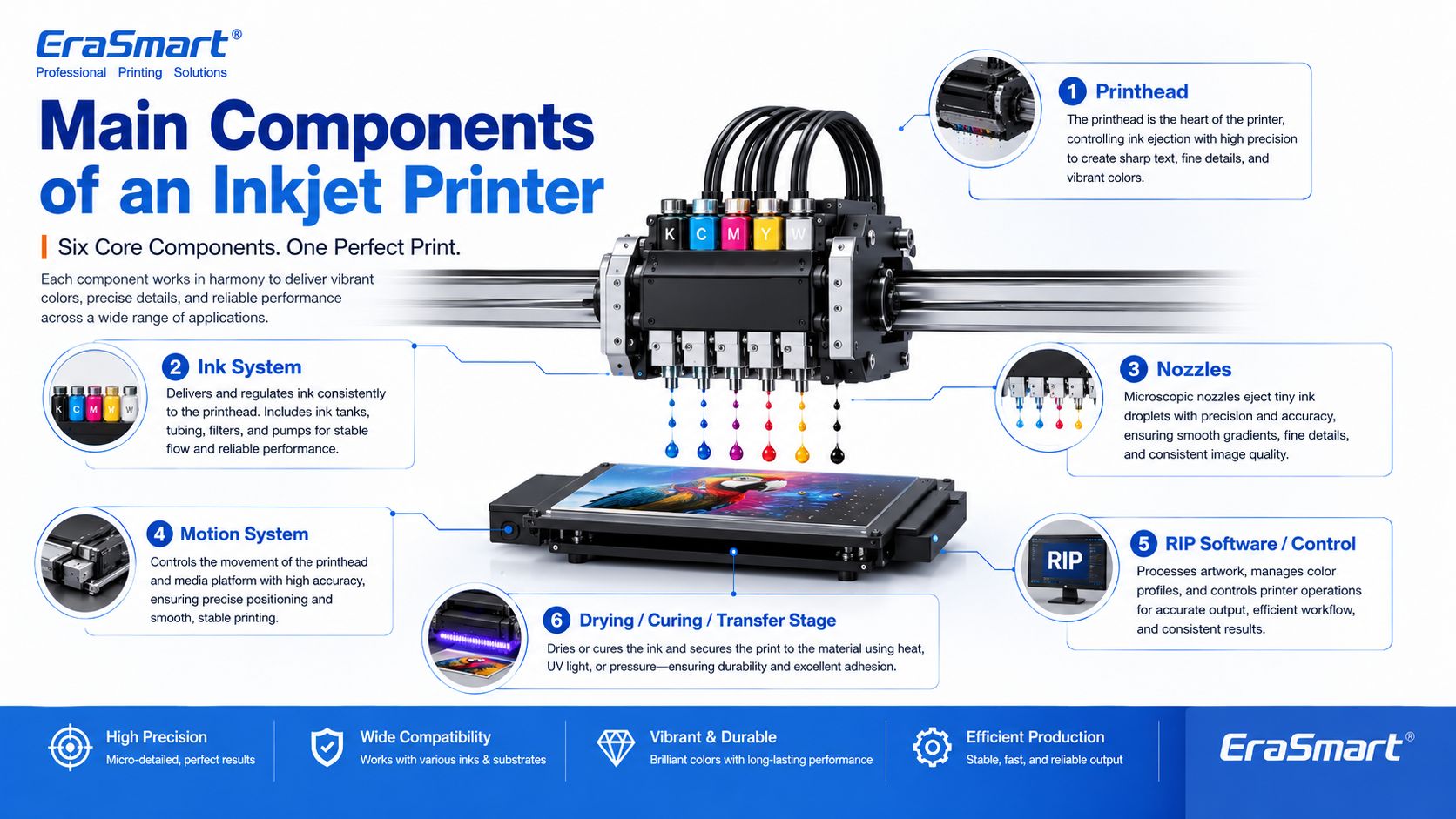
1. Printhead

The printhead is the most important part of an inkjet printer. It contains many tiny nozzles that eject ink droplets. The printhead determines much of the printer’s resolution, droplet control, speed, and print quality.

In custom printing, printhead condition directly affects:

  • sharpness
  • color consistency
  • line accuracy
  • white ink quality
  • nozzle stability
  • production reliability
  • maintenance requirements

This is why printer maintenance is so important in DTF and UV printing. If the printhead nozzles are clogged or unstable, the final print may show banding, missing lines, weak colors, or poor detail.

For apparel printing users, EraSmart’s DTFプリンターメンテナンスガイド is a useful resource for understanding why nozzle checks, cleaning, white ink circulation, and daily care matter.

2. Ink System

The ink system stores and delivers ink to the printhead. Different inkjet printers use different types of ink depending on the application.

Common ink types include:

  • dye ink
  • pigment ink
  • sublimation ink
  • textile ink
  • DTFインク
  • UV硬化型インク
  • solvent or eco-solvent ink
  • industrial marking ink

For EraSmart customers, the most relevant ink systems are DTF ink, UV ink, white ink, and varnish.

a DTFプリンター commonly uses CMYK ink plus white ink. The white ink helps designs appear clearly on dark garments. A UVプリンター may use CMYK, white ink, and varnish to print on hard surfaces such as acrylic, glass, metal, wood, plastic, leather, and packaging materials.

If you want to understand how CMYK, white ink, and varnish work together in product customization, see EraSmart’s UV Ink Guide: CMYK, White Ink, and Varnish

3. Nozzles

Nozzles are microscopic openings in the printhead. They eject ink droplets in controlled patterns.

Nozzle performance affects:

  • print resolution
  • detail clarity
  • ink density
  • 色の精度
  • 滑らかなグラデーション
  • edge sharpness
  • production stability

Nozzles can become clogged if ink dries, settles, or becomes contaminated. This is especially important for white ink systems because white ink contains heavier pigment particles and needs proper circulation and maintenance.

4. Motion System

Inkjet printers need accurate motion control. Either the printhead moves across the material, the material moves under the printhead, or both are coordinated.

The motion system affects:

  • print alignment
  • image registration
  • repeatability
  • production speed
  • print size accuracy
  • multi-pass quality

In UV flatbed printing, the platform and printhead movement must be stable so the image lands accurately on rigid objects. In DTF printing, film feeding must be smooth so the transfer image remains consistent.

5. RIP Software and Print Control

RIP software converts artwork into printer-ready instructions. It controls color output, resolution, ink layering, white ink channels, varnish layers, print passes, and other production settings.

For custom printing businesses, RIP setup is important because it affects:

  • color performance
  • white ink underbase
  • image sharpness
  • ink usage
  • 印刷速度
  • material compatibility
  • repeatability

A good printer is only part of the system. Correct artwork preparation and RIP settings are also necessary for professional results.

6. Drying, Curing, or Transfer System

Inkjet printing is not finished when ink leaves the nozzle. The ink must also become stable on the final product.

Different workflows use different finishing methods:

Inkjet WorkflowWhat Happens After Printing
Office inkjetInk dries or absorbs into paper
DTF印刷Powder is applied, cured, then heat pressed onto fabric
UV印刷UV light cures the ink almost instantly
UV DTF印刷UV ink is printed on film, laminated, then applied as a transfer
昇華Printed transfer is heat pressed into polyester or coated blanks

This is why inkjet technology can support many industries. The core droplet technology is similar, but the finishing process changes based on the product.

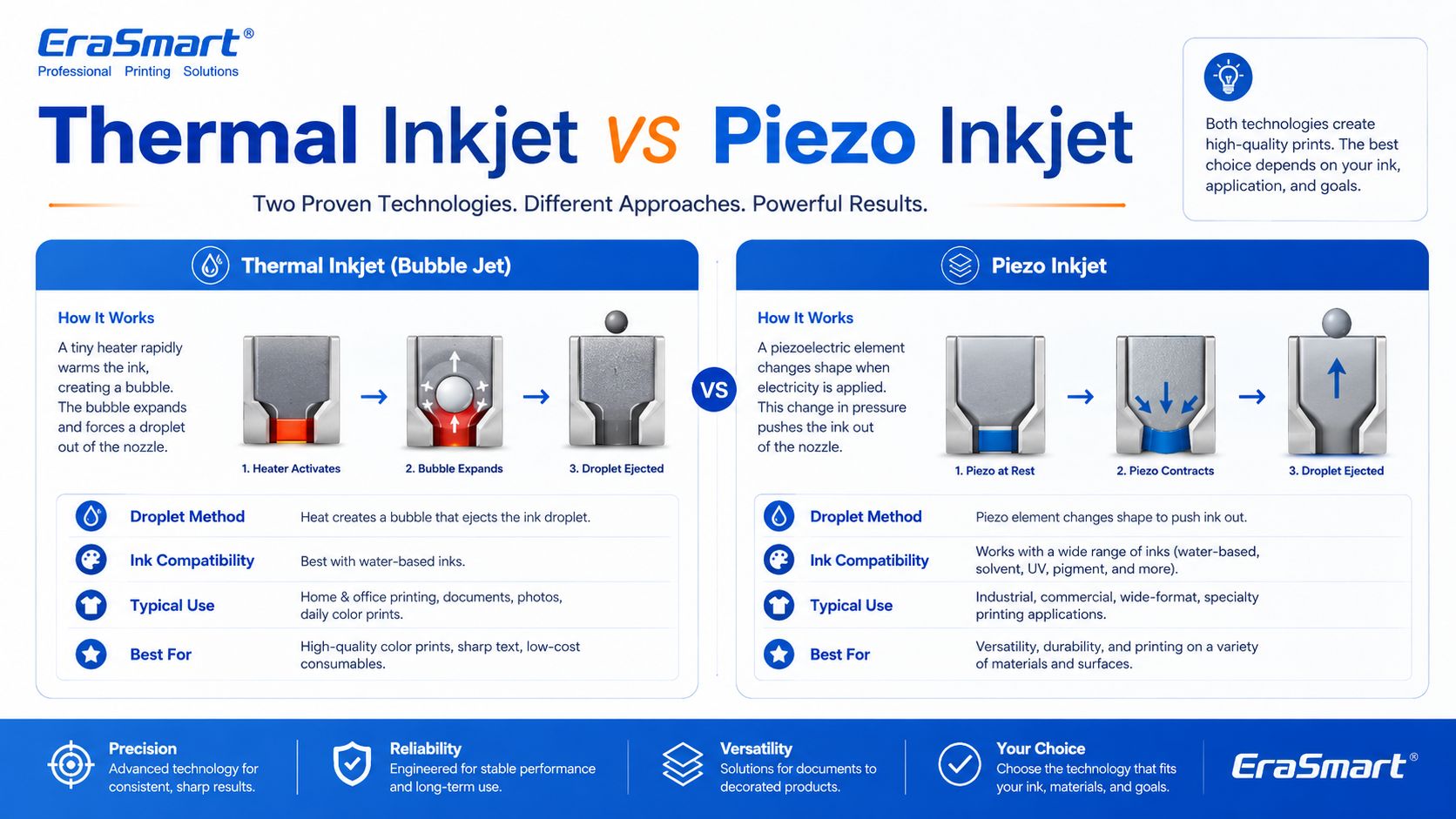
Thermal Inkjet vs Piezo Inkjet

There are two major inkjet technologies: thermal inkjet and piezo inkjet.

Thermal Inkjet

Thermal inkjet uses heat to create a vapor bubble inside the ink chamber. The pressure from this bubble pushes a droplet of ink out of the nozzle.

Thermal inkjet is common in many desktop and office printers. It can produce high-quality prints on paper, but the ink must be compatible with heat-based ejection.

Piezo Inkjet

Piezo inkjet uses a piezoelectric element that changes shape when voltage is applied. This mechanical movement creates pressure and ejects ink droplets through the nozzle.

Piezo inkjet is widely used in many professional and industrial printing systems because it can work with a broader range of inks. Since the ink is not heated for ejection, piezo technology is suitable for inks that may not perform well in thermal systems, including many specialty inks used in industrial and custom printing.

For DTF, UV, and UV DTF applications, piezo-style inkjet technology is especially important because these workflows require precise ink control and compatibility with specialized ink types.

Drop-on-Demand vs Continuous Inkjet

Inkjet printing can also be divided by how ink is delivered.

Drop-on-Demand Inkjet

Drop-on-demand means ink droplets are ejected only when needed. This is common in many graphic and custom printing applications because it offers precise control and efficient ink use.

DTF, UV, and UV DTF printers generally operate around controlled digital droplet placement, which is why they can reproduce detailed designs and full-color artwork.

Continuous Inkjet

Continuous inkjet ejects a continuous stream of ink droplets. Some droplets are directed to the surface, while others may be recycled. This method is often used in industrial coding and marking, such as printing dates, batch codes, and product identification on packaging lines.

For EraSmart customers, drop-on-demand inkjet is the more relevant concept because custom apparel and product printing require accurate image reproduction rather than simple coding.

Inkjet Printing in DTF Printers

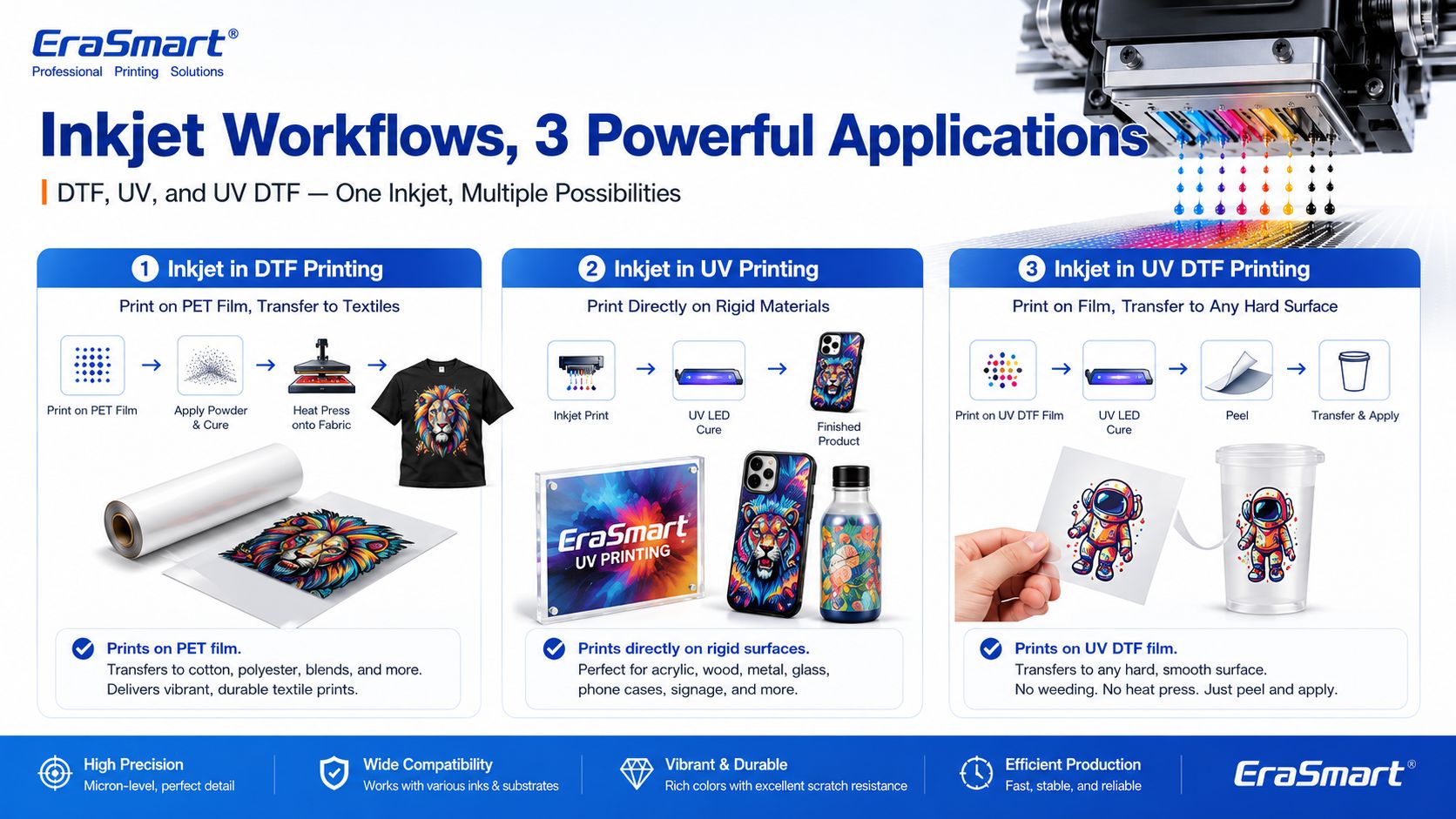
A DTF printer is a specialized inkjet printer for garment transfer production. Instead of printing directly onto a shirt, it prints the design onto PET transfer film.

The typical DTF process includes:

  1. Print CMYK and white ink onto PET film
  2. ホットメルト接着剤パウダーを塗布します
  3. 粉を硬化させる
  4. 生地に転写をヒートプレスします
  5. フィルムを剥がします
  6. 必要に応じて終了ボタンを押します

This process is useful for custom apparel because it supports:

  • フルカラーのアートワーク
  • 暗い服
  • small-batch orders
  • personalized designs
  • 綿、ポリエステル、混紡など
  • プリントオンデマンド制作

If you are interested in building an apparel business, EraSmart’s DTFプリンター category includes different models for startups, small studios, growing shops, and higher-volume production. You can also read the DTF 制作ワークフロー to understand the full process from artwork to finished garment.

Inkjet Printing in UV Printers

A UV printer is another specialized inkjet system. Instead of using standard paper ink, it uses UV-curable ink. The printer ejects ink onto the material surface, and UV light cures the ink almost immediately.

UV printing is suitable for many hard and semi-rigid materials, such as:

  • アクリル
  • ガラス
  • 金属
  • 木材
  • プラスチック
  • ceramic
  • レザー
  • 電話ケース
  • 包装サンプル
  • プロモーション製品

The advantage of UV printing is direct-to-object customization. You can print full-color designs, white ink layers, and varnish effects on many product surfaces.

EraSmartの UVプリンター category is designed for businesses that want to create custom gifts, signs, phone cases, packaging samples, acrylic products, and hard-surface promotional items. For material selection, see the UV プリンター材料ガイド

Inkjet Printing in UV DTF Printers

UV DTF printing combines UV inkjet printing with a transfer workflow. The printer prints UV ink onto A film, laminates it with B film, and creates a transfer decal that can be applied to hard surfaces.

UV DTF is useful for:

  • ステッカー
  • decals
  • カップラップ
  • bottle labels
  • 化粧品の包装ラベル
  • gadget skins
  • ガラスの装飾
  • acrylic decals
  • 金属タグ
  • 製品のブランディング

Unlike textile DTF, UV DTF is mainly for hard-surface transfers, not garments. It is a good choice for businesses that want to sell premium stickers, decals, labels, and cup wraps.

EraSmartの UV DTFプリンター is suitable for hard-surface transfer applications, while the A/B Film for UV DTF Printing guide explains how the film system works in the transfer process.

Why Inkjet Technology Is Important for Custom Printing

Inkjet printing is important because it allows digital, flexible, short-run production. Unlike traditional methods that require screens, plates, or molds, inkjet printing can print directly from a digital file.

This creates major advantages for custom businesses:

  • lower setup barriers
  • faster design changes
  • easier personalization
  • full-color printing
  • short-run production
  • lower inventory pressure
  • product variety
  • print-on-demand flexibility

For example, a DTF apparel business can print different names, numbers, and graphics without preparing new screens. A UV printing business can print different logos on phone cases, acrylic signs, glass gifts, or packaging samples. A UV DTF business can produce custom decals and labels for many small brands.

This is why inkjet technology is no longer only about office printing. It is now a core technology for modern customization businesses.

Advantages of Inkjet Printing

1. Digital Flexibility

Inkjet printing works directly from digital files. This makes it easy to change designs, personalize products, and produce short runs.

2. Full-Color Output

Inkjet printers can reproduce complex color images, gradients, photos, and illustrations. This is useful for apparel graphics, product decoration, stickers, and packaging samples.

3. Short-Run Production

Inkjet does not require plates or screens, so it is suitable for low-MOQ custom orders and on-demand production.

4. Variable Data Printing

Each print can be different. This is useful for names, numbers, QR codes, serialized labels, personalized gifts, and custom designs.

5. Wide Application Range

Inkjet technology can be adapted to many surfaces and workflows, including paper, textiles, film, rigid materials, packaging, labels, and transfers.

6. Scalable Business Model

A business can start with small orders and upgrade equipment as demand grows. This is why inkjet-based DTF, UV, and UV DTF systems are attractive to startups and growing shops.

Limitations of Inkjet Printing

1. Printhead Maintenance Is Important

Inkjet printers need regular maintenance. If nozzles clog, print quality declines. This is especially important for white ink, UV ink, and other specialty ink systems.

2. Ink Compatibility Matters

Not every ink works with every printhead or material. Ink viscosity, pigment size, curing method, and surface compatibility all matter.

3. Material Preparation May Be Needed

Some surfaces need cleaning, primer, coating, or testing before printing. This is especially common in UV printing on glass, metal, plastic, and other hard materials.

4. Color Management Requires Testing

Screen colors and printed colors are not always identical. Professional results require color profiles, test prints, correct RIP settings, and stable consumables.

5. Production Speed Depends on Quality Settings

Higher resolution, more passes, white ink layers, and varnish effects may improve quality but increase printing time.

6. Workflow Control Matters

In DTF printing, powdering, curing, and heat pressing affect durability. In UV DTF, lamination and application affect transfer quality. In UV printing, curing and adhesion affect final product quality.

Common Inkjet Printer Problems

1. Clogged Nozzles

This is one of the most common inkjet problems. It can be caused by dried ink, settled pigment, poor maintenance, incompatible ink, or long idle time.

2. Banding

Banding appears as unwanted horizontal or vertical lines. It can be caused by clogged nozzles, incorrect feed settings, poor calibration, or unstable ink flow.

3. Color Difference

Colors may look different from the screen because of material surface, ink type, printer profile, white ink layer, or lighting conditions.

4. Poor Adhesion

In UV printing, poor adhesion can happen if the surface is oily, dusty, incompatible, or not treated correctly.

5. Weak White Ink

In DTF and UV printing, white ink must be managed carefully. Weak white ink can reduce color brightness, opacity, and dark-surface performance.

6. Ink Smearing or Poor Curing

If ink is not dried, cured, or transferred correctly, the final product may smear, peel, crack, or lose durability.

How to Choose the Right Inkjet Printer for Your Business

The right inkjet printer depends on what you want to sell.

Choose a DTF Printer If You Want to Print Apparel

を選択してください DTFプリンター if your business focuses on:

  • Tシャツ
  • パーカー
  • トートバッグ
  • 制服
  • スポーツウェア
  • ファッショングラフィックス
  • 暗い服
  • small-batch custom apparel
  • print-on-demand clothing

For machine selection, read EraSmart’s DTF プリンターの選び方 そして DTF プリンター購入チェックリスト

DIY&個人スタジオ向け

エントリーレベルのコンパクトなセットアップ

• 小ロットのカスタマイズ
• 設計テスト
• 入力の負担が少ない

DIY 愛好家や個人スタジオに最適

小規模から始めてワークフローをテストし、個人的なカスタマイズや小規模な商用利用に対応することが目標の場合、最も現実的な選択は、管理しやすいコストとシンプルな日常操作を備えたコンパクトなセットアップです。

このタイプのマシンは、大型の A3 または A1 制作機器を早すぎることなく使用せずに、信頼できるエントリー ポイントを必要とするクリエイター、初めての購入者、および個人スタジオに適しています。

小規模スタジオおよびスタートアップ向け

柔軟な A3 エントリー商用セットアップ

• ローカルカスタムオーダー
• 少量生産のアパレル
• スタートアップに優しいワークフロー

小規模スタジオ、新しいブランド、スタートアップショップに最適

すでにビジネスのアイデアを持っている場合、ローカルのカスタムオーダーを受注している場合、または A4 エントリーマシンよりも柔軟性が必要な小さなスタジオを運営している場合は、通常、A3 レンジに移行すると、より実用的な商用ワークフローが作成されます。

これらのモデルは、高出力の産業用機器に直接移行することなく、より強力な出力範囲を必要とするスタートアップ ブランド、スタジオ オペレーター、初期段階のショップに適しています。

Eコマースとデザイナー向け

詳細、色、および素早いデザインのローテーション

• デザイン性の高いグラフィックス
• 頻繁な新規ドロップ
• プレミアムなビジュアルプレゼンテーション

Eコマース起業家とデザイナースタジオに最適

ビジネスが頻繁なデザイン変更、色彩豊富なアートワーク、詳細な画像、および迅速なオンライン製品テストに依存している場合、より強力な画像表示とよりスムーズな商業的柔軟性を提供するモデルを選択するのが理にかなっています。

このグループは、オンライン販売者、デザイナー主導のブランド、クリエイティブ チーム、およびビジュアル プレゼンテーションと新しいデザインの発表がビジネス モデルの中心となる店舗に非常に適しています。

中小企業向け

毎日の安定した商業生産

• 毎日の注文
• 生産リズムの向上
• より安定した商業生産量

小規模アパレル事業者や日々の安定生産に最適

ビジネスが一時的な注文を超えて、毎日の安定した生産量に依存し始めると、よりスムーズなワークフロー、強力な一貫性、より良い生産リズムをサポートするマシンを選択することがより重要になります。

通常、このレベルでは、購入者はエントリー価格だけを考えるのをやめ、出力の安定性、ワークフローの効率、長期的な運用の実用性についてより真剣に考え始める必要があります。

自動化向け

スループットの向上とワークフローのアップグレード

• ワークフローの高速化
• 手作業の負担を軽減
• 生産継続性の向上

より自動化されたワークフローに向けてアップグレードするショップに最適

ビジネスが基本的な手動制作を超えて、よりスムーズでより本番に対応できるプロセスを望んでいる場合、より強力なワークフロー統合とより高いスループットの期待をサポートするモデルを検討することは理にかなっています。

この方向性は、すでに安定した注文があり、生産の摩擦を軽減し、再現性を向上させ、より大きな毎日の稼働量に備えたいと考えているショップに特に関係があります。

大規模生産向け

ワイドフォーマット産業の方向性

• より高い生産目標
• 広い印刷幅
• 工業生産リズム

大規模製造チームおよび高生産量チームに最適

ビジネスでより広い印刷幅、より強力な出力上限、およびより本格的な工業生産の方向性が必要な場合、A1 シリーズは評価するのに適切なカテゴリになります。このレベルは、出力の継続性と中断コストの削減が運用上の重要な優先事項であるビジネスに適しています。

生産目標がどれほど積極的か、および生産性の向上にどの程度の価値を置くかに基づいて、プリントヘッド層を選択してください。

Choose a UV Printer If You Want to Print Hard Products

を選択してください UVプリンター if your business focuses on:

  • 電話ケース
  • アクリル板
  • ガラスのギフト
  • メタルサイン
  • wood products
  • セラミックタイル
  • 包装サンプル
  • プロモーション製品
  • product decoration

For material planning, read EraSmart’s UV プリンター材料ガイド そして How to Choose a UV Printer

小規模なスターター プロジェクト

小判のカスタム商品やサンプル、コンパクトなギフト、省スペースでUVプリントを始めたいユーザーに最適です。

コンパクトなビジネス用途

電話ケース、アクセサリー、小さなアクリル製品、パーソナライズされたギフト、小規模企業の生産に実用的なオプションです。

A3 製品の柔軟性

大規模なプラットフォーム、より多くの製品範囲、より柔軟な小バッチ生産を必要とするユーザーにとって強力な選択肢です。

より大きなフォーマットの制作

広い印刷領域と強力な拡張性を必要とする大型の看板、パネル、カスタム ボード、および制作チームに適しています。

電話ケース事業

電話ケースのカスタマイズと、より焦点を絞ったアプリケーション パスによる迅速なパーソナライズされた製品生産のために設計されています。

デカールとカップラップ

UV DTF ステッカー、クリスタル ラベル、カップのラップ、ボトル、および硬い表面の転写デカールに適しています。

Choose a UV DTF Printer If You Want to Print Decals and Transfers

を選択してください UV DTFプリンター if your business focuses on:

  • ステッカー
  • decals
  • カップラップ
  • labels
  • cosmetic packaging transfers
  • bottle decoration
  • gadget skins
  • hard-surface branding

To understand the film workflow, read EraSmart’s A/B Film for UV DTF Printing

EraSmart 購入の推奨事項

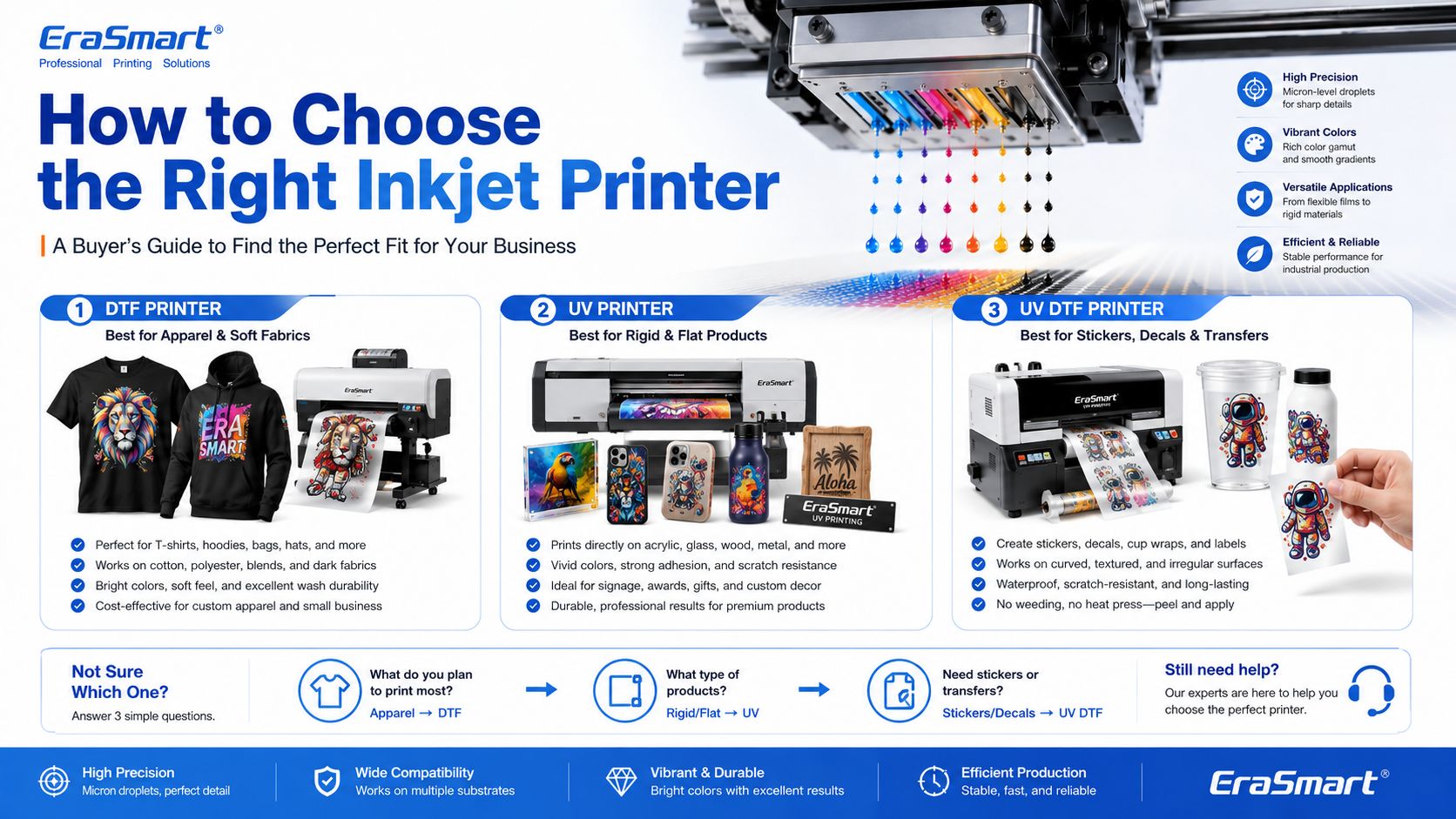
Inkjet printing is not one single business model. It is a technology foundation. The right machine depends on your target products.

A simple buying direction looks like this:

ビジネス目標Recommended EraSmart Direction
Custom T-shirts, hoodies, apparelDTFプリンター
Acrylic, glass, metal, wood, phone casesUVプリンター
Stickers, cup wraps, labels, decalsUV DTFプリンター
Apparel startupA4 / A3 DTF Printer
Growing apparel shopA3 MAX DTF / shaker workflow
Custom product studioA4 / A3 UV Printer
Hard-surface transfer businessA3 UV DTFプリンター

If your business is apparel-first, start with EraSmart’s DTFプリンター lineup. If your business is hard-product customization, compare the UVプリンター range. If your business is stickers, decals, labels, and cup wraps, start with the UV DTFプリンター

Final Answer: What Is an Inkjet Printer?

An inkjet printer is a digital printer that creates images by ejecting tiny ink droplets through microscopic nozzles onto a surface.

In basic office printing, that surface is usually paper. In custom printing, the surface may be PET film, transfer film, acrylic, glass, metal, wood, plastic, packaging board, fabric, or product blanks.

The most important point is this: inkjet printing is not only for documents and photos. It is the core technology behind many modern custom printing systems, including DTF printers, UV printers, and UV DTF printers.

For small businesses, inkjet technology makes it possible to print full-color designs, personalize products, produce short runs, reduce setup cost, and build flexible custom printing workflows.

Need help choosing the right inkjet-based printing system for your business? Share your target products, material type, print size, expected daily order volume, and budget range with EraSmart.

Our team can help you choose the right DTFプリンターUVプリンター、 または UV DTFプリンター for your custom printing business.


あなたも好きかもしれません

  • Erasmartプリンター

    UVプリンター
    DTFプリンター
    DTGプリンター
    ヒートプレスマシン
    広告プリンター

  • プリンターツール

    DTFオーブン
    ホットプレス
    カービングマシン
    マグ熱伝達
    ラミネートマシン

  • 消耗品

    印刷インク
    携帯電話ケース
    ガラス製品
    液体の洗浄
    綿棒

  • お問い合わせ

    WhatsApp:+8618566233796
    WeChat:+8618566233796
    モバイル:+8618566233796
    ウェブ:www.erasmart.com
    店:www.erasmartmall.com

  • 見積もりをリクエストしてください

    いくつかの詳細を提供するだけで、簡単な見積もりを手に入れるのに役立ちます!