Producător de imprimantă cu jet de cerneală cu dimensiuni mici
86-18566233796 [email protected]

Cloud Design & Printing System for Custom Print Shops

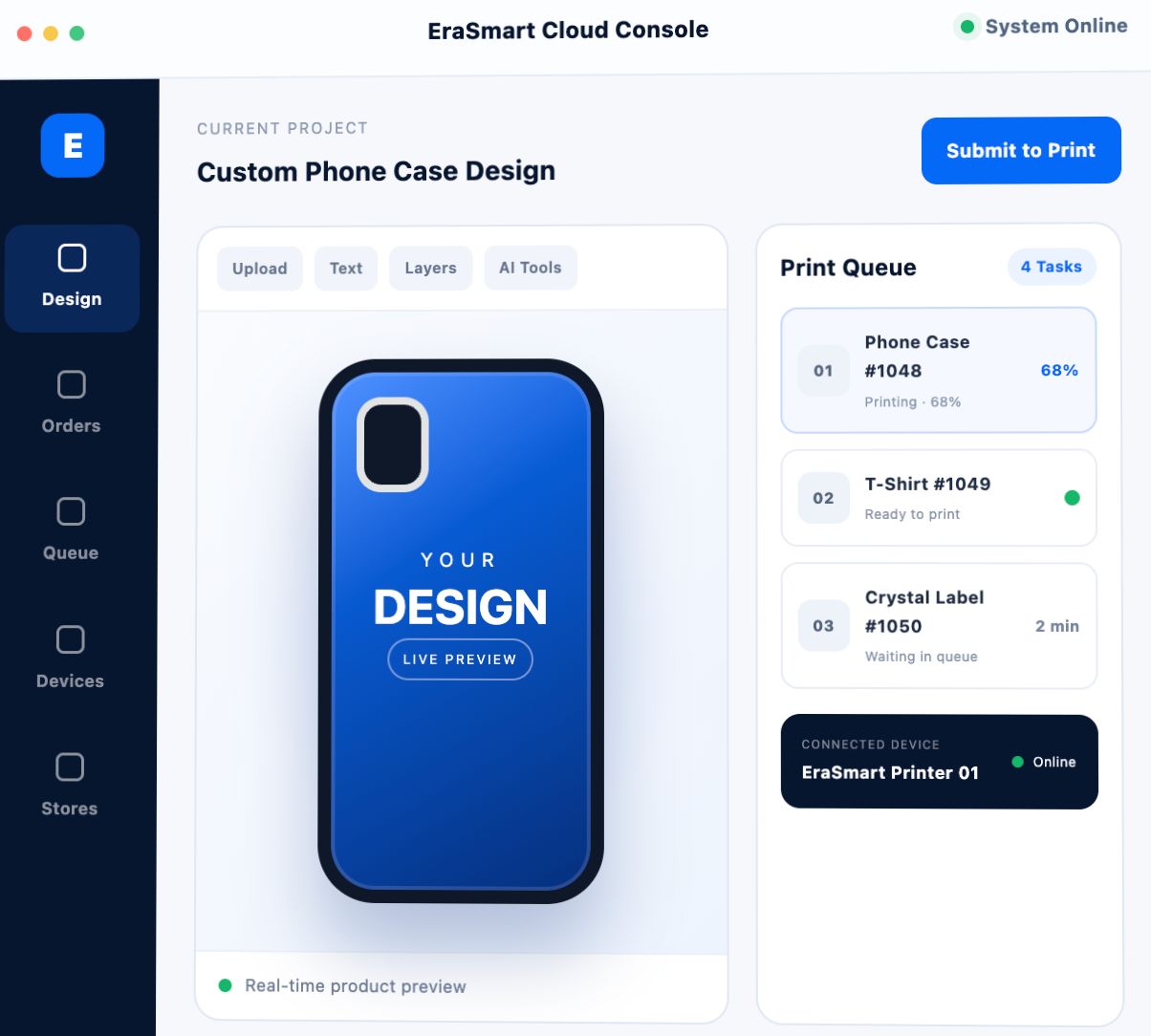
Let customers design products online, preview the final result, and submit print-ready jobs directly to your store—without repeated file transfers, manual layout, or chaotic order handling.

Online Product Design

Upload, edit and preview from mobile or desktop.

Automatic Print Jobs

Convert approved designs into production tasks.

Smart Production Queue

Automatically receive, sort and process orders.

White-Label Deployment

Custom domain, branding, UI and development.
Designed for Custom PrintingConnect customer design with real production.
6-Language InterfaceBuilt for local and overseas store operations.
Multi-Store ManagementCentralized visibility for orders and devices.
White-Label AvailableIndependent domain, brand and UI options.
Business Challenges

Replace Manual Order Handling with a Cloud Design and Printing Workflow

Turn repeated file communication, manual layout and disorganized print tasks into a connected online design-to-production process.

Traditional Pain Point Customers send images and staff must confirm details repeatedly.

Artwork, placement, wording and final effects are handled through repeated messages.

Cloud Solution Customers design independently and preview results in real time.

The platform reduces communication rounds and helps customers approve designs faster.

Traditional Pain Point Staff download files and arrange layouts manually.

Manual downloading, naming and layout work wastes time and increases errors.

Cloud Solution Approved cloud designs are converted directly into print tasks.

The production side receives structured jobs without repeating the design process.

Traditional Pain Point Multiple customers ordering at the same time creates confusion.

Stores face missed tasks, mixed files, duplicated work and unclear order priority.

Cloud Solution The desktop application receives and queues tasks automatically.

Each task enters an organized production queue for more reliable order handling.

Traditional Pain Point Ordinary store staff cannot use professional design software.

Complex software increases training time and limits who can process customer orders.

Cloud Solution Built-in templates, materials and basic editing tools lower the barrier.

Store teams can complete common customization work without advanced design skills.

Traditional Pain Point Order records and print history are difficult to trace.

Old jobs, customer files and production details are easily lost or scattered.

Cloud Solution Order records and printing history are saved automatically.

Stores can review jobs for customer service, reorders and operational analysis.

Traditional Pain Point Chain stores use inconsistent workflows and printing parameters.

Different settings and habits can create uneven output and management difficulty.

Cloud Solution Parameter import, export and backend management support standardization.

Stable settings can be reused across branches to simplify deployment and training.

Traditional Pain Point Overseas customers and stores face language barriers.

A single-language platform limits adoption in local markets and cross-border business.

Cloud Solution Six interface languages support wider market deployment.

Chinese, English, French, German, Spanish and Arabic are available.

Traditional Pain Point Distributors need software that carries their own brand.

Generic systems make it difficult to build a differentiated local solution.

Cloud Solution Independent domain, UI customization and secondary development are supported.

Partners can offer a branded software and equipment package in their market.

Four-Step Workflow

How the Online Design-to-Print Workflow Works

Connect customer-side customization with store-side production through one continuous process.

1

Customer Designs Online

Customers enter the platform from a phone or computer, upload images, select templates, add text, adjust layers and preview the final effect.

2

One-Click Job Submission

After confirmation, the customer submits the design and the system automatically creates a production task for the selected store or device.

3

Desktop App Queues Tasks

The store application receives cloud orders, places them in sequence and helps operators manage multiple jobs without mixing files.

4

Store Prints and Delivers

The store completes production according to the queue while order records and print history remain available for future review.

Connected System

Three Core Components for Design, Production and Management

Each interface serves a different role while sharing the same cloud workflow and order data.

WEB

Online Design Software for Custom Print Shops

Customers or store staff create personalized artwork, choose product templates and preview finished results online.

  • Mobile and desktop access
  • Image upload, scaling and rotation
  • Text, layer and transparency controls
  • AI image cleanup and enhancement
  • Templates, materials and mockup previews
APP

Automatic Print Queue and Store-Side Production Management

The desktop application receives cloud tasks, organizes print order and supports daily device operations.

  • Automatic cloud task reception
  • Production queue management
  • Print modes and saved parameters
  • Nozzle cleaning and printhead testing
  • Offline printing for cached tasks
CMS

Multi-Store Printing Management for Chain Businesses

The management backend helps headquarters and distributors view devices, orders and business activity across locations.

  • Store and device data monitoring
  • Printer online status visibility
  • Multi-store order summaries
  • Print history and business statistics
  • Brand and interface customization
Feature Highlights

Designed for Real Custom Printing Operations

More than a design editor, the system supports customer creation, store production and scalable business management.

Six-Language Support

Switch between Chinese, English, French, German, Spanish and Arabic for local or overseas deployment.

EDIT

Basic Image Editing

Resize, rotate, combine and arrange uploaded graphics for common personalization requirements.

LAY

Layer and Text Controls

Add custom text, manage multiple layers and adjust transparency for flexible artwork creation.

5P

Collaborative Editing

Up to five people can collaborate online to help customers, designers and store staff confirm designs.

AI

AI Image Optimization

Use intelligent background removal, quality enhancement and blurry image repair for customer-owned graphics.

TPL

Template and Asset Library

Use product templates, trend graphics, backgrounds, shapes and local file imports to speed up design.

3D

Product Mockup Preview

Preview artwork on phone cases, T-shirts, crystal labels, canvas bags and other customizable products.

Q

Automatic Task Queue

Cloud-submitted jobs enter the store queue automatically, helping reduce missed and mixed orders.

LOG

Order and Print History

Keep searchable records for production tracking, customer support, repeat jobs and operational review.

Flexible Deployment

Choose the Right Operating Mode for Your Business

Configure the platform for one independent store, a chain operation or a distributor-led white-label solution.

Single Store Mode

For independent customization stores that want customers to design online and staff to receive organized print jobs.

  • Cloud design interface and desktop application
  • Customer self-service design and preview
  • Automatic task reception and queueing
  • Print parameters and device maintenance tools
  • Lower training and manual handling requirements
Complete Printing Solution

Connect Cloud Software with EraSmart Printing Equipment

Combine customer-side design, store-side task management and the right production equipment to build a more complete customization workflow.

Distributor Advantage

Launch a Cloud Printing System Under Your Own Brand

Offer customers a complete software and equipment solution instead of selling hardware alone. EraSmart can support localized branding and additional development according to project requirements.

Independent domain
Custom logo and colors
Front-end UI customization
Backend UI customization
Feature extension
Secondary development
Your Brand Cloud StudioWHITE LABEL
Aplicații

Built for Multiple Personalized Printing Businesses

Use the platform wherever customers need to create, preview and submit personalized graphics before production.

CASE

Tipărirea carcasei telefonice

Let customers design cases online and preview the result before production.

GIFT

Personalizare cadouri

Simplify artwork confirmation for personalized gifts and promotional products.

DTF

T-Shirt Printing

Collect customer designs and send approved artwork into a DTF production workflow.

UV

Stickers and Labels

Manage custom crystal labels, decals, decorative graphics and short-run orders.

BAG

Bags and Accessories

Use templates to personalize canvas bags, pouches and other printable accessories.

POD

POD and E-Commerce

Create a smoother path from online customization to store-side production.

SHOP

Chain Retail Stores

Standardize order and device management across branches and franchise locations.

OEM

Equipment Distributors

Build a localized, branded software service around your printing equipment business.

Questions and Answers

Întrebări frecvente

Common questions from independent print shops, chain brands and equipment distribution partners.

It is suitable for independent customization stores, phone case shops, gift printers, T-shirt printing businesses, chain stores, POD sellers and printing equipment distributors.
Request a Solution

Build a Smarter Design-to-Print Workflow with EraSmart

Tell us about your printing application, number of stores, equipment requirements and branding plans. We will help you evaluate the right deployment mode.

Online design and preview
Automatic task synchronization
Print queue management
White-label partner options

Request a Live Demo or Custom Plan

Contact EraSmart to discuss single-store deployment, chain management, equipment integration or distributor branding.

You can replace this block with a Contact Form 7 or Elementor Form widget placed directly below this HTML widget.

Request a Live Demo

Oferiți doar câteva detalii și vă vom ajuta să obțineți citate rapide!

  • Imprimantă Erasmart

    imprimantă UV
    Imprimantă DTF
    Imprimantă DTG
    Mașină de presă de căldură
    Imprimantă publicitară

  • Instrumente pentru imprimantă

    Cuptor DTF
    Presă fierbinte
    Mașină de sculptură
    Transfer de căldură cu cană
    Mașină de laminare

  • Consumabile

    Cerneală tipografică
    Carcasă pentru telefonul mobil
    Produs de sticlă
    Curățarea lichidului
    Tampon de bumbac

  • Contactaţi-ne

    WhatsApp : +8618566233796
    WeChat : +8618566233796
    Mobile : +8618566233796
    Web:www.erasmart.com
    Magazin:www.erasmartmall.com

  • Solicitați o ofertă

    Oferiți doar câteva detalii și vă vom ajuta să obțineți citate rapide!

    downlond

    Lăsați-vă un e-mail și trimiteți adresa URL de descărcare pe e-mail.

    Aveți nevoie de preț pentru imprimantă?

    Spuneți-ne nevoile dvs. de imprimare. Echipa noastră va răspunde în 24 de ore.