Producător de imprimantă cu jet de cerneală cu dimensiuni mici

86-18566233796 [email protected]

Blog What Is an Inkjet Printer and How Does It Work? A Practical Guide for Custom Printing Businesses

What Is an Inkjet Printer and How Does It Work? A Practical Guide for Custom Printing Businesses

June 17, 2026 Blog

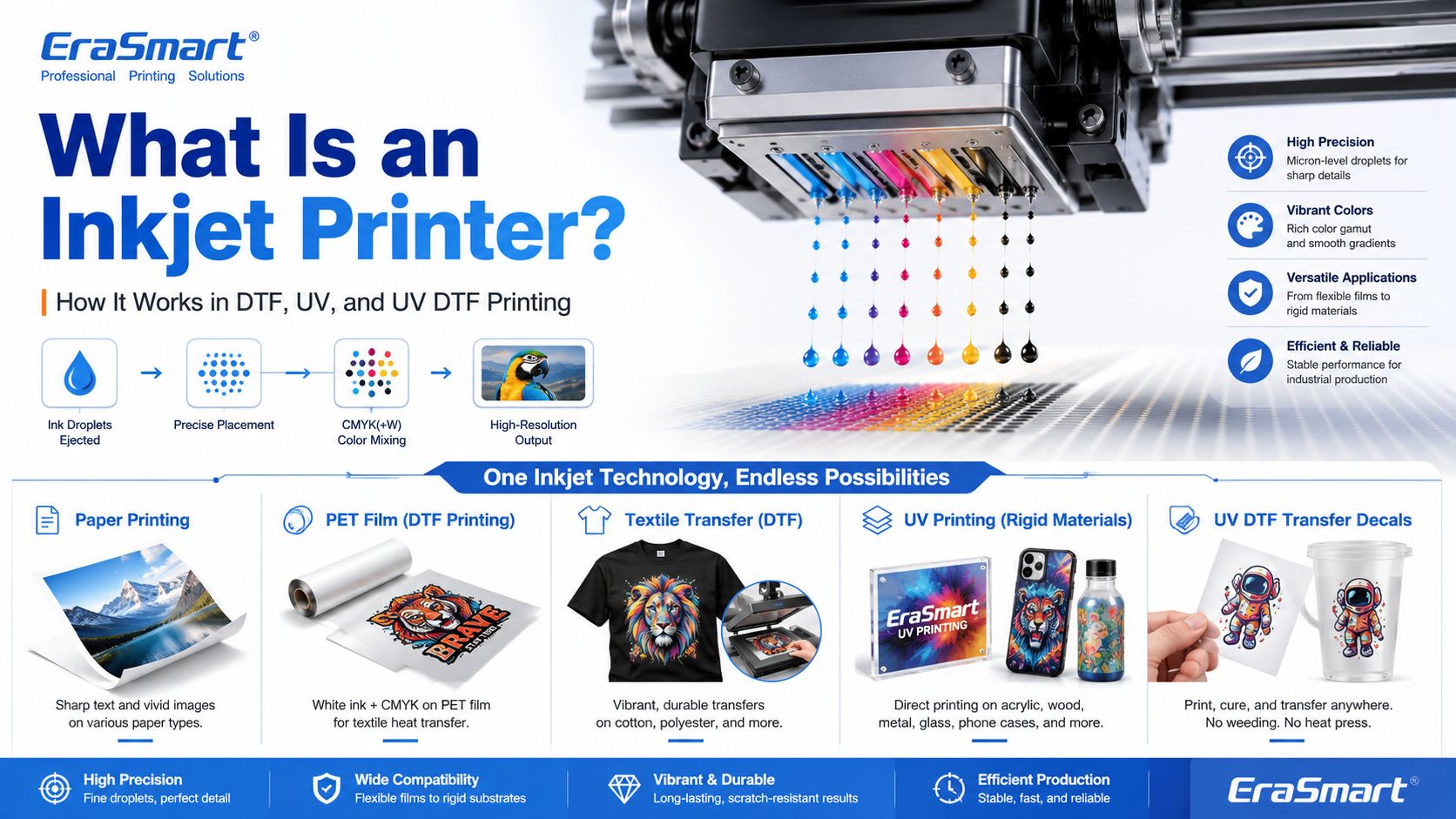
An inkjet printer is a digital printing device that creates images by ejecting tiny droplets of ink onto a surface. Instead of using plates, screens, or physical stencils, an inkjet printer receives digital image data and places controlled ink droplets in precise positions to form text, graphics, photos, labels, transfers, or product decoration.

Most people first know inkjet printers from office or home photo printing. But inkjet technology is much broader than desktop paper printing. Today, inkjet systems are used in DTF printing, UV flatbed printing, UV DTF transfers, packaging samples, product labels, signage, promotional products, textile decoration, industrial marking, and custom product manufacturing.

For EraSmart customers, this topic matters because many modern custom printing machines are built on inkjet principles. A Imprimantă DTF uses inkjet technology to print garment designs onto transfer film. A Imprimanta UV uses inkjet technology to print UV-curable ink directly onto rigid materials. A Imprimantă DTF UV uses inkjet printing to create hard-surface decals and transfers on A/B film.

In simple terms, inkjet printing is the foundation. DTF, UV, and UV DTF are specialized business workflows built around that foundation.

Quick Answer: What Is an Inkjet Printer?

An inkjet printer is a printer that sprays or ejects tiny droplets of liquid ink through microscopic nozzles to create a printed image.

A basic inkjet printing system includes:

  • digital artwork file
  • RIP or printer control software
  • ink supply system
  • printhead
  • microscopic nozzles
  • movement system
  • printable surface
  • drying, curing, or transfer process

The printhead is the key component. It controls where ink droplets land, how much ink is ejected, and how accurately the image is formed.

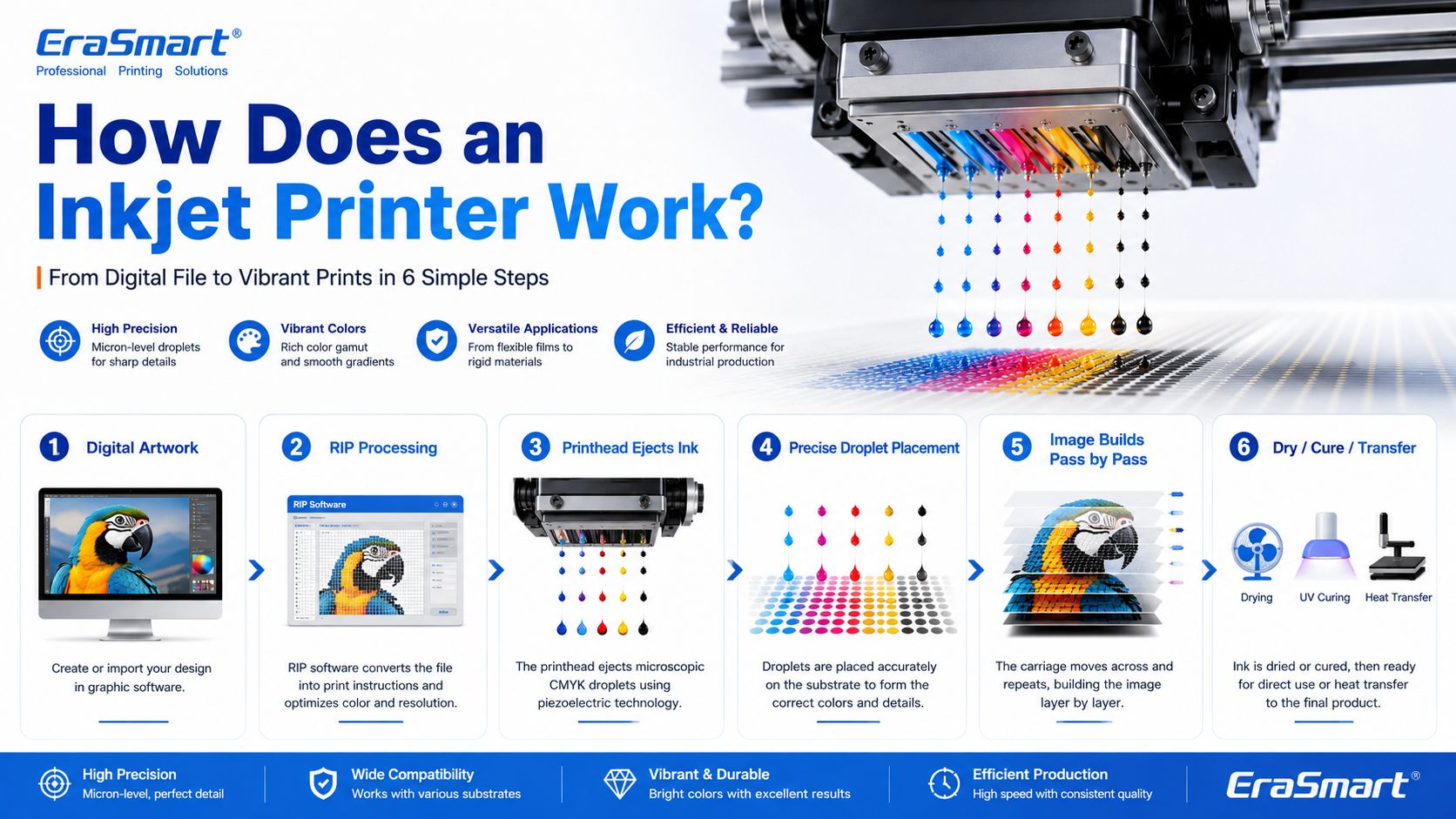
How Does an Inkjet Printer Work?

Inkjet printing may look simple from the outside, but inside the printer there is a precise digital control process.

A simplified workflow looks like this:

  1. The computer sends image data to the printer.
  2. The printer software processes the file into printable dot information.
  3. The printer moves the printhead or material into position.
  4. The printhead ejects tiny droplets of ink through nozzles.
  5. The droplets land on the target surface in controlled positions.
  6. The printer builds the image line by line or pass by pass.
  7. The ink dries, cures, absorbs, or transfers depending on the printing method.

In an office inkjet printer, ink is usually printed onto paper and dries or absorbs into the paper surface. In an industrial or custom printing system, the process may be more specialized. For example, UV ink is cured by UV light, while DTF ink is printed onto PET film and later heat transferred onto fabric.

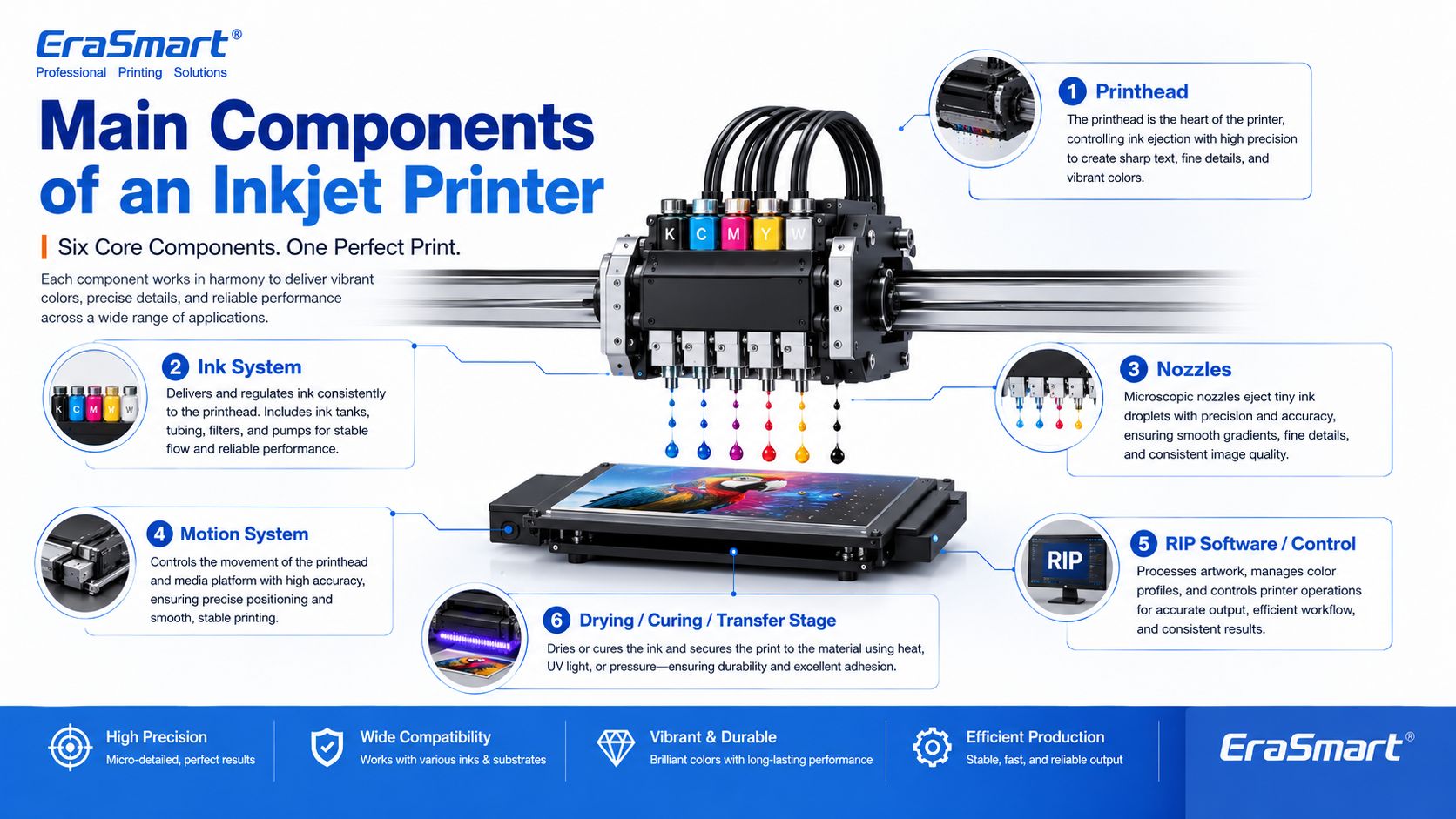
Main Components of an Inkjet Printer

1. Printhead

The printhead is the most important part of an inkjet printer. It contains many tiny nozzles that eject ink droplets. The printhead determines much of the printer’s resolution, droplet control, speed, and print quality.

In custom printing, printhead condition directly affects:

  • sharpness
  • color consistency
  • line accuracy
  • white ink quality
  • nozzle stability
  • production reliability
  • maintenance requirements

This is why printer maintenance is so important in DTF and UV printing. If the printhead nozzles are clogged or unstable, the final print may show banding, missing lines, weak colors, or poor detail.

For apparel printing users, EraSmart’s Ghid de întreținere a imprimantei DTF is a useful resource for understanding why nozzle checks, cleaning, white ink circulation, and daily care matter.

2. Ink System

The ink system stores and delivers ink to the printhead. Different inkjet printers use different types of ink depending on the application.

Common ink types include:

  • dye ink
  • pigment ink
  • sublimation ink
  • textile ink
  • Cerneală DTF
  • Cerneală tratabilă cu UV
  • solvent or eco-solvent ink
  • industrial marking ink

For EraSmart customers, the most relevant ink systems are DTF ink, UV ink, white ink, and varnish.

O Imprimantă DTF commonly uses CMYK ink plus white ink. The white ink helps designs appear clearly on dark garments. A Imprimanta UV may use CMYK, white ink, and varnish to print on hard surfaces such as acrylic, glass, metal, wood, plastic, leather, and packaging materials.

If you want to understand how CMYK, white ink, and varnish work together in product customization, see EraSmart’s UV Ink Guide: CMYK, White Ink, and Varnish.

3. Nozzles

Nozzles are microscopic openings in the printhead. They eject ink droplets in controlled patterns.

Nozzle performance affects:

  • print resolution
  • detail clarity
  • ink density
  • acuratețea culorii
  • gradiente netede
  • edge sharpness
  • production stability

Nozzles can become clogged if ink dries, settles, or becomes contaminated. This is especially important for white ink systems because white ink contains heavier pigment particles and needs proper circulation and maintenance.

4. Motion System

Inkjet printers need accurate motion control. Either the printhead moves across the material, the material moves under the printhead, or both are coordinated.

The motion system affects:

  • print alignment
  • image registration
  • repeatability
  • production speed
  • print size accuracy
  • multi-pass quality

In UV flatbed printing, the platform and printhead movement must be stable so the image lands accurately on rigid objects. In DTF printing, film feeding must be smooth so the transfer image remains consistent.

5. RIP Software and Print Control

RIP software converts artwork into printer-ready instructions. It controls color output, resolution, ink layering, white ink channels, varnish layers, print passes, and other production settings.

For custom printing businesses, RIP setup is important because it affects:

  • color performance
  • white ink underbase
  • image sharpness
  • ink usage
  • viteză de imprimare
  • material compatibility
  • repeatability

A good printer is only part of the system. Correct artwork preparation and RIP settings are also necessary for professional results.

6. Drying, Curing, or Transfer System

Inkjet printing is not finished when ink leaves the nozzle. The ink must also become stable on the final product.

Different workflows use different finishing methods:

Inkjet WorkflowWhat Happens After Printing
Office inkjetInk dries or absorbs into paper
Imprimare DTFPowder is applied, cured, then heat pressed onto fabric
Imprimare UVUV light cures the ink almost instantly
Imprimare UV DTFUV ink is printed on film, laminated, then applied as a transfer
SublimarePrinted transfer is heat pressed into polyester or coated blanks

This is why inkjet technology can support many industries. The core droplet technology is similar, but the finishing process changes based on the product.

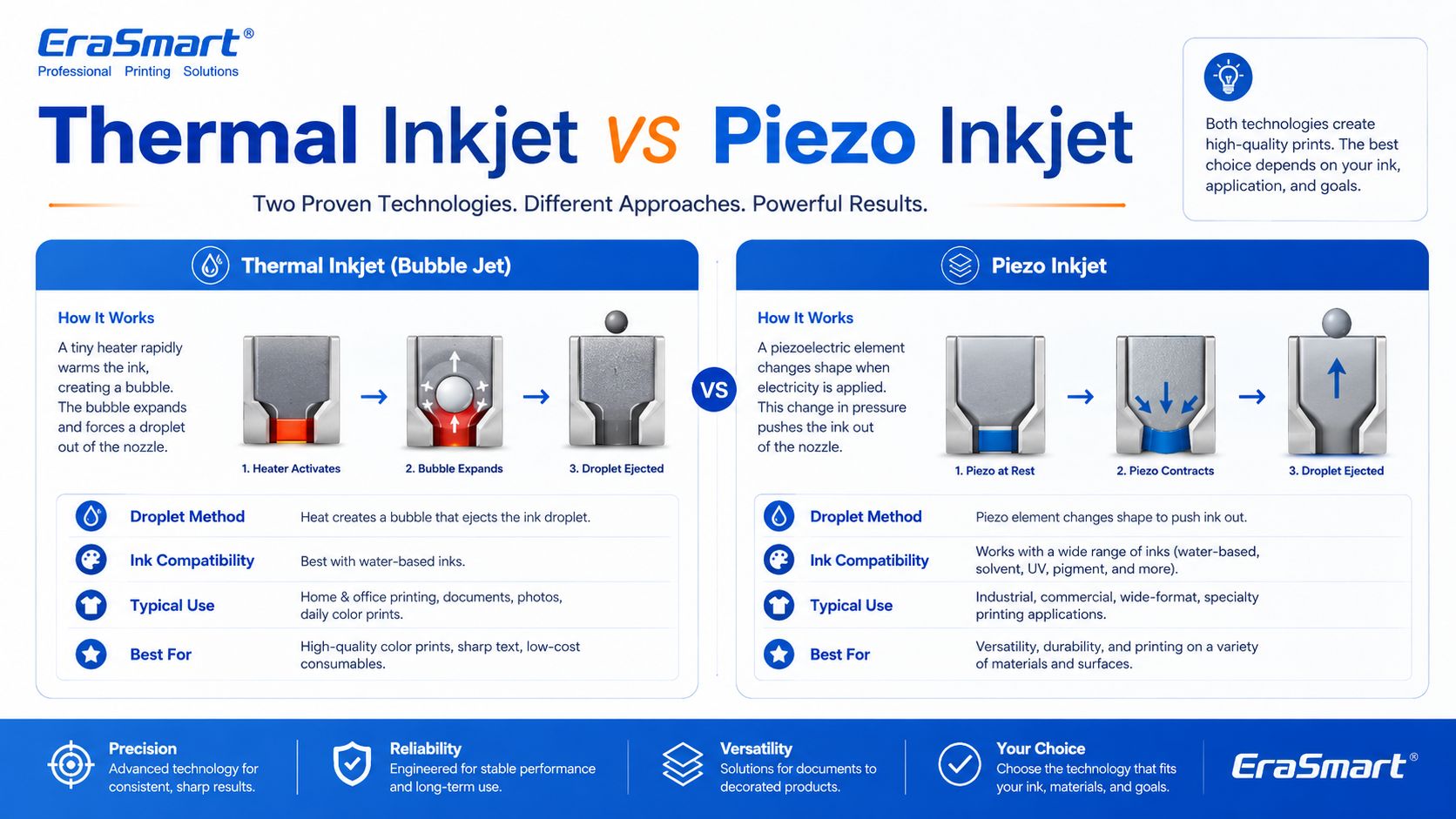
Thermal Inkjet vs Piezo Inkjet

There are two major inkjet technologies: thermal inkjet and piezo inkjet.

Thermal Inkjet

Thermal inkjet uses heat to create a vapor bubble inside the ink chamber. The pressure from this bubble pushes a droplet of ink out of the nozzle.

Thermal inkjet is common in many desktop and office printers. It can produce high-quality prints on paper, but the ink must be compatible with heat-based ejection.

Piezo Inkjet

Piezo inkjet uses a piezoelectric element that changes shape when voltage is applied. This mechanical movement creates pressure and ejects ink droplets through the nozzle.

Piezo inkjet is widely used in many professional and industrial printing systems because it can work with a broader range of inks. Since the ink is not heated for ejection, piezo technology is suitable for inks that may not perform well in thermal systems, including many specialty inks used in industrial and custom printing.

For DTF, UV, and UV DTF applications, piezo-style inkjet technology is especially important because these workflows require precise ink control and compatibility with specialized ink types.

Drop-on-Demand vs Continuous Inkjet

Inkjet printing can also be divided by how ink is delivered.

Drop-on-Demand Inkjet

Drop-on-demand means ink droplets are ejected only when needed. This is common in many graphic and custom printing applications because it offers precise control and efficient ink use.

DTF, UV, and UV DTF printers generally operate around controlled digital droplet placement, which is why they can reproduce detailed designs and full-color artwork.

Continuous Inkjet

Continuous inkjet ejects a continuous stream of ink droplets. Some droplets are directed to the surface, while others may be recycled. This method is often used in industrial coding and marking, such as printing dates, batch codes, and product identification on packaging lines.

For EraSmart customers, drop-on-demand inkjet is the more relevant concept because custom apparel and product printing require accurate image reproduction rather than simple coding.

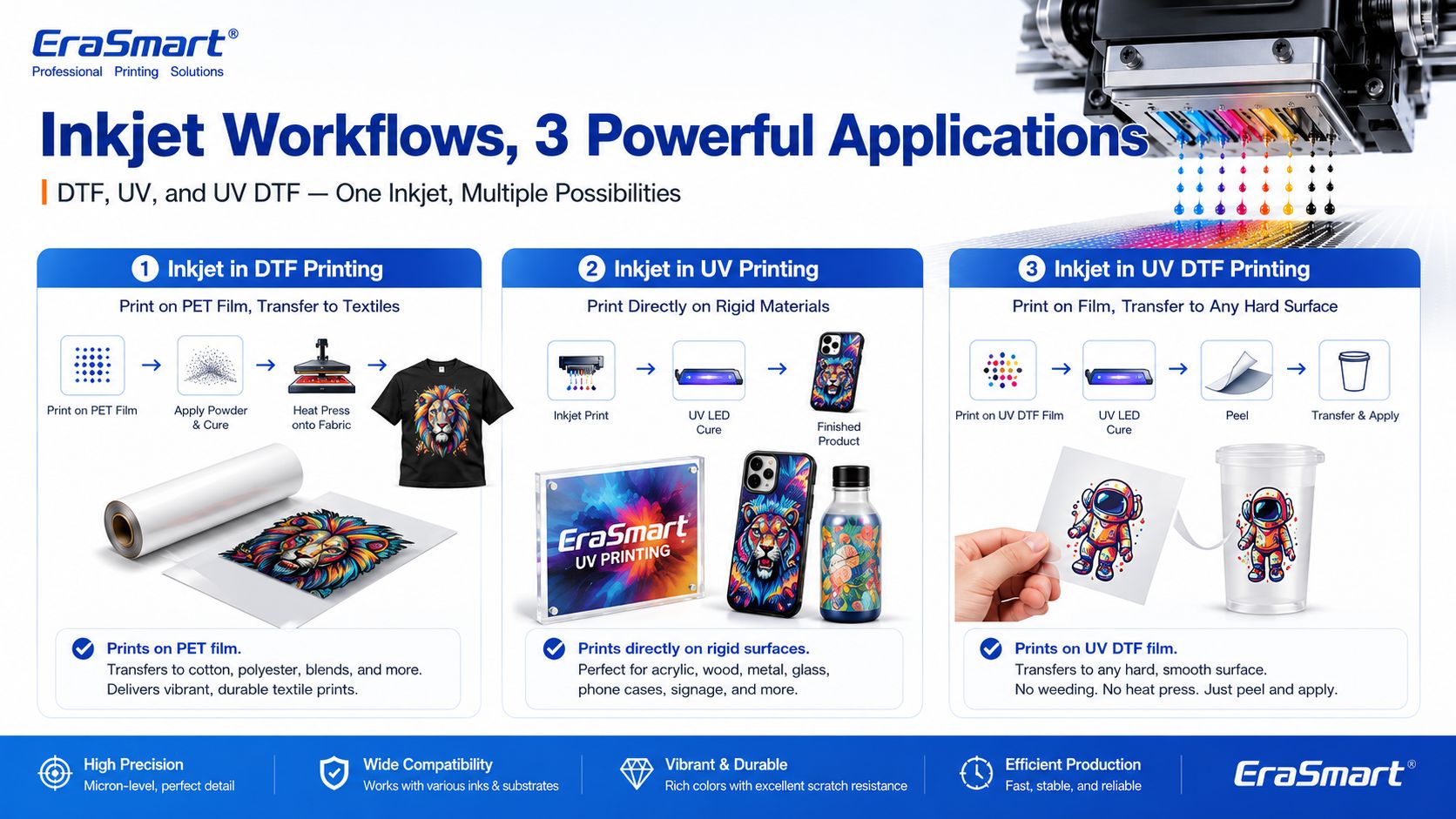
Inkjet Printing in DTF Printers

A DTF printer is a specialized inkjet printer for garment transfer production. Instead of printing directly onto a shirt, it prints the design onto PET transfer film.

The typical DTF process includes:

  1. Print CMYK and white ink onto PET film
  2. Aplicați pulbere adezivă topibilă la cald
  3. Întăriți pulberea
  4. Apăsați la căldură transferul pe material
  5. Curățați filmul
  6. Terminați apăsarea dacă este necesar

This process is useful for custom apparel because it supports:

  • opera de artă plină de culoare
  • haine întunecate
  • small-batch orders
  • personalized designs
  • bumbac, poliester, amestecuri și multe altele
  • producție tipărită la cerere

If you are interested in building an apparel business, EraSmart’s Imprimantă DTF category includes different models for startups, small studios, growing shops, and higher-volume production. You can also read the Flux de lucru de producție DTF to understand the full process from artwork to finished garment.

Inkjet Printing in UV Printers

A UV printer is another specialized inkjet system. Instead of using standard paper ink, it uses UV-curable ink. The printer ejects ink onto the material surface, and UV light cures the ink almost immediately.

UV printing is suitable for many hard and semi-rigid materials, such as:

  • acril
  • sticlă
  • metal
  • lemn
  • plastic
  • ceramic
  • piele
  • Carcase de telefon
  • mostre de ambalare
  • Produse promoționale

The advantage of UV printing is direct-to-object customization. You can print full-color designs, white ink layers, and varnish effects on many product surfaces.

EraSmart’s Imprimantă UV category is designed for businesses that want to create custom gifts, signs, phone cases, packaging samples, acrylic products, and hard-surface promotional items. For material selection, see the Ghid de materiale pentru imprimante UV.

Inkjet Printing in UV DTF Printers

UV DTF printing combines UV inkjet printing with a transfer workflow. The printer prints UV ink onto A film, laminates it with B film, and creates a transfer decal that can be applied to hard surfaces.

UV DTF is useful for:

  • autocolante
  • decals
  • împachetări cu ceașcă
  • bottle labels
  • etichete pentru ambalaje cosmetice
  • gadget skins
  • decor de sticlă
  • acrylic decals
  • etichete metalice
  • branding de produs

Unlike textile DTF, UV DTF is mainly for hard-surface transfers, not garments. It is a good choice for businesses that want to sell premium stickers, decals, labels, and cup wraps.

EraSmart’s Imprimantă DTF UV is suitable for hard-surface transfer applications, while the A/B Film for UV DTF Printing guide explains how the film system works in the transfer process.

Why Inkjet Technology Is Important for Custom Printing

Inkjet printing is important because it allows digital, flexible, short-run production. Unlike traditional methods that require screens, plates, or molds, inkjet printing can print directly from a digital file.

This creates major advantages for custom businesses:

  • lower setup barriers
  • faster design changes
  • easier personalization
  • full-color printing
  • short-run production
  • lower inventory pressure
  • product variety
  • print-on-demand flexibility

For example, a DTF apparel business can print different names, numbers, and graphics without preparing new screens. A UV printing business can print different logos on phone cases, acrylic signs, glass gifts, or packaging samples. A UV DTF business can produce custom decals and labels for many small brands.

This is why inkjet technology is no longer only about office printing. It is now a core technology for modern customization businesses.

Advantages of Inkjet Printing

1. Digital Flexibility

Inkjet printing works directly from digital files. This makes it easy to change designs, personalize products, and produce short runs.

2. Full-Color Output

Inkjet printers can reproduce complex color images, gradients, photos, and illustrations. This is useful for apparel graphics, product decoration, stickers, and packaging samples.

3. Short-Run Production

Inkjet does not require plates or screens, so it is suitable for low-MOQ custom orders and on-demand production.

4. Variable Data Printing

Each print can be different. This is useful for names, numbers, QR codes, serialized labels, personalized gifts, and custom designs.

5. Wide Application Range

Inkjet technology can be adapted to many surfaces and workflows, including paper, textiles, film, rigid materials, packaging, labels, and transfers.

6. Scalable Business Model

A business can start with small orders and upgrade equipment as demand grows. This is why inkjet-based DTF, UV, and UV DTF systems are attractive to startups and growing shops.

Limitations of Inkjet Printing

1. Printhead Maintenance Is Important

Inkjet printers need regular maintenance. If nozzles clog, print quality declines. This is especially important for white ink, UV ink, and other specialty ink systems.

2. Ink Compatibility Matters

Not every ink works with every printhead or material. Ink viscosity, pigment size, curing method, and surface compatibility all matter.

3. Material Preparation May Be Needed

Some surfaces need cleaning, primer, coating, or testing before printing. This is especially common in UV printing on glass, metal, plastic, and other hard materials.

4. Color Management Requires Testing

Screen colors and printed colors are not always identical. Professional results require color profiles, test prints, correct RIP settings, and stable consumables.

5. Production Speed Depends on Quality Settings

Higher resolution, more passes, white ink layers, and varnish effects may improve quality but increase printing time.

6. Workflow Control Matters

In DTF printing, powdering, curing, and heat pressing affect durability. In UV DTF, lamination and application affect transfer quality. In UV printing, curing and adhesion affect final product quality.

Common Inkjet Printer Problems

1. Clogged Nozzles

This is one of the most common inkjet problems. It can be caused by dried ink, settled pigment, poor maintenance, incompatible ink, or long idle time.

2. Banding

Banding appears as unwanted horizontal or vertical lines. It can be caused by clogged nozzles, incorrect feed settings, poor calibration, or unstable ink flow.

3. Color Difference

Colors may look different from the screen because of material surface, ink type, printer profile, white ink layer, or lighting conditions.

4. Poor Adhesion

In UV printing, poor adhesion can happen if the surface is oily, dusty, incompatible, or not treated correctly.

5. Weak White Ink

In DTF and UV printing, white ink must be managed carefully. Weak white ink can reduce color brightness, opacity, and dark-surface performance.

6. Ink Smearing or Poor Curing

If ink is not dried, cured, or transferred correctly, the final product may smear, peel, crack, or lose durability.

How to Choose the Right Inkjet Printer for Your Business

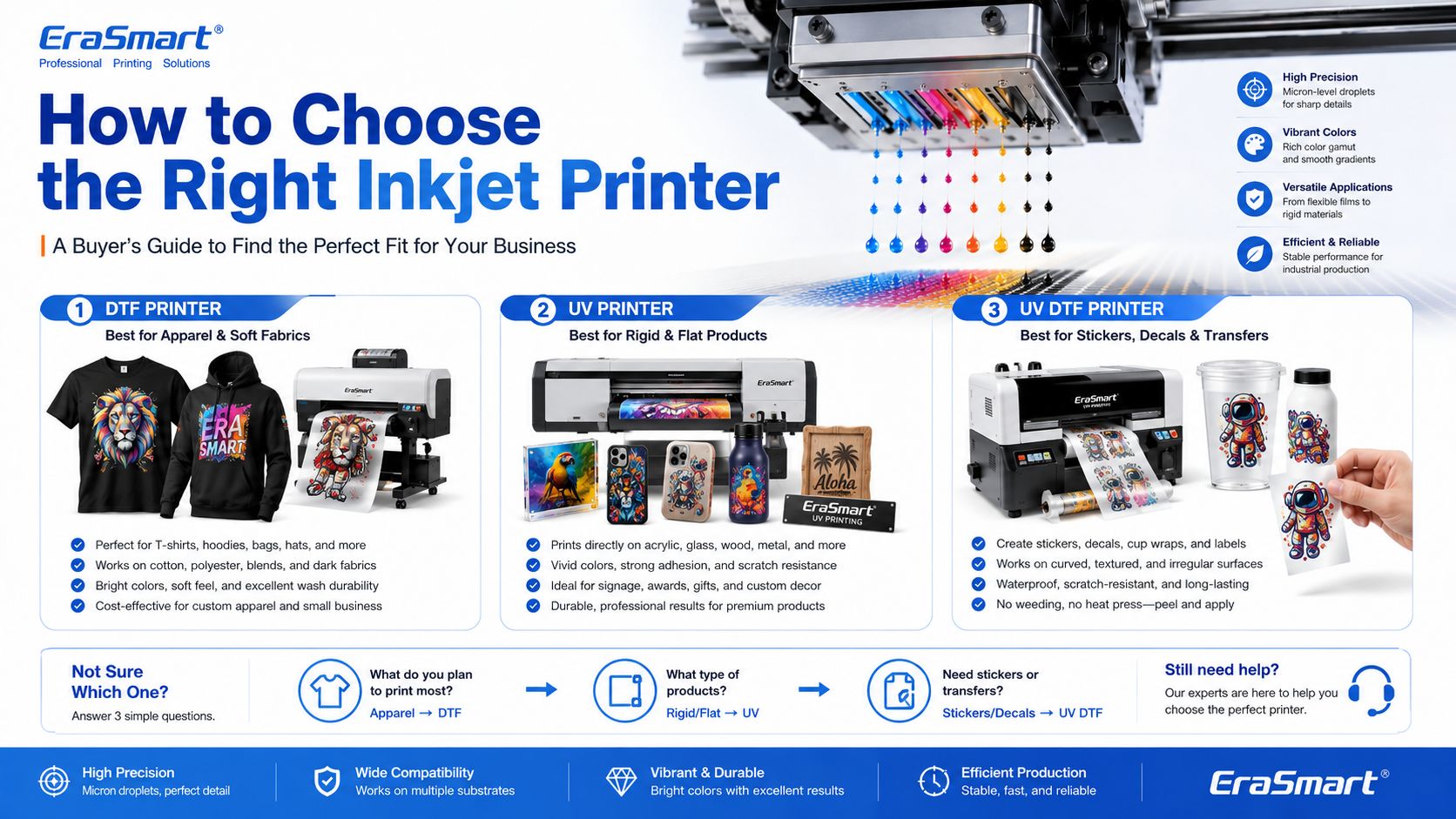
The right inkjet printer depends on what you want to sell.

Choose a DTF Printer If You Want to Print Apparel

Alegeți o Imprimantă DTF if your business focuses on:

  • tricouri
  • hanorace
  • genți de tote
  • uniformele
  • îmbrăcăminte sport
  • grafică de modă
  • haine întunecate
  • small-batch custom apparel
  • print-on-demand clothing

For machine selection, read EraSmart’s Cum să alegi o imprimantă DTF şi Lista de verificare pentru achiziționarea imprimantei DTF.

Pentru bricolaj și studio personal

Configurare compactă la nivel de bază

• Personalizare în loturi mici
• Testarea proiectării
• Sarcina redusă de intrare

Cel mai bun pentru amatorii de bricolaj și studiourile personale

Dacă scopul dvs. este să începeți puțin, să testați fluxul de lucru și să gestionați personalizarea personală sau utilizarea comercială ușoară, cea mai practică alegere este o configurație compactă, cu costuri gestionabile și operare zilnică simplă.

Acest tip de mașină funcționează bine pentru creatori, cumpărători pentru prima dată și studiouri personale care au nevoie de un punct de intrare fiabil, fără a trece prea devreme în echipamente de producție mai mari A3 sau A1.

Pentru studiouri mici și startup-uri

Configurare comercială flexibilă pentru intrare A3

• Comenzi personalizate locale
• Îmbrăcăminte în loturi mici
• Flux de lucru prietenos cu pornirea

Cel mai bun pentru studiouri mici, mărci noi și magazine pentru startup

Dacă aveți deja o idee de afaceri, luați comenzi personalizate locale sau conduceți un mic studio care are nevoie de mai multă flexibilitate decât aparatele de intrare A4, trecerea în gama A3 creează de obicei un flux de lucru comercial mai practic.

Aceste modele se potrivesc mai bine mărcilor startup, operatorilor de studio și magazinelor aflate în stadiu incipient care doresc o gamă de producție mai puternică, fără a trece direct în echipamente industriale cu randament mai ridicat.

Pentru comerț electronic și designeri

Detaliu, culoare și rotire rapidă a designului

• Grafică bogată în design
• Picături noi frecvente
• Prezentare vizuală premium

Cel mai bun pentru antreprenorii de comerț electronic și studiourile de designeri

Atunci când afacerea dvs. depinde de schimbări frecvente de design, lucrări de artă bogate în culori, imagini detaliate și testare mai rapidă a produselor online, este logic să alegeți modele care oferă o prezentare mai puternică a imaginii și o flexibilitate comercială mai fluidă.

Acest grup este potrivit pentru vânzătorii online, mărcile conduse de designeri, echipele creative și magazinele în care prezentarea vizuală și lansările de design noi sunt esențiale pentru modelul de afaceri.

Modele recomandate

Pentru întreprinderile mici

Producție comercială zilnică constantă

• Comenzi zilnice
• Ritm de producție mai bun
• Producție comercială mai stabilă

Cel mai bun pentru întreprinderile mici de îmbrăcăminte și producția zilnică constantă

Odată ce afacerea dvs. trece dincolo de comenzile ocazionale și începe să depindă de producția zilnică mai constantă, devine mai important să alegeți mașini care să susțină un flux de lucru mai fluid, o consistență mai puternică și un ritm de producție mai bun.

Acest nivel este de obicei în care cumpărătorii ar trebui să nu se mai gândească doar la prețul de intrare și să înceapă să se gândească mai serios la stabilitatea producției, eficiența fluxului de lucru și funcționalitatea pe termen lung.

Pentru automatizare

Debit mai mare și actualizare a fluxului de lucru

• Flux de lucru mai rapid
• Sarcina manuală mai mică
• Continuitate mai bună a producției

Cel mai bun pentru magazinele care se modernizează către un flux de lucru mai automat

Dacă afacerea dvs. trece dincolo de producția manuală de bază și dorește un proces mai fluid și mai pregătit pentru producție, este logic să luați în considerare modele care susțin o integrare mai puternică a fluxului de lucru și așteptări mai mari de debit.

Această direcție este relevantă în special pentru magazinele care au deja comenzi constante și doresc să reducă frecarea producției, să îmbunătățească repetabilitatea și să se pregătească pentru volume de operare zilnică mai mari.

Pentru producția la scară largă

Direcție industrială format larg

• Obiectiv de producție mai mare
• Lățime de imprimare mai mare
• Ritmul producției industriale

Cel mai bun pentru echipele de producție la scară largă și cu producție mai mare

Atunci când afacerea dvs. are nevoie de o lățime de imprimare mai mare, un plafon de ieșire mai puternic și o direcție de producție industrială mai serioasă, seria A1 devine categoria potrivită pentru evaluare. Acest nivel este mai potrivit pentru întreprinderile în care continuitatea producției și costurile de întrerupere mai mici sunt priorități operaționale importante.

Alegeți nivelul capului de imprimare în funcție de cât de agresiv este ținta dvs. de producție și de cât de multă valoare acordați productivității mai puternice.

Choose a UV Printer If You Want to Print Hard Products

Alegeți o Imprimanta UV if your business focuses on:

  • Carcase de telefon
  • plăci acrilice
  • cadouri din sticlă
  • semne metalice
  • wood products
  • placi ceramice
  • mostre de ambalare
  • Produse promoționale
  • product decoration

For material planning, read EraSmart’s Ghid de materiale pentru imprimante UV şi How to Choose a UV Printer.

Proiecte mici de început

Potrivit pentru produse personalizate de format mic, mostre, cadouri compacte și utilizatori care doresc să înceapă imprimarea UV cu o amprentă mai mică.

Utilizare compactă în afaceri

O opțiune practică pentru huse de telefon, accesorii, produse acrilice mici, cadouri personalizate și producție pentru întreprinderi mici.

A3 Flexibilitatea produsului

O alegere mai puternică pentru utilizatorii care au nevoie de o platformă mai mare, o acoperire mai mare a produselor și o producție mai flexibilă în loturi mici.

Producție în format mai mare

Potrivit pentru panouri mai mari, panouri, panouri personalizate și echipe de producție care au nevoie de o zonă de imprimare mai largă și o scalabilitate mai puternică.

Husă pentru telefon Business

Conceput pentru personalizarea carcasei telefonului și producția rapidă de produse personalizate, cu o cale de aplicare mai concentrată.

Decalcomanii și împachetări pentru cupe

Mai bine pentru autocolante UV DTF, etichete cu cristal, împachetări pentru pahare, sticle și decalcomanii de transfer pe suprafețe dure.

Choose a UV DTF Printer If You Want to Print Decals and Transfers

Alegeți o Imprimantă DTF UV if your business focuses on:

  • autocolante
  • decals
  • împachetări cu ceașcă
  • labels
  • cosmetic packaging transfers
  • bottle decoration
  • gadget skins
  • hard-surface branding

To understand the film workflow, read EraSmart’s A/B Film for UV DTF Printing.

Recomandare de cumpărare EraSmart

Inkjet printing is not one single business model. It is a technology foundation. The right machine depends on your target products.

A simple buying direction looks like this:

Scop de afaceriRecommended EraSmart Direction
Custom T-shirts, hoodies, apparelImprimantă DTF
Acrylic, glass, metal, wood, phone casesImprimantă UV
Stickers, cup wraps, labels, decalsImprimantă DTF UV
Apparel startupA4 / A3 DTF Printer
Growing apparel shopA3 MAX DTF / shaker workflow
Custom product studioA4 / A3 UV Printer
Hard-surface transfer businessA3 UV DTF Imprimantă

If your business is apparel-first, start with EraSmart’s Imprimantă DTF lineup. If your business is hard-product customization, compare the Imprimantă UV range. If your business is stickers, decals, labels, and cup wraps, start with the Imprimantă DTF UV.

Final Answer: What Is an Inkjet Printer?

An inkjet printer is a digital printer that creates images by ejecting tiny ink droplets through microscopic nozzles onto a surface.

In basic office printing, that surface is usually paper. In custom printing, the surface may be PET film, transfer film, acrylic, glass, metal, wood, plastic, packaging board, fabric, or product blanks.

The most important point is this: inkjet printing is not only for documents and photos. It is the core technology behind many modern custom printing systems, including DTF printers, UV printers, and UV DTF printers.

For small businesses, inkjet technology makes it possible to print full-color designs, personalize products, produce short runs, reduce setup cost, and build flexible custom printing workflows.

Need help choosing the right inkjet-based printing system for your business? Share your target products, material type, print size, expected daily order volume, and budget range with EraSmart.

Our team can help you choose the right Imprimantă DTF, Imprimanta UV, sau Imprimantă DTF UV for your custom printing business.


Poate fi tu ca și tu

  • Imprimantă Erasmart

    imprimantă UV
    Imprimantă DTF
    Imprimantă DTG
    Mașină de presă de căldură
    Imprimantă publicitară

  • Instrumente pentru imprimantă

    Cuptor DTF
    Presă fierbinte
    Mașină de sculptură
    Transfer de căldură cu cană
    Mașină de laminare

  • Consumabile

    Cerneală tipografică
    Carcasă pentru telefonul mobil
    Produs de sticlă
    Curățarea lichidului
    Tampon de bumbac

  • Contactaţi-ne

    WhatsApp : +8618566233796
    WeChat : +8618566233796
    Mobile : +8618566233796
    Web:www.erasmart.com
    Magazin:www.erasmartmall.com

  • Solicitați o ofertă

    Oferiți doar câteva detalii și vă vom ajuta să obțineți citate rapide!