ผู้ผลิตเครื่องพิมพ์อิงค์เจ็ทขนาดเล็ก

การ์ดแต่งงาน DIY: ข้อดี ข้อเสีย และคู่มือการพิมพ์ UV
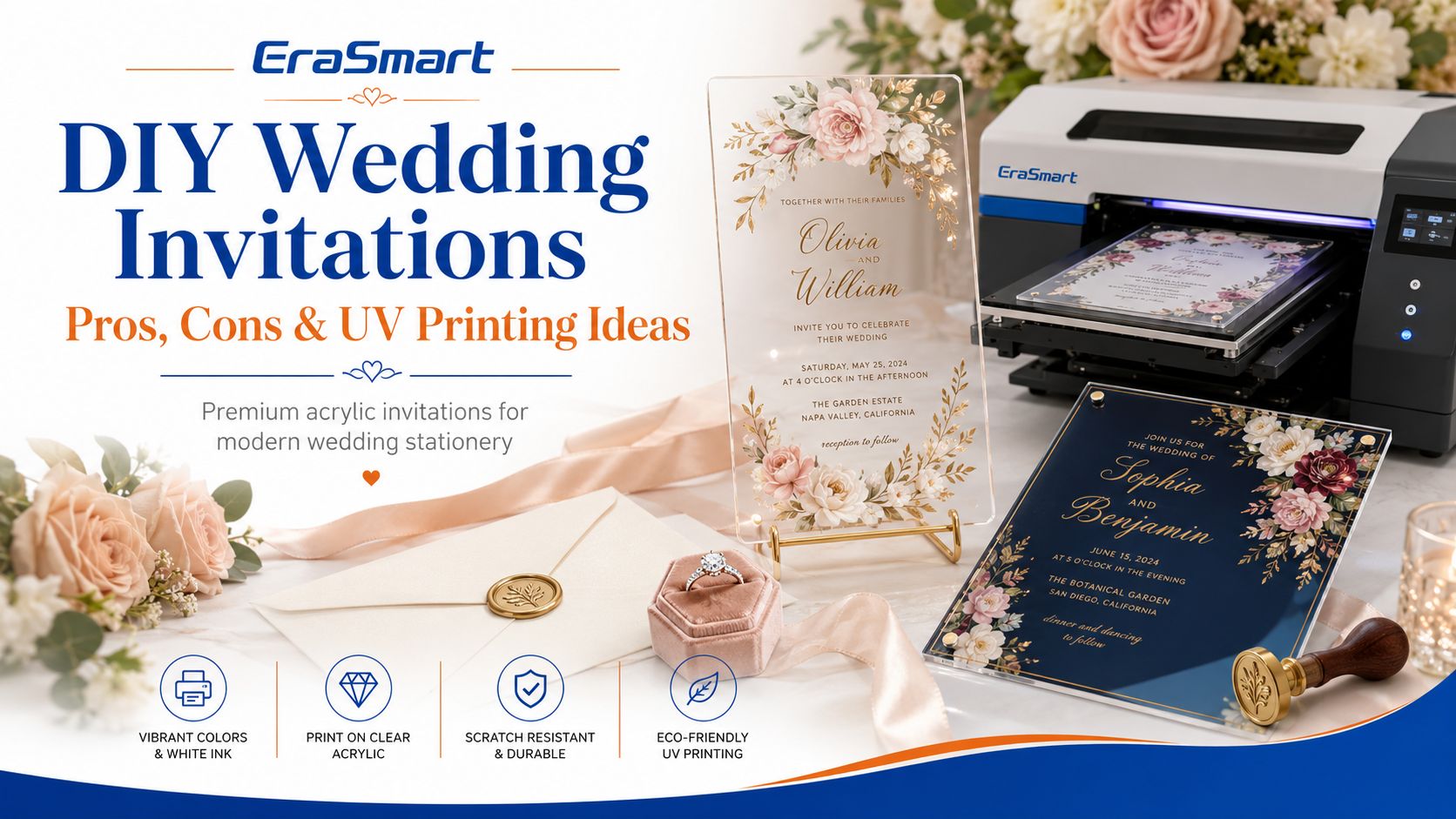
การ์ดแต่งงานแบบ DIY เป็นวิธีที่ดีในการทำให้งานแต่งงานมีความเป็นส่วนตัวมากขึ้น คู่รักสามารถควบคุมการพิมพ์ สี วัสดุ ข้อความ และรายละเอียดการตกแต่ง แทนที่จะเลือกแพ็คเกจบัตรเชิญที่เป็นมาตรฐานโดยสิ้นเชิง
แต่ “DIY” ไม่ได้หมายความว่าถูกกว่าหรือง่ายกว่าเสมอไป
การแก้ไขการออกแบบ ทดสอบการพิมพ์ ขยะวัสดุ การตัด การประกอบ บรรจุภัณฑ์ การส่งไปรษณีย์ และข้อผิดพลาดในการผลิตสามารถเปลี่ยนโครงการคำเชิญธรรมดาให้กลายเป็นงานที่ยิ่งใหญ่ได้อย่างรวดเร็ว
แนวทางที่ดีที่สุดขึ้นอยู่กับสิ่งที่คุณพยายามทำให้สำเร็จ
หากคุณกำลังเตรียมคำเชิญสำหรับ งานแต่งงานครั้งเดียวเท่านั้นการออกแบบงานศิลปะด้วยตัวเองและการว่าจ้างการผลิตจากภายนอกอาจมีประโยชน์มากกว่าการซื้ออุปกรณ์พิเศษ
หากคุณดำเนินการก สตูดิโอเครื่องเขียนงานแต่งงาน ร้าน Etsy ร้านพิมพ์ ธุรกิจตกแต่งงานกิจกรรม หรือธุรกิจของขวัญเฉพาะบุคคลการนำการผลิตมาใช้ภายในองค์กรอาจดูสมเหตุสมผลกว่ามาก เนื่องจากเครื่องพิมพ์สามารถผลิตบัตรเชิญ การ์ดสถานที่ ป้าย ของที่ระลึก และผลิตภัณฑ์งานแต่งงานอื่นๆ ต่อไปได้หลังจากการสั่งซื้อครั้งแรก
สำหรับสินค้าพรีเมียมอาทิเช่น บัตรเชิญอะคริลิคใสหรือฝ้าการพิมพ์ด้วย UV โดยตรงมีประโยชน์อย่างยิ่งเนื่องจากสามารถรวมงานศิลปะสีเต็มรูปแบบ หมึกสีขาว และการเคลือบเงาบนวัสดุแข็งได้
คู่มือนี้จะอธิบายข้อดีและข้อเสียที่แท้จริงของบัตรเชิญงานแต่งงานแบบ DIY เมื่อกระดาษหรืออะคริลิกเหมาะสมกว่า และวิธีทำ เครื่องพิมพ์ UV EraSmart สามารถเข้ากับเวิร์กโฟลว์เครื่องเขียนงานแต่งงานแบบมืออาชีพได้
คำตอบด่วน: การ์ดแต่งงาน DIY คุ้มค่าหรือไม่?
การ์ดแต่งงานแบบ DIY คุ้มค่าที่จะพิจารณาเมื่อคุณให้ความสำคัญกับ:
- การควบคุมการสร้างสรรค์เต็มรูปแบบ
- การปรับเปลี่ยนในแบบของคุณ
- ความยืดหยุ่นชุดเล็ก
- ความสามารถในการเปลี่ยนแปลงในนาทีสุดท้าย
- จับคู่เครื่องเขียนตลอดทั้งงานแต่งงาน
- สร้างผลิตภัณฑ์สำหรับธุรกิจเครื่องเขียนงานแต่งงาน
อาจใช้งานได้จริงน้อยลงเมื่อ:
- คุณมีเวลาในการผลิตน้อยมาก
- รายชื่อแขกมีขนาดใหญ่
- คุณไม่เคยเตรียมงานศิลปะพร้อมพิมพ์เลย
- การเชิญต้องมีการตกแต่งที่ซับซ้อน
- ขยะวัสดุจะมีราคาแพง
- คุณต้องการคำเชิญสำหรับงานแต่งงานเพียงครั้งเดียวเท่านั้น
- คุณภาพระดับมืออาชีพที่สม่ำเสมอมีความสำคัญมากกว่าการทำทุกอย่างด้วยตัวเอง
วิธีคิดที่เป็นประโยชน์คือ:
| สถานการณ์ | ทิศทางการปฏิบัติ |
|---|---|
| งานแต่งงานครั้งเดียว มีเวลาจำกัด | ออกแบบตัวคุณเองและจ้างงานพิมพ์จากภายนอก |
| งานแต่งงานครั้งหนึ่ง มีความสนใจ DIY อย่างมาก | พิมพ์หรือประกอบองค์ประกอบที่เลือกด้วยตัวเอง |
| ร้านเครื่องเขียนงานแต่งงานเล็กๆ | พิจารณาการผลิตภายในองค์กร |
| ผู้ขายงานแต่งงาน Etsy | การผลิตภายในบริษัทสามารถปรับปรุงความยืดหยุ่นได้ |
| ธุรกิจปรับแต่งอีเว้นท์ | การพิมพ์ยูวีสามารถขยายกลุ่มผลิตภัณฑ์ได้ |
| ผู้เชี่ยวชาญด้านการเชิญอะคริลิก | ขั้นตอนการพิมพ์ UV โดยเฉพาะเหมาะสมกว่า |
คำถามสำคัญไม่ใช่แค่:
“ฉันขอคำเชิญไปงานแต่งงานเองได้ไหม”
มันคือ:
“การทำให้พวกเขาปรับปรุงผลลัพธ์ ต้นทุน ความยืดหยุ่น หรือมูลค่าทางธุรกิจในระยะยาวด้วยตัวเองหรือไม่?”
“คำเชิญงานแต่งงาน DIY” จริงๆ แล้วหมายถึงอะไร?
การ์ดแต่งงานแบบ DIY อาจมีความหมายได้หลายอย่าง
ระดับ 1: ออกแบบด้วยตัวเอง จ้างงานพิมพ์จากภายนอก
คุณสร้าง:
- เค้าโครง
- ถ้อยคำ
- สี
- แบบอักษร
- ภาพประกอบ
- การปรับแต่งแขก
จากนั้นส่งไฟล์ที่เสร็จแล้วให้กับบริษัทโรงพิมพ์มืออาชีพ
นี่มักเป็นตัวเลือก DIY ที่ใช้งานได้จริงที่สุดสำหรับคู่รักที่ต้องการการควบคุมอย่างสร้างสรรค์โดยไม่ต้องจัดการอุปกรณ์การพิมพ์
ระดับ 2: ออกแบบและพิมพ์ที่บ้าน
คุณสร้างงานศิลปะและพิมพ์บนเครื่องพิมพ์เดสก์ท็อป
วิธีนี้ใช้ได้ผลดีที่สุดกับบัตรเชิญกระดาษที่ค่อนข้างเรียบง่าย
คุณยังอาจต้องการ:
- กระดาษการ์ดคุณภาพ
- เครื่องตัดกระดาษ
- เครื่องมือให้คะแนน
- ซองจดหมาย
- กาว
- ริบบิ้น
- ซีลขี้ผึ้ง
- ปัดเศษมุม
- การสอบเทียบเครื่องพิมพ์
- แผ่นทดสอบ
ความท้าทายก็คือเครื่องพิมพ์ตามบ้านทั่วไปได้รับการออกแบบสำหรับกระดาษเป็นหลัก ไม่ได้สร้างมาสำหรับการพิมพ์โดยตรงบนอะคริลิกแข็ง ไม้ โลหะ แก้ว หรือผลิตภัณฑ์แข็งอื่นๆ
ระดับ 3: การผลิตแบบกำหนดเองภายในองค์กรเต็มรูปแบบ
ธุรกิจเครื่องเขียนในงานแต่งงานแบบมืออาชีพอาจจัดทำบัตรเชิญและจับคู่ผลิตภัณฑ์โดยใช้อุปกรณ์พิเศษ เช่น เครื่องพิมพ์ยูวีแบบแท่น
สิ่งนี้ก้าวไปไกลกว่าโครงการงานฝีมือแบบครั้งเดียว
เครื่องพิมพ์จะกลายเป็นส่วนหนึ่งของระบบการผลิตสำหรับ:
- คำเชิญอะคริลิก
- บัตรสถานที่
- หมายเลขตาราง
- โล่ต้อนรับ
- สัญญาณคิวอาร์
- ชอบแท็ก
- ของที่ระลึกเล็กๆ น้อยๆ
- ผลิตภัณฑ์ของขวัญแต่งงาน
ในขั้นตอนนี้ การตัดสินใจควรได้รับการประเมินว่าเป็น การลงทุนทางธุรกิจไม่ใช่แค่ค่าใช้จ่ายในการพิมพ์ชุดคำเชิญหนึ่งชุด
DIY กับคำเชิญงานแต่งงานแบบมืออาชีพ: ข้อดีข้อเสีย
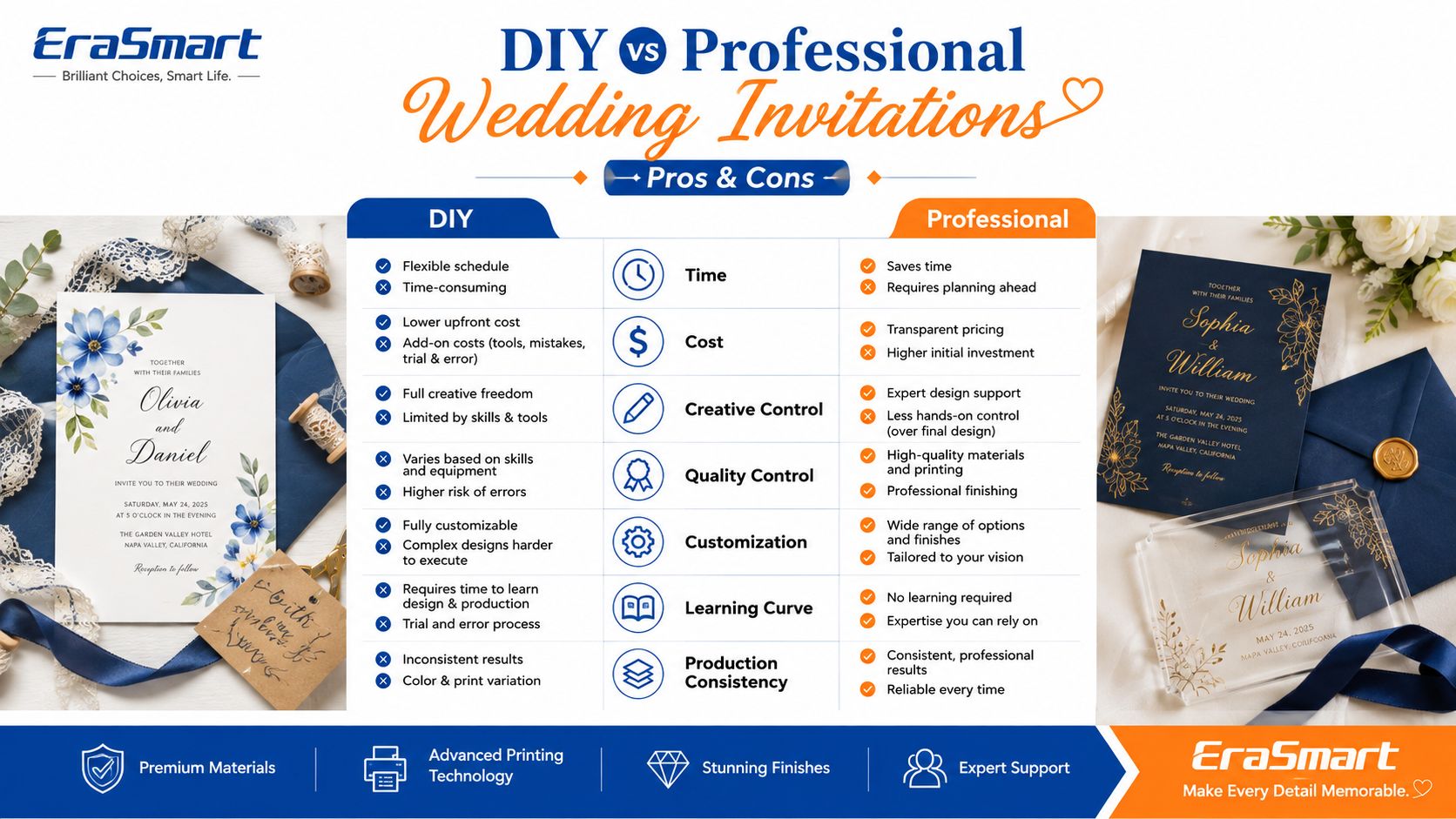
ไม่มีผู้ชนะที่เป็นสากล
ข้อดีของคำเชิญงานแต่งงาน DIY
1. การควบคุมที่สร้างสรรค์มากขึ้น
DIY ช่วยให้คุณควบคุม:
- ตัวเลือกแบบอักษร
- สี
- ภาพประกอบ
- เค้าโครง
- ถ้อยคำ
- ชื่อ
- วันที่
- ธีม
- วัสดุ
- บรรจุภัณฑ์
สิ่งนี้มีประโยชน์อย่างยิ่งสำหรับคู่รักที่ต้องการสิ่งที่แตกต่างจากเทมเพลตคำเชิญมาตรฐาน
2. การปรับเปลี่ยนในแบบของคุณที่ง่ายขึ้น
คุณสามารถสร้างเวอร์ชันต่างๆ สำหรับ:
- สมาชิกในครอบครัว
- แขกรับเชิญช่วงเย็น
- แขกรับเชิญงานแต่งงานปลายทาง
- คำเชิญวีไอพี
- คำเชิญหลายภาษา
- เหตุการณ์ที่แตกต่างกัน
การพิมพ์แบบดิจิทัลยังทำให้การปรับเปลี่ยนเฉพาะบุคคลได้ง่ายกว่าวิธีการผลิตแบบดั้งเดิมที่ต้องอาศัยเพลตหรือหน้าจอแบบคงที่เป็นอย่างมาก
3. สามารถผลิตปริมาณน้อยได้
ขั้นตอนการทำงานแบบดิจิทัลไม่จำเป็นต้องมีชิ้นงานที่เหมือนกันหลายพันชิ้น
นั่นมีประโยชน์สำหรับ:
- งานแต่งงานที่ใกล้ชิด
- งานแต่งงานปลายทาง
- ชุดตัวอย่าง
- คำเชิญที่หรูหรา
- คำเชิญ VIP ส่วนบุคคล
4. การเปลี่ยนแปลงการออกแบบอย่างรวดเร็ว
หากสถานที่ วันที่ รหัส QR รายละเอียดการติดต่อ หรือกำหนดการมีการเปลี่ยนแปลงก่อนการผลิต งานศิลปะดิจิทัลก็สามารถอัปเดตได้อย่างรวดเร็ว
5. ทักษะ DIY สามารถเป็นธุรกิจได้
นี่คือข้อแตกต่างที่ยิ่งใหญ่ที่สุดระหว่างโปรเจ็กต์งานแต่งงานแบบครั้งเดียวและขั้นตอนการพิมพ์เชิงพาณิชย์
ทักษะเดียวกันนี้สามารถนำไปใช้ในการผลิตผลิตภัณฑ์งานแต่งงานให้กับลูกค้ารายอื่นได้ในภายหลัง
ข้อเสียของคำเชิญงานแต่งงาน DIY
1. การผลิตต้องใช้เวลา
คุณต้องการเวลาสำหรับ:
- ออกแบบ
- การพิสูจน์อักษร
- ทดสอบการพิมพ์
- การพิมพ์
- การตัด
- การประกอบ
- การตรวจสอบคุณภาพ
- บรรจุภัณฑ์
- ที่อยู่
- การส่งจดหมาย
สำหรับการเชิญ 100 หรือ 200 ครั้ง งานเล็กๆ น้อยๆ ที่ต้องทำเองจะมีความสำคัญ
2. ข้อผิดพลาดสร้างขยะ
ปัญหาที่พบบ่อยได้แก่:
- การสะกดผิด
- วันที่ผิด
- สีไม่สม่ำเสมอ
- อะคริลิกมีรอยขีดข่วน
- การจัดแนวที่ไม่ตรง
- หมึกสีขาวไม่ถูกต้อง
- ฝุ่นบนพื้นผิวการพิมพ์
- บรรจุภัณฑ์ที่ไม่ดี
วัสดุพรีเมี่ยมทำผิดพลาดมีราคาแพงกว่า
3. อุปกรณ์มีช่วงการเรียนรู้
เครื่องพิมพ์ UV ระดับมืออาชีพไม่ได้เป็นเพียงเครื่องพิมพ์ในสำนักงานขนาดใหญ่เท่านั้น
ผู้ประกอบการจำเป็นต้องเข้าใจ:
- การเตรียมงานศิลปะ
- ซอฟต์แวร์ RIP
- ความสูงของการพิมพ์
- หมึกสีขาว
- วานิช
- การเตรียมพื้นผิว
- การบำรุงรักษาเครื่องพิมพ์
- การทดสอบการยึดเกาะ
- ความสม่ำเสมอในการผลิต
4. ค่าอุปกรณ์จะสมเหตุสมผลเมื่อใช้งานต่อไปเท่านั้น
การซื้อเครื่องพิมพ์ระดับมืออาชีพเพียงเพื่อจัดทำบัตรเชิญเพียงชุดเดียวโดยปกติแล้วไม่สมเหตุสมผลในเชิงเศรษฐศาสตร์
สำหรับสตูดิโอเชิงพาณิชย์ที่คาดว่าจะมีงานแต่งงานอย่างต่อเนื่องและงานสั่งทำพิเศษ การคำนวณจะแตกต่างไปจากเดิมอย่างสิ้นเชิง
การ์ดแต่งงานแบบกระดาษกับอะคริลิค
กระดาษยังคงเป็นทางเลือกแบบดั้งเดิม ในขณะที่อะคริลิกได้รับความนิยมสำหรับงานแต่งงานสมัยใหม่ระดับพรีเมียม
ไม่มีดีกว่าในระดับสากล
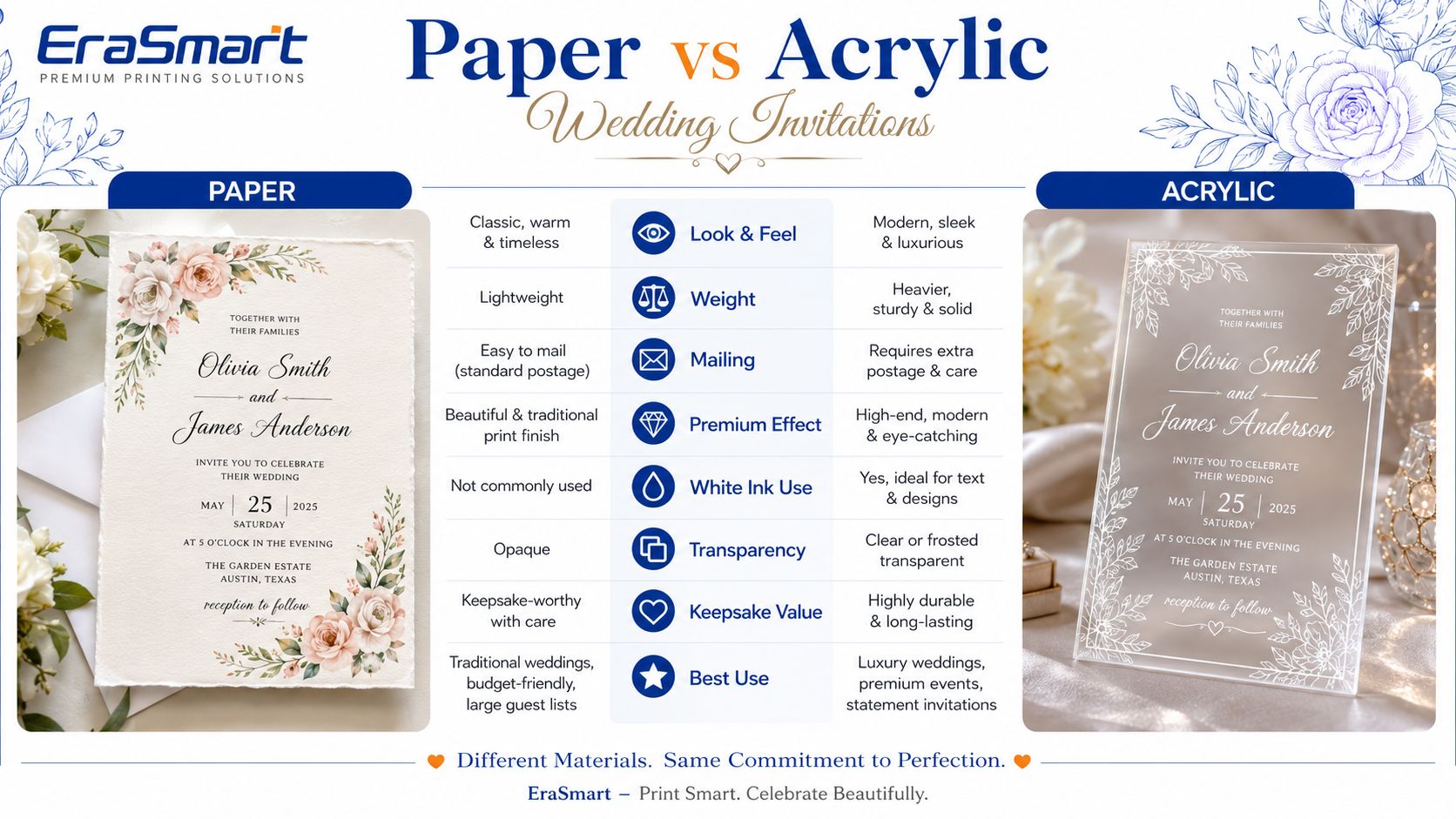
| ปัจจัย | บัตรเชิญกระดาษ | บัตรเชิญอะคริลิก |
|---|---|---|
| รูปร่าง | แบบดั้งเดิมที่อบอุ่น | ทันสมัยระดับพรีเมียม |
| น้ำหนัก | น้ำหนักเบา | หนักกว่า |
| การส่งจดหมาย | ค่อนข้างง่าย | ต้องการการปกป้องเพิ่มเติม |
| ความโปร่งใส | เลขที่ | ตัวเลือกที่ชัดเจนหรือฝ้า |
| หมึกขาว | ขึ้นอยู่กับวิธีการพิมพ์ | มีประโยชน์มาก |
| งานศิลปะลายดอกไม้หลากสีสัน | ใช่ | ใช่ |
| การพิมพ์ยูวีโดยตรง | เป็นไปได้บนสื่อที่เหมาะสม แต่มักไม่จำเป็น | แอปพลิเคชั่นที่แข็งแกร่ง |
| ความแข็งแกร่ง | ยืดหยุ่นได้ | แข็ง |
| คุณค่าแห่งความทรงจำ | ดี | มักถูกมองว่าสูงส่ง |
| บรรจุภัณฑ์ | ซองจดหมายมาตรฐานได้ | แนะนำให้ใช้บรรจุภัณฑ์ป้องกัน |
| ดีที่สุดสำหรับ | เครื่องเขียนแบบดั้งเดิม | พรีเมี่ยม / คำเชิญใบแจ้งยอด |
ทำไมถึงเลือกกระดาษ?
กระดาษเหมาะอย่างยิ่งเมื่อ:
- ปริมาณคำเชิญอยู่ในระดับสูง
- เรื่องไปรษณีย์
- ควรใช้รูปลักษณ์แบบดั้งเดิม
- หุ้นที่มีพื้นผิวมีความสำคัญ
- ซองจดหมายจะต้องมีน้ำหนักเบา
- การออกแบบขึ้นอยู่กับการตกแต่งกระดาษแบบดั้งเดิม
บัตรเชิญบนกระดาษยังสามารถใช้วิธีการผลิตแบบพิเศษ เช่น การปั๊มฟอยล์ การพิมพ์ลายนูน การพิมพ์ลายตัวอักษร และกระบวนการอื่นๆ
ไม่ควรนำเสนอการพิมพ์ยูวีเพื่อทดแทนเทคนิคเหล่านี้ทั้งหมด
ทำไมต้องเลือกอะคริลิก?
อะคริลิกจะดูน่าดึงดูดเมื่อบัตรเชิญตั้งใจให้รู้สึกเหมือนเป็นของที่ระลึกที่จับต้องได้
มันทำงานได้ดีเป็นพิเศษสำหรับ:
- งานแต่งงานที่หรูหรา
- การออกแบบที่เรียบง่ายทันสมัย
- คำเชิญที่ชัดเจน
- คำเชิญที่มีน้ำค้างแข็ง
- ตัวพิมพ์สีขาว
- งานศิลปะดอกไม้
- ชื่อย่อ
- กล่องเชิญระดับพรีเมียม
- การเชิญส่วนตัวขนาดเล็กดำเนินไป
เนื่องจากอะคริลิกใสไม่มีพื้นหลังกระดาษสีขาว หมึกสีขาวมีความสำคัญอย่างยิ่ง-
หากไม่มีฐานด้านล่างสีขาวที่เหมาะสม สีบางสีอาจดูโปร่งใสหรือสีอ่อนเมื่อมองบนพื้นหลังที่ต่างกัน
เหตุใดการพิมพ์ยูวีจึงทำงานได้ดีกับบัตรเชิญงานแต่งงานแบบอะคริลิก
การพิมพ์แบบ UV ใช้หมึก UV-curable ที่ถูกบ่มด้วยแสง UV ในระหว่างกระบวนการพิมพ์
เครื่องพิมพ์ยูวีแบบแท่นสามารถวางอะคริลิกลงบนแท่นพิมพ์ได้โดยตรง และพิมพ์การออกแบบลงบนพื้นผิว
สิ่งนี้สร้างข้อดีที่มีประโยชน์หลายประการสำหรับเครื่องเขียนในงานแต่งงาน
งานศิลปะสีเต็มรูปแบบ
บัตรเชิญอะคริลิกอาจรวมถึง:
- ดอกไม้สีน้ำ
- ภาพประกอบ
- ชื่อย่อ
- การไล่ระดับสี
- เส้นขอบตกแต่ง
- ภาพถ่าย
- งานศิลปะที่กำหนดเอง
หมึกขาว
สีขาวสามารถใช้เป็น:
- ตัวพิมพ์สีขาวแบบสแตนด์อโลน
- โลโก้หรือเส้นขอบสีขาว
- ฐานด้านล่างด้านหลังกราฟิก CMYK
- เลือกความทึบไว้ใต้งานศิลปะลายดอกไม้
ซึ่งมีประโยชน์อย่างยิ่งกับอะคริลิกใสและมีสี
ผลวานิช
ในการกำหนดค่าที่เข้ากันได้ สามารถใช้วานิชเพื่อเพิ่ม:
- ความเงาที่เลือก
- ยกรายละเอียดการตกแต่ง
- โมโนแกรมที่เน้น
- เอฟเฟกต์พื้นผิวระดับพรีเมี่ยม
อย่างไรก็ตาม วานิชยูวีไม่ควรจะเรียกว่าเป็นสิ่งเดียวกัน ฟอยล์ร้อนโลหะ-
หากการออกแบบต้องใช้ฟอยล์โลหะจริงเป็นพิเศษ อาจต้องมีกระบวนการตกแต่งเพิ่มเติมเพิ่มเติม
การปรับเปลี่ยนในแบบของคุณในระยะสั้น
การพิมพ์แบบดิจิทัลสามารถทำได้หลายเวอร์ชันโดยไม่ต้องสร้างแผ่นพิมพ์แบบเดิมสำหรับชื่อหรือการออกแบบใหม่ทุกครั้ง
สิ่งนี้สามารถช่วยในเรื่อง:
- เวอร์ชันคำเชิญ VIP
- ของที่ระลึกส่วนบุคคล
- หมายเลขตาราง
- ชื่อแขก
- รหัส QR
- วันที่ที่กำหนดเอง
วิธีพิมพ์บัตรเชิญงานแต่งงานแบบอะคริลิกด้วยเครื่องพิมพ์ UV
กระบวนการระดับมืออาชีพควรได้มาตรฐานก่อนผลิตตามคำสั่งซื้อของลูกค้า
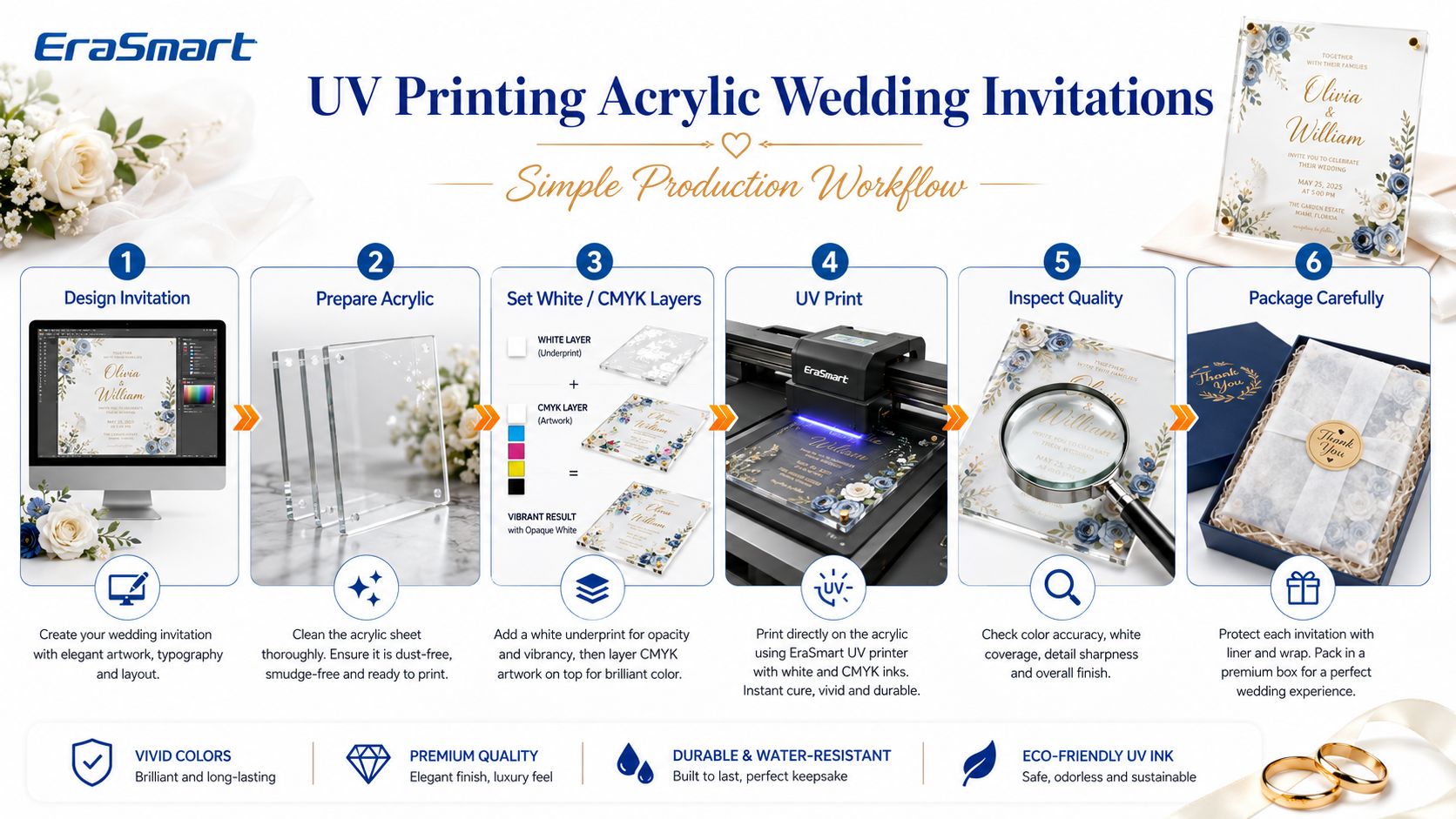
ขั้นตอนที่ 1: เตรียมอาร์ตเวิร์กคำเชิญ
สร้างการออกแบบในขนาดการพิมพ์ขั้นสุดท้าย
ตรวจสอบ:
- ชื่อ
- วันที่
- สถานที่จัดงาน
- เวลา
- ข้อมูลการติดต่อ
- รายละเอียดการตอบรับคำเชิญ
- รหัส QR
- การสะกดคำ
- อัตรากำไรขั้นต้นที่ปลอดภัย
สำหรับการออกแบบที่มีข้อความจำนวนมาก แนะนำให้ใช้อาร์ตเวิร์กแบบเวกเตอร์ทุกครั้งที่เป็นไปได้
ขั้นตอนที่ 2: เตรียมอะคริลิก
ก่อนพิมพ์:
- กำจัดฝุ่น
- ตรวจสอบรอยขีดข่วน
- ยืนยันว่าจะพิมพ์ด้านไหน
- ทำความสะอาดพื้นผิว
- จับอะคริลิกอย่างระมัดระวัง
- ทดสอบการยึดเกาะกับวัสดุจริง
แผ่นอะคริลิกบางแผ่นมาพร้อมกับฟิล์มป้องกัน ลำดับการจัดการที่ถูกต้องขึ้นอยู่กับวัสดุและขั้นตอนการพิมพ์
ขั้นตอนที่ 3: เตรียมเลเยอร์สีขาวและ CMYK
บนอะคริลิกใส ให้เลือกบริเวณที่ต้องการใช้หมึกสีขาว
โครงสร้างที่เป็นไปได้ ได้แก่ :
สีขาวเท่านั้น
สำหรับตัวพิมพ์สีขาวที่หรูหรา
CMYK + รองพื้นสีขาว
เพื่องานศิลปะที่มีสีสมบูรณ์แข็งแรงยิ่งขึ้น
ขาว + CMYK + วานิชที่เลือก
สำหรับการออกแบบที่ต้องการเอฟเฟกต์พื้นผิวเพิ่มเติม
ทดสอบก่อนการผลิตเนื่องจากลำดับชั้นส่งผลต่อลักษณะที่ปรากฏขั้นสุดท้าย
ขั้นตอนที่ 4: วางตำแหน่งอะคริลิก
วัสดุพิมพ์ต้องคงความเสถียรและจัดแนวอย่างถูกต้อง
สำหรับงานทำซ้ำ อุปกรณ์จัดตำแหน่งหรือเทมเพลตสามารถปรับปรุงความสม่ำเสมอได้
แพลตฟอร์มสุญญากาศยังช่วยยึดวัสดุเรียบที่เหมาะสมระหว่างการพิมพ์
ขั้นตอนที่ 5: พิมพ์ยูวี
พิมพ์งานศิลปะที่ได้รับอนุมัติลงบนอะคริลิกโดยตรง
ระบบยูวีจะรักษาหมึกระหว่างการพิมพ์
อย่าเริ่มทำทั้งชุดทันทีหลังจากที่รูปภาพแรกที่ยอมรับได้ปรากฏขึ้น
ขั้นแรกให้ยืนยัน:
- การลงทะเบียน
- ครอบคลุมหมึกสีขาว
- สี
- ข้อความขนาดเล็ก
- ตำแหน่งขอบ
- การยึดเกาะ
- การปรากฏตัวครั้งสุดท้าย
ขั้นตอนที่ 6: ตรวจสอบทุกชิ้นที่เสร็จแล้ว
สำหรับคำเชิญงานแต่งงานแบบพรีเมียม โปรดตรวจสอบ:
- ฝุ่น
- รอยขีดข่วน
- หัวฉีดหายไป
- การเปลี่ยนแปลงสี
- การจัดตำแหน่งหมึกสีขาว
- การสะกดคำ
- ข้อผิดพลาดวันที่
- การลงทะเบียนการพิมพ์
- ข้อบกพร่องของขอบ
ขั้นตอนที่ 7: บรรจุภัณฑ์อย่างระมัดระวัง
อะคริลิกต้องการการปกป้องมากกว่ากระดาษการ์ดทั่วไป
พิจารณา:
- ปลอกป้องกันส่วนบุคคล
- เนื้อเยื่อ
- สมุทร
- โฟม
- จดหมายที่เข้มงวด
- กล่องป้องกัน
ข้อกำหนดในการส่งไปรษณีย์แตกต่างกันไปตามประเทศ ผู้ให้บริการขนส่ง ความหนา ขนาด และน้ำหนัก ดังนั้นผู้ขายควรตรวจสอบข้อกำหนดทางไปรษณีย์ในพื้นที่ก่อนเสนอราคาจัดส่ง
แนวทางงานศิลปะสำหรับคำเชิญงานแต่งงานแบบอะคริลิก
การพิมพ์ที่ดีเริ่มต้นจากงานศิลปะที่ดี
ใช้ไฟล์เวกเตอร์สำหรับข้อความเมื่อเป็นไปได้
แนะนำให้ใช้งานศิลปะเวกเตอร์สำหรับ:
- ชื่อ
- วันที่
- เส้นขอบ
- โลโก้
- ชื่อย่อ
- การพิมพ์ที่ดี
- รหัส QR
รูปแบบทั่วไป ได้แก่:
- AI
- กำไรต่อหุ้น
- SVG ที่ได้รับการสนับสนุนจากเวิร์กโฟลว์การออกแบบ
ใช้อาร์ตเวิร์กแรสเตอร์ที่มีความละเอียดสูง
สำหรับงานศิลปะดอกไม้และภาพถ่าย ให้ใช้รูปภาพต้นฉบับที่มีความละเอียดสูง
รอบๆ 300 DPI ที่ขนาดการพิมพ์ขั้นสุดท้าย เป็นจุดเริ่มต้นที่เป็นประโยชน์สำหรับงานศิลปะที่มีมุมมองใกล้ที่สุด
อย่าใช้ภาพเว็บขนาดเล็กและเพียงแค่เปลี่ยนข้อมูลไฟล์เป็น 300 DPI แหล่งที่มายังต้องการพิกเซลจริงเพียงพอ
ให้ความสนใจกับข้อความขนาดเล็ก
การ์ดแต่งงานมักประกอบด้วย:
- ที่อยู่สถานที่จัดงาน
- วันที่
- ข้อมูลตอบรับคำเชิญ
- รายละเอียดกำหนดการ
แบบอักษรที่สวยงามขนาดเล็กอาจดูสวยงามบนหน้าจอ แต่จะอ่านยากหลังจากการพิมพ์
พิมพ์ตัวอย่างทางกายภาพเสมอ
ทดสอบการออกแบบที่โปร่งใสกับพื้นหลังที่แตกต่างกัน
คำเชิญชวนที่ชัดเจนอาจถูกมองว่าขัดแย้งกับ:
- กระดาษสีขาว
- เสื้อผ้าสีเข้ม
- โต๊ะไม้
- ดอกไม้
- ซองจดหมายสี
การออกแบบที่ดูแข็งแกร่งบนผืนผ้าใบสีขาวของคอมพิวเตอร์อาจดูอ่อนแอบนอะคริลิกใส
หมึกสีขาวช่วยควบคุมสิ่งนี้
ผลิตภัณฑ์งานแต่งงานที่คุณสามารถพิมพ์ได้มากกว่าบัตรเชิญ
เหตุผลที่สำคัญที่สุดประการหนึ่งที่ธุรกิจเครื่องเขียนในงานแต่งงานอาจลงทุนในการพิมพ์ UV คืออุปกรณ์ไม่ได้จำกัดอยู่เพียงผลิตภัณฑ์เดียว
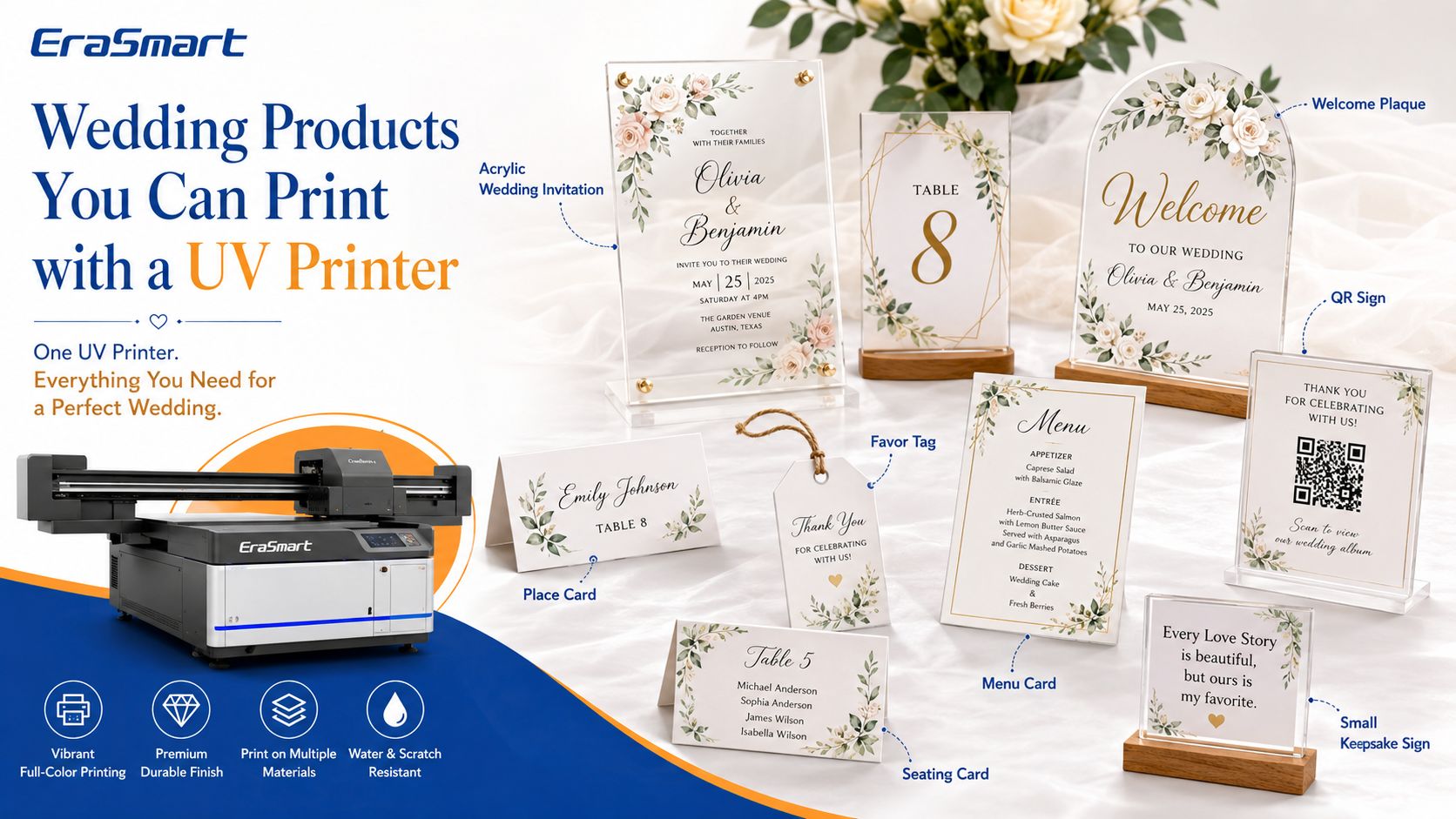
คอลเลกชันงานแต่งงานที่ประสานงานอาจรวมถึง:
การ์ดแต่งงานอะคริลิค
คำเชิญหลักสามารถสร้างธีมภาพสำหรับงานแต่งงานทั้งหมดได้
ชิ้นส่วนบันทึกวันที่
สร้างชิ้นงานอะคริลิกหรือแข็งที่มีขนาดเล็กลงโดยใช้รูปลักษณ์ที่เหมือนกัน
บัตรสถานที่
ชื่อส่วนบุคคลสามารถสร้างการตั้งค่าตารางที่มีมูลค่าสูงกว่าได้
หมายเลขตาราง
การจับคู่หมายเลขตารางอะคริลิกช่วยให้นักวางแผนงานแต่งงานรักษาธีมที่สอดคล้องกัน
โล่ต้อนรับขนาดเล็ก
จอแสดงผลที่พิมพ์ออกมาแบบแข็งสามารถผลิตได้ภายในขนาดที่รองรับของเครื่องพิมพ์
การ์ดเมนู
ร้านอาหาร สถานที่ และผู้วางแผนอาจต้องมีเมนูที่สอดคล้องกัน
ป้ายรหัส QR
สัญญาณ QR สามารถเชื่อมโยงไปยัง:
- เว็บไซต์จัดงานแต่งงาน
- แกลเลอรี่ภาพ
- หน้าอัพโหลดของแขก
- เมนูดิจิตอล
- ข้อมูลที่นั่ง
ทดสอบการสแกนรหัส QR ทางกายภาพก่อนส่งคำสั่งซื้อเสมอ
แท็กที่ชอบ
แท็กส่วนบุคคลสามารถเพิ่มการสร้างแบรนด์ให้กับ:
- กล่องของขวัญ
- โปรดปราน
- เทียน
- ของที่ระลึก
ของที่ระลึกส่วนบุคคล
คู่รักอาจสั่งสินค้าเพิ่มเติมด้วย:
- ชื่อ
- วันแต่งงาน
- ใบเสนอราคา
- ภาพถ่าย
- ชื่อย่อ
สิ่งนี้ทำให้ธุรกิจเปลี่ยนจากการขาย "คำเชิญ" ไปเป็นการขาย ระบบผลิตภัณฑ์งานแต่งงาน-
เครื่องพิมพ์ UV ที่ใช้งานได้จริงสำหรับเครื่องเขียนในงานแต่งงาน: EraSmart A3 PRO Dual XP600
สำหรับธุรกิจที่ผลิตบัตรเชิญอะคริลิกและผลิตภัณฑ์งานแต่งงานขนาดเล็ก แท่นเรียบระดับ A3 ให้ความสมดุลที่เป็นประโยชน์ระหว่างพื้นที่พิมพ์และรอยพื้นที่ในสตูดิโอ
ที่ เครื่องพิมพ์ UV EraSmart Digital Inkjet A3 — Dual XP600 เป็นทางเลือกหนึ่งสำหรับขั้นตอนการทำงานประเภทนี้
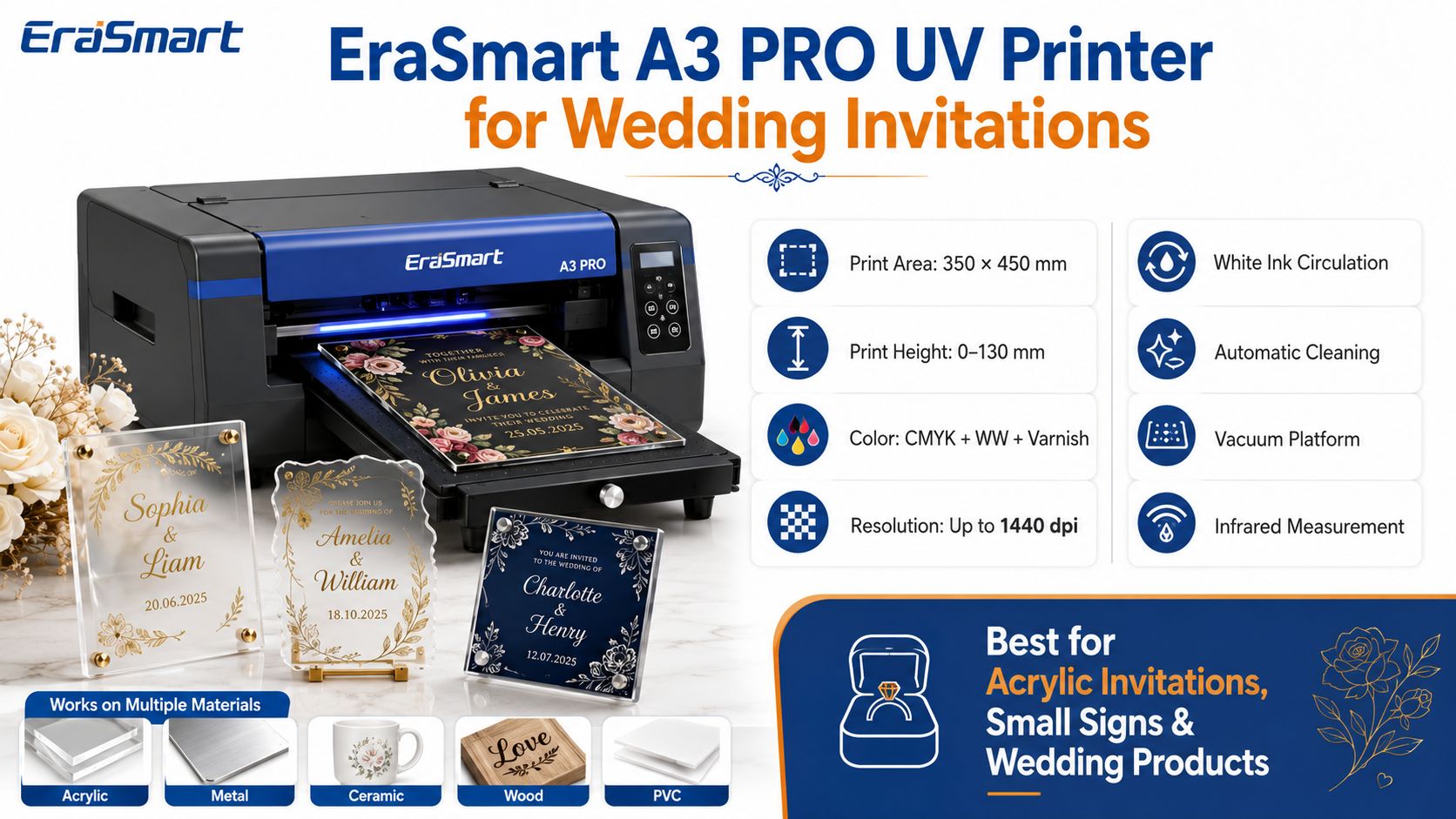
การกำหนดค่าคีย์
| ข้อมูลจำเพาะ | เครื่องพิมพ์ยูวี EraSmart A3 PRO |
|---|---|
| หัวพิมพ์ | XP600 คู่ |
| พื้นที่การพิมพ์ | 350 × 450 มม |
| ความสูงการพิมพ์ | 0–130 มม |
| การกำหนดค่าหมึก | CMYK + WW + วานิช |
| ปณิธาน | ความละเอียดสูงสุด 1440 dpi |
| หมึกขาว | รองรับ |
| วานิช | รองรับ |
| การไหลเวียนของหมึกสีขาว | ใช่ |
| ทำความสะอาดอัตโนมัติ | ใช่ |
| แพลตฟอร์มสุญญากาศ | ใช่ |
| การวัดส่วนสูง | การวัดด้วยอินฟราเรด |
| ซอฟต์แวร์ RIP | รีอิน / PrivateRip |
A3 PRO รองรับวัสดุ ได้แก่ :
- อะคริลิก
- โลหะ
- เซรามิค
- ไม้
- พีวีซี
- ทีพียู
- หนัง
- บอร์ดเคที
ซึ่งหมายความว่าเครื่องพิมพ์เดียวกันสามารถรองรับได้มากกว่าคำเชิญ
สตูดิโอปรับแต่งงานแต่งงานอาจใช้สำหรับ:
- คำเชิญอะคริลิก
- ตัวอย่างคำเชิญ
- บัตรสถานที่
- หมายเลขตาราง
- โล่ขนาดเล็ก
- พวงกุญแจ
- ชิ้นของขวัญส่วนบุคคล
- ตกแต่งผลิตภัณฑ์จัดงานแต่งงานที่เข้มงวด
ประโยชน์หลักสำหรับสตูดิโอเชิงพาณิชย์คือ ความยืดหยุ่นของผลิตภัณฑ์ไม่ใช่แค่การพิมพ์การ์ดประเภทใดประเภทหนึ่งเท่านั้น
ทำไมพื้นที่การพิมพ์ 350 × 450 มม. จึงมีความสำคัญ
พื้นที่การพิมพ์ 350 × 450 มม. ให้พื้นที่เพียงพอสำหรับรูปแบบบัตรเชิญทั่วไปและงานแต่งงานขนาดเล็กหลายชิ้น ขึ้นอยู่กับเค้าโครง
ตัวอย่างเช่น ร้านค้าสามารถจัดระเบียบได้หลายอย่าง:
- บัตรสถานที่
- ชอบแท็ก
- ชิ้นส่วนชื่อเล็ก ๆ
ภายในโครงร่างการผลิตที่ขนาดอนุญาต
จำนวนที่แน่นอนต่อการวิ่งขึ้นอยู่กับ:
- ขนาดผลิตภัณฑ์ขั้นสุดท้าย
- ระยะห่างของฟิกซ์เจอร์
- งานศิลปะมีเลือดออก
- ขอบเครื่องพิมพ์
- วิธีการจัดตำแหน่ง
อย่าคำนวณกำลังการผลิตตามพื้นที่ทางทฤษฎีเท่านั้น สร้างเทมเพลตการผลิตจริงเสมอ
เหตุใดความสูงการพิมพ์ 0–130 มม. จึงมีประโยชน์
การปรับแต่งงานแต่งงานไม่ได้จำกัดอยู่แค่แผ่นอะครีลิคแผ่นเรียบเท่านั้น
ระยะห่างจากวัตถุที่สูงขึ้นทำให้สามารถประเมินวัตถุที่หนาหรือแข็งที่เลือกไว้ภายในขีดจำกัดน้ำหนัก รูปทรง พื้นผิว และตำแหน่งของเครื่องพิมพ์ที่รองรับ
แนวคิดเกี่ยวกับผลิตภัณฑ์ที่เป็นไปได้อาจรวมถึง:
- ผลิตภัณฑ์ของขวัญ
- ของที่ระลึกที่เข้มงวด
- โล่ประกาศเกียรติคุณ
- รายการส่งเสริมการขาย
แต่ละออบเจ็กต์ยังคงต้องมีการทดสอบสำหรับ:
- การกวาดล้างหัวพิมพ์อย่างปลอดภัย
- ความเรียบของพื้นผิว
- การยึดเกาะ
- การวางตำแหน่ง
- ความเข้ากันได้ของหมึก UV
หมึกสีขาวสำหรับอะคริลิกใส
สำหรับการผลิตบัตรเชิญงานแต่งงาน หมึกสีขาวเป็นหนึ่งในคุณสมบัติที่สำคัญที่สุดของ A3 PRO
อะคริลิกใสจำเป็นต้องมีการวางแผนด้วยหมึกสีขาวโดยเจตนา เพราะไม่เช่นนั้นกราฟิก CMYK ที่มีสีอ่อนอาจสูญเสียคอนทราสต์
สีขาวสามารถใช้สำหรับ:
ตัวอักษรสีขาว
การออกแบบที่เรียบง่ายโดยใช้เพียงข้อความสีขาวเท่านั้น
รองพื้นสีขาว
สีขาวด้านหลังงานศิลปะลายดอกไม้ CMYK ช่วยเพิ่มความทึบ
คัดสรรสีขาว
งานศิลปะบางส่วนเท่านั้นที่จะได้รับสีขาว ทำให้พื้นที่อื่นๆ ยังคงโปร่งใส
ทำให้อะคริลิกใสมีความหลากหลายมากขึ้นในฐานะวัสดุการออกแบบ
การใช้วานิชในการออกแบบงานแต่งงาน
วานิชสามารถช่วยเน้นบริเวณที่เลือก เช่น:
- ชื่อย่อ
- ชื่อย่อ
- รายละเอียดดอกไม้
- เส้นตกแต่ง
- โลโก้
- เส้นขอบระดับพรีเมียม
หลีกเลี่ยงการเคลือบทุกการออกแบบด้วยสารเคลือบเงาหนาเพียงเพราะเครื่องพิมพ์รองรับ
เอฟเฟ็กต์เล็กๆ น้อยๆ มักจะดูมีคุณภาพมากกว่า
เมื่อเครื่องพิมพ์ UV ขนาดใหญ่เข้าท่า
ธุรกิจจัดงานแต่งงานบางครั้งขยายจากการเชิญไปสู่การจัดแสดงที่ใหญ่ขึ้น
เมื่อคำสั่งซื้อของคุณเริ่มมีแผ่นโลหะหรือแผงที่ใหญ่ขึ้น แท่นพิมพ์ที่ใหญ่ขึ้นอาจมีประโยชน์
EraSmart ยังนำเสนอ เครื่องพิมพ์ยูวี A2ซึ่งให้รูปแบบการทำงานที่ใหญ่กว่าเครื่องระดับ A3
ความก้าวหน้าทางธุรกิจอาจมีลักษณะดังนี้:
ขั้นตอนการทำงานระดับ A3
- คำเชิญ
- หมายเลขตาราง
- สัญญาณเล็กๆ
- บัตรสถานที่
- โล่ประกาศเกียรติคุณ
- ของขวัญส่วนตัว
จากนั้นจึงขยายไปสู่แพลตฟอร์มที่ใหญ่ขึ้นเมื่อคำสั่งซื้อของลูกค้าจริงต้องใช้ชิ้นที่ใหญ่ขึ้น
อย่าซื้อเครื่องที่ใหญ่กว่าเพียงเพราะ “ใหญ่กว่านั้นต้องดีกว่า”
ขนาดเครื่องควรเป็นไปตามความต้องการของผลิตภัณฑ์
การพิมพ์เครื่องเขียนงานแต่งงานเป็นธุรกิจ
โอกาสทางธุรกิจจะน่าสนใจยิ่งขึ้นเมื่อคุณหยุดขายเฉพาะคำเชิญเท่านั้น
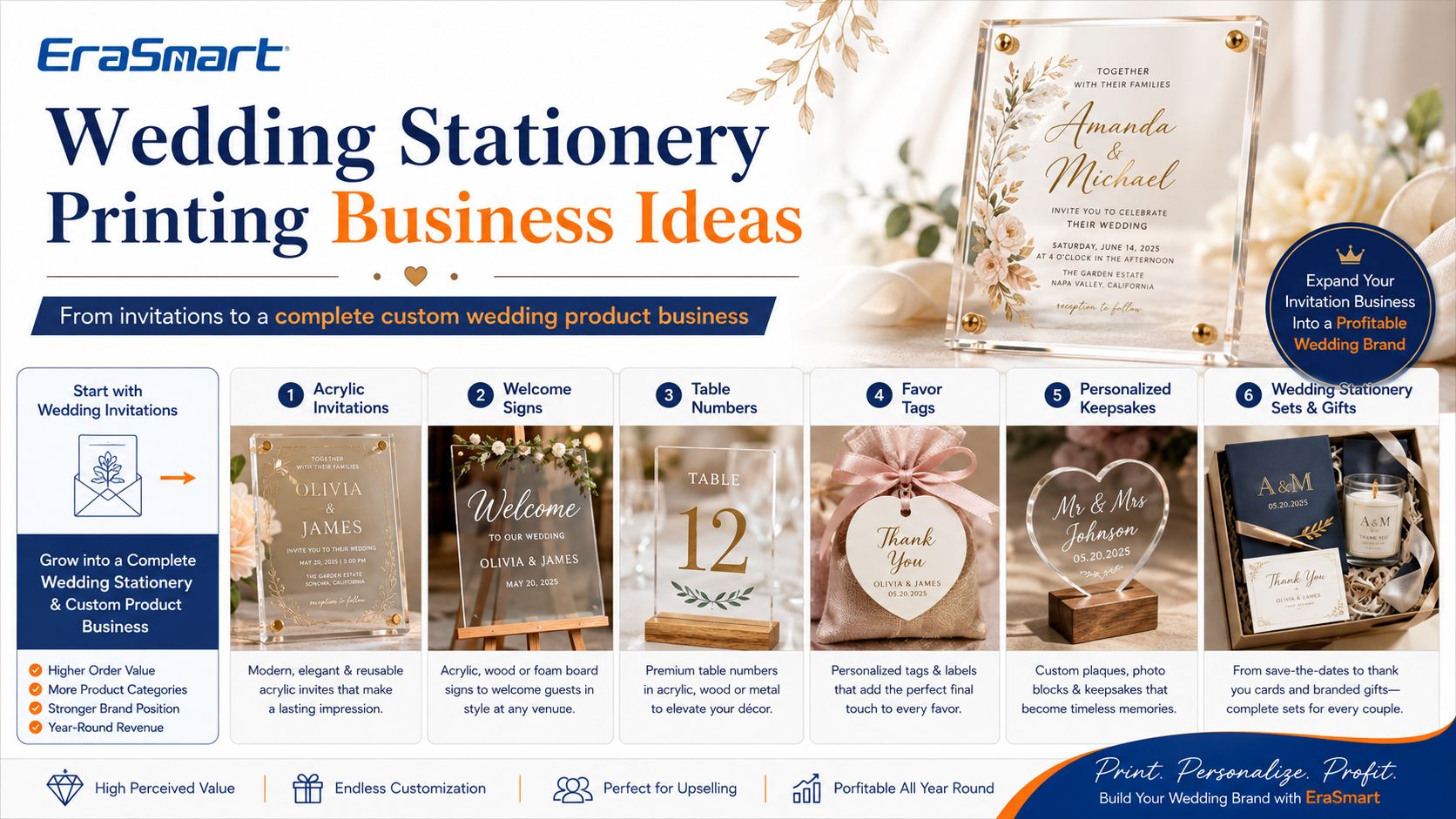
ลูกค้ารายหนึ่งอาจต้องการคอลเลกชันที่ประสานงานทั้งหมด
ก่อนวันแต่งงาน
ขาย:
- ผลิตภัณฑ์บันทึกวันที่
- ตัวอย่างคำเชิญ
- คำเชิญ
- ตอบรับคำเชิญ
- กล่องของขวัญ
พิธีและการต้อนรับ
ขาย:
- โล่ต้อนรับ
- หมายเลขตาราง
- บัตรสถานที่
- ชิ้นเมนู
- สัญญาณคิวอาร์
- ชอบแท็ก
- องค์ประกอบที่นั่งภายในขนาดการผลิตของคุณ
หลังงานแต่งงาน
ขาย:
- ของขวัญขอบคุณ
- ของที่ระลึกส่วนบุคคล
- ชิ้นวันครบรอบ
- แผ่นรูปถ่าย
สิ่งนี้จะเพิ่มมูลค่าการสั่งซื้อที่เป็นไปได้จากความสัมพันธ์กับลูกค้ารายเดียวกัน
ตัวอย่าง: เปลี่ยนดีไซน์หนึ่งให้เป็นคอลเลกชันงานแต่งงาน
ลองนึกภาพลูกค้าเลือกการออกแบบลายดอกไม้อันนุ่มนวลด้วยดอกกุหลาบสีขาวและตัวพิมพ์สีทอง
งานศิลปะสามารถกลายเป็น:
- บัตรเชิญอะครีลิคใส
- หมายเลขโต๊ะที่ตรงกัน
- บัตรสถานที่ส่วนบุคคล
- ป้ายแชร์รูปภาพ QR
- แท็กโปรดปราน
- ป้ายขอบคุณเล็กๆ
- สินค้าที่ระลึก
งานออกแบบถูกนำมาใช้ซ้ำ
เฉพาะ:
- ขนาด
- ข้อความ
- ชื่อ
- เค้าโครง
- เทมเพลตผลิตภัณฑ์
เปลี่ยน.
สิ่งนี้สามารถทำให้การผลิตมีประสิทธิภาพมากกว่าการออกแบบผลิตภัณฑ์ทุกชิ้นอย่างอิสระ
ใครสามารถสร้างธุรกิจการพิมพ์งานแต่งงานได้?
ผู้ใช้ที่มีศักยภาพ ได้แก่ :
สตูดิโอเครื่องเขียนงานแต่งงาน
ขยายจากเครื่องเขียนกระดาษไปสู่ผลิตภัณฑ์แข็งระดับพรีเมียม
ผู้ขาย Etsy
สร้างผลิตภัณฑ์ที่แตกต่างมากขึ้น แทนที่จะแข่งขันกับเทมเพลตกระดาษเท่านั้น
ร้านพิมพ์ในท้องถิ่น
เพิ่มผลิตภัณฑ์งานแต่งงานส่วนบุคคลในระยะสั้น
นักวางแผนงานแต่งงาน
นำเสนอการผลิตการตกแต่งที่เลือกสรรภายในองค์กรหรือร่วมมือกับธุรกิจสิ่งพิมพ์
ร้านขายของที่ระลึก
รวมคำเชิญเข้ากับของขวัญแต่งงานส่วนตัว
บริษัทตกแต่งงานอีเว้นท์
เพิ่มป้ายที่กำหนดเอง บัตรสถานที่ และผลิตภัณฑ์ที่มีตราสินค้าที่เข้มงวด
นักออกแบบกราฟิก
เปลี่ยนเทมเพลตงานแต่งงานดิจิทัลให้เป็นผลิตภัณฑ์สำเร็จรูปที่จับต้องได้
คู่รักควรซื้อเครื่องพิมพ์ UV สำหรับงานแต่งงานครั้งเดียวหรือไม่?
โดยปกติแล้วไม่มี
นี่คือความแตกต่างที่สำคัญ
หากคุณต้องการบัตรเชิญสำหรับงานแต่งงานของคุณเองเพียง 50–150 ใบ และไม่ได้วางแผนที่จะพิมพ์ต่อ การซื้ออุปกรณ์ UV ระดับมืออาชีพไม่น่าจะเป็นวิธีที่ง่ายที่สุดหรือต้นทุนต่ำที่สุด
แนวทางที่ดีกว่าอาจเป็น:
- สร้างการออกแบบด้วยตัวคุณเอง
- สั่งซื้อตัวอย่างวัสดุหลายรายการ
- ทำงานร่วมกับเครื่องพิมพ์มืออาชีพ
- อนุมัติหลักฐานทางกายภาพ
- จ้างบุคคลภายนอกในการผลิตขั้นสุดท้าย
ความคุ้มค่าของการเป็นเจ้าของเครื่องพิมพ์ UV จะสมเหตุสมผลมากขึ้นเมื่อเครื่องพิมพ์รองรับ คำสั่งซื้อเชิงพาณิชย์อย่างต่อเนื่อง-
การพิมพ์ภายในองค์กรเริ่มสมเหตุสมผลเมื่อใด?
พิจารณานำการพิมพ์ UV เข้ามาภายในองค์กรเมื่อ:
- คุณได้รับคำสั่งซื้องานแต่งงานเป็นประจำ
- ระยะเวลารอคอยการเอาท์ซอร์สทำให้ธุรกิจของคุณช้าลง
- ลูกค้าขอแก้ไขบ่อยๆ
- คำสั่งซื้อขั้นต่ำขนาดเล็กเป็นเรื่องยากที่จะจ้างบุคคลภายนอก
- คุณต้องมีการควบคุมการกำหนดเวลาที่ดีขึ้น
- คุณต้องการปรับแต่งแต่ละชิ้น
- คุณต้องการขยายไปสู่ผลิตภัณฑ์งานแต่งงานที่เกี่ยวข้อง
- ส่วนต่างคำสั่งซื้อของคุณสามารถรองรับการบำรุงรักษาอุปกรณ์ได้
- คุณมีพื้นที่ทำงานเพียงพอ
- คุณพร้อมที่จะเรียนรู้การทำงานของเครื่องพิมพ์ UV แล้ว
เป้าหมายไม่ควรอยู่ที่ “การเป็นเจ้าของเครื่องพิมพ์”
เป้าหมายคือการสร้างระบบการผลิตแบบทำซ้ำได้
ปัจจัยต้นทุนสำหรับคำเชิญงานแต่งงานอะคริลิก DIY
อย่าคำนวณต้นทุนโดยใช้เพียงแผ่นอะคริลิกเปล่า
พิจารณา:
- ช่องว่างอะคริลิก
- หมึกยูวี
- หมึกสีขาว
- วานิช
- ชิ้นทดสอบ
- งานพิมพ์ที่ถูกปฏิเสธ
- เวลางานศิลปะ
- การบำรุงรักษาเครื่องพิมพ์
- วัสดุทำความสะอาด
- บรรจุภัณฑ์
- แผ่นป้องกัน
- กล่อง
- การส่งสินค้า
- แรงงาน
หากคำเชิญเป็นแบบส่วนตัว ให้ระบุ:
- การสื่อสารกับลูกค้า
- การตรวจสอบรายชื่อ
- การพิสูจน์อักษรรายบุคคล
- การเตรียมไฟล์
- การเรียงลำดับ
งานสั่งทำพิเศษควรตั้งราคาตามบริการที่จัดให้ครบถ้วน
ข้อผิดพลาดทั่วไปเมื่อพิมพ์คำเชิญงานแต่งงานแบบอะคริลิก
ข้อผิดพลาด 1: การพิมพ์คำสั่งซื้อทั้งหมดโดยไม่มีหลักฐาน
สร้างตัวอย่างทางกายภาพที่ได้รับอนุมัติก่อนเสมอ
ข้อผิดพลาด 2: ละเว้นหมึกสีขาว
วัสดุโปร่งใสสามารถเปลี่ยนลักษณะสีได้อย่างมาก
ข้อผิดพลาด 3: การใช้แบบอักษรตกแต่งเล็กๆ น้อยๆ
ตัวพิมพ์ที่หรูหรายังคงต้องอ่านได้
ข้อผิดพลาดที่ 4: การรักษาแผ่นอะคริลิกทุกแผ่นเหมือนกัน
การรักษาพื้นผิวและประเภทอะคริลิกอาจแตกต่างกัน
ทดสอบอยู่เสมอ
ข้อผิดพลาด 5: ไม่ตรวจสอบการยึดเกาะ
งานพิมพ์ที่สวยงามจะไม่มีประโยชน์หากการยึดเกาะไม่ดี
ข้อผิดพลาด 6: การจัดการอะคริลิกสำเร็จรูปโดยไม่มีการป้องกัน
รอยนิ้วมือและรอยขีดข่วนสามารถลดคุณภาพการรับรู้ของผลิตภัณฑ์ระดับพรีเมียมได้
ข้อผิดพลาด 7: ประเมินบรรจุภัณฑ์ต่ำเกินไป
สินค้าแข็งต้องมีการบรรจุอย่างระมัดระวัง
ข้อผิดพลาด 8: ฟอยล์เมทัลลิกแท้ที่มีแนวโน้มด้วยหมึก UV มาตรฐาน
งานศิลปะ CMYK สีทองหรือเอฟเฟกต์เคลือบเงาจะไม่เทียบเท่ากับการปั๊มฟอยล์โลหะโดยอัตโนมัติ
ใช้วิธีการตกแต่งที่ถูกต้องเมื่อลูกค้าขอฟอยล์จริงโดยเฉพาะ
รายการตรวจสอบการผลิตเชิงปฏิบัติ
ก่อนที่จะยอมรับคำสั่งซื้อบัตรเชิญงานแต่งงาน โปรดยืนยัน:
ข้อมูลลูกค้า
- ชื่อคู่
- วันแต่งงาน
- สถานที่จัดงาน
- เวลาพิธี
- รายละเอียดการตอบรับคำเชิญ
- ปริมาณแขก
- การสะกดคำ
- กำหนดเวลา
งานศิลปะ
- มิติสุดท้าย
- ข้อความเวกเตอร์
- ความละเอียดของภาพ
- บริเวณที่เป็นหมึกสีขาว
- ชั้น CMYK
- พื้นที่เคลือบเงา
- มีเลือดออก
- อัตรากำไรขั้นต้นที่ปลอดภัย
วัสดุ
- ประเภทอะคริลิก
- ความหนา
- สี
- ความโปร่งใส
- สภาพพื้นผิว
- การทดสอบการยึดเกาะ
การผลิต
- อุปกรณ์ติดตั้ง
- ความสูงของการพิมพ์
- โหมดการพิมพ์
- ตรวจสอบหัวฉีด
- สภาพหมึกขาว
- การอนุมัติตัวอย่างทางกายภาพ
จบ
- การตรวจสอบรอยขีดข่วน
- ทำความสะอาด
- ฟิล์มป้องกัน
- บรรจุภัณฑ์
- การตรวจสอบปริมาณ
สำหรับงานจัดงานแต่งงาน ชื่อที่สะกดผิดเพียงชื่อเดียวก็มีความสำคัญพอๆ กับข้อบกพร่องในการพิมพ์
วิธีลดขยะ
อะคริลิกพรีเมียมอาจมีราคาแพงกว่ากระดาษการ์ดธรรมดา
ลดของเสียโดย:
- การยืนยันข้อความก่อนพิมพ์
- การสร้างหลักฐานทางกายภาพที่สมบูรณ์หนึ่งรายการ
- กำลังบันทึกค่าที่ตั้งไว้ล่วงหน้า RIP ที่ได้รับอนุมัติ
- การใช้ฟิกซ์เจอร์กำหนดตำแหน่งที่ทำซ้ำได้
- ดำเนินการตรวจสอบหัวฉีดก่อนการผลิต
- เก็บช่องว่างไว้ทดแทน
- การแยกผลิตภัณฑ์ที่ได้รับอนุมัติและถูกปฏิเสธ
- การบำรุงรักษารายการตรวจสอบการผลิต
การกำหนดมาตรฐานมีความสำคัญอย่างยิ่งเมื่อผู้ปฏิบัติงานหลายคนทำงานในลำดับเดียวกัน
การพิมพ์ UV เป็นวิธีที่ดีที่สุดสำหรับบัตรเชิญงานแต่งงานทุกครั้งหรือไม่?
เลขที่
การพิมพ์ด้วยระบบ UV มีประโยชน์อย่างยิ่งสำหรับ:
- อะคริลิก
- วัสดุแข็ง
- การปรับแต่งโดยตรงไปยังวัตถุ
- หมึกสีขาว
- วิ่งระยะสั้น
- การปรับเปลี่ยนในแบบของคุณ
- เอฟเฟกต์การตกแต่งระดับพรีเมี่ยม
เทคนิคการพิมพ์และการตกแต่งอื่นๆ อาจดีกว่าเมื่อการออกแบบต้องการ:
- ตัวพิมพ์
- ลายนูนลึก
- ปั๊มฟอยล์แบบดั้งเดิม
- เอฟเฟ็กต์กระดาษทำมือแบบพิเศษ
- การพิมพ์กระดาษในปริมาณมาก
บริษัทเครื่องเขียนงานแต่งงานมืออาชีพไม่จำเป็นต้องใช้เทคโนโลยีการผลิตเพียงอย่างเดียว
เป้าหมายคือการเลือกกระบวนการที่ตรงกับผลิตภัณฑ์ที่ต้องการ
คำตอบสุดท้าย: การ์ดแต่งงาน DIY เป็นความคิดที่ดีหรือไม่?
บัตรเชิญงานแต่งงานแบบ DIY เป็นทางเลือกที่ดีเมื่อคุณต้องการอิสระในการสร้างสรรค์ และสะดวกในการจัดการเวลาพิเศษและงานด้านการผลิต
สำหรับงานแต่งงานเดี่ยว โมเดล DIY ที่ใช้งานได้จริงที่สุดมักจะเป็น:
ออกแบบเอง + จ้างงานพิมพ์แบบมืออาชีพ
สำหรับธุรกิจเครื่องเขียนงานแต่งงานหรืองานปรับแต่ง การคำนวณจะเปลี่ยนไป
เครื่องพิมพ์ UV มืออาชีพสามารถเปลี่ยนบัตรเชิญอะคริลิกให้เป็นส่วนหนึ่งของระบบผลิตภัณฑ์ที่ใหญ่กว่ามาก ได้แก่:
- หมายเลขตาราง
- บัตรสถานที่
- สัญญาณเล็กๆ
- คิวอาร์แสดง
- ชอบแท็ก
- ของที่ระลึก
- ของขวัญส่วนตัว
ระบบยูวีคลาส A3 เช่น EraSmart A3 PRO ดูอัล XP600 ให้ พื้นที่การพิมพ์ 350 × 450 มม., ความสูงการพิมพ์ 0–130 มม., หัวพิมพ์ XP600 คู่, ความสามารถ CMYK + ขาว + เคลือบเงา, สูงสุด 1440 dpi, การไหลเวียนของหมึกสีขาว, ทำความสะอาดอัตโนมัติ, แพลตฟอร์มสุญญากาศ และการวัดความสูงอินฟราเรด-
สำหรับสตูดิโอเชิงพาณิชย์ คุณค่าที่แท้จริงไม่ใช่แค่การพิมพ์บัตรเชิญเท่านั้น
สามารถเปลี่ยนดีไซน์งานแต่งงานหนึ่งเดียวให้เป็นผลิตภัณฑ์ส่วนบุคคลที่สมบูรณ์แบบได้
คำถามที่พบบ่อย
ฉันสามารถพิมพ์บัตรเชิญงานแต่งงานด้วยตัวเองได้หรือไม่?
ใช่. บัตรเชิญแบบกระดาษมักจะสามารถผลิตได้ด้วยอุปกรณ์เดสก์ท็อปที่เหมาะสม ในขณะที่บัตรเชิญแบบอะคริลิกและแบบแข็งมักจะต้องใช้อุปกรณ์การพิมพ์พิเศษเพิ่มเติม หากคุณต้องการพิมพ์โดยตรง
เครื่องพิมพ์ UV สามารถพิมพ์บนบัตรเชิญงานแต่งงานอะคริลิกได้หรือไม่
ใช่ อะคริลิกที่เข้ากันได้คือแอปพลิเคชันการพิมพ์ UV ทั่วไป ควรทดสอบประเภทวัสดุและการยึดเกาะของพื้นผิวก่อนการผลิตในปริมาณมาก
ฉันต้องใช้หมึกสีขาวสำหรับบัตรเชิญอะคริลิกใสหรือไม่?
แนะนำให้ใช้หมึกสีขาวเมื่อคุณต้องการข้อความทึบแสง สี CMYK ที่สว่างกว่า หรือควบคุมความโปร่งใสบนอะคริลิกใส
ความละเอียดใดที่เหมาะกับอาร์ตเวิร์คคำเชิญงานแต่งงาน?
ประมาณ 300 DPI ในขนาดสุดท้ายเป็นจุดเริ่มต้นที่เป็นประโยชน์สำหรับงานศิลปะแรสเตอร์ ไฟล์เวกเตอร์เหมาะสำหรับการพิมพ์ โลโก้ โมโนแกรม เส้นขอบ และโค้ด QR
เครื่องพิมพ์ UV สามารถพิมพ์ข้อความเชิญงานแต่งงานสีทองได้หรือไม่
เครื่องพิมพ์ UV สามารถสร้างกราฟิกสีทองโดยใช้หมึกสี และการเคลือบเงาอาจเพิ่มเอฟเฟกต์การตกแต่งพื้นผิว สิ่งนี้ไม่ควรถูกอธิบายโดยอัตโนมัติว่าเป็นฟอยล์โลหะที่แท้จริง ฟอยล์โลหะแท้ปกติต้องใช้กระบวนการฟอยล์แยกต่างหาก
อะคริลิคมีราคาแพงกว่าการส่งไปรษณีย์มากกว่ากระดาษหรือไม่?
บัตรเชิญแบบอะคริลิกโดยทั่วไปจะหนักและแข็งกว่ากระดาษ การจัดส่งและค่าจัดส่งขึ้นอยู่กับขนาด ความหนา น้ำหนัก บรรจุภัณฑ์ ปลายทาง และข้อกำหนดของผู้ขนส่ง ตรวจสอบกฎเกณฑ์ไปรษณีย์ท้องถิ่นก่อนเสนอราคาจัดส่ง
การซื้อเครื่องพิมพ์ UV คุ้มค่าสำหรับงานแต่งงานครั้งเดียวหรือไม่?
มักจะไม่ เครื่องพิมพ์ UV ระดับมืออาชีพสร้างความรู้สึกทางการเงินให้กับธุรกิจที่คาดว่าจะมีงานสั่งทำ เช่น งานแต่งงาน ของขวัญ ป้าย หรืองานสั่งทำแบบที่เกิดขึ้นซ้ำๆ
ฉันสามารถผลิตผลิตภัณฑ์งานแต่งงานอะไรได้บ้างด้วยเครื่องพิมพ์ UV
ขึ้นอยู่กับขนาดของเครื่องพิมพ์และความเข้ากันได้ของวัสดุ ผลิตภัณฑ์อาจรวมถึงบัตรเชิญอะคริลิก บัตรสถานที่ หมายเลขโต๊ะ ป้ายขนาดเล็ก ป้าย QR ป้ายของขวัญ ของที่ระลึกเฉพาะบุคคล และของขวัญแต่งงานแบบแข็ง
เครื่องพิมพ์ EraSmart UV รุ่นใดที่เหมาะกับบัตรเชิญอะคริลิก
สำหรับการผลิตคลาส A3 เครื่องพิมพ์ UV EraSmart Digital Inkjet A3 — Dual XP600 เป็นตัวเลือกที่ดีสำหรับบัตรเชิญอะคริลิกและผลิตภัณฑ์สั่งทำพิเศษที่เกี่ยวข้อง
สร้างมากกว่าบัตรเชิญงานแต่งงาน
หากเป้าหมายของคุณคือการสร้างธุรกิจเครื่องเขียนในงานแต่งงาน ของขวัญส่วนตัว Etsy หรือธุรกิจปรับแต่งงานกิจกรรม ให้เริ่มต้นด้วยการกำหนดผลิตภัณฑ์ที่คุณต้องการขาย
บอก EraSmart:
- มิติคำเชิญของคุณ
- ความหนาของอะคริลิก
- ปริมาณการสั่งซื้อต่อเดือนที่คาดหวัง
- ผลิตภัณฑ์งานแต่งงานอื่น ๆ ที่คุณต้องการผลิต
- ต้องใช้หมึกสีขาวหรือสารเคลือบเงา
- พื้นที่ทำงานที่มีอยู่
- แผนการขยายธุรกิจในอนาคต
สำรวจให้ครบถ้วน เครื่องพิมพ์ UV EraSmart ช่วงหรือดู เครื่องพิมพ์ UV EraSmart A3 PRO Dual XP600 สำหรับเวิร์กโฟลว์การพิมพ์งานแต่งงานแบบกำหนดเองระดับ A3
พิมพ์คำเชิญ สร้างคอลเลกชัน ขยายธุรกิจ
อาจเป็นเช่นเดียวกับคุณด้วย

ลิขสิทธิ์ 2020 © Erasmart - แผนผังไซต์