ผู้ผลิตเครื่องพิมพ์อิงค์เจ็ทขนาดเล็ก

วิธีพิมพ์บนไม้: คู่มือปฏิบัติสำหรับการพิมพ์ UV การเตรียมผลิตภัณฑ์ และผลิตภัณฑ์สั่งทำพิเศษ
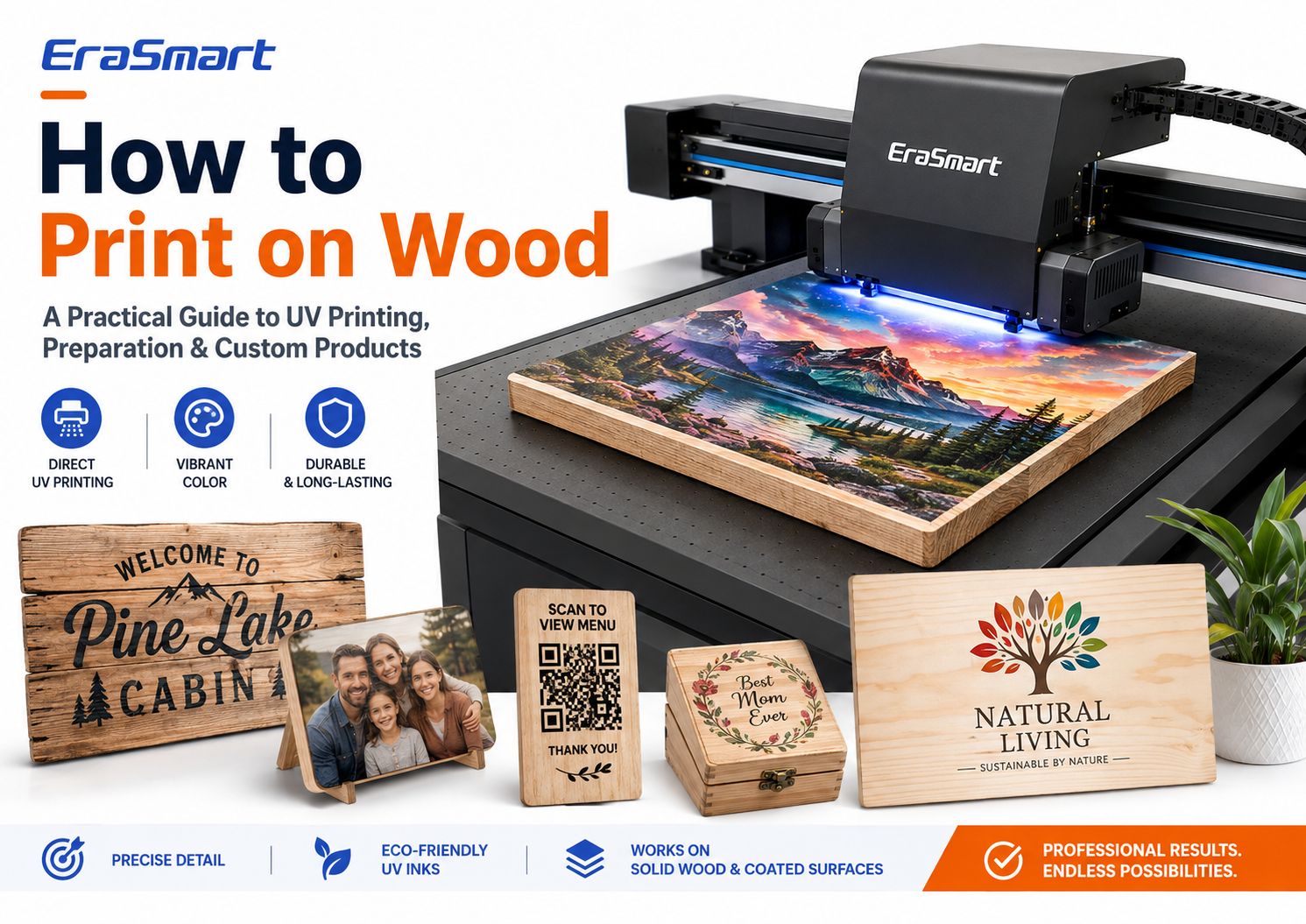
ใช่ คุณสามารถพิมพ์ลงบนไม้ได้โดยตรง
สำหรับการปรับแต่งสีเต็มรูปแบบแบบมืออาชีพ การพิมพ์แบบ UV Flatbed เป็นหนึ่งในวิธีการที่เป็นประโยชน์มากที่สุด เนื่องจากเครื่องพิมพ์สามารถวาง CMYK หมึกสีขาว และสารเคลือบเงาเสริมลงบนพื้นผิวไม้ที่เหมาะสมได้โดยตรงโดยไม่ต้องใช้กระดาษถ่ายโอน
ทำให้สามารถผลิตป้ายไม้ แผ่นรูปถ่าย การแสดงโค้ด QR รางวัล กล่องของขวัญ ที่รองแก้ว บอร์ดเมนู ของตกแต่งบ้าน สินค้าแบรนด์เนม และของขวัญส่วนบุคคลเป็นชุดขนาดเล็กหรือขนาดกลาง
แต่การพิมพ์ไม้ที่ประสบความสำเร็จไม่ได้เป็นเพียงเรื่องของการวางกระดานไม้บนเครื่องพิมพ์ UV แล้วกดพิมพ์
ไม้เป็นวัสดุธรรมชาติ ลายเนื้อไม้ ความพรุน ฝุ่น ความชื้น สารเคลือบพื้นผิว ความเรียบ น้ำมัน ขี้ผึ้ง และพื้นผิว ล้วนส่งผลต่อคุณภาพการพิมพ์และการยึดเกาะของหมึก
แผงไม้อัดเบิร์ชเรียบอาจมีพฤติกรรมแตกต่างจากไม้สนหยาบมาก กระดานไม้ไผ่ดิบอาจมีพฤติกรรมแตกต่างจากผลิตภัณฑ์ไม้ไผ่เคลือบ แม้แต่ช่องว่างไม้ที่มีลักษณะคล้ายกันสองช่องก็สามารถสร้างผลลัพธ์ที่แตกต่างกันได้หากการเคลือบต่างกัน
แนวทางแบบมืออาชีพจึงเป็นดังนี้:
เตรียมพื้นผิว → ทดสอบวัสดุ → เลือกกลยุทธ์หมึกสีขาวที่เหมาะสม → พิมพ์ตัวอย่าง → ตรวจสอบการยึดเกาะ → สร้างมาตรฐานขั้นตอนการทำงาน
คู่มือนี้จะอธิบายวิธีการหลักๆ ในการพิมพ์บนไม้ วิธีการทำงานของการพิมพ์ด้วย UV โดยตรง พื้นผิวไม้ชนิดใดที่พิมพ์ได้ง่ายกว่า วิธีเตรียมวัสดุ ควรใช้หมึกสีขาวเมื่อใด วิธีสร้างขั้นตอนการผลิตที่ทำซ้ำได้ และผลิตภัณฑ์ใดบ้างที่คุณสามารถสร้างได้ด้วยเครื่องพิมพ์ UV EraSmart-
คำตอบด่วน: วิธีไหนดีที่สุดในการพิมพ์บนไม้?
ไม่มีวิธีการใดที่ดีที่สุดสำหรับผลิตภัณฑ์ไม้ทุกชนิด
วิธีการที่ถูกต้องขึ้นอยู่กับ:
- ไม่ว่าไม้จะดิบหรือเคลือบก็ตาม
- ไม่ว่าคุณต้องการสีเต็มหรือไม่
- ไม่ว่าคุณจะต้องการหมึกสีขาวก็ตาม
- ปริมาณการสั่งซื้อ
- รูปร่างพื้นผิว
- ความซับซ้อนของการออกแบบ
- เสร็จสิ้นที่จำเป็น
- ความเร็วในการผลิต
- ไม่ว่าจะเป็นสินค้าที่เป็นงานฝีมือ DIY หรือสินค้าเชิงพาณิชย์
สำหรับการปรับแต่งสีเชิงพาณิชย์บนผลิตภัณฑ์ไม้เรียบการพิมพ์ด้วย UV โดยตรงเป็นหนึ่งในตัวเลือกที่ยืดหยุ่นที่สุด-
ช่วยให้สามารถพิมพ์งานศิลปะลงบนพื้นผิวได้โดยตรง และมีประโยชน์อย่างยิ่งเมื่อคุณต้องการ:
- กราฟิกสีเต็มรูปแบบ
- ภาพถ่าย
- โลโก้
- หมึกสีขาว
- การผลิตชุดเล็ก
- ชื่อส่วนบุคคล
- การออกแบบตัวแปร
- เทมเพลตผลิตภัณฑ์ซ้ำ
อย่างไรก็ตาม วิธีการอื่นๆ ยังคงมีประโยชน์ในตัวเอง
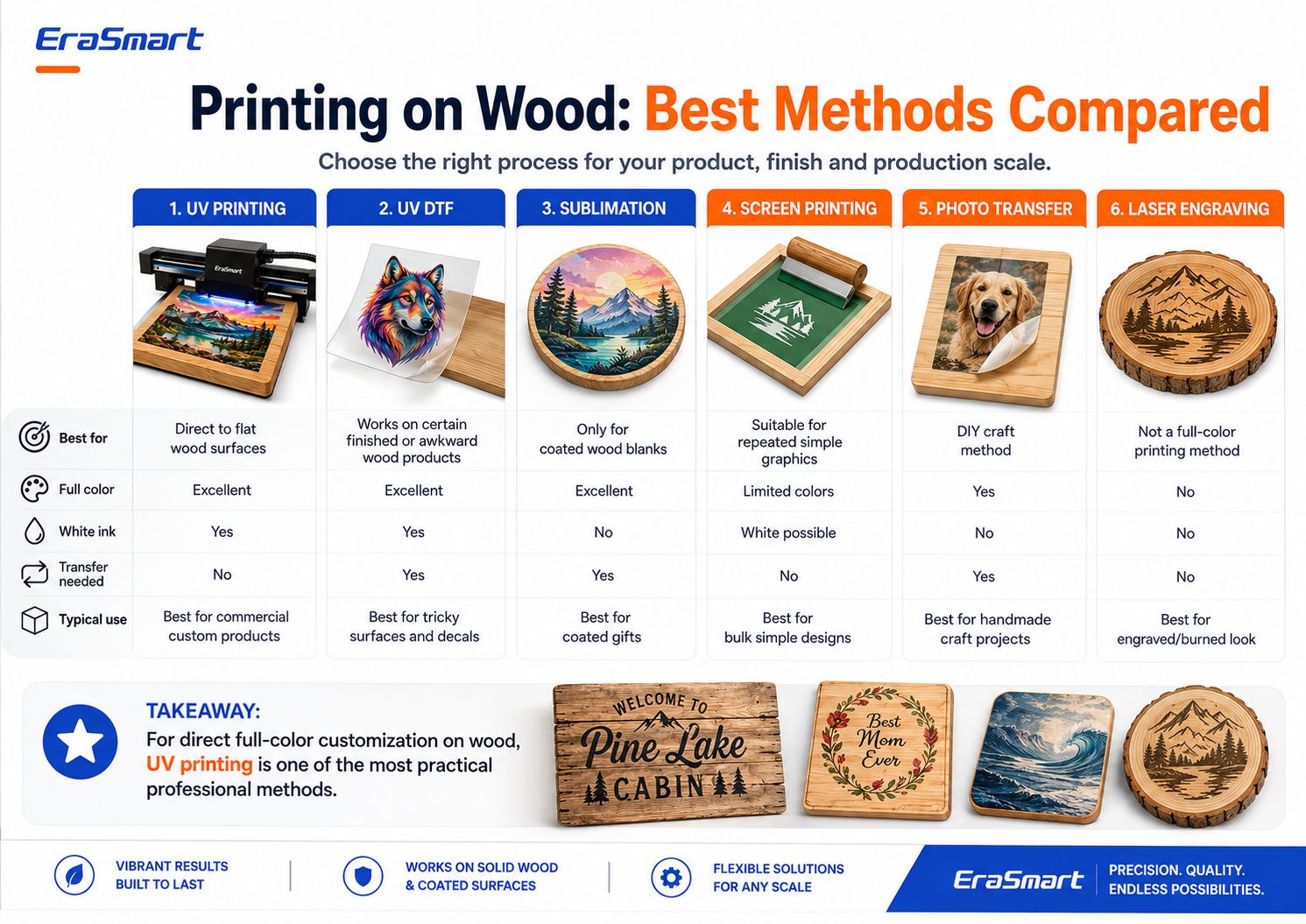
| วิธี | สีเต็ม | หมึกขาว | จำเป็นต้องโอน | ใช้ดีที่สุด |
|---|---|---|---|---|
| การพิมพ์ยูวี | ยอดเยี่ยม | ใช่ | เลขที่ | การปรับแต่งไม้โดยตรงเชิงพาณิชย์ |
| ยูวี ดีทีเอฟ | ยอดเยี่ยม | ใช่ | ใช่ | ผลิตภัณฑ์สำเร็จรูปหรือวางตำแหน่งยาก |
| การระเหิด | ยอดเยี่ยม | เลขที่ | ใช่ | ช่องว่างไม้เคลือบระเหิด |
| การพิมพ์สกรีน | จำกัดโดยการตั้งค่า | เป็นไปได้ | เลขที่ | กราฟิกที่เรียบง่ายซ้ำแล้วซ้ำอีก |
| การถ่ายโอนภาพถ่าย | ใช่ | เลขที่ | ใช่ | โครงการหัตถกรรม DIY |
| การแกะสลักด้วยเลเซอร์ | ไม่มีสีเต็ม | เลขที่ | เลขที่ | เอฟเฟกต์ไม้เผาหรือแกะสลัก |
ประเด็นสำคัญก็คือการพิมพ์บนไม้ไม่ใช่กระบวนการเดียว
เลือกวิธีการตามผลิตภัณฑ์สำเร็จรูปที่คุณต้องการขาย
ทำไมการพิมพ์ยูวีจึงทำงานได้ดีบนไม้
เครื่องพิมพ์ UV ใช้หมึกที่บ่มด้วยแสง UV ในระหว่างกระบวนการพิมพ์
แทนที่จะใช้กระดาษถ่ายโอน เครื่องพิมพ์จะพ่นหมึกลงบนพื้นผิวไม้โดยตรง
สำหรับผลิตภัณฑ์ไม้ที่เหมาะสมจะทำให้เกิดข้อดีหลายประการ
การพิมพ์โดยตรงสู่พื้นผิว
งานศิลปะจะถูกพิมพ์ลงบนกระดานโดยตรง
สิ่งนี้สามารถลดขั้นตอนการผลิตได้เมื่อเทียบกับเวิร์กโฟลว์ที่ต้องการ:
- กระดาษถ่ายโอน
- แยกกาว
- การถ่ายเทความร้อน
- การถ่ายโอนภาพถ่ายด้วยตนเอง
งานศิลปะสีเต็มรูปแบบ
การพิมพ์ยูวีเหมาะสำหรับการออกแบบเช่น:
- ภาพถ่าย
- ภาพประกอบที่มีสีสัน
- โลโก้
- ทิวทัศน์
- กราฟิกงานแต่งงาน
- รูปแบบการตกแต่ง
- รหัส QR
- ชื่อส่วนบุคคล
- การสร้างตราสินค้าผลิตภัณฑ์
หมึกขาว
หมึกสีขาวมีประโยชน์อย่างยิ่งกับไม้เนื่องจากพื้นผิวตามธรรมชาติไม่ใช่สีขาว
คุณสามารถใช้หมึกสีขาวเพื่อสร้างความทึบที่เข้มขึ้นและสีที่คาดเดาได้มากขึ้น
ผลวานิช
สำหรับการกำหนดค่าเครื่องพิมพ์ UV ที่เข้ากันได้ สามารถเลือกเติมสารเคลือบเงาสำหรับ:
- สปอตกลอส
- รายละเอียดที่ยกขึ้น
- ไฮไลท์โลโก้
- สำเนียงการตกแต่ง
- เอฟเฟกต์พื้นผิวระดับพรีเมี่ยม
การปรับแต่งชุดเล็ก
การพิมพ์แบบดิจิทัลทำให้การผลิตง่ายขึ้น:
- แผ่นรูปถ่ายหนึ่งแผ่น
- สิบชื่อที่แตกต่างกัน
- สัญญาณ QR หลายรายการ
- ผลิตภัณฑ์ของขวัญระยะสั้น
- ชิ้นงานแต่งงานส่วนบุคคล
- ป้ายธุรกิจท้องถิ่น
โดยไม่ต้องสร้างหน้าจอหรือเพลทการพิมพ์แบบดั้งเดิมแยกต่างหากสำหรับทุกการออกแบบ
ไม้ชนิดใดที่คุณสามารถพิมพ์ด้วย UV ได้?
เครื่องพิมพ์ UV สามารถทำงานได้กับพื้นผิวไม้และพื้นผิวไม้หลายชนิด แต่ชนิดของไม้เพียงอย่างเดียวไม่สามารถกำหนดคุณภาพการพิมพ์ได้
สภาพพื้นผิวก็มีความสำคัญเช่นกัน
วัสดุทั่วไป ได้แก่ :
- ไม้อัดเบิร์ช
- เมเปิ้ล
- ต้นสน
- ไม้ไผ่
- ไม้เอ็มดีเอฟ
- ไม้เคลือบ
- ไม้ทาสี
- ไม้ปิดผนึก
- แผงไม้เนื้อแข็งที่เตรียมไว้
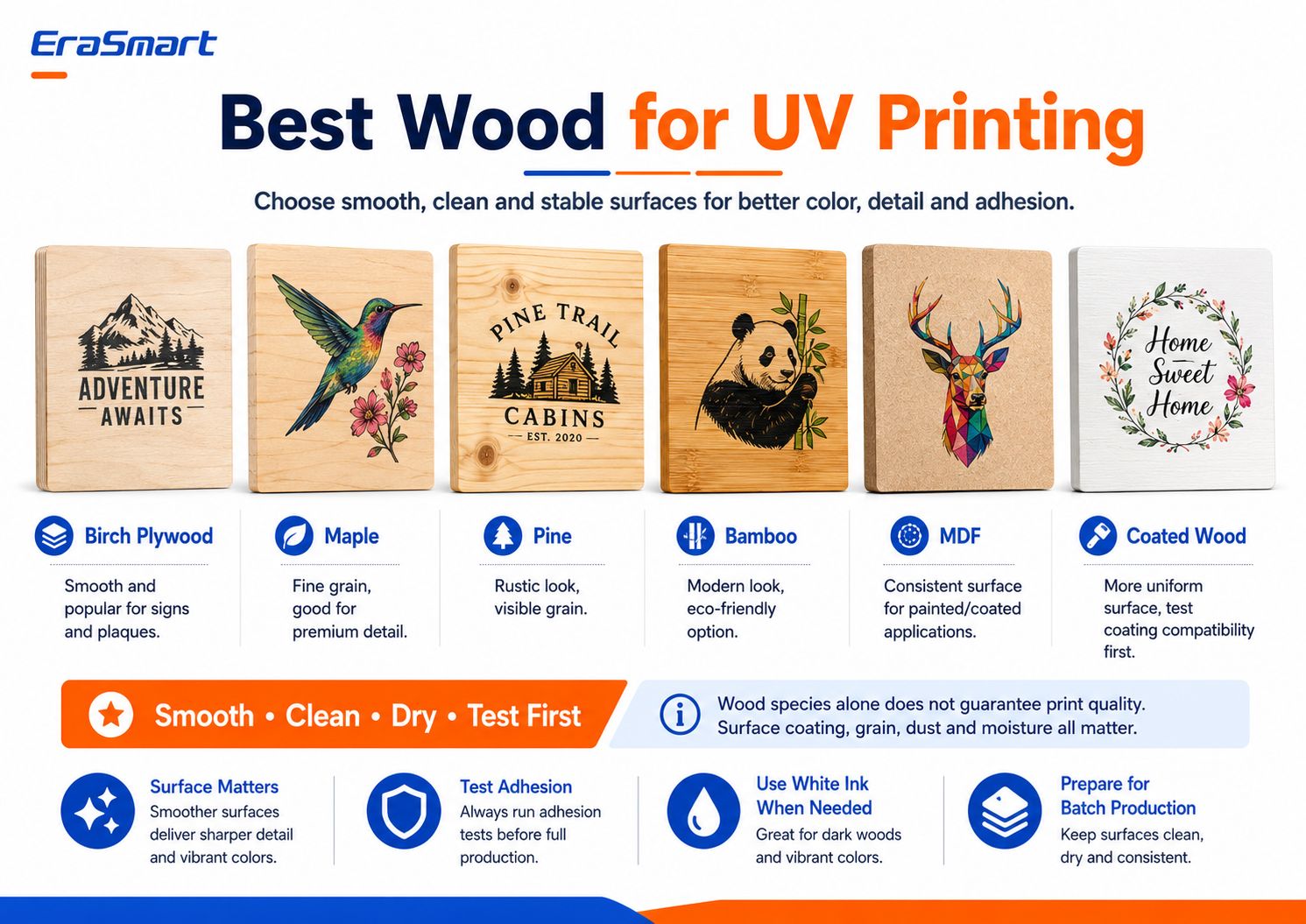
ไม้อัดเบิร์ช
ไม้อัดเบิร์ชเป็นที่นิยมสำหรับ:
- สัญญาณ
- โล่ประกาศเกียรติคุณ
- ชิ้นตกแต่ง
- ของขวัญส่วนตัว
พื้นผิวไม้อัดเรียบสามารถให้รายละเอียดที่ดีและตำแหน่งที่คาดเดาได้
อย่างไรก็ตาม คุณภาพของไม้อัดจะแตกต่างกันไป ตรวจสอบการบิดเบี้ยว ข้อบกพร่องที่พื้นผิว และความสม่ำเสมอของแผ่นไม้อัด
เมเปิ้ล
เมเปิ้ลมีลายไม้ที่ค่อนข้างละเอียดและสามารถทำงานได้ดีกับผลิตภัณฑ์ที่ให้ความสำคัญกับรายละเอียดเล็กๆ น้อยๆ
อาจเหมาะสำหรับ:
- โล่พรีเมี่ยม
- ผลิตภัณฑ์ภาพถ่าย
- สัญญาณเล็กๆ
- ของขวัญที่มีตราสินค้า
ต้นสน
ไม้สนมีรูปลักษณ์ที่เรียบง่ายกว่า
ลายเกรนและปมที่มองเห็นอาจกลายเป็นส่วนหนึ่งของการออกแบบ โดยเฉพาะอย่างยิ่งเมื่อพิมพ์โดยไม่มีฐานด้านล่างสีขาวทั้งหมด
อย่างไรก็ตาม ไม้สนที่หยาบกว่าอาจต้องขัดและเตรียมการเพิ่มเติม
ไม้ไผ่
ผลิตภัณฑ์จากไม้ไผ่เป็นที่นิยมสำหรับ:
- ของขวัญ
- การตกแต่ง
- อุปกรณ์ครัว
- โล่ประกาศเกียรติคุณ
- สินค้าแบรนด์เนม
เนื่องจากผลิตภัณฑ์จากไม้ไผ่สำเร็จรูปอาจมีการเคลือบพื้นผิวที่แตกต่างกัน โปรดทดสอบผลิตภัณฑ์ให้แน่ชัดก่อนการผลิต
ไม้เอ็มดีเอฟ
MDF ให้พื้นผิวที่ผลิตได้สม่ำเสมอมากกว่าลายไม้ธรรมชาติ
อาจมีประโยชน์สำหรับ:
- แผงทาสี
- ป้าย
- การตกแต่ง
- แสดงผลิตภัณฑ์
MDF ดิบมีรูพรุน ดังนั้นควรประเมินสภาพพื้นผิวและกระบวนการเคลือบหรือปิดผนึกก่อนการผลิต
ไม้เคลือบ
ไม้เคลือบหรือทาสีสามารถให้รูปลักษณ์ที่สม่ำเสมอมากขึ้น
อย่างไรก็ตาม การเคลือบทำให้เกิดตัวแปรอื่น:
หมึก UV จะยึดติดกับการเคลือบนั้นอย่างเหมาะสมหรือไม่?
การเคลือบมัน ขี้ผึ้ง แล็กเกอร์ สี น้ำยาซีล หรือการเคลือบพื้นผิวที่ใช้พลังงานต่ำอาจส่งผลต่อการยึดเกาะ
ทดสอบวัสดุสำเร็จรูปจริงเสมอ
กฎที่สำคัญที่สุด: เรียบเนียน สะอาด แห้ง และมั่นคง
เมื่อเลือกไม้สำหรับการพิมพ์ด้วยแสง UV ให้มองหาคุณลักษณะสี่ประการ:
เรียบ
โดยทั่วไปพื้นผิวที่เรียบกว่าจะรองรับข้อความที่คมชัดกว่า เส้นที่สะอาดตา และรายละเอียดของภาพที่สม่ำเสมอยิ่งขึ้น
ทำความสะอาด
ฝุ่นจากการขัดหรือการจัดการอาจรบกวนการพิมพ์และการยึดเกาะ
แห้ง
ความชื้นอาจส่งผลต่อพื้นผิวและความเสถียรของผลิตภัณฑ์ในระยะยาว
มั่นคง
บอร์ดควรวางให้เรียบเพียงพอเพื่อการกวาดล้างหัวพิมพ์ที่ปลอดภัยและสม่ำเสมอ
เรื่องนี้มีความสำคัญมากกว่าการเลือกสายพันธุ์จากรายการ
หากต้องการดูพื้นผิวที่เข้ากันได้กับ UV ในวงกว้าง โปรดดู EraSmartคู่มือวัสดุเครื่องพิมพ์ UV-
ไม้ดิบกับไม้เคลือบ
ไม้ดิบและไม้เคลือบสร้างโอกาสที่แตกต่างกัน
การพิมพ์บนไม้ดิบ
ไม้ดิบคงลักษณะของวัสดุธรรมชาติ
สิ่งนี้มีประโยชน์เมื่อลายไม้เป็นส่วนหนึ่งของการออกแบบโดยเจตนา
ข้อดีได้แก่:
- ลักษณะที่เป็นธรรมชาติ
- ผลชนบท
- พื้นผิวไม้ที่มองเห็นได้
- รูปแบบผลิตภัณฑ์ที่เป็นเอกลักษณ์
ความท้าทายอาจรวมถึง:
- ความพรุนมากขึ้น
- เม็ดไม่สม่ำเสมอ
- ฝุ่น
- เส้นใยพื้นผิว
- การดูดซึมแบบแปรผัน
- การยึดเกาะที่ไม่สอดคล้องกัน
ไม้ดิบมักจะได้ประโยชน์จากการขัดและทำความสะอาดอย่างระมัดระวัง
การพิมพ์บนไม้เคลือบหรือปิดผนึก
ไม้เคลือบสามารถให้พื้นผิวที่มองเห็นได้สม่ำเสมอยิ่งขึ้น
ข้อดีที่เป็นไปได้:
- เรียบเนียนยิ่งขึ้น
- รูปลักษณ์ที่สม่ำเสมอยิ่งขึ้น
- เม็ดที่มองเห็นได้น้อยลง
- สีที่คาดเดาได้มากขึ้นในบางกรณี
แต่การเคลือบนั้นจะต้องเข้ากันได้กับหมึก UV
ปัญหาที่อาจเกิดขึ้น ได้แก่ :
- การยึดเกาะที่อ่อนแอ
- เกา
- ปอกเปลือก
- หมึกอยู่บนพื้นผิวที่เข้ากันไม่ได้
นี่คือเหตุผลว่าทำไมแนวทางที่ปลอดภัยที่สุดคือ:
ห้ามอนุมัติวัสดุไม้เพื่อการผลิตโดยยึดตามชื่อเท่านั้น ทดสอบผลิตภัณฑ์เปล่าหรือผลิตภัณฑ์สำเร็จรูปที่แน่นอน
วิธีเตรียมไม้ก่อนพิมพ์ยูวี
การเตรียมพื้นผิวเป็นส่วนที่สำคัญที่สุดประการหนึ่งของกระบวนการทั้งหมด
ขั้นตอนที่ 1: ตรวจสอบคณะกรรมการ
ตรวจสอบ:
- ความเรียบ
- รอยขีดข่วน
- รอยบุบ
- นอต
- เส้นใยหลวม
- การเคลือบ
- การแปรปรวน
- ความชื้น
- น้ำมันหรือขี้ผึ้ง
อย่าเริ่มพิมพ์จนกว่าคุณจะรู้ว่าคุณกำลังทำงานกับพื้นผิวใด
ขั้นตอนที่ 2: ทรายหากจำเป็น
หากกระดานมีความหยาบ การขัดเล็กน้อยอาจช่วยสร้างพื้นผิวการพิมพ์ที่สม่ำเสมอมากขึ้น
เป้าหมายไม่ได้อยู่ที่การกำจัดลักษณะไม้ตามธรรมชาติเสมอไป
เป้าหมายคือการกำจัด:
- เส้นใยหลวม
- จุดสูงหยาบ
- เศษเล็กเศษน้อย
- ข้อบกพร่องพื้นผิวที่ไม่พึงประสงค์
การขัดแบบละเอียดมักจะเหมาะสมกว่าสำหรับการเตรียมการพิมพ์มากกว่าการปล่อยให้พื้นผิวหยาบที่ยังไม่เสร็จ
ขั้นตอนที่ 3: กำจัดฝุ่นขัดทั้งหมด
ขั้นตอนนี้ดูถูกดูแคลนได้ง่าย
ฝุ่นไม้สามารถรบกวน:
- ตำแหน่งหมึก
- ความคมชัดของขอบ
- การยึดเกาะ
- การปรากฏตัวครั้งสุดท้าย
ใช้วิธีการทำความสะอาดที่ไม่เป็นขุยที่เหมาะสม และตรวจสอบให้แน่ใจว่าพื้นผิวสะอาดก่อนพิมพ์
ขั้นตอนที่ 4: ขจัดน้ำมันและการปนเปื้อน
ผลิตภัณฑ์ไม้สำเร็จรูปบางชนิดอาจมี:
- น้ำมัน
- ขี้ผึ้ง
- สารขัดเงา
- ลายนิ้วมือ
- สารตกค้างจากการผลิต
สิ่งเหล่านี้สามารถลดการยึดเกาะของหมึกได้
ขั้นตอนที่ 5: ตรวจสอบการเคลือบที่มีอยู่
หากผลิตภัณฑ์ได้รับการทาสี ปิดผนึก แล็คเกอร์ หรือเคลือบ ให้ทำการทดสอบการยึดเกาะ
อย่าคิดว่าผลิตภัณฑ์ไม้ที่ทาสีหรือปิดผนึกทุกชิ้นจะสามารถพิมพ์ด้วยรังสียูวีได้โดยอัตโนมัติ
ขั้นตอนที่ 6: ทดสอบก่อนการผลิต
พิมพ์ตัวอย่างเล็กๆ โดยใช้สิ่งเดียวกัน:
- ไม้
- การรักษาพื้นผิว
- ประเภทงานศิลปะ
- กลยุทธ์หมึกขาว
- การตั้งค่าการบ่ม
ที่คุณวางแผนจะใช้สำหรับคำสั่งซื้อของลูกค้าขั้นสุดท้าย
หากจำเป็นสำหรับพื้นผิวเฉพาะ ไพรเมอร์หรือการปรับสภาพที่เหมาะสมอาจช่วยเพิ่มการยึดเกาะได้
อย่าใช้สีรองพื้นอัตโนมัติกับไม้ทุกชิ้น
ใช้เมื่อการทดสอบแสดงให้เห็นว่าวัสดุต้องการ
เตรียมงานศิลปะสำหรับการพิมพ์ไม้
งานพิมพ์ไม้ที่ดีเริ่มต้นก่อนที่วัสดุจะถึงเครื่องพิมพ์
ตรวจสอบ:
- ขนาดผลิตภัณฑ์ขั้นสุดท้าย
- ความละเอียดของงานศิลปะ
- โลโก้
- ขนาดข้อความ
- คุณภาพของภาพ
- ชั้นหมึกสีขาว
- ชั้นวานิช
- พื้นที่โปร่งใส
- มีเลือดออก
- อัตรากำไรขั้นต้นที่ปลอดภัย
งานศิลปะแรสเตอร์
สำหรับภาพถ่ายและภาพประกอบโดยละเอียดรอบๆ300 DPI ที่ขนาดการพิมพ์สุดท้ายเป็นจุดเริ่มต้นที่เป็นประโยชน์สำหรับผลิตภัณฑ์ที่มีมุมมองระยะใกล้
เว็กเตอร์อาร์ตเวิร์ค
ไฟล์เวกเตอร์เหมาะกว่าสำหรับ:
- โลโก้
- รหัส QR
- ข้อความ
- ไอคอน
- ศิลปะการใช้เส้น
- กราฟิกของแบรนด์
เพราะยังคงความคมชัดเมื่อปรับขนาด
การออกแบบเพื่อไม้ ไม่ใช่แค่หน้าจอ
การออกแบบที่จัดทำบนผืนผ้าใบคอมพิวเตอร์สีขาวอาจดูแตกต่างไปจากเดิมอย่างสิ้นเชิงเมื่อพิมพ์บนไม้ธรรมชาติ
นี่คือเหตุผลว่าทำไมการตัดสินใจเรื่องหมึกขาวจึงมีความสำคัญมาก
หมึกสีขาวกับลายไม้ธรรมชาติ: คุณควรเลือกอันไหน
นี่เป็นหนึ่งในการตัดสินใจเชิงสร้างสรรค์ที่สำคัญที่สุดในการพิมพ์ยูวีบนไม้
มีแนวทางปฏิบัติสามประการ
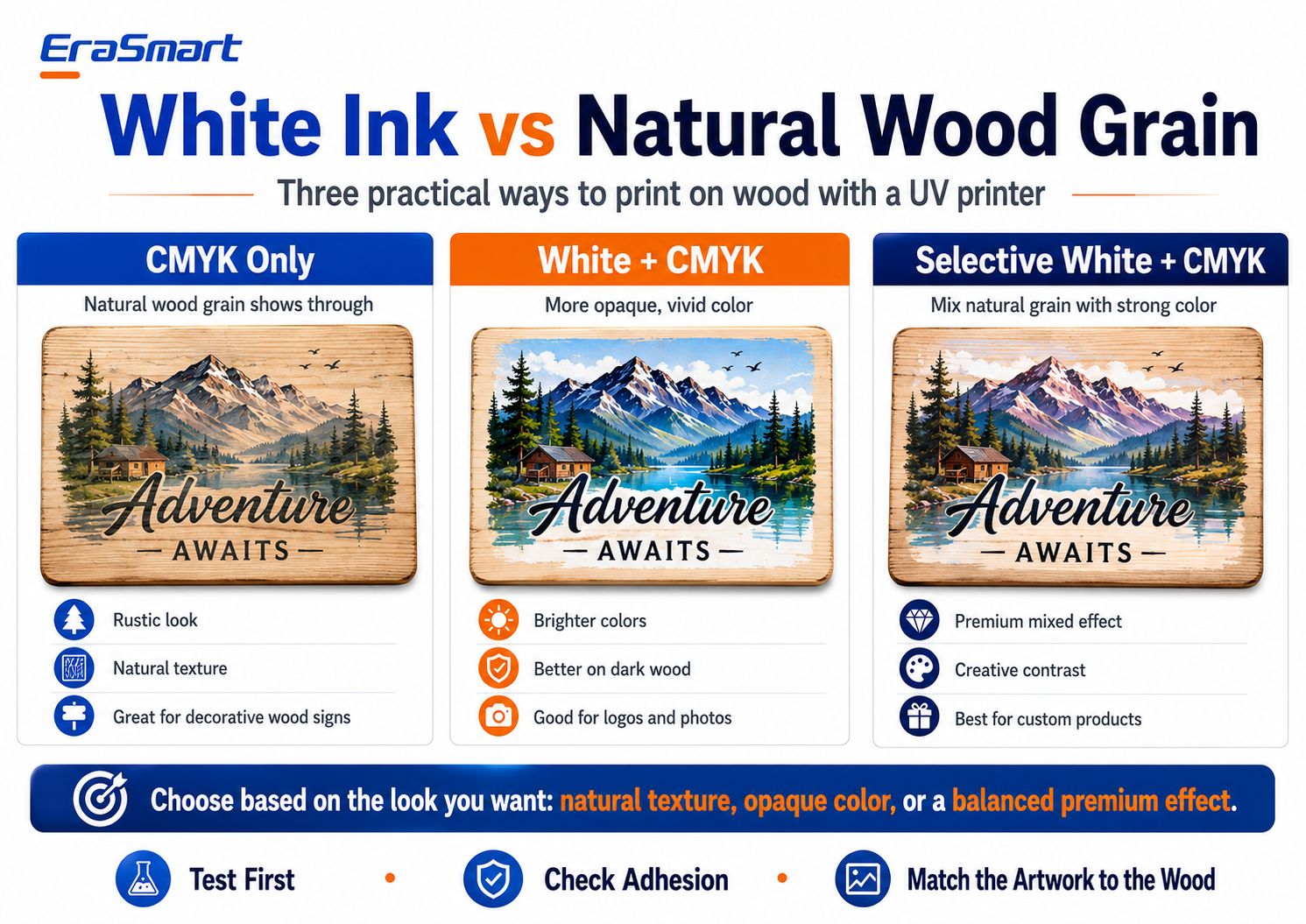
ตัวเลือกที่ 1: CMYK เท่านั้น
ด้วยการพิมพ์แบบ CMYK เท่านั้น ไม้ธรรมชาติยังคงมองเห็นได้ผ่านส่วนที่สว่างกว่าของอาร์ตเวิร์ค
สิ่งนี้สามารถสร้าง:
- ดูเรียบง่าย
- รูปลักษณ์วินเทจ
- เนื้อธรรมชาติ
- ความรู้สึกที่ทำด้วยมือ
ใช้งานได้ดีโดยเฉพาะกับการออกแบบที่สร้างขึ้นโดยเจตนาสำหรับพื้นหลังไม้
ผลิตภัณฑ์ที่เหมาะสม ได้แก่ :
- สัญญาณห้องโดยสาร
- แผ่นตกแต่ง
- ป้ายคาเฟ่
- ของขวัญแบบชนบท
- ตกแต่งบ้านอย่างเป็นธรรมชาติ
ข้อจำกัดที่สำคัญคือความสามารถในการคาดเดาสีได้
เนื่องจากพื้นผิวเป็นสีน้ำตาลหรือสีแทนแทนที่จะเป็นสีขาว สีสุดท้ายจึงจะมีปฏิกิริยากับไม้
บริเวณที่มีแสงสว่างอาจดูเข้มกว่าหรือโปร่งใสมากกว่าที่ปรากฏบนหน้าจอ
ตัวเลือก 2: ขาว + CMYK
ฐานด้านล่างสีขาวจะสร้างรองพื้นที่ทึบแสงมากขึ้นใต้อาร์ตเวิร์คสี
สิ่งนี้มีประโยชน์เมื่อคุณต้องการ:
- สีที่แข็งแกร่งขึ้น
- ภาพถ่ายที่สว่างยิ่งขึ้น
- โลโก้ที่ชัดเจนยิ่งขึ้น
- สีของแบรนด์ที่สอดคล้องกันมากขึ้น
- มองเห็นได้ดีขึ้นบนไม้สีเข้ม
การใช้งานทั่วไปได้แก่:
- ภาพถ่าย
- โลโก้ธุรกิจ
- ภาพประกอบที่มีสีสัน
- การสร้างตราสินค้าผลิตภัณฑ์
- งานศิลปะที่มีรายละเอียด
สีขาว + CMYK ช่วยลดอิทธิพลของสีไม้ธรรมชาติ
ตัวเลือก 3: เลือกสีขาว + CMYK
สีขาวคัดสรรมักเป็นตัวเลือกที่น่าสนใจที่สุดสำหรับผลิตภัณฑ์ไม้ระดับพรีเมียม
แทนที่จะพิมพ์สีขาวทั้งภาพ ให้ใช้สีขาวเฉพาะเมื่อต้องการความทึบเท่านั้น
ตัวอย่างเช่น:
- สีขาวภายใต้ภูมิทัศน์ที่เต็มไปด้วยสีสัน
- ไม่มีสีขาวหลังพื้นที่ไม้พื้นหลัง
- สีขาวใต้โลโก้บริษัท
- ลายไม้ธรรมชาติรอบๆ องค์ประกอบตกแต่ง
สิ่งนี้จะสร้างการรวมกันของ:
ไม้ธรรมชาติ+คุมสีทั้งคัน
และสามารถทำให้ผลิตภัณฑ์สำเร็จรูปมีรูปลักษณ์ที่ออกแบบมาอย่างตั้งใจมากขึ้น
คุณควรใช้โหมดหมึกขาวแบบใด
กฎการตัดสินใจง่ายๆ:
ต้องการเนื้อสัมผัสที่เป็นธรรมชาติสูงสุดหรือไม่?
ใช้ CMYK เท่านั้น
ต้องการสีที่สดใสและคาดเดาได้มากขึ้นใช่ไหม
ใช้สีขาว + CMYK
ต้องการเอฟเฟกต์มิกซ์ระดับพรีเมียมหรือไม่?
ใช้สีขาวแบบเลือกสี + CMYK
ตัวเลือกที่ดีที่สุดขึ้นอยู่กับงานศิลปะและการวางตำแหน่งผลิตภัณฑ์
วิธีการพิมพ์ยูวีบนไม้ทีละขั้นตอน
เมื่อเตรียมวัสดุและอาร์ตเวิร์คแล้ว ให้สร้างกระบวนการผลิตที่ทำซ้ำได้
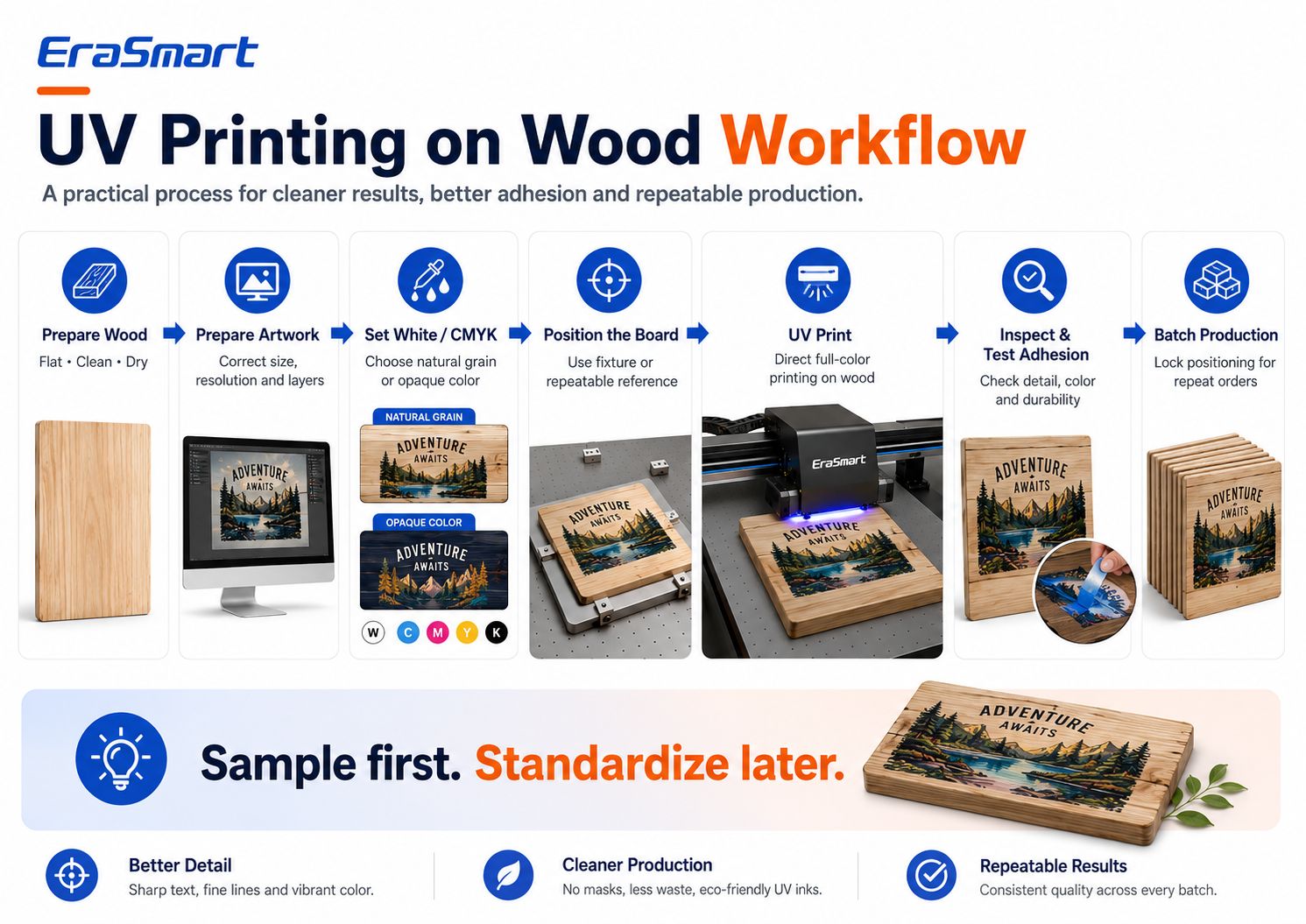
ขั้นตอนที่ 1: เตรียมไม้
ตรวจสอบให้แน่ใจว่าบอร์ดคือ:
- ทำความสะอาด
- แห้ง
- แบน
- ปราศจากฝุ่น
- เหมาะสำหรับการทดสอบ
ขั้นตอนที่ 2: เตรียมงานศิลปะ
ชุด:
- มิติสุดท้าย
- ความละเอียดของภาพ
- ตำแหน่งการพิมพ์
- ชั้น CMYK
- ชั้นหมึกสีขาว
- วานิชชั้นถ้าจำเป็น
ขั้นตอนที่ 3: เลือกกลยุทธ์หมึกขาวของคุณ
ตัดสินใจระหว่าง:
- สี CMYK เท่านั้น
- ขาว + สี CMYK
- เลือกสีขาว + CMYK
ก่อนส่งงานเข้าโรงพิมพ์
ขั้นตอนที่ 4: วางตำแหน่งบอร์ด
วางไม้ไว้อย่างแน่นหนาบนแท่นพิมพ์
สำหรับผลิตภัณฑ์ที่ใช้ซ้ำ ให้พิจารณาใช้:
- เครื่องหมายตำแหน่ง
- การอ้างอิงขอบ
- ติดตั้ง
- จิ๊ก
- แม่แบบ
ซึ่งจะช่วยลดข้อผิดพลาดในการจัดตำแหน่ง
ขั้นตอนที่ 5: ตั้งค่าความสูงการพิมพ์
การกวาดล้างหัวพิมพ์ที่ถูกต้องเป็นสิ่งสำคัญ
พื้นผิวที่บิดเบี้ยวไม่ดีหรืออยู่ในตำแหน่งสูงเกินไปอาจทำให้เกิด:
- ปัญหาคุณภาพการพิมพ์
- ระยะการพุ่งไม่ถูกต้อง
- อาจมีความเสี่ยงต่อหัวพิมพ์
อย่าใช้เครื่องพิมพ์เพื่อชดเชยไม้ที่บิดงออย่างรุนแรง
ใช้ผลิตภัณฑ์ที่มีความเรียบและมั่นคงเพียงพอ
ขั้นตอนที่ 6: พิมพ์หนึ่งตัวอย่าง
อย่าเริ่มชุด 100 ชิ้นทันที
พิมพ์หนึ่งตัวอย่างก่อน
ตรวจสอบ:
- สี
- รายละเอียด
- การจัดตำแหน่งหมึกสีขาว
- ตำแหน่งการพิมพ์
- การยึดเกาะ
- ความต้านทานต่อรอยขีดข่วน
- ลักษณะโดยรวม
ขั้นตอนที่ 7: ทดสอบการยึดเกาะ
หลังจากการบ่ม ให้ทดสอบว่าชั้นหมึกเหมาะสมกับการใช้งานที่ต้องการหรือไม่
การทดสอบที่แน่นอนขึ้นอยู่กับผลิตภัณฑ์
แผ่นป้ายสำหรับตกแต่งในร่มมีข้อกำหนดที่แตกต่างจากสินค้าที่ต้องจัดการบ่อยๆ
ขั้นตอนที่ 8: ล็อคตำแหน่ง
เมื่อตัวอย่างได้รับการอนุมัติแล้ว:
- บันทึกการตั้งค่า RIP
- บันทึกตำแหน่ง X/Y
- สร้างมาตรฐานให้กับอุปกรณ์
- บันทึกขนาดกระดาน
ขั้นตอนที่ 9: เริ่มการผลิตเป็นชุด
ขณะนี้สามารถผลิตชิ้นงานได้หลายชิ้นโดยมีขั้นตอนการทำงานที่ทำซ้ำได้มากขึ้น
ขั้นตอนที่ 10: QC ขั้นสุดท้าย
ตรวจสอบแต่ละชุดสำหรับ:
- การจัดตำแหน่ง
- ข้อบกพร่องของหัวฉีด
- รอยขีดข่วน
- ข้อบกพร่องของบอร์ด
- งานศิลปะที่ไม่ถูกต้อง
- การเปลี่ยนแปลงสี
- ปัญหาการยึดเกาะ
นี่เป็นสิ่งสำคัญอย่างยิ่งสำหรับงานเฉพาะบุคคล
ตัวอย่างก่อน สร้างมาตรฐานในภายหลัง
ความแตกต่างที่ใหญ่ที่สุดประการหนึ่งระหว่างการพิมพ์ตามงานอดิเรกกับการผลิตแบบมืออาชีพก็คือการกำหนดมาตรฐาน
สำหรับป้ายไม้แผ่นเดียว อาจยอมรับการวางตำแหน่งด้วยตนเองได้
สำหรับป้าย QR ของคาเฟ่ที่เหมือนกัน 50 ป้าย เป้าหมายควรเป็น:
วัสดุเดียวกัน + ฟิกซ์เจอร์เดียวกัน + ค่าที่ตั้งไว้ล่วงหน้า RIP เดียวกัน + ตำแหน่งเดียวกัน + QC เดียวกัน
สิ่งนี้จะช่วยลด:
- เวลาตั้งค่า
- พิมพ์ผิด
- ช่องว่างที่สูญเปล่า
- ข้อร้องเรียนของลูกค้า
วิธีวางตำแหน่งไม้สำหรับการสั่งซื้อซ้ำ
หากคุณพิมพ์ไม้แผ่นเดิมเป็นประจำ ให้สร้างระบบการวางตำแหน่งที่ทำซ้ำได้
แนวทางที่เป็นไปได้ ได้แก่:
- หยุดมุม
- จิ๊กทางกายภาพ
- แม่แบบที่พิมพ์
- ผู้ปกครองตำแหน่ง
- อุปกรณ์ติดตั้งเฉพาะ
เป้าหมายคือเพื่อหลีกเลี่ยงการเดาตำแหน่งของสินค้าทุกชิ้นด้วยตนเอง
ตัวอย่างเช่น หากลูกค้าสั่งป้ายเมนูไม้ 30 ป้าย:
- ใช้ขนาดกระดานเดียวกัน
- แก้ไขบอร์ดให้อยู่ในตำแหน่งอ้างอิงเดียวกัน
- ล็อคพิกัด RIP
- เปลี่ยนเฉพาะข้อมูลอาร์ตเวิร์คตามที่จำเป็น
- ตรวจสอบตามระยะเวลาที่กำหนด
สิ่งนี้จะเปลี่ยนการพิมพ์ไม้ตามสั่งให้เป็นขั้นตอนการผลิตแทนที่จะเป็นการทดลองงานฝีมือ
การพิมพ์ด้วย UV โดยตรงเทียบกับ UV DTF บนไม้
EraSmart นำเสนอทั้งขั้นตอนการทำงานแบบ UV Flatbed และ UV DTF แต่ไม่ใช่กระบวนการเดียวกัน
การพิมพ์ยูวีโดยตรง
เลือกเครื่องพิมพ์ UV โดยตรงเมื่อ:
- พื้นผิวไม้เรียบ
- วัตถุนั้นพอดีกับฐานพิมพ์
- คุณต้องการพิมพ์โดยตรงไปยังผลิตภัณฑ์
- คุณต้องมีตำแหน่งที่แม่นยำ
- คุณกำลังผลิตโล่ แผง ป้าย หรือของขวัญ
- คุณต้องการเอฟเฟกต์สีขาวและเคลือบเงาบนผลิตภัณฑ์โดยตรง
ยูวี ดีทีเอฟ
UV DTF จะมีประโยชน์เมื่อ:
- ผลิตภัณฑ์สำเร็จรูปนั้นยากต่อการวางบนพื้นเรียบ
- พื้นที่การพิมพ์ดูอึดอัด
- คุณต้องการสร้างกราฟิกก่อนแล้วจึงนำไปใช้ในภายหลัง
- คุณกำลังตกแต่งวัตถุบางอย่างที่เสร็จแล้ว
อย่างไรก็ตาม การยึดเกาะด้วย UV DTF บนไม้ยังคงขึ้นอยู่กับพื้นผิวเป็นอย่างมาก
สติ๊กเกอร์ที่ติดได้ดีกับไม้เรียบที่ปิดสนิทอาจไม่ทำงานเหมือนกันบน:
- ต้นสนดิบที่เต็มไปด้วยฝุ่น
- ไม้ที่มีพื้นผิวหนา
- ไม้ทาน้ำมัน
- พื้นผิวแว็กซ์
ดังนั้นควรทดสอบก่อนการผลิตเชิงพาณิชย์
ปัญหาทั่วไปเมื่อพิมพ์บนไม้
ปัญหาที่ 1: สีดูหมองคล้ำ
เหตุผลที่เป็นไปได้:
- ไม่มีฐานสีขาว
- ไม้สีเข้ม
- เม็ดธรรมชาติที่แข็งแกร่ง
- งานศิลปะที่ออกแบบมาสำหรับพื้นหลังสีขาว
สารละลาย
ทดสอบสีขาว + CMYK หรือสีขาวแบบเลือก
ปรับอาร์ตเวิร์คโดยคำนึงถึงพื้นหลังไม้จริงด้วย
ปัญหาที่ 2: การยึดเกาะของหมึกอ่อน
สาเหตุที่เป็นไปได้:
- ฝุ่น
- น้ำมัน
- ขี้ผึ้ง
- การเคลือบที่เข้ากันไม่ได้
- ความชื้น
- การเตรียมพื้นผิวไม่ดี
สารละลาย
ทำความสะอาดพื้นผิวให้ถูกต้องและทดสอบการยึดเกาะ
หากจำเป็น ให้ประเมินการปรับสภาพล่วงหน้าที่เข้ากันได้ที่เหมาะสมสำหรับวัสดุนั้น
ปัญหาที่ 3: ข้อความขนาดเล็กดูหยาบ
สาเหตุที่เป็นไปได้:
- เม็ดหยาบ
- เส้นใยหลวม
- งานศิลปะที่มีความละเอียดต่ำ
- ระยะห่างของหัวพิมพ์ไม่ถูกต้อง
สารละลาย
ใช้ไม้ที่เรียบเนียนขึ้น ปรับปรุงการเตรียมพื้นผิว ใช้ข้อความเวกเตอร์ และตรวจสอบความสูงของการพิมพ์
ปัญหาที่ 4: การเปลี่ยนแปลงตำแหน่งการพิมพ์ระหว่างผลิตภัณฑ์
สาเหตุที่เป็นไปได้:
การวางตำแหน่งด้วยตนเองโดยไม่มีการอ้างอิงซ้ำ
สารละลาย
ใช้ฟิกซ์เจอร์หรือเทมเพลตการวางตำแหน่ง
ปัญหาที่ 5: คณะกรรมการบิดเบี้ยว
การบิดงอสามารถสร้างระยะห่างระหว่างหัวพิมพ์และพื้นผิวที่ไม่สอดคล้องกัน
สารละลาย
ใช้กระดานแบนที่มั่นคงและเพียงพอ
แท่นสุญญากาศสามารถช่วยยึดวัสดุเรียบที่เหมาะสมได้ แต่ไม่ควรคาดหวังว่าจะแก้ไขการบิดงออย่างรุนแรงได้
ปัญหาที่ 6: ลายไม้ครอบงำงานศิลปะ
นี่มักเป็นปัญหาด้านการออกแบบมากกว่าปัญหาเครื่องพิมพ์
สารละลาย
ใช้รองพื้นสีขาวที่ต้องการความทึบแสงมากขึ้น
หรือออกแบบงานศิลปะใหม่โดยตั้งใจโดยใช้ลายไม้ธรรมชาติ
คุณต้องการการเคลือบป้องกันหลังจากการพิมพ์ด้วย UV หรือไม่?
ไม่ใช่ผลิตภัณฑ์ไม้ทุกชนิดที่ต้องการการเคลือบสีใสเพิ่มเติม
การตัดสินใจขึ้นอยู่กับ:
- การใช้งานในร่มและกลางแจ้ง
- ความถี่ในการจัดการ
- รอยขีดข่วน
- การสัมผัสกับความชื้น
- ความคาดหวังของลูกค้า
- ประเภทไม้
- พิมพ์เสร็จ
สำหรับผลิตภัณฑ์ตกแต่งภายในอาคาร การพิมพ์ด้วยการอบด้วยรังสียูวีอาจทำให้ได้รูปลักษณ์ที่ต้องการอยู่แล้ว
สำหรับผลิตภัณฑ์ที่จะเผชิญกับการสึกหรอหนักกว่าหรือสัมผัสกับสิ่งแวดล้อมโดยเฉพาะ อาจมีการประเมินการตกแต่งเพิ่มเติม
ทดสอบการเคลือบหลังการพิมพ์เสมอ เนื่องจากอาจมีการเปลี่ยนแปลง:
- ความมันวาว
- ลักษณะสี
- เนื้อสัมผัส
- การยึดเกาะ
- ผลวานิช
เครื่องพิมพ์ UV EraSmart ที่ใช้งานได้จริงสำหรับงานพิมพ์ไม้
สำหรับผลิตภัณฑ์ไม้ขนาดเล็กและขนาดกลาง UV Flatbed ระดับ A3 คือรูปแบบการผลิตที่ใช้งานได้จริง
ทางเลือกหนึ่งคือเครื่องพิมพ์ UV EraSmart Digital Inkjet A3 — Dual XP600-
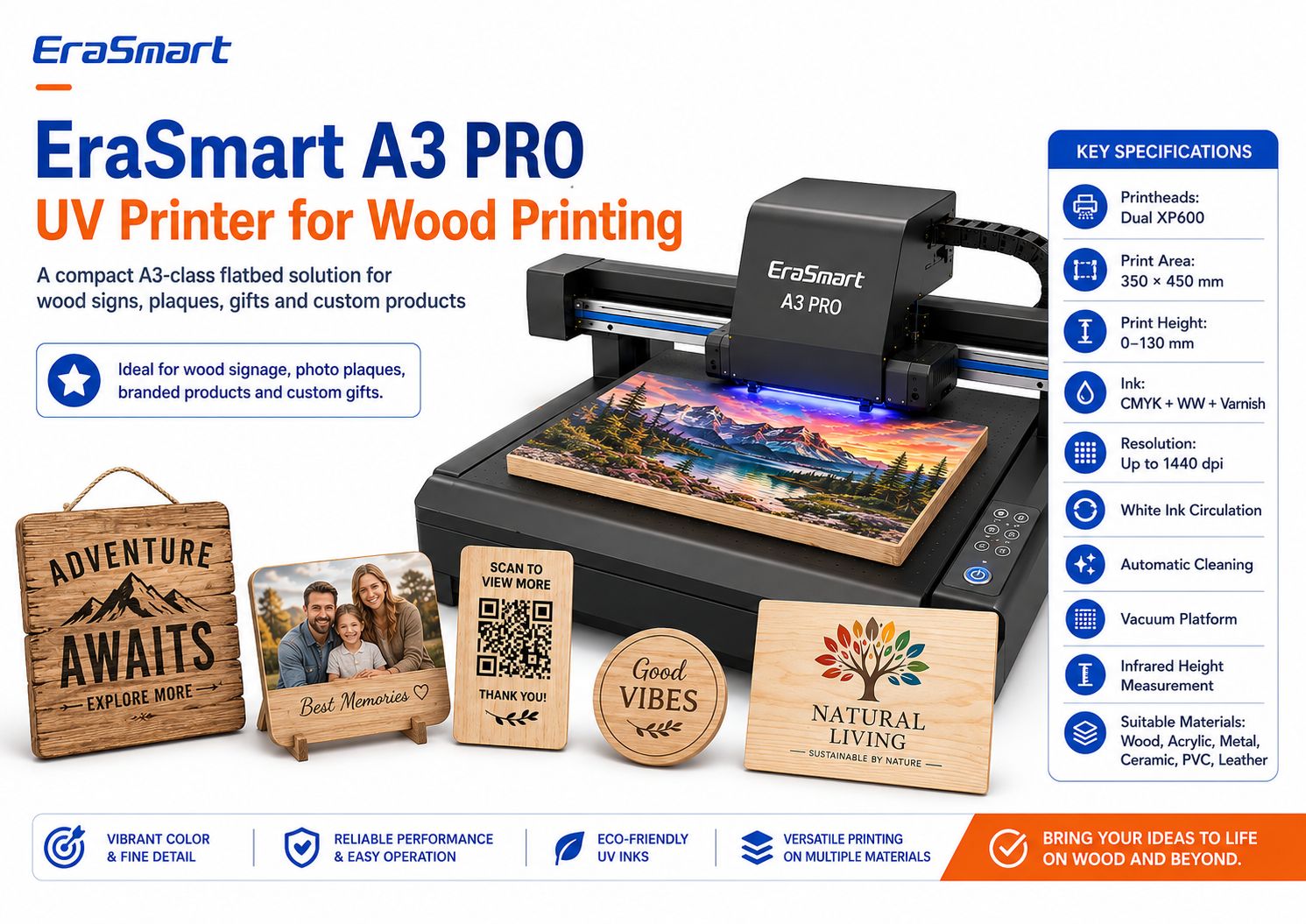
ข้อมูลจำเพาะที่สำคัญของ EraSmart A3 PRO
| ข้อมูลจำเพาะ | EraSmart A3 PRO |
|---|---|
| หัวพิมพ์ | XP600 คู่ |
| พื้นที่การพิมพ์ | 350 × 450 มม |
| ความสูงพิมพ์ | 0–130 มม |
| การกำหนดค่าหมึก | CMYK + WW + วานิช |
| ปณิธาน | ความละเอียดสูงสุด 1440 dpi |
| การไหลเวียนของหมึกสีขาว | ใช่ |
| ทำความสะอาดอัตโนมัติ | ใช่ |
| แพลตฟอร์มสุญญากาศ | ใช่ |
| การวัดส่วนสูง | อินฟราเรด |
| ซอฟต์แวร์ RIP | รีอิน / PrivateRip |
เครื่องพิมพ์รองรับวัสดุ ได้แก่:
- ไม้
- อะคริลิก
- โลหะ
- เซรามิค
- พีวีซี
- ทีพียู
- หนัง
- บอร์ดเคที
สำหรับงานไม้ผสมผสานระหว่างหมึกสีขาว ความสามารถในการเคลือบเงา แท่นสุญญากาศ และการวัดความสูงแบบอินฟราเรดมีประโยชน์อย่างยิ่งสำหรับการปรับแต่งผลิตภัณฑ์แบบเรียบชุดเล็ก
ผลิตภัณฑ์ไม้ใดบ้างที่เหมาะกับขั้นตอนการทำงานระดับ A3
พื้นที่การพิมพ์ 350 × 450 มม. สามารถรองรับผลิตภัณฑ์แบบกำหนดเองขนาดเล็กจำนวนมากได้ ขึ้นอยู่กับขนาดขั้นสุดท้าย
ตัวอย่างได้แก่:
- แผ่นรูปถ่าย
- สัญญาณคิวอาร์
- ป้ายเมนูเล็กๆ
- ของขวัญส่วนตัว
- จานรองแก้ว
- กล่องของขวัญที่มีตราสินค้า
- รางวัลไม้
- แผงตกแต่ง
- ป้ายธุรกิจขนาดเล็ก
- ชิ้นงานแต่งงาน
สำหรับแผงไม้ขนาดใหญ่ ป้าย หรือหลายชิ้นต่อชุด แท่นขนาดใหญ่อาจดูสมเหตุสมผลกว่า
EraSmart ยังนำเสนอเครื่องพิมพ์ยูวี A2พร้อมพื้นที่ทำงานที่ใหญ่ขึ้นสำหรับธุรกิจที่มีขนาดผลิตภัณฑ์ต้องการพื้นที่มากขึ้น
เลือกขนาดเครื่องพิมพ์ตามผลิตภัณฑ์ของคุณ ไม่ใช่เพียงเพราะเครื่องที่ใหญ่กว่าฟังดูเป็นมืออาชีพมากกว่า
ผลิตภัณฑ์ไม้ที่คุณสามารถพิมพ์ด้วยเครื่องพิมพ์ UV
ไม้มีคุณค่าเพราะสามารถรองรับตลาดธุรกิจหลายแห่งได้ในคราวเดียว
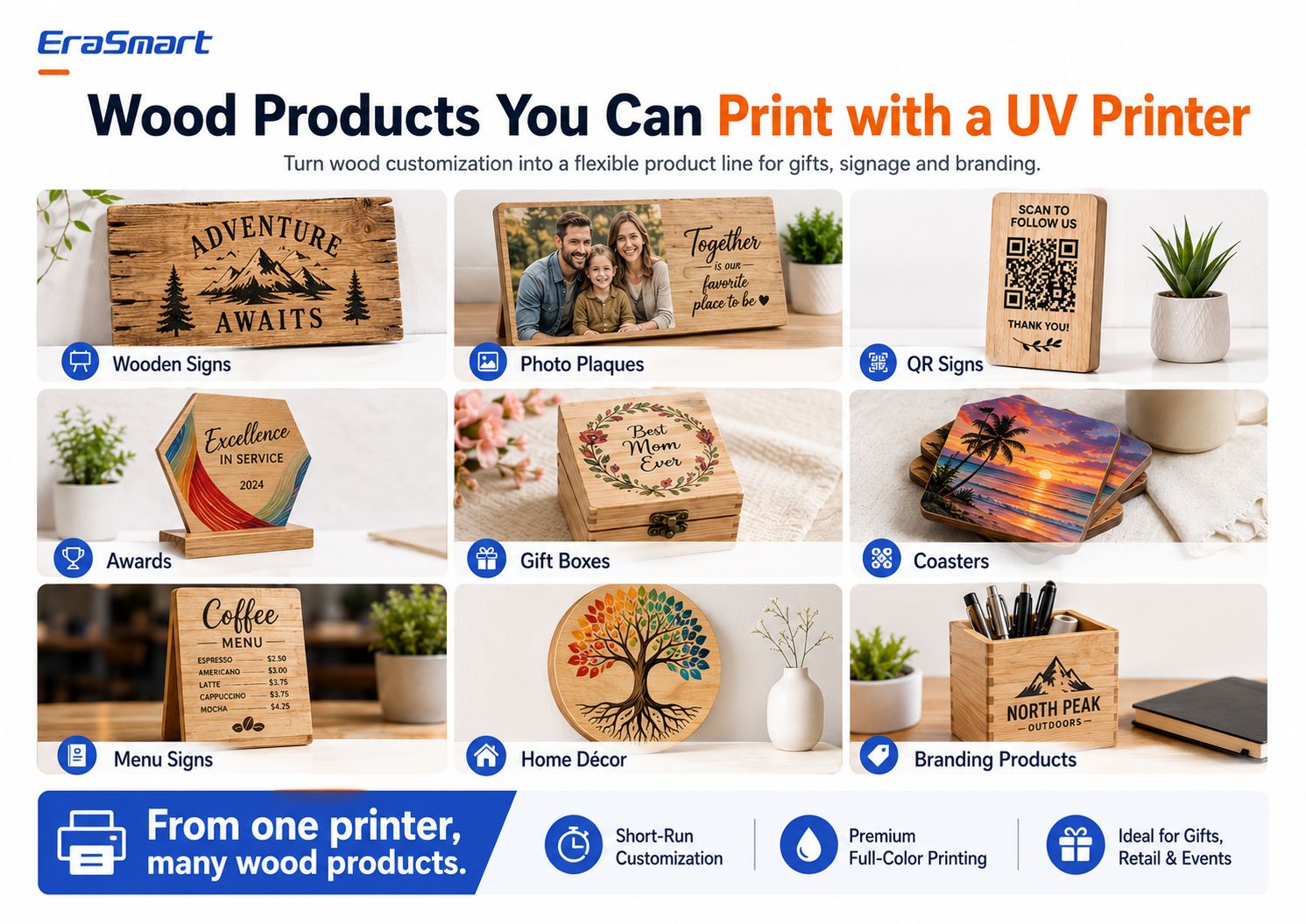
1. ป้ายไม้
ตัวอย่าง:
- สัญญาณห้องโดยสาร
- สัญญาณชื่อครอบครัว
- สัญญาณงานแต่งงาน
- ป้ายคาเฟ่
- ป้ายร้านค้า
- สัญญาณทิศทาง
- คำพูดตกแต่ง
2. แผ่นรูปถ่าย
การพิมพ์ยูวีสีเต็มรูปแบบสามารถเปลี่ยนภาพถ่ายให้เป็น:
- ของขวัญครอบครัว
- ชิ้นวันครบรอบ
- โล่ที่ระลึก
- ของขวัญแต่งงาน
- ภาพสัตว์เลี้ยง
- ความทรงจำการเดินทาง
หมึกสีขาวมักมีประโยชน์ในงานศิลปะภาพถ่าย
3. ป้ายรหัส QR
ธุรกิจขนาดเล็กใช้จอแสดงผล QR มากขึ้นเพื่อ:
- เมนู
- การชำระเงิน
- ความคิดเห็น
- การเข้าถึงอินเทอร์เน็ตไร้สาย
- โซเชียลมีเดีย
- หน้าการจอง
พิมพ์และสแกนรหัส QR ก่อนจัดส่ง
อย่าพึ่งพาเฉพาะการแสดงตัวอย่างแบบดิจิทัลเท่านั้น
4. รางวัลไม้
สร้าง:
- รางวัลของบริษัท
- ชิ้นส่วนการรับรู้ของพนักงาน
- รางวัลกีฬา
- โล่สโมสร
- ใบรับรองที่มีตราสินค้า
5. กล่องของขวัญ
กล่องไม้สามารถปรับแต่งได้ด้วย:
- ชื่อ
- โลโก้
- กราฟิกดอกไม้
- วันแต่งงาน
- การสร้างแบรนด์องค์กร
รูปทรงของกล่องที่แน่นอนจะต้องพอดีอย่างปลอดภัยภายในขนาดและระยะห่างที่รองรับของเครื่องพิมพ์
6. ที่รองแก้ว
ที่รองแก้วเหมาะสำหรับ:
- การออกแบบการท่องเที่ยว
- คอลเลกชันงานศิลปะ
- คาเฟ่
- ของขวัญแต่งงาน
- สินค้าที่มีตราสินค้า
สำหรับผลิตภัณฑ์ที่สัมผัสกับความชื้นหรือการเสียดสีซ้ำๆ ให้ทดสอบผลิตภัณฑ์สำเร็จรูปตามการใช้งานจริง
7. ป้ายเมนู
เมนูไม้สามารถใช้ได้กับ:
- คาเฟ่
- ร้านอาหาร
- บาร์
- รถบรรทุกอาหาร
- งานแต่งงาน
- เหตุการณ์ต่างๆ
8. ของตกแต่งบ้าน
ตัวอย่าง:
- ศิลปะพฤกษศาสตร์
- นามสกุล
- ตกแต่งสถานรับเลี้ยงเด็ก
- แผงแนวนอน
- เครื่องหมายคำพูด
- การตกแต่งวันหยุด
9. การสร้างแบรนด์ผลิตภัณฑ์
ธุรกิจอาจสั่งซื้อ:
- สัญญาณเคาน์เตอร์
- แผ่นโลโก้
- ของขวัญส่งเสริมการขาย
- ชิ้นแสดงผล
- การตกแต่งร้านค้าปลีก
- สินค้าโต๊ะทำงานแบรนด์เนม
คำสั่งซื้อ B2B อาจมีคุณค่าเป็นพิเศษ เนื่องจากลูกค้าอาจสั่งซื้อเทมเพลตเดียวกันใหม่โดยมีข้อความที่อัปเดตหรือชื่อพนักงานที่แตกต่างกัน
การออกแบบไม้เพียงชิ้นเดียวสามารถกลายเป็นผลิตภัณฑ์ที่หลากหลายได้อย่างไร
ธุรกิจการปรับแต่งที่ชาญฉลาดสามารถนำงานศิลปะกลับมาใช้ซ้ำได้
ตัวอย่างเช่น ภาพประกอบภูเขาหนึ่งภาพสามารถกลายเป็น:
- ป้ายห้องโดยสาร
- ชุดรถไฟเหาะ
- พื้นหลังกรอบรูป
- กล่องของขวัญ
- โล่ที่ระลึก
- เครื่องหมายคิวอาร์
- รายการโต๊ะทำงานที่มีตราสินค้า
ไม่จำเป็นต้องสร้างการออกแบบเดียวกันใหม่สำหรับผลิตภัณฑ์ทุกชิ้น
ให้ปรับตัวแทน:
- ขนาด
- ครอบตัด
- ข้อความ
- มาส์กหมึกขาว
- เทมเพลตผลิตภัณฑ์
สิ่งนี้จะเพิ่มมูลค่าของไฟล์อาร์ตเวิร์คแต่ละไฟล์
แนวคิดทางธุรกิจสำหรับการพิมพ์ไม้ UV
ร้านขายของที่ระลึกส่วนบุคคล
ขาย:
- แผ่นรูปถ่าย
- สัญญาณครอบครัว
- ของขวัญแต่งงาน
- ผลิตภัณฑ์สำหรับสัตว์เลี้ยง
- กล่องส่วนบุคคล
ร้านป้ายท้องถิ่น
เสนอ:
- ป้ายคาเฟ่
- เมนู
- คิวอาร์แสดง
- โล่โต๊ะ
- โลโก้ธุรกิจ
Etsy หรือผู้ขายออนไลน์
สร้าง:
- สัญญาณชนบท
- การตกแต่งตามฤดูกาล
- ของขวัญส่วนตัว
- ชุดรถไฟเหาะ
- ผลิตภัณฑ์จัดงานแต่งงาน
ธุรกิจการท่องเที่ยวและของที่ระลึก
พิมพ์:
- งานศิลปะปลายทาง
- แผนที่ท้องถิ่น
- กราฟิกสถานที่สำคัญ
- โล่ที่ระลึก
- คอลเลกชันรถไฟเหาะ
ธุรกิจจัดงานแต่งงานและงานอีเว้นท์
ผลิต:
- สัญญาณต้อนรับ
- ชิ้นส่วนโต๊ะ
- โปรดปราน
- โล่ขนาดเล็ก
- ของที่ระลึก
ผู้จำหน่ายของขวัญองค์กร
เสนอ:
- รางวัล
- กล่องที่มีตราสินค้า
- โล่โต๊ะ
- ของขวัญการรับรู้
- สินค้าโลโก้
วิธีกำหนดราคาการพิมพ์ไม้แบบกำหนดเอง
อย่าคำนวณราคาโดยใช้เพียงหมึกและไม้
รวม:
- ไม้เปล่า
- การเตรียมพื้นผิว
- หมึก
- หมึกสีขาว
- วานิช
- ชิ้นทดสอบ
- การพิมพ์ล้มเหลว
- การตั้งค่างานศิลปะ
- การปรับเปลี่ยนในแบบของคุณ
- เวลาเครื่อง
- แรงงาน
- จบ
- บรรจุภัณฑ์
- ค่าธรรมเนียมแพลตฟอร์ม
- วัสดุจัดส่ง
- การซ่อมบำรุง
- กำไร
Personalization มักจะสร้างมูลค่าเพิ่มเนื่องจากลูกค้าไม่ได้ซื้อกระดานไม้ทั่วไป
พวกเขากำลังซื้อผลิตภัณฑ์สำเร็จรูปแบบกำหนดเอง
ข้อผิดพลาดทั่วไปที่ควรหลีกเลี่ยง
ข้อผิดพลาด 1: สมมติว่าลายไม้ทั้งหมดเหมือนกัน
มันไม่ได้
ทดสอบวัสดุที่แน่นอน
ข้อผิดพลาด 2: การพิมพ์บนไม้ฝุ่น
ฝุ่นขัดอาจทำให้คุณภาพและการยึดเกาะลดลง
ข้อผิดพลาด 3: ละเว้นหมึกสีขาว
หมึกสีขาวเป็นหนึ่งในเครื่องมือสร้างสรรค์ที่สำคัญที่สุดในการควบคุมสีบนไม้ธรรมชาติ
ข้อผิดพลาด 4: การพิมพ์คำสั่งซื้อทั้งหมดโดยไม่มีตัวอย่าง
อนุมัติตัวอย่างทางกายภาพก่อนเสมอ
ข้อผิดพลาด 5: การใช้ไม้ที่บิดเบี้ยวอย่างรุนแรง
ความเรียบเป็นสิ่งสำคัญสำหรับระยะห่างของหัวพิมพ์ที่สม่ำเสมอ
ข้อผิดพลาด 6: ละเว้นการเคลือบพื้นผิวที่มีอยู่
ขี้ผึ้ง น้ำมัน แล็กเกอร์ สี และสารเคลือบอื่นๆ อาจส่งผลต่อการยึดเกาะ
ข้อผิดพลาด 7: การใช้อาร์ตเวิร์กเดียวกันสำหรับกระดาษขาวและไม้
การออกแบบสำหรับพื้นผิวจริง
ข้อผิดพลาด 8: การจัดตำแหน่งผลิตภัณฑ์ทุกชิ้นด้วยตนเอง
สร้างฟิกซ์เจอร์ที่ทำซ้ำได้สำหรับการผลิตเป็นชุด
รายการตรวจสอบการพิมพ์ไม้ระดับมืออาชีพ
ก่อนพิมพ์:
วัสดุ
- ยืนยันประเภทไม้แล้ว
- พื้นผิวสะอาด
- กระดานแห้ง
- แบนพอสมควร
- การเคลือบที่ระบุ
- มีการวางแผนการทดสอบการยึดเกาะ
งานศิลปะ
- ขนาดสุดท้ายถูกต้อง
- ภาพความละเอียดสูง
- ข้อความเวกเตอร์/โลโก้หากเป็นไปได้
- เตรียมมาส์กหมึกขาวแล้ว
- เตรียมชั้นวานิชหากจำเป็น
เครื่องพิมพ์
- การตรวจสอบหัวฉีดเสร็จสมบูรณ์
- ความสูงของการพิมพ์ถูกต้อง
- พร้อมตั้งค่าสุญญากาศหรือตำแหน่งแล้ว
- เลือกค่าที่ตั้งไว้ล่วงหน้าของ RIP แล้ว
ตัวอย่าง
- ตรวจสอบสีแล้ว
- ตรวจสอบรายละเอียดแล้ว
- ตรวจสอบหมึกสีขาวแล้ว
- ตรวจสอบการยึดเกาะแล้ว
- ได้รับการอนุมัติตำแหน่งแล้ว
การผลิต
- ล็อคการติดตั้ง
- ยืนยันเวอร์ชั่นอาร์ตเวิร์คแล้ว
- ตรวจสอบปริมาณแบทช์แล้ว
- ดำเนินการควบคุมคุณภาพเป็นระยะ
จบ
- ตรวจสอบรอยขีดข่วนแล้ว
- ตรวจสอบขอบแล้ว
- บรรจุภัณฑ์ที่เตรียมไว้
- ตรวจสอบปริมาณสุดท้ายแล้ว
คำตอบสุดท้าย: คุณพิมพ์บนไม้ได้อย่างไร?
สำหรับการพิมพ์โดยตรงอย่างมืออาชีพบนผลิตภัณฑ์ไม้ที่เหมาะสม การพิมพ์ UV ให้ขั้นตอนการทำงานที่ยืดหยุ่นสำหรับงานศิลปะสีเต็มรูปแบบ หมึกสีขาว เอฟเฟกต์เคลือบเงา การปรับแต่งส่วนบุคคล และการผลิตในปริมาณน้อย
กระบวนการคือ:
เตรียมไม้ → เตรียมงานศิลปะ → เลือกกลยุทธ์หมึกสีขาว → วางตำแหน่งผลิตภัณฑ์ → กำหนดความสูงในการพิมพ์ → พิมพ์ตัวอย่าง → ทดสอบการยึดเกาะ → ปรับตำแหน่งให้เป็นมาตรฐาน → เริ่มการผลิตเป็นชุด
ปัจจัยที่ใหญ่ที่สุดไม่ใช่ความละเอียดสูงสุดของเครื่องพิมพ์
มันคือการควบคุมพื้นผิว-
ผลิตภัณฑ์ไม้ที่สะอาด เรียบ และมั่นคงพร้อมการตั้งค่าการพิมพ์ที่ผ่านการทดสอบแล้วมักจะให้ผลลัพธ์ที่คาดเดาได้มากกว่าการพิมพ์ด้วยเครื่องจักรราคาแพงบนพื้นผิวที่ไม่เหมาะสม มีฝุ่น มันมัน หรือบิดเบี้ยวไม่ดี
หมึกสีขาวเป็นปัจจัยหลักประการที่สอง
ใช้:
- สี CMYK เท่านั้นเมื่อคุณต้องการลายไม้ธรรมชาติ
- ขาว + สี CMYKเมื่อคุณต้องการความทึบแสงมากขึ้น
- เลือกสีขาว + CMYKเมื่อคุณต้องการผสมผสานลักษณะของวัสดุที่เป็นธรรมชาติเข้ากับสีสันที่สดใส
สำหรับธุรกิจที่ผลิตแผ่นไม้ ป้าย ของขวัญ การแสดง QR ที่รองแก้ว รางวัล กล่อง และผลิตภัณฑ์สั่งทำแบบเรียบอื่นๆเครื่องพิมพ์ยูวี EraSmart A3 PROมีแพลตฟอร์มระดับ A3 ขนาด 350 × 450 มม. พร้อมด้วยหัวพิมพ์ Dual XP600 หมึกสีขาว ความสามารถในการเคลือบเงา การไหลเวียนของหมึกสีขาว การทำความสะอาดอัตโนมัติ แท่นสูญญากาศ และการวัดความสูงแบบอินฟราเรด
เป้าหมายไม่ใช่แค่การพิมพ์บนไม้เท่านั้น
เป้าหมายคือการสร้างขั้นตอนการทำงานที่สามารถสร้างคุณภาพเดียวกันซ้ำแล้วซ้ำอีก-
คำถามที่พบบ่อย
เครื่องพิมพ์ UV สามารถพิมพ์บนไม้โดยตรงได้หรือไม่?
ใช่. เครื่องพิมพ์ยูวีแบบแท่นสามารถพิมพ์ได้โดยตรงบนพื้นผิวไม้ที่เหมาะสมหลายประเภท ไม้ควรสะอาด มั่นคง เรียบเพียงพอ และผ่านการทดสอบการยึดเกาะก่อนการผลิตเชิงพาณิชย์
ฉันจำเป็นต้องขัดไม้ก่อนพิมพ์ UV หรือไม่?
ไม่เสมอไป ไม้ที่เตรียมเรียบแล้วอาจเหมาะสมแล้ว พื้นผิวที่หยาบ เส้นใยที่หลุดร่อน หรือการตกแต่งที่ไม่เรียบสม่ำเสมออาจได้รับประโยชน์จากการขัดทราย ขจัดฝุ่นขัดออกก่อนพิมพ์ทุกครั้ง
ไม้ชนิดใดดีที่สุดสำหรับการพิมพ์ด้วย UV?
โดยทั่วไปแล้ว ไม้ที่เรียบ สะอาด และมั่นคงจะให้ผลลัพธ์ที่คาดเดาได้มากที่สุด ไม้อัดเบิร์ช เมเปิ้ล ไม้สนที่เตรียมไว้ ไม้ไผ่ MDF และไม้เคลือบสามารถใช้ได้ทั้งนี้ขึ้นอยู่กับสภาพพื้นผิวและการตกแต่งที่ต้องการ
คุณสามารถพิมพ์ UV บนไม้ดิบได้หรือไม่?
ใช่ แต่ไม้ดิบอาจมีรูพรุนและมีพื้นผิวมากกว่า ผลลัพธ์ที่ได้ขึ้นอยู่กับเกรน ความเรียบของพื้นผิว ความชื้น ฝุ่น และงานศิลปะ
ฉันต้องใช้หมึกสีขาวเมื่อพิมพ์บนไม้หรือไม่?
ไม่เสมอไป
ใช้ CMYK เฉพาะเมื่อคุณต้องการให้เกรนธรรมชาติปรากฏออกมา
ใช้สีขาวภายใต้ CMYK เมื่อคุณต้องการสีที่ทึบแสง สดใส หรือคาดเดาได้มากขึ้น
การพิมพ์ด้วย UV สามารถพิมพ์ภาพถ่ายบนไม้ได้หรือไม่?
ใช่. สำหรับผลิตภัณฑ์การถ่ายภาพ ให้ใช้งานศิลปะคุณภาพสูงและพิจารณาใช้ฐานด้านล่างเป็นสีขาว หากคุณต้องการให้สีของภาพคงอยู่ชัดเจนขึ้นและไม่ได้รับอิทธิพลจากโทนสีไม้น้อยลง
ฉันสามารถพิมพ์รหัส QR บนไม้ได้หรือไม่?
ใช่ แต่โค้ด QR จะต้องมีขนาดใหญ่ คมชัด และคอนทราสต์สูงเพียงพอ ทดสอบรหัสที่พิมพ์เสร็จแล้วกับโทรศัพท์หลายเครื่องก่อนส่งมอบเสมอ
ผลิตภัณฑ์ไม้ทุกชนิดจำเป็นต้องใช้สีรองพื้นหรือไม่?
ไม่ ข้อกำหนดของสีรองพื้นขึ้นอยู่กับข้อกำหนดของพื้นผิวไม้ การเคลือบ หมึก และการยึดเกาะ ทดสอบก่อนแทนที่จะทาไพรเมอร์โดยอัตโนมัติ
เครื่องพิมพ์ UV สามารถพิมพ์กล่องไม้ได้หรือไม่?
อาจเป็นไปได้ว่าหากผลิตภัณฑ์พอดีกับขนาด ความสูง น้ำหนัก และระยะห่างของหัวพิมพ์ที่รองรับของเครื่องพิมพ์ พื้นที่ที่สามารถพิมพ์ได้จะต้องเรียบเพียงพอ
เครื่องพิมพ์ EraSmart ใดที่เหมาะกับการพิมพ์ไม้?
สำหรับผลิตภัณฑ์ไม้เรียบขนาดเล็กและขนาดกลางเครื่องพิมพ์ UV EraSmart Digital Inkjet A3 — Dual XP600เป็นทางเลือกหนึ่งที่เหมาะสม สำหรับชิ้นไม้ขนาดใหญ่ ให้ตรวจสอบเครื่องพิมพ์ UV EraSmartและเลือกพื้นที่การพิมพ์ตามขนาดผลิตภัณฑ์จริงของคุณ
ต้องการสร้างธุรกิจการพิมพ์ไม้ตามสั่งใช่ไหม
บอก EraSmart:
- คุณต้องการพิมพ์ผลิตภัณฑ์ไม้อะไร
- ขนาดผลิตภัณฑ์ของคุณ
- ประเภทไม้
- ไม่ว่าพื้นผิวจะดิบ ทาสี หรือเคลือบก็ตาม
- คาดว่าจะผลิตได้ต่อเดือน
- ไม่ว่าคุณจะต้องการหมึกสีขาวก็ตาม
- ไม่ว่าคุณต้องการเอฟเฟกต์เคลือบเงาหรือไม่
- พื้นที่ทำงานของคุณ
- แผนผลิตภัณฑ์ในอนาคตของคุณ
ทีมงานของเราสามารถช่วยคุณเปรียบเทียบสิ่งที่ถูกต้องได้เครื่องพิมพ์ UV EraSmartและขั้นตอนการผลิตป้ายไม้ ป้ายรูปถ่าย ของขวัญเฉพาะบุคคล ผลิตภัณฑ์แบรนด์ ป้าย QR ที่รองแก้ว กล่อง และงานไม้ตามสั่งอื่นๆ
เตรียมพื้นผิว. ควบคุมหมึกขาว ทดสอบตัวอย่าง จากนั้นปรับขนาดเวิร์กโฟลว์
อาจเป็นเช่นเดียวกับคุณด้วย

ลิขสิทธิ์ 2020 © Erasmart - แผนผังไซต์