
- Casa
- Sobre nosotros
- productos
- Solicitud
- conocimiento
- Descripción general del producto
- Descripción general del producto DTF
- Descripción general del producto DTG
- Descripción general del producto UV
- Descripción general del producto UV-DTF
- Descripción general del producto de la prensa de calor
- Descripción general del producto del horno
- Descripción general del producto de la agitador de polvo
- Guía de operación
- Apoyo técnico
- Caso de manejo de mal funcionamiento
- Descripción general del producto
- Noticias
- Apoyo
Guía de mantenimiento de la impresora UV: limpieza diaria, cuidado de la tinta blanca y estabilidad a largo plazo
Una impresora UV puede producir productos personalizados de alto valor, pero un resultado estable depende de un mantenimiento regular. Esta guía explica la limpieza diaria, la circulación de tinta blanca, la revisión de los inyectores, el cuidado de la estación de taponado, la limpieza de la plataforma, la inspección de la lámpara UV, la protección contra inactividad prolongada y los errores de mantenimiento comunes que los compradores y operadores deben evitar.
Prioridades de mantenimiento
Antes de imprimir
A diario
Semanalmente
Inactivo largo
Proteger el cabezal de impresión
Las revisiones de las boquillas, el cuidado de la estación de taponado y las rutinas de limpieza reducen el riesgo de obstrucción.
Mantener la tinta blanca
La tinta blanca requiere circulación, agitación y comprobaciones periódicas de estabilidad de la salida.
Mantenga la plataforma limpia
El polvo, los residuos de tinta y la colocación desigual pueden afectar la calidad de impresión y la adhesión.
Evite daños por inactividad prolongada
El apagado correcto y el cuidado inactivo ayudan a reducir los problemas de secado, sedimentos y arranque.
Conceptos básicos de mantenimiento
Por qué el mantenimiento de la impresora UV es diferente al de la impresión normal
Las impresoras UV utilizan tinta curable mediante luz ultravioleta durante la impresión. Esto proporciona a la impresión UV una gran flexibilidad del material y un potencial de producción rápido, pero también significa que los operadores deben controlar cuidadosamente la condición de la tinta, el estado de las boquillas, la limpieza de la plataforma, el rendimiento del curado y la preparación del material.
La tinta blanca es especialmente importante en la impresión UV porque admite materiales transparentes, oscuros y coloreados. Sin embargo, la tinta blanca también requiere más atención porque el pigmento puede sedimentarse si el sistema de tinta no se mantiene adecuadamente. Para lograr confiabilidad a largo plazo, el mantenimiento debe tratarse como parte del flujo de trabajo de producción, no como un paso de reparación de emergencia.
Regla sencilla
Una impresora UV debe revisarse antes de imprimir, limpiarse después de la producción, mantenerse semanalmente y protegerse cuidadosamente antes de largos períodos de inactividad. Las pequeñas rutinas diarias suelen evitar problemas mayores de tiempo de inactividad.
Programa de mantenimiento
Tabla de cronograma de mantenimiento de la impresora UV
Utilice este programa de mantenimiento como marco práctico. La rutina exacta debe seguir el manual de la máquina y la configuración del sistema de tinta.
| Frecuencia | Tarea de mantenimiento | Por qué es importante | Consejo del operador |
|---|---|---|---|
| Antes de imprimir | Prueba de boquillas, verificación de plataforma, limpieza de superficies de material, confirmación de altura | Evita bandas, resultados borrosos, golpes en la cabeza y mala adherencia. | No comience la producción antes de verificar el patrón de las boquillas. |
| Durante la impresión | Supervise el flujo de tinta, el color de salida, la estabilidad de la plataforma y el resultado del curado. | Detecta los problemas antes de que se desperdicie un lote completo | Inspeccione la primera pieza terminada antes de continuar con la producción en masa. |
| Después de imprimir | Limpie la plataforma, elimine los residuos de tinta, revise el área de taponado, organice archivos | Mantiene la impresora lista para el siguiente trabajo. | Nunca deje polvo de material ni piezas sueltas sobre la plataforma. |
| A diario | Verifique el estado de la tinta blanca, el nivel de tinta residual, el estado de las boquillas y el sello de la tapa. | Protege la estabilidad de la tinta blanca y el estado del cabezal de impresión. | La tinta blanca debe considerarse una prioridad de mantenimiento diario. |
| Semanalmente | Limpie el limpiador, la estación de taponado, los rieles, los sensores y las áreas de tinta circundantes. | Reduce los problemas mecánicos y relacionados con la tinta. | Programe el mantenimiento semanal incluso cuando la producción sea ligera. |
| Inactivo largo | Siga las comprobaciones de protección de apagado, cuidado del cabezal, cuidado de la ruta de tinta y reinicio | Previene el secado, los sedimentos y los fallos de arranque. | No deje una impresora UV inactiva sin preparación. |
Antes de imprimir
Lista de verificación de mantenimiento previa a la impresión
Un trabajo de impresión UV estable comienza antes de presionar el botón de impresión. El mantenimiento previo a la impresión ayuda a prevenir problemas con las boquillas, mala adherencia, altura incorrecta y defectos relacionados con el material.
Ejecute una prueba de inyectores
Compruebe si los canales CMYK, tinta blanca y barniz funcionan correctamente antes de la producción. Las líneas faltantes pueden provocar bandas, una cobertura blanca débil o un barniz desigual.
Limpiar la superficie del material
El polvo, el aceite, las huellas dactilares y los residuos de recubrimiento pueden reducir la adhesión y hacer que el producto terminado parezca inconsistente.
Comprobar la altura del objeto
La altura incorrecta puede provocar una impresión borrosa, una precisión deficiente o una colisión de los cabezales de impresión. Confirme la distancia antes de imprimir productos gruesos o irregulares.
Confirmar la configuración de RIP
Verifique el orden de las capas, la configuración de la tinta blanca, la capa de barniz, el modo de paso y el perfil del material antes de comenzar el trabajo.
Mantenimiento diario
Rutina diaria de mantenimiento de la impresora UV
El mantenimiento diario es el hábito más importante para la estabilidad de la impresora UV. No es necesario que sea complicado, pero sí coherente. El objetivo es mantener limpios y predecibles el sistema de tinta, el cabezal de impresión, el área de taponado, la plataforma y el flujo de trabajo de manipulación de materiales.
| Punto de control diario | Qué hacer | Problema que ayuda a prevenir |
|---|---|---|
| Patrón de boquilla | Ejecute una impresión de prueba y confirme que todos los canales estén completos | Bandas, líneas faltantes, color débil, tinta blanca desigual |
| Sistema de tinta blanca | Verifique el estado de circulación, agitación y salida de tinta blanca. | Sedimento de tinta blanca, obstrucción, opacidad inestable. |
| Estación de tapado | Inspeccione el área de sellado y elimine los residuos visibles. | Secado del cabezal de impresión y mala recuperación después del tiempo de inactividad |
| Plataforma | Retire el polvo, residuos, desechos y piezas sueltas. | Errores de posicionamiento, rayones, problemas de altura. |
| Tinta de desecho | Compruebe el nivel de la botella de tinta residual o del sistema de residuos | Desbordamiento, contaminación, proceso de limpieza inestable |
Cuidado de la tinta blanca
Mantenimiento de tinta blanca para impresoras UV
La tinta blanca es una de las principales razones por las que los compradores eligen una impresora UV profesional. Permite imprimir sobre acrílico transparente, vidrio, fundas de teléfonos oscuros, sustratos de colores y productos de primera calidad. Pero la tinta blanca también necesita una rutina de mantenimiento disciplinada porque el pigmento es más pesado que la tinta de color estándar.
Si la tinta blanca no circula, se agita o se imprime con regularidad, puede volverse inestable. Esto puede provocar una opacidad débil, falta de líneas blancas, obstrucción de las boquillas, sedimentos o resultados inconsistentes en un lote.
Circulación
La circulación de tinta blanca ayuda a reducir los sedimentos y mantiene la ruta de la tinta más estable durante el uso.
Agitación
Revolver o agitar el tanque de tinta ayuda a mantener el pigmento distribuido de manera más uniforme.
Salida regular
Imprimir o comprobar la tinta blanca con regularidad ayuda a identificar problemas antes de que comience la producción.
Protección del cabezal de impresión
Mantenimiento del cabezal de impresión, estación de taponado y limpiador
El cabezal de impresión es una de las partes más importantes y sensibles de una impresora UV. Una buena rutina de mantenimiento protege el cabezal de impresión al mantener limpia la superficie de la boquilla, la estación de taponado sellada y el área del limpiador libre de tinta seca o residuos.
| Componente | Enfoque de mantenimiento | Si se ignora | Consejos para el operador |
|---|---|---|---|
| cabezal de impresión | Prueba de boquillas, limpieza adecuada, control de altura seguro | Bandas, líneas faltantes, golpe en la cabeza, salida inestable | Nunca imprima si la altura del objeto es incierta. |
| Estación de tapado | Estado del sellado, limpieza, protección contra la humedad. | Secado de boquillas y difícil recuperación tras tiempo de inactividad | Compruebe si la tapa sella correctamente cuando está inactiva. |
| Limpiaparabrisas | Retire los residuos de tinta e inspeccione el desgaste. | Mal resultado de limpieza y contaminación de las boquillas | Mantenga el limpiador limpio y reemplácelo cuando sea necesario. |
| Ruta de tinta | Flujo de tinta estable, sin problemas de aire ni sedimentos | Salida intermitente, color débil, inestabilidad de la boquilla | Esté atento a cambios repentinos de producción durante la producción. |
Cuidado de la plataforma
Limpieza de plataformas y manipulación de materiales
El mantenimiento de la plataforma a menudo se pasa por alto, pero afecta directamente la precisión del posicionamiento, la altura de impresión, la nitidez de la impresión y la seguridad del producto. El polvo, los tornillos, los restos de película, los residuos de tinta o los accesorios desiguales pueden crear defectos de impresión o incluso aumentar el riesgo de colisión del cabezal de impresión.
Mantenga limpia la plataforma
Elimine el polvo, los residuos de tinta, las marcas de adhesivo y los restos de producto después de cada trabajo. Una plataforma limpia favorece un mejor posicionamiento y una impresión más segura.
Utilice accesorios estables
Las plantillas y plantillas pueden mejorar la repetibilidad de fundas para teléfonos, pequeños obsequios, etiquetas y producción por lotes.
Controlar la altura del objeto
Confirme que el objeto sea plano y estable. Evite imprimir sobre productos inestables que puedan moverse o elevarse durante la impresión.
Limpiar la superficie del material
Las huellas dactilares, el aceite, el polvo y los residuos de revestimiento pueden reducir la adhesión y hacer que la impresión sea menos duradera.
Curado UV
Lámpara UV y mantenimiento de curado
El curado UV es lo que convierte la tinta UV impresa en una capa sólida sobre la superficie del material. Si el curado es demasiado débil, la tinta puede permanecer blanda o rayarse fácilmente. Si el curado es demasiado fuerte para un material o configuración específica, el resultado puede volverse quebradizo, desigual o visualmente inconsistente.
| Punto de control de curado | Qué mirar | Posible problema |
|---|---|---|
| Condición de la lámpara UV | Compruebe si el curado se mantiene constante durante la producción. | Tinta blanda, mala adherencia, acabado de barniz débil. |
| Fuerza de curado | Haga coincidir la fuerza de curado con el material y el modo de impresión | Sobrecurado, subcurado, acabado desigual |
| Acabado de barniz | Verifique el brillo, la textura y la consistencia de la superficie. | El barniz no es lo suficientemente brillante o tiene una textura desigual. |
| Sensibilidad al calor del material | Algunos plásticos o productos recubiertos pueden reaccionar de manera diferente. | Deformación, deformación, mal resultado superficial. |
Mantenimiento semanal
Lista de verificación de mantenimiento semanal de la impresora UV
Limpiar rieles y áreas móviles
Los residuos de polvo y tinta pueden afectar la estabilidad del movimiento y el rendimiento mecánico a largo plazo.
Inspeccionar las piezas de tapado y limpiador
Compruebe si hay tinta seca, superficies desgastadas, sellado deficiente y rendimiento de limpieza.
Comprobar el sistema de tinta residual
La acumulación de tinta residual puede crear contaminación y problemas de limpieza si se ignora.
Revisar muestras de calidad de impresión
Compare la producción a lo largo del tiempo para identificar cambios de color, bandas, tinta blanca débil o cambios de barniz.
Cuidado inactivo prolongado
Qué hacer si una impresora UV permanece inactiva
Muchas pequeñas empresas no utilizan una impresora UV todos los días. Si la impresora permanece inactiva, los operadores deben prepararla adecuadamente en lugar de simplemente apagarla y dejarla. Un tiempo de inactividad prolongado puede aumentar el riesgo de que se sequen las boquillas, que se formen sedimentos de tinta blanca, que el rendimiento inicial sea deficiente y que la recuperación sea difícil.
| Periodo inactivo | Enfoque recomendado | Riesgo si se ignora |
|---|---|---|
| 1 día | Limpie la plataforma, tape el cabezal de impresión correctamente y verifique el estado de la tinta antes del próximo uso. | Problemas menores de inicio si el área de limitación está sucia |
| 2 a 3 días | Preste especial atención a la tinta blanca, el sello de tapa y la comprobación de los inyectores al reiniciar | Inestabilidad de la tinta blanca y pérdida parcial de la boquilla. |
| Aproximadamente 1 semana | Siga la rutina de reinicio y protección inactiva recomendada por el proveedor | Secado de boquillas, sedimentos, salida débil de tinta blanca |
| Almacenamiento más prolongado | Utilice una guía formal de apagado/almacenamiento basada en la máquina y el sistema de tinta. | Obstrucción grave o recuperación difícil |
Advertencia importante
No deje una impresora UV inactiva durante varios días sin comprender el proceso correcto de apagado y reinicio. La tinta blanca, el estado de la tapa y la protección de los inyectores son las principales áreas de riesgo.
Solución de problemas de mantenimiento
Problemas de mantenimiento y lo que suelen significar
Muchos problemas de la impresión UV están relacionados con el mantenimiento. La siguiente tabla ayuda a los operadores a conectar los síntomas con las áreas probables de mantenimiento.
| Problema | Posible causa de mantenimiento | Qué comprobar primero | Guía relacionada |
|---|---|---|---|
| Bandas o líneas faltantes | Obstrucción de boquillas, mala limpieza, flujo de tinta inestable | Rutina de prueba y limpieza de boquillas. | Guía de solución de problemas |
| Tinta blanca débil | Sedimentos, mala circulación, configuración incorrecta de la capa blanca | Circulación de tinta blanca y configuración de la capa RIP | Guía de tinta UV |
| La tinta se raya | Mala limpieza del material o falta de coincidencia en el curado | Limpieza de superficies y resistencia al curado UV. | Guía de materiales |
| Barniz no brillante | Capa de barniz, curado o condición de la superficie incorrectos | Configuración de barniz y resultado de curado. | Guía de tinta UV |
| Imagen borrosa | Altura incorrecta o colocación de plataforma inestable | Altura de impresión y estabilidad de la fijación. | Guía de solución de problemas |
Ruta del modelo EraSmart
¿Qué configuración de impresora UV debería considerar?
Al comparar las impresoras UV EraSmart, tenga en cuenta los materiales de destino, si necesita tinta blanca, si los efectos del barniz son parte del valor de su producto y qué tamaño de impresión requieren sus productos.
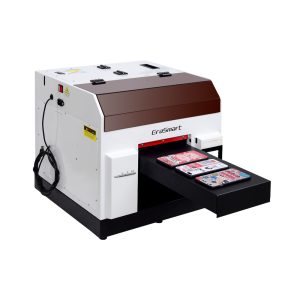
Una opción práctica para fundas de teléfonos, accesorios, pequeños productos acrílicos y flujos de trabajo de personalización de regalos.
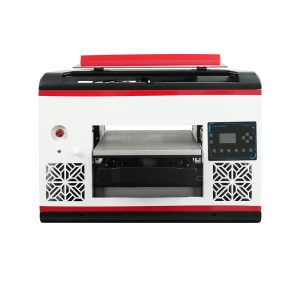
Adecuado para usuarios que necesitan un área de plataforma más grande y una cobertura de material más amplia.
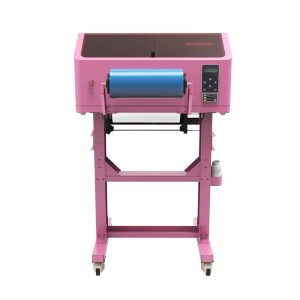
Mejor para calcomanías UV DTF, envoltorios de vasos, pegatinas, botellas y aplicaciones de transferencia a superficies duras.
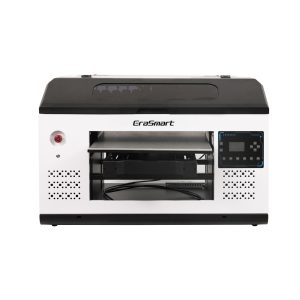
Una mejor opción para paneles, letreros, tableros y equipos de producción más grandes que necesitan más espacio en la plataforma.
Errores comunes
Errores de mantenimiento de la impresora UV que se deben evitar
Impresión sin test de inyectores
Saltarse la prueba de los inyectores puede desperdiciar materiales y producir bandas, falta de colores o tinta blanca débil.
Ignorar la circulación de tinta blanca
La tinta blanca necesita más atención que la tinta de color. Un mal cuidado de la tinta blanca puede provocar sedimentos y opacidad inestable.
Dejar la plataforma sucia
El polvo, los residuos y los objetos sueltos pueden afectar el posicionamiento, la altura de impresión y la seguridad del cabezal de impresión.
Dejar la impresora inactiva sin preparación
Los períodos prolongados de inactividad aumentan el riesgo de secado y obstrucción, especialmente si la estación de tapado o el sistema de tinta no están preparados adecuadamente.
Preguntas frecuentes sobre el mantenimiento de la impresora UV
-
1. ¿Con qué frecuencia debo dar mantenimiento a una impresora UV?
Una impresora UV debe revisarse antes de cada sesión de impresión, limpiarse diariamente durante el uso regular, inspeccionarse semanalmente y prepararse cuidadosamente antes de largos períodos de inactividad.
-
2. ¿Por qué la tinta blanca necesita un mantenimiento especial?
La tinta blanca contiene pigmentos más pesados que la tinta de color estándar, por lo que necesita circulación, agitación, revisión de boquillas y tapado adecuado para mantener una producción estable.
-
3. ¿Debo realizar una prueba de inyectores antes de cada trabajo?
Sí. Una prueba de inyectores ayuda a identificar líneas faltantes, obstrucciones o salida de tinta débil antes de desperdiciar materiales en un trabajo de producción completa.
-
4. ¿Qué causa la obstrucción de la boquilla de la impresora UV?
Las causas comunes incluyen taponado deficiente, tinta seca, limpieza insuficiente, sedimento de tinta blanca, tiempo de inactividad prolongado y flujo de tinta inestable.
-
5. ¿Cómo evito una mala adherencia en la impresión UV?
Limpie la superficie del material, pruebe el sustrato exacto, utilice la configuración de curado adecuada y compruebe si el material requiere un tratamiento previo o un flujo de trabajo diferente.
-
6. ¿Qué debo hacer si no voy a utilizar una impresora UV durante varios días?
Siga la rutina de protección inactiva recomendada por el proveedor. Preste especial atención a la limitación del cabezal de impresión, la estabilidad de la tinta blanca, el estado de la ruta de la tinta y reinicie las comprobaciones de los inyectores.
-
7. ¿Es difícil el mantenimiento de la impresora UV?
El mantenimiento es manejable cuando se realiza de manera consistente. Los mayores problemas generalmente provienen de pruebas omitidas de los inyectores, cuidado deficiente de la tinta blanca, áreas de taponado sucias y largos períodos de inactividad sin preparación.
-
8. ¿El barniz requiere un mantenimiento especial?
La salida del barniz debe comprobarse al igual que otros canales de tinta. Si el barniz se vuelve desigual, no brillante o mal colocado, verifique el estado de la boquilla, la configuración de la capa RIP, la resistencia del curado y la superficie del material.
Serie de impresoras EraSmart


High-quality UV Printers for metal, acrylic, glass, wood & more. Instant curing, vivid 1440dpi prints, versatile for diverse materials.

Imprima calcomanías vívidas y en relieve con **CMYK + Blanco + Barniz** en una sola pasada. Sin polvo. Sin horno. Despegue y pegue sobre artículos planos o curvos en minutos.
¿No pudiste encontrar una guía adecuada? ¡Obtenga soporte técnico gratuito ahora!
¡Solo proporcione algunos detalles y lo ayudaremos a obtener cotizaciones rápidas!
Impresora EraSmart
impresora uv
Impresora DTF
Impresora DTG
Máquina de prensa de calor
Impresora publicitaria
Herramientas de impresora
Horno DTF
Revista de actualidad
Máquina de tallado
Taza de transferencia de calor
Maquina laminadora
Consumibles
Tinta de impresión
Estuche para celular
Producto de vidrio
Líquido de limpieza
Bastoncillo de algodón
Contáctenos
WhatsApp: +8618566233796
WeChat: +8618566233796
Móvil: +8618566233796
Web:www.erasmart.com
Comercio:www.erasmartmall.com
envíanos whatsapp
Solicitar una cotización
¡Solo proporcione algunos detalles y lo ayudaremos a obtener cotizaciones rápidas!
abajo
Deje su correo electrónico y envíe la URL de descarga al correo electrónico.
¿Necesita precio de impresora?
Cuéntanos tus necesidades de impresión. Nuestro equipo responderá dentro de las 24 horas.