
Guide de l'encre UV : explications CMJN, encre blanche et vernis pour l'impression UV
Les performances de l'imprimante UV dépendent non seulement de la machine, de la tête d'impression et de la plate-forme, mais également du système d'encre. Le CMJN crée des graphiques en couleur, l'encre blanche prend en charge les matériaux sombres et transparents et le vernis ajoute de la brillance, de la texture et des effets de finition haut de gamme. Ce guide explique le fonctionnement de chaque couche d'encre et comment choisir la bonne configuration pour vos produits.
Résumé du système d'encre
CMJN
Encre blanche
Vernis
Contrôle de la couche RIP
Comprendre CMJN
CMJN crée l'image principale, y compris les photos, les logos, les graphiques et les illustrations du produit.
Utiliser correctement l'encre blanche
L'encre blanche améliore la force de la couleur sur les substrats transparents, foncés et colorés.
Ajouter des effets de vernis
Le vernis ajoute de la brillance, des reflets, un revêtement ponctuel et des effets décoratifs en relief.
Maintenir la stabilité de l'encre
La circulation de l'encre blanche, les contrôles des buses et le flux de travail de nettoyage protègent la production quotidienne.
Bases de l’encre UV
Pourquoi la configuration de l'encre UV est importante
Dans l'impression UV, la configuration des encres détermine les produits que vous pouvez fabriquer, les matériaux que vous pouvez manipuler et les effets visuels que vous pouvez vendre. Une configuration de base couleur uniquement peut suffire pour des impressions simples sur des matériaux blancs ou de couleur claire. Cependant, la plupart des applications d’impression UV commerciales nécessitent plus qu’une simple sortie CMJN.
L'encre blanche est indispensable pour imprimer sur des supports transparents, foncés ou colorés. Le vernis peut ajouter une valeur de surface supérieure grâce à la brillance, au revêtement ponctuel, à la texture en relief et à la finition décorative. Pour les acheteurs, comprendre le CMJN, l’encre blanche et le vernis permet d’éviter de choisir une imprimante qui semble abordable au premier abord mais qui ne peut pas prendre en charge les produits qu’ils souhaitent réellement vendre.
Les acheteurs ne doivent pas seulement se demander si un matériau peut être imprimé. Ils doivent également se demander si le résultat imprimé est stable, durable, reproductible et commercialement pratique. Un matériau qui fonctionne pour un seul échantillon peut néanmoins créer des problèmes dans la production quotidienne si la surface est incohérente, courbée, poussiéreuse, huileuse ou difficile à positionner.
Règle simple
Si vous souhaitez imprimer uniquement sur des supports plats blancs ou de couleur claire, le CMJN peut suffire. Si vous souhaitez imprimer sur de l'acrylique, du verre, des produits sombres, des objets transparents ou des cadeaux haut de gamme, l'encre blanche et le vernis deviennent beaucoup plus importants.
Tableau principal
CMJN vs encre blanche vs vernis dans l'impression UV
Utilisez ce tableau pour comprendre rapidement ce que fait chaque couche d’encre UV et quand elle est nécessaire.
| Couche d'encre | Fonction principale | Quand vous en avez besoin | Matériaux typiques | Point d'achat clé |
|---|---|---|---|---|
| CMJN | Crée une sortie d'image en couleur | Presque tous les travaux d'impression UV | Acrylique blanc, plastique léger, panneaux, cadeaux, étuis de téléphone | Vérifiez la stabilité des couleurs, les paramètres RIP et le mode d'impression |
| Encre blanche | Crée une sous-couche et prend en charge l'opacité | Matériaux transparents, foncés ou colorés | Acrylique transparent, verre, coques de téléphone foncées, substrats colorés | Vérifier la circulation, l'agitation, le bouchage et le flux de travail de maintenance |
| Vernis | Ajoute de la brillance, du revêtement ponctuel et des effets en relief | Produits haut de gamme et finitions décoratives | Panneaux acryliques, cadeaux, articles de marque, panneaux décoratifs | Vérifiez le contrôle des couches, l'effet de durcissement et la prise en charge logicielle |
Couche d'encre 1
Qu'est-ce que l'encre CMJN dans l'impression UV ?
L'encre CMJN est la base de l'impression UV. Il utilise le cyan, le magenta, le jaune et le noir pour créer des images, des logos, du texte, des motifs et des dessins photographiques en couleur. Pour de nombreux matériaux blancs ou de couleur claire, le CMJN peut créer à lui seul un résultat clair et éclatant.
Cependant, le CMJN seul ne suffit pas toujours. Sur les matériaux transparents, la couleur peut paraître faible car la lumière traverse le substrat. Sur les matériaux sombres, les couleurs peuvent perdre de leur éclat car le fond affecte l'aspect final. C'est pourquoi l'encre blanche est souvent utilisée avec le CMJN dans l'impression UV professionnelle.
Meilleure utilisation
Graphiques en couleur sur des surfaces blanches, de couleur claire ou déjà opaques.
Principal avantage
Produit une sortie couleur standard pour les logos, les photos, le texte et les illustrations décoratives.
Principale limite
La couleur peut paraître faible sur des matériaux transparents, foncés ou fortement colorés sans encre blanche.
Couche d'encre 2
À quoi sert l’encre blanche dans l’impression UV ?
L'encre blanche est l'un des éléments les plus importants d'une imprimante UV professionnelle. Il est couramment utilisé comme couche de base avant l’impression couleur. Cette sous-couche blanche bloque l'effet du matériau de fond et aide les couleurs CMJN à apparaître plus lumineuses, plus fortes et plus précises.
L'encre blanche est particulièrement importante pour l'acrylique transparent, le verre, le plastique transparent, les coques de téléphone foncées, les articles cadeaux colorés et de nombreux produits décoratifs. Sans encre blanche, la couleur imprimée peut paraître transparente, terne ou difficile à voir.
| Situation matérielle | Sans encre blanche | Avec de l'encre blanche | Recommandation |
|---|---|---|---|
| Acrylique transparent | La couleur peut paraître transparente ou faible | La couleur devient plus forte et plus visible | Utilisez une sous-couche blanche pour la plupart des travaux commerciaux |
| Un verre | Le design peut manquer d’opacité | L'image imprimée est plus claire et plus solide | Testez la couche blanche et l'adhérence ensemble |
| Coque de téléphone sombre | La couleur peut être masquée par l'arrière-plan | La couleur semble plus vive | Utilisez de l'encre blanche pour des illustrations éclatantes |
| Substrat coloré | La couleur d’arrière-plan affecte les illustrations | Les illustrations semblent plus précises | Utilisez de l'encre blanche lorsque la précision des couleurs est importante |
Rappel d'entretien de l'encre blanche
L'encre blanche contient des pigments plus lourds, les acheteurs doivent donc prêter une attention particulière à la circulation de l'encre blanche, à son agitation, à la protection des buses et à l'entretien quotidien. Un bon système d’encre blanche peut réduire les sédiments, les risques de colmatage et les sorties instables.
Couche d'encre 3
Qu’est-ce que le vernis dans l’impression UV ?
Le vernis est une couche d'encre transparente durcissable aux UV utilisée pour créer des reflets brillants, un revêtement ponctuel, une texture décorative et des effets en relief. Cela peut donner aux produits imprimés un aspect plus haut de gamme et aider les entreprises à vendre des articles personnalisés de plus grande valeur.
Le vernis est souvent utilisé sur les panneaux acryliques, les produits cadeaux, les panneaux décoratifs, les échantillons d'emballage, les logos, les plaques signalétiques et les articles de marque. Ce n’est pas nécessaire pour chaque travail, mais cela peut s’avérer utile lorsque les clients souhaitent un look ou un effet tactile plus haut de gamme.
Effet brillant
Ajoute de la brillance aux zones sélectionnées ou à toute la surface d'impression.
Vernis ponctuel
Met en évidence les logos, les motifs, le texte ou les détails de conception.
Texture surélevée
Crée un effet tactile en construisant des couches de vernis.
Finition haut de gamme
Améliore la valeur perçue des cadeaux et des panneaux personnalisés.
Modes de calque
Pourquoi l'encre blanche a besoin de plus d'attention
L'encre blanche est précieuse car elle élargit la gamme de matériaux et d'effets qu'une imprimante UV peut gérer. Cependant, elle nécessite également un entretien plus minutieux que l’encre couleur standard. Le pigment plus lourd de l’encre blanche peut se déposer si le système d’encre est mal entretenu.
Avant d'acheter une imprimante UV, les utilisateurs doivent se demander comment la machine gère la circulation de l'encre blanche, l'agitation, le bouchage, le nettoyage des buses et la protection contre les longues périodes d'inactivité. Ces détails affectent la fiabilité quotidienne et la protection à long terme des têtes d'impression.
| Zone d'entretien | Pourquoi c'est important | Question à poser |
|---|---|---|
| Circulation d'encre blanche | Aide à réduire les sédiments et la production de blanc inégale | L'imprimante prend-elle en charge la circulation de l'encre blanche ? |
| Agitation de l'encre | Aide à maintenir la répartition des pigments | Le réservoir d'encre est-il agité ou agité ? |
| Station de capsulage | Protège la tête d'impression lorsqu'elle n'imprime pas | Dans quelle mesure la station de capsulage scelle-t-elle ? |
| Routine de vérification des buses | Aide à détecter le colmatage avant la production | Quel processus de vérification quotidienne des buses est recommandé ? |
| Protection contre les longues périodes d'inactivité | Important lorsque l'imprimante n'est pas utilisée pendant des jours | Que doivent faire les utilisateurs avant que la machine ne reste inactive ? |
Logiciel et contrôle des couches
Pourquoi le logiciel RIP est important pour l'encre blanche et le vernis
L'impression UV nécessite souvent plusieurs couches. Un utilisateur peut avoir besoin d'encre blanche sous la couleur, de vernis sur la couleur ou d'une zone spécifique de vernis sélectif. Le logiciel RIP contrôle la manière dont ces couches sont générées, disposées et imprimées.
Sans un contrôle approprié des calques, les utilisateurs risquent de constater une faible couverture blanche, un vernis mal placé, une sortie couleur incorrecte, un mauvais repérage ou un flux de travail inefficace. Pour les acheteurs, le logiciel RIP doit être évalué avec le matériel de l'imprimante.
Contrôle de la couche d'encre blanche
Le logiciel doit prendre en charge la génération et le placement de sous-couches blanches pour les matériaux sombres ou transparents.
Contrôle des couches de vernis
Le logiciel devrait permettre aux utilisateurs d'appliquer du vernis sur des zones sélectionnées ou de créer des effets décoratifs en couches.
Mode de réussite et qualité
Différents modes de passage permettent d'équilibrer la qualité d'impression, la vitesse de production, l'épaisseur de l'encre et le résultat de la surface.
Paramètres de couleur et de matériau
Les profils et paramètres recommandés aident les utilisateurs à obtenir des résultats plus reproductibles sur différents matériaux.
Dépannage
Problèmes courants d’encre UV et ce qu’ils signifient généralement
Les problèmes liés à l'encre proviennent souvent d'une combinaison de préparation du matériau, de l'état du système d'encre, des paramètres RIP, de la force de durcissement et des habitudes de maintenance. Le tableau ci-dessous résume les problèmes courants.
| Problème | Cause possible | Que vérifier en premier | Guide connexe |
|---|---|---|---|
| La couleur semble faible sur un matériau transparent | Pas de sous-couche blanche ni de couche blanche faible | Paramétrage de la couche d'encre blanche et ordre d'impression | Guide des matériaux |
| L'encre blanche semble inégale | Sédiments, problème de buse ou mauvaise circulation | Circulation de l'encre blanche et vérification des buses | Guide d'entretien |
| Le vernis n'est pas assez brillant | Épaisseur de couche, paramètre de durcissement ou problème de surface | Couche de vernis et résistance au durcissement aux UV | Guide de dépannage |
| L'encre se raye | Mauvaise adhérence ou mauvaise préparation du matériau | Nettoyage des surfaces et compatibilité des matériaux | Guide des matériaux |
| Bandes ou lignes manquantes | Buse obstruée ou état de la tête d'impression | Test des buses et routine de nettoyage | Guide de dépannage |
Conseils d'achat
Questions sur l'encre UV à poser avant d'acheter une imprimante
| Problème | Cause possible | Que vérifier en premier | Guide connexe |
|---|---|---|---|
| La couleur semble faible sur un matériau transparent | Pas de sous-couche blanche ni de couche blanche faible | Paramétrage de la couche d'encre blanche et ordre d'impression | Guide des matériaux |
| L'encre blanche semble inégale | Sédiments, problème de buse ou mauvaise circulation | Circulation de l'encre blanche et vérification des buses | Guide d'entretien |
| Le vernis n'est pas assez brillant | Épaisseur de couche, paramètre de durcissement ou problème de surface | Couche de vernis et résistance au durcissement aux UV | Guide de dépannage |
| L'encre se raye | Mauvaise adhérence ou mauvaise préparation du matériau | Nettoyage des surfaces et compatibilité des matériaux | Guide des matériaux |
| Bandes ou lignes manquantes | Buse obstruée ou état de la tête d'impression | Test des buses et routine de nettoyage | Guide de dépannage |
Chemin du modèle EraSmart
Quelle configuration d’imprimante UV devriez-vous considérer ?
Lorsque vous comparez les imprimantes UV EraSmart, tenez compte de vos matériaux cibles, si vous avez besoin d'encre blanche, si les effets de vernis font partie de la valeur de votre produit et quelle taille d'impression vos produits nécessitent.
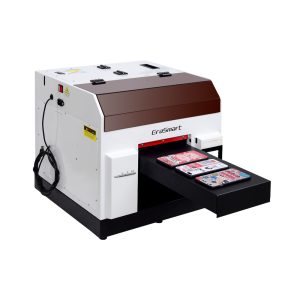
Un choix pratique pour les coques de téléphone, les accessoires, les petits produits en acrylique et les workflows de personnalisation de cadeaux.
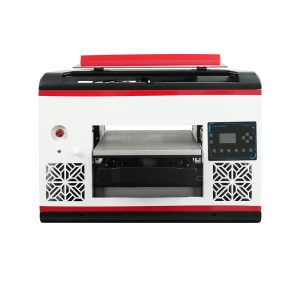
Convient aux utilisateurs qui ont besoin d'une plus grande surface de plateau et d'une couverture matérielle plus large.
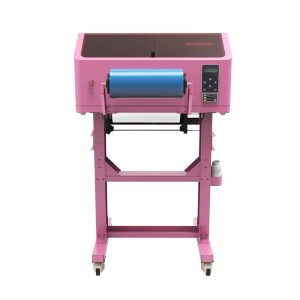
Idéal pour les autocollants UV DTF, les emballages de gobelets, les autocollants, les bouteilles et les applications de transfert sur surface dure.
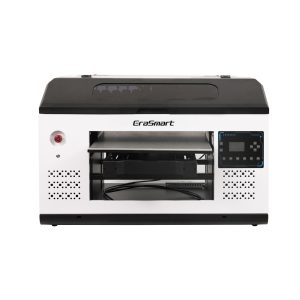
Un meilleur ajustement pour les panneaux, panneaux et équipes de production plus grands ayant besoin de plus d’espace de plate-forme.
Erreurs courantes
Erreurs d’encre UV à éviter
Ignorer la maintenance de l'encre blanche
L'encre blanche est puissante mais sensible à l'entretien. Les acheteurs ne doivent pas la traiter comme une encre CMJN ordinaire.
Impression de matériaux transparents sans encre blanche
Les couleurs peuvent paraître faibles ou transparentes sur de l'acrylique transparent ou du verre sans une base blanche appropriée.
En supposant que le vernis n’est qu’une décoration
Le vernis peut devenir une valeur ajoutée du produit lorsqu'il est utilisé pour des finitions brillantes, texturées et haut de gamme.
Ne pas vérifier le contrôle de la couche RIP
L'encre blanche et le vernis nécessitent un contrôle précis des couches. Le matériel seul ne suffit pas.
Questions fréquemment posées
-
1 et 1 Quelle encre utilise une imprimante UV ?
Une imprimante UV utilise une encre durcissable aux UV qui est durcie par la lumière UV pendant le processus d'impression. Les canaux d'encre courants incluent CMJN, l'encre blanche et le vernis.
-
2 Qu’est-ce que le CMJN en impression UV ?
CMJN fait référence aux encres cyan, magenta, jaune et noire utilisées pour créer des images, des logos, des graphiques et du texte en couleur.
-
3 et 3 Pourquoi une imprimante UV a-t-elle besoin d'encre blanche ?
L'encre blanche est utilisée comme sous-couche pour les matériaux foncés, colorés ou transparents. Cela aide les couleurs CMJN à paraître plus lumineuses et plus précises.
-
4 Qu'est-ce que le vernis en impression UV ?
Le vernis est une couche transparente durcissable aux UV utilisée pour créer du brillant, un revêtement ponctuel, des effets de relief et une texture de surface de qualité supérieure.
-
5 Ai-je toujours besoin d’encre blanche ?
Pas toujours. L'encre blanche est généralement nécessaire pour les matériaux transparents, foncés ou colorés, mais elle peut être facultative pour les matériaux blancs ou de couleur claire.
-
6. Ai-je toujours besoin de vernis ?
Non. Le vernis est facultatif, mais il peut augmenter la valeur du produit lorsque les clients souhaitent du brillant, de la texture, des effets ponctuels ou une finition plus haut de gamme.
-
7 Pourquoi l’encre blanche est-elle plus difficile à entretenir ?
L'encre blanche contient des pigments plus lourds, elle nécessite donc une circulation, une agitation, des vérifications des buses et une protection de la tête d'impression appropriées pour maintenir une sortie stable.
-
8 L'encre UV peut-elle imprimer sur l'acrylique et le verre ?
Oui, mais l'acrylique et le verre nécessitent souvent de l'encre blanche pour une couleur plus forte et une préparation minutieuse de la surface pour une meilleure adhérence.
Série d'imprimantes EraSmart


High-quality UV Printers for metal, acrylic, glass, wood & more. Instant curing, vivid 1440dpi prints, versatile for diverse materials.

Imprimez des décalcomanies vives et en relief avec **CMYK + Blanc + Vernis** en un seul passage. Pas de poudre. Pas de four. Décollez et collez sur des objets plats ou incurvés en quelques minutes.
Vous n'avez pas trouvé de guide adapté ? Obtenez une assistance technique gratuite dès maintenant !
Fournissez simplement quelques détails et nous vous aiderons à obtenir des citations rapides!
Imprimante EraSmart
imprimante uv
imprimante DTF
Imprimante DTG
Presse à chaud
Imprimeur publicitaire
Outils d'impression
four DTF
Presse à chaud
Machine à découper
Tasse transfert de chaleur
Machine de laminage
Consommables
Encre à imprimer
Cas de téléphone portable
Produit en verre
Liquide nettoyant
Coton-tige
Contactez-nous
WhatsApp: +8618566233796
WeChat: +8618566233796
Mobile: +8618566233796
Web :www.erasmart.com
Boutique:www.erasmartmall.com
WhatsApp nous
Demander un devis
Fournissez simplement quelques détails et nous vous aiderons à obtenir des citations rapides!
DownLondres
Laissez-vous un e-mail et envoyez l'URL de téléchargement par e-mail.
Besoin du prix d’une imprimante ?
Faites-nous part de vos besoins en impression. Notre équipe vous répondra dans les 24 heures.