
Guide de maintenance de l'imprimante UV : nettoyage quotidien, entretien de l'encre blanche et stabilité à long terme
Une imprimante UV peut produire des produits personnalisés de grande valeur, mais un résultat stable dépend d’un entretien régulier. Ce guide explique le nettoyage quotidien, la circulation de l'encre blanche, la vérification des buses, l'entretien de la station de bouchage, le nettoyage de la plate-forme, l'inspection des lampes UV, la protection contre les longues périodes d'inactivité et les erreurs de maintenance courantes que les acheteurs et les opérateurs devraient éviter.
Priorités de maintenance
Avant l'impression
Tous les jours
Hebdomadaire
Longue inactivité
Protéger la tête d'impression
Les vérifications des buses, l’entretien des stations de bouchage et les routines de nettoyage réduisent le risque de colmatage.
Conserver l'encre blanche
L'encre blanche nécessite une circulation, une agitation et des contrôles réguliers de sortie pour garantir sa stabilité.
Gardez la plate-forme propre
La poussière, les résidus d'encre et un placement irrégulier peuvent affecter la qualité d'impression et l'adhérence.
Prévenir les dommages causés par une longue période d'inactivité
Un arrêt correct et un entretien au ralenti aident à réduire les problèmes de séchage, de sédiments et de démarrage.
Bases de la maintenance
Pourquoi la maintenance des imprimantes UV est différente de l'impression ordinaire
Les imprimantes UV utilisent une encre durcissable par UV qui est durcie par la lumière UV pendant l'impression. Cela confère à l'impression UV une grande flexibilité des matériaux et un potentiel de production rapide, mais cela signifie également que les opérateurs doivent contrôler soigneusement l'état de l'encre, l'état des buses, la propreté de la plate-forme, les performances de durcissement et la préparation du matériau.
L'encre blanche est particulièrement importante dans l'impression UV car elle prend en charge les matériaux transparents, sombres et colorés. Cependant, l’encre blanche nécessite également plus d’attention car le pigment peut se déposer si le système d’encre n’est pas entretenu correctement. Pour une fiabilité à long terme, la maintenance doit être traitée comme faisant partie du flux de production et non comme une étape de réparation d’urgence.
Règle simple
Une imprimante UV doit être vérifiée avant l’impression, nettoyée après la production, entretenue chaque semaine et soigneusement protégée avant de longues périodes d’inactivité. De petites routines quotidiennes évitent généralement des problèmes de temps d'arrêt plus importants.
Calendrier d'entretien
Tableau du calendrier de maintenance de l'imprimante UV
Utilisez ce programme de maintenance comme cadre pratique. La routine exacte doit suivre le manuel de la machine et la configuration du système d'encre.
| Fréquence | Tâche de maintenance | Pourquoi c'est important | Conseil à l'opérateur |
|---|---|---|---|
| Avant l'impression | Test de buse, vérification de la plate-forme, nettoyage de la surface du matériau, confirmation de la hauteur | Empêche les bandes, les sorties floues, les coups de tête et une mauvaise adhérence | Ne démarrez pas la production avant d’avoir vérifié le motif des buses. |
| Pendant l'impression | Surveillez le débit d'encre, la couleur de sortie, la stabilité de la plate-forme et le résultat du durcissement | Détecte les problèmes avant qu'un lot complet ne soit gaspillé | Inspectez la première pièce finie avant de poursuivre la production en masse. |
| Après l'impression | Nettoyer la plateforme, éliminer les résidus d'encre, vérifier la zone de recouvrement, organiser les fichiers | Maintient l'imprimante prête pour le prochain travail | Ne laissez jamais de poussière de matériau ou de pièces détachées sur la plate-forme. |
| Tous les jours | Vérifiez l'état de l'encre blanche, le niveau d'encre usagée, l'état des buses et le joint de bouchage. | Protège la stabilité de l'encre blanche et l'état de la tête d'impression | L’encre blanche doit être traitée comme une priorité d’entretien quotidien. |
| Hebdomadaire | Nettoyer le racleur, la station de bouchage, les rails, les capteurs et les zones d'encre environnantes | Réduit les problèmes mécaniques et liés à l’encre | Planifiez une maintenance hebdomadaire même lorsque la production est faible. |
| Longue inactivité | Suivez la protection contre l'arrêt, les soins de la tête, les soins du chemin d'encre et les contrôles de redémarrage | Empêche le séchage, les sédiments et l'échec du démarrage | Ne laissez pas une imprimante UV inactive sans préparation. |
Avant l'impression
Liste de contrôle de maintenance avant impression
Un travail d'impression UV stable démarre avant que le bouton d'impression ne soit enfoncé. La maintenance avant impression permet d'éviter les problèmes de buses, une mauvaise adhérence, une hauteur incorrecte et des défauts liés au matériau.
Exécuter une vérification des buses
Vérifiez si les canaux CMJN, encre blanche et vernis sont correctement imprimés avant la production. Des lignes manquantes peuvent entraîner des bandes, une faible couverture blanche ou un vernis inégal.
Nettoyer la surface du matériau
La poussière, l'huile, les empreintes digitales et les résidus de revêtement peuvent réduire l'adhérence et donner un aspect incohérent au produit fini.
Vérifier la hauteur de l'objet
Une hauteur incorrecte peut entraîner une impression floue, une mauvaise précision ou une collision des têtes d'impression. Confirmez la distance avant d'imprimer des produits épais ou irréguliers.
Confirmer les paramètres RIP
Vérifiez l'ordre des couches, le réglage de l'encre blanche, la couche de vernis, le mode de passage et le profil du matériau avant de commencer le travail.
Entretien quotidien
Routine d'entretien quotidienne de l'imprimante UV
L'entretien quotidien est l'habitude la plus importante pour la stabilité de l'imprimante UV. Cela n’a pas besoin d’être compliqué, mais cela doit être cohérent. L'objectif est de maintenir le système d'encre, la tête d'impression, la zone de bouchage, la plate-forme et le flux de travail de manutention propres et prévisibles.
| Point de contrôle quotidien | Ce qu'il faut faire | Problème qu’il aide à prévenir |
|---|---|---|
| Modèle de buse | Exécutez un test d'impression et confirmez que tous les canaux sont terminés | Bandes, lignes manquantes, couleur faible, encre blanche inégale |
| Système d'encre blanc | Vérifiez la circulation, l'agitation et l'état de sortie de l'encre blanche | Sédiment d'encre blanche, colmatage, opacité instable |
| Station de capsulage | Inspecter la zone d'étanchéité et éliminer les résidus visibles | Séchage des têtes d'impression et mauvaise récupération après une période d'inactivité |
| Plate-forme | Enlevez la poussière, les résidus, les restes et les pièces détachées | Erreurs de positionnement, rayures, problèmes de hauteur |
| Encre usagée | Vérifiez le niveau de la bouteille d'encre usagée ou du système de récupération. | Débordement, contamination, processus de nettoyage instable |
Entretien de l'encre blanche
Entretien de l'encre blanche pour les imprimantes UV
L’encre blanche est l’une des principales raisons pour lesquelles les acheteurs choisissent une imprimante UV professionnelle. Il permet d'imprimer sur de l'acrylique transparent, du verre, des coques de téléphone foncées, des substrats colorés et des produits haut de gamme. Mais l’encre blanche nécessite également une routine d’entretien disciplinée car le pigment est plus lourd que l’encre de couleur standard.
Si l’encre blanche ne circule pas, n’est pas mélangée ou n’est pas imprimée régulièrement, elle peut devenir instable. Cela peut entraîner une faible opacité, des lignes blanches manquantes, un colmatage des buses, des sédiments ou des résultats incohérents dans un lot.
Circulation
La circulation de l'encre blanche aide à réduire les sédiments et maintient le chemin de l'encre plus stable pendant l'utilisation.
Agitation
L'agitation ou l'agitation du réservoir d'encre permet de maintenir une répartition plus uniforme des pigments.
Sortie régulière
Imprimer ou vérifier régulièrement l’encre blanche permet d’identifier les problèmes avant le début de la production.
Protection des têtes d'impression
Entretien de la tête d'impression, de la station de bouchage et du racleur
La tête d'impression est l'une des parties les plus importantes et les plus sensibles d'une imprimante UV. Une bonne routine d'entretien protège la tête d'impression en gardant la surface de la buse propre, la station de bouchage scellée et la zone du racleur exempte d'encre séchée ou de débris.
| Composant | Objectif maintenance | Si ignoré | Conseils à l'opérateur |
|---|---|---|---|
| Tête d'impression | Test des buses, nettoyage approprié, contrôle de la hauteur en toute sécurité | Bandes, lignes manquantes, frappe de tête, sortie instable | N'imprimez jamais si la hauteur de l'objet est incertaine. |
| Station de capsulage | État du joint, propreté, protection contre l'humidité | Séchage des buses et récupération difficile après un temps d'inactivité | Vérifiez si le capuchon se ferme correctement au repos. |
| Essuie-glace | Enlever les résidus d'encre et inspecter l'usure | Mauvais résultat de nettoyage et contamination des buses | Gardez l'essuie-glace propre et remplacez-le si nécessaire. |
| Chemin d'encre | Débit d'encre stable, pas de problèmes d'air ou de sédiments | Sortie intermittente, faiblesse des couleurs, instabilité des buses | Surveillez les changements soudains de production pendant la production. |
Entretien de la plateforme
Nettoyage de plate-forme et manutention des matériaux
La maintenance de la plate-forme est souvent négligée, mais elle affecte directement la précision du positionnement, la hauteur d'impression, la netteté de l'impression et la sécurité des produits. La poussière, les vis, les restes de film, les résidus d'encre ou les fixations inégales peuvent créer des défauts d'impression ou même augmenter le risque de collision des têtes d'impression.
Gardez le plateau propre
Retirez la poussière, les résidus d'encre, les marques d'adhésif et les débris de produit après chaque travail. Une plate-forme propre permet un meilleur positionnement et une impression plus sûre.
Utilisez des appareils stables
Les gabarits et les modèles peuvent améliorer la répétabilité des coques de téléphone, des petits cadeaux, des étiquettes et de la production par lots.
Contrôler la hauteur de l'objet
Confirmez que l'objet est plat et stable. Évitez d'imprimer sur des produits instables qui pourraient bouger ou se soulever pendant l'impression.
Nettoyer la surface du matériau
Les empreintes digitales, l'huile, la poussière et les résidus de revêtement peuvent réduire l'adhérence et rendre l'impression moins durable.
Durcissement UV
Lampe UV et entretien du durcissement
Le durcissement UV est ce qui transforme l’encre UV imprimée en une couche solide sur la surface du matériau. Si le durcissement est trop faible, l'encre peut rester molle ou se rayer facilement. Si le durcissement est trop fort pour un matériau ou un réglage spécifique, le résultat peut devenir cassant, irrégulier ou visuellement incohérent.
| Point de contrôle de guérison | Que regarder | Problème possible |
|---|---|---|
| État de la lampe UV | Vérifiez si le durcissement reste constant pendant la production | Encre douce, mauvaise adhérence, finition vernis faible |
| Force de guérison | Adaptez la force de durcissement au matériau et au mode d'impression | Durcissement excessif, sous-durcissement, finition inégale |
| Finition Vernis | Vérifiez la brillance, la texture et la consistance de la surface | Vernis pas assez brillant ou texture inégale |
| Sensibilité thermique du matériau | Certains plastiques ou produits revêtus peuvent réagir différemment | Gondolement, déformation, mauvais résultat de surface |
Entretien hebdomadaire
Liste de contrôle hebdomadaire de maintenance de l’imprimante UV
Nettoyer les rails et les zones de déplacement
La poussière et les résidus d'encre peuvent affecter la stabilité du mouvement et les performances mécaniques à long terme.
Inspecter les pièces de recouvrement et d'essuie-glace
Vérifiez l'encre séchée, les surfaces usées, une mauvaise étanchéité et les performances de nettoyage.
Vérifier le système d'encre usagée
L’accumulation d’encre usagée peut créer des problèmes de contamination et de nettoyage si elle est ignorée.
Vérifier les exemples de qualité d'impression
Comparez la sortie au fil du temps pour identifier les changements de couleur, les bandes, l’encre blanche faible ou les changements de vernis.
Entretien pendant une longue période d'inactivité
Que faire si une imprimante UV reste inactive
De nombreuses petites entreprises n’utilisent pas quotidiennement une imprimante UV. Si l’imprimante reste inactive, les opérateurs doivent la préparer correctement au lieu de simplement l’éteindre et la laisser. Un temps d'inactivité prolongé peut augmenter le risque de séchage des buses, de sédiments d'encre blanche, de mauvais rendement au démarrage et de récupération difficile.
| Période d'inactivité | Mise au point recommandée | Risque si ignoré |
|---|---|---|
| 1 jour | Nettoyez la plate-forme, bouchez correctement la tête d'impression, vérifiez l'état de l'encre avant la prochaine utilisation | Problèmes de démarrage mineurs si la zone de plafonnement est sale |
| 2 à 3 jours | Portez une attention particulière à l'encre blanche, au joint de bouchage et à la vérification des buses au redémarrage. | Instabilité de l'encre blanche et perte partielle des buses |
| Environ 1 semaine | Suivez la protection contre l'inactivité recommandée par le fournisseur et la routine de redémarrage | Séchage des buses, sédiments, faible sortie d'encre blanche |
| Stockage plus long | Utiliser des conseils formels d'arrêt/de stockage basés sur la machine et le système d'encre | Colmatage important ou reprise difficile |
Avertissement important
Ne laissez pas une imprimante UV inactive pendant plusieurs jours sans comprendre le processus d'arrêt et de redémarrage correct. L'encre blanche, l'état du bouchage et la protection des buses sont les principaux domaines à risque.
Dépannage d'entretien
Problèmes de maintenance et ce qu'ils signifient habituellement
De nombreux problèmes d’impression UV sont liés à la maintenance. Le tableau ci-dessous aide les opérateurs à relier les symptômes aux zones de maintenance probables.
| Problème | Cause possible de maintenance | Que vérifier en premier | Guide connexe |
|---|---|---|---|
| Bandes ou lignes manquantes | Buse obstruée, mauvais nettoyage, débit d'encre instable | Test des buses et routine de nettoyage | Guide de dépannage |
| Encre blanche faible | Sédiments, mauvaise circulation, mauvais réglages de la couche blanche | Circulation de l'encre blanche et configuration de la couche RIP | Guide des encres UV |
| L'encre se raye | Mauvais nettoyage des matériaux ou inadéquation du durcissement | Nettoyage de surface et résistance au durcissement aux UV | Guide des matériaux |
| Vernis pas brillant | Couche de vernis, durcissement ou état de surface incorrects | Paramètres du vernis et résultat du durcissement | Guide des encres UV |
| Image floue | Hauteur incorrecte ou placement de la plate-forme instable | Hauteur d'impression et stabilité du luminaire | Guide de dépannage |
Chemin du modèle EraSmart
Quelle configuration d’imprimante UV devriez-vous considérer ?
Lorsque vous comparez les imprimantes UV EraSmart, tenez compte de vos matériaux cibles, si vous avez besoin d'encre blanche, si les effets de vernis font partie de la valeur de votre produit et quelle taille d'impression vos produits nécessitent.
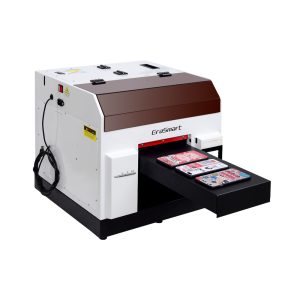
Un choix pratique pour les coques de téléphone, les accessoires, les petits produits en acrylique et les workflows de personnalisation de cadeaux.
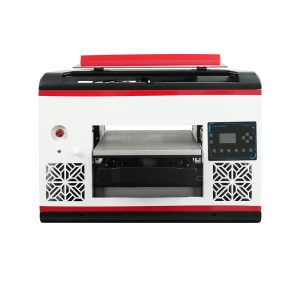
Convient aux utilisateurs qui ont besoin d'une plus grande surface de plateau et d'une couverture matérielle plus large.
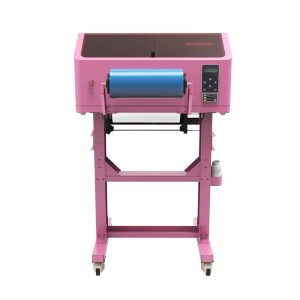
Idéal pour les autocollants UV DTF, les emballages de gobelets, les autocollants, les bouteilles et les applications de transfert sur surface dure.
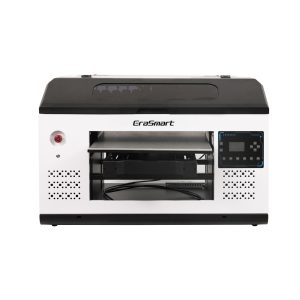
Un meilleur ajustement pour les panneaux, panneaux et équipes de production plus grands ayant besoin de plus d’espace de plate-forme.
Erreurs courantes
Erreurs de maintenance de l’imprimante UV à éviter
Impression sans vérification des buses
Ignorer le test des buses peut gaspiller des matériaux et produire des bandes, des couleurs manquantes ou une encre blanche faible.
Ignorer la circulation de l'encre blanche
L’encre blanche nécessite plus d’attention que l’encre couleur. Un mauvais entretien de l’encre blanche peut provoquer des sédiments et une opacité instable.
Laisser la plateforme sale
La poussière, les résidus et les objets en vrac peuvent affecter le positionnement, la hauteur d'impression et la sécurité de la tête d'impression.
Laisser l'imprimante inactive sans préparation
De longues périodes d'inactivité augmentent le risque de séchage et de colmatage, surtout si la station de capsulage ou le système d'encre n'est pas préparé correctement.
FAQ sur la maintenance des imprimantes UV
-
1 et 1 À quelle fréquence dois-je entretenir une imprimante UV ?
Une imprimante UV doit être vérifiée avant chaque session d'impression, nettoyée quotidiennement lors d'une utilisation régulière, inspectée chaque semaine et préparée soigneusement avant de longues périodes d'inactivité.
-
2 Pourquoi l’encre blanche nécessite-t-elle un entretien particulier ?
L'encre blanche contient des pigments plus lourds que l'encre de couleur standard, elle nécessite donc une circulation, une agitation, des vérifications des buses et un bouchage approprié pour maintenir un résultat stable.
-
3 et 3 Dois-je effectuer une vérification des buses avant chaque travail ?
Oui. Une vérification des buses permet d'identifier les lignes manquantes, les obstructions ou les faibles sorties d'encre avant de gaspiller des matériaux sur un travail de production complet.
-
4 Quelles sont les causes du colmatage des buses de l’imprimante UV ?
Les causes courantes incluent un mauvais bouchage, de l'encre séchée, un nettoyage insuffisant, des sédiments d'encre blanche, un temps d'inactivité prolongé et un débit d'encre instable.
-
5 Comment puis-je éviter une mauvaise adhérence lors de l’impression UV ?
Nettoyez la surface du matériau, testez le substrat exact, utilisez les paramètres de durcissement appropriés et vérifiez si le matériau nécessite un prétraitement ou un flux de travail différent.
-
6. Que dois-je faire si une imprimante UV ne sera pas utilisée pendant plusieurs jours ?
Suivez la routine de protection contre le ralenti recommandée par le fournisseur. Portez une attention particulière au bouchage de la tête d'impression, à la stabilité de l'encre blanche, à l'état du trajet de l'encre et au redémarrage des vérifications des buses.
-
7 La maintenance des imprimantes UV est-elle difficile ?
La maintenance est gérable lorsqu’elle est effectuée de manière cohérente. Les plus gros problèmes proviennent généralement de vérifications de buses ignorées, d'un mauvais entretien de l'encre blanche, de zones de recouvrement sales et de longues périodes d'inactivité sans préparation.
-
8 Le vernis nécessite-t-il un entretien particulier ?
La sortie du vernis doit être vérifiée comme les autres canaux d’encre. Si le vernis devient irrégulier, non brillant ou mal placé, vérifiez l'état de la buse, le réglage de la couche RIP, la force de durcissement et la surface du matériau.
Série d'imprimantes EraSmart


High-quality UV Printers for metal, acrylic, glass, wood & more. Instant curing, vivid 1440dpi prints, versatile for diverse materials.

Imprimez des décalcomanies vives et en relief avec **CMYK + Blanc + Vernis** en un seul passage. Pas de poudre. Pas de four. Décollez et collez sur des objets plats ou incurvés en quelques minutes.
Vous n'avez pas trouvé de guide adapté ? Obtenez une assistance technique gratuite dès maintenant !
Fournissez simplement quelques détails et nous vous aiderons à obtenir des citations rapides!
Imprimante EraSmart
imprimante uv
imprimante DTF
Imprimante DTG
Presse à chaud
Imprimeur publicitaire
Outils d'impression
four DTF
Presse à chaud
Machine à découper
Tasse transfert de chaleur
Machine de laminage
Consommables
Encre à imprimer
Cas de téléphone portable
Produit en verre
Liquide nettoyant
Coton-tige
Contactez-nous
WhatsApp: +8618566233796
WeChat: +8618566233796
Mobile: +8618566233796
Web :www.erasmart.com
Boutique:www.erasmartmall.com
WhatsApp nous
Demander un devis
Fournissez simplement quelques détails et nous vous aiderons à obtenir des citations rapides!
DownLondres
Laissez-vous un e-mail et envoyez l'URL de téléchargement par e-mail.
Besoin du prix d’une imprimante ?
Faites-nous part de vos besoins en impression. Notre équipe vous répondra dans les 24 heures.