Fabricant d'imprimantes à jet d'encre à plat de petite taille

86-18566233796 [email protected]

» Icônes de police Blog » Icônes de police What Is an Inkjet Printer and How Does It Work? A Practical Guide for Custom Printing Businesses

What Is an Inkjet Printer and How Does It Work? A Practical Guide for Custom Printing Businesses

June 17, 2026 Blog

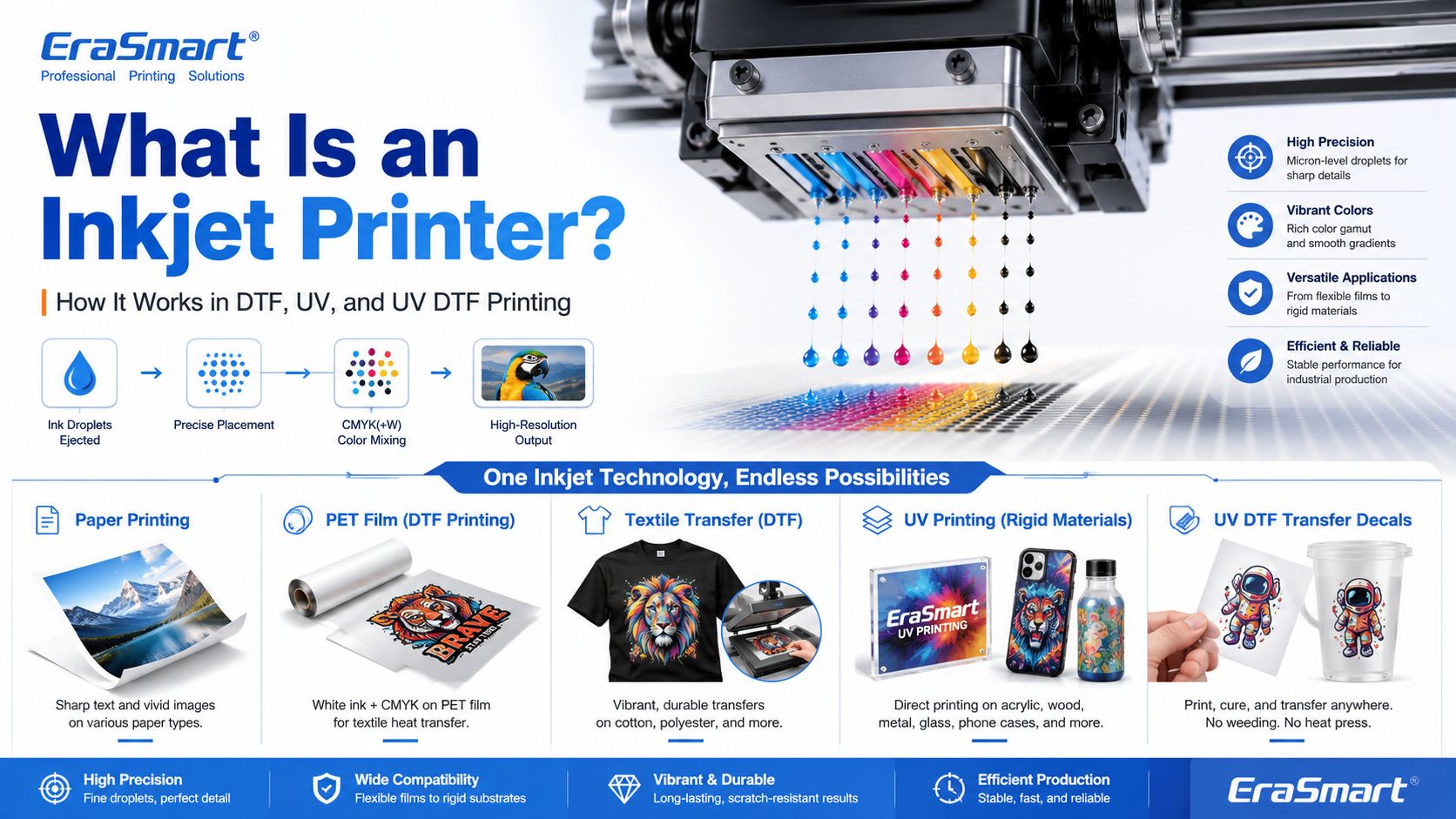
An inkjet printer is a digital printing device that creates images by ejecting tiny droplets of ink onto a surface. Instead of using plates, screens, or physical stencils, an inkjet printer receives digital image data and places controlled ink droplets in precise positions to form text, graphics, photos, labels, transfers, or product decoration.

Most people first know inkjet printers from office or home photo printing. But inkjet technology is much broader than desktop paper printing. Today, inkjet systems are used in DTF printing, UV flatbed printing, UV DTF transfers, packaging samples, product labels, signage, promotional products, textile decoration, industrial marking, and custom product manufacturing.

For EraSmart customers, this topic matters because many modern custom printing machines are built on inkjet principles. A imprimante DTF uses inkjet technology to print garment designs onto transfer film. A Imprimante UV uses inkjet technology to print UV-curable ink directly onto rigid materials. A Imprimante UV DTF uses inkjet printing to create hard-surface decals and transfers on A/B film.

In simple terms, inkjet printing is the foundation. DTF, UV, and UV DTF are specialized business workflows built around that foundation.

Quick Answer: What Is an Inkjet Printer?

An inkjet printer is a printer that sprays or ejects tiny droplets of liquid ink through microscopic nozzles to create a printed image.

A basic inkjet printing system includes:

  • digital artwork file
  • RIP or printer control software
  • ink supply system
  • tête d'impression
  • microscopic nozzles
  • movement system
  • printable surface
  • drying, curing, or transfer process

The printhead is the key component. It controls where ink droplets land, how much ink is ejected, and how accurately the image is formed.

How Does an Inkjet Printer Work?

Inkjet printing may look simple from the outside, but inside the printer there is a precise digital control process.

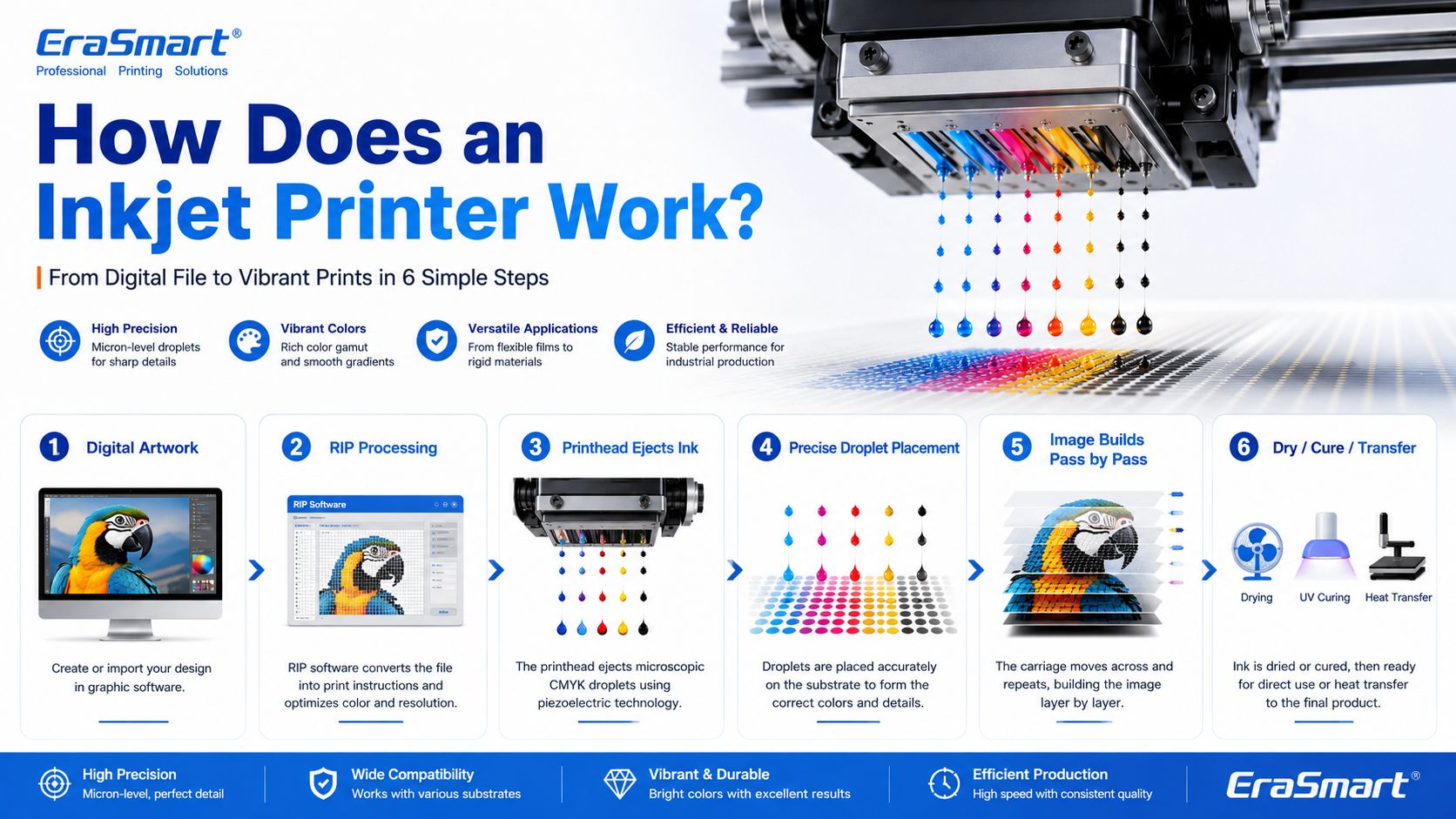
A simplified workflow looks like this:

  1. The computer sends image data to the printer.
  2. The printer software processes the file into printable dot information.
  3. The printer moves the printhead or material into position.
  4. The printhead ejects tiny droplets of ink through nozzles.
  5. The droplets land on the target surface in controlled positions.
  6. The printer builds the image line by line or pass by pass.
  7. The ink dries, cures, absorbs, or transfers depending on the printing method.

In an office inkjet printer, ink is usually printed onto paper and dries or absorbs into the paper surface. In an industrial or custom printing system, the process may be more specialized. For example, UV ink is cured by UV light, while DTF ink is printed onto PET film and later heat transferred onto fabric.

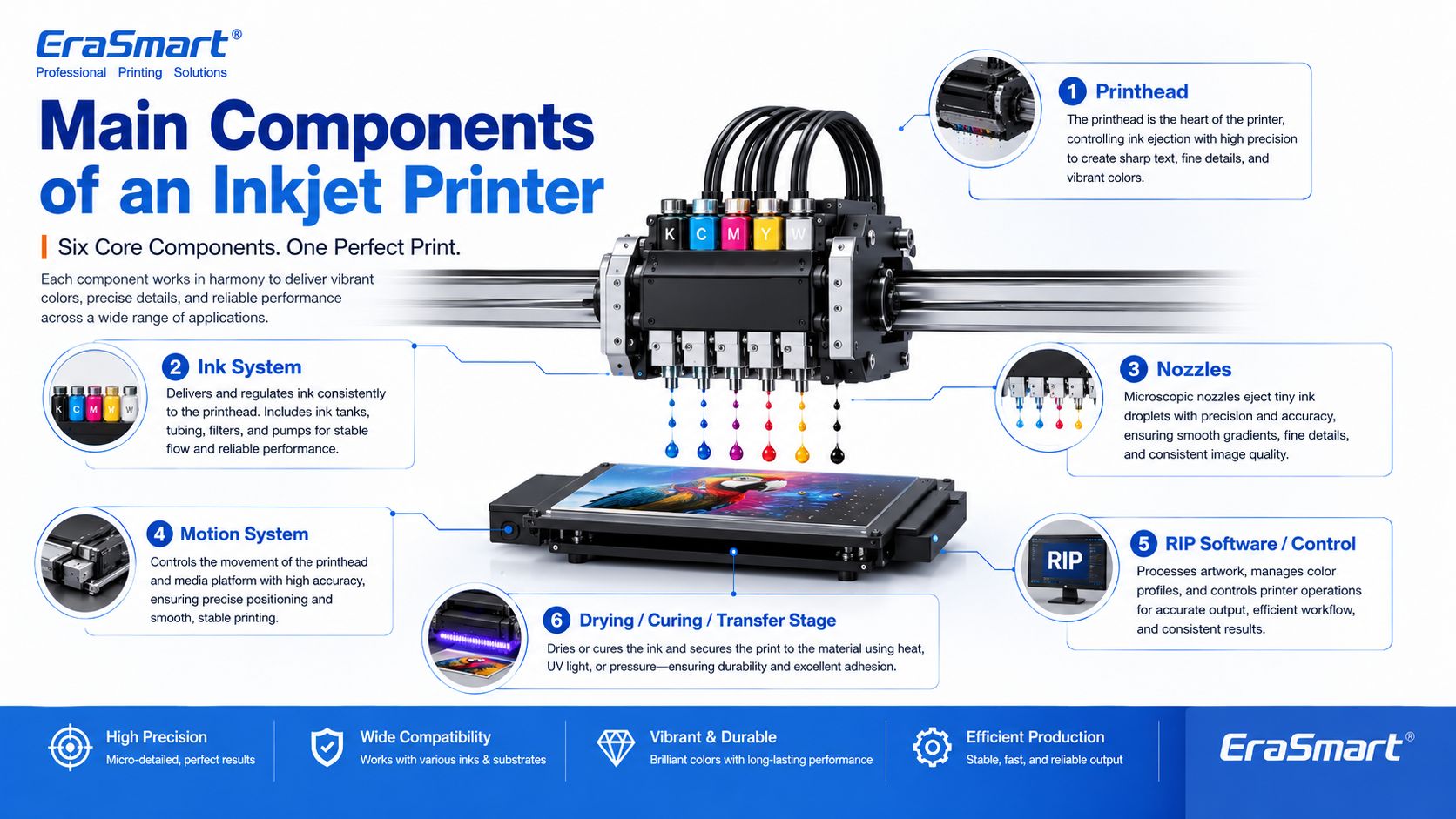
Main Components of an Inkjet Printer

1. Printhead

The printhead is the most important part of an inkjet printer. It contains many tiny nozzles that eject ink droplets. The printhead determines much of the printer’s resolution, droplet control, speed, and print quality.

In custom printing, printhead condition directly affects:

  • sharpness
  • color consistency
  • line accuracy
  • white ink quality
  • nozzle stability
  • production reliability
  • maintenance requirements

This is why printer maintenance is so important in DTF and UV printing. If the printhead nozzles are clogged or unstable, the final print may show banding, missing lines, weak colors, or poor detail.

For apparel printing users, EraSmart’s Guide de maintenance de l'imprimante DTF is a useful resource for understanding why nozzle checks, cleaning, white ink circulation, and daily care matter.

2. Ink System

The ink system stores and delivers ink to the printhead. Different inkjet printers use different types of ink depending on the application.

Common ink types include:

  • dye ink
  • encre pigmentée
  • sublimation ink
  • textile ink
  • Encre DTF
  • Encre durcissable aux UV
  • solvent or eco-solvent ink
  • industrial marking ink

For EraSmart customers, the most relevant ink systems are DTF ink, UV ink, white ink, and varnish.

UN imprimante DTF commonly uses CMYK ink plus white ink. The white ink helps designs appear clearly on dark garments. A Imprimante UV may use CMYK, white ink, and varnish to print on hard surfaces such as acrylic, glass, metal, wood, plastic, leather, and packaging materials.

If you want to understand how CMYK, white ink, and varnish work together in product customization, see EraSmart’s UV Ink Guide: CMYK, White Ink, and Varnish.

3. Nozzles

Nozzles are microscopic openings in the printhead. They eject ink droplets in controlled patterns.

Nozzle performance affects:

  • print resolution
  • detail clarity
  • ink density
  • précision des couleurs
  • dégradés fluides
  • edge sharpness
  • production stability

Nozzles can become clogged if ink dries, settles, or becomes contaminated. This is especially important for white ink systems because white ink contains heavier pigment particles and needs proper circulation and maintenance.

4. Motion System

Inkjet printers need accurate motion control. Either the printhead moves across the material, the material moves under the printhead, or both are coordinated.

The motion system affects:

  • print alignment
  • image registration
  • repeatability
  • production speed
  • print size accuracy
  • multi-pass quality

In UV flatbed printing, the platform and printhead movement must be stable so the image lands accurately on rigid objects. In DTF printing, film feeding must be smooth so the transfer image remains consistent.

5. RIP Software and Print Control

RIP software converts artwork into printer-ready instructions. It controls color output, resolution, ink layering, white ink channels, varnish layers, print passes, and other production settings.

For custom printing businesses, RIP setup is important because it affects:

  • color performance
  • white ink underbase
  • image sharpness
  • ink usage
  • vitesse d'impression
  • material compatibility
  • repeatability

A good printer is only part of the system. Correct artwork preparation and RIP settings are also necessary for professional results.

6. Drying, Curing, or Transfer System

Inkjet printing is not finished when ink leaves the nozzle. The ink must also become stable on the final product.

Different workflows use different finishing methods:

Inkjet WorkflowWhat Happens After Printing
Office inkjetInk dries or absorbs into paper
Impression DTFPowder is applied, cured, then heat pressed onto fabric
Impression UVUV light cures the ink almost instantly
Impression UVDTFUV ink is printed on film, laminated, then applied as a transfer
SublimationPrinted transfer is heat pressed into polyester or coated blanks

This is why inkjet technology can support many industries. The core droplet technology is similar, but the finishing process changes based on the product.

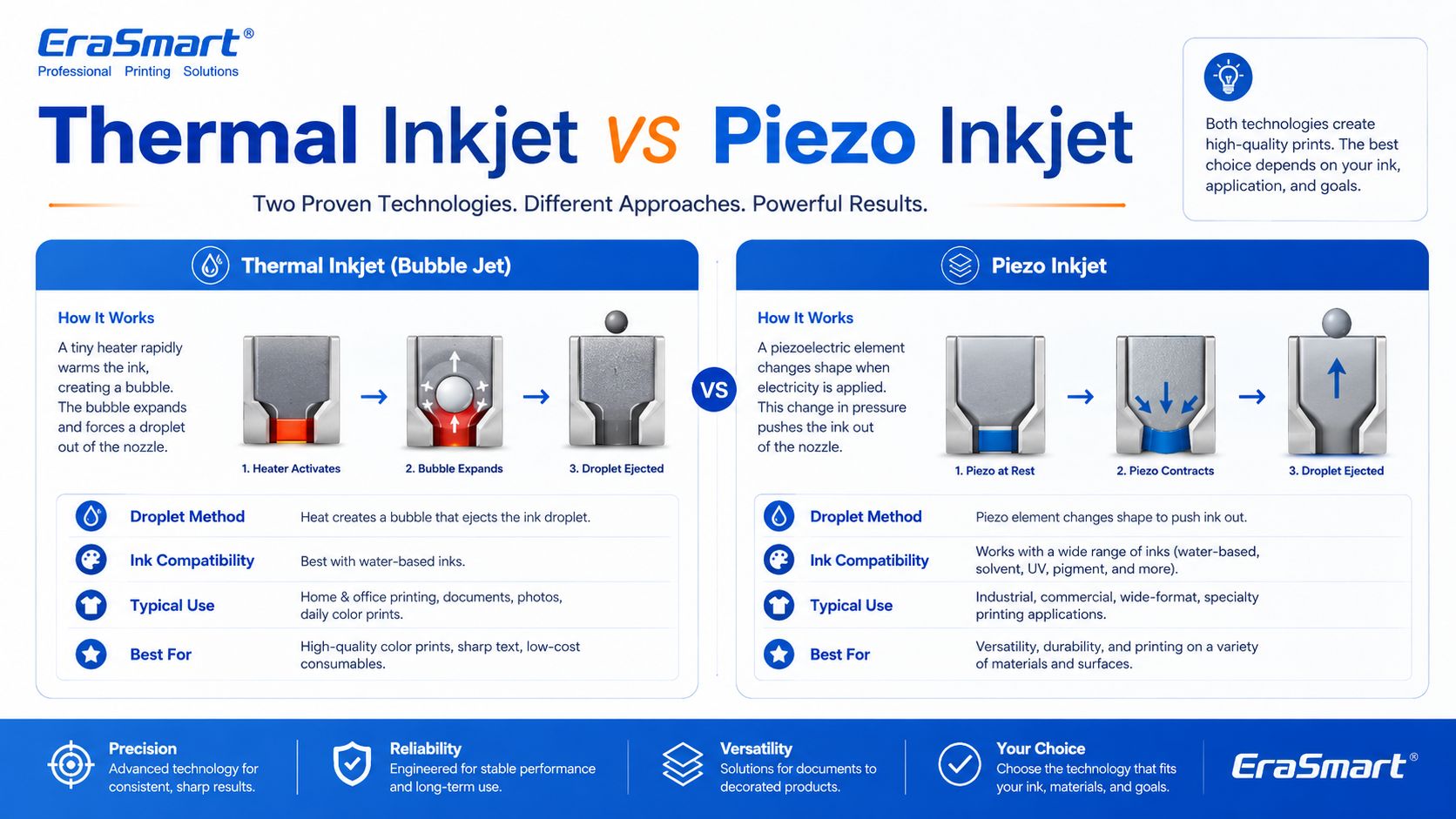
Thermal Inkjet vs Piezo Inkjet

There are two major inkjet technologies: thermal inkjet and piezo inkjet.

Thermal Inkjet

Thermal inkjet uses heat to create a vapor bubble inside the ink chamber. The pressure from this bubble pushes a droplet of ink out of the nozzle.

Thermal inkjet is common in many desktop and office printers. It can produce high-quality prints on paper, but the ink must be compatible with heat-based ejection.

Piezo Inkjet

Piezo inkjet uses a piezoelectric element that changes shape when voltage is applied. This mechanical movement creates pressure and ejects ink droplets through the nozzle.

Piezo inkjet is widely used in many professional and industrial printing systems because it can work with a broader range of inks. Since the ink is not heated for ejection, piezo technology is suitable for inks that may not perform well in thermal systems, including many specialty inks used in industrial and custom printing.

For DTF, UV, and UV DTF applications, piezo-style inkjet technology is especially important because these workflows require precise ink control and compatibility with specialized ink types.

Drop-on-Demand vs Continuous Inkjet

Inkjet printing can also be divided by how ink is delivered.

Drop-on-Demand Inkjet

Drop-on-demand means ink droplets are ejected only when needed. This is common in many graphic and custom printing applications because it offers precise control and efficient ink use.

DTF, UV, and UV DTF printers generally operate around controlled digital droplet placement, which is why they can reproduce detailed designs and full-color artwork.

Continuous Inkjet

Continuous inkjet ejects a continuous stream of ink droplets. Some droplets are directed to the surface, while others may be recycled. This method is often used in industrial coding and marking, such as printing dates, batch codes, and product identification on packaging lines.

For EraSmart customers, drop-on-demand inkjet is the more relevant concept because custom apparel and product printing require accurate image reproduction rather than simple coding.

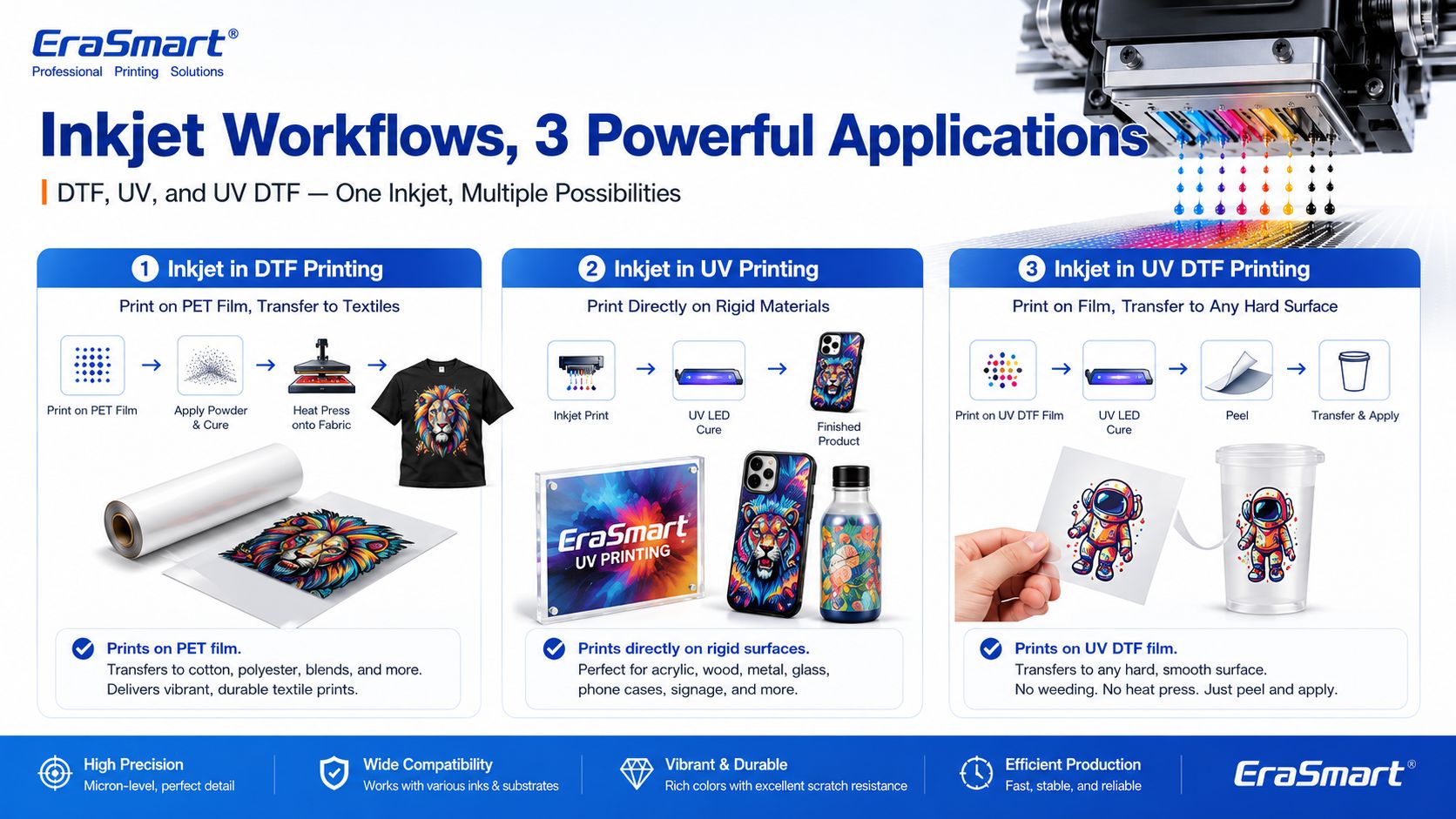
Inkjet Printing in DTF Printers

A DTF printer is a specialized inkjet printer for garment transfer production. Instead of printing directly onto a shirt, it prints the design onto PET transfer film.

The typical DTF process includes:

  1. Print CMYK and white ink onto PET film
  2. Appliquer de la poudre adhésive thermofusible
  3. Guérir la poudre
  4. Pressez à chaud le transfert sur le tissu
  5. Décollez le film
  6. Finir de presser si nécessaire

This process is useful for custom apparel because it supports:

  • oeuvre d'art en couleur
  • vêtements sombres
  • small-batch orders
  • personalized designs
  • coton, polyester, mélanges et plus
  • production d'impression à la demande

If you are interested in building an apparel business, EraSmart’s Imprimante DTF category includes different models for startups, small studios, growing shops, and higher-volume production. You can also read the Flux de travail de production DTF to understand the full process from artwork to finished garment.

Inkjet Printing in UV Printers

A UV printer is another specialized inkjet system. Instead of using standard paper ink, it uses UV-curable ink. The printer ejects ink onto the material surface, and UV light cures the ink almost immediately.

UV printing is suitable for many hard and semi-rigid materials, such as:

  • acrylique
  • un verre
  • métal
  • bois
  • Plastique
  • céramique
  • cuir
  • caisses téléphoniques
  • échantillons d'emballage
  • produits promotionnels

The advantage of UV printing is direct-to-object customization. You can print full-color designs, white ink layers, and varnish effects on many product surfaces.

EraSmart Imprimante UV category is designed for businesses that want to create custom gifts, signs, phone cases, packaging samples, acrylic products, and hard-surface promotional items. For material selection, see the Guide des matériaux pour imprimante UV.

Inkjet Printing in UV DTF Printers

UV DTF printing combines UV inkjet printing with a transfer workflow. The printer prints UV ink onto A film, laminates it with B film, and creates a transfer decal that can be applied to hard surfaces.

UV DTF is useful for:

  • autocollants
  • decals
  • enveloppes de tasse
  • bottle labels
  • étiquettes d'emballage cosmétique
  • gadget skins
  • décoration en verre
  • acrylic decals
  • étiquettes métalliques
  • image de marque du produit

Unlike textile DTF, UV DTF is mainly for hard-surface transfers, not garments. It is a good choice for businesses that want to sell premium stickers, decals, labels, and cup wraps.

EraSmart Imprimante DTF UV is suitable for hard-surface transfer applications, while the A/B Film for UV DTF Printing guide explains how the film system works in the transfer process.

Why Inkjet Technology Is Important for Custom Printing

Inkjet printing is important because it allows digital, flexible, short-run production. Unlike traditional methods that require screens, plates, or molds, inkjet printing can print directly from a digital file.

This creates major advantages for custom businesses:

  • lower setup barriers
  • faster design changes
  • easier personalization
  • full-color printing
  • short-run production
  • lower inventory pressure
  • product variety
  • print-on-demand flexibility

For example, a DTF apparel business can print different names, numbers, and graphics without preparing new screens. A UV printing business can print different logos on phone cases, acrylic signs, glass gifts, or packaging samples. A UV DTF business can produce custom decals and labels for many small brands.

This is why inkjet technology is no longer only about office printing. It is now a core technology for modern customization businesses.

Advantages of Inkjet Printing

1. Digital Flexibility

Inkjet printing works directly from digital files. This makes it easy to change designs, personalize products, and produce short runs.

2. Full-Color Output

Inkjet printers can reproduce complex color images, gradients, photos, and illustrations. This is useful for apparel graphics, product decoration, stickers, and packaging samples.

3. Short-Run Production

Inkjet does not require plates or screens, so it is suitable for low-MOQ custom orders and on-demand production.

4. Variable Data Printing

Each print can be different. This is useful for names, numbers, QR codes, serialized labels, personalized gifts, and custom designs.

5. Wide Application Range

Inkjet technology can be adapted to many surfaces and workflows, including paper, textiles, film, rigid materials, packaging, labels, and transfers.

6. Scalable Business Model

A business can start with small orders and upgrade equipment as demand grows. This is why inkjet-based DTF, UV, and UV DTF systems are attractive to startups and growing shops.

Limitations of Inkjet Printing

1. Printhead Maintenance Is Important

Inkjet printers need regular maintenance. If nozzles clog, print quality declines. This is especially important for white ink, UV ink, and other specialty ink systems.

2. Ink Compatibility Matters

Not every ink works with every printhead or material. Ink viscosity, pigment size, curing method, and surface compatibility all matter.

3. Material Preparation May Be Needed

Some surfaces need cleaning, primer, coating, or testing before printing. This is especially common in UV printing on glass, metal, plastic, and other hard materials.

4. Color Management Requires Testing

Screen colors and printed colors are not always identical. Professional results require color profiles, test prints, correct RIP settings, and stable consumables.

5. Production Speed Depends on Quality Settings

Higher resolution, more passes, white ink layers, and varnish effects may improve quality but increase printing time.

6. Workflow Control Matters

In DTF printing, powdering, curing, and heat pressing affect durability. In UV DTF, lamination and application affect transfer quality. In UV printing, curing and adhesion affect final product quality.

Common Inkjet Printer Problems

1. Clogged Nozzles

This is one of the most common inkjet problems. It can be caused by dried ink, settled pigment, poor maintenance, incompatible ink, or long idle time.

2. Banding

Banding appears as unwanted horizontal or vertical lines. It can be caused by clogged nozzles, incorrect feed settings, poor calibration, or unstable ink flow.

3. Color Difference

Colors may look different from the screen because of material surface, ink type, printer profile, white ink layer, or lighting conditions.

4. Poor Adhesion

In UV printing, poor adhesion can happen if the surface is oily, dusty, incompatible, or not treated correctly.

5. Weak White Ink

In DTF and UV printing, white ink must be managed carefully. Weak white ink can reduce color brightness, opacity, and dark-surface performance.

6. Ink Smearing or Poor Curing

If ink is not dried, cured, or transferred correctly, the final product may smear, peel, crack, or lose durability.

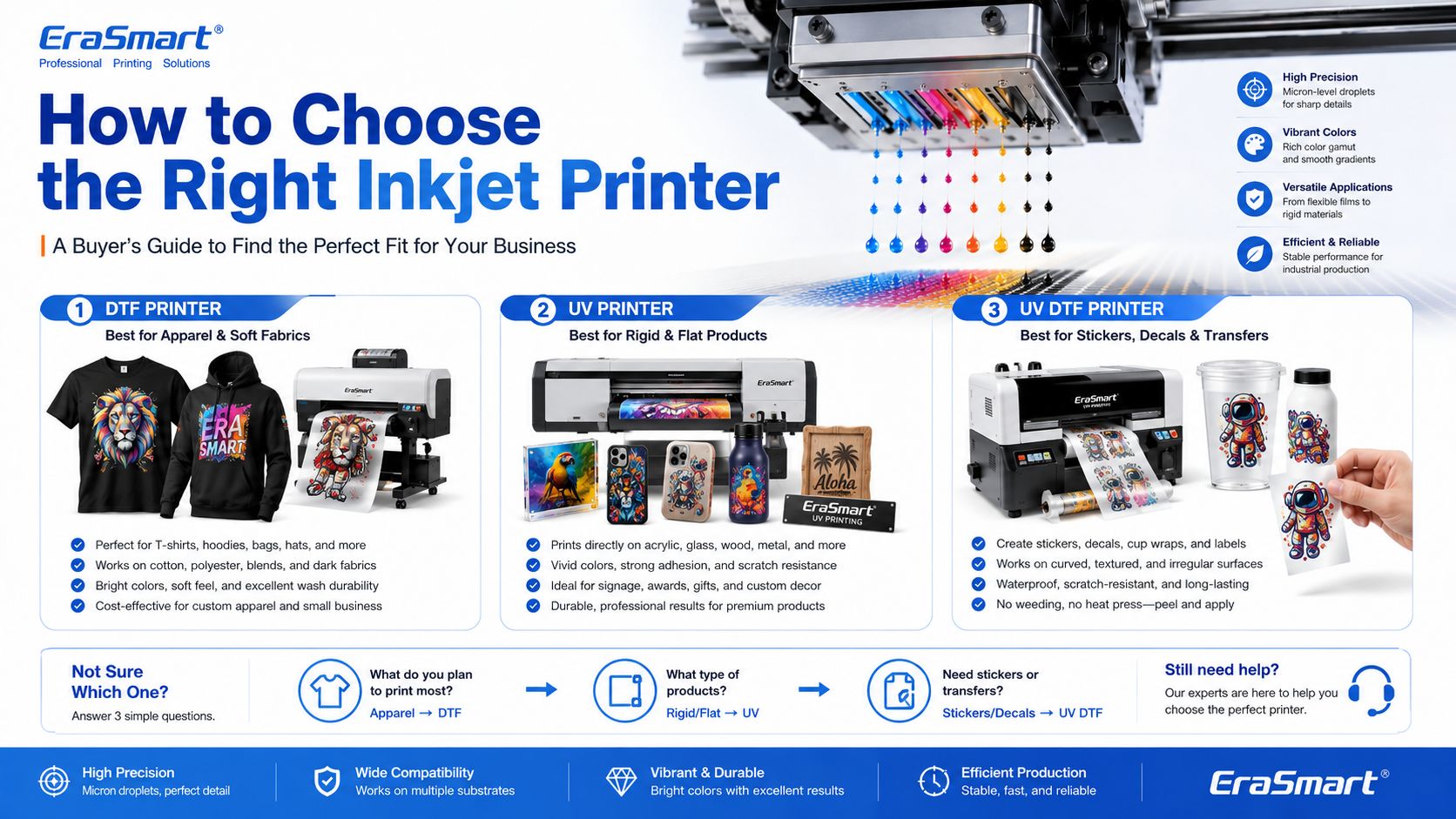
How to Choose the Right Inkjet Printer for Your Business

The right inkjet printer depends on what you want to sell.

Choose a DTF Printer If You Want to Print Apparel

Choisissez un imprimante DTF if your business focuses on:

  • Tee-shirts
  • sweats à capuche
  • sacs fourre-tout
  • uniformes
  • vêtements de sport
  • graphiques de mode
  • vêtements sombres
  • small-batch custom apparel
  • print-on-demand clothing

For machine selection, read EraSmart’s Comment choisir une imprimante DTF et Liste de contrôle pour l'achat d'une imprimante DTF.

Pour le bricolage et le studio personnel

Configuration compacte d'entrée de gamme

• Personnalisation en petits lots
• Tests de conception
• Faible charge d'entrée

Idéal pour les bricoleurs et les studios personnels

Si votre objectif est de commencer petit, de tester le flux de travail et de gérer la personnalisation personnelle ou une utilisation commerciale légère, le choix le plus pratique est une configuration compacte avec un coût gérable et un fonctionnement quotidien simple.

Ce type de machine fonctionne bien pour les créateurs, les primo-accédants et les studios personnels qui ont besoin d’un point d’entrée fiable sans se lancer trop tôt dans un équipement de production A3 ou A1 plus grand.

Pour les petits studios et startups

Configuration commerciale flexible d'entrée A3

• Commandes personnalisées locales
• Vêtements en petits lots
• Flux de travail adapté aux startups

Idéal pour les petits studios, les nouvelles marques et les startups

Si vous avez déjà une idée commerciale, acceptez des commandes personnalisées locales ou dirigez un petit studio qui a besoin de plus de flexibilité que les machines d'entrée de gamme A4, le passage à la gamme A3 crée généralement un flux de travail commercial plus pratique.

Ces modèles conviennent mieux aux marques en démarrage, aux exploitants de studios et aux ateliers en démarrage qui souhaitent une plage de production plus large sans passer directement à des équipements industriels à plus haut rendement.

Pour le commerce électronique et les designers

Détails, couleurs et rotation rapide du design

• Graphiques riches en design
• Nouvelles sorties fréquentes
• Présentation visuelle haut de gamme

Idéal pour les entrepreneurs en commerce électronique et les studios de créateurs

Lorsque votre entreprise dépend de changements de conception fréquents, d'illustrations riches en couleurs, d'images détaillées et de tests de produits en ligne plus rapides, il est logique de choisir des modèles offrant une présentation d'image plus forte et une flexibilité commerciale plus fluide.

Ce groupe convient parfaitement aux vendeurs en ligne, aux marques dirigées par des créateurs, aux équipes créatives et aux magasins où la présentation visuelle et le lancement de nouveaux designs sont au cœur du modèle commercial.

Modèles recommandés

Pour les petites entreprises

Production commerciale quotidienne stable

• Commandes quotidiennes
• Meilleur rythme de production
• Production commerciale plus stable

Idéal pour les petites entreprises de vêtements et une production quotidienne stable

Une fois que votre entreprise dépasse les commandes occasionnelles et commence à dépendre d’une production quotidienne plus stable, il devient plus important de choisir des machines qui prennent en charge un flux de travail plus fluide, une plus grande cohérence et un meilleur rythme de production.

C'est généralement à ce niveau que les acheteurs devraient cesser de penser uniquement au prix d'entrée et commencer à réfléchir plus sérieusement à la stabilité de la production, à l'efficacité du flux de travail et à la praticité de fonctionnement à long terme.

Pour l'automatisation

Débit plus élevé et mise à niveau du flux de travail

• Flux de travail plus rapide
• Charge manuelle réduite
• Meilleure continuité de production

Idéal pour les magasins qui évoluent vers un flux de travail plus automatisé

Si votre entreprise va au-delà de la production manuelle de base et souhaite un processus plus fluide et plus prêt pour la production, il est logique d'envisager des modèles qui prennent en charge une intégration plus forte des flux de travail et des attentes de débit plus élevées.

Cette orientation est particulièrement pertinente pour les ateliers qui ont déjà des commandes stables et qui souhaitent réduire les frictions de production, améliorer la répétabilité et se préparer à des volumes d'exploitation quotidiens plus importants.

Pour une production à grande échelle

Direction Industrielle Grand Format

• Objectif de production plus élevé
• Largeur d'impression plus large
• Rythme de production industrielle

Idéal pour la fabrication à grande échelle et les équipes à plus haut rendement

Lorsque votre entreprise a besoin d'une largeur d'impression plus large, d'un plafond de production plus élevé et d'une orientation de production industrielle plus sérieuse, la série A1 devient la catégorie idéale à évaluer. Ce niveau est mieux adapté aux entreprises où la continuité de la production et la réduction des coûts d'interruption sont des priorités opérationnelles importantes.

Choisissez le niveau de tête d'impression en fonction du niveau d'agressivité de votre objectif de production et de la valeur que vous accordez à une productivité plus élevée.

Choose a UV Printer If You Want to Print Hard Products

Choisissez un Imprimante UV if your business focuses on:

  • caisses téléphoniques
  • plaques acryliques
  • cadeaux en verre
  • panneaux métalliques
  • wood products
  • carreaux de céramique
  • échantillons d'emballage
  • produits promotionnels
  • product decoration

For material planning, read EraSmart’s Guide des matériaux pour imprimante UV et How to Choose a UV Printer.

Petits projets de démarrage

Convient aux produits personnalisés de petit format, aux échantillons, aux cadeaux compacts et aux utilisateurs qui souhaitent démarrer l'impression UV avec un encombrement réduit.

Utilisation professionnelle compacte

Une option pratique pour les coques de téléphone, les accessoires, les petits produits en acrylique, les cadeaux personnalisés et la production des petites entreprises.

Flexibilité du produit A3

Un choix plus judicieux pour les utilisateurs qui ont besoin d’une plateforme plus grande, d’une plus grande couverture de produits et d’une production en petits lots plus flexible.

Production de plus grand format

Convient aux panneaux, panneaux, tableaux personnalisés et équipes de production plus grands qui ont besoin d'une zone d'impression plus large et d'une plus grande évolutivité.

Affaires de cas de téléphone

Conçu pour la personnalisation des coques de téléphone et la production rapide de produits personnalisés avec un chemin d'application plus ciblé.

Décalcomanies et enveloppes de tasses

Idéal pour les autocollants UV DTF, les étiquettes en cristal, les emballages de tasses, les bouteilles et les autocollants de transfert sur surface dure.

Choose a UV DTF Printer If You Want to Print Decals and Transfers

Choisissez un Imprimante UV DTF if your business focuses on:

  • autocollants
  • decals
  • enveloppes de tasse
  • Étiquettes
  • cosmetic packaging transfers
  • bottle decoration
  • gadget skins
  • hard-surface branding

To understand the film workflow, read EraSmart’s A/B Film for UV DTF Printing.

Recommandation d'achat EraSmart

Inkjet printing is not one single business model. It is a technology foundation. The right machine depends on your target products.

A simple buying direction looks like this:

Objectif commercialRecommended EraSmart Direction
Custom T-shirts, hoodies, apparelImprimante DTF
Acrylic, glass, metal, wood, phone casesImprimante UV
Stickers, cup wraps, labels, decalsImprimante DTF UV
Apparel startupA4 / A3 DTF Printer
Growing apparel shopA3 MAX DTF / shaker workflow
Custom product studioA4 / A3 UV Printer
Hard-surface transfer businessImprimante A3 UV DTF

If your business is apparel-first, start with EraSmart’s Imprimante DTF lineup. If your business is hard-product customization, compare the Imprimante UV range. If your business is stickers, decals, labels, and cup wraps, start with the Imprimante DTF UV.

Final Answer: What Is an Inkjet Printer?

An inkjet printer is a digital printer that creates images by ejecting tiny ink droplets through microscopic nozzles onto a surface.

In basic office printing, that surface is usually paper. In custom printing, the surface may be PET film, transfer film, acrylic, glass, metal, wood, plastic, packaging board, fabric, or product blanks.

The most important point is this: inkjet printing is not only for documents and photos. It is the core technology behind many modern custom printing systems, including DTF printers, UV printers, and UV DTF printers.

For small businesses, inkjet technology makes it possible to print full-color designs, personalize products, produce short runs, reduce setup cost, and build flexible custom printing workflows.

Need help choosing the right inkjet-based printing system for your business? Share your target products, material type, print size, expected daily order volume, and budget range with EraSmart.

Our team can help you choose the right imprimante DTF, Imprimante UV, ou Imprimante UV DTF for your custom printing business.


Peut-être que tu as aussi

  • Imprimante EraSmart

    imprimante uv
    imprimante DTF
    Imprimante DTG
    Presse à chaud
    Imprimeur publicitaire

  • Outils d'impression

    four DTF
    Presse à chaud
    Machine à découper
    Tasse transfert de chaleur
    Machine de laminage

  • Consommables

    Encre à imprimer
    Cas de téléphone portable
    Produit en verre
    Liquide nettoyant
    Coton-tige

  • Contactez-nous

    WhatsApp: +8618566233796
    WeChat: +8618566233796
    Mobile: +8618566233796
    Web :www.erasmart.com
    Boutique:www.erasmartmall.com

  • Demander un devis

    Fournissez simplement quelques détails et nous vous aiderons à obtenir des citations rapides!