
UV 잉크 가이드: UV 인쇄에 대한 CMYK, 흰색 잉크 및 광택제 설명
UV 프린터 성능은 기계, 프린트헤드, 플랫폼뿐만 아니라 잉크 시스템에 따라서도 달라집니다. CMYK는 풀 컬러 그래픽을 만들고, 흰색 잉크는 어둡고 투명한 재질을 지원하며, 바니시는 광택, 질감 및 프리미엄 마감 효과를 추가합니다. 이 가이드에서는 각 잉크 레이어의 작동 방식과 제품에 적합한 구성을 선택하는 방법을 설명합니다.
잉크 시스템 요약
CMYK
흰색 잉크
광택
RIP 레이어 제어
CMYK 이해
CMYK는 사진, 로고, 그래픽, 제품 아트워크를 포함한 기본 이미지를 만듭니다.
흰색 잉크를 올바르게 사용하십시오
흰색 잉크는 투명하고 어두운 인쇄물과 유색 인쇄물의 색상 강도를 향상시킵니다.
광택 효과 추가
바니시는 광택, 하이라이트, 스팟 코팅 및 장식 효과를 높여줍니다.
잉크 안정성 유지
흰색 잉크 순환, 노즐 점검, 청소 작업 흐름으로 일일 출력물을 보호합니다.
UV 잉크 기본 사항
UV 잉크 구성이 중요한 이유
UV 인쇄에서는 잉크 구성에 따라 어떤 제품을 만들 수 있는지, 어떤 재료를 다룰 수 있는지, 어떤 시각 효과를 판매할 수 있는지가 결정됩니다. 흰색이나 밝은 색상의 재료에 대한 간단한 인쇄에는 기본 색상 전용 설정으로 충분할 수 있습니다. 그러나 대부분의 상업용 UV 인쇄 응용 프로그램에는 기본 CMYK 출력 이상이 필요합니다.
흰색 잉크는 투명하거나 어둡거나 색상이 있는 인쇄물에 인쇄하는 데 필수적입니다. 바니시는 광택, 점 코팅, 양각 질감 및 장식 마감을 통해 프리미엄 표면 가치를 더할 수 있습니다. 구매자의 경우 CMYK, 흰색 잉크 및 광택제를 이해하면 처음에는 저렴해 보이지만 실제로 판매하려는 제품을 지원할 수 없는 프린터를 선택하는 것을 피하는 데 도움이 됩니다.
구매자는 재료를 인쇄할 수 있는지 여부만 물어서는 안됩니다. 또한 인쇄된 결과가 안정적이고 내구성이 있으며 반복 가능하고 상업적으로 실용적인지 물어봐야 합니다. 단일 샘플에 적합한 재료라도 표면이 일관되지 않거나, 구부러져 있거나, 먼지가 많거나, 기름기가 많거나 위치를 잡기 어려운 경우 일상 생산에서 여전히 문제를 일으킬 수 있습니다.
간단한 규칙
흰색이나 밝은 색상의 평면 소재에만 인쇄하려면 CMYK로도 충분할 수 있습니다. 아크릴, 유리, 어두운 제품, 투명 제품, 고급 선물 등에 인쇄하려면 흰색 잉크와 바니시가 훨씬 더 중요해집니다.
마스터 테이블
UV 인쇄의 CMYK vs 흰색 잉크 vs 바니시
이 표를 사용하면 각 UV 잉크 레이어의 기능과 필요한 시기를 빠르게 이해할 수 있습니다.
| 잉크층 | 주요 기능 | 필요할 때 | 일반적인 재료 | 주요 구매 포인트 |
|---|---|---|---|---|
| CMYK | 풀 컬러 이미지 출력 생성 | 거의 모든 UV 인쇄 작업 | 흰색 아크릴, 가벼운 플라스틱, 간판, 선물, 휴대폰 케이스 | 색상 안정성, RIP 설정 및 인쇄 모드 확인 |
| 흰색 잉크 | 언더베이스를 생성하고 불투명도를 지원합니다. | 투명하거나 어둡거나 색상이 있는 재료 | 투명 아크릴, 유리, 어두운 색상의 휴대폰 케이스, 컬러 기판 | 순환, 교반, 캡핑 및 유지 관리 작업 흐름을 확인하세요. |
| 광택 | 광택, 스팟 코팅, 양각 효과 추가 | 프리미엄 제품 및 장식 마감재 | 아크릴 간판, 선물, 브랜딩 아이템, 장식 패널 | 레이어 조절, 경화 효과, 소프트웨어 지원 확인 |
잉크 레이어 1
UV 인쇄에서 CMYK 잉크란 무엇입니까?
CMYK 잉크는 UV 인쇄의 기초입니다. 청록색, 자홍색, 노란색 및 검정색을 사용하여 풀 컬러 이미지, 로고, 텍스트, 패턴 및 사진 디자인을 만듭니다. 흰색이나 밝은 색상의 소재가 많은 경우 CMYK 자체만으로도 선명하고 생생한 결과를 얻을 수 있습니다.
그러나 CMYK만으로는 항상 충분하지 않습니다. 투명한 재질의 경우 빛이 기판을 통과하기 때문에 색상이 약하게 보일 수 있습니다. 어두운 재질에서는 배경이 최종 모양에 영향을 미치므로 색상이 밝기를 잃을 수 있습니다. 이것이 바로 전문적인 UV 인쇄에서 흰색 잉크가 CMYK와 함께 자주 사용되는 이유입니다.
최고의 사용
흰색, 밝은 색상 또는 이미 불투명한 표면의 풀 컬러 그래픽.
주요 이점
로고, 사진, 텍스트 및 장식 작품에 대한 표준 색상 출력을 생성합니다.
주요 제한 사항
흰색 잉크가 없는 투명하거나 어둡거나 강한 색상의 재료에서는 색상이 약하게 나타날 수 있습니다.
잉크 레이어 2
UV 인쇄에 흰색 잉크는 무엇에 사용됩니까?
흰색 잉크는 전문 UV 프린터의 가장 중요한 부분 중 하나입니다. 컬러 인쇄 전 베이스 레이어로 흔히 사용됩니다. 이 흰색 바탕은 배경 자료의 효과를 차단하고 CMYK 색상이 더 밝고 강하며 정확하게 표시되도록 도와줍니다.
흰색 잉크는 투명한 아크릴, 유리, 투명한 플라스틱, 어두운 휴대폰 케이스, 유색 선물 품목 및 다양한 장식 제품에 특히 중요합니다. 흰색 잉크가 없으면 인쇄된 색상이 투명하거나 흐릿하거나 보기 어려울 수 있습니다.
| 자재 상황 | 흰색 잉크 없이 | 흰색 잉크 사용 | 추천 |
|---|---|---|---|
| 투명 아크릴 | 색상이 투명하거나 약하게 보일 수 있습니다. | 색상이 더 강해지고 눈에 띄게됩니다. | 대부분의 상업 작업에는 흰색 베이스를 사용하세요. |
| 유리 | 디자인의 불투명도가 부족할 수 있습니다. | 인쇄된 이미지가 더욱 선명하고 견고해졌습니다. | 흰색 층과 접착력을 함께 테스트하십시오. |
| 어두운 휴대폰 케이스 | 색상은 배경에 의해 숨겨질 수 있습니다. | 색상이 더 선명하게 나타납니다 | 생생한 아트웍을 위해 흰색 잉크를 사용하세요. |
| 컬러 기판 | 배경색이 아트워크에 영향을 미침 | 작품이 더 정확해 보입니다. | 색상 정확도가 중요한 경우 흰색 잉크를 사용하세요. |
흰색 잉크 유지 관리 알림
흰색 잉크에는 더 무거운 안료가 포함되어 있으므로 구매자는 흰색 잉크 순환, 교반, 노즐 보호 및 일상 유지 관리에 세심한 주의를 기울여야 합니다. 좋은 흰색 잉크 시스템은 침전물, 막힘 위험 및 불안정한 출력을 줄일 수 있습니다.
잉크 레이어 3
UV 인쇄에서 바니시는 무엇입니까?
바니시는 광택 있는 하이라이트, 스폿 코팅, 장식 질감 및 양각 효과를 만드는 데 사용되는 투명한 UV 경화 잉크 층입니다. 인쇄된 제품을 더욱 고급스러워 보이게 만들고 기업이 더 높은 가치의 맞춤형 품목을 판매하는 데 도움이 됩니다.
바니시는 아크릴 간판, 선물 제품, 장식 패널, 포장 샘플, 로고, 명판 및 브랜드 품목에 자주 사용됩니다. 모든 작업에 필요한 것은 아니지만 고객이 더욱 고급스러운 외관이나 촉각 효과를 원하는 경우 유용할 수 있습니다.
광택 효과
선택한 영역이나 전체 인쇄 표면에 광택을 추가합니다.
스팟 바니시
로고, 패턴, 텍스트 또는 디자인 세부 사항을 강조합니다.
제기 질감
바니시 레이어를 구축하여 촉각 효과를 만듭니다.
프리미엄 마감
맞춤형 선물 및 표지판에 대한 인지된 가치를 향상시킵니다.
레이어 모드
흰색 잉크에 더 많은 주의가 필요한 이유
흰색 잉크는 UV 프린터가 처리할 수 있는 재료와 효과의 범위를 확장하므로 가치가 있습니다. 그러나 표준 컬러 잉크보다 더 세심한 유지 관리가 필요합니다. 잉크 시스템을 제대로 유지 관리하지 않으면 흰색 잉크의 더 무거운 안료가 침전될 수 있습니다.
UV 프린터를 구입하기 전에 사용자는 기계가 흰색 잉크 순환, 교반, 캡핑, 노즐 청소 및 장기 유휴 보호를 어떻게 처리하는지 물어봐야 합니다. 이러한 세부 사항은 일상적인 신뢰성과 장기적인 프린트 헤드 보호에 영향을 미칩니다.
| 유지보수 구역 | 중요한 이유 | 물어볼 질문 |
|---|---|---|
| 흰색 잉크 순환 | 침전물과 고르지 못한 흰색 출력물을 줄이는 데 도움이 됩니다. | 프린터가 흰색 잉크 순환을 지원합니까? |
| 잉크 교반 | 색소 분포를 유지하는 데 도움이 됩니다. | 잉크 탱크에 교반 또는 교반 현상이 있습니까? |
| 캡핑 스테이션 | 인쇄하지 않을 때 프린트 헤드를 보호합니다. | 캡핑 스테이션은 얼마나 잘 밀봉됩니까? |
| 노즐 점검 루틴 | 생산 전 막힘 감지에 도움 | 권장되는 일일 노즐 점검 프로세스는 무엇입니까? |
| 장시간 유휴 보호 | 프린터를 며칠 동안 사용하지 않을 때 중요 | 기계가 유휴 상태가 되기 전에 사용자는 무엇을 해야 합니까? |
소프트웨어 및 레이어 제어
흰색 잉크 및 광택제에 RIP 소프트웨어가 중요한 이유
UV 인쇄에는 종종 여러 레이어가 필요합니다. 사용자는 색상 아래 흰색 잉크, 색상 위에 광택제 또는 특정 별색 광택제 영역이 필요할 수 있습니다. RIP 소프트웨어는 이러한 레이어가 생성, 배열 및 인쇄되는 방식을 제어합니다.
적절한 레이어 제어가 없으면 사용자는 약한 흰색 적용 범위, 잘못된 바니시 배치, 잘못된 색상 출력, 불량한 등록 또는 비효율적인 작업 흐름을 경험할 수 있습니다. 구매자의 경우 RIP 소프트웨어는 프린터 하드웨어와 함께 평가되어야 합니다.
흰색 잉크 레이어 제어
소프트웨어는 어둡거나 투명한 재료에 대한 흰색 밑바탕 생성 및 배치를 지원해야 합니다.
바니시 레이어 제어
소프트웨어를 통해 사용자는 선택한 영역에 바니시를 적용하거나 계층화된 장식 효과를 만들 수 있어야 합니다.
패스 모드 및 품질
다양한 패스 모드는 인쇄 품질, 생산 속도, 잉크 두께 및 표면 결과의 균형을 맞추는 데 도움이 됩니다.
색상 및 재료 설정
권장 프로필 및 설정은 사용자가 다양한 재료에서 보다 반복 가능한 결과를 얻을 수 있도록 도와줍니다.
문제 해결
일반적인 UV 잉크 문제와 그 의미
잉크 관련 문제는 재료 준비, 잉크 시스템 상태, RIP 설정, 경화 강도 및 유지 관리 습관의 조합으로 인해 발생하는 경우가 많습니다. 아래 표에는 일반적인 문제가 요약되어 있습니다.
| 문제 | 가능한 원인 | 먼저 확인해야 할 사항 | 관련 가이드 |
|---|---|---|---|
| 투명한 소재에서는 색상이 약해 보입니다. | 흰색 바탕이 없거나 약한 흰색 층이 없음 | 흰색 잉크 레이어 설정 및 인쇄 순서 | 재료 가이드 |
| 흰색 잉크가 고르지 않게 보입니다. | 침전물, 노즐 문제 또는 순환 불량 | 흰색 잉크 순환 및 노즐 점검 | 유지보수 가이드 |
| 바니쉬의 광택이 충분하지 않습니다. | 레이어 두께, 경화 설정 또는 표면 문제 | 바니시층 및 UV 경화강도 | 문제 해결 가이드 |
| 잉크가 긁히다 | 접착력이 좋지 않거나 재료 준비가 잘못되었습니다. | 표면 청소 및 재료 호환성 | 재료 가이드 |
| 밴딩 또는 누락된 선 | 노즐 막힘 또는 프린트헤드 상태 | 노즐 테스트 및 청소 루틴 | 문제 해결 가이드 |
구매 팁
프린터를 구입하기 전에 물어봐야 할 UV 잉크 질문
| 문제 | 가능한 원인 | 먼저 확인해야 할 사항 | 관련 가이드 |
|---|---|---|---|
| 투명한 소재에서는 색상이 약해 보입니다. | 흰색 바탕이 없거나 약한 흰색 층이 없음 | 흰색 잉크 레이어 설정 및 인쇄 순서 | 재료 가이드 |
| 흰색 잉크가 고르지 않게 보입니다. | 침전물, 노즐 문제 또는 순환 불량 | 흰색 잉크 순환 및 노즐 점검 | 유지보수 가이드 |
| 바니쉬의 광택이 충분하지 않습니다. | 레이어 두께, 경화 설정 또는 표면 문제 | 바니시층 및 UV 경화강도 | 문제 해결 가이드 |
| 잉크가 긁히다 | 접착력이 좋지 않거나 재료 준비가 잘못되었습니다. | 표면 청소 및 재료 호환성 | 재료 가이드 |
| 밴딩 또는 누락된 선 | 노즐 막힘 또는 프린트헤드 상태 | 노즐 테스트 및 청소 루틴 | 문제 해결 가이드 |
EraSmart 모델 경로
어떤 UV 프린터 구성을 고려해야 합니까?
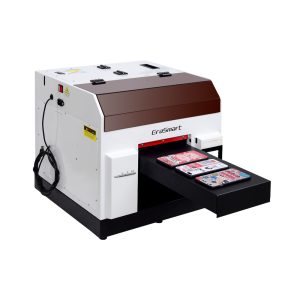
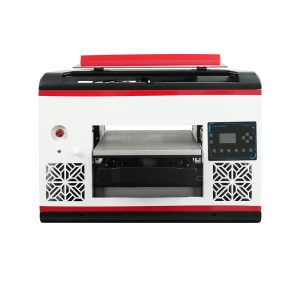
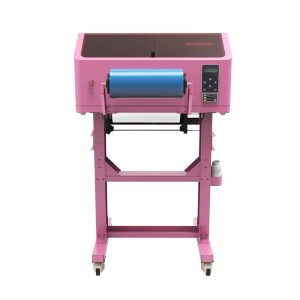
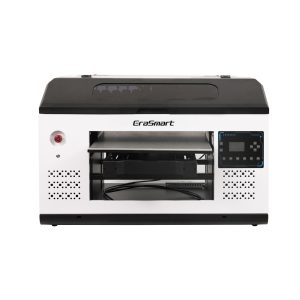
EraSmart UV 프린터를 비교할 때 대상 재료, 흰색 잉크가 필요한지 여부, 광택 효과가 제품 가치의 일부인지, 제품에 필요한 인쇄 크기를 고려하십시오.
일반적인 실수
피해야 할 UV 잉크 실수
흰색 잉크 유지 관리 무시
흰색 잉크는 강력하지만 유지 관리에 민감합니다. 구매자는 일반 CMYK 잉크처럼 취급해서는 안됩니다.
흰색 잉크 없이 투명 재료 인쇄하기
적절한 흰색 바탕이 없으면 투명 아크릴이나 유리에서는 색상이 약하거나 투명하게 보일 수 있습니다.
바니시는 단지 장식일 뿐이라고 가정
바니시는 반점 광택, 질감 및 고급 마감재에 사용될 때 제품 가치 특징이 될 수 있습니다.
RIP 레이어 제어를 확인하지 않음
흰색 잉크와 바니시는 정확한 레이어 제어가 필요합니다. 하드웨어만으로는 충분하지 않습니다.
자주 묻는 질문
-
1. UV 프린터는 어떤 잉크를 사용합니까?
UV 프린터는 인쇄 과정에서 UV 광선에 의해 경화되는 UV 경화 잉크를 사용합니다. 일반적인 잉크 채널에는 CMYK, 흰색 잉크 및 광택제가 포함됩니다.
-
2. UV 인쇄에서 CMYK란 무엇입니까?
CMYK는 풀 컬러 이미지, 로고, 그래픽 및 텍스트를 만드는 데 사용되는 청록색, 자홍색, 노란색 및 검정색 잉크를 나타냅니다.
-
3. UV 프린터에 흰색 잉크가 필요한 이유는 무엇입니까?
흰색 잉크는 어둡거나 색상이 있거나 투명한 재료의 바탕으로 사용됩니다. CMYK 색상이 더 밝고 정확하게 표시되도록 도와줍니다.
-
4. UV 인쇄에서 바니시는 무엇입니까?
바니시는 광택, 점 코팅, 향상된 효과 및 프리미엄 표면 질감을 만드는 데 사용되는 투명한 UV 경화 층입니다.
-
5. 항상 흰색 잉크가 필요합니까?
항상 그런 것은 아닙니다. 흰색 잉크는 일반적으로 투명하거나 어두운 색상 또는 색상이 있는 재료에 필요하지만 흰색 또는 밝은 색상의 재료에는 선택 사항일 수 있습니다.
-
6. 항상 바니시가 필요합니까?
아니요. 바니시는 선택 사항이지만 고객이 광택, 질감, 얼룩 효과 또는 보다 고급스러운 마감을 원하는 경우 제품 가치를 높일 수 있습니다.
-
7. 흰색 잉크를 유지 관리하기가 더 어려운 이유는 무엇입니까?
흰색 잉크에는 더 무거운 안료가 포함되어 있으므로 안정적인 출력을 유지하려면 적절한 순환, 교반, 노즐 점검 및 프린트 헤드 보호가 필요합니다.
-
8. 아크릴과 유리에 UV 잉크로 인쇄할 수 있나요?
예. 하지만 아크릴과 유리에는 더 강한 색상을 위해 흰색 잉크가 필요하고 더 나은 접착력을 위해 세심한 표면 준비가 필요한 경우가 많습니다.
EraSmart 프린터 시리즈


High-quality UV Printers for metal, acrylic, glass, wood & more. Instant curing, vivid 1440dpi prints, versatile for diverse materials.

**CMYK + 흰색 + 바니시**를 사용하여 한 번에 생생하고 양각된 데칼을 인쇄할 수 있습니다. 가루가 없습니다. 오븐이 없습니다. 몇 분 안에 평평하거나 구부러진 품목을 껍질을 벗기고 붙입니다.
적합한 가이드를 찾을 수 없나요? 지금 무료 기술 지원을 받으세요!
몇 가지 세부 정보 만 제공하면 빠른 인용문을 얻을 수 있도록 도와 드리겠습니다!
프린터 도구
DTF 오븐
핫 프레스
조각 기계
머그잔 열전달
라미네이팅 머신
소모품
인쇄 잉크
핸드폰 케이스
유리 제품
청소 유체
면봉
저희에게 연락하십시오
whatsapp : +8618566233796
WeChat : +8618566233796
모바일 : +8618566233796
편물:www.erasmart.com
가게:www.erasmartmall.com
WhatsApp에 우리
견적을 요청하십시오
몇 가지 세부 정보 만 제공하면 빠른 인용문을 얻을 수 있도록 도와 드리겠습니다!
다운론
이메일을 남겨주시고 다운로드 URL을 이메일로 보내주세요.
프린터 가격이 필요하십니까?
귀하의 인쇄 요구 사항을 알려주십시오. 우리 팀이 24시간 이내에 답변을 드릴 것입니다.