
UV 프린터 유지 관리 가이드: 일일 청소, 흰색 잉크 관리 및 장기 안정성
UV 프린터는 고부가가치 맞춤형 제품을 생산할 수 있지만 안정적인 출력은 정기적인 유지 관리에 달려 있습니다. 이 가이드에서는 일일 청소, 흰색 잉크 순환, 노즐 점검, 캡핑 스테이션 관리, 플랫폼 청소, UV 램프 점검, 장시간 공회전 보호, 구매자와 운영자가 피해야 하는 일반적인 유지보수 실수에 대해 설명합니다.
유지관리 우선순위
인쇄하기 전
일일
주간
장기 유휴
프린트헤드 보호
노즐 점검, 캡핑 스테이션 관리 및 청소 루틴을 통해 막힘 위험을 줄일 수 있습니다.
흰색 잉크 유지
흰색 잉크는 안정성을 위해 순환, 교반 및 정기적인 출력 점검이 필요합니다.
플랫폼을 깨끗하게 유지하세요
먼지, 잉크 잔여물, 고르지 못한 배치는 인쇄 품질과 접착력에 영향을 줄 수 있습니다.
장기 유휴 손상 방지
올바른 종료 및 유휴 관리는 건조, 침전물 및 시동 문제를 줄이는 데 도움이 됩니다.
유지 관리 기본 사항
UV 프린터 유지 관리가 일반 인쇄와 다른 이유
UV 프린터는 인쇄하는 동안 UV 광선에 의해 경화되는 UV 경화 잉크를 사용합니다. 이는 UV 인쇄에 강력한 재료 유연성과 빠른 생산 잠재력을 제공하지만 작업자가 잉크 상태, 노즐 상태, 플랫폼 청결도, 경화 성능 및 재료 준비를 신중하게 제어해야 함을 의미합니다.
흰색 잉크는 투명하고 어두운 재료와 유색 재료를 지원하므로 UV 인쇄에서 특히 중요합니다. 하지만 흰색 잉크 역시 잉크 시스템이 제대로 유지되지 않으면 안료가 침전될 수 있기 때문에 더욱 주의가 필요합니다. 장기적인 신뢰성을 위해 유지 관리는 긴급 수리 단계가 아닌 생산 작업 흐름의 일부로 처리되어야 합니다.
간단한 규칙
UV 프린터는 인쇄 전에 점검하고, 생산 후 청소하고, 매주 유지 관리하고, 오랜 유휴 기간 전에 주의 깊게 보호해야 합니다. 작은 일일 루틴은 일반적으로 더 큰 가동 중지 시간 문제를 예방합니다.
유지보수 일정
UV 프린터 유지 관리 일정 표
이 유지 관리 일정을 실용적인 프레임워크로 활용하세요. 정확한 루틴은 기계 설명서 및 잉크 시스템 구성을 따라야 합니다.
| 빈도 | 유지보수 작업 | 중요한 이유 | 운영자 팁 |
|---|---|---|---|
| 인쇄하기 전 | 노즐 테스트, 플랫폼 점검, 소재 표면 청소, 높이 확인 | 밴딩, 출력 흐림, 헤드 스트라이크, 접착 불량 방지 | 노즐 패턴을 확인하기 전에는 생산을 시작하지 마십시오. |
| 인쇄 중 | 잉크 흐름, 출력 색상, 플랫폼 안정성 및 경화 결과 모니터링 | 전체 배치가 낭비되기 전에 문제를 포착합니다. | 대량 생산을 계속하기 전에 첫 번째 완성품을 검사하십시오. |
| 인쇄 후 | 플랫폼 청소, 잉크 잔여물 제거, 캡핑 영역 확인, 파일 정리 | 다음 작업을 위해 프린터를 준비 상태로 유지합니다. | 플랫폼에 물질의 먼지나 느슨한 부품을 두지 마십시오. |
| 일일 | 흰색 잉크 상태, 폐잉크량, 노즐 상태, 캡핑 씰 확인 | 흰색 잉크 안정성과 프린트헤드 상태를 보호합니다. | 흰색 잉크는 일일 유지 관리 우선순위로 처리해야 합니다. |
| 주간 | 와이퍼, 캡핑 스테이션, 레일, 센서 및 주변 잉크 영역을 청소합니다. | 기계 및 잉크 관련 문제 감소 | 생산량이 적은 경우에도 주간 유지 관리 일정을 계획하십시오. |
| 장기 유휴 | 종료 보호, 헤드 관리, 잉크 경로 관리 및 재시작 확인을 따릅니다. | 건조, 침전, 시동 불량 방지 | 준비 없이 UV 프린터를 유휴 상태로 두지 마십시오. |
인쇄하기 전
인쇄 전 유지 관리 체크리스트
인쇄 버튼을 누르기 전에 안정적인 UV 인쇄 작업이 시작됩니다. 인쇄 전 유지 관리는 노즐 문제, 접착 불량, 잘못된 높이 및 재료 관련 결함을 방지하는 데 도움이 됩니다.
노즐 검사 실행
제작 전 CMYK, 흰색 잉크, 바니시 채널이 제대로 출력되는지 확인하세요. 누락된 선은 밴딩, 약한 흰색 적용 또는 불균일한 광택으로 이어질 수 있습니다.
재료 표면 청소
먼지, 기름, 지문, 코팅 잔여물은 접착력을 저하시키고 완성된 제품이 일관성을 잃게 만들 수 있습니다.
물체 높이 확인
높이가 잘못되면 인쇄가 흐려지거나 정확도가 떨어지거나 프린트 헤드 충돌이 발생할 수 있습니다. 두껍거나 불규칙한 제품을 인쇄하기 전에 거리를 확인하십시오.
RIP 설정 확인
작업을 시작하기 전에 레이어 순서, 흰색 잉크 설정, 바니시 레이어, 통과 모드, 재료 프로필을 확인하세요.
일일 유지 관리
일일 UV 프린터 유지 관리 루틴
UV 프린터의 안정성을 위해서는 일상적인 유지 관리가 가장 중요한 습관입니다. 복잡할 필요는 없지만 일관성이 있어야 합니다. 목표는 잉크 시스템, 프린트 헤드, 캡핑 영역, 플랫폼 및 자재 처리 작업 흐름을 깨끗하고 예측 가능하게 유지하는 것입니다.
| 일일 체크포인트 | 해야 할 일 | 문제 예방에 도움이 됨 |
|---|---|---|
| 노즐 패턴 | 테스트 인쇄를 실행하고 모든 채널이 완료되었는지 확인하세요. | 밴딩, 선 누락, 약한 색상, 균일하지 않은 흰색 잉크 |
| 흰색 잉크 시스템 | 순환, 교반, 흰색 잉크 출력 상태 확인 | 흰색 잉크 침전물, 막힘, 불안정한 불투명도 |
| 캡핑 스테이션 | 밀봉 영역을 검사하고 눈에 보이는 잔여물을 제거합니다. | 유휴 시간 이후 프린트헤드 건조 및 복구 불량 |
| 플랫폼 | 먼지, 잔여물, 스크랩 및 느슨한 부품을 제거합니다. | 위치 오류, 긁힘, 높이 문제 |
| 폐잉크 | 폐잉크통 또는 폐시스템 수준을 확인하세요. | 오버플로, 오염, 불안정한 세척 공정 |
흰색 잉크 관리
UV 프린터용 흰색 잉크 유지 관리
흰색 잉크는 구매자가 전문 UV 프린터를 선택하는 주요 이유 중 하나입니다. 투명 아크릴, 유리, 어두운 휴대폰 케이스, 컬러 기판, 프리미엄 제품에 인쇄할 수 있습니다. 그러나 흰색 잉크는 안료가 표준 컬러 잉크보다 무겁기 때문에 엄격한 유지 관리 루틴도 필요합니다.
흰색 잉크를 정기적으로 순환, 교반, 인쇄하지 않으면 불안정해질 수 있습니다. 이는 약한 불투명도, 흰색 선 누락, 노즐 막힘, 침전물 또는 배치 전반에 걸쳐 일관되지 않은 결과를 초래할 수 있습니다.
순환
흰색 잉크 순환은 침전물을 줄이고 사용 중에 잉크 경로를 더욱 안정적으로 유지하는 데 도움이 됩니다.
동요
잉크 탱크를 휘젓거나 휘저으면 안료가 더욱 균일하게 분포되는 데 도움이 됩니다.
일반 출력
흰색 잉크를 정기적으로 인쇄하거나 확인하면 생산이 시작되기 전에 문제를 식별하는 데 도움이 됩니다.
프린트헤드 보호
프린트헤드, 캡핑 스테이션 및 와이퍼 유지 관리
프린트 헤드는 UV 프린터에서 가장 중요하고 민감한 부품 중 하나입니다. 올바른 유지 관리 루틴은 노즐 표면을 깨끗하게 유지하고 캡핑 스테이션을 밀봉하며 와이퍼 영역에 마른 잉크나 잔해물이 없도록 유지하여 프린트헤드를 보호합니다.
| 요소 | 유지보수 초점 | 무시된 경우 | 운영자 조언 |
|---|---|---|---|
| 프린트 헤드 | 노즐 테스트, 적절한 청소, 안전한 높이 조절 | 밴딩, 줄빠짐, 헤드스트라이크, 출력불안정 | 물체 높이가 불확실한 경우 인쇄하지 마십시오. |
| 캡핑 스테이션 | 밀봉 상태, 청결성, 습기 보호 | 노즐 건조 및 유휴 시간 이후 복구 어려움 | 유휴 상태에서 캡이 제대로 밀봉되는지 확인하십시오. |
| 와이퍼 | 잉크 잔여물 제거 및 마모 검사 | 청소 결과 불량 및 노즐 오염 | 와이퍼를 깨끗하게 유지하고 필요한 경우 교체하십시오. |
| 잉크 경로 | 안정적인 잉크 흐름, 공기나 침전물 문제 없음 | 간헐적인 출력, 색약함, 노즐 불안정 | 생산 중 급격한 출력 변화에 주의하십시오. |
플랫폼 관리
플랫폼 청소 및 자재 취급
플랫폼 유지 관리는 간과되는 경우가 많지만 위치 정확도, 인쇄 높이, 인쇄 선명도 및 제품 안전에 직접적인 영향을 미칩니다. 먼지, 나사, 필름 조각, 잉크 잔여물 또는 고르지 않은 고정 장치로 인해 인쇄 결함이 발생하거나 프린트 헤드 충돌 위험이 높아질 수도 있습니다.
평판을 깨끗하게 유지하세요
각 작업 후에는 먼지, 잉크 잔여물, 접착제 자국, 제품 잔해물을 제거하십시오. 깨끗한 플랫폼은 더 나은 위치 지정과 안전한 인쇄를 지원합니다.
안정적인 고정 장치 사용
지그와 템플릿은 전화 케이스, 작은 선물, 태그 및 일괄 생산의 반복성을 향상시킬 수 있습니다.
개체 높이 제어
물체가 평평하고 안정적인지 확인하십시오. 인쇄 중에 움직이거나 떠오를 수 있는 불안정한 제품에는 인쇄를 피하세요.
재료 표면 청소
지문, 기름, 먼지 및 코팅 잔여물은 접착력을 저하시키고 인쇄물의 내구성을 떨어뜨릴 수 있습니다.
UV 경화
UV 램프 및 경화 유지 관리
UV 경화는 인쇄된 UV 잉크를 재료 표면의 고체 층으로 바꾸는 것입니다. 경화가 너무 약하면 잉크가 부드러워지거나 쉽게 긁힐 수 있습니다. 특정 재료나 환경에 대해 경화가 너무 강한 경우 결과가 부서지기 쉽고 고르지 않거나 시각적으로 일관되지 않을 수 있습니다.
| 경화 체크포인트 | 볼만한 동영상 | 가능한 문제 |
|---|---|---|
| UV 램프 상태 | 생산 중에 경화가 일관되게 유지되는지 확인하십시오. | 잉크가 연성, 접착력 불량, 바니시 마감이 약함 |
| 경화 강도 | 재료 및 인쇄 모드에 경화 강도를 일치시킵니다. | 과경화, 과소경화, 고르지 못한 마감 |
| 바니시 마감 | 광택, 질감, 표면 일관성 확인 | 광택이 충분하지 않거나 질감이 고르지 않은 바니시 |
| 재료 열 민감도 | 일부 플라스틱이나 코팅된 제품은 다르게 반응할 수 있습니다. | 뒤틀림, 변형, 표면 결과 불량 |
주간 유지보수
주간 UV 프린터 유지 관리 체크리스트
깨끗한 레일 및 이동 공간
먼지와 잉크 잔여물은 동작 안정성과 장기적인 기계적 성능에 영향을 미칠 수 있습니다.
캡핑 및 와이퍼 부품 검사
마른 잉크, 마모된 표면, 밀봉 불량, 청소 성능을 확인하십시오.
폐잉크 시스템 확인
무시할 경우 폐잉크 축적으로 인해 오염 및 청소 문제가 발생할 수 있습니다.
인쇄 품질 샘플 검토
시간 경과에 따른 출력을 비교하여 색상 변화, 밴딩, 약한 흰색 잉크 또는 광택제 변화를 식별합니다.
장기 유휴 관리
UV 프린터가 유휴 상태인 경우 수행할 작업
많은 중소기업에서는 매일 UV 프린터를 사용하지 않습니다. 프린터가 유휴 상태로 있을 경우 운영자는 단순히 프린터를 끄고 그대로 두는 대신 적절하게 준비해야 합니다. 유휴 시간이 길면 노즐 건조, 흰색 잉크 침전, 시작 출력 저하 및 복구 어려움의 위험이 높아질 수 있습니다.
| 유휴 기간 | 추천 초점 | 무시할 경우 위험 |
|---|---|---|
| 1일 | 플랫폼을 청소하고, 프린트 헤드를 올바르게 덮고, 다음 사용 전에 잉크 상태를 확인하십시오. | 캡핑 영역이 더러운 경우 사소한 시작 문제 |
| 2~3일 | 흰색 잉크, 캡핑 씰, 재시작 시 노즐 점검에 각별히 주의하세요. | 흰색 잉크 불안정 및 부분적인 노즐 손실 |
| 약 1주일 | 공급업체가 권장하는 유휴 보호 및 재시작 루틴을 따르십시오. | 노즐 건조, 침전물, 약한 흰색 잉크 출력 |
| 더 긴 저장 공간 | 기계 및 잉크 시스템을 기반으로 한 공식적인 종료/보관 지침을 사용하십시오. | 막힘이 심하거나 회복이 어렵습니다. |
중요한 경고
올바른 종료 및 재시작 프로세스를 이해하지 못한 채 며칠 동안 UV 프린터를 유휴 상태로 두지 마십시오. 흰색 잉크, 캡핑 상태 및 노즐 보호가 주요 위험 영역입니다.
유지보수 문제 해결
유지 관리 문제 및 일반적으로 의미하는 것
많은 UV 인쇄 문제는 유지 관리와 관련되어 있습니다. 아래 표는 운영자가 증상과 가능한 유지 관리 영역을 연결하는 데 도움이 됩니다.
| 문제 | 가능한 유지보수 원인 | 먼저 확인해야 할 사항 | 관련 가이드 |
|---|---|---|---|
| 밴딩 또는 누락된 선 | 노즐 막힘, 청소 불량, 잉크 흐름 불안정 | 노즐 테스트 및 청소 루틴 | 문제 해결 가이드 |
| 약한 흰색 잉크 | 침전물, 혈액순환 불량, 잘못된 화이트 레이어 설정 | 흰색 잉크 순환 및 RIP 레이어 설정 | UV 잉크 가이드 |
| 잉크가 긁히다 | 재료 세척 불량 또는 경화 불일치 | 표면세정 및 UV경화강도 | 재료 가이드 |
| 광택이 나지 않는 바니시 | 잘못된 바니시 층, 경화 또는 표면 상태 | 바니시 설정 및 경화 결과 | UV 잉크 가이드 |
| 흐릿한 이미지 | 높이가 잘못되었거나 플랫폼 배치가 불안정함 | 인쇄 높이 및 고정 장치 안정성 | 문제 해결 가이드 |
EraSmart 모델 경로
어떤 UV 프린터 구성을 고려해야 합니까?
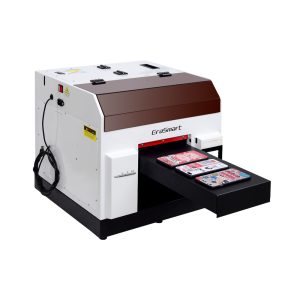
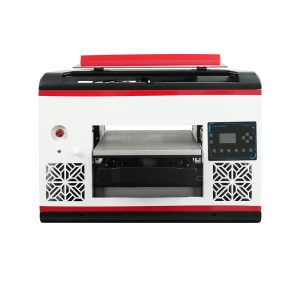
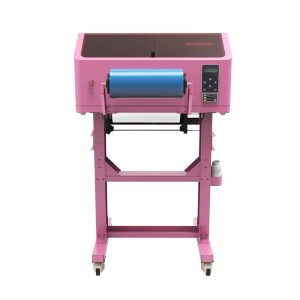
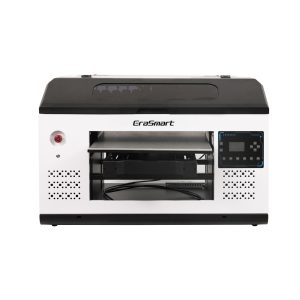
EraSmart UV 프린터를 비교할 때 대상 재료, 흰색 잉크가 필요한지 여부, 광택 효과가 제품 가치의 일부인지, 제품에 필요한 인쇄 크기를 고려하십시오.
일반적인 실수
피해야 할 UV 프린터 유지 관리 실수
노즐 검사 없이 인쇄하기
노즐 테스트를 건너뛰면 재료가 낭비되고 밴딩, 색상 누락 또는 약한 흰색 잉크가 생성될 수 있습니다.
흰색 잉크 순환 무시
흰색 잉크는 컬러 잉크보다 더 많은 주의가 필요합니다. 흰색 잉크를 잘못 관리하면 침전물과 불안정한 불투명도가 발생할 수 있습니다.
플랫폼을 더러운 채로 두기
먼지, 잔여물 및 느슨한 물체는 위치 지정, 인쇄 높이 및 프린트 헤드 안전에 영향을 미칠 수 있습니다.
준비 없이 프린터를 유휴 상태로 두기
유휴 기간이 길면 특히 캡핑 스테이션이나 잉크 시스템이 제대로 준비되지 않은 경우 건조 및 막힘 위험이 증가합니다.
UV 프린터 유지 관리 FAQ
-
1. UV 프린터를 얼마나 자주 유지관리해야 합니까?
UV 프린터는 각 인쇄 세션 전에 점검하고, 정기적으로 사용하는 동안 매일 청소하고, 매주 검사하고, 오랜 유휴 기간 전에 주의 깊게 준비해야 합니다.
-
2. 흰색 잉크에 특별한 유지 관리가 필요한 이유는 무엇입니까?
흰색 잉크는 표준 컬러 잉크보다 안료가 더 많이 함유되어 있어 안정적인 출력을 유지하려면 순환, 교반, 노즐 점검, 적절한 캡핑이 필요합니다.
-
3. 모든 작업 전에 노즐 검사를 실행해야 합니까?
예. 노즐 검사는 전체 생산 작업에서 재료를 낭비하기 전에 누락된 라인, 막힘 또는 약한 잉크 출력을 식별하는 데 도움이 됩니다.
-
4. UV 프린터 노즐 막힘의 원인은 무엇입니까?
일반적인 원인으로는 캡핑 불량, 잉크 건조, 청소 부족, 흰색 잉크 침전물, 긴 유휴 시간, 불안정한 잉크 흐름 등이 있습니다.
-
5. UV 인쇄 시 접착 불량을 방지하려면 어떻게 해야 합니까?
재료 표면을 청소하고, 정확한 기판을 테스트하고, 적절한 경화 설정을 사용하고, 재료에 전처리가 필요한지 또는 다른 작업 흐름이 필요한지 확인하십시오.
-
6. UV 프린터를 며칠 동안 사용하지 않을 경우 어떻게 해야 합니까?
공급업체가 권장하는 유휴 보호 루틴을 따르십시오. 프린트헤드 캡핑, 흰색 잉크 안정성, 잉크 경로 상태 및 노즐 점검 재시작에 특히 주의하십시오.
-
7. UV 프린터 유지관리가 어렵나요?
유지 관리는 일관되게 수행될 때 관리 가능합니다. 가장 큰 문제는 일반적으로 노즐 검사 건너뛰기, 흰색 잉크 관리 불량, 캡핑 영역 오염, 준비 없는 긴 유휴 기간 등에서 발생합니다.
-
8. 바니시는 특별한 유지 관리가 필요합니까?
광택 출력은 다른 잉크 채널과 마찬가지로 확인해야 합니다. 바니시가 고르지 않거나 광택이 나지 않거나 배치가 불량한 경우 노즐 상태, RIP 레이어 설정, 경화 강도 및 재료 표면을 확인하십시오.
EraSmart 프린터 시리즈


High-quality UV Printers for metal, acrylic, glass, wood & more. Instant curing, vivid 1440dpi prints, versatile for diverse materials.

**CMYK + 흰색 + 바니시**를 사용하여 한 번에 생생하고 양각된 데칼을 인쇄할 수 있습니다. 가루가 없습니다. 오븐이 없습니다. 몇 분 안에 평평하거나 구부러진 품목을 껍질을 벗기고 붙입니다.
적합한 가이드를 찾을 수 없나요? 지금 무료 기술 지원을 받으세요!
몇 가지 세부 정보 만 제공하면 빠른 인용문을 얻을 수 있도록 도와 드리겠습니다!
프린터 도구
DTF 오븐
핫 프레스
조각 기계
머그잔 열전달
라미네이팅 머신
소모품
인쇄 잉크
핸드폰 케이스
유리 제품
청소 유체
면봉
저희에게 연락하십시오
whatsapp : +8618566233796
WeChat : +8618566233796
모바일 : +8618566233796
편물:www.erasmart.com
가게:www.erasmartmall.com
WhatsApp에 우리
견적을 요청하십시오
몇 가지 세부 정보 만 제공하면 빠른 인용문을 얻을 수 있도록 도와 드리겠습니다!
다운론
이메일을 남겨주시고 다운로드 URL을 이메일로 보내주세요.
프린터 가격이 필요하십니까?
귀하의 인쇄 요구 사항을 알려주십시오. 우리 팀이 24시간 이내에 답변을 드릴 것입니다.