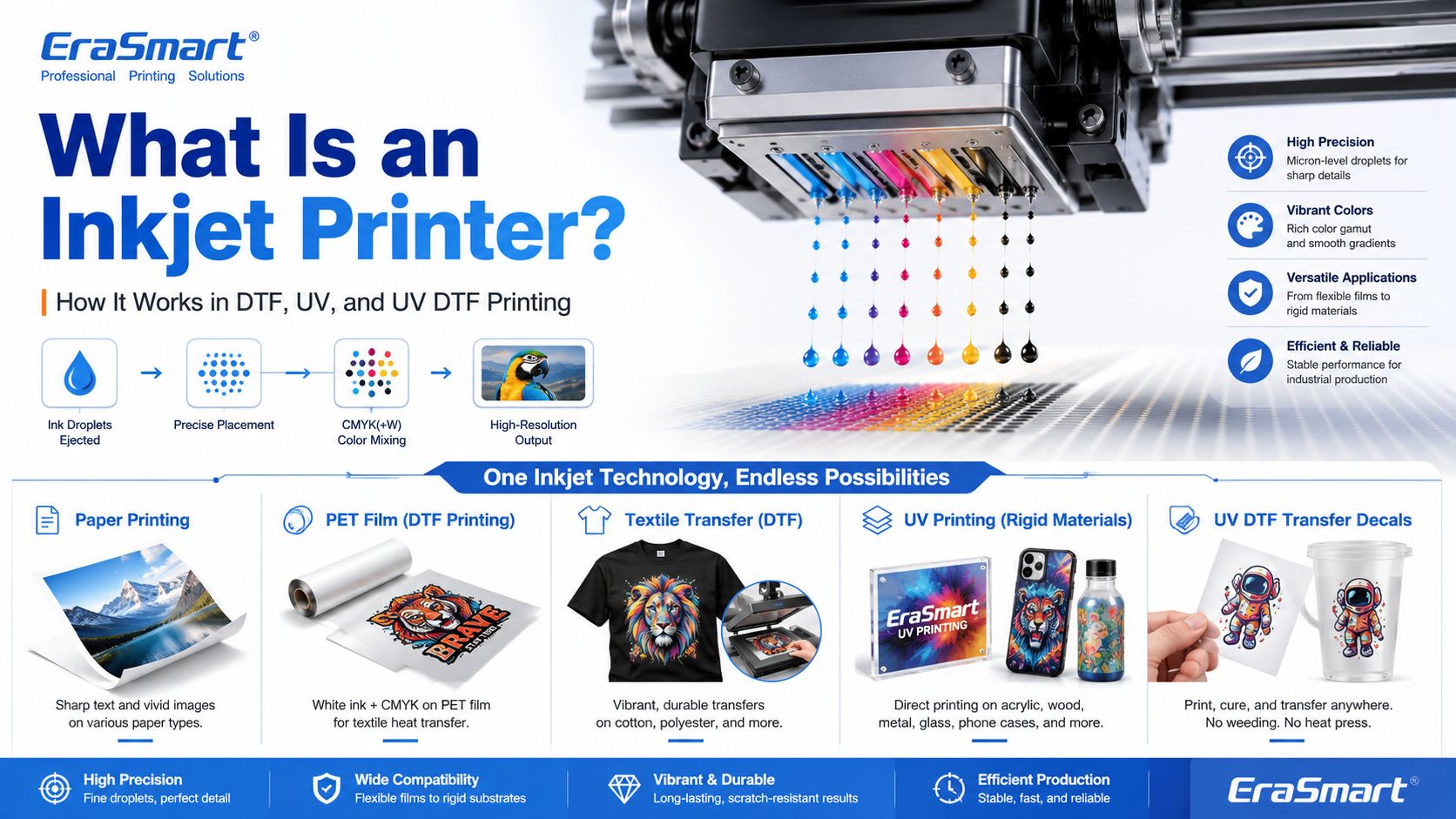
An inkjet printer is a digital printing device that creates images by ejecting tiny droplets of ink onto a surface. Instead of using plates, screens, or physical stencils, an inkjet printer receives digital image data and places controlled ink droplets in precise positions to form text, graphics, photos, labels, transfers, or product decoration.
Most people first know inkjet printers from office or home photo printing. But inkjet technology is much broader than desktop paper printing. Today, inkjet systems are used in DTF printing, UV flatbed printing, UV DTF transfers, packaging samples, product labels, signage, promotional products, textile decoration, industrial marking, and custom product manufacturing.
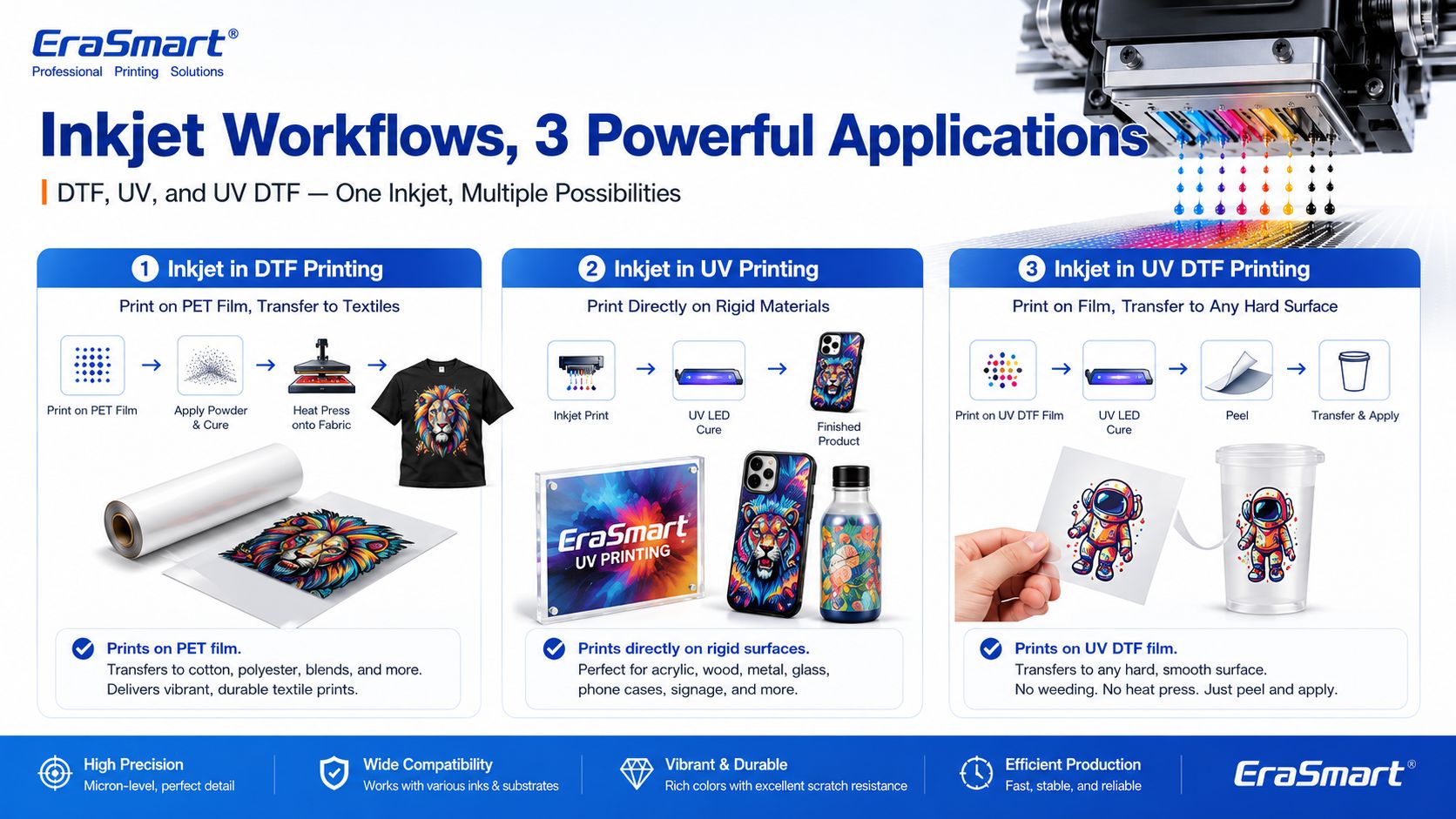
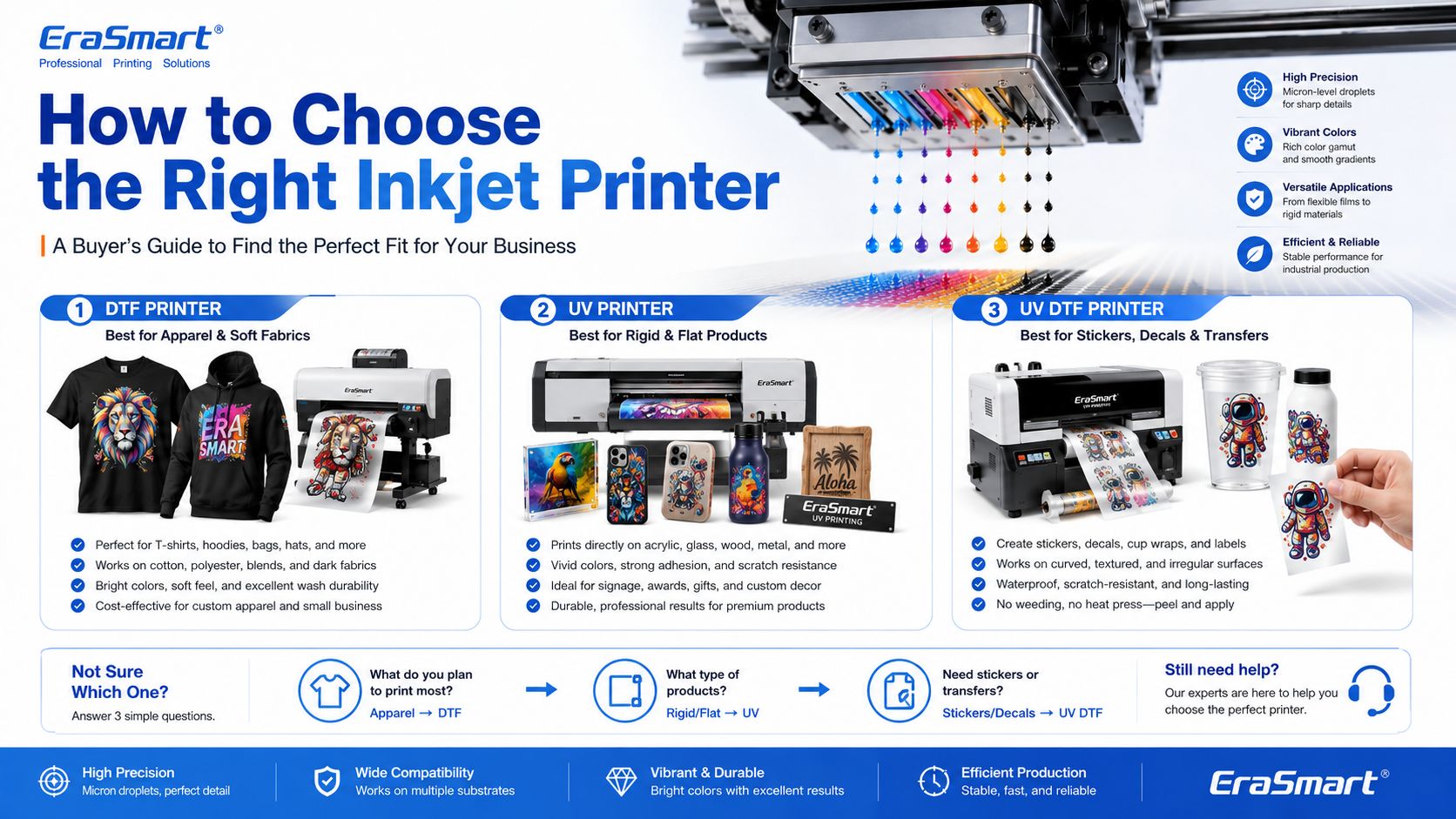
For EraSmart customers, this topic matters because many modern custom printing machines are built on inkjet principles. A DTF 프린터 uses inkjet technology to print garment designs onto transfer film. A UV 프린터 uses inkjet technology to print UV-curable ink directly onto rigid materials. A UV DTF 프린터 uses inkjet printing to create hard-surface decals and transfers on A/B film.
In simple terms, inkjet printing is the foundation. DTF, UV, and UV DTF are specialized business workflows built around that foundation.
An inkjet printer is a printer that sprays or ejects tiny droplets of liquid ink through microscopic nozzles to create a printed image.
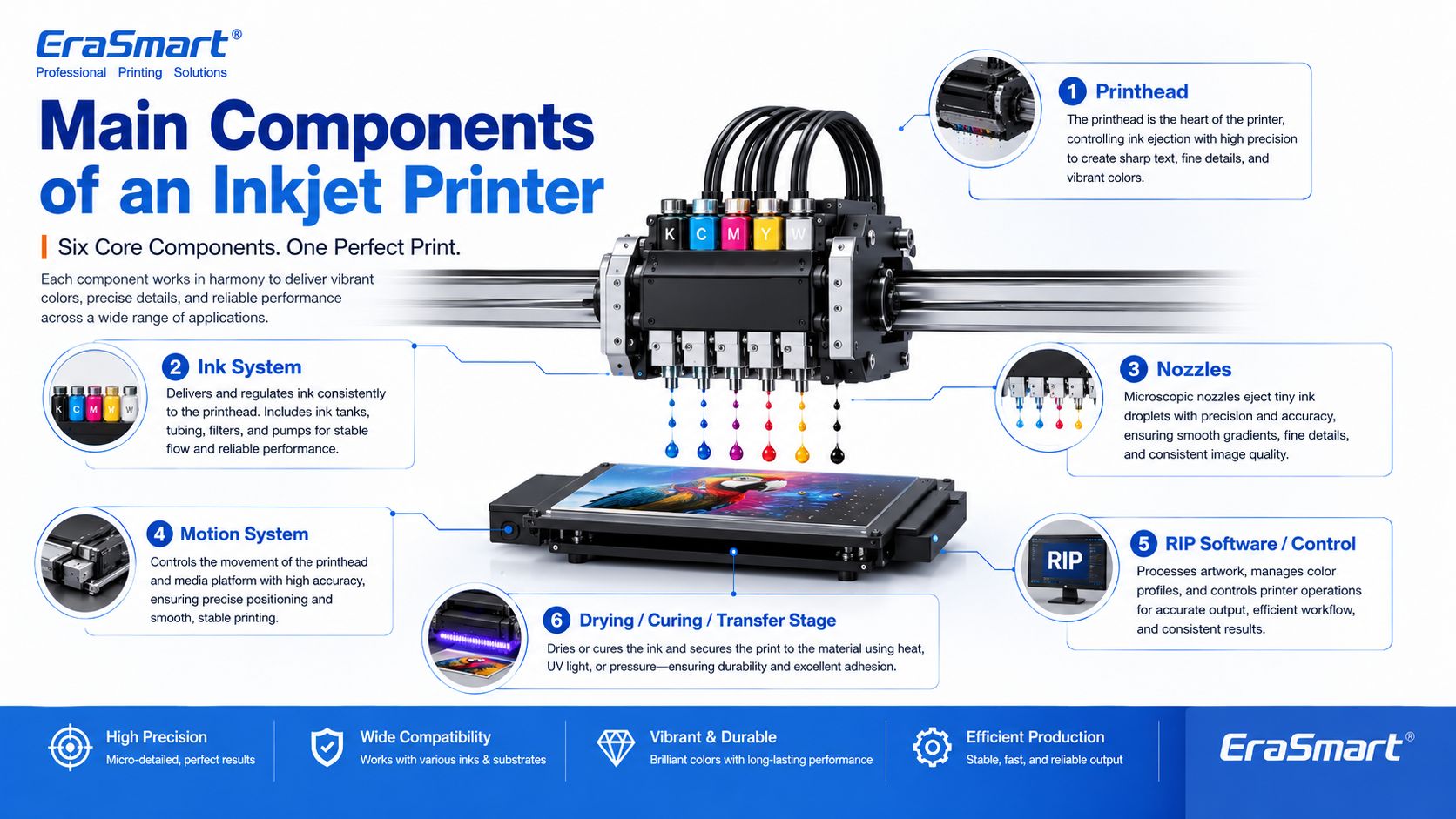
A basic inkjet printing system includes:
The printhead is the key component. It controls where ink droplets land, how much ink is ejected, and how accurately the image is formed.

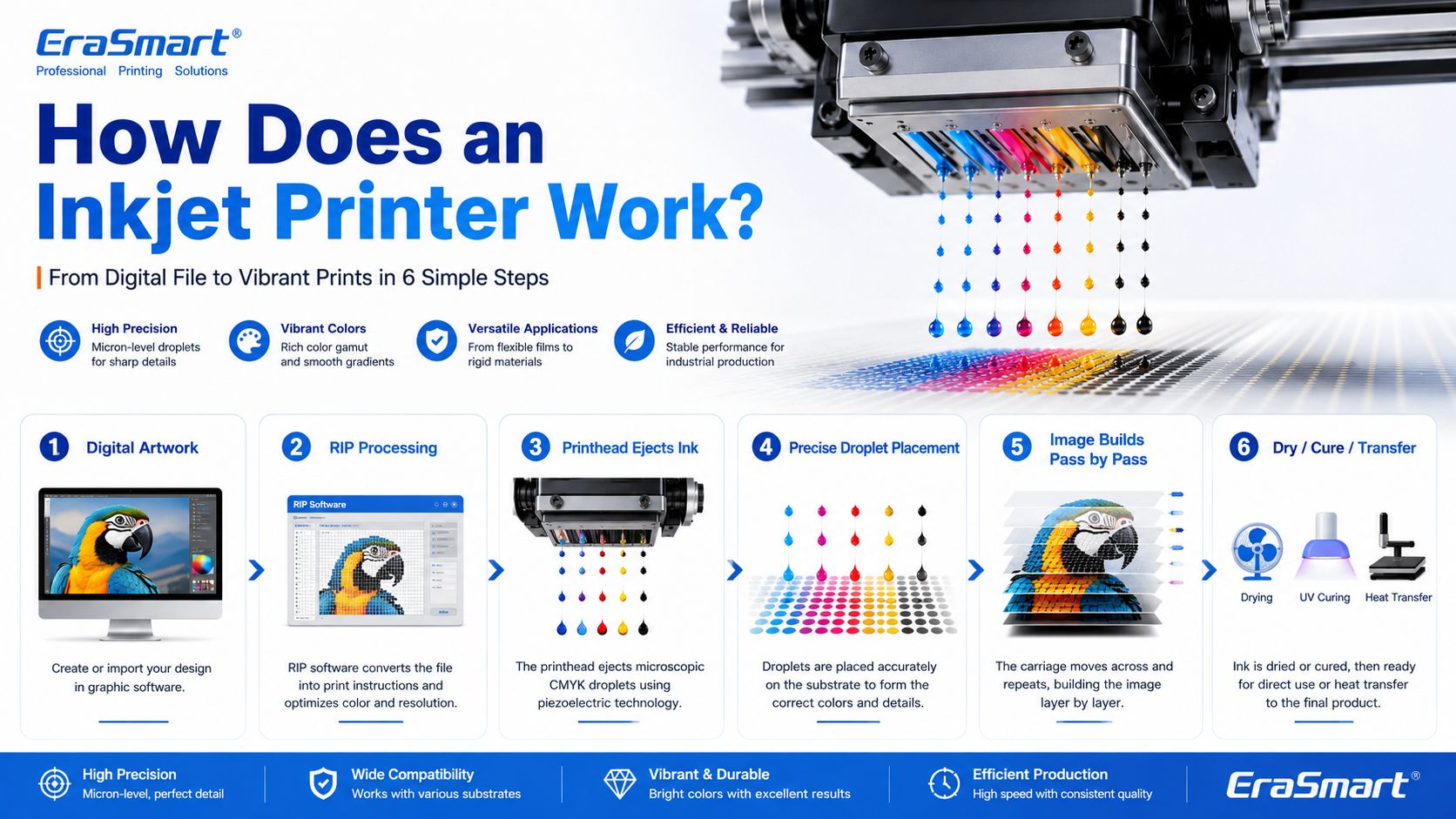
Inkjet printing may look simple from the outside, but inside the printer there is a precise digital control process.
A simplified workflow looks like this:
In an office inkjet printer, ink is usually printed onto paper and dries or absorbs into the paper surface. In an industrial or custom printing system, the process may be more specialized. For example, UV ink is cured by UV light, while DTF ink is printed onto PET film and later heat transferred onto fabric.

The printhead is the most important part of an inkjet printer. It contains many tiny nozzles that eject ink droplets. The printhead determines much of the printer’s resolution, droplet control, speed, and print quality.
In custom printing, printhead condition directly affects:
This is why printer maintenance is so important in DTF and UV printing. If the printhead nozzles are clogged or unstable, the final print may show banding, missing lines, weak colors, or poor detail.
For apparel printing users, EraSmart’s DTF 프린터 유지 관리 안내서 is a useful resource for understanding why nozzle checks, cleaning, white ink circulation, and daily care matter.
The ink system stores and delivers ink to the printhead. Different inkjet printers use different types of ink depending on the application.
Common ink types include:
For EraSmart customers, the most relevant ink systems are DTF ink, UV ink, white ink, and varnish.
에이 DTF 프린터 commonly uses CMYK ink plus white ink. The white ink helps designs appear clearly on dark garments. A UV 프린터 may use CMYK, white ink, and varnish to print on hard surfaces such as acrylic, glass, metal, wood, plastic, leather, and packaging materials.
If you want to understand how CMYK, white ink, and varnish work together in product customization, see EraSmart’s UV Ink Guide: CMYK, White Ink, and Varnish.
Nozzles are microscopic openings in the printhead. They eject ink droplets in controlled patterns.
Nozzle performance affects:
Nozzles can become clogged if ink dries, settles, or becomes contaminated. This is especially important for white ink systems because white ink contains heavier pigment particles and needs proper circulation and maintenance.
Inkjet printers need accurate motion control. Either the printhead moves across the material, the material moves under the printhead, or both are coordinated.
The motion system affects:
In UV flatbed printing, the platform and printhead movement must be stable so the image lands accurately on rigid objects. In DTF printing, film feeding must be smooth so the transfer image remains consistent.
RIP software converts artwork into printer-ready instructions. It controls color output, resolution, ink layering, white ink channels, varnish layers, print passes, and other production settings.
For custom printing businesses, RIP setup is important because it affects:
A good printer is only part of the system. Correct artwork preparation and RIP settings are also necessary for professional results.

Inkjet printing is not finished when ink leaves the nozzle. The ink must also become stable on the final product.
Different workflows use different finishing methods:
| Inkjet Workflow | What Happens After Printing |
|---|---|
| Office inkjet | Ink dries or absorbs into paper |
| DTF 인쇄 | Powder is applied, cured, then heat pressed onto fabric |
| UV 인쇄 | UV light cures the ink almost instantly |
| UV DTF 인쇄 | UV ink is printed on film, laminated, then applied as a transfer |
| 승화 | Printed transfer is heat pressed into polyester or coated blanks |
This is why inkjet technology can support many industries. The core droplet technology is similar, but the finishing process changes based on the product.

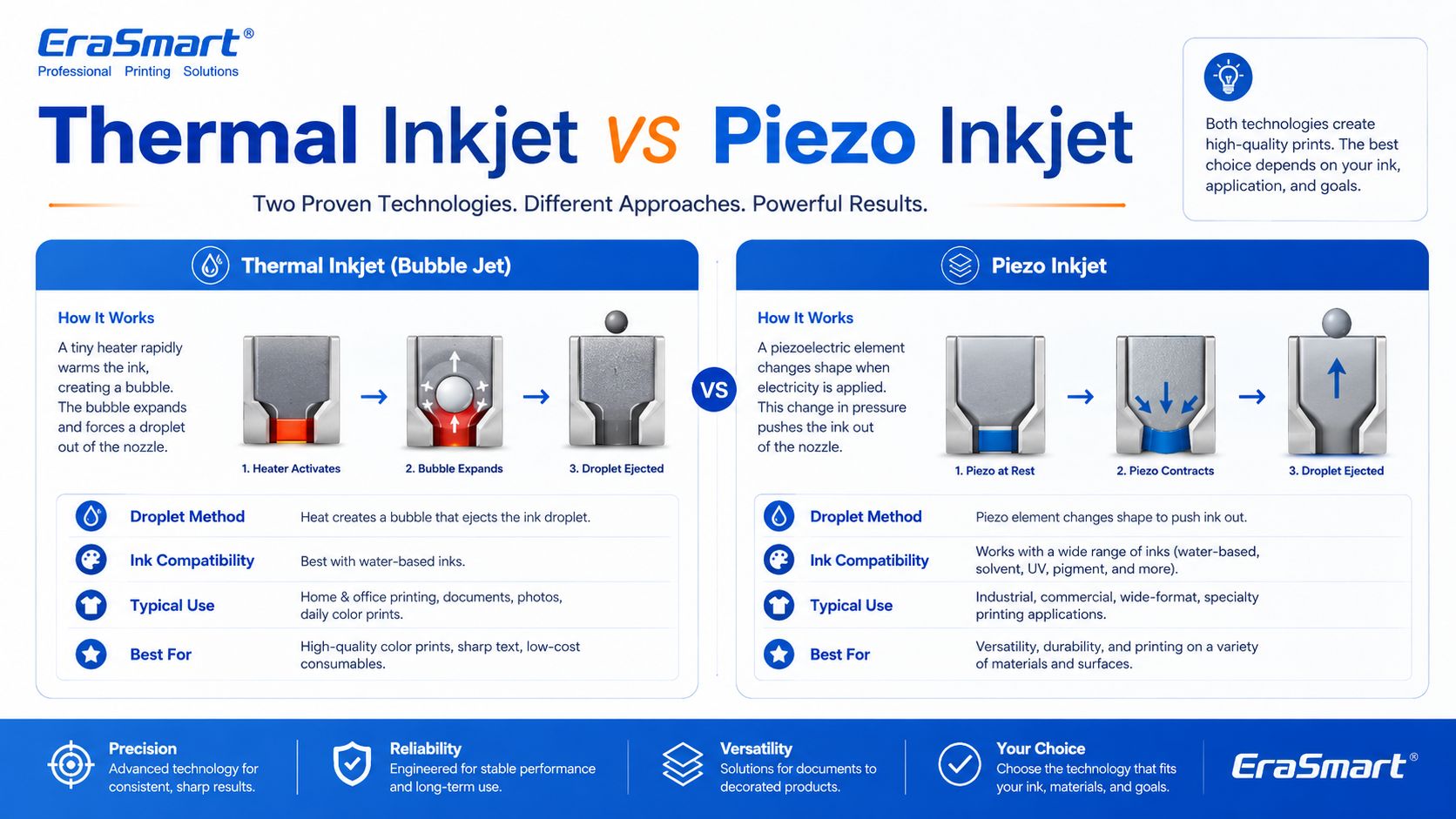
There are two major inkjet technologies: thermal inkjet and piezo inkjet.
Thermal inkjet uses heat to create a vapor bubble inside the ink chamber. The pressure from this bubble pushes a droplet of ink out of the nozzle.
Thermal inkjet is common in many desktop and office printers. It can produce high-quality prints on paper, but the ink must be compatible with heat-based ejection.
Piezo inkjet uses a piezoelectric element that changes shape when voltage is applied. This mechanical movement creates pressure and ejects ink droplets through the nozzle.
Piezo inkjet is widely used in many professional and industrial printing systems because it can work with a broader range of inks. Since the ink is not heated for ejection, piezo technology is suitable for inks that may not perform well in thermal systems, including many specialty inks used in industrial and custom printing.
For DTF, UV, and UV DTF applications, piezo-style inkjet technology is especially important because these workflows require precise ink control and compatibility with specialized ink types.
Inkjet printing can also be divided by how ink is delivered.
Drop-on-demand means ink droplets are ejected only when needed. This is common in many graphic and custom printing applications because it offers precise control and efficient ink use.
DTF, UV, and UV DTF printers generally operate around controlled digital droplet placement, which is why they can reproduce detailed designs and full-color artwork.
Continuous inkjet ejects a continuous stream of ink droplets. Some droplets are directed to the surface, while others may be recycled. This method is often used in industrial coding and marking, such as printing dates, batch codes, and product identification on packaging lines.
For EraSmart customers, drop-on-demand inkjet is the more relevant concept because custom apparel and product printing require accurate image reproduction rather than simple coding.
A DTF printer is a specialized inkjet printer for garment transfer production. Instead of printing directly onto a shirt, it prints the design onto PET transfer film.
The typical DTF process includes:
This process is useful for custom apparel because it supports:
If you are interested in building an apparel business, EraSmart’s DTF 프린터 category includes different models for startups, small studios, growing shops, and higher-volume production. You can also read the DTF 제작 워크플로우 to understand the full process from artwork to finished garment.
A UV printer is another specialized inkjet system. Instead of using standard paper ink, it uses UV-curable ink. The printer ejects ink onto the material surface, and UV light cures the ink almost immediately.
UV printing is suitable for many hard and semi-rigid materials, such as:
The advantage of UV printing is direct-to-object customization. You can print full-color designs, white ink layers, and varnish effects on many product surfaces.
EraSmart의 UV 프린터 category is designed for businesses that want to create custom gifts, signs, phone cases, packaging samples, acrylic products, and hard-surface promotional items. For material selection, see the UV 프린터 재료 가이드.
UV DTF printing combines UV inkjet printing with a transfer workflow. The printer prints UV ink onto A film, laminates it with B film, and creates a transfer decal that can be applied to hard surfaces.
UV DTF is useful for:
Unlike textile DTF, UV DTF is mainly for hard-surface transfers, not garments. It is a good choice for businesses that want to sell premium stickers, decals, labels, and cup wraps.
EraSmart의 UV DTF 프린터 is suitable for hard-surface transfer applications, while the A/B Film for UV DTF Printing guide explains how the film system works in the transfer process.
Inkjet printing is important because it allows digital, flexible, short-run production. Unlike traditional methods that require screens, plates, or molds, inkjet printing can print directly from a digital file.
This creates major advantages for custom businesses:
For example, a DTF apparel business can print different names, numbers, and graphics without preparing new screens. A UV printing business can print different logos on phone cases, acrylic signs, glass gifts, or packaging samples. A UV DTF business can produce custom decals and labels for many small brands.
This is why inkjet technology is no longer only about office printing. It is now a core technology for modern customization businesses.
Inkjet printing works directly from digital files. This makes it easy to change designs, personalize products, and produce short runs.
Inkjet printers can reproduce complex color images, gradients, photos, and illustrations. This is useful for apparel graphics, product decoration, stickers, and packaging samples.
Inkjet does not require plates or screens, so it is suitable for low-MOQ custom orders and on-demand production.
Each print can be different. This is useful for names, numbers, QR codes, serialized labels, personalized gifts, and custom designs.
Inkjet technology can be adapted to many surfaces and workflows, including paper, textiles, film, rigid materials, packaging, labels, and transfers.
A business can start with small orders and upgrade equipment as demand grows. This is why inkjet-based DTF, UV, and UV DTF systems are attractive to startups and growing shops.
Inkjet printers need regular maintenance. If nozzles clog, print quality declines. This is especially important for white ink, UV ink, and other specialty ink systems.
Not every ink works with every printhead or material. Ink viscosity, pigment size, curing method, and surface compatibility all matter.
Some surfaces need cleaning, primer, coating, or testing before printing. This is especially common in UV printing on glass, metal, plastic, and other hard materials.
Screen colors and printed colors are not always identical. Professional results require color profiles, test prints, correct RIP settings, and stable consumables.
Higher resolution, more passes, white ink layers, and varnish effects may improve quality but increase printing time.
In DTF printing, powdering, curing, and heat pressing affect durability. In UV DTF, lamination and application affect transfer quality. In UV printing, curing and adhesion affect final product quality.
This is one of the most common inkjet problems. It can be caused by dried ink, settled pigment, poor maintenance, incompatible ink, or long idle time.
Banding appears as unwanted horizontal or vertical lines. It can be caused by clogged nozzles, incorrect feed settings, poor calibration, or unstable ink flow.
Colors may look different from the screen because of material surface, ink type, printer profile, white ink layer, or lighting conditions.
In UV printing, poor adhesion can happen if the surface is oily, dusty, incompatible, or not treated correctly.
In DTF and UV printing, white ink must be managed carefully. Weak white ink can reduce color brightness, opacity, and dark-surface performance.
If ink is not dried, cured, or transferred correctly, the final product may smear, peel, crack, or lose durability.

The right inkjet printer depends on what you want to sell.
선택하세요 DTF 프린터 if your business focuses on:
For machine selection, read EraSmart’s DTF 프린터를 선택하는 방법 그리고 DTF 프린터 구매 체크리스트.
• 소규모 배치 맞춤화
• 디자인 테스트
• 낮은 진입 부담
소규모로 시작하여 작업 흐름을 테스트하고 개인 맞춤화 또는 가벼운 상업적 사용을 처리하는 것이 목표라면 가장 실용적인 선택은 관리 가능한 비용과 간단한 일상 운영을 갖춘 컴팩트한 설정입니다.
이러한 유형의 기계는 더 큰 A3 또는 A1 제작 장비를 너무 일찍 사용하지 않고 안정적인 진입점이 필요한 제작자, 최초 구매자 및 개인 스튜디오에 적합합니다.
• 현지 맞춤 주문
• 소규모 의류
• 스타트업 친화적인 워크플로우
이미 사업 아이디어가 있거나 현지 맞춤형 주문을 받거나 A4 입력 기계보다 더 많은 유연성이 필요한 소규모 스튜디오를 운영하는 경우 일반적으로 A3 범위로 이동하면 보다 실용적인 상업 작업 흐름이 생성됩니다.
이 모델은 고출력 산업 장비로 직접 이동하지 않고 더 강력한 출력 범위를 원하는 스타트업 브랜드, 스튜디오 운영자 및 초기 단계 상점에 더 적합합니다.
• 디자인이 풍부한 그래픽
• 빈번한 신규 드롭
• 프리미엄 시각적 프레젠테이션
귀하의 비즈니스가 빈번한 디자인 변경, 색상이 풍부한 아트워크, 상세한 이미지 및 보다 빠른 온라인 제품 테스트에 의존하는 경우, 보다 강력한 이미지 표현과 보다 원활한 상업적 유연성을 제공하는 모델을 선택하는 것이 합리적입니다.
이 그룹은 시각적 프레젠테이션과 새로운 디자인 출시가 비즈니스 모델의 중심인 온라인 판매자, 디자이너가 주도하는 브랜드, 크리에이티브 팀 및 상점에 매우 적합합니다.
• 일일 주문
• 더 나은 생산 리듬
• 더욱 안정적인 상용 출력
귀하의 비즈니스가 비정기적인 주문을 넘어 보다 안정적인 일일 생산량에 의존하기 시작하면 보다 원활한 작업 흐름, 보다 강력한 일관성 및 보다 나은 생산 리듬을 지원하는 기계를 선택하는 것이 더욱 중요해집니다.
이 수준은 일반적으로 구매자가 진입 가격에만 생각하지 않고 출력 안정성, 작업 흐름 효율성 및 장기적인 운영 실용성에 대해 더 진지하게 생각해야 하는 단계입니다.
• 더욱 빨라진 작업 흐름
• 수작업 부담 감소
• 생산 연속성 향상
귀하의 비즈니스가 기본적인 수동 생산을 넘어 보다 원활하고 생산 준비가 완료된 프로세스를 원하는 경우 보다 강력한 워크플로 통합과 더 높은 처리량 기대치를 지원하는 모델을 고려하는 것이 합리적입니다.
이 방향은 이미 꾸준한 주문을 받고 생산 마찰을 줄이고 반복성을 개선하며 일일 운영 규모 확대에 대비하려는 매장에 특히 적합합니다.
• 더 높은 생산량 목표
• 더 넓어진 인쇄 폭
• 산업생산리듬
비즈니스에 더 넓은 인쇄 폭, 더 강력한 출력 한도, 더 심각한 산업 생산 방향이 필요한 경우 A1 시리즈는 평가하기에 적합한 범주가 됩니다. 이 수준은 출력 연속성과 낮은 중단 비용이 중요한 운영 우선 순위인 비즈니스에 더 적합합니다.
생산 목표가 얼마나 공격적인지, 생산성 향상에 얼마나 많은 가치를 두는지에 따라 프린트 헤드 계층을 선택하십시오.
선택하세요 UV 프린터 if your business focuses on:
For material planning, read EraSmart’s UV 프린터 재료 가이드 그리고 How to Choose a UV Printer.
더 큰 플랫폼, 더 많은 제품 범위, 더 유연한 소규모 배치 생산이 필요한 사용자를 위한 더 강력한 선택입니다.
선택하세요 UV DTF 프린터 if your business focuses on:
To understand the film workflow, read EraSmart’s A/B Film for UV DTF Printing.
Inkjet printing is not one single business model. It is a technology foundation. The right machine depends on your target products.
A simple buying direction looks like this:
| 사업목표 | Recommended EraSmart Direction |
|---|---|
| Custom T-shirts, hoodies, apparel | DTF 프린터 |
| Acrylic, glass, metal, wood, phone cases | UV 프린터 |
| Stickers, cup wraps, labels, decals | UV DTF 프린터 |
| Apparel startup | A4 / A3 DTF Printer |
| Growing apparel shop | A3 MAX DTF / shaker workflow |
| Custom product studio | A4 / A3 UV Printer |
| Hard-surface transfer business | A3 UV DTF 프린터 |
If your business is apparel-first, start with EraSmart’s DTF 프린터 lineup. If your business is hard-product customization, compare the UV 프린터 range. If your business is stickers, decals, labels, and cup wraps, start with the UV DTF 프린터.
An inkjet printer is a digital printer that creates images by ejecting tiny ink droplets through microscopic nozzles onto a surface.
In basic office printing, that surface is usually paper. In custom printing, the surface may be PET film, transfer film, acrylic, glass, metal, wood, plastic, packaging board, fabric, or product blanks.
The most important point is this: inkjet printing is not only for documents and photos. It is the core technology behind many modern custom printing systems, including DTF printers, UV printers, and UV DTF printers.
For small businesses, inkjet technology makes it possible to print full-color designs, personalize products, produce short runs, reduce setup cost, and build flexible custom printing workflows.
Need help choosing the right inkjet-based printing system for your business? Share your target products, material type, print size, expected daily order volume, and budget range with EraSmart.
Our team can help you choose the right DTF 프린터,,, UV 프린터, 또는 UV DTF 프린터 for your custom printing business.
DTF 오븐
핫 프레스
조각 기계
머그잔 열전달
라미네이팅 머신
인쇄 잉크
핸드폰 케이스
유리 제품
청소 유체
면봉
whatsapp : +8618566233796
WeChat : +8618566233796
모바일 : +8618566233796
편물:www.erasmart.com
가게:www.erasmartmall.com
WhatsApp에 우리
몇 가지 세부 정보 만 제공하면 빠른 인용문을 얻을 수 있도록 도와 드리겠습니다!