
คู่มือหมึก UV: อธิบาย CMYK, หมึกสีขาว และสารเคลือบเงาสำหรับการพิมพ์ UV
ประสิทธิภาพของเครื่องพิมพ์ UV ไม่เพียงแต่ขึ้นอยู่กับเครื่องจักร หัวพิมพ์ และแท่นพิมพ์เท่านั้น แต่ยังขึ้นอยู่กับระบบหมึกด้วย CMYK สร้างกราฟิกสีเต็มรูปแบบ หมึกสีขาวรองรับวัสดุสีเข้มและโปร่งใส และสารเคลือบเงาเพิ่มความมันเงา พื้นผิว และเอฟเฟกต์การตกแต่งระดับพรีเมียม คู่มือนี้จะอธิบายวิธีการทำงานของแต่ละชั้นหมึกและวิธีเลือกการกำหนดค่าที่เหมาะสมสำหรับผลิตภัณฑ์ของคุณ
สรุประบบหมึก
CMYK
หมึกขาว
วานิช
การควบคุมเลเยอร์ RIP
ทำความเข้าใจเกี่ยวกับสี CMYK
CMYK สร้างภาพหลัก รวมถึงภาพถ่าย โลโก้ กราฟิก และอาร์ตเวิร์คของผลิตภัณฑ์
ใช้หมึกขาวอย่างถูกต้อง
หมึกสีขาวช่วยเพิ่มความเข้มของสีบนพื้นผิวโปร่งใส สีเข้ม และสี
เพิ่มเอฟเฟกต์วานิช
วานิชเพิ่มความมันเงา ไฮไลท์ เคลือบเฉพาะจุด และเพิ่มความโดดเด่นให้กับการตกแต่ง
รักษาความเสถียรของหมึก
การไหลเวียนของหมึกสีขาว การตรวจสอบหัวฉีด และขั้นตอนการทำความสะอาด ช่วยปกป้องผลผลิตรายวัน
ข้อมูลพื้นฐานเกี่ยวกับหมึก UV
เหตุใดการกำหนดค่าหมึก UV จึงมีความสำคัญ
ในการพิมพ์ UV การกำหนดค่าหมึกจะกำหนดว่าคุณสามารถผลิตผลิตภัณฑ์ใดได้บ้าง วัสดุใดที่คุณสามารถจัดการได้ และเอฟเฟ็กต์ภาพใดบ้างที่คุณสามารถขายได้ การตั้งค่าพื้นฐานเฉพาะสีอาจเพียงพอสำหรับการพิมพ์ธรรมดาบนวัสดุสีขาวหรือสีอ่อน อย่างไรก็ตาม การใช้งานการพิมพ์ UV เชิงพาณิชย์ส่วนใหญ่ต้องการมากกว่าเอาต์พุต CMYK พื้นฐาน
หมึกสีขาวจำเป็นสำหรับการพิมพ์บนพื้นผิวโปร่งใส สีเข้ม หรือสี วานิชสามารถเพิ่มมูลค่าพื้นผิวระดับพรีเมียมได้ผ่านการเคลือบเงา การเคลือบเฉพาะจุด พื้นผิวที่ยกขึ้น และการตกแต่งขั้นสุดท้าย สำหรับผู้ซื้อ การทำความเข้าใจ CMYK หมึกขาว และสารเคลือบเงา จะช่วยหลีกเลี่ยงการเลือกเครื่องพิมพ์ที่ดูราคาไม่แพงในตอนแรก แต่ไม่สามารถรองรับสินค้าที่พวกเขาต้องการขายจริงได้
ผู้ซื้อไม่ควรเพียงแต่ถามว่าสามารถพิมพ์วัสดุได้หรือไม่ พวกเขาควรถามด้วยว่าผลงานพิมพ์มีความเสถียร ทนทาน ทำซ้ำได้ และใช้งานได้จริงในเชิงพาณิชย์หรือไม่ วัสดุที่ใช้กับตัวอย่างเดียวอาจยังคงสร้างปัญหาในการผลิตในแต่ละวัน หากพื้นผิวไม่สอดคล้องกัน โค้งงอ มีฝุ่น มันมัน หรือจัดตำแหน่งยาก
กฎง่ายๆ
หากคุณต้องการพิมพ์เฉพาะบนวัสดุเรียบสีขาวหรือสีอ่อน CMYK อาจเพียงพอแล้ว หากคุณต้องการพิมพ์บนอะคริลิก แก้ว ผลิตภัณฑ์สีเข้ม สินค้าโปร่งใส หรือของขวัญระดับพรีเมียม หมึกสีขาวและสารเคลือบเงามีความสำคัญมากกว่ามาก
ตารางหลัก
CMYK เทียบกับหมึกสีขาวเทียบกับวานิชในการพิมพ์ UV
ใช้ตารางนี้เพื่อทำความเข้าใจอย่างรวดเร็วว่าแต่ละชั้นหมึก UV ทำหน้าที่อะไรและเมื่อใดที่จำเป็น
| เลเยอร์หมึก | ฟังก์ชั่นหลัก | เมื่อคุณต้องการมัน | วัสดุทั่วไป | จุดซื้อที่สำคัญ |
|---|---|---|---|---|
| CMYK | สร้างเอาต์พุตภาพสีเต็มรูปแบบ | งานพิมพ์ยูวีเกือบทั้งหมด | อะครีลิคสีขาว พลาสติกบาง ป้าย ของขวัญ เคสโทรศัพท์ | ตรวจสอบความเสถียรของสี การตั้งค่า RIP และโหมดการพิมพ์ |
| หมึกขาว | สร้างฐานด้านล่างและรองรับความทึบ | วัสดุโปร่งใส สีเข้ม หรือมีสี | อะครีลิคใส แก้ว เคสโทรศัพท์สีเข้ม วัสดุพิมพ์สี | ตรวจสอบการไหลเวียน การกวน การปิดฝา และขั้นตอนการบำรุงรักษา |
| วานิช | เพิ่มความแวววาว เคลือบเฉพาะจุด และเอฟเฟกต์ที่เพิ่มขึ้น | ผลิตภัณฑ์ระดับพรีเมียมและการตกแต่ง | ป้ายอะคริลิค ของขวัญ สินค้าแบรนด์ แผงตกแต่ง | ตรวจสอบการควบคุมเลเยอร์ ผลการบ่ม และการสนับสนุนซอฟต์แวร์ |
หมึกชั้น 1
หมึก CMYK ในการพิมพ์ UV คืออะไร?
หมึก CMYK เป็นรากฐานของการพิมพ์ยูวี ใช้สีฟ้า สีม่วงแดง สีเหลือง และสีดำเพื่อสร้างภาพ โลโก้ ข้อความ รูปแบบ และการออกแบบภาพถ่ายที่มีสีเต็มรูปแบบ สำหรับวัสดุสีขาวหรือสีอ่อนหลายชนิด CMYK อาจสร้างผลลัพธ์ที่ชัดเจนและสดใสได้ด้วยตัวเอง
อย่างไรก็ตาม CMYK เพียงอย่างเดียวนั้นไม่เพียงพอเสมอไป บนวัสดุโปร่งใส สีอาจดูอ่อนลงเนื่องจากแสงส่องผ่านวัสดุพิมพ์ บนวัสดุสีเข้ม สีอาจสูญเสียความสว่างเนื่องจากพื้นหลังส่งผลต่อลักษณะที่ปรากฏขั้นสุดท้าย นั่นคือเหตุผลที่หมึกสีขาวมักใช้ร่วมกับ CMYK ในการพิมพ์ UV แบบมืออาชีพ
ใช้ดีที่สุด
กราฟิกสีเต็มรูปแบบบนพื้นผิวสีขาว สีอ่อน หรือทึบแสงอยู่แล้ว
ข้อได้เปรียบหลัก
สร้างเอาต์พุตสีมาตรฐานสำหรับโลโก้ รูปภาพ ข้อความ และงานศิลปะการตกแต่ง
ข้อจำกัดหลัก
สีอาจดูจางลงบนวัสดุโปร่งใส สีเข้ม หรือมีสีจัดจ้านโดยไม่มีหมึกสีขาว
หมึกชั้น 2
หมึกสีขาวใช้ในการพิมพ์ UV คืออะไร?
หมึกสีขาวเป็นส่วนที่สำคัญที่สุดอย่างหนึ่งของเครื่องพิมพ์ UV ระดับมืออาชีพ โดยทั่วไปจะใช้เป็นชั้นรองพื้นก่อนการพิมพ์สี ฐานด้านล่างสีขาวนี้ปิดกั้นเอฟเฟกต์ของวัสดุพื้นหลัง และช่วยให้สี CMYK ดูสว่างขึ้น เข้มขึ้น และแม่นยำยิ่งขึ้น
หมึกสีขาวมีความสำคัญอย่างยิ่งสำหรับอะคริลิกใส แก้ว พลาสติกใส เคสโทรศัพท์สีเข้ม ของขวัญหลากสี และผลิตภัณฑ์ตกแต่งมากมาย หากไม่มีหมึกสีขาว สีที่พิมพ์ออกมาอาจดูโปร่งใส มัว หรือมองเห็นได้ยาก
| สถานการณ์วัสดุ | ปราศจากหมึกขาว | ด้วยหมึกสีขาว | คำแนะนำ |
|---|---|---|---|
| อะคริลิคใส | สีอาจดูโปร่งใสหรือสีอ่อน | สีจะเข้มขึ้นและมองเห็นได้ชัดเจนยิ่งขึ้น | ใช้ฐานด้านล่างสีขาวสำหรับงานเชิงพาณิชย์ส่วนใหญ่ |
| กระจก | การออกแบบอาจขาดความทึบ | ภาพที่พิมพ์มีความชัดเจนและมั่นคงยิ่งขึ้น | ทดสอบชั้นสีขาวและการยึดเกาะเข้าด้วยกัน |
| เคสโทรศัพท์สีเข้ม | สีอาจถูกซ่อนไว้โดยพื้นหลัง | สีดูสดใสยิ่งขึ้น | ใช้หมึกสีขาวเพื่องานศิลปะที่สดใส |
| วัสดุพิมพ์สี | สีพื้นหลังส่งผลต่องานศิลปะ | งานศิลปะดูแม่นยำยิ่งขึ้น | ใช้หมึกสีขาวเมื่อความถูกต้องของสีมีความสำคัญ |
การแจ้งเตือนการบำรุงรักษาหมึกสีขาว
หมึกสีขาวมีเม็ดสีที่หนักกว่า ดังนั้นผู้ซื้อควรใส่ใจกับการไหลเวียนของหมึกสีขาว การกวน การป้องกันหัวฉีด และการบำรุงรักษาประจำวันอย่างใกล้ชิด ระบบหมึกสีขาวที่ดีสามารถลดตะกอน ความเสี่ยงในการอุดตัน และผลผลิตที่ไม่เสถียร
หมึกชั้น 3
สารเคลือบเงาในการพิมพ์ UV คืออะไร?
วานิชเป็นชั้นหมึกใสที่สามารถรักษาด้วยรังสียูวีได้ ซึ่งใช้เพื่อสร้างไฮไลท์แบบมันเงา การเคลือบเฉพาะจุด พื้นผิวการตกแต่ง และเอฟเฟ็กต์นูน สามารถทำให้ผลิตภัณฑ์สิ่งพิมพ์ดูพรีเมียมยิ่งขึ้น และช่วยให้ธุรกิจขายสินค้าสั่งทำพิเศษที่มีมูลค่าสูงขึ้นได้
วานิชมักใช้กับป้ายอะคริลิก ผลิตภัณฑ์ของขวัญ แผงตกแต่ง ตัวอย่างบรรจุภัณฑ์ โลโก้ ป้ายชื่อ และสินค้าที่มีตราสินค้า ไม่จำเป็นสำหรับทุกงาน แต่อาจมีคุณค่าได้เมื่อลูกค้าต้องการรูปลักษณ์หรือสัมผัสที่พรีเมียมยิ่งขึ้น
เอฟเฟกต์เงา
เพิ่มความเงางามให้กับพื้นที่ที่เลือกหรือพื้นผิวการพิมพ์ทั้งหมด
สปอตวานิช
เน้นโลโก้ รูปแบบ ข้อความ หรือรายละเอียดการออกแบบ
พื้นผิวที่ยกขึ้น
สร้างเอฟเฟกต์สัมผัสโดยการสร้างชั้นวานิช
พื้นผิวระดับพรีเมียม
ปรับปรุงมูลค่าการรับรู้สำหรับของขวัญและป้ายแบบกำหนดเอง
โหมดเลเยอร์
เหตุใด White Ink จึงต้องการความสนใจมากกว่านี้
หมึกสีขาวมีคุณค่าเนื่องจากขยายขอบเขตของวัสดุและลักษณะพิเศษที่เครื่องพิมพ์ UV สามารถรองรับได้ อย่างไรก็ตาม ยังต้องมีการบำรุงรักษาอย่างระมัดระวังมากกว่าหมึกสีมาตรฐานอีกด้วย เม็ดสีที่หนักกว่าในหมึกสีขาวสามารถจับตัวได้หากระบบหมึกได้รับการดูแลไม่ดี
ก่อนที่จะซื้อเครื่องพิมพ์ UV ผู้ใช้ควรสอบถามว่าเครื่องจัดการกับการไหลเวียนของหมึกสีขาว การกวน การปิดฝา การทำความสะอาดหัวฉีด และการป้องกันเมื่อไม่ได้ใช้งานเป็นเวลานานอย่างไร รายละเอียดเหล่านี้ส่งผลต่อความน่าเชื่อถือในแต่ละวันและการปกป้องหัวพิมพ์ในระยะยาว
| พื้นที่ซ่อมบำรุง | ทำไมมันถึงสำคัญ | คำถามที่จะถาม |
|---|---|---|
| การไหลเวียนของหมึกสีขาว | ช่วยลดตะกอนและผลผลิตสีขาวไม่สม่ำเสมอ | เครื่องพิมพ์รองรับการไหลเวียนของหมึกสีขาวหรือไม่ |
| การกวนหมึก | ช่วยทำให้เม็ดสีกระจายตัว | ตลับหมึกมีการกวนหรือปั่นป่วนหรือไม่ |
| สถานีสูงสุด | ปกป้องหัวพิมพ์เมื่อไม่ได้พิมพ์ | สถานี capping ปิดผนึกได้ดีแค่ไหน? |
| กิจวัตรการตรวจสอบหัวฉีด | ช่วยตรวจจับการอุดตันก่อนการผลิต | แนะนำให้ตรวจสอบหัวฉีดรายวันแบบใด? |
| การป้องกันการใช้งานที่ยาวนาน | สิ่งสำคัญเมื่อไม่ได้ใช้งานเครื่องพิมพ์เป็นเวลาหลายวัน | ผู้ใช้ควรทำอย่างไรก่อนที่เครื่องจะไม่ได้ใช้งาน? |
ซอฟต์แวร์และการควบคุมเลเยอร์
เหตุใดซอฟต์แวร์ RIP จึงมีความสำคัญสำหรับหมึกขาวและสารเคลือบเงา
การพิมพ์ยูวีมักต้องใช้หลายชั้น ผู้ใช้อาจต้องใช้หมึกสีขาวใต้สี เคลือบเงาทับสี หรือเฉพาะจุดเคลือบเงา ซอฟต์แวร์ RIP ควบคุมวิธีการสร้าง จัดเรียง และพิมพ์เลเยอร์เหล่านี้
หากไม่มีการควบคุมชั้นที่เหมาะสม ผู้ใช้อาจพบกับความครอบคลุมของสีขาวที่อ่อนแอ การเคลือบเงาผิดตำแหน่ง ผลลัพธ์สีที่ไม่ถูกต้อง การได้สีที่ไม่ดี หรือขั้นตอนการทำงานที่ไม่มีประสิทธิภาพ สำหรับผู้ซื้อ ซอฟต์แวร์ RIP ควรได้รับการประเมินร่วมกับฮาร์ดแวร์เครื่องพิมพ์
การควบคุมเลเยอร์หมึกสีขาว
ซอฟต์แวร์ควรรองรับการสร้างและการวางฐานด้านล่างสีขาวสำหรับวัสดุสีเข้มหรือโปร่งใส
การควบคุมชั้นวานิช
ซอฟต์แวร์ควรอนุญาตให้ผู้ใช้สามารถทาวานิชในพื้นที่ที่เลือกหรือสร้างเอฟเฟ็กต์ตกแต่งเป็นชั้นได้
โหมดผ่านและคุณภาพ
โหมดการส่งผ่านที่แตกต่างกันช่วยสร้างสมดุลระหว่างคุณภาพการพิมพ์ ความเร็วในการผลิต ความหนาของหมึก และผลลัพธ์ของพื้นผิว
การตั้งค่าสีและวัสดุ
โปรไฟล์และการตั้งค่าที่แนะนำช่วยให้ผู้ใช้ได้รับผลลัพธ์ที่ทำซ้ำได้มากขึ้นในวัสดุต่างๆ
การแก้ไขปัญหา
ปัญหาหมึก UV ทั่วไปและความหมายโดยทั่วไป
ปัญหาเกี่ยวกับหมึกมักมาจากการเตรียมวัสดุ สภาพระบบหมึก การตั้งค่า RIP ความแข็งแรงในการแห้งตัว และลักษณะการบำรุงรักษา ตารางด้านล่างสรุปปัญหาทั่วไป
| ปัญหา | สาเหตุที่เป็นไปได้ | สิ่งที่ต้องตรวจสอบก่อน | คำแนะนำที่เกี่ยวข้อง |
|---|---|---|---|
| สีดูอ่อนแอบนวัสดุใส | ไม่มีฐานสีขาวหรือชั้นสีขาวอ่อน | การตั้งค่าเลเยอร์หมึกสีขาวและลำดับการพิมพ์ | คู่มือวัสดุ |
| หมึกขาวดูไม่สม่ำเสมอ | ตะกอน ปัญหาหัวฉีด หรือการไหลเวียนไม่ดี | ตรวจสอบการไหลเวียนของหมึกสีขาวและหัวฉีด | คู่มือการบำรุงรักษา |
| วานิชไม่มันเงาพอ | ความหนาของชั้น การตั้งค่าการบ่ม หรือปัญหาพื้นผิว | ชั้นวานิชและความแข็งแรงในการบ่มด้วยรังสียูวี | คู่มือการแก้ไขปัญหา |
| หมึกมีรอยขีดข่วน | การยึดเกาะไม่ดีหรือการเตรียมวัสดุไม่ถูกต้อง | การทำความสะอาดพื้นผิวและความเข้ากันได้ของวัสดุ | คู่มือวัสดุ |
| มีแถบหรือเส้นขาดหายไป | หัวฉีดอุดตันหรือสภาพหัวพิมพ์ | การทดสอบหัวฉีดและขั้นตอนการทำความสะอาด | คู่มือการแก้ไขปัญหา |
เคล็ดลับการซื้อ
คำถามเกี่ยวกับหมึก UV ที่ควรถามก่อนซื้อเครื่องพิมพ์
| ปัญหา | สาเหตุที่เป็นไปได้ | สิ่งที่ต้องตรวจสอบก่อน | คำแนะนำที่เกี่ยวข้อง |
|---|---|---|---|
| สีดูอ่อนแอบนวัสดุใส | ไม่มีฐานสีขาวหรือชั้นสีขาวอ่อน | การตั้งค่าเลเยอร์หมึกสีขาวและลำดับการพิมพ์ | คู่มือวัสดุ |
| หมึกขาวดูไม่สม่ำเสมอ | ตะกอน ปัญหาหัวฉีด หรือการไหลเวียนไม่ดี | ตรวจสอบการไหลเวียนของหมึกสีขาวและหัวฉีด | คู่มือการบำรุงรักษา |
| วานิชไม่มันเงาพอ | ความหนาของชั้น การตั้งค่าการบ่ม หรือปัญหาพื้นผิว | ชั้นวานิชและความแข็งแรงในการบ่มด้วยรังสียูวี | คู่มือการแก้ไขปัญหา |
| หมึกมีรอยขีดข่วน | การยึดเกาะไม่ดีหรือการเตรียมวัสดุไม่ถูกต้อง | การทำความสะอาดพื้นผิวและความเข้ากันได้ของวัสดุ | คู่มือวัสดุ |
| มีแถบหรือเส้นขาดหายไป | หัวฉีดอุดตันหรือสภาพหัวพิมพ์ | การทดสอบหัวฉีดและขั้นตอนการทำความสะอาด | คู่มือการแก้ไขปัญหา |
เส้นทางโมเดล EraSmart
คุณควรพิจารณาการกำหนดค่าเครื่องพิมพ์ UV แบบใด
เมื่อเปรียบเทียบเครื่องพิมพ์ EraSmart UV ให้พิจารณาวัสดุเป้าหมายของคุณ ไม่ว่าคุณต้องการหมึกสีขาว ไม่ว่าเอฟเฟกต์เคลือบเงาจะเป็นส่วนหนึ่งของมูลค่าผลิตภัณฑ์ของคุณหรือไม่ และขนาดการพิมพ์ที่ผลิตภัณฑ์ของคุณต้องการหรือไม่
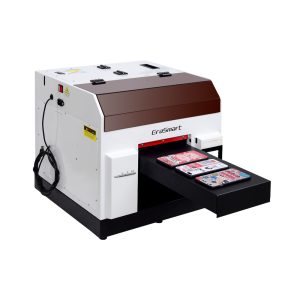
ตัวเลือกที่ใช้งานได้จริงสำหรับเคสโทรศัพท์ อุปกรณ์เสริม ผลิตภัณฑ์อะคริลิกขนาดเล็ก และขั้นตอนการปรับแต่งของขวัญ
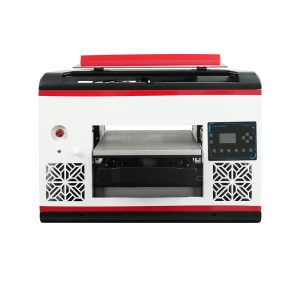
เหมาะสำหรับผู้ใช้ที่ต้องการพื้นที่พื้นเรียบที่ใหญ่ขึ้นและครอบคลุมวัสดุได้กว้างขึ้น
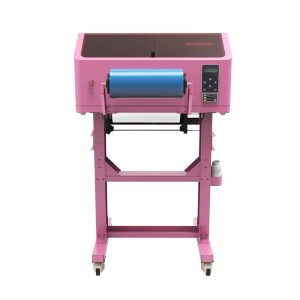
เหมาะสำหรับสติ๊กเกอร์ UV DTF กระดาษห่อแก้ว สติ๊กเกอร์ ขวด และงานลอกพื้นผิวแข็ง
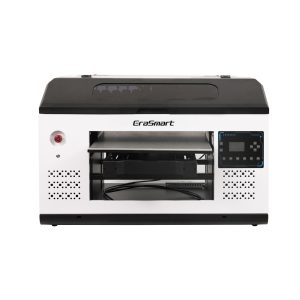
เหมาะสมกว่าสำหรับแผง ป้าย ป้าย และทีมผลิตที่ใหญ่ขึ้นซึ่งต้องการพื้นที่แพลตฟอร์มมากขึ้น
ข้อผิดพลาดทั่วไป
ข้อผิดพลาดเกี่ยวกับหมึก UV ที่ควรหลีกเลี่ยง
ละเว้นการบำรุงรักษาหมึกสีขาว
หมึกสีขาวมีประสิทธิภาพแต่จำเป็นต้องบำรุงรักษา ผู้ซื้อไม่ควรปฏิบัติเหมือนหมึก CMYK ธรรมดา
การพิมพ์วัสดุโปร่งใสโดยไม่ต้องใช้หมึกสีขาว
สีอาจดูจางหรือโปร่งใสบนอะคริลิกใสหรือกระจกโดยไม่มีฐานสีขาวที่เหมาะสม
สมมติว่าวานิชเป็นเพียงการตกแต่งเท่านั้น
วานิชสามารถกลายเป็นคุณสมบัติที่มีคุณค่าของผลิตภัณฑ์ได้เมื่อใช้กับสปอตกลอส พื้นผิว และการตกแต่งระดับพรีเมียม
ไม่ตรวจสอบการควบคุมเลเยอร์ RIP
หมึกสีขาวและสารเคลือบเงาต้องมีการควบคุมชั้นที่แม่นยำ ฮาร์ดแวร์เพียงอย่างเดียวไม่เพียงพอ
คำถามที่พบบ่อย
-
1. เครื่องพิมพ์ UV ใช้หมึกอะไร?
เครื่องพิมพ์ UV ใช้หมึก UV-curable ที่ถูกบ่มด้วยแสง UV ในระหว่างกระบวนการพิมพ์ ช่องหมึกทั่วไป ได้แก่ CMYK หมึกขาว และวานิช
-
2. CMYK ในการพิมพ์ UV คืออะไร?
CMYK หมายถึงหมึกสีฟ้า สีม่วงแดง สีเหลือง และสีดำที่ใช้ในการสร้างภาพสี โลโก้ กราฟิก และข้อความ
-
3. เหตุใดเครื่องพิมพ์ UV จึงต้องใช้หมึกสีขาว
หมึกสีขาวใช้เป็นฐานสำหรับวัสดุสีเข้ม สี หรือโปร่งใส ช่วยให้สี CMYK ดูสว่างและแม่นยำยิ่งขึ้น
-
4. สารเคลือบเงาในการพิมพ์ UV คืออะไร?
วานิชเป็นชั้นใสที่สามารถรักษาด้วยรังสียูวีได้ ซึ่งใช้ในการสร้างความมันเงา การเคลือบเฉพาะจุด เอฟเฟกต์ที่นูนขึ้น และพื้นผิวระดับพรีเมียม
-
5. ฉันจำเป็นต้องใช้หมึกสีขาวเสมอหรือไม่?
ไม่เสมอไป โดยปกติแล้วหมึกสีขาวจำเป็นสำหรับวัสดุโปร่งใส สีเข้ม หรือมีสี แต่อาจไม่จำเป็นสำหรับวัสดุสีขาวหรือสีอ่อน
-
6. ฉันจำเป็นต้องเคลือบเงาเสมอหรือไม่?
ไม่ วานิชเป็นทางเลือก แต่สามารถเพิ่มมูลค่าผลิตภัณฑ์ได้เมื่อลูกค้าต้องการความมันเงา พื้นผิว เอฟเฟกต์เฉพาะจุด หรือการตกแต่งระดับพรีเมียมมากขึ้น
-
7. เหตุใดหมึกสีขาวจึงดูแลรักษายากกว่า
หมึกสีขาวมีเม็ดสีที่หนักกว่า ดังนั้นจึงต้องมีการไหลเวียนที่เหมาะสม การกวน การตรวจสอบหัวฉีด และการป้องกันหัวพิมพ์เพื่อรักษาเอาต์พุตที่เสถียร
-
8. หมึก UV สามารถพิมพ์บนอะคริลิกและกระจกได้หรือไม่?
ใช่ แต่อะคริลิกและแก้วมักต้องใช้หมึกสีขาวเพื่อให้ได้สีที่เข้มกว่า และการเตรียมพื้นผิวอย่างระมัดระวังเพื่อการยึดเกาะที่ดีขึ้น
ซีรี่ส์เครื่องพิมพ์ EraSmart


High-quality UV Printers for metal, acrylic, glass, wood & more. Instant curing, vivid 1440dpi prints, versatile for diverse materials.

พิมพ์สติ๊กเกอร์นูนสีสดใสด้วย **CMYK + สีขาว + วานิช** ได้ในรอบเดียว ไม่มีแป้ง ไม่มีเตาอบ ลอกและติดบนสิ่งของที่เรียบหรือโค้งได้ภายในไม่กี่นาที
ไม่พบคำแนะนำที่เหมาะสมใช่ไหม รับการสนับสนุนด้านเทคนิคฟรีทันที!
เพียงแค่ให้รายละเอียดเล็กน้อยและเราจะช่วยให้คุณได้รับใบเสนอราคาด่วน!
เครื่องพิมพ์ Erasmart
เครื่องพิมพ์ UV
เครื่องพิมพ์ DTF
เครื่องพิมพ์ DTG
เครื่องกดความร้อน
เครื่องพิมพ์โฆษณา
เครื่องมือเครื่องพิมพ์
เตาอบ DTF
กดร้อน
เครื่องแกะสลัก
การถ่ายเทความร้อนของแก้ว
เครื่องเคลือบ
สิ้นเปลือง
หมึกพิมพ์
เคสโทรศัพท์มือถือ
ผลิตภัณฑ์แก้ว
ทำความสะอาดของเหลว
ผ้าฝ้าย
ติดต่อเรา
whatsapp: +8618566233796
WeChat: +8618566233796
มือถือ: +8618566233796
เว็บ:www.erasmart.com
ร้านค้า:www.erasmartmall.com
วอทส์แอพหาเรา
ขอใบเสนอราคา
เพียงแค่ให้รายละเอียดเล็กน้อยและเราจะช่วยให้คุณได้รับใบเสนอราคาด่วน!
ดาวน์ลง
ปล่อยให้คุณส่งอีเมลและส่ง URL ดาวน์โหลดไปที่อีเมล
ต้องการราคาเครื่องพิมพ์ใช่ไหม?
บอกความต้องการการพิมพ์ของคุณให้เราทราบ ทีมงานของเราจะตอบกลับภายใน 24 ชั่วโมง