
คู่มือการบำรุงรักษาเครื่องพิมพ์ UV: การทำความสะอาดรายวัน การดูแลหมึกขาว และความเสถียรในระยะยาว
เครื่องพิมพ์ UV สามารถผลิตผลิตภัณฑ์แบบกำหนดเองที่มีมูลค่าสูงได้ แต่ผลงานที่มีเสถียรภาพนั้นขึ้นอยู่กับการบำรุงรักษาตามปกติ คู่มือนี้อธิบายการทำความสะอาดรายวัน การหมุนเวียนหมึกสีขาว การตรวจสอบหัวฉีด การดูแลสถานีปิดฝา การทำความสะอาดแท่น การตรวจสอบหลอด UV การป้องกันเมื่อไม่ได้ใช้งานเป็นเวลานาน และข้อผิดพลาดในการบำรุงรักษาทั่วไปที่ผู้ซื้อและผู้ปฏิบัติงานควรหลีกเลี่ยง
ลำดับความสำคัญในการบำรุงรักษา
ก่อนการพิมพ์
รายวัน
รายสัปดาห์
ไม่ได้ใช้งานนาน
ปกป้องหัวพิมพ์
การตรวจสอบหัวฉีด การดูแลสถานีปิดฝา และขั้นตอนการทำความสะอาดช่วยลดความเสี่ยงในการอุดตัน
รักษาหมึกสีขาว
หมึกสีขาวต้องมีการหมุนเวียน การกวน และการตรวจสอบผลลัพธ์อย่างสม่ำเสมอเพื่อความคงตัว
รักษาแพลตฟอร์มให้สะอาด
ฝุ่น คราบหมึก และตำแหน่งที่ไม่สม่ำเสมออาจส่งผลต่อคุณภาพการพิมพ์และการยึดเกาะ
ป้องกันความเสียหายที่ไม่ได้ใช้งานเป็นเวลานาน
การปิดเครื่องอย่างถูกต้องและการดูแลที่ไม่ได้ใช้งานจะช่วยลดปัญหาการทำให้แห้ง ตะกอน และการเริ่มต้นทำงาน
พื้นฐานการบำรุงรักษา
เหตุใดการบำรุงรักษาเครื่องพิมพ์ UV จึงแตกต่างจากการพิมพ์ทั่วไป
เครื่องพิมพ์ UV ใช้หมึก UV-curable ซึ่งได้รับการบ่มด้วยแสง UV ในระหว่างการพิมพ์ สิ่งนี้ทำให้การพิมพ์ UV มีความยืดหยุ่นของวัสดุที่แข็งแกร่งและมีศักยภาพในการผลิตที่รวดเร็ว แต่ยังหมายความว่าผู้ปฏิบัติงานจะต้องควบคุมสภาพของหมึก สถานะหัวฉีด ความสะอาดของแท่น ประสิทธิภาพการบ่ม และการเตรียมวัสดุอย่างระมัดระวัง
หมึกสีขาวมีความสำคัญอย่างยิ่งในการพิมพ์แบบ UV เนื่องจากรองรับวัสดุที่โปร่งใส สีเข้ม และเป็นสี อย่างไรก็ตาม หมึกสีขาวยังต้องการการดูแลเป็นพิเศษ เนื่องจากเม็ดสีสามารถจับตัวได้หากระบบหมึกไม่ได้รับการดูแลอย่างเหมาะสม เพื่อความน่าเชื่อถือในระยะยาว การบำรุงรักษาควรถือเป็นส่วนหนึ่งของขั้นตอนการผลิต ไม่ใช่ขั้นตอนการซ่อมฉุกเฉิน
กฎง่ายๆ
ควรตรวจสอบเครื่องพิมพ์ UV ก่อนพิมพ์ ทำความสะอาดหลังการผลิต บำรุงรักษาทุกสัปดาห์ และป้องกันอย่างระมัดระวังก่อนที่จะมีการใช้งานเป็นเวลานาน กิจวัตรประจำวันเล็กๆ น้อยๆ มักจะป้องกันปัญหาการหยุดทำงานที่ใหญ่กว่าได้
กำหนดการบำรุงรักษา
ตารางการบำรุงรักษาเครื่องพิมพ์ UV
ใช้กำหนดการบำรุงรักษานี้เป็นกรอบการทำงานในทางปฏิบัติ กิจวัตรที่แน่นอนควรเป็นไปตามคู่มือเครื่องและการกำหนดค่าระบบหมึก
| ความถี่ | งานบำรุงรักษา | ทำไมมันถึงสำคัญ | เคล็ดลับผู้ประกอบการ |
|---|---|---|---|
| ก่อนการพิมพ์ | การทดสอบหัวฉีด การตรวจสอบแท่น การทำความสะอาดพื้นผิววัสดุ การยืนยันความสูง | ป้องกันแถบคาด การพิมพ์ที่พร่ามัว การกระแทกที่ศีรษะ และการยึดเกาะที่ไม่ดี | ห้ามเริ่มการผลิตก่อนตรวจสอบรูปแบบหัวฉีด |
| ระหว่างการพิมพ์ | ตรวจสอบการไหลของหมึก สีของงานพิมพ์ ความเสถียรของแท่นพิมพ์ และผลการแห้งตัว | ตรวจจับปัญหาก่อนที่จะเสียทั้งแบทช์ | ตรวจสอบชิ้นงานที่เสร็จแล้วชิ้นแรกก่อนดำเนินการผลิตมวลออกต่อไป |
| หลังการพิมพ์ | ทำความสะอาดแท่น ลบคราบหมึก ตรวจสอบพื้นที่ปิดฝา จัดระเบียบไฟล์ | ช่วยให้เครื่องพิมพ์พร้อมสำหรับงานต่อไป | อย่าทิ้งฝุ่นหรือชิ้นส่วนที่หลวมไว้บนแท่น |
| รายวัน | ตรวจสอบสถานะหมึกสีขาว ระดับหมึกเสีย สภาพหัวฉีด และซีลปิดฝา | ปกป้องความเสถียรของหมึกสีขาวและสภาพของหัวพิมพ์ | หมึกสีขาวควรถือเป็นการบำรุงรักษารายวัน |
| รายสัปดาห์ | ทำความสะอาดที่ปัดน้ำฝน สถานีปิดฝา ราง เซ็นเซอร์ และบริเวณหมึกโดยรอบ | ลดปัญหาเกี่ยวกับกลไกและหมึก | กำหนดเวลาการบำรุงรักษารายสัปดาห์ แม้ว่าการผลิตจะมีปริมาณน้อยก็ตาม |
| ไม่ได้ใช้งานนาน | ปฏิบัติตามการป้องกันการปิดระบบ การดูแลส่วนหัว การดูแลเส้นทางหมึก และรีสตาร์ทการตรวจสอบ | ป้องกันการแห้ง ตะกอน และความล้มเหลวในการเริ่มต้น | อย่าปล่อยเครื่องพิมพ์ UV ทิ้งไว้โดยไม่ได้เตรียมการ |
ก่อนการพิมพ์
รายการตรวจสอบการบำรุงรักษาก่อนพิมพ์
งานพิมพ์ UV ที่มีความเสถียรเริ่มต้นก่อนที่จะกดปุ่มพิมพ์ การบำรุงรักษาก่อนการพิมพ์ช่วยป้องกันปัญหาหัวฉีด การยึดเกาะไม่ดี ความสูงไม่ถูกต้อง และข้อบกพร่องเกี่ยวกับวัสดุ
เรียกใช้การตรวจสอบหัวฉีด
ตรวจสอบว่าช่อง CMYK หมึกขาว และวานิชแสดงผลอย่างถูกต้องก่อนการผลิตหรือไม่ เส้นที่ขาดหายไปอาจทำให้เกิดแถบคาด สีขาวจางลง หรือสารเคลือบเงาที่ไม่สม่ำเสมอ
ทำความสะอาดพื้นผิววัสดุ
ฝุ่น น้ำมัน รอยนิ้วมือ และสารเคลือบสามารถลดการยึดเกาะและทำให้ผลิตภัณฑ์สำเร็จรูปดูไม่สอดคล้องกัน
ตรวจสอบความสูงของวัตถุ
ความสูงที่ไม่ถูกต้องอาจทำให้การพิมพ์ไม่ชัด ความแม่นยำต่ำ หรือการชนกันของหัวพิมพ์ ตรวจสอบระยะห่างก่อนพิมพ์สินค้าที่มีความหนาหรือไม่สม่ำเสมอ
ยืนยันการตั้งค่า RIP
ตรวจสอบลำดับชั้น การตั้งค่าหมึกสีขาว ชั้นวานิช โหมดการส่งผ่าน และโปรไฟล์วัสดุก่อนเริ่มงาน
การบำรุงรักษารายวัน
กิจวัตรการบำรุงรักษาเครื่องพิมพ์ UV รายวัน
การบำรุงรักษารายวันเป็นพฤติกรรมที่สำคัญที่สุดสำหรับความเสถียรของเครื่องพิมพ์ UV ไม่จำเป็นต้องซับซ้อน แต่ควรจะสอดคล้องกัน เป้าหมายคือการรักษาระบบหมึก หัวพิมพ์ พื้นที่ปิดฝา แท่นพิมพ์ และขั้นตอนการทำงานในการจัดการวัสดุให้สะอาดและสามารถคาดเดาได้
| จุดตรวจรายวัน | จะทำอย่างไร | ปัญหามันช่วยป้องกัน |
|---|---|---|
| รูปแบบหัวฉีด | เรียกใช้การทดสอบการพิมพ์และยืนยันว่าทุกช่องเสร็จสมบูรณ์ | แถบขาด เส้นขาด สีอ่อน หมึกขาวไม่สม่ำเสมอ |
| ระบบหมึกขาว | ตรวจสอบการไหลเวียน การกวน และสถานะการพิมพ์หมึกสีขาว | ตะกอนหมึกขาว อุดตัน ความทึบแสงไม่คงที่ |
| สถานีสูงสุด | ตรวจสอบพื้นที่ปิดผนึกและกำจัดสิ่งตกค้างที่มองเห็นได้ | หัวพิมพ์แห้งและการฟื้นตัวไม่ดีหลังจากไม่ได้ใช้งาน |
| แพลตฟอร์ม | ขจัดฝุ่น สารตกค้าง เศษซาก และชิ้นส่วนที่หลวม | ตำแหน่งผิดพลาด รอยขีดข่วน ปัญหาความสูง |
| หมึกเสีย | ตรวจสอบระดับขวดหมึกเสียหรือระบบของเสีย | น้ำล้น การปนเปื้อน กระบวนการทำความสะอาดที่ไม่เสถียร |
การดูแลหมึกขาว
การบำรุงรักษาหมึกขาวสำหรับเครื่องพิมพ์ UV
หมึกสีขาวเป็นหนึ่งในเหตุผลหลักที่ผู้ซื้อเลือกเครื่องพิมพ์ UV ระดับมืออาชีพ ช่วยให้สามารถพิมพ์บนอะคริลิคใส แก้ว เคสโทรศัพท์สีเข้ม วัสดุพิมพ์ที่มีสี และผลิตภัณฑ์ระดับพรีเมียม แต่หมึกสีขาวยังต้องได้รับการบำรุงรักษาอย่างมีระเบียบวินัย เนื่องจากเม็ดสีจะหนักกว่าหมึกสีมาตรฐาน
หากหมึกสีขาวไม่หมุนเวียน กวน หรือพิมพ์เป็นประจำ หมึกสีขาวอาจไม่เสถียรได้ สิ่งนี้อาจนำไปสู่ความทึบแสงเล็กน้อย เส้นสีขาวหายไป การอุดตันของหัวฉีด ตะกอน หรือผลลัพธ์ที่ไม่สอดคล้องกันในแต่ละชุด
การไหลเวียน
การไหลเวียนของหมึกสีขาวช่วยลดตะกอนและช่วยให้เส้นทางของหมึกมีความเสถียรมากขึ้นระหว่างการใช้งาน
ความปั่นป่วน
การกวนหรือการกวนของตลับหมึกช่วยให้เม็ดสีกระจายตัวสม่ำเสมอมากขึ้น
เอาท์พุทปกติ
การพิมพ์หรือตรวจสอบหมึกขาวเป็นประจำจะช่วยระบุปัญหาก่อนเริ่มการผลิต
การป้องกันหัวพิมพ์
การบำรุงรักษาหัวพิมพ์ สถานีปิดฝา และที่ปัดน้ำฝน
หัวพิมพ์ถือเป็นชิ้นส่วนที่สำคัญและละเอียดอ่อนที่สุดของเครื่องพิมพ์ยูวี กิจวัตรการบำรุงรักษาที่ดีจะช่วยปกป้องหัวพิมพ์โดยการรักษาพื้นผิวหัวฉีดให้สะอาด ปิดผนึกสถานีปิดฝา และบริเวณที่ปัดน้ำฝนปราศจากหมึกแห้งหรือเศษซาก
| ส่วนประกอบ | เน้นการบำรุงรักษา | หากละเลย | คำแนะนำผู้ประกอบการ |
|---|---|---|---|
| หัวพิมพ์ | การทดสอบหัวฉีด การทำความสะอาดที่เหมาะสม การควบคุมความสูงที่ปลอดภัย | แถบคาด, เส้นหายไป, โดนหัว, เอาต์พุตไม่เสถียร | ห้ามพิมพ์หากความสูงของวัตถุไม่แน่นอน |
| สถานีสูงสุด | สภาพซีล ความสะอาด ป้องกันความชื้น | หัวฉีดแห้งและฟื้นตัวได้ยากหลังจากไม่ได้ใช้งาน | ตรวจสอบว่าฝาปิดปิดสนิทหรือไม่เมื่อไม่ได้ใช้งาน |
| ที่ปัดน้ำฝน | ขจัดคราบหมึกและตรวจสอบการสึกหรอ | ผลการทำความสะอาดไม่ดีและการปนเปื้อนของหัวฉีด | รักษาที่ปัดน้ำฝนให้สะอาดและเปลี่ยนใหม่เมื่อจำเป็น |
| เส้นทางหมึก | การไหลของหมึกคงที่ ไม่มีปัญหาเรื่องอากาศหรือตะกอน | ผลผลิตไม่สม่ำเสมอ สีอ่อน หัวฉีดไม่เสถียร | สังเกตการเปลี่ยนแปลงเอาท์พุตอย่างกะทันหันในระหว่างการผลิต |
การดูแลแพลตฟอร์ม
การทำความสะอาดแท่นและการจัดการวัสดุ
การบำรุงรักษาแพลตฟอร์มมักถูกมองข้าม แต่จะส่งผลโดยตรงต่อความแม่นยำของตำแหน่ง ความสูงของการพิมพ์ ความคมชัดในการพิมพ์ และความปลอดภัยของผลิตภัณฑ์ ฝุ่น สกรู เศษฟิล์ม คราบหมึก หรือสิ่งติดตั้งที่ไม่สม่ำเสมอสามารถสร้างข้อบกพร่องในการพิมพ์หรือแม้แต่เพิ่มความเสี่ยงที่หัวพิมพ์จะชนกัน
รักษาความสะอาดของพื้นเรียบ
ขจัดฝุ่น คราบหมึก รอยกาว และเศษผลิตภัณฑ์หลังแต่ละงาน แพลตฟอร์มที่สะอาดตารองรับการวางตำแหน่งที่ดีขึ้นและการพิมพ์ที่ปลอดภัยยิ่งขึ้น
ใช้อุปกรณ์จับยึดที่มั่นคง
จิ๊กและเทมเพลตสามารถปรับปรุงความสามารถในการทำซ้ำสำหรับเคสโทรศัพท์ ของขวัญชิ้นเล็กๆ แท็ก และการผลิตเป็นชุด
ควบคุมความสูงของวัตถุ
ยืนยันว่าวัตถุนั้นแบนและมั่นคง หลีกเลี่ยงการพิมพ์บนผลิตภัณฑ์ที่ไม่มั่นคงซึ่งอาจขยับหรือลุกขึ้นระหว่างการพิมพ์
ทำความสะอาดพื้นผิววัสดุ
ลายนิ้วมือ น้ำมัน ฝุ่น และสารเคลือบสามารถลดการยึดเกาะและทำให้งานพิมพ์มีความคงทนน้อยลง
การบ่มด้วยรังสียูวี
การบำรุงรักษาหลอด UV และการบ่ม
การบ่มด้วยรังสียูวีคือสิ่งที่เปลี่ยนหมึกยูวีที่พิมพ์ออกมาให้เป็นชั้นแข็งบนพื้นผิวของวัสดุ หากการบ่มอ่อนเกินไป หมึกอาจยังคงอ่อนตัวหรือเป็นรอยขีดข่วนได้ง่าย หากการบ่มแข็งเกินไปสำหรับวัสดุหรือการตั้งค่าเฉพาะ ผลลัพธ์ที่ได้อาจเปราะ ไม่สม่ำเสมอ หรือไม่สอดคล้องกันในการมองเห็น
| จุดตรวจการบ่ม | สิ่งที่ต้องดู | ปัญหาที่เป็นไปได้ |
|---|---|---|
| สภาพหลอด UV | ตรวจสอบว่าการบ่มยังคงสม่ำเสมอในระหว่างการผลิตหรือไม่ | หมึกอ่อน การยึดเกาะไม่ดี ผิวเคลือบเงาอ่อน |
| ความแข็งแรงในการบ่ม | จับคู่ความแข็งแรงในการบ่มกับวัสดุและโหมดการพิมพ์ | การบ่มมากเกินไป การบ่มน้อยเกินไป การเคลือบไม่เรียบ |
| เคลือบเงา | ตรวจสอบความมันเงา เนื้อสัมผัส และความสม่ำเสมอของพื้นผิว | วานิชไม่มันเงาพอหรือเนื้อไม่เรียบ |
| ความไวต่อความร้อนของวัสดุ | พลาสติกหรือผลิตภัณฑ์เคลือบบางชนิดอาจมีปฏิกิริยาแตกต่างออกไป | การบิดเบี้ยว การเสียรูป ผลลัพธ์พื้นผิวที่ไม่ดี |
การบำรุงรักษารายสัปดาห์
รายการตรวจสอบการบำรุงรักษาเครื่องพิมพ์ UV รายสัปดาห์
ทำความสะอาดรางและพื้นที่เคลื่อนที่
ฝุ่นและหมึกที่ตกค้างอาจส่งผลต่อความเสถียรของการเคลื่อนไหวและประสิทธิภาพเชิงกลในระยะยาว
ตรวจสอบฝาครอบและชิ้นส่วนที่ปัดน้ำฝน
ตรวจสอบหมึกแห้ง พื้นผิวสึกหรอ การปิดผนึกไม่ดี และประสิทธิภาพการทำความสะอาด
ตรวจสอบระบบหมึกเสีย
การสะสมของหมึกที่เสียสามารถสร้างปัญหาการปนเปื้อนและการทำความสะอาดได้หากละเลย
ตรวจสอบตัวอย่างคุณภาพการพิมพ์
เปรียบเทียบผลลัพธ์เมื่อเวลาผ่านไปเพื่อระบุการเปลี่ยนสี แถบสี หมึกสีขาวอ่อน หรือการเปลี่ยนแปลงของสารเคลือบเงา
การดูแลที่ไม่ได้ใช้งานเป็นเวลานาน
จะทำอย่างไรถ้าเครื่องพิมพ์ UV ไม่ได้ใช้งาน
ธุรกิจขนาดเล็กจำนวนมากไม่ได้ใช้เครื่องพิมพ์ UV ทุกวัน หากเครื่องพิมพ์ไม่ได้ใช้งาน ผู้ปฏิบัติงานควรเตรียมเครื่องพิมพ์อย่างเหมาะสม แทนที่จะปิดเครื่องแล้วปล่อยทิ้งไว้ เวลาไม่ได้ใช้งานนานอาจเพิ่มความเสี่ยงที่หัวฉีดแห้ง ตะกอนหมึกสีขาว ผลการเริ่มต้นไม่ดี และการฟื้นตัวที่ยากลำบาก
| ช่วงเวลาว่าง | โฟกัสที่แนะนำ | เสี่ยงหากละเลย |
|---|---|---|
| 1 วัน | ทำความสะอาดแท่นพิมพ์ ปิดฝาหัวพิมพ์อย่างเหมาะสม ตรวจสอบสถานะหมึกก่อนใช้งานครั้งต่อไป | ปัญหาการเริ่มต้นเล็กน้อยหากพื้นที่สูงสุดสกปรก |
| 2–3 วัน | ให้ความสนใจเป็นพิเศษกับหมึกสีขาว ซีลปิดฝา และการตรวจสอบหัวฉีดเมื่อรีสตาร์ท | ความไม่เสถียรของหมึกสีขาวและการสูญเสียหัวฉีดบางส่วน |
| ประมาณ 1 สัปดาห์ | ปฏิบัติตามการป้องกันการไม่ได้ใช้งานตามที่ซัพพลายเออร์แนะนำ และรีสตาร์ทรูทีน | หัวฉีดแห้ง ตะกอน หมึกสีขาวอ่อน |
| การจัดเก็บอีกต่อไป | ใช้คำแนะนำในการปิดเครื่อง/การจัดเก็บอย่างเป็นทางการตามเครื่องจักรและระบบหมึก | การอุดตันอย่างรุนแรงหรือการฟื้นตัวที่ยากลำบาก |
คำเตือนที่สำคัญ
อย่าปล่อยให้เครื่องพิมพ์ UV ใช้งานเป็นเวลาหลายวันโดยไม่เข้าใจกระบวนการปิดเครื่องและรีสตาร์ทที่ถูกต้อง หมึกสีขาว สภาพการปิดฝา และการป้องกันหัวฉีดคือพื้นที่เสี่ยงที่สำคัญ
การแก้ไขปัญหาการบำรุงรักษา
ปัญหาการบำรุงรักษาและความหมายโดยทั่วไป
ปัญหาการพิมพ์ด้วย UV หลายอย่างเกี่ยวข้องกับการบำรุงรักษา ตารางด้านล่างช่วยให้ผู้ปฏิบัติงานเชื่อมโยงอาการกับพื้นที่ที่น่าจะบำรุงรักษา
| ปัญหา | สาเหตุการบำรุงรักษาที่เป็นไปได้ | สิ่งที่ต้องตรวจสอบก่อน | คำแนะนำที่เกี่ยวข้อง |
|---|---|---|---|
| มีแถบหรือเส้นขาดหายไป | หัวฉีดอุดตัน การทำความสะอาดไม่ดี การไหลของหมึกไม่เสถียร | การทดสอบหัวฉีดและขั้นตอนการทำความสะอาด | คู่มือการแก้ไขปัญหา |
| หมึกขาวอ่อน | ตะกอน การไหลเวียนไม่ดี การตั้งค่าชั้นสีขาวผิด | การไหลเวียนของหมึกสีขาวและการตั้งค่าเลเยอร์ RIP | คู่มือหมึก UV |
| หมึกมีรอยขีดข่วน | การทำความสะอาดวัสดุไม่ดีหรือการบ่มไม่ตรงกัน | การทำความสะอาดพื้นผิวและความแข็งแรงในการบ่มด้วยรังสียูวี | คู่มือวัสดุ |
| วานิชไม่มันเงา | ชั้นวานิช การบ่ม หรือสภาพพื้นผิวไม่ถูกต้อง | การตั้งค่าวานิชและผลการบ่ม | คู่มือหมึก UV |
| ภาพไม่ชัด | ความสูงไม่ถูกต้องหรือตำแหน่งแพลตฟอร์มไม่มั่นคง | ความสูงของการพิมพ์และความเสถียรของฟิกซ์เจอร์ | คู่มือการแก้ไขปัญหา |
เส้นทางโมเดล EraSmart
คุณควรพิจารณาการกำหนดค่าเครื่องพิมพ์ UV แบบใด
เมื่อเปรียบเทียบเครื่องพิมพ์ EraSmart UV ให้พิจารณาวัสดุเป้าหมายของคุณ ไม่ว่าคุณต้องการหมึกสีขาว ไม่ว่าเอฟเฟกต์เคลือบเงาจะเป็นส่วนหนึ่งของมูลค่าผลิตภัณฑ์ของคุณหรือไม่ และขนาดการพิมพ์ที่ผลิตภัณฑ์ของคุณต้องการหรือไม่
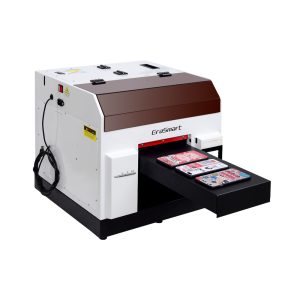
ตัวเลือกที่ใช้งานได้จริงสำหรับเคสโทรศัพท์ อุปกรณ์เสริม ผลิตภัณฑ์อะคริลิกขนาดเล็ก และขั้นตอนการปรับแต่งของขวัญ
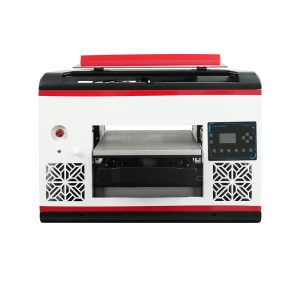
เหมาะสำหรับผู้ใช้ที่ต้องการพื้นที่พื้นเรียบที่ใหญ่ขึ้นและครอบคลุมวัสดุได้กว้างขึ้น
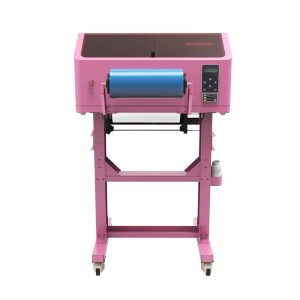
เหมาะสำหรับสติ๊กเกอร์ UV DTF กระดาษห่อแก้ว สติ๊กเกอร์ ขวด และงานลอกพื้นผิวแข็ง
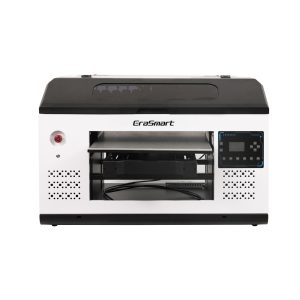
เหมาะสมกว่าสำหรับแผง ป้าย ป้าย และทีมผลิตที่ใหญ่ขึ้นซึ่งต้องการพื้นที่แพลตฟอร์มมากขึ้น
ข้อผิดพลาดทั่วไป
ข้อผิดพลาดในการบำรุงรักษาเครื่องพิมพ์ UV ที่ควรหลีกเลี่ยง
การพิมพ์โดยไม่ต้องตรวจสอบหัวฉีด
การข้ามการทดสอบหัวฉีดอาจทำให้วัสดุสิ้นเปลืองและทำให้เกิดแถบ สีที่หายไป หรือหมึกสีขาวอ่อน
ไม่สนใจการไหลเวียนของหมึกสีขาว
หมึกสีขาวต้องการความสนใจมากกว่าหมึกสี การดูแลหมึกสีขาวที่ไม่ดีอาจทำให้เกิดตะกอนและความทึบแสงที่ไม่เสถียร
ออกจากแพลตฟอร์มสกปรก
ฝุ่น สารตกค้าง และวัตถุที่หลวมอาจส่งผลต่อตำแหน่ง ความสูงของการพิมพ์ และความปลอดภัยของหัวพิมพ์
การปล่อยให้เครื่องพิมพ์ไม่ได้ใช้งานโดยไม่ต้องเตรียมการ
ระยะเวลาที่ไม่ได้ใช้งานนานจะเพิ่มความเสี่ยงในการแห้งและการอุดตัน โดยเฉพาะอย่างยิ่งหากไม่ได้เตรียมสถานีปิดฝาหรือระบบหมึกอย่างเหมาะสม
คำถามที่พบบ่อยเกี่ยวกับการบำรุงรักษาเครื่องพิมพ์ UV
-
1. ฉันควรบำรุงรักษาเครื่องพิมพ์ UV บ่อยแค่ไหน?
ควรตรวจสอบเครื่องพิมพ์ UV ก่อนการพิมพ์แต่ละครั้ง ทำความสะอาดทุกวันระหว่างการใช้งานปกติ ตรวจสอบทุกสัปดาห์ และเตรียมพร้อมอย่างระมัดระวังก่อนที่จะมีช่วงไม่ได้ใช้งานเป็นเวลานาน
-
2. ทำไมหมึกขาวจึงต้องได้รับการดูแลเป็นพิเศษ?
หมึกสีขาวมีเม็ดสีที่หนักกว่าหมึกสีมาตรฐาน ดังนั้นจึงต้องมีการไหลเวียน การกวน การตรวจสอบหัวฉีด และการปิดฝาที่เหมาะสมเพื่อรักษาความเสถียรของงานพิมพ์
-
3. ฉันควรทำการตรวจสอบหัวฉีดก่อนทุกงานหรือไม่?
ใช่. การตรวจสอบหัวฉีดช่วยระบุเส้นที่หายไป การอุดตัน หรือปริมาณหมึกที่อ่อนแอ ก่อนที่จะสิ้นเปลืองวัสดุในงานการผลิตทั้งหมด
-
4. สาเหตุของการอุดตันของหัวฉีดเครื่องพิมพ์ UV คืออะไร?
สาเหตุที่พบบ่อย ได้แก่ ฝาไม่ดี หมึกแห้ง การทำความสะอาดไม่เพียงพอ ตะกอนหมึกสีขาว เวลาไม่ได้ใช้งานนาน และการไหลของหมึกไม่เสถียร
-
5. ฉันจะป้องกันการยึดเกาะที่ไม่ดีในการพิมพ์ UV ได้อย่างไร
ทำความสะอาดพื้นผิวของวัสดุ ทดสอบพื้นผิวที่แน่นอน ใช้การตั้งค่าการบ่มที่เหมาะสม และตรวจสอบว่าวัสดุต้องมีการปรับสภาพล่วงหน้าหรือขั้นตอนการทำงานอื่นหรือไม่
-
6. ฉันควรทำอย่างไรหากไม่ได้ใช้งานเครื่องพิมพ์ UV เป็นเวลาหลายวัน?
ปฏิบัติตามขั้นตอนการป้องกันเมื่อไม่ได้ใช้งานตามที่ซัพพลายเออร์แนะนำ ให้ความสนใจเป็นพิเศษกับการปิดฝาหัวพิมพ์ ความคงตัวของหมึกสีขาว สภาพเส้นทางของหมึก และรีสตาร์ทการตรวจสอบหัวฉีด
-
7. การบำรุงรักษาเครื่องพิมพ์ UV ทำได้ยากหรือไม่?
การบำรุงรักษาสามารถจัดการได้เมื่อดำเนินการอย่างสม่ำเสมอ ปัญหาใหญ่ที่สุดมักมาจากการตรวจสอบหัวฉีดที่ข้ามไป การดูแลหมึกสีขาวที่ไม่ดี พื้นที่การพิมพ์ที่สกปรก และระยะเวลาที่ไม่ได้ใช้งานเป็นเวลานานโดยไม่ได้เตรียมการ
-
8. วานิชจำเป็นต้องได้รับการดูแลเป็นพิเศษหรือไม่?
ควรตรวจสอบเอาต์พุตวานิชเช่นเดียวกับช่องหมึกอื่นๆ หากวานิชไม่สม่ำเสมอ ไม่มันเงา หรือวางได้ไม่ดี ให้ตรวจสอบสภาพของหัวฉีด การตั้งค่าชั้น RIP ความแข็งแรงในการบ่ม และพื้นผิวของวัสดุ
ซีรี่ส์เครื่องพิมพ์ EraSmart


High-quality UV Printers for metal, acrylic, glass, wood & more. Instant curing, vivid 1440dpi prints, versatile for diverse materials.

พิมพ์สติ๊กเกอร์นูนสีสดใสด้วย **CMYK + สีขาว + วานิช** ได้ในรอบเดียว ไม่มีแป้ง ไม่มีเตาอบ ลอกและติดบนสิ่งของที่เรียบหรือโค้งได้ภายในไม่กี่นาที
ไม่พบคำแนะนำที่เหมาะสมใช่ไหม รับการสนับสนุนด้านเทคนิคฟรีทันที!
เพียงแค่ให้รายละเอียดเล็กน้อยและเราจะช่วยให้คุณได้รับใบเสนอราคาด่วน!
เครื่องพิมพ์ Erasmart
เครื่องพิมพ์ UV
เครื่องพิมพ์ DTF
เครื่องพิมพ์ DTG
เครื่องกดความร้อน
เครื่องพิมพ์โฆษณา
เครื่องมือเครื่องพิมพ์
เตาอบ DTF
กดร้อน
เครื่องแกะสลัก
การถ่ายเทความร้อนของแก้ว
เครื่องเคลือบ
สิ้นเปลือง
หมึกพิมพ์
เคสโทรศัพท์มือถือ
ผลิตภัณฑ์แก้ว
ทำความสะอาดของเหลว
ผ้าฝ้าย
ติดต่อเรา
whatsapp: +8618566233796
WeChat: +8618566233796
มือถือ: +8618566233796
เว็บ:www.erasmart.com
ร้านค้า:www.erasmartmall.com
วอทส์แอพหาเรา
ขอใบเสนอราคา
เพียงแค่ให้รายละเอียดเล็กน้อยและเราจะช่วยให้คุณได้รับใบเสนอราคาด่วน!
ดาวน์ลง
ปล่อยให้คุณส่งอีเมลและส่ง URL ดาวน์โหลดไปที่อีเมล
ต้องการราคาเครื่องพิมพ์ใช่ไหม?
บอกความต้องการการพิมพ์ของคุณให้เราทราบ ทีมงานของเราจะตอบกลับภายใน 24 ชั่วโมง