ผู้ผลิตเครื่องพิมพ์อิงค์เจ็ทขนาดเล็ก

86-18566233796 [email protected]

บล็อก What Is an Inkjet Printer and How Does It Work? A Practical Guide for Custom Printing Businesses

What Is an Inkjet Printer and How Does It Work? A Practical Guide for Custom Printing Businesses

June 17, 2026 บล็อก

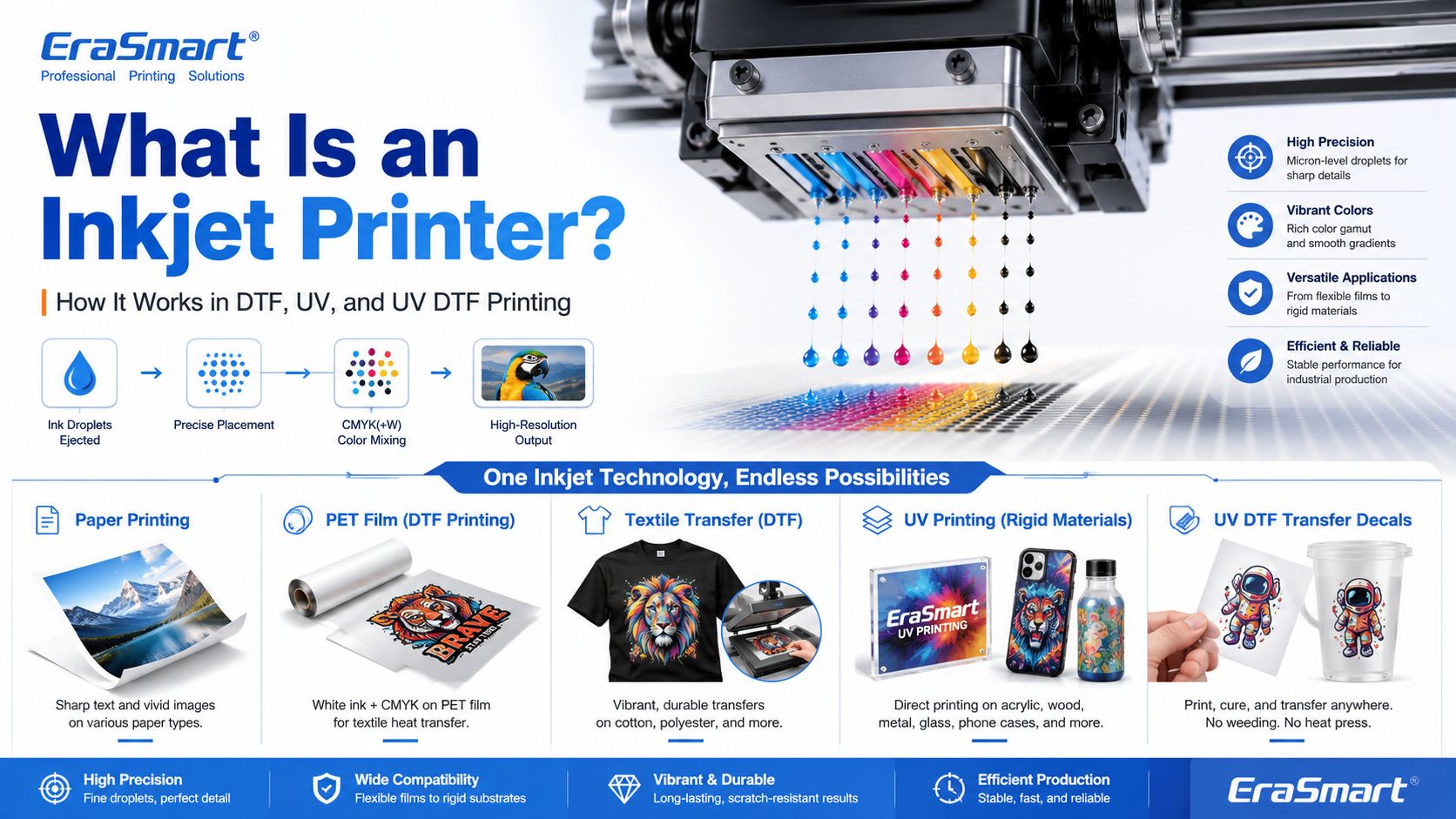
An inkjet printer is a digital printing device that creates images by ejecting tiny droplets of ink onto a surface. Instead of using plates, screens, or physical stencils, an inkjet printer receives digital image data and places controlled ink droplets in precise positions to form text, graphics, photos, labels, transfers, or product decoration.

Most people first know inkjet printers from office or home photo printing. But inkjet technology is much broader than desktop paper printing. Today, inkjet systems are used in DTF printing, UV flatbed printing, UV DTF transfers, packaging samples, product labels, signage, promotional products, textile decoration, industrial marking, and custom product manufacturing.

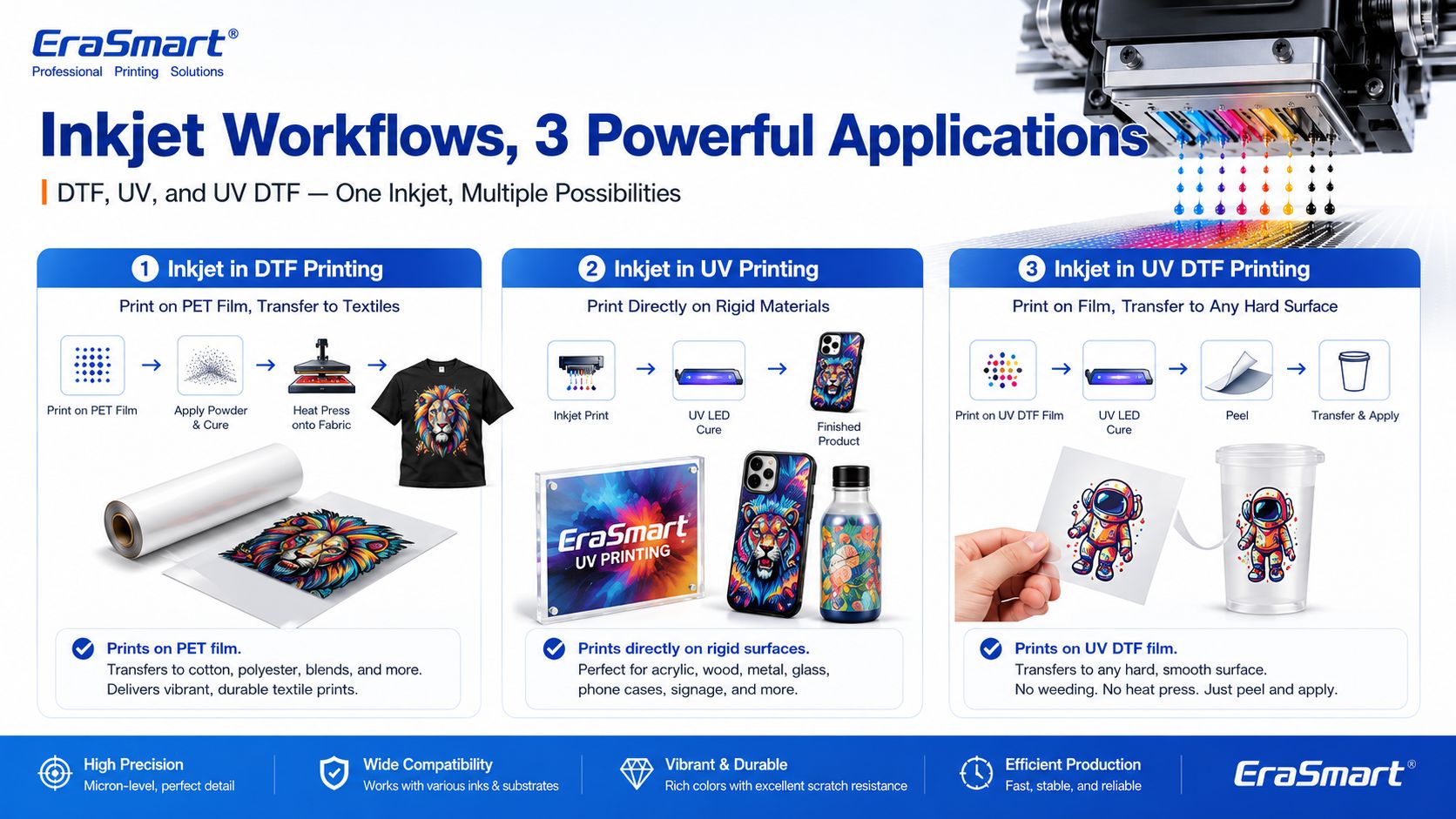
For EraSmart customers, this topic matters because many modern custom printing machines are built on inkjet principles. A เครื่องพิมพ์ DTF uses inkjet technology to print garment designs onto transfer film. A เครื่องพิมพ์ยูวี uses inkjet technology to print UV-curable ink directly onto rigid materials. A เครื่องพิมพ์ UV DTF uses inkjet printing to create hard-surface decals and transfers on A/B film.

In simple terms, inkjet printing is the foundation. DTF, UV, and UV DTF are specialized business workflows built around that foundation.

Quick Answer: What Is an Inkjet Printer?

An inkjet printer is a printer that sprays or ejects tiny droplets of liquid ink through microscopic nozzles to create a printed image.

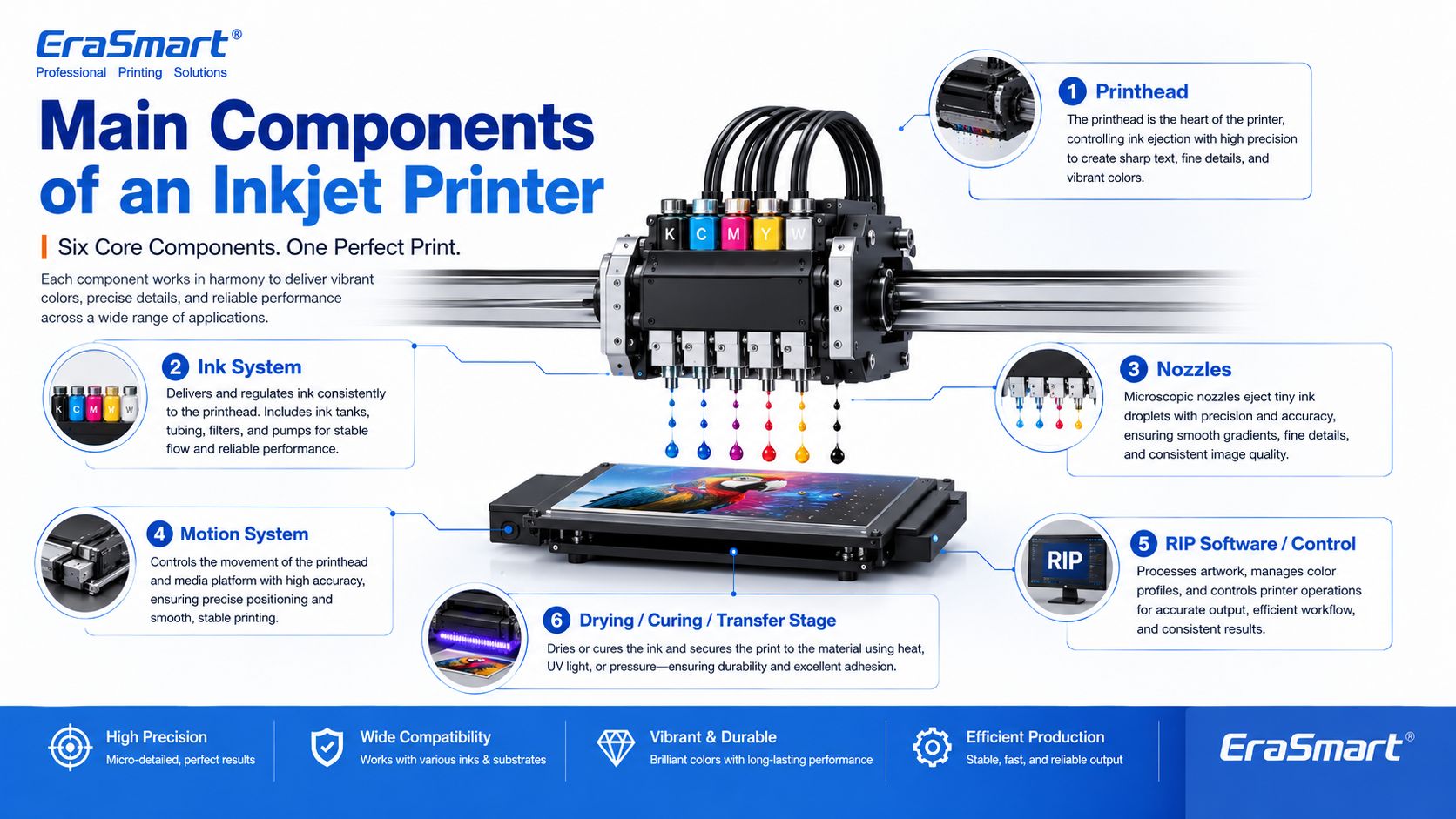
A basic inkjet printing system includes:

  • digital artwork file
  • RIP or printer control software
  • ink supply system
  • printhead
  • microscopic nozzles
  • movement system
  • printable surface
  • drying, curing, or transfer process

The printhead is the key component. It controls where ink droplets land, how much ink is ejected, and how accurately the image is formed.

How Does an Inkjet Printer Work?

Inkjet printing may look simple from the outside, but inside the printer there is a precise digital control process.

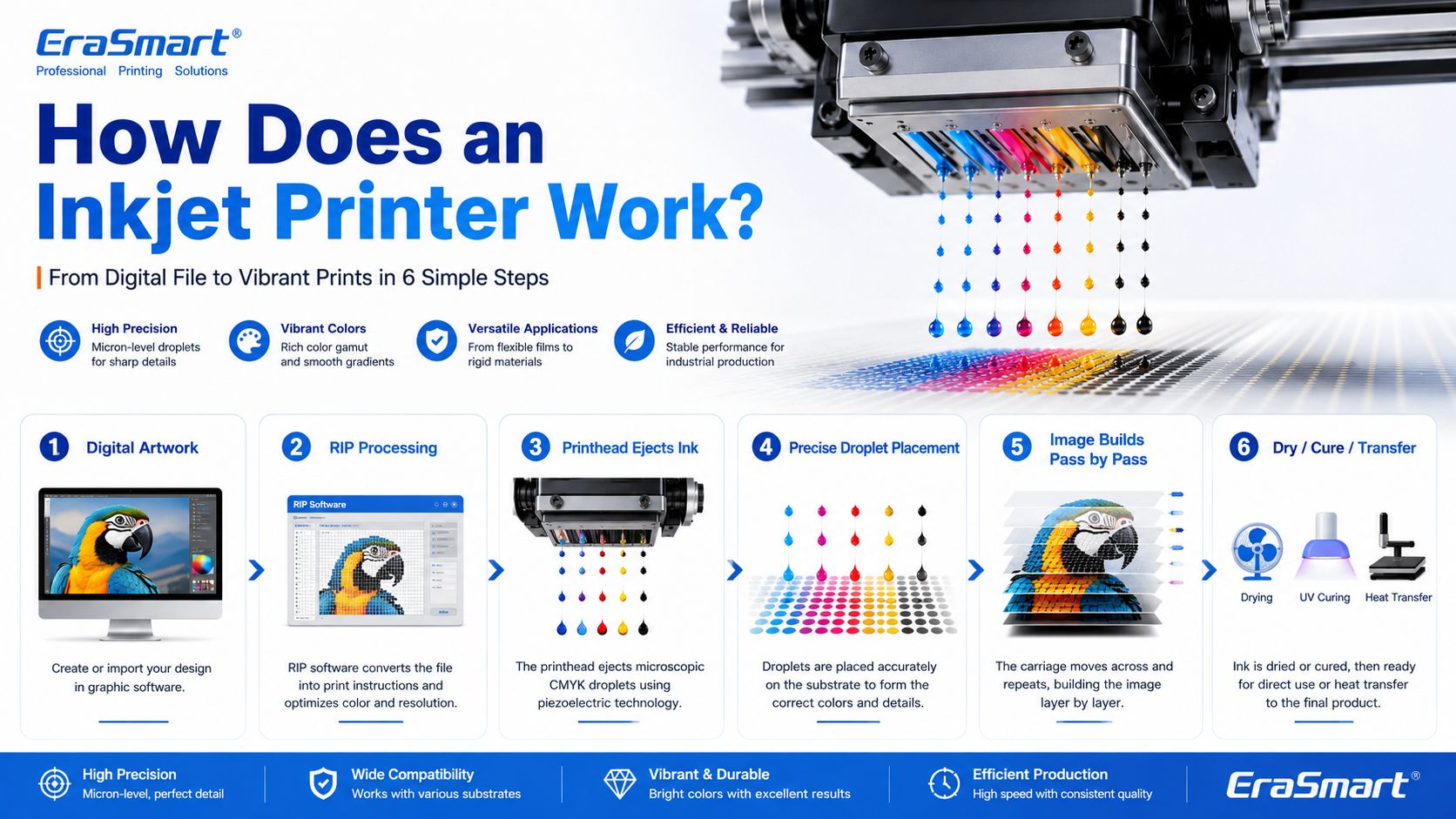
A simplified workflow looks like this:

  1. The computer sends image data to the printer.
  2. The printer software processes the file into printable dot information.
  3. The printer moves the printhead or material into position.
  4. The printhead ejects tiny droplets of ink through nozzles.
  5. The droplets land on the target surface in controlled positions.
  6. The printer builds the image line by line or pass by pass.
  7. The ink dries, cures, absorbs, or transfers depending on the printing method.

In an office inkjet printer, ink is usually printed onto paper and dries or absorbs into the paper surface. In an industrial or custom printing system, the process may be more specialized. For example, UV ink is cured by UV light, while DTF ink is printed onto PET film and later heat transferred onto fabric.

Main Components of an Inkjet Printer

1. Printhead

The printhead is the most important part of an inkjet printer. It contains many tiny nozzles that eject ink droplets. The printhead determines much of the printer’s resolution, droplet control, speed, and print quality.

In custom printing, printhead condition directly affects:

  • sharpness
  • color consistency
  • line accuracy
  • white ink quality
  • nozzle stability
  • production reliability
  • maintenance requirements

This is why printer maintenance is so important in DTF and UV printing. If the printhead nozzles are clogged or unstable, the final print may show banding, missing lines, weak colors, or poor detail.

For apparel printing users, EraSmart’s DTF Printer Maintenance Guide is a useful resource for understanding why nozzle checks, cleaning, white ink circulation, and daily care matter.

2. Ink System

The ink system stores and delivers ink to the printhead. Different inkjet printers use different types of ink depending on the application.

Common ink types include:

  • dye ink
  • pigment ink
  • sublimation ink
  • textile ink
  • หมึก DTF
  • หมึกยูวีรักษาได้
  • solvent or eco-solvent ink
  • industrial marking ink

For EraSmart customers, the most relevant ink systems are DTF ink, UV ink, white ink, and varnish.

อัน เครื่องพิมพ์ DTF commonly uses CMYK ink plus white ink. The white ink helps designs appear clearly on dark garments. A เครื่องพิมพ์ยูวี may use CMYK, white ink, and varnish to print on hard surfaces such as acrylic, glass, metal, wood, plastic, leather, and packaging materials.

If you want to understand how CMYK, white ink, and varnish work together in product customization, see EraSmart’s UV Ink Guide: CMYK, White Ink, and Varnish-

3. Nozzles

Nozzles are microscopic openings in the printhead. They eject ink droplets in controlled patterns.

Nozzle performance affects:

  • print resolution
  • detail clarity
  • ink density
  • color accuracy
  • การไล่ระดับสีเรียบ
  • edge sharpness
  • production stability

Nozzles can become clogged if ink dries, settles, or becomes contaminated. This is especially important for white ink systems because white ink contains heavier pigment particles and needs proper circulation and maintenance.

4. Motion System

Inkjet printers need accurate motion control. Either the printhead moves across the material, the material moves under the printhead, or both are coordinated.

The motion system affects:

  • print alignment
  • image registration
  • repeatability
  • production speed
  • print size accuracy
  • multi-pass quality

In UV flatbed printing, the platform and printhead movement must be stable so the image lands accurately on rigid objects. In DTF printing, film feeding must be smooth so the transfer image remains consistent.

5. RIP Software and Print Control

RIP software converts artwork into printer-ready instructions. It controls color output, resolution, ink layering, white ink channels, varnish layers, print passes, and other production settings.

For custom printing businesses, RIP setup is important because it affects:

  • color performance
  • white ink underbase
  • image sharpness
  • ink usage
  • ความเร็วในการพิมพ์
  • material compatibility
  • repeatability

A good printer is only part of the system. Correct artwork preparation and RIP settings are also necessary for professional results.

6. Drying, Curing, or Transfer System

Inkjet printing is not finished when ink leaves the nozzle. The ink must also become stable on the final product.

Different workflows use different finishing methods:

Inkjet WorkflowWhat Happens After Printing
Office inkjetInk dries or absorbs into paper
การพิมพ์ DTFPowder is applied, cured, then heat pressed onto fabric
การพิมพ์ยูวีUV light cures the ink almost instantly
การพิมพ์ยูวี DTFUV ink is printed on film, laminated, then applied as a transfer
การระเหิดPrinted transfer is heat pressed into polyester or coated blanks

This is why inkjet technology can support many industries. The core droplet technology is similar, but the finishing process changes based on the product.

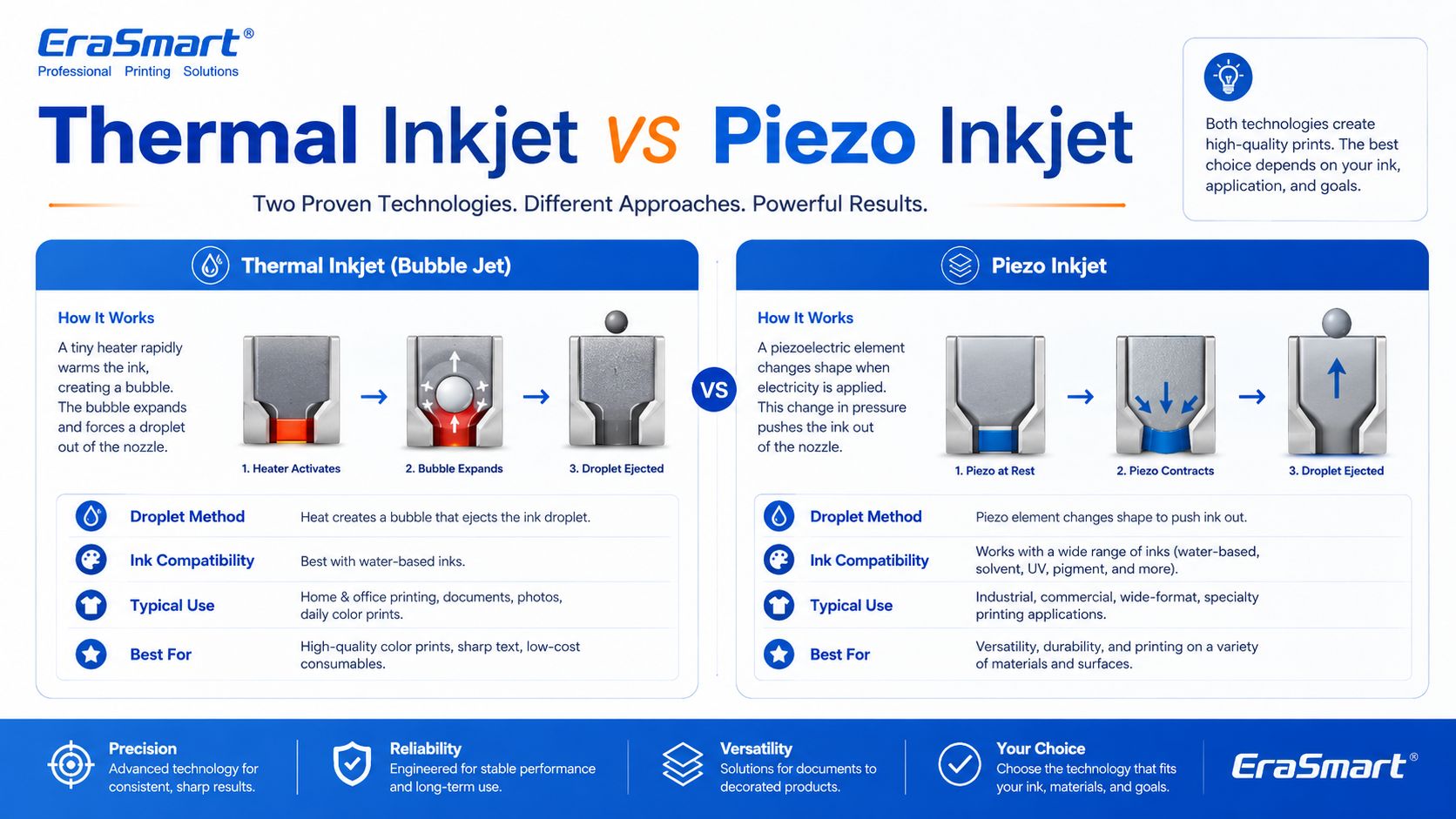
Thermal Inkjet vs Piezo Inkjet

There are two major inkjet technologies: thermal inkjet and piezo inkjet.

Thermal Inkjet

Thermal inkjet uses heat to create a vapor bubble inside the ink chamber. The pressure from this bubble pushes a droplet of ink out of the nozzle.

Thermal inkjet is common in many desktop and office printers. It can produce high-quality prints on paper, but the ink must be compatible with heat-based ejection.

Piezo Inkjet

Piezo inkjet uses a piezoelectric element that changes shape when voltage is applied. This mechanical movement creates pressure and ejects ink droplets through the nozzle.

Piezo inkjet is widely used in many professional and industrial printing systems because it can work with a broader range of inks. Since the ink is not heated for ejection, piezo technology is suitable for inks that may not perform well in thermal systems, including many specialty inks used in industrial and custom printing.

For DTF, UV, and UV DTF applications, piezo-style inkjet technology is especially important because these workflows require precise ink control and compatibility with specialized ink types.

Drop-on-Demand vs Continuous Inkjet

Inkjet printing can also be divided by how ink is delivered.

Drop-on-Demand Inkjet

Drop-on-demand means ink droplets are ejected only when needed. This is common in many graphic and custom printing applications because it offers precise control and efficient ink use.

DTF, UV, and UV DTF printers generally operate around controlled digital droplet placement, which is why they can reproduce detailed designs and full-color artwork.

Continuous Inkjet

Continuous inkjet ejects a continuous stream of ink droplets. Some droplets are directed to the surface, while others may be recycled. This method is often used in industrial coding and marking, such as printing dates, batch codes, and product identification on packaging lines.

For EraSmart customers, drop-on-demand inkjet is the more relevant concept because custom apparel and product printing require accurate image reproduction rather than simple coding.

Inkjet Printing in DTF Printers

A DTF printer is a specialized inkjet printer for garment transfer production. Instead of printing directly onto a shirt, it prints the design onto PET transfer film.

The typical DTF process includes:

  1. Print CMYK and white ink onto PET film
  2. ใช้ผงกาวร้อนละลาย
  3. บ่มผง
  4. กดความร้อนลงบนผ้า
  5. Peel the film
  6. Finish press if needed

This process is useful for custom apparel because it supports:

  • full-color artwork
  • เสื้อผ้าสีเข้ม
  • small-batch orders
  • personalized designs
  • ผ้าฝ้าย โพลีเอสเตอร์ ผ้าผสม และอื่นๆ
  • print-on-demand production

If you are interested in building an apparel business, EraSmart’s เครื่องพิมพ์ DTF category includes different models for startups, small studios, growing shops, and higher-volume production. You can also read the ขั้นตอนการผลิต DTF to understand the full process from artwork to finished garment.

Inkjet Printing in UV Printers

A UV printer is another specialized inkjet system. Instead of using standard paper ink, it uses UV-curable ink. The printer ejects ink onto the material surface, and UV light cures the ink almost immediately.

UV printing is suitable for many hard and semi-rigid materials, such as:

  • อะคริลิก
  • กระจก
  • โลหะ
  • ไม้
  • พลาสติก
  • ceramic
  • หนัง
  • เคสโทรศัพท์
  • ตัวอย่างบรรจุภัณฑ์
  • สินค้าส่งเสริมการขาย

The advantage of UV printing is direct-to-object customization. You can print full-color designs, white ink layers, and varnish effects on many product surfaces.

อีราสมาร์ท เครื่องพิมพ์ UV category is designed for businesses that want to create custom gifts, signs, phone cases, packaging samples, acrylic products, and hard-surface promotional items. For material selection, see the คู่มือวัสดุเครื่องพิมพ์ UV-

Inkjet Printing in UV DTF Printers

UV DTF printing combines UV inkjet printing with a transfer workflow. The printer prints UV ink onto A film, laminates it with B film, and creates a transfer decal that can be applied to hard surfaces.

UV DTF is useful for:

  • สติ๊กเกอร์
  • decals
  • ห่อถ้วย
  • bottle labels
  • ฉลากบรรจุภัณฑ์เครื่องสำอาง
  • gadget skins
  • ตกแต่งกระจก
  • acrylic decals
  • แท็กโลหะ
  • การสร้างตราสินค้าผลิตภัณฑ์

Unlike textile DTF, UV DTF is mainly for hard-surface transfers, not garments. It is a good choice for businesses that want to sell premium stickers, decals, labels, and cup wraps.

อีราสมาร์ท เครื่องพิมพ์ UV DTF is suitable for hard-surface transfer applications, while the A/B Film for UV DTF Printing guide explains how the film system works in the transfer process.

Why Inkjet Technology Is Important for Custom Printing

Inkjet printing is important because it allows digital, flexible, short-run production. Unlike traditional methods that require screens, plates, or molds, inkjet printing can print directly from a digital file.

This creates major advantages for custom businesses:

  • lower setup barriers
  • faster design changes
  • easier personalization
  • full-color printing
  • short-run production
  • lower inventory pressure
  • product variety
  • print-on-demand flexibility

For example, a DTF apparel business can print different names, numbers, and graphics without preparing new screens. A UV printing business can print different logos on phone cases, acrylic signs, glass gifts, or packaging samples. A UV DTF business can produce custom decals and labels for many small brands.

This is why inkjet technology is no longer only about office printing. It is now a core technology for modern customization businesses.

Advantages of Inkjet Printing

1. Digital Flexibility

Inkjet printing works directly from digital files. This makes it easy to change designs, personalize products, and produce short runs.

2. Full-Color Output

Inkjet printers can reproduce complex color images, gradients, photos, and illustrations. This is useful for apparel graphics, product decoration, stickers, and packaging samples.

3. Short-Run Production

Inkjet does not require plates or screens, so it is suitable for low-MOQ custom orders and on-demand production.

4. Variable Data Printing

Each print can be different. This is useful for names, numbers, QR codes, serialized labels, personalized gifts, and custom designs.

5. Wide Application Range

Inkjet technology can be adapted to many surfaces and workflows, including paper, textiles, film, rigid materials, packaging, labels, and transfers.

6. Scalable Business Model

A business can start with small orders and upgrade equipment as demand grows. This is why inkjet-based DTF, UV, and UV DTF systems are attractive to startups and growing shops.

Limitations of Inkjet Printing

1. Printhead Maintenance Is Important

Inkjet printers need regular maintenance. If nozzles clog, print quality declines. This is especially important for white ink, UV ink, and other specialty ink systems.

2. Ink Compatibility Matters

Not every ink works with every printhead or material. Ink viscosity, pigment size, curing method, and surface compatibility all matter.

3. Material Preparation May Be Needed

Some surfaces need cleaning, primer, coating, or testing before printing. This is especially common in UV printing on glass, metal, plastic, and other hard materials.

4. Color Management Requires Testing

Screen colors and printed colors are not always identical. Professional results require color profiles, test prints, correct RIP settings, and stable consumables.

5. Production Speed Depends on Quality Settings

Higher resolution, more passes, white ink layers, and varnish effects may improve quality but increase printing time.

6. Workflow Control Matters

In DTF printing, powdering, curing, and heat pressing affect durability. In UV DTF, lamination and application affect transfer quality. In UV printing, curing and adhesion affect final product quality.

Common Inkjet Printer Problems

1. Clogged Nozzles

This is one of the most common inkjet problems. It can be caused by dried ink, settled pigment, poor maintenance, incompatible ink, or long idle time.

2. Banding

Banding appears as unwanted horizontal or vertical lines. It can be caused by clogged nozzles, incorrect feed settings, poor calibration, or unstable ink flow.

3. Color Difference

Colors may look different from the screen because of material surface, ink type, printer profile, white ink layer, or lighting conditions.

4. Poor Adhesion

In UV printing, poor adhesion can happen if the surface is oily, dusty, incompatible, or not treated correctly.

5. Weak White Ink

In DTF and UV printing, white ink must be managed carefully. Weak white ink can reduce color brightness, opacity, and dark-surface performance.

6. Ink Smearing or Poor Curing

If ink is not dried, cured, or transferred correctly, the final product may smear, peel, crack, or lose durability.

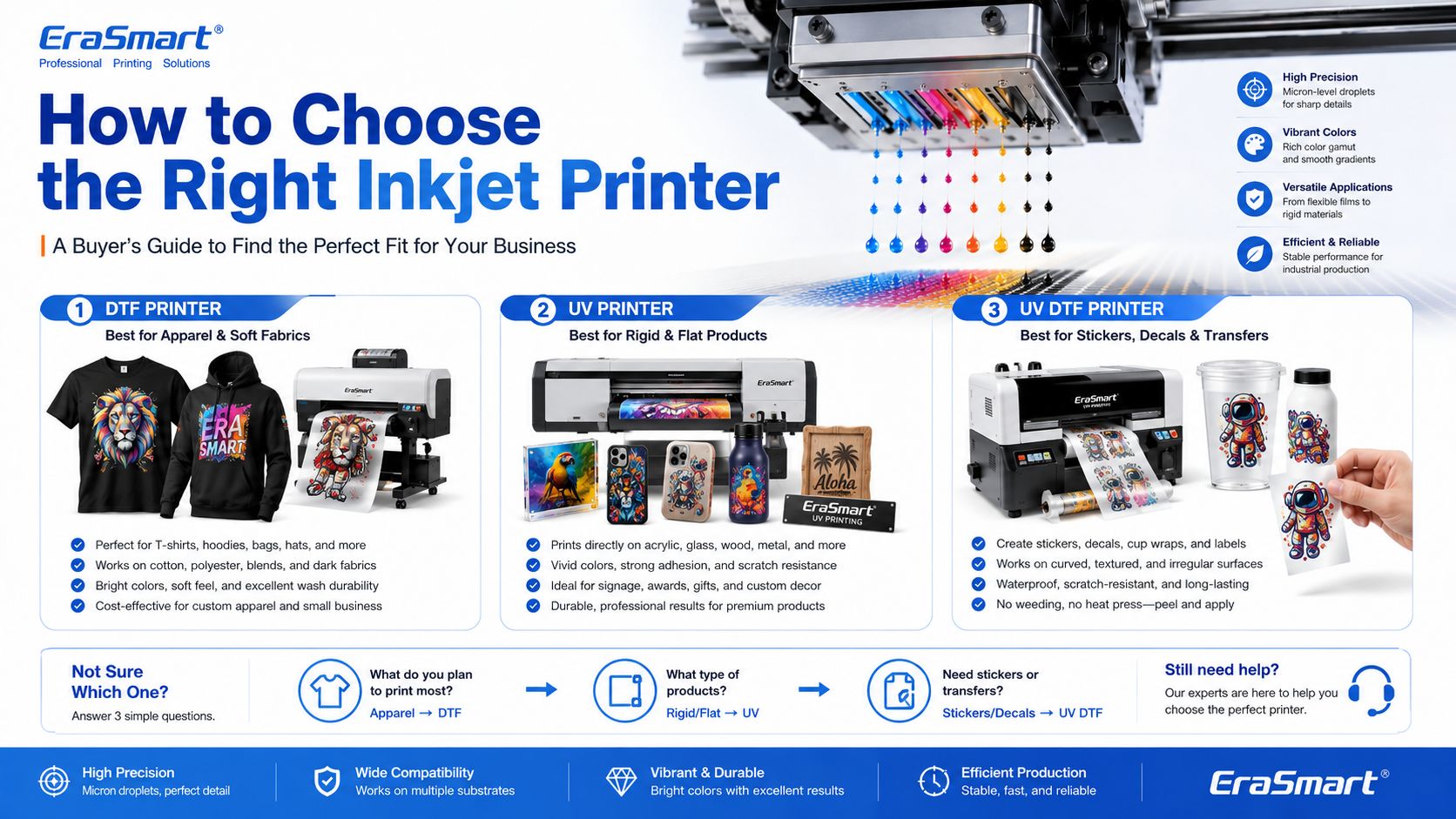
How to Choose the Right Inkjet Printer for Your Business

The right inkjet printer depends on what you want to sell.

Choose a DTF Printer If You Want to Print Apparel

เลือกก เครื่องพิมพ์ DTF if your business focuses on:

  • เสื้อยืด
  • เสื้อฮู้ด
  • tote bags
  • เครื่องแบบ
  • ชุดกีฬา
  • กราฟิกแฟชั่น
  • เสื้อผ้าสีเข้ม
  • small-batch custom apparel
  • print-on-demand clothing

For machine selection, read EraSmart’s วิธีเลือกเครื่องพิมพ์ DTF และ รายการตรวจสอบการซื้อเครื่องพิมพ์ DTF-

สำหรับ DIY และสตูดิโอส่วนตัว

การตั้งค่าขนาดกะทัดรัดระดับเริ่มต้น

• การปรับแต่งชุดข้อมูลขนาดเล็ก
• การทดสอบการออกแบบ
• ภาระการเข้าต่ำ

ดีที่สุดสำหรับมือสมัครเล่น DIY และสตูดิโอส่วนตัว

หากเป้าหมายของคุณคือการเริ่มต้นจากเล็กๆ น้อยๆ ทดสอบขั้นตอนการทำงาน และจัดการกับการปรับแต่งส่วนบุคคลหรือการใช้งานเชิงพาณิชย์ขนาดเบา ตัวเลือกที่ใช้งานได้จริงมากที่สุดคือการตั้งค่าที่กะทัดรัดพร้อมต้นทุนที่จัดการได้และการดำเนินงานรายวันที่เรียบง่าย

เครื่องจักรประเภทนี้ทำงานได้ดีสำหรับผู้สร้าง ผู้ซื้อครั้งแรก และสตูดิโอส่วนตัวที่ต้องการจุดเริ่มต้นที่เชื่อถือได้ โดยไม่ต้องรีบใช้อุปกรณ์การผลิต A3 หรือ A1 ขนาดใหญ่เร็วเกินไป

สำหรับสตูดิโอขนาดเล็กและสตาร์ทอัพ

การตั้งค่าเชิงพาณิชย์รายการ A3 ที่ยืดหยุ่น

• คำสั่งซื้อแบบกำหนดเองในท้องถิ่น
• เครื่องแต่งกายชุดเล็ก
• ขั้นตอนการทำงานที่เป็นมิตรกับการเริ่มต้น

ดีที่สุดสำหรับสตูดิโอขนาดเล็ก แบรนด์ใหม่ และร้านค้าสตาร์ทอัพ

หากคุณมีแนวคิดทางธุรกิจอยู่แล้ว รับคำสั่งซื้อแบบกำหนดเองในท้องถิ่น หรือใช้สตูดิโอขนาดเล็กที่ต้องการความยืดหยุ่นมากกว่าเครื่องป้อนขนาด A4 การย้ายเข้าสู่กลุ่มผลิตภัณฑ์ A3 มักจะสร้างขั้นตอนการทำงานเชิงพาณิชย์ที่ใช้งานได้จริงมากขึ้น

โมเดลเหล่านี้เหมาะกว่าสำหรับแบรนด์สตาร์ทอัพ ผู้ประกอบการสตูดิโอ และร้านค้าระยะเริ่มต้นที่ต้องการช่วงเอาท์พุตที่แข็งแกร่งขึ้นโดยไม่ต้องย้ายไปยังอุปกรณ์อุตสาหกรรมที่มีเอาท์พุตสูงกว่าโดยตรง

สำหรับอีคอมเมิร์ซและนักออกแบบ

รายละเอียด สี และการหมุนเวียนการออกแบบที่รวดเร็ว

• กราฟิกที่เน้นการออกแบบ
• หยดใหม่บ่อยครั้ง
• การนำเสนอด้วยภาพระดับพรีเมียม

ดีที่สุดสำหรับผู้ประกอบการอีคอมเมิร์ซและสตูดิโอดีไซเนอร์

เมื่อธุรกิจของคุณขึ้นอยู่กับการเปลี่ยนแปลงการออกแบบบ่อยครั้ง งานศิลปะที่มีสีสันสดใส รูปภาพที่มีรายละเอียด และการทดสอบผลิตภัณฑ์ออนไลน์ที่รวดเร็วขึ้น ก็สมเหตุสมผลที่จะเลือกรุ่นที่นำเสนอภาพที่แข็งแกร่งกว่าและความยืดหยุ่นทางการค้าที่ราบรื่นยิ่งขึ้น

กลุ่มนี้เหมาะอย่างยิ่งสำหรับผู้ขายออนไลน์ แบรนด์ที่นำโดยนักออกแบบ ทีมงานสร้างสรรค์ และร้านค้าที่การนำเสนอด้วยภาพและการเปิดตัวการออกแบบใหม่เป็นศูนย์กลางของโมเดลธุรกิจ

รุ่นที่แนะนำ

สำหรับธุรกิจขนาดเล็ก

การผลิตเชิงพาณิชย์ที่มั่นคงรายวัน

• คำสั่งซื้อรายวัน
• จังหวะการผลิตดีขึ้น
• ผลผลิตเชิงพาณิชย์มีเสถียรภาพมากขึ้น

เหมาะสำหรับธุรกิจเครื่องแต่งกายขนาดเล็กและการผลิตที่มั่นคงในแต่ละวัน

เมื่อธุรกิจของคุณก้าวไปไกลกว่าคำสั่งซื้อเป็นครั้งคราว และเริ่มพึ่งพาผลผลิตรายวันที่มั่นคงมากขึ้น การเลือกเครื่องจักรที่รองรับขั้นตอนการทำงานที่ราบรื่นยิ่งขึ้น ความสม่ำเสมอที่แข็งแกร่งขึ้น และจังหวะการผลิตที่ดีขึ้นก็มีความสำคัญมากขึ้น

โดยปกติแล้วระดับนี้จะเป็นจุดที่ผู้ซื้อควรหยุดคิดเฉพาะราคาเริ่มต้น และเริ่มคิดอย่างจริงจังมากขึ้นเกี่ยวกับความเสถียรของเอาต์พุต ประสิทธิภาพเวิร์กโฟลว์ และการปฏิบัติจริงในระยะยาว

สำหรับระบบอัตโนมัติ

ปริมาณงานที่สูงขึ้นและการอัพเกรดเวิร์กโฟลว์

• ขั้นตอนการทำงานเร็วขึ้น
• ลดภาระการใช้มือ
• ความต่อเนื่องในการผลิตที่ดีขึ้น

ดีที่สุดสำหรับร้านค้าที่อัปเกรดไปสู่ขั้นตอนการทำงานแบบอัตโนมัติมากขึ้น

หากธุรกิจของคุณก้าวไปไกลกว่าการผลิตแบบแมนนวลขั้นพื้นฐาน และต้องการกระบวนการที่ราบรื่นและพร้อมสำหรับการผลิตมากขึ้น การพิจารณาโมเดลที่รองรับการบูรณาการเวิร์กโฟลว์ที่แข็งแกร่งขึ้นและความคาดหวังปริมาณงานที่สูงขึ้นก็สมเหตุสมผล

ทิศทางนี้เกี่ยวข้องโดยเฉพาะอย่างยิ่งสำหรับร้านค้าที่มีคำสั่งซื้อที่มั่นคงอยู่แล้วและต้องการลดความขัดแย้งในการผลิต ปรับปรุงความสามารถในการทำซ้ำ และเตรียมพร้อมสำหรับปริมาณการปฏิบัติงานรายวันที่มากขึ้น

สำหรับการผลิตขนาดใหญ่

ทิศทางอุตสาหกรรมรูปแบบกว้าง

• เป้าหมายผลผลิตที่สูงขึ้น
• ความกว้างในการพิมพ์ที่กว้างขึ้น
• จังหวะการผลิตภาคอุตสาหกรรม

ดีที่สุดสำหรับการผลิตขนาดใหญ่และทีมผลผลิตที่สูงขึ้น

เมื่อธุรกิจของคุณต้องการความกว้างในการพิมพ์ที่กว้างขึ้น เพดานเอาท์พุตที่แข็งแกร่ง และทิศทางการผลิตทางอุตสาหกรรมที่เข้มงวดมากขึ้น ซีรี่ส์ A1 จะกลายเป็นประเภทที่เหมาะสมสำหรับการประเมิน ระดับนี้เหมาะกว่าสำหรับธุรกิจที่ความต่อเนื่องของผลผลิตและต้นทุนการหยุดชะงักที่ต่ำกว่าเป็นลำดับความสำคัญในการดำเนินงานที่สำคัญ

เลือกระดับหัวพิมพ์โดยพิจารณาจากเป้าหมายการผลิตเชิงรุกของคุณ และมูลค่าที่คุณมอบให้กับประสิทธิภาพการผลิตที่แข็งแกร่งขึ้น

Choose a UV Printer If You Want to Print Hard Products

เลือกก เครื่องพิมพ์ยูวี if your business focuses on:

  • เคสโทรศัพท์
  • แผ่นอะคริลิค
  • ของขวัญแก้ว
  • ป้ายโลหะ
  • wood products
  • กระเบื้องเซรามิค
  • ตัวอย่างบรรจุภัณฑ์
  • สินค้าส่งเสริมการขาย
  • product decoration

For material planning, read EraSmart’s คู่มือวัสดุเครื่องพิมพ์ UV และ How to Choose a UV Printer-

โครงการเริ่มต้นขนาดเล็ก

เหมาะสำหรับผลิตภัณฑ์แบบกำหนดเองรูปแบบขนาดเล็ก ตัวอย่าง ของขวัญขนาดกะทัดรัด และผู้ใช้ที่ต้องการเริ่มการพิมพ์ UV ด้วยขนาดที่เล็กลง

การใช้งานทางธุรกิจขนาดกะทัดรัด

ตัวเลือกที่ใช้งานได้จริงสำหรับเคสโทรศัพท์ อุปกรณ์เสริม ผลิตภัณฑ์อะคริลิกขนาดเล็ก ของขวัญเฉพาะบุคคล และการผลิตสำหรับธุรกิจขนาดเล็ก

ความยืดหยุ่นของผลิตภัณฑ์ A3

ตัวเลือกที่ดีกว่าสำหรับผู้ใช้ที่ต้องการแพลตฟอร์มที่ใหญ่กว่า ความครอบคลุมของผลิตภัณฑ์ที่มากขึ้น และการผลิตในปริมาณน้อยที่ยืดหยุ่นมากขึ้น

การผลิตรูปแบบที่ใหญ่ขึ้น

เหมาะสำหรับป้าย แผง แผง บอร์ดแบบกำหนดเอง และทีมผลิตขนาดใหญ่ที่ต้องการพื้นที่การพิมพ์ที่กว้างขึ้นและความสามารถในการปรับขนาดที่แข็งแกร่งขึ้น

ธุรกิจเคสโทรศัพท์

ออกแบบมาเพื่อการปรับแต่งเคสโทรศัพท์และการผลิตผลิตภัณฑ์เฉพาะบุคคลที่รวดเร็วพร้อมเส้นทางการใช้งานที่มุ่งเน้นมากขึ้น

สติ๊กเกอร์และผ้าพันถ้วย

เหมาะสำหรับสติกเกอร์ UV DTF ฉลากคริสตัล กระดาษห่อแก้ว ขวด และสติ๊กเกอร์ลอกพื้นผิวแข็ง

Choose a UV DTF Printer If You Want to Print Decals and Transfers

เลือกก เครื่องพิมพ์ UV DTF if your business focuses on:

  • สติ๊กเกอร์
  • decals
  • ห่อถ้วย
  • labels
  • cosmetic packaging transfers
  • bottle decoration
  • gadget skins
  • hard-surface branding

To understand the film workflow, read EraSmart’s A/B Film for UV DTF Printing-

คำแนะนำการซื้อ EraSmart

Inkjet printing is not one single business model. It is a technology foundation. The right machine depends on your target products.

A simple buying direction looks like this:

เป้าหมายทางธุรกิจRecommended EraSmart Direction
Custom T-shirts, hoodies, apparelเครื่องพิมพ์ DTF
Acrylic, glass, metal, wood, phone casesเครื่องพิมพ์ UV
Stickers, cup wraps, labels, decalsเครื่องพิมพ์ UV DTF
Apparel startupA4 / A3 DTF Printer
Growing apparel shopA3 MAX DTF / shaker workflow
Custom product studioA4 / A3 UV Printer
Hard-surface transfer businessเครื่องพิมพ์ยูวี DTF ขนาด A3

If your business is apparel-first, start with EraSmart’s เครื่องพิมพ์ DTF lineup. If your business is hard-product customization, compare the เครื่องพิมพ์ UV range. If your business is stickers, decals, labels, and cup wraps, start with the เครื่องพิมพ์ UV DTF-

Final Answer: What Is an Inkjet Printer?

An inkjet printer is a digital printer that creates images by ejecting tiny ink droplets through microscopic nozzles onto a surface.

In basic office printing, that surface is usually paper. In custom printing, the surface may be PET film, transfer film, acrylic, glass, metal, wood, plastic, packaging board, fabric, or product blanks.

The most important point is this: inkjet printing is not only for documents and photos. It is the core technology behind many modern custom printing systems, including DTF printers, UV printers, and UV DTF printers.

For small businesses, inkjet technology makes it possible to print full-color designs, personalize products, produce short runs, reduce setup cost, and build flexible custom printing workflows.

Need help choosing the right inkjet-based printing system for your business? Share your target products, material type, print size, expected daily order volume, and budget range with EraSmart.

Our team can help you choose the right เครื่องพิมพ์ DTF- เครื่องพิมพ์ยูวี, หรือ เครื่องพิมพ์ UV DTF for your custom printing business.


อาจเป็นเช่นเดียวกับคุณด้วย

  • เครื่องพิมพ์ Erasmart

    เครื่องพิมพ์ UV
    เครื่องพิมพ์ DTF
    เครื่องพิมพ์ DTG
    เครื่องกดความร้อน
    เครื่องพิมพ์โฆษณา

  • เครื่องมือเครื่องพิมพ์

    เตาอบ DTF
    กดร้อน
    เครื่องแกะสลัก
    การถ่ายเทความร้อนของแก้ว
    เครื่องเคลือบ

  • สิ้นเปลือง

    หมึกพิมพ์
    เคสโทรศัพท์มือถือ
    ผลิตภัณฑ์แก้ว
    ทำความสะอาดของเหลว
    ผ้าฝ้าย

  • ติดต่อเรา

    whatsapp: +8618566233796
    WeChat: +8618566233796
    มือถือ: +8618566233796
    เว็บ:www.erasmart.com
    ร้านค้า:www.erasmartmall.com

  • ขอใบเสนอราคา

    เพียงแค่ให้รายละเอียดเล็กน้อยและเราจะช่วยให้คุณได้รับใบเสนอราคาด่วน!