Small Size Flatbed Inkjet Printer Manufacturer

UV Printing on Metal: Process, Best Metal Types, Surface Preparation & Applications
UV printing makes it possible to print full-color graphics, white ink and varnish effects directly onto many suitable metal surfaces, including aluminum, stainless steel, coated steel, brass and copper.
For custom print shops, sign makers, gift businesses and small manufacturers, this opens applications such as:
- metal signs
- stainless-steel nameplates
- aluminum photo panels
- equipment labels
- QR code signs
- decorative metal tags
- awards
- branded plates
- promotional products
However, successful UV printing on metal depends on more than the printer.
Metal is a smooth, non-porous substrate. UV ink normally remains on the surface instead of absorbing into the material, which means oil, fingerprints, oxidation, anodizing, paint, powder coating, protective films and other surface treatments can significantly affect adhesion.
The professional workflow is therefore:
Identify the metal surface → clean and degrease → prepare the artwork → choose CMYK/white/varnish layers → print a sample → test adhesion → standardize the setup → begin production
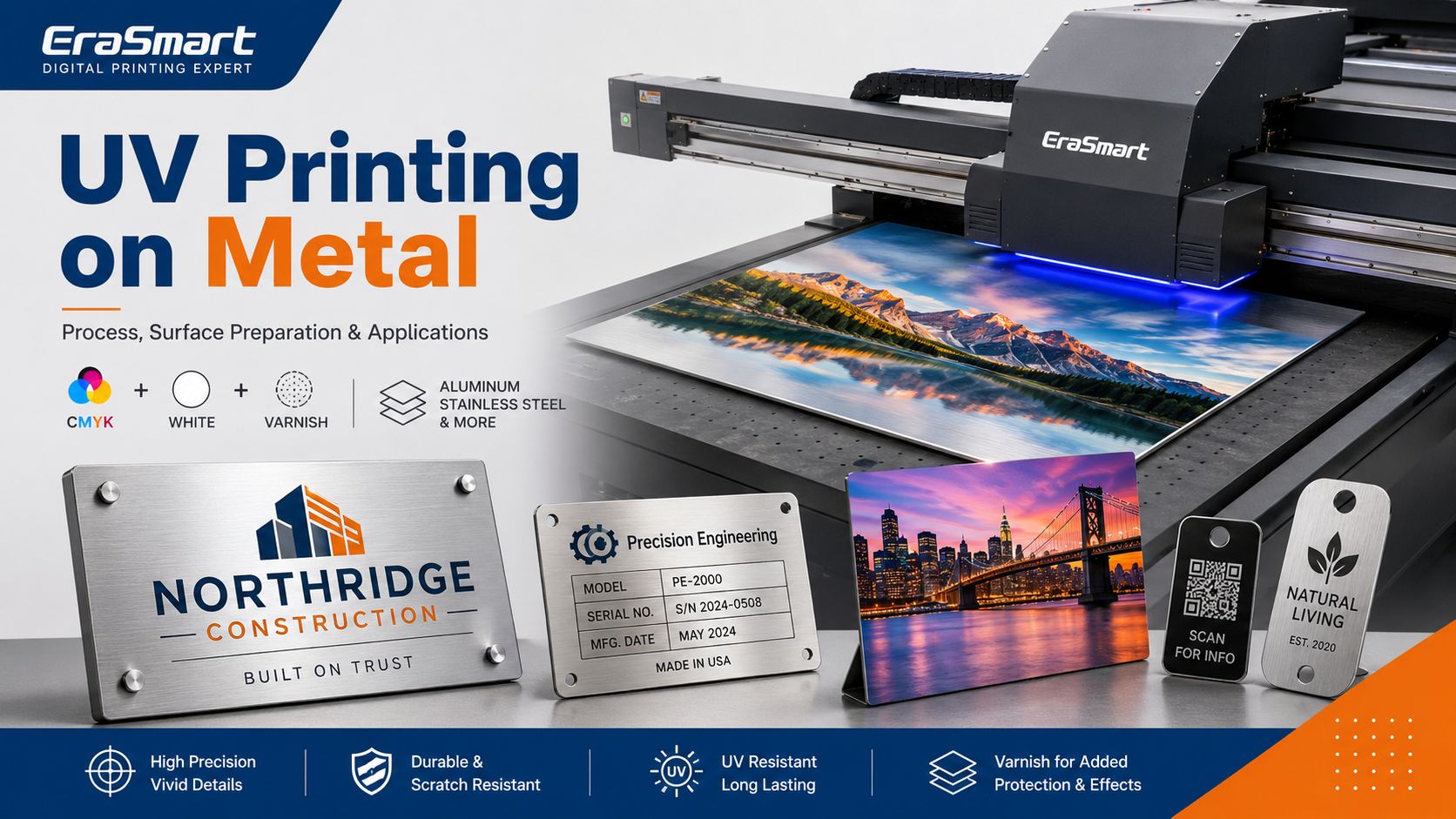
This guide explains how UV printing on metal works, which metals are commonly used, how to prepare metal surfaces, when white ink or primer may be needed, how to test adhesion, and how to choose an EraSmart UV printer for different metal products.
Quick Answer: Can a UV Printer Print on Metal?
Yes. A UV flatbed printer can print directly onto many suitable metal surfaces.
But “printable” does not automatically mean “perfect adhesion.”
Different metals and coatings require different preparation.
| Question | Practical Answer |
|---|---|
| Can UV printers print on metal? | Yes, after material testing |
| Common metals | Aluminum, stainless steel, coated steel, brass, copper |
| Does metal absorb UV ink? | No, UV ink generally cures on the surface |
| Is white ink useful? | Yes, especially on dark, silver or transparent-looking backgrounds |
| Is primer always required? | No; it depends on the exact surface |
| Is a heat press required? | No |
| Main production challenge | Surface preparation and adhesion |
| Best applications | Signs, nameplates, panels, tags, awards and branded products |
The most important rule is simple:
Test the exact metal product you intend to sell.
Two aluminum sheets that look almost identical can have different coatings and therefore different adhesion performance.
How Does UV Printing on Metal Work?
UV printing is a digital direct-to-surface process.
Instead of transferring an image from paper or film, a UV flatbed printer jets UV-curable ink directly onto the metal.
A simplified process is:
- Prepare the digital artwork.
- Process the file in RIP software.
- Create CMYK, white and varnish layers as required.
- Position the metal on the printer bed.
- Jet UV ink onto the surface.
- UV LED light cures the ink during printing.
- Inspect the finished print.
- Test adhesion before production approval.
Unlike water-based or solvent-based inks that rely heavily on absorption or evaporation, UV ink is cured through a light-triggered polymerization process.
For a deeper explanation of the ink itself, see What Is UV Ink?.
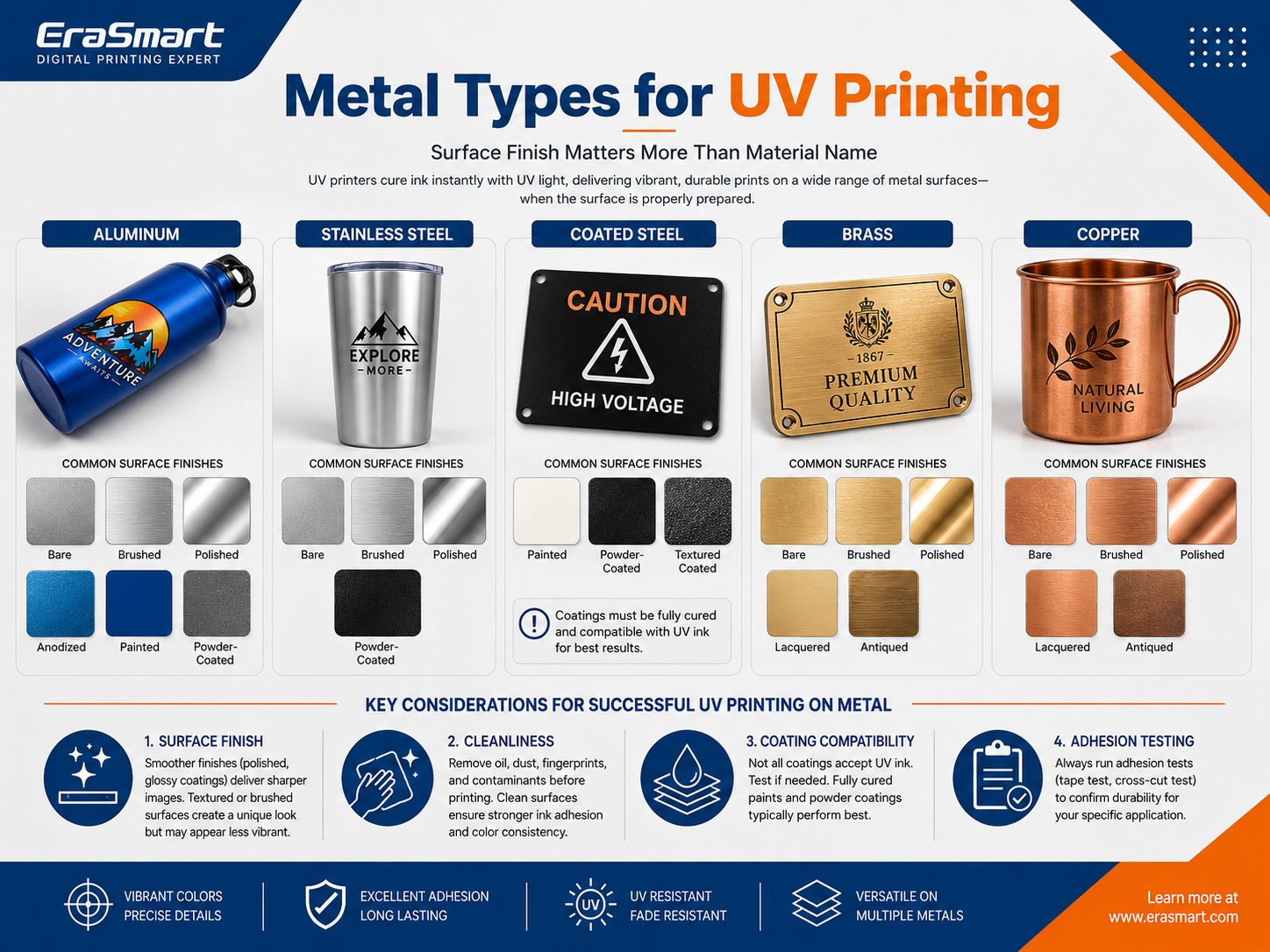
Which Metals Can You UV Print On?
Many metal products can be customized with a UV printer, but the surface finish often matters as much as the metal type.
Common materials include:
- aluminum
- stainless steel
- coated steel
- brass
- copper
- painted metal
- anodized aluminum
- powder-coated metal
Aluminum
Aluminum is widely used for:
- signage
- nameplates
- photo panels
- awards
- promotional products
- display panels
- equipment identification
However, “aluminum” can describe several very different print surfaces.
Bare Aluminum
The natural metallic appearance can become part of the design, but adhesion needs to be tested carefully.
Brushed Aluminum
Brushed aluminum provides a premium metallic texture.
When CMYK is printed without a complete white underbase, some of that metallic effect can remain visible through the artwork.
Anodized Aluminum
Anodizing changes the aluminum surface and can provide a consistent decorative finish.
Different anodized coatings should still be tested individually.
Painted or Coated Aluminum
A coated sheet may provide a more uniform printing background.
But remember:
The UV ink is bonding to the coating—not directly to the aluminum underneath it.
The coating therefore becomes part of the adhesion system.
Stainless Steel
Stainless steel is popular for:
- premium nameplates
- business signage
- branded plates
- decorative products
- equipment labels
- plaques
Common finishes include:
- bare stainless steel
- brushed stainless steel
- polished stainless steel
- painted stainless steel
- coated stainless steel
Stainless steel can be more challenging because it is smooth and non-porous.
Potential contaminants include:
- fingerprints
- oil
- polishing compound
- manufacturing residue
- protective-film adhesive
Proper degreasing and adhesion testing are therefore especially important.
A future material-specific guide can go deeper into UV printing on stainless steel, including brushed vs polished surfaces and adhesion-promoter selection.
Coated and Powder-Coated Steel
Coated steel is common in:
- equipment panels
- signs
- industrial housings
- branded components
- display products
In this case, printing performance depends strongly on the coating.
A fully cured compatible coating may provide a good printing surface, while another coating may have poor surface energy and weak UV ink adhesion.
Never approve a coated metal based on appearance alone.
Brass
Brass can create a premium traditional look for:
- plaques
- awards
- signs
- decorative branding
- luxury gifts
Because brass surfaces may oxidize or receive lacquer and polishing treatments, clean and test the exact blank.
Copper
Copper offers a distinctive natural color and is useful for:
- decorative plaques
- art products
- premium gifts
- branded pieces
Oxidation, protective coatings and surface polishing can all influence printing performance.
Bare Metal vs Coated Metal
A useful way to evaluate metal is by surface condition rather than only by alloy.
| Metal Surface | Main Visual Advantage | Main Printing Consideration |
|---|---|---|
| Bare metal | Natural metallic appearance | Adhesion |
| Brushed metal | Premium texture | Grain affects appearance |
| Polished metal | Reflective finish | Fingerprints and adhesion |
| Anodized aluminum | Consistent decorative finish | Anodized coating varies |
| Painted metal | Controlled background color | Paint compatibility |
| Powder-coated metal | Finished commercial surface | Coating chemistry |
| Lacquered metal | Premium protective appearance | Ink-to-lacquer adhesion |
This is why material testing is central to professional metal UV printing.
For other substrate types, see our UV Printer Materials Guide.
How to Prepare Metal Before UV Printing
Surface preparation is one of the most important stages in the entire workflow.
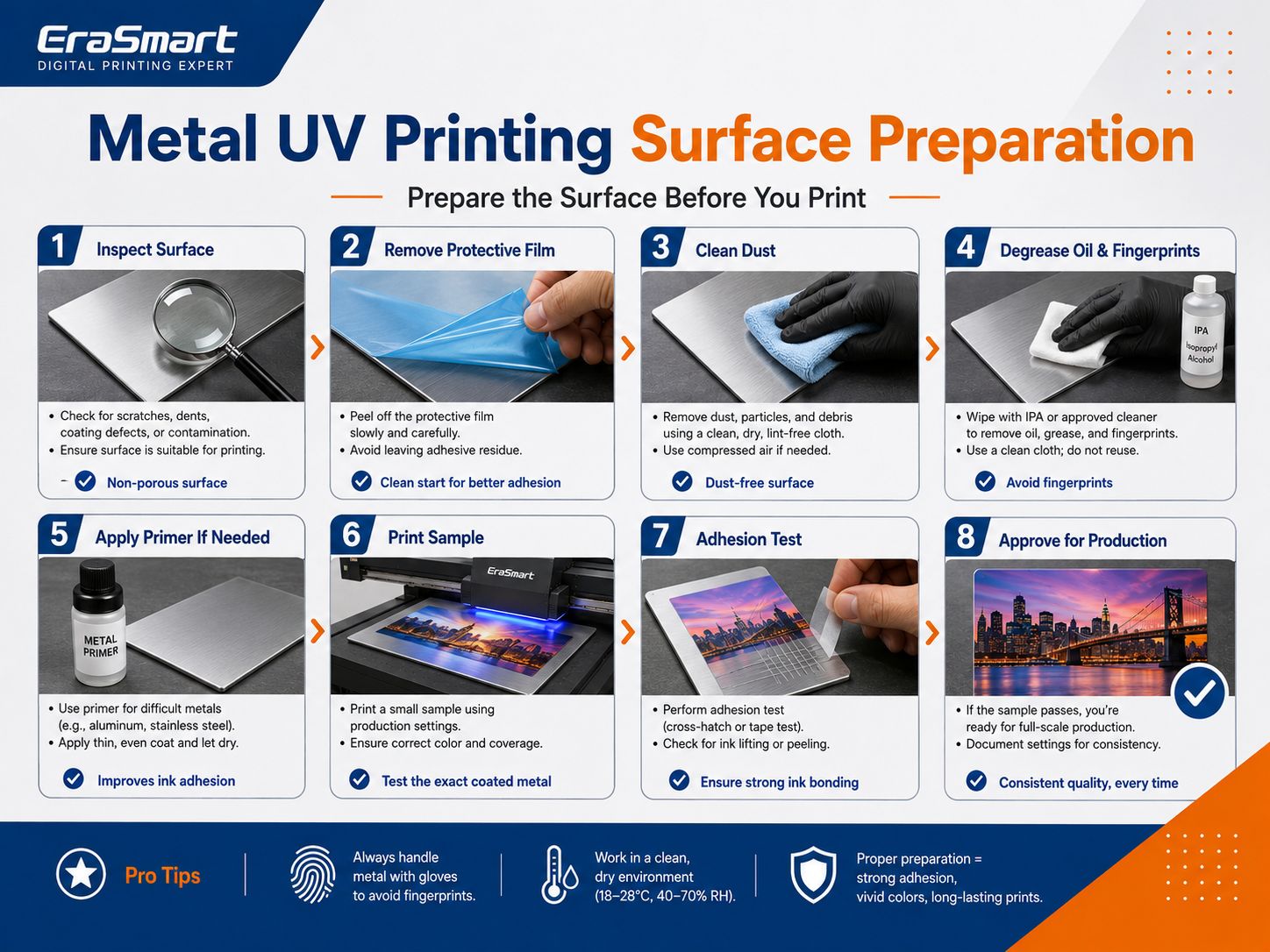
Step 1: Identify the Exact Surface
Determine whether the metal is:
- bare
- brushed
- polished
- anodized
- painted
- powder coated
- lacquered
- otherwise treated
Do not treat all metal as one substrate preset.
Step 2: Inspect the Surface
Look for:
- scratches
- dents
- oxidation
- contamination
- coating defects
- warping
- protective film
A premium print cannot hide every substrate defect.
Step 3: Remove Protective Film When Appropriate
Some metal blanks arrive with a protective film.
Remove it according to the blank manufacturer’s workflow before printing on the intended finished surface.
Check that no adhesive residue remains.
Step 4: Remove Dust
Use an appropriate lint-free cleaning method.
Particles can interfere with:
- print quality
- adhesion
- fine text
- varnish effects
Step 5: Degrease the Metal
Metal can easily retain:
- fingerprints
- machining oil
- polishing residue
- manufacturing grease
Use a compatible cleaning method for the specific metal and coating.
After cleaning, handle the printable area carefully to avoid contaminating it again.
Step 6: Evaluate Primer or Adhesion Promoter
Some metal surfaces may benefit from an appropriate primer or adhesion promoter.
But primer is not universally required.
The correct approach is:
test without primer → evaluate adhesion → test compatible pretreatment if necessary → compare results
Always follow the ink, substrate and pretreatment supplier’s compatibility requirements.
Step 7: Print a Sample
Use the same:
- metal
- surface finish
- artwork
- ink layers
- curing configuration
that you intend to use in production.
Step 8: Test Adhesion
Do not judge success only by appearance.
The print may look perfect immediately after printing but still have insufficient adhesion for the intended application.
Do You Need Primer for UV Printing on Metal?
Sometimes.
There is no responsible universal answer.
Primer requirements depend on:
- metal type
- surface energy
- coating
- polishing
- oxidation
- UV ink formulation
- curing
- required durability
- final application
Some coated or treated metal blanks may perform adequately without additional pretreatment.
Some polished, bare or difficult surfaces may require a compatible adhesion promoter.
Therefore:
Do not apply primer automatically, and do not assume primer is never necessary.
Test the exact substrate.
CMYK, White Ink and Varnish on Metal
Metal gives designers an additional variable that white paper does not:
the substrate itself has color and reflectivity.
This means white ink can dramatically change the final appearance.
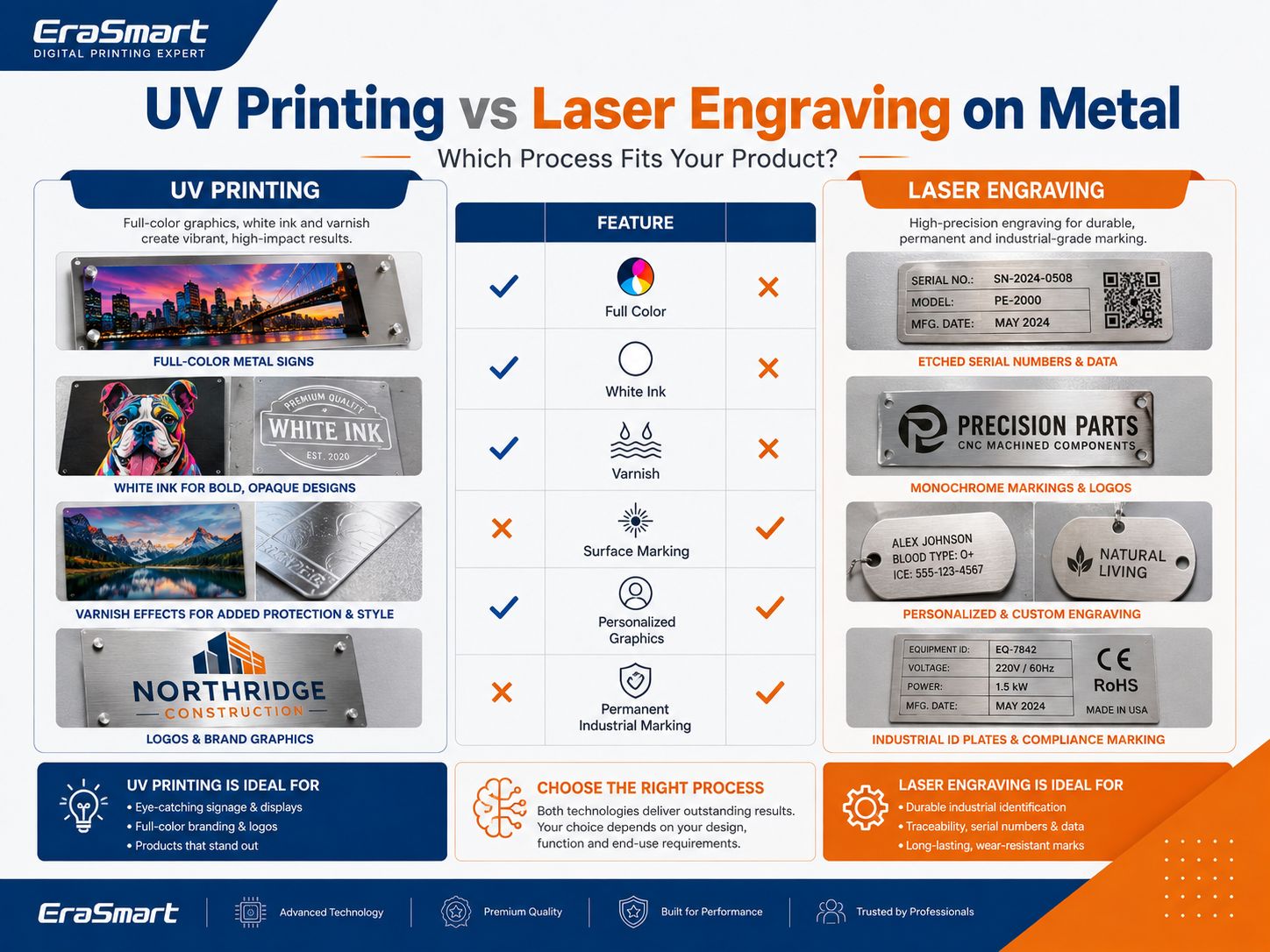
CMYK Only
Printing CMYK directly onto silver or brushed metal allows the metal to influence the artwork.
This can create:
- metallic highlights
- translucent-looking color
- integrated metal texture
- industrial design effects
This approach is useful when the metallic background is intentionally part of the design.
However, color will not look exactly like the same artwork printed on white paper.
White + CMYK
A white underbase reduces the influence of the metal color.
This is useful for:
- photographs
- colorful logos
- brand colors
- illustrations
- dark metal
- brushed stainless steel
- silver aluminum
White + CMYK can produce a more opaque and predictable full-color result.
Selective White + CMYK
Selective white allows only part of the design to receive a white underbase.
For example:
- white under the logo
- no white under the background
- full color in one area
- visible brushed metal in another
This creates a premium combination of:
natural metallic texture + controlled full color
Varnish
On supported EraSmart configurations, varnish can add:
- spot gloss
- highlighted logos
- decorative texture
- raised effects
- premium contrast
Varnish should be treated as a design layer—not automatically applied everywhere.
For more detail, see the UV Ink Guide: CMYK, White and Varnish.
How to UV Print on Metal Step by Step
Once the metal has passed initial material testing, build a repeatable workflow.
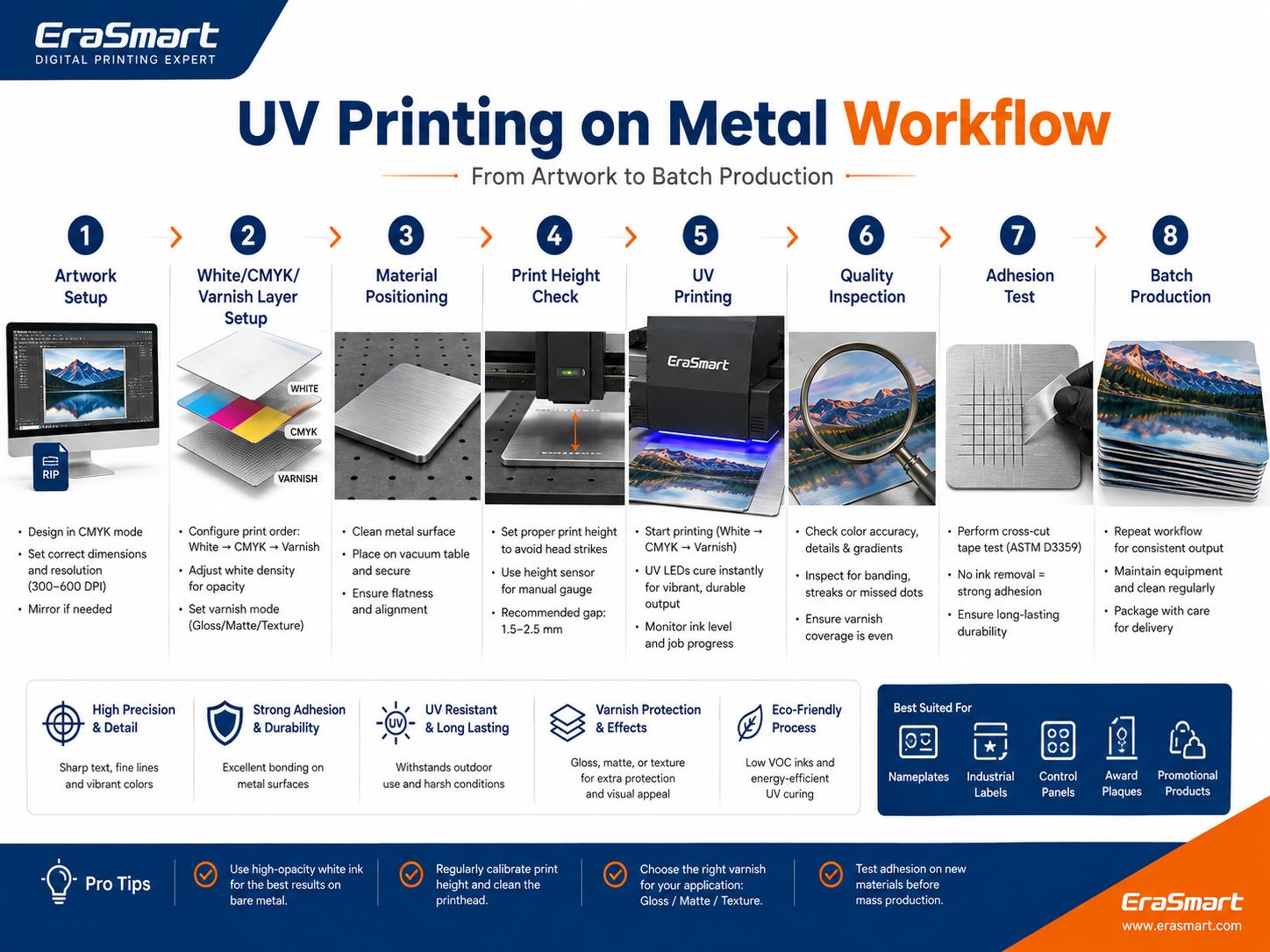
Step 1: Prepare the Artwork
Confirm:
- final dimensions
- image resolution
- logos
- text
- bleed
- print position
Vector artwork is preferred for:
- text
- QR codes
- logos
- serial information
- line graphics
Around 300 DPI at final size is a practical starting point for high-quality raster artwork viewed at close distance.
Step 2: Prepare CMYK, White and Varnish Layers
Decide whether the job requires:
- CMYK only
- White + CMYK
- Selective White + CMYK
- White + CMYK + Varnish
The choice should follow the desired visual effect.
Step 3: Position the Metal
Flat metal pieces should sit securely on the printing platform.
For repeat orders, consider using:
- jigs
- fixtures
- corner references
- templates
- fixed positioning coordinates
Step 4: Set the Print Height
Correct printhead clearance is essential.
A badly warped metal sheet can create inconsistent printhead distance and should not be treated as a normal production blank.
Step 5: Print One Sample
Before starting the full order, check:
- color
- white ink
- registration
- small text
- varnish
- positioning
Step 6: Inspect the Print
Look for:
- banding
- missing nozzles
- alignment errors
- dust
- surface defects
- inconsistent white
- uneven varnish
Step 7: Test Adhesion
Evaluate whether the print is suitable for the actual product requirement.
Step 8: Standardize Batch Production
Once approved:
- save the RIP preset
- record the material
- record the cleaning process
- lock the jig
- record positioning
- document the white/varnish structure
This turns an experimental print into a repeatable production workflow.
How to Test UV Ink Adhesion on Metal
Adhesion should be evaluated according to the end use.
Initial Rub Check
Useful for detecting obvious adhesion failure.
If ink immediately lifts under light handling, the surface preparation or ink/substrate combination should be reviewed.
Tape-Based Internal Check
A controlled tape check can help compare production samples.
If your customer requires compliance with a specific recognized adhesion-test standard, follow the exact standard and test conditions rather than relying on an informal shop test.
Scratch and Abrasion Evaluation
Products such as:
- keychains
- equipment labels
- frequently handled signs
may require more abrasion resistance than decorative wall art.
Test accordingly.
Cleaning Resistance
If the final product will be wiped or cleaned regularly, test it using cleaning conditions representative of actual use.
Do not describe a UV-printed product as meeting an industrial, automotive, chemical, outdoor or other regulated durability standard unless the finished product has actually been tested to that standard.
UV Printing vs Sublimation on Metal
Both methods can create full-color metal products, but their workflows are different.
| Feature | UV Printing | Sublimation |
|---|---|---|
| Direct to metal | Yes, on suitable surfaces | No |
| Special coating | Depends on metal | Sublimation coating required |
| White ink | Yes | No |
| Heat press | No | Yes |
| Dark metal | White underbase possible | Generally unsuitable for normal sublimation |
| Varnish | Available on supported UV systems | No |
| Variable short-run work | Excellent | Excellent |
| Main requirement | Adhesion | Sublimation-compatible coating |
Sublimation remains a strong option for purpose-made coated photo panels.
UV printing offers greater flexibility when white ink, direct printing, different surface types or varnish effects are required.
UV Printing vs Laser Engraving on Metal
UV printing and laser engraving should not be treated as competing versions of the same technology.
They solve different problems.
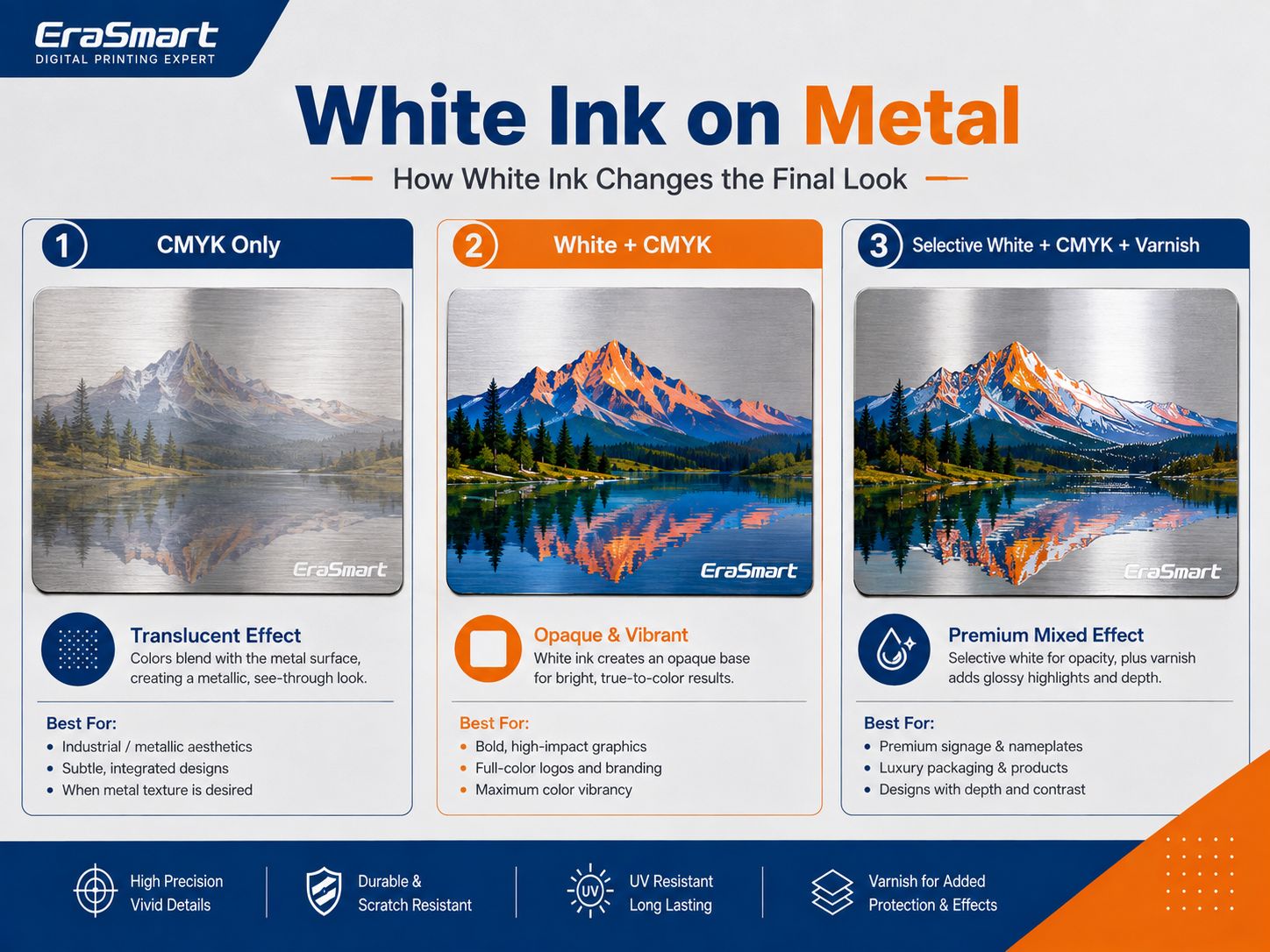
| Feature | UV Printing | Laser Engraving / Marking |
|---|---|---|
| Full-color graphics | Excellent | Limited |
| Photographs in color | Yes | No conventional full-color ink |
| White ink | Yes | No |
| Varnish effects | Yes, on supported systems | No |
| Adds ink layer | Yes | No |
| Alters/marks surface | Not the primary process | Yes |
| Decorative branding | Excellent | Good |
| Serial/data marking | Possible as printed graphics | Strong application |
| Permanent industrial marking | Not its primary strength | Strong application |
| Personalized graphics | Excellent | Excellent |
Choose UV printing when the product requires:
- colorful logos
- photographs
- artwork
- white ink
- varnish
- decorative branding
Choose an appropriate laser-marking process when the primary requirement is:
- engraved information
- permanent identification
- serial numbers
- traceability
- industrial surface marking
Some businesses use both technologies.
UV Flatbed vs UV DTF for Metal Products
EraSmart offers both UV flatbed printers and UV DTF printers.
The right workflow depends on product shape.
Choose Direct UV Flatbed Printing For:
- metal plates
- aluminum signs
- stainless-steel nameplates
- photo panels
- tags
- badges
- awards
- flat promotional products
The object goes directly onto the printer platform.
Consider UV DTF For:
- finished metal bottles
- tumblers
- irregular products
- difficult-to-position objects
- surfaces where direct flatbed positioning is impractical
With UV DTF, the artwork is printed onto an A/B film system and then transferred to the compatible product surface.
Adhesion still needs to be tested on the finished surface.
This distinction is important:
A standard flatbed printer should not automatically be described as a complete 360° cylindrical printing system.
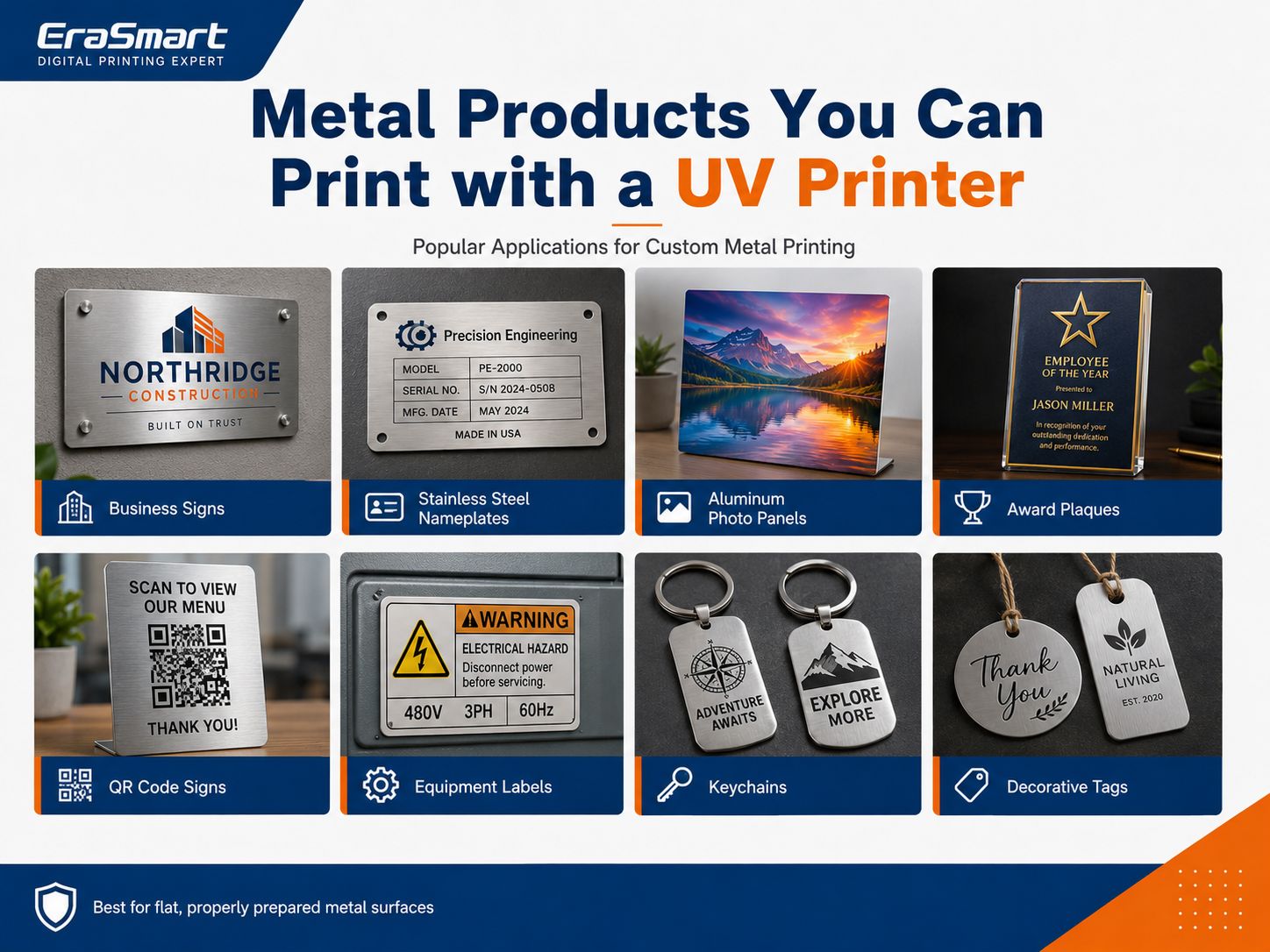
Metal Products You Can Print with a UV Printer
Metal UV printing covers both consumer customization and B2B production.
Metal Signs
Applications include:
- business signs
- door signs
- directional signs
- office signage
- decorative signs
- QR signs
Stainless-Steel Nameplates
Possible products include:
- company nameplates
- equipment identification plates
- desk plates
- branded plaques
If a plate must meet a specific industrial identification standard, verify the finished product according to that standard.
Aluminum Photo Panels
Full-color photographs and artwork can be printed directly onto compatible aluminum surfaces.
White ink can be used when greater opacity is required.
Equipment Labels
Potential applications include:
- machine identification
- control-panel graphics
- equipment branding
- instruction plates
Again, do not claim safety-label or regulatory compliance unless the complete product has been tested and approved for that specific requirement.
QR Code Signs
Metal QR code signs can be used for:
- menus
- reviews
- Wi-Fi
- payment links
- product information
- social media
Always scan the finished physical product before delivery.
Awards and Recognition Products
Create:
- employee awards
- corporate plaques
- event awards
- recognition pieces
White ink and varnish can help increase the perceived value of decorative designs.
Keychains and Tags
Small metal blanks can be personalized with:
- logos
- names
- artwork
- photographs
- event branding
A fixture can improve positioning when printing multiple identical blanks.
Promotional and Branded Products
Examples include:
- logo plates
- display pieces
- souvenir tags
- branded desk products
- promotional gifts
Why Fixtures Matter for Batch Metal Printing
Suppose a customer orders 100 identical stainless-steel nameplates.
Manually placing every plate by eye is inefficient.
Instead:
- Build a positioning jig.
- Define the fixed print location.
- Lock the RIP coordinates.
- Record the cleaning process.
- Print one approved sample.
- Repeat the same workflow.
For variable-data products, the physical blank can remain in the same location while names, codes or artwork change digitally.
This is one of the major advantages of digital UV production.
Which EraSmart UV Printer Is Suitable for Metal Printing?
Printer selection should follow the product dimensions and production workflow, not simply the largest machine available.
EraSmart A3 PRO UV Printer — Dual XP600
The EraSmart Digital Inkjet A3 UV Printer — Dual XP600 is designed for personalized customization and small-batch UV production.
Key specifications include:
| Specification | A3 PRO |
|---|---|
| Printheads | Dual XP600 |
| Effective Print Area | 350 × 450 mm |
| Printing Height | 0–130 mm |
| Resolution | Up to 1440 dpi |
| Ink Configuration | CMYK + WW + VVVVVV |
| White Ink Circulation | Yes |
| Timing Automatic Cleaning | Yes |
| Suction Platform | Yes |
| Height Measurement | Infrared |
| RIP | Riin / EraRip |
Metal is one of the materials officially listed for this system.
The A3 PRO is a practical option for products such as:
- smaller signs
- metal photo panels
- nameplates
- tags
- keychains
- awards
- decorative plates
- promotional products
White ink circulation is particularly useful because white UV ink contains heavier pigments that require appropriate management.
EraSmart A2 UV Printer
For larger metal products, the EraSmart A2 UV Printer provides a larger working area.
| Specification | A2 UV Printer |
|---|---|
| Printheads | Dual XP600 |
| Print Area | 420 × 600 mm |
| Printing Height | 0–130 mm |
| Resolution | Up to 1440 dpi |
| Ink Configuration | CMYK + WW + VVVVVV |
| Automatic Cleaning | Yes |
| Suction Platform | Yes |
| RIP | Riin / EraRip |
The larger platform can be useful for:
- larger signs
- larger photo panels
- larger nameplates
- decorative metal panels
- multiple smaller products arranged in one print layout
The right machine depends on the dimensions of the products you intend to produce repeatedly.
Common Problems When UV Printing on Metal
UV Ink Scratches Off Easily
Possible causes include:
- oil
- fingerprints
- incompatible coating
- inadequate surface preparation
- unsuitable primer
- adhesion problems
Start by testing the exact metal surface rather than immediately changing print resolution.
Colors Look Weak
Possible reasons:
- metallic substrate influencing CMYK
- insufficient white underbase
- artwork prepared for a white background
Try a White + CMYK or selective-white workflow.
White Ink Is Not Opaque Enough
Check:
- white ink condition
- circulation
- nozzle status
- RIP white settings
- layer structure
White ink requires regular maintenance.
Small Text Looks Blurry
Check:
- source artwork
- surface texture
- material flatness
- printhead distance
- nozzle condition
Use vector text wherever possible.
Printing Position Changes Between Pieces
Use:
- fixture
- jig
- fixed edge reference
- saved coordinates
instead of manually estimating every position.
Varnish Looks Uneven
Check:
- artwork mask
- printhead condition
- substrate flatness
- varnish layer configuration
Varnish should be tested as part of the complete product rather than added automatically.
How to Choose a UV Printer for Metal
Before buying a printer, first define the products.
Ask:
What Is the Largest Product?
A 100 × 150 mm tag and a 500 mm metal sign need very different print-bed sizes.
Is the Product Flat?
Flat products are ideal for standard flatbed UV printing.
Curved bottles and tumblers may require a different workflow.
Do You Need White Ink?
White is especially valuable for:
- stainless steel
- black metal
- dark coatings
- photographs
- brand-color accuracy
Do You Need Varnish?
Varnish is useful for premium effects, but not every product needs it.
How Many Pieces Will You Produce?
Consider:
- one-off customization
- small batches
- repeat B2B orders
- jig requirements
- workflow automation
What Surface Will You Actually Print?
Do not buy a printer based only on the word “metal.”
Test your real:
- aluminum blank
- stainless-steel plate
- coated panel
- award plate
- tag
before building a commercial workflow.
Final Answer: Is UV Printing Good for Metal?
UV printing is a flexible method for producing full-color graphics, white ink and decorative varnish effects directly on many suitable metal surfaces.
Common applications include:
- aluminum signs
- stainless-steel nameplates
- photo panels
- awards
- equipment plates
- tags
- QR signs
- promotional products
However, the most important factor is not simply maximum printer resolution.
It is the metal surface.
The correct production logic is:
Identify → Clean → Degrease → Pretreat if required → Print Sample → Test Adhesion → Approve → Standardize → Batch Produce
Use:
- CMYK only when the metallic surface should remain part of the design
- White + CMYK when stronger opacity and color are required
- Selective White + CMYK when you want to combine metallic texture with vivid graphics
- Varnish when premium spot effects support the product design
For flat metal products, an EraSmart UV flatbed is the most direct workflow.
For certain bottles, tumblers and irregular finished objects, UV DTF printing may provide a more practical transfer-based alternative.
Above all:
Do not assume that every metal surface behaves the same. Test the exact product before commercial production.
FAQ
Can a UV printer print directly on metal?
Yes. UV flatbed printers can print directly on many suitable metal surfaces, including aluminum, stainless steel, coated steel, brass and copper. Surface preparation and adhesion testing are important.
Which metal is best for UV printing?
There is no universal best metal. Coated or properly prepared aluminum is common, while stainless steel, brass, copper and other metals can also be printed after testing.
Can UV printers print on stainless steel?
Yes. Brushed, polished and coated stainless-steel products can be UV printed, but the smooth non-porous surface makes cleaning and adhesion testing especially important.
Does metal need primer before UV printing?
Not always. Primer depends on the exact metal, coating, ink system and required adhesion. Test the substrate first.
Can you UV print on bare aluminum?
Yes, but bare aluminum should be cleaned and tested carefully. Depending on the surface and required durability, pretreatment may be necessary.
Do I need white ink when printing on metal?
Not always.
Use CMYK only when you want the metallic background to influence the design.
Use white beneath CMYK when you want more opaque and predictable colors.
Can UV printers print photographs on metal?
Yes. Full-color photographs can be UV printed onto compatible metal surfaces. A white underbase is often useful when the metal background should not influence the photograph.
Can a UV printer print QR codes on metal?
Yes. Use sufficiently large, sharp and high-contrast artwork. Always scan the finished physical QR code before delivery.
Can a flatbed UV printer print metal tumblers?
A standard flatbed is primarily suited to flat products. Cylindrical printing requires an appropriate rotary or object-positioning workflow. For many finished cups and bottles, UV DTF may be a more practical alternative.
Is UV printing permanent on metal?
Do not assume that every UV print is permanent. Durability depends on the metal surface, coating, preparation, ink, curing and final environment.
Is UV printing better than laser engraving on metal?
They serve different purposes. UV printing is better suited to full-color decorative graphics, white ink and varnish effects. Laser engraving or marking is often better suited to permanent serial numbers, traceability and engraved industrial identification.
Can UV-printed metal be used outdoors?
Potentially, but outdoor performance depends on the substrate, coating, ink system, surface preparation and environmental exposure. Test the complete finished product for the intended outdoor application before making durability claims.
Which EraSmart UV printer can print metal?
The EraSmart A3 PRO Dual XP600 supports a 350 × 450 mm print area and 0–130 mm print height, while the EraSmart A2 UV Printer provides a larger 420 × 600 mm platform. Both list metal among their supported materials.
Build a Repeatable Metal Printing Workflow
If you are evaluating a UV printer for metal products, send EraSmart:
- metal type
- surface finish
- product dimensions
- product photos
- expected monthly volume
- required white ink effect
- whether varnish is needed
- intended indoor or outdoor use
We can help you compare the appropriate EraSmart UV Printer and test workflow for your actual metal products.
Prepare the surface. Test the adhesion. Standardize the workflow. Then scale production.
MAY BE YOU LIKE ALSO

Copyright 2020 © EraSmart. | Sitemap