Small Size Flatbed Inkjet Printer Manufacturer

UV DTF vs DTF: Which Printer Should You Buy for Your Business?
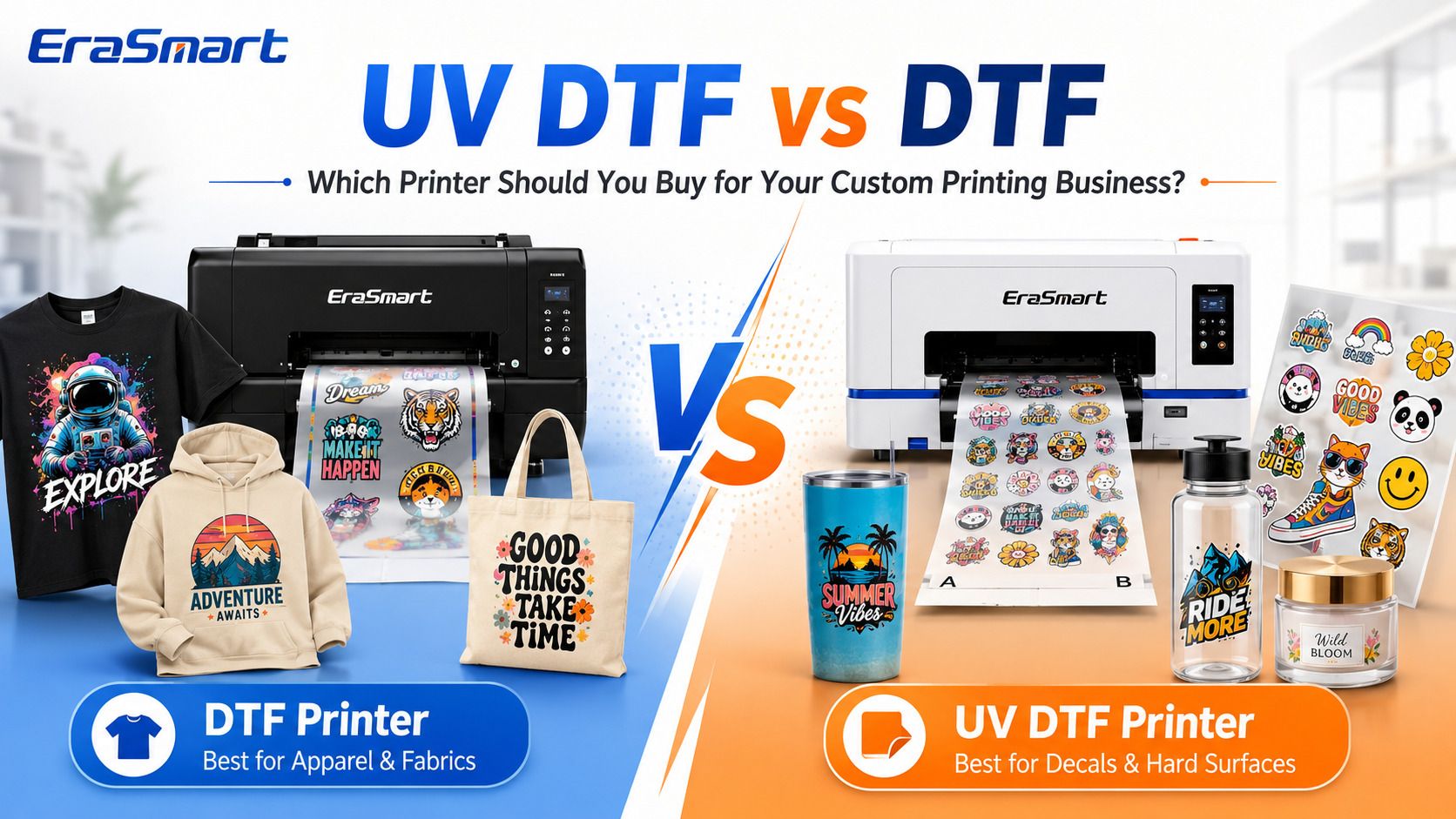
If you are choosing between a DTF printer and a UV DTF printer, the most important question is not which technology is “better.”
The better question is:
What products do you want to sell?
If your main products are T-shirts, hoodies, uniforms, sportswear, tote bags, workwear, and other textile products, a DTF printer is usually the right direction.
If your main products are stickers, cup wraps, bottle decals, cosmetic labels, candle jar branding, packaging decals, phone case graphics, and other hard-surface applications, a UV DTF printer is usually the better fit.
And if your long-term goal is to build a broader customization business serving both apparel and hard goods, the two technologies can complement each other rather than compete with each other.
This guide goes beyond a basic definition of DTF and UV DTF. Instead, we will compare the two systems from a buying and business perspective: products, materials, workflow, equipment, consumables, maintenance, customer types, order structure, and expansion potential.
If you first need a broader technical comparison between UV DTF, textile DTF, and direct UV printing, read EraSmart’s UV DTF vs Textile DTF vs UV Flatbed guide.
Quick Answer: Should You Buy a DTF or UV DTF Printer?
Here is the simplest way to decide.
| If Your Main Business Is… | Better Starting Point |
|---|---|
| Custom T-shirts | DTF Printer |
| Hoodies and streetwear | DTF Printer |
| Sportswear and uniforms | DTF Printer |
| Tote bags and fabric merchandise | DTF Printer |
| Print-on-demand apparel | DTF Printer |
| DTF transfer selling | DTF Printer |
| Premium stickers and decals | UV DTF Printer |
| Cup wraps and tumbler decals | UV DTF Printer |
| Bottle and jar branding | UV DTF Printer |
| Cosmetic and candle labels | UV DTF Printer |
| Packaging decals | UV DTF Printer |
| Gadget and phone case decals | UV DTF Printer |
| Both apparel and hard-surface customization | Consider Both |
The core rule is:
Fabric and apparel → DTF
Decals and hard surfaces → UV DTF
Do not choose only by printer price, maximum resolution, or how many printheads a machine has. Buy according to the products your customers are actually going to order.
DTF and UV DTF Sound Similar, but They Are Different Production Systems
The names can be confusing because both technologies include “DTF,” meaning Direct to Film.
Both print a design onto film first and transfer it later.
But that is where the similarity largely ends.
A standard textile DTF workflow uses:
- DTF pigment ink
- CMYK + white ink
- PET transfer film
- hot-melt adhesive powder
- powder curing
- heat pressing
- textile products
A UV DTF workflow uses:
- UV-curable ink
- CMYK + white + varnish
- A film
- B film
- UV LED curing
- lamination
- cold transfer/application
- hard-surface products
They use different ink chemistry, different films, different adhesive systems, and different final application methods.
That means a DTF printer cannot simply be converted into a UV DTF printer by changing film, and a UV DTF printer should not be purchased for printing T-shirts.
DTF vs UV DTF Workflow: Where the Real Difference Starts
The workflow is one of the most important differences for a business owner because it determines what equipment you need, how much operator work is involved, and how orders move through your shop.
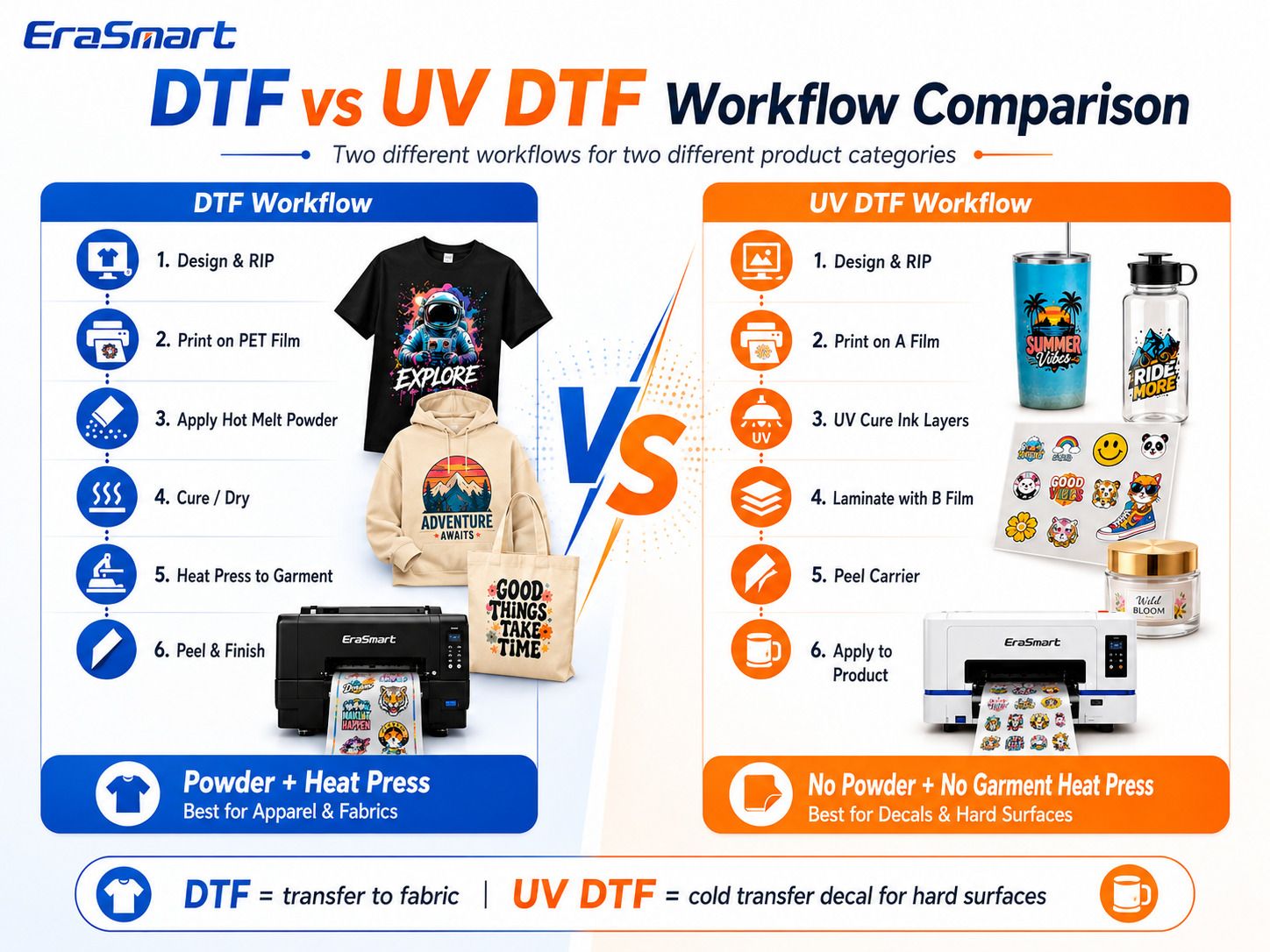
DTF Workflow
A typical textile DTF workflow looks like this:
- Prepare artwork.
- Process artwork in RIP software.
- Print CMYK and white ink onto PET film.
- Apply hot-melt adhesive powder.
- Cure or melt the adhesive powder.
- Position the transfer on the garment.
- Heat press the transfer.
- Peel the film.
- Finish press if required.
- Inspect the final garment.
The printer creates the transfer, but the garment is not finished until the transfer is heat pressed.
For a more detailed production explanation, see EraSmart’s DTF Production Workflow.
UV DTF Workflow
A typical UV DTF workflow looks like this:
- Prepare artwork.
- Process CMYK, white, and varnish layers in RIP software.
- Print onto A film.
- UV LEDs cure the ink during printing.
- Laminate with B film.
- Cut or trim the finished transfer if needed.
- Peel the appropriate carrier layer.
- Position the decal on the product.
- Burnish or press it onto the surface.
- Remove the carrier.
There is no hot-melt powder and normally no garment heat press.
That difference makes UV DTF especially useful when customers bring many different hard products that would otherwise require direct printing fixtures or positioning.
What Products Do You Actually Want to Sell?
This should be the first buying decision.
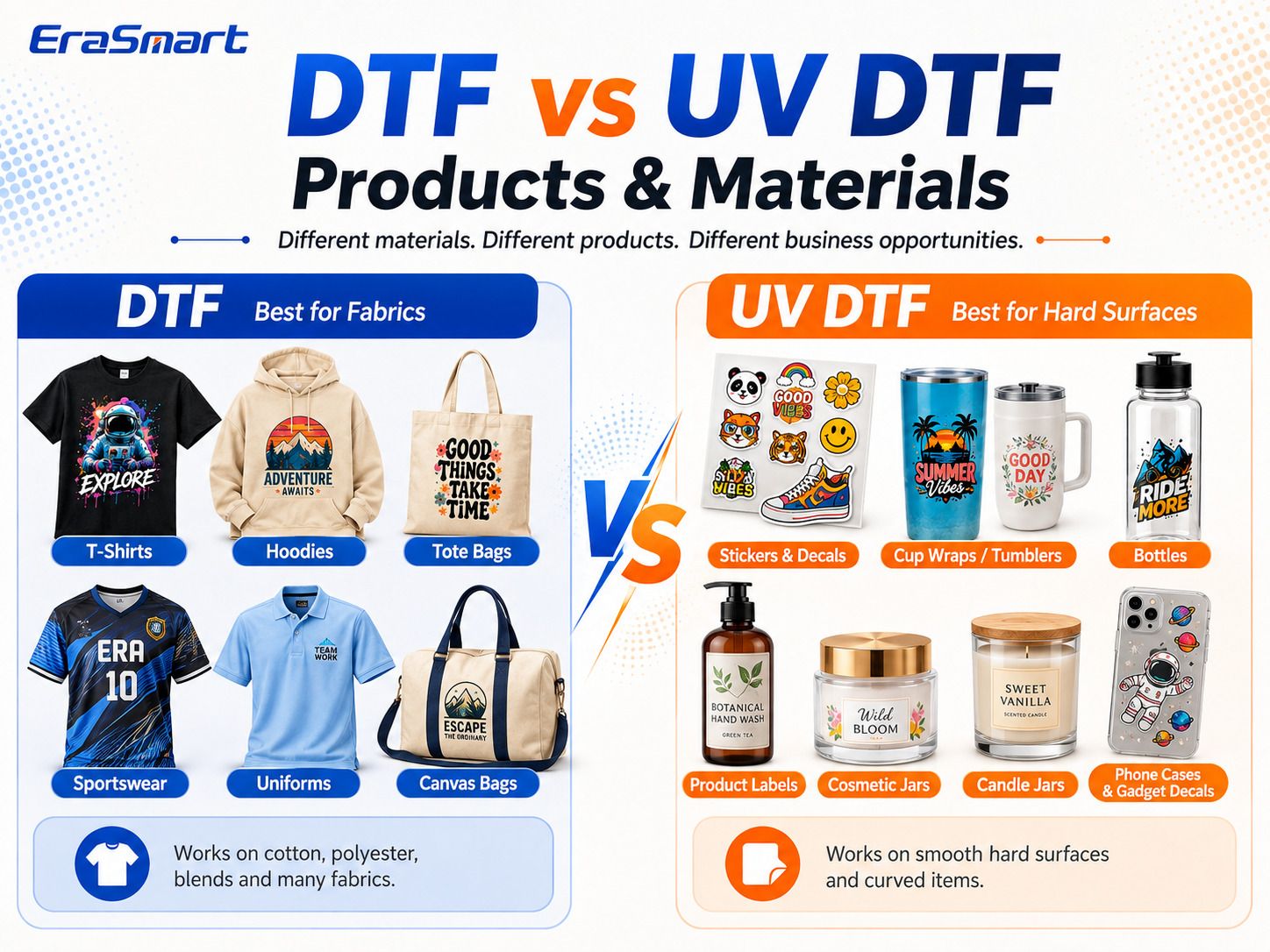
Choose DTF for Apparel and Fabrics
DTF is designed around textile decoration.
Common products include:
- T-shirts
- hoodies
- sweatshirts
- sports jerseys
- uniforms
- workwear
- tote bags
- canvas bags
- team apparel
- branded merchandise
- event shirts
- school and club apparel
- personalized garments
- print-on-demand clothing
DTF is particularly useful when a shop handles different garment colors and mixed order quantities.
White ink creates an opaque underbase, allowing colorful artwork to be transferred to dark garments as well as light-colored fabrics.
A DTF shop can also sell the transfers themselves instead of only selling finished garments. This creates another potential business model: printing gang sheets or transfers for local clothing businesses, craft sellers, schools, or other apparel decorators.
Explore the complete EraSmart DTF Printer range if apparel is your main direction.
Choose UV DTF for Stickers, Labels, and Hard-Surface Products
UV DTF is designed around transferable UV decals.
Typical products include:
- premium stickers
- logo decals
- cup wraps
- tumblers
- water bottles
- glassware branding
- candle jar labels
- cosmetic bottle labels
- product packaging
- gift box decals
- phone case decals
- gadget skins
- QR code labels
- promotional product branding
- small business labels
Instead of placing the object inside the printer, you first produce the decal on film and apply it afterward.
This is useful for product businesses with many shapes and SKUs.
For example, the same logo transfer can potentially be applied to a bottle, jar, gift box, acrylic item, or another compatible smooth surface after suitable adhesion testing.
Explore EraSmart’s UV DTF Printer lineup if decals and hard goods are your primary market.
Material Compatibility: Fabric vs Hard Surfaces
A common buying mistake is assuming UV DTF is simply “better DTF” because it adds UV ink and varnish.
It is not.
They solve different material problems.
DTF Is Designed for Heat-Press-Compatible Textiles
Typical DTF applications include cotton, polyester, blends, canvas, and many common garment materials.
However, operators should still test new fabrics, coatings, stretch behavior, pressing temperature, and adhesion before accepting a production order.
UV DTF Is Designed for Compatible Hard Surfaces
UV DTF is generally used on clean, smooth hard surfaces such as:
- glass
- acrylic
- metal
- coated containers
- plastic products
- packaging
- bottles
- jars
- selected wood surfaces
- gadgets and accessories
Surface texture and surface energy matter.
A UV DTF decal that adheres very well to smooth glass may behave differently on an oily plastic, raw wood, silicone-like material, heavily textured surface, or flexible product.
Testing the actual blank is always recommended before volume production.
Print Appearance and Customer Experience
DTF and UV DTF also create very different finished products.
DTF: Flexible Apparel Graphics
A good DTF transfer can provide:
- vibrant full-color artwork
- white underbase for dark garments
- fine graphic detail
- small-batch personalization
- flexible garment decoration
The final feel depends on artwork coverage, ink density, adhesive powder, curing, pressing, and the garment itself.
A large solid graphic will naturally feel different from a small chest logo with more negative space.
UV DTF: Premium Decal and Raised Effects
UV DTF can use:
CMYK + White + Varnish
Varnish allows effects such as:
- gloss
- spot gloss
- raised details
- premium logo effects
- textured decorative accents
This makes UV DTF attractive for brand labels, drinkware, packaging, gift products, and premium decorative graphics.
It should still be thought of as a transferred decal layer rather than printing directly into the substrate.
Equipment and Consumables: What Do You Really Need?
The printer is only part of the investment.
You should compare the complete production system.
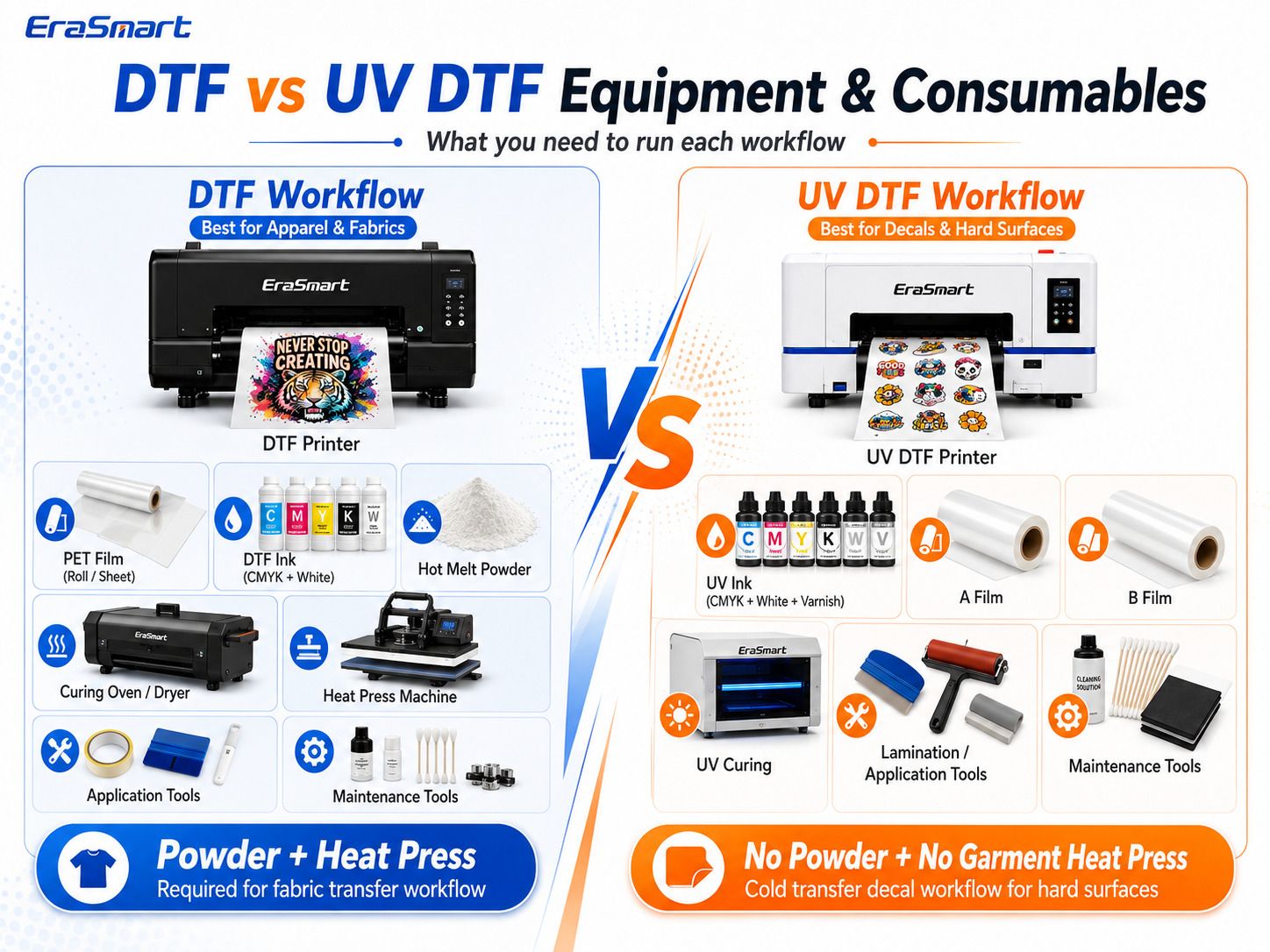
DTF Production System
A complete DTF workflow may require:
- DTF printer
- CMYK + white DTF ink
- PET transfer film
- hot-melt adhesive powder
- powder application system
- curing oven or dryer
- heat press
- RIP software
- cleaning solution
- maintenance tools
- blank apparel
Small shops can apply powder manually and use separate curing equipment.
As production increases, an automatic powder shaker and dryer can reduce manual work and improve consistency.
For buyers considering that upgrade, EraSmart also provides the A3 MAX XP600 DTF Printer with Powder Shaker.
UV DTF Production System
A UV DTF workflow generally needs:
- UV DTF printer
- UV CMYK ink
- white UV ink
- varnish
- A film
- B film
- UV curing system
- lamination system
- RIP software
- trimming/application tools
- cleaning and maintenance supplies
The EraSmart UV DTF workflow is powderless and does not require a garment heat press for standard decal application.
This makes the production structure very different from textile DTF.
Which Workflow Has More Steps?
It depends on what you count.
DTF needs additional garment production steps after the transfer is printed:
powder → cure → heat press → peel
UV DTF needs:
UV cure during printing → laminate → trim → apply → peel
So the question should not be “Which one has fewer steps?”
The better question is:
Which workflow fits the products you want to sell repeatedly?
If 90% of your orders are T-shirts, a DTF workflow will feel natural.
If 90% of your orders are cup wraps and packaging decals, a UV DTF workflow will make much more sense.
Maintenance: Which Printer Is Easier to Own?
Neither system should be treated as maintenance-free.
Both DTF and UV DTF printers contain inkjet printheads and white ink systems that need proper operating routines.
DTF Maintenance Priorities
DTF operators need to manage:
- white ink circulation
- nozzle checks
- printhead condition
- capping station
- wiper
- ink lines
- powder contamination
- film storage
- room temperature and humidity
- idle-time routines
White ink contains heavier pigment and is one of the main reasons regular DTF operation and maintenance matter.
EraSmart’s DTF Maintenance Guide provides additional maintenance guidance.
UV DTF Maintenance Priorities
UV DTF operators also need to manage:
- printhead condition
- white ink system
- UV ink
- varnish channel
- nozzle checks
- capping and cleaning
- A/B film storage
- lamination quality
- UV curing system
- dust and contamination
UV DTF removes hot-melt powder from the workflow, but that does not mean the printer itself can be left unused indefinitely without care.
For either system, daily operating discipline is more important than marketing phrases such as “easy maintenance.”
Which Is Easier for a Beginner?
There is no universal answer.
The easiest printer for a beginner is usually the printer that matches the beginner’s first product category.
DTF Is Easier to Understand If You Already Want to Sell Clothing
If your business idea is:
“I want to sell custom T-shirts and hoodies.”
DTF has a clear path:
design → transfer → heat press → garment.
Your main learning areas will be:
- artwork preparation
- RIP setup
- white ink management
- powder curing
- pressing
- garment testing
UV DTF Is Easier to Understand If You Want to Sell Decals and Custom Hard Goods
If your business idea is:
“I want to sell tumbler wraps, labels, and custom product decals.”
UV DTF gives you a workflow that naturally matches those products.
Your main learning areas will be:
- CMYK/white/varnish setup
- A/B film
- lamination
- decal positioning
- application technique
- substrate adhesion testing
Buying the wrong system creates a much harder beginner experience than choosing either technology correctly.
DTF vs UV DTF Business Models
The difference becomes even clearer when you stop thinking about printers and start thinking about customers.
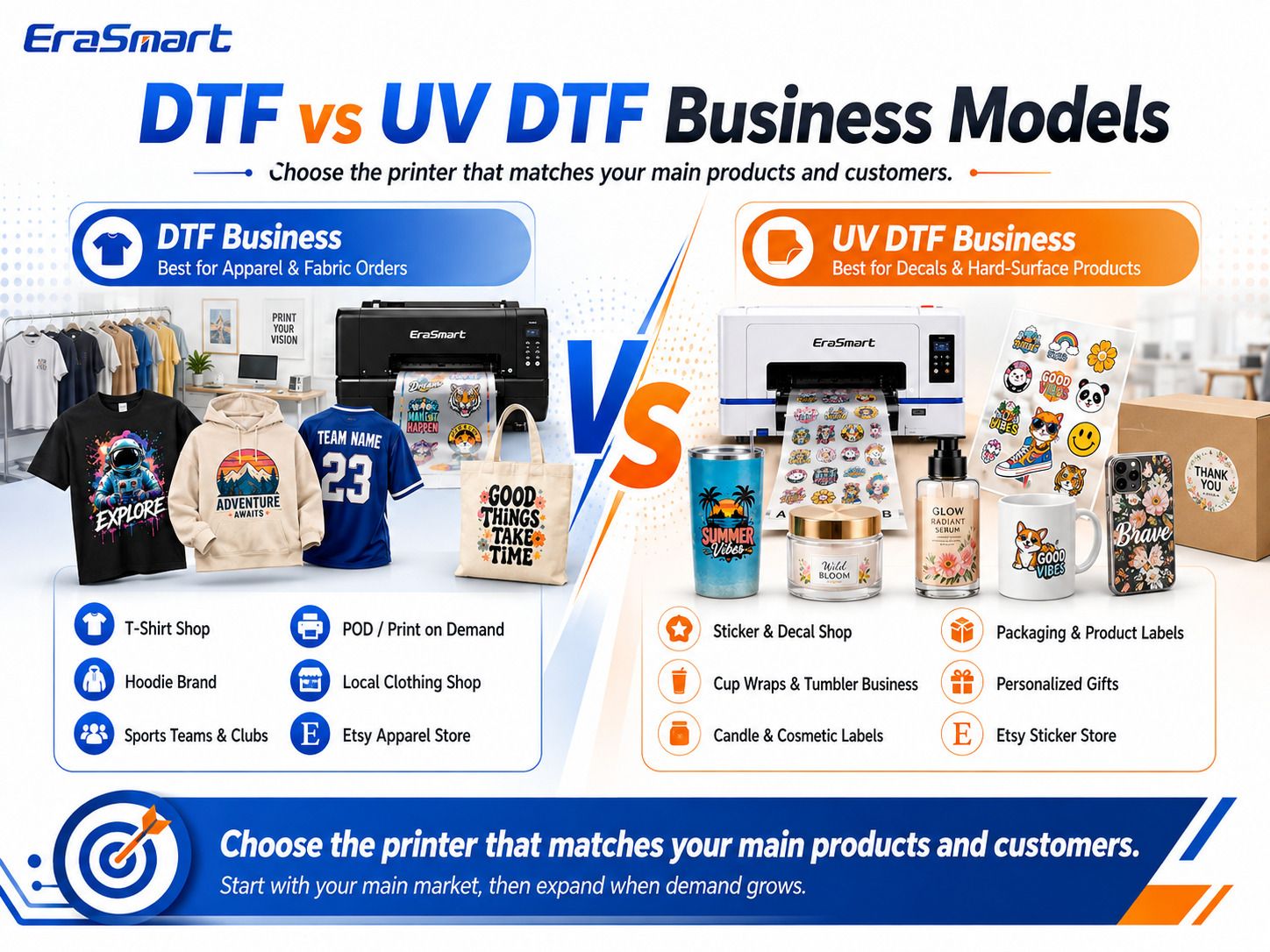
DTF Business Models
DTF is a strong fit for:
Custom T-Shirt Shop
Customers send designs and order shirts in small or medium quantities.
Print-on-Demand Apparel
Multiple designs can be prepared and produced as orders arrive.
Streetwear and Clothing Brands
Brands can launch small collections without preparing screens for every design.
School, Team, and Club Apparel
Names, numbers, logos, and changing designs suit digital transfer production.
Corporate Merchandise
Staff shirts, event apparel, workwear, and branded garments can create repeat business.
DTF Transfer Supplier
Instead of pressing garments yourself, you can sell finished transfers to other decorators.
UV DTF Business Models
UV DTF is a strong fit for:
Sticker and Decal Shop
Produce premium hard-surface transfers for consumers and businesses.
Cup Wrap Business
Create artwork for tumblers, glass cups, bottles, and drinkware.
Packaging and Product Labels
Serve small brands that want attractive short-run labels and decals.
Candle and Cosmetic Branding
Create decorative branding for compatible jars and containers.
Personalized Gift Business
Use decals to customize different gift products without directly printing each item.
B2B Branding Supplier
Serve cafés, salons, gift shops, local product brands, event companies, and promotional product businesses.
Which Is Better for Etsy and Online Stores?
Both can work well, but they lead to different stores.
DTF Online Store
Possible products:
- graphic T-shirts
- custom hoodies
- personalized sportswear
- event shirts
- tote bags
- creator merchandise
- apparel transfers
This model fits sellers whose visual identity is based on clothing.
UV DTF Online Store
Possible products:
- sticker sheets
- cup wraps
- tumbler decals
- bottle labels
- seasonal decal collections
- personalized labels
- small-business branding packs
UV DTF transfers can also be sold without the finished blank, reducing the need to stock every possible cup, jar, or bottle design.
Which Is Better for Local Print Shops?
This depends on your local customer base.
DTF is attractive if you regularly receive:
- restaurant staff shirt orders
- sports team apparel
- school shirts
- construction/workwear orders
- club merchandise
- event apparel
- corporate uniforms
UV DTF is attractive if your customers need:
- packaging labels
- bottle branding
- product decals
- tumbler customization
- QR code decals
- promotional gifts
- cosmetic/candle labels
- small-run branding
A local print shop may eventually have demand for both.
Which Has Better Growth Potential?
Neither technology automatically makes more money.
Profit depends on:
- local demand
- selling price
- material cost
- waste
- machine utilization
- labor
- product positioning
- marketing
- customer retention
- repeat orders
DTF gives you a growth path inside apparel.
You can move from:
small custom orders → apparel brand work → gang sheets → transfer selling → larger production systems.
UV DTF gives you a growth path inside hard-surface decoration.
You can move from:
stickers → drinkware → packaging labels → B2B branding → promotional products → larger decal production.
The better growth platform is the one connected to the customer base you can realistically build.
Can You Run DTF and UV DTF Together?
Yes. In fact, the two systems can be complementary because they target different product categories.
Imagine a café customer wants a complete branded merchandise package.
With DTF you could produce:
- staff T-shirts
- promotional hoodies
- event shirts
- tote bags
With UV DTF you could produce:
- cup logo decals
- bottle branding
- QR code stickers
- packaging labels
- gift box branding
One customer can therefore generate orders across multiple product types.
This is why a mature customization shop may eventually operate both systems.
But that does not mean a beginner should automatically buy both on day one.
Start with the system that matches your strongest product opportunity. Add the second workflow when customer demand justifies it.
EraSmart A3 MAX DTF vs A3 UV DTF Printer
For a more practical buying example, consider two EraSmart A3-class systems.
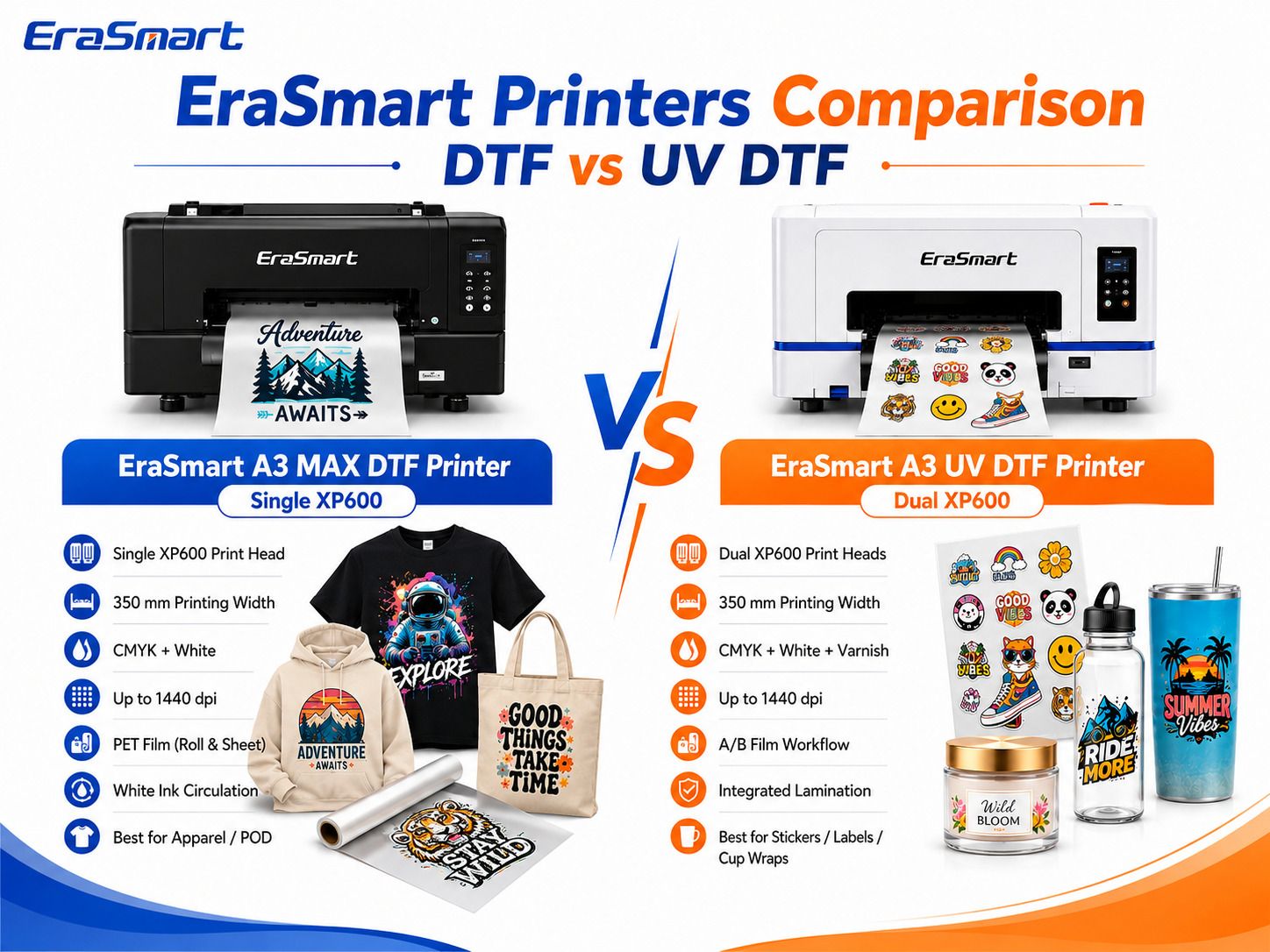
| Specification | EraSmart A3 MAX DTF Printer | EraSmart A3 UV DTF Printer |
|---|---|---|
| Main Application | Apparel transfers | Hard-surface decals |
| Printhead | Single XP600 | Dual XP600 |
| Max Printing Width | 350 mm | 350 mm |
| Color System | CMYK + White | CMYK + White + Varnish |
| Resolution | Up to 1440 dpi | Up to 1440 dpi |
| Film | PET Film, Roll & Sheet | A/B UV DTF Film |
| Adhesive Workflow | Hot-melt powder | A/B film adhesive system |
| Curing | Powder curing required | UV LED curing |
| Lamination | Not part of standard DTF transfer workflow | Integrated/cold lamination workflow |
| Heat Press | Required to apply to garment | No garment heat press for standard decal application |
| White Ink Management | White Ink Circulation | White ink/UV ink management |
| Best Fit | Apparel, POD, textiles | Stickers, labels, cup wraps, decals |
EraSmart A3 MAX DTF Printer — Single XP600
The EraSmart A3 MAX DTF Printer — Single XP600 is an A3-class textile transfer printer designed around a 350 mm PET film workflow.
Key features include:
- Single XP600 printhead
- up to 350 mm printing width
- CMYK + white
- PET film roll and sheet support
- up to 1440 dpi
- white ink circulation
- Riin / EraRip workflow
- designed for custom apparel and POD applications
It is a practical direction for shops that want to produce their own apparel transfers in-house without immediately moving into a wider A1 production platform.
EraSmart A3 UV DTF Printer — Dual XP600
The EraSmart A3 UV DTF Printer is designed around the A/B film decal workflow.
Its core configuration includes:
- Dual XP600 printheads
- up to 350 mm media width
- CMYK + white + varnish
- up to 1440 dpi
- A/B film workflow
- UV curing
- cold/integrated lamination workflow
- no hot-melt powder
- no garment heat press for standard decal application
- designed for stickers, labels, cup wraps, and hard-surface transfers
The important difference is not that one machine has one printhead and the other has two.
The important difference is that the machines are designed for two different businesses.
Do Not Compare Printhead Count Without Comparing the Workflow
This deserves special attention.
A buyer may see:
- Single XP600 on one printer
- Dual XP600 on another printer
and immediately assume the dual-head machine is simply “better.”
That is not a useful comparison.
Printheads are configured according to the machine’s ink system, width, layer requirements, and intended workflow.
A UV DTF printer may need to manage CMYK, white, varnish, and curing/lamination requirements.
A textile DTF printer is optimized for CMYK + white transfer production.
Therefore:
Do not choose DTF vs UV DTF based on printhead count alone.
Choose according to what you need to make.
Cost: Which Is Cheaper to Run?
There is no responsible universal answer because costs vary by market, supplier, product size, ink coverage, waste, labor, and order type.
Instead, compare the cost structure.
DTF Cost Structure
Include:
- DTF ink
- PET film
- hot-melt powder
- curing energy
- heat press
- blank garments
- cleaning supplies
- failed transfers
- maintenance
- labor
UV DTF Cost Structure
Include:
- UV ink
- white ink
- varnish
- A film
- B film
- lamination
- cleaning supplies
- failed decals
- application labor
- maintenance
- blank products if you sell finished goods
The cheapest cost per square meter does not necessarily produce the best business.
A premium cup decal or cosmetic label may sell very differently from a large T-shirt graphic.
Always calculate cost based on the finished product you sell, not just the ink or film.
Space Requirements
Both A3 systems can fit into relatively compact custom-printing environments, but their surrounding workflows differ.
DTF Workspace
Plan room for:
- printer
- PET film
- powder
- curing system
- heat press
- garment preparation
- completed transfers
- powder containment
- ventilation
If you add an automatic powder shaker, the production footprint becomes larger but the workflow becomes more automated.
UV DTF Workspace
Plan room for:
- UV DTF printer
- A/B film storage
- lamination
- cutting/trimming
- decal application
- hard-product storage
- cleaning supplies
A UV DTF business may not need a garment heat press, but it can require much more storage if you sell many different blank hard goods.
Which System Is Better for High-Mix Small Orders?
This is where both technologies perform well, but in different markets.
DTF is strong when one customer order contains:
- five shirt designs
- several garment colors
- different names
- team numbers
- low quantities per design
UV DTF is strong when one order contains:
- multiple logo decals
- several bottle sizes
- cup wraps
- packaging labels
- different personalized names
Both workflows help small businesses avoid traditional high setup requirements.
The difference is the product category.
Which System Should You Buy First?
Use the following decision guide.
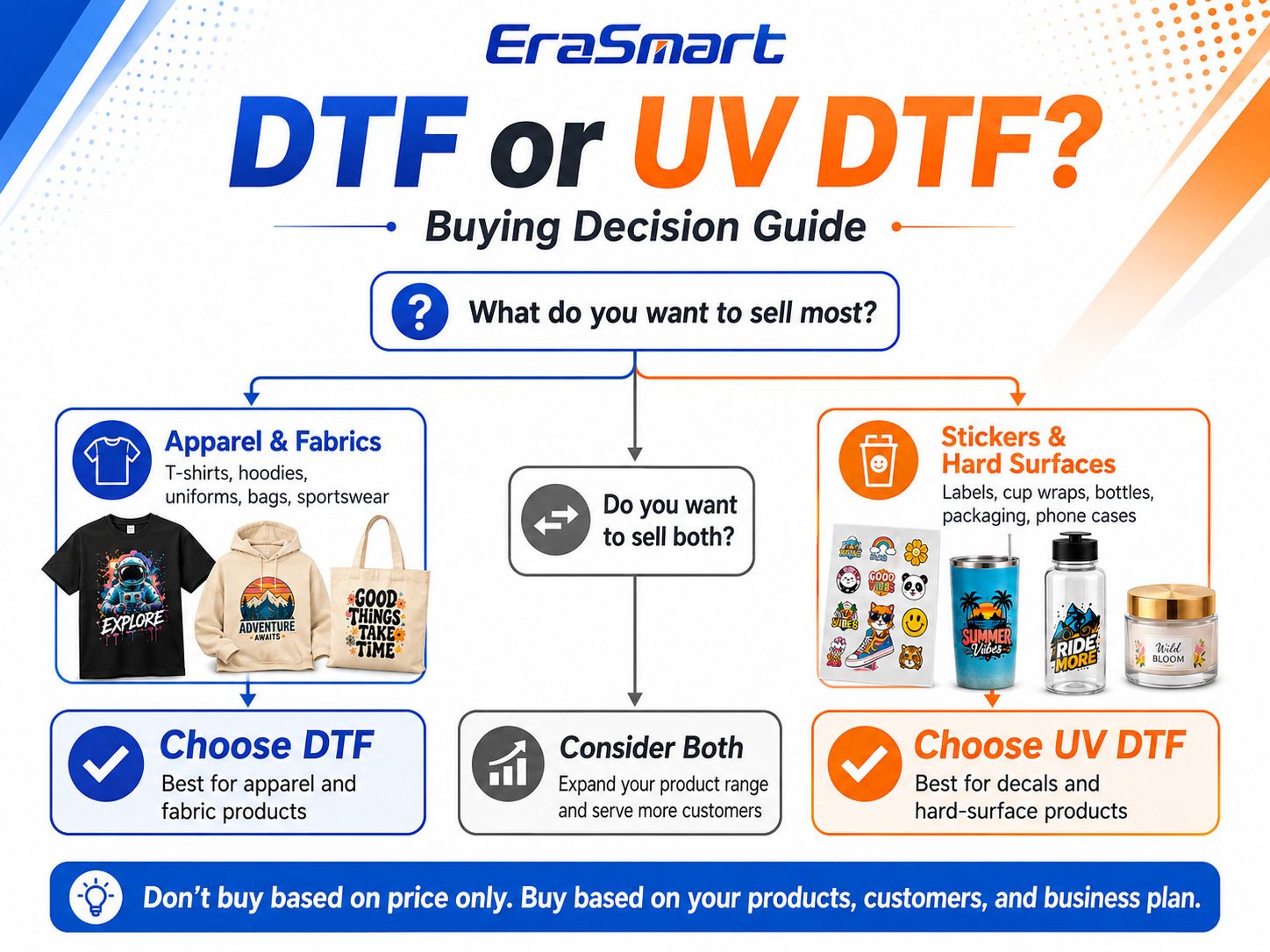
Choose DTF If:
- most of your products are garments
- customers want T-shirts and hoodies
- you want to build an apparel brand
- you want to serve teams and schools
- you plan to sell DTF transfers
- you need full-color printing on dark garments
- POD apparel is your main business
Start with the EraSmart DTF Printer range.
Choose UV DTF If:
- stickers and decals are your core products
- you want to sell cup wraps
- you serve candle or cosmetic brands
- packaging labels are an important market
- customers bring bottles, jars, or gift products
- you want spot-varnish effects
- you want a hard-surface transfer business
Start with the EraSmart UV DTF Printer range.
Consider Both If:
- you already have customers asking for both apparel and branded hard goods
- you want to offer complete merchandise packages
- your existing DTF customers want labels and cup wraps
- your existing decal customers want apparel
- your order volume can support two separate workflows
- you have enough workspace and staff to maintain both systems
Do not buy two machines simply because you want “more possibilities.”
Buy the second system after customer demand proves that those possibilities are real.
DTF vs UV DTF: Final Comparison
| Category | DTF | UV DTF |
|---|---|---|
| Primary Market | Apparel | Hard-surface decals |
| Typical Products | T-shirts, hoodies, uniforms, bags | Stickers, cups, bottles, labels, packaging |
| Ink | DTF pigment ink | UV-curable ink |
| Color Configuration | CMYK + White | CMYK + White + Varnish |
| Film | PET | A/B film |
| Adhesive | Hot-melt powder | A/B film adhesive |
| Curing | Powder curing | UV LED |
| Final Transfer | Heat press | Cold application |
| Heat Press | Yes | Normally no |
| Powder | Yes | No |
| Varnish Effects | No standard varnish layer | Yes |
| Main Maintenance Focus | White ink, printhead, powder workflow | White ink, UV ink, varnish, printhead, film/lamination |
| Best Beginner | Apparel-focused beginner | Decal/hard-goods-focused beginner |
| Best Business Direction | POD, apparel, transfers | Stickers, labels, gift/product branding |
Final Answer: UV DTF or DTF — Which Printer Should You Buy?
If your business is built around T-shirts, hoodies, uniforms, sportswear, tote bags, and textile merchandise, buy a DTF printer.
If your business is built around stickers, labels, cup wraps, bottles, jars, packaging, gadgets, and hard-surface decals, buy a UV DTF printer.
If your customers consistently need both apparel and product branding, consider operating both systems once your order volume justifies the investment.
The biggest buying mistake is choosing according to specifications before choosing your product.
Do not start with:
Which printer has more printheads?
Do not start with:
Which printer has the highest DPI?
And do not start with:
Which printer is cheaper?
Start with:
What am I going to sell, and who is going to buy it?
Once that answer is clear, the choice between DTF and UV DTF becomes much easier.
FAQ
Is UV DTF better than DTF?
No. UV DTF and DTF are designed for different applications. DTF is better suited to textile and apparel transfers, while UV DTF is designed for decals that are applied to compatible hard surfaces.
Can a UV DTF printer print T-shirts?
UV DTF should not be treated as a textile DTF replacement. For T-shirts, hoodies, uniforms, and fabric products, use a textile DTF printer.
Can a DTF printer make cup wraps?
Standard textile DTF transfers are designed for heat-press-compatible textiles. For cup wraps, bottles, labels, and hard-surface decals, use a UV DTF printer.
Does UV DTF require a heat press?
Standard UV DTF decals use a cold-transfer A/B film workflow and normally do not require a garment heat press for application.
Does DTF require powder?
Yes. Standard textile DTF production uses hot-melt adhesive powder that is applied to the printed transfer and cured before heat pressing.
Does UV DTF use powder?
No. UV DTF uses UV-curable ink and an A/B film transfer system rather than hot-melt DTF powder.
What is the difference between DTF film and UV DTF film?
Textile DTF commonly uses PET transfer film that carries DTF ink and hot-melt adhesive powder before heat pressing.
UV DTF typically uses an A/B film system. The image is printed and UV-cured on A film, then laminated and transferred using B film.
Which is better for a small business?
If the business mainly sells apparel, DTF is usually the better starting system. If the business mainly sells stickers, labels, cup wraps, and hard goods, UV DTF is usually the better starting system.
Which is easier to maintain?
Both require routine inkjet printer maintenance. DTF requires careful white ink and powder workflow management. UV DTF also requires printhead, white ink, varnish, UV ink, and film/lamination management. Neither should be considered maintenance-free.
Can I start with DTF and add UV DTF later?
Yes. This is a practical expansion path for an apparel business that begins receiving requests for decals, drinkware, packaging labels, and other hard-surface products.
Can I start with UV DTF and add DTF later?
Yes. Sticker, gift, and product-branding businesses may later add DTF when customers begin requesting T-shirts, hoodies, staff uniforms, and apparel merchandise.
Not sure whether DTF or UV DTF fits your business?
Tell EraSmart:
- what products you want to sell
- what materials you will customize
- your typical order quantity
- your expected daily production
- your workspace
- whether you are starting from home or operating a print shop
- your future product expansion plan
Our team can help you compare the right DTF Printer and UV DTF Printer workflow based on your actual products instead of recommending a machine only by specifications.
MAY BE YOU LIKE ALSO

Copyright 2020 © EraSmart. | Sitemap