Small Size Flatbed Inkjet Printer Manufacturer

EraSmart UV Printer for Plastics Printing
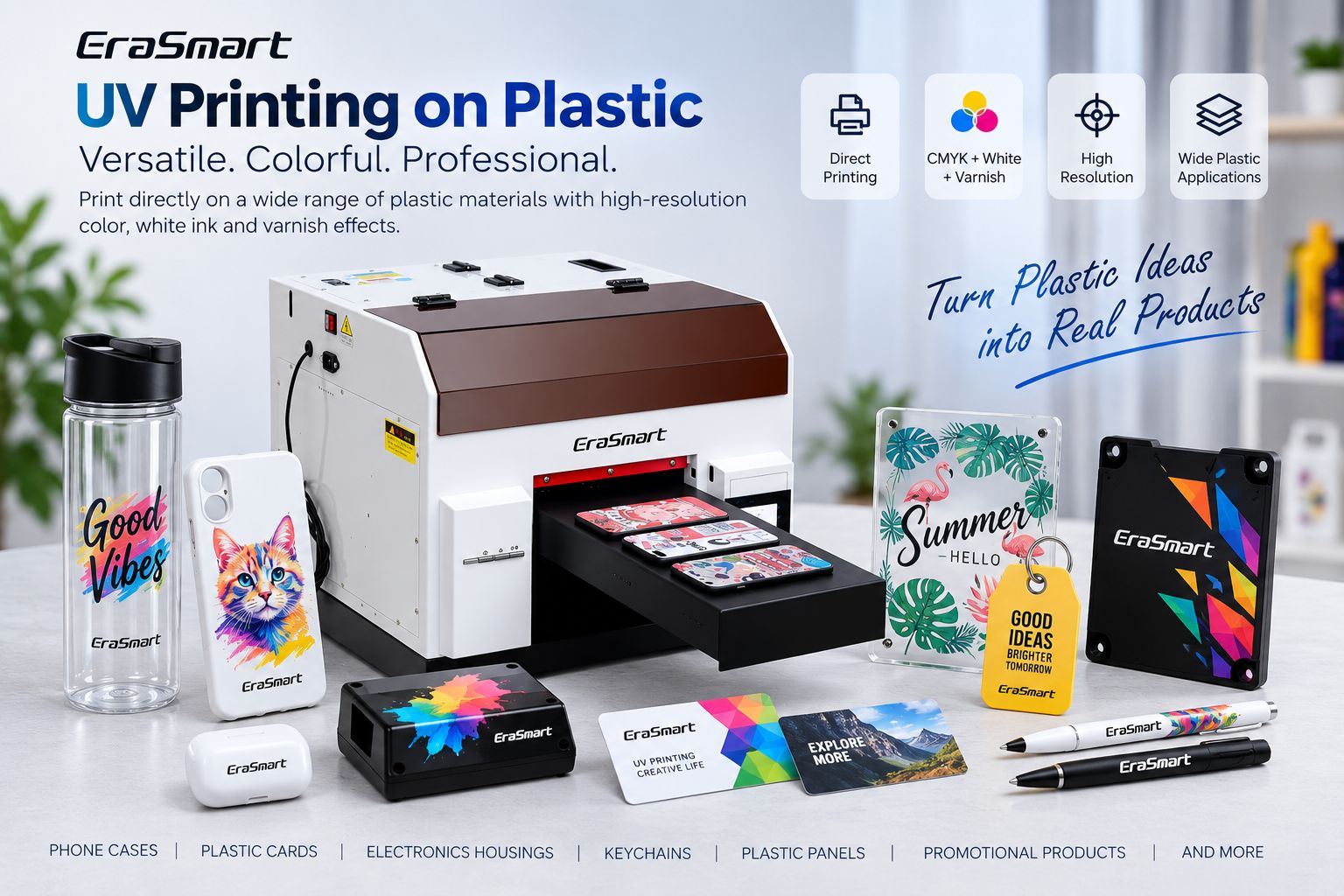
UV printing makes it possible to print full-color graphics, white ink and decorative varnish effects directly onto many plastic products.
Typical applications include:
- phone cases
- plastic cards
- electronics housings
- keychains
- tags
- control panels
- promotional products
- plastic signs
- packaging samples
- cosmetic containers
- custom panels
But there is one important rule every UV printer buyer and operator should understand:
Plastic is not one material.
ABS, PVC, polycarbonate, PET, TPU, polypropylene and polyethylene can behave very differently with the same UV ink.
A design that adheres well to an ABS phone-case blank may perform poorly on a polypropylene container. A PVC card may print easily while a polyethylene bottle made with a different resin formulation may need additional surface treatment.
EraSmart’s current UV Printer Materials Guide therefore classifies plastic suitability as “varies by type” and recommends testing the exact plastic product before production.
The most reliable production workflow is:
Identify the plastic → inspect the surface → clean → test direct printing → evaluate pretreatment if required → print a sample → test adhesion → standardize → begin production
Quick Answer: Can a UV Printer Print on Plastic?
Yes, but not every plastic is equally easy to print.
Some plastics commonly provide more workable surfaces for UV ink, while others are more challenging and may require primers, coatings, corona treatment, plasma treatment or another validated surface-preparation method.
| Plastic | Typical Printing Situation | Main Consideration |
|---|---|---|
| ABS | Often workable | Surface cleanliness |
| PVC | Often workable | Formulation and coating |
| Polycarbonate / PC | Often workable | Cleaning and surface treatment |
| PET / PETG | Varies | Surface treatment |
| TPU | Application-dependent | Adhesion + flexibility |
| PP | More challenging | Low surface energy |
| PE | More challenging | Low surface energy |
| Coated plastic | Depends on coating | Ink-to-coating adhesion |
Technical inkjet guidance also shows why a single “plastic compatibility” claim is misleading: PET, ABS, PVC and polycarbonate can show good adhesion in some UV ink systems, while PP and PE are often specifically identified as more difficult substrates.
So instead of asking:
Can a UV printer print plastic?
Ask:
What exact plastic is this product made from, what is on its surface, and has that exact blank been tested?
Plastic Is Not One Material
This is the most important difference between plastic UV printing and many other substrate categories.
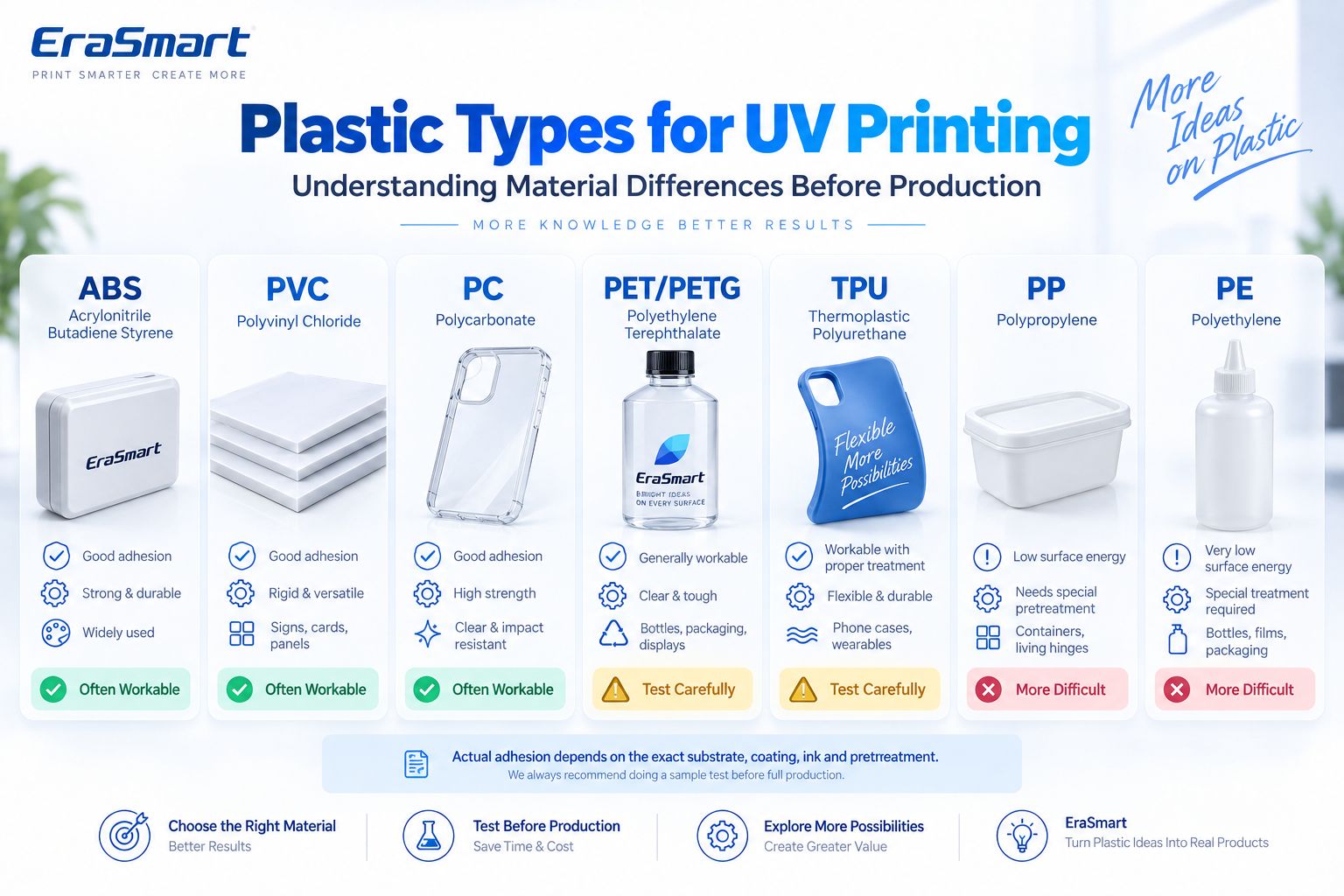
The term “plastic” covers a large family of polymers.
Different plastics can vary in:
- surface energy
- rigidity
- flexibility
- chemical composition
- additives
- mold-release agents
- coatings
- transparency
- heat sensitivity
- scratch resistance
Even two products both labeled “ABS” may not behave identically if one contains a coating, paint, anti-static layer or mold-release residue.
That is why production approval should always be based on the actual blank, not only the polymer name.
How Does UV Printing on Plastic Work?
A UV flatbed printer jets UV-curable ink directly onto the plastic surface.
A typical process is:
- Prepare the artwork.
- Import it into RIP software.
- Configure CMYK, white and varnish layers.
- Position the plastic product.
- Set the correct print height.
- Print directly onto the substrate.
- UV light cures the ink during printing.
- Inspect the sample.
- Test adhesion and durability for the intended application.
UV ink does not need to soak deeply into the plastic.
Instead, the cured ink layer must maintain sufficient interaction with the plastic surface.
This makes surface condition and adhesion critical.
For the chemistry and curing principle, see What Is UV Ink?.
ABS Plastic
ABS, or acrylonitrile butadiene styrene, is common in:
- electronics housings
- device covers
- rigid cases
- promotional products
- appliance components
- molded parts
ABS is often one of the more workable plastics for UV printing in compatible ink systems.
However, the surface may still contain:
- mold-release residue
- grease
- fingerprints
- paint
- protective coatings
So the correct workflow remains:
clean → sample print → adhesion test
rather than assuming every ABS part can be printed without preparation.
PVC
PVC is widely used in:
- plastic cards
- signage
- panels
- tags
- promotional items
- display components
EraSmart currently lists PVC among the supported materials for its A3 PRO UV flatbed printer.
PVC can be a practical direct-print substrate, but PVC itself also varies.
There are:
- rigid PVC
- flexible PVC
- clear PVC
- colored PVC
- coated PVC
- modified formulations
Plasticizers and surface coatings can affect the final result.
Always test the actual product.
Polycarbonate / PC
Polycarbonate is used for:
- transparent panels
- electronics components
- covers
- protective products
- display parts
- clear decorative pieces
Polycarbonate can provide good adhesion with compatible UV systems, and cleaning with a suitable method is often recommended before printing to remove contamination and reduce surface issues.
Transparent polycarbonate also creates another design decision:
Do you want transparency or opaque full color?
That determines how white ink should be used.
PET and PETG
PET and PETG are common in:
- bottles
- packaging
- transparent displays
- containers
- sheet products
Their printing behavior depends strongly on the exact material and surface treatment.
For PET, technical UV-printing guidance specifically recommends evaluating high-adhesion surface treatment, including corona or plasma treatment, with primer considered when necessary.
That does not mean every PET product needs corona treatment.
It means PET should not be approved simply because another PET sample printed successfully.
TPU
TPU is a flexible thermoplastic commonly found in:
- flexible phone cases
- protective covers
- wearable accessories
- soft customized products
EraSmart’s A3 PRO currently lists TPU among its supported materials.
However, TPU introduces a second production question beyond adhesion:
flexibility.
A print may adhere successfully while the product lies flat but still fail after repeated:
- bending
- twisting
- stretching
- abrasion
For flexible TPU products, test the finished product under realistic movement conditions.
Direct printing success does not automatically guarantee long-term flex performance.
Polypropylene / PP
PP deserves special attention.
It is widely used for:
- containers
- packaging
- caps
- boxes
- household products
- molded components
But PP is commonly regarded as a more difficult surface for ink adhesion.
Technical UV-printing documentation identifies polypropylene as one of the materials where ink can be difficult to adhere reliably.
Possible solutions may include:
- compatible primer
- corona treatment
- plasma treatment
- another validated surface modification
But none of those should be assumed to work universally.
The resin grade, additives and manufacturing process still matter.
Polyethylene / PE
PE is widely used for:
- bottles
- films
- bags
- containers
- packaging
- molded products
Like PP, polyethylene is usually a higher-risk substrate for direct UV adhesion.
Technical printer documentation also identifies PE among materials that can be difficult for UV ink adhesion.
This makes PE a material that should always be approached through testing rather than marketing assumptions.
Coated Plastic
Some plastic products are:
- painted
- lacquered
- coated
- treated
- printed with another base layer
In these cases, the UV ink may not actually be bonding directly to the polymer.
It is bonding to the coating.
Therefore the real substrate becomes:
plastic + coating system
A coating can improve printing in one product and create adhesion problems in another.
Why Surface Energy Matters in Plastic UV Printing
Surface energy helps explain why one plastic prints easily while another does not.
For a UV ink droplet to form a useful printed layer, it must first wet the surface sufficiently.
On a more receptive surface, the ink spreads in a controlled way.
On a difficult low-surface-energy material, the ink may:
- bead
- retract
- wet unevenly
- show weak adhesion
- peel more easily
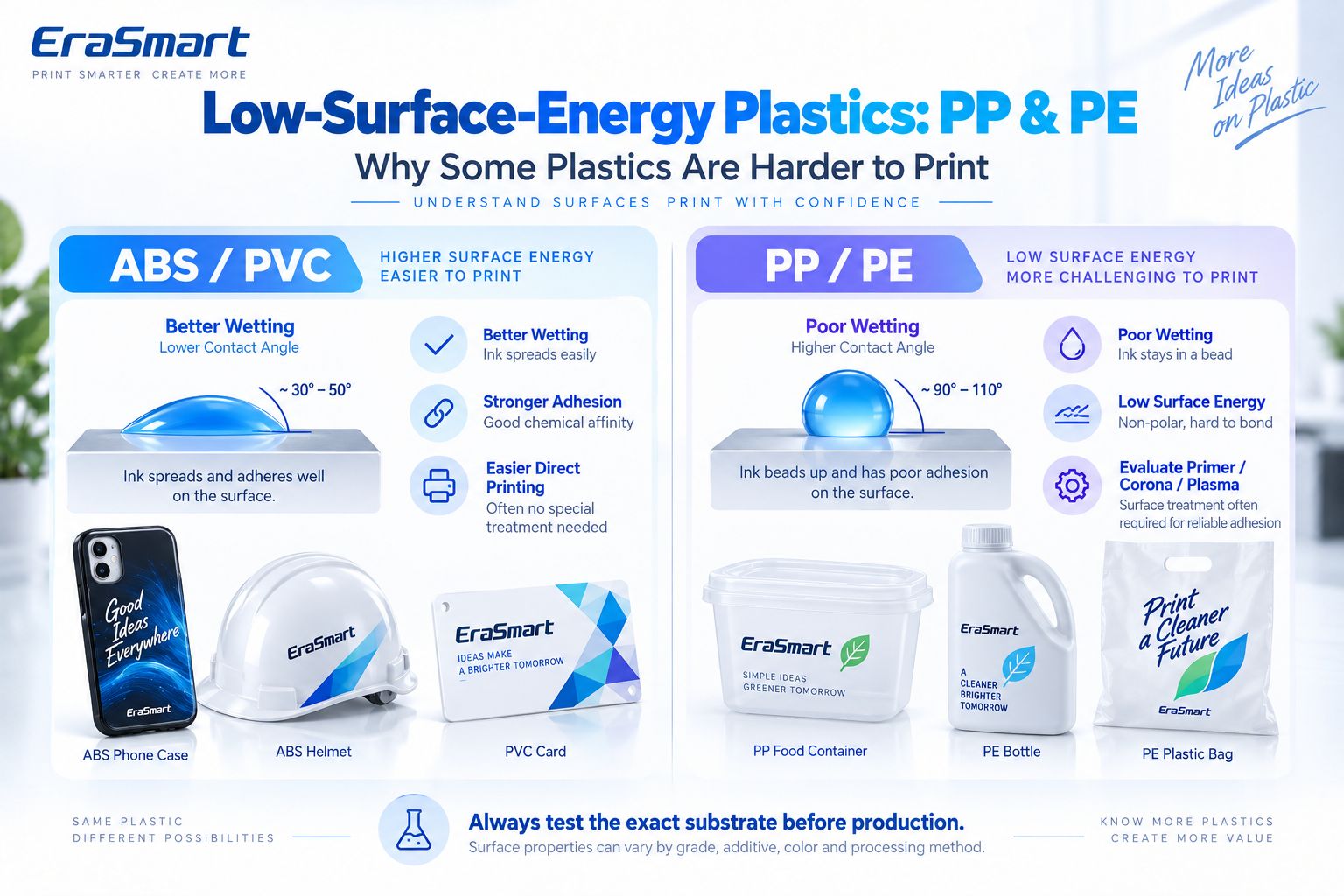
PP and PE are well-known examples of plastics that can present this type of challenge.
For production, the useful lesson is not a theoretical surface-energy number.
It is:
If the ink does not wet and adhere reliably, evaluate the substrate, pretreatment and ink system before changing artwork or DPI.
Why Is UV Ink Peeling Off PP or PE?
If UV ink peels easily from polypropylene or polyethylene, possible causes include:
- low surface energy
- mold-release residue
- silicone or slip additives
- oil
- contamination
- unsuitable primer
- insufficient surface treatment
- incompatible ink/substrate combination
A common mistake is to increase UV curing and assume the problem must be “undercured ink.”
Curing and adhesion are related but not identical.
An ink layer can be cured and still have poor adhesion to the substrate.
If adhesion is weak, investigate the ink-to-plastic interface.
How to Prepare Plastic Before UV Printing
Preparation should begin before the artwork is printed.
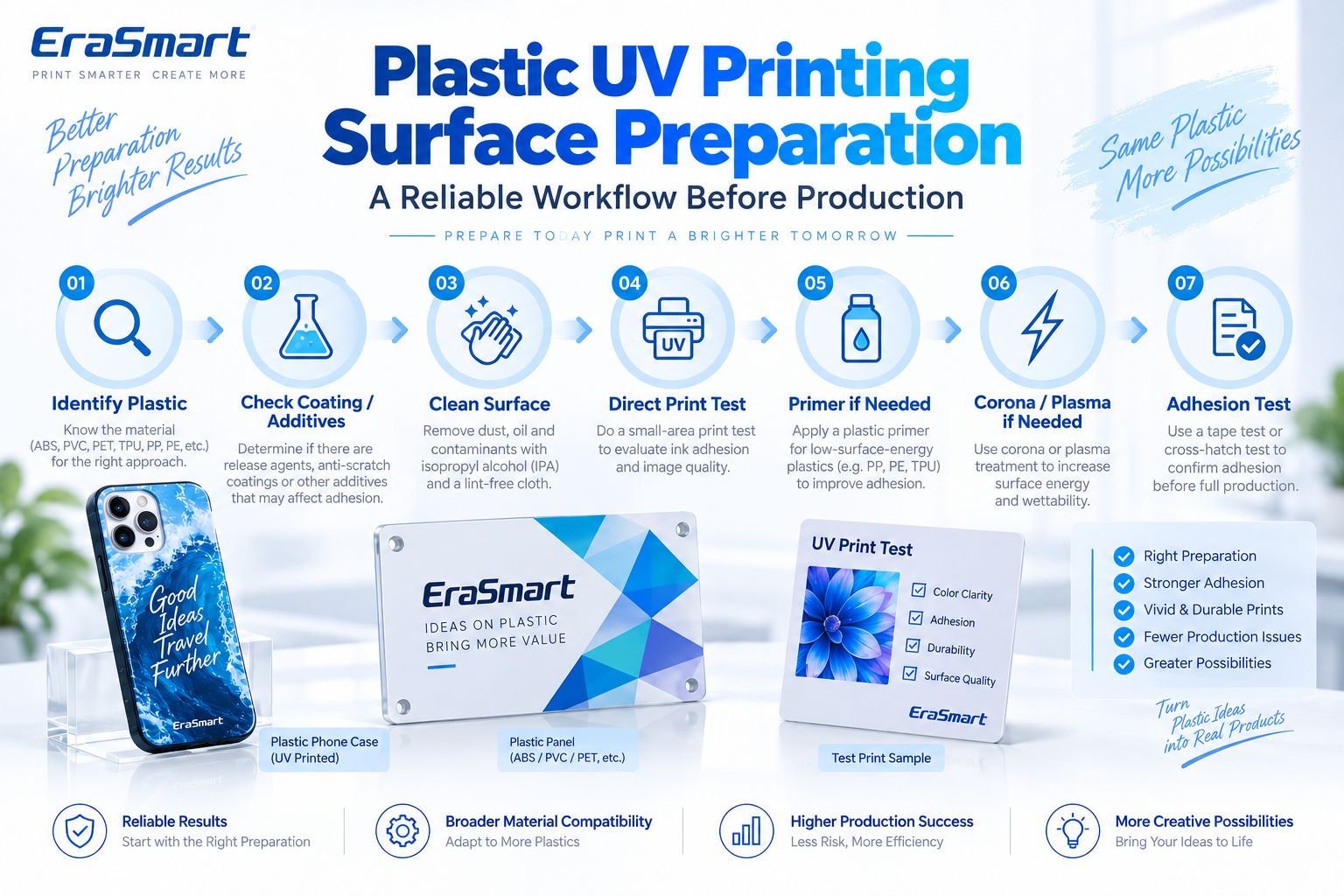
Step 1: Identify the Plastic
Determine whether it is:
- ABS
- PVC
- PC
- PET
- PETG
- TPU
- PP
- PE
- another polymer
If the material is unknown, ask the blank supplier.
Step 2: Check Coatings and Additives
Look for:
- protective coating
- paint
- mold-release residue
- anti-static treatment
- silicone
- slip additives
- surface lacquer
These can completely change adhesion behavior.
Step 3: Clean the Surface
Remove:
- dust
- oil
- fingerprints
- manufacturing residue
Use a cleaning method compatible with the actual plastic.
Do not assume the same solvent is safe for every polymer.
Some plastics can haze, crack or react with aggressive cleaners.
Step 4: Print a Small Direct Test
Before pretreating everything, test whether the surface already provides adequate adhesion.
This helps avoid unnecessary production steps.
Step 5: Evaluate Primer If Needed
If direct printing does not achieve the required adhesion, consider a compatible primer.
Primer should be selected according to:
- plastic
- UV ink
- intended durability
- supplier recommendations
Do not assume one universal plastic primer works on every polymer.
Step 6: Evaluate Corona or Plasma Treatment
For certain difficult substrates, surface treatment can improve printability.
Technical UV printing guidance specifically recommends evaluating corona/plasma treatment for PET films and plasma treatment for some molded plastic products.
These processes are especially relevant in higher-volume or industrial production.
They are not automatically necessary for every small print shop.
Step 7: Print a Production Sample
Use the final:
- blank
- artwork
- ink layers
- cleaning procedure
- primer/treatment
- print settings
Step 8: Test Adhesion
Only approve production after the sample meets the requirements of the final product.
Primer vs Corona vs Plasma: What’s the Difference?
These methods all attempt to improve print reliability, but they do not work in exactly the same way.
Primer
Adds a compatible intermediate layer between the substrate and UV ink.
Useful when:
- direct adhesion is inadequate
- a validated primer exists
- production volume makes the additional step practical
Corona Treatment
Modifies the surface to improve wettability.
Often associated with:
- films
- PET
- PP
- PE
- packaging substrates
Plasma Treatment
Also modifies the surface and may be suitable for:
- molded plastics
- rigid parts
- difficult substrates
The correct method depends on your production environment.
For a custom print shop producing phone cases, a compatible prepared blank may be more practical than installing industrial surface-treatment equipment.
For a manufacturer printing thousands of molded PP parts, the calculation is different.
White Ink on Plastic
Plastic color and transparency strongly affect the final print.
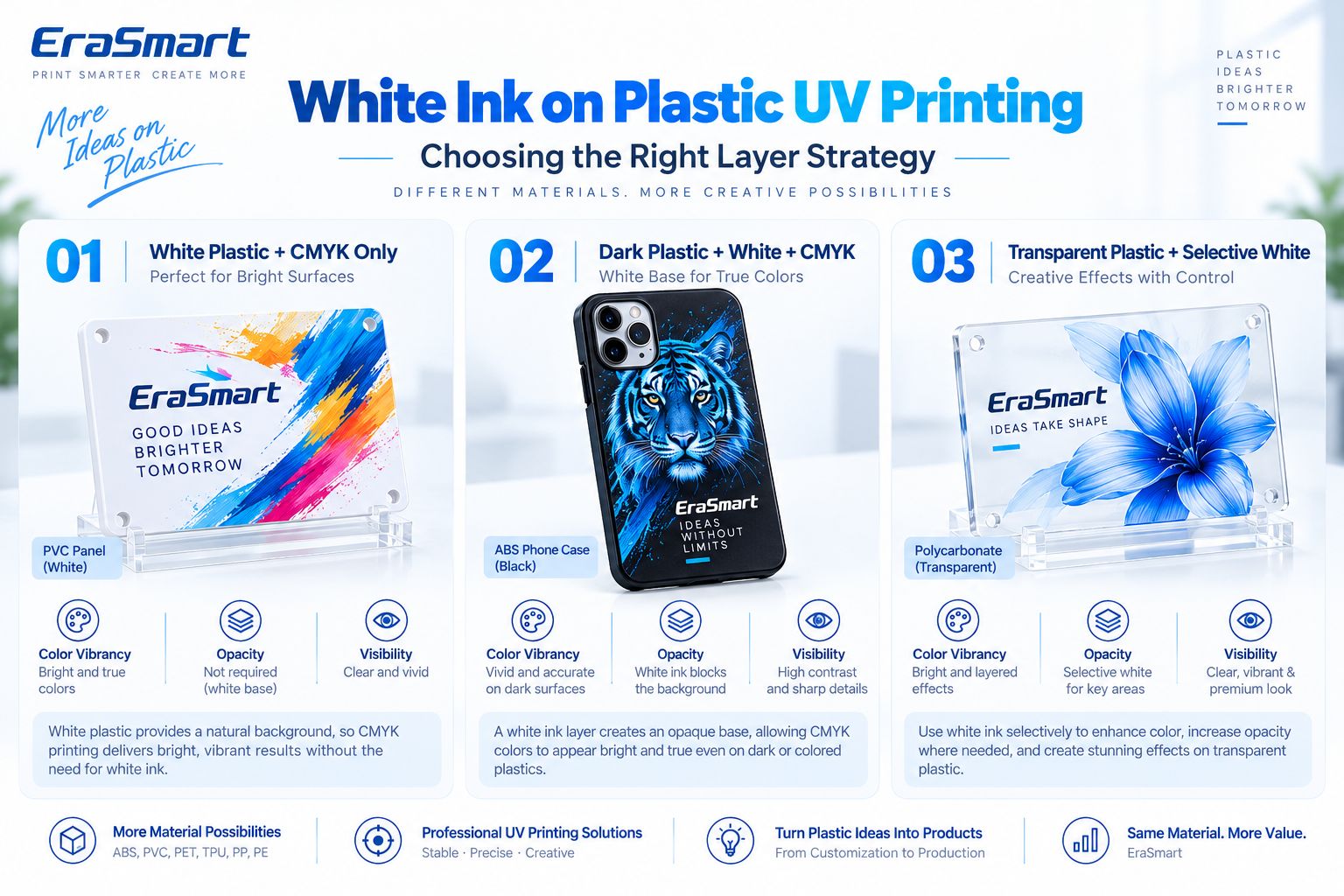
White or Light Plastic: CMYK Only
White plastic already provides a neutral visual background.
Examples:
- white PVC panel
- white ABS enclosure
- white plastic card
CMYK-only printing may be sufficient when opacity and design requirements allow.
Dark Plastic: White + CMYK
On:
- black ABS
- dark phone cases
- colored housings
- dark plastic panels
a white underbase helps block the substrate color.
This produces:
- brighter CMYK
- stronger contrast
- more predictable brand colors
- clearer small graphics
Transparent Plastic: Selective White
Transparent PC, PETG or other clear plastics can use white strategically.
For example:
- white behind the logo
- no white in transparent decorative areas
- white behind photographs
- selective opacity
This can combine:
transparent material + vivid printed graphics
in one product.
White + CMYK + Varnish
On compatible EraSmart systems, varnish can be used for:
- spot gloss
- raised effects
- logo highlights
- decorative texture
Varnish is a visual effect layer.
Do not automatically treat it as a universal abrasion-resistant protective coating.
How to UV Print on Plastic Step by Step
Once material compatibility has been established, create a repeatable workflow.
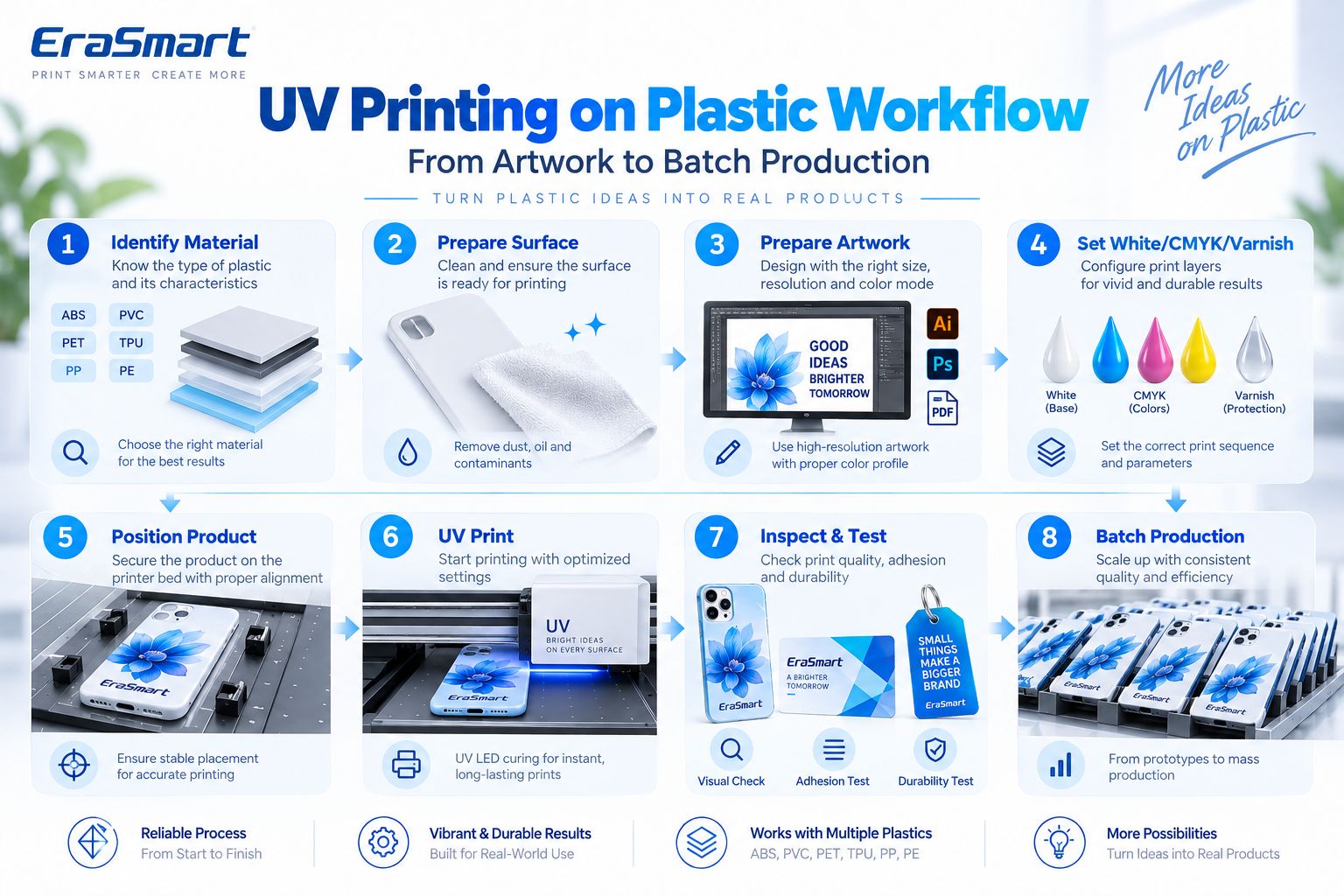
Step 1: Identify the Material
Record the actual polymer and supplier.
Step 2: Prepare the Surface
Clean and apply validated pretreatment if required.
Step 3: Prepare the Artwork
Check:
- final dimensions
- image resolution
- text
- logos
- bleed
- safe area
- personalization
For close-view raster artwork, around 300 DPI at final size is a practical starting point.
Vector artwork is preferred for:
- logos
- text
- QR codes
- line graphics
Step 4: Prepare White / CMYK / Varnish
Choose:
- CMYK
- White + CMYK
- Selective White + CMYK
- White + CMYK + Varnish
according to the plastic color and desired effect.
Step 5: Position the Product
For repeat products such as phone cases, use:
- fixtures
- jigs
- corner stops
- templates
Step 6: Set the Print Height
Use appropriate clearance based on the product thickness.
Step 7: Print One Sample
Check:
- color
- alignment
- white opacity
- varnish
- adhesion
- product fit
Step 8: Perform Application-Specific Tests
Depending on the product, test:
- adhesion
- flex
- scratch resistance
- handling
- cleaning
Step 9: Lock the Production Setup
Save:
- RIP preset
- fixture location
- material name
- supplier
- pretreatment
- white ink setup
Step 10: Begin Batch Production
Perform periodic QC throughout production.
How to Test UV Ink Adhesion on Plastic
A printed sample should be tested according to its real use.
Basic Rub Check
Useful for detecting obvious adhesion failure.
Tape-Based Internal Check
Can help compare production samples.
If a customer requires a formal recognized test standard, follow that complete standard rather than treating a simple shop tape test as certification.
Scratch / Abrasion Evaluation
Useful for:
- keychains
- cases
- control panels
- cards
- promotional products
Flex Test
Especially important for:
- TPU
- flexible cases
- bendable components
Bend the product in a way representative of actual use and inspect whether the ink cracks or separates.
Cleaning Resistance
Useful for:
- device housings
- frequently handled items
- reusable plastic products
Test with a cleaning method that reflects the real application.
Direct UV Printing vs UV DTF on Plastic
EraSmart offers both UV flatbed printers and UV DTF printers.
They solve different product-shape problems.
Direct UV Flatbed Printing
Well suited to:
- phone cases
- plastic cards
- ABS housings
- PVC panels
- flat tags
- control panels
- plastic signage
- promotional products
The object is positioned directly on the printer bed.
UV DTF
Can be practical for:
- bottles
- curved containers
- irregular finished plastic products
- difficult-to-position surfaces
But UV DTF does not eliminate surface-adhesion considerations.
A UV DTF transfer may still have poor adhesion on a low-surface-energy PP or PE product.
Always test the finished blank.
Plastic Products You Can Print with a UV Printer
Plastic is one of the broadest categories for custom-product businesses.
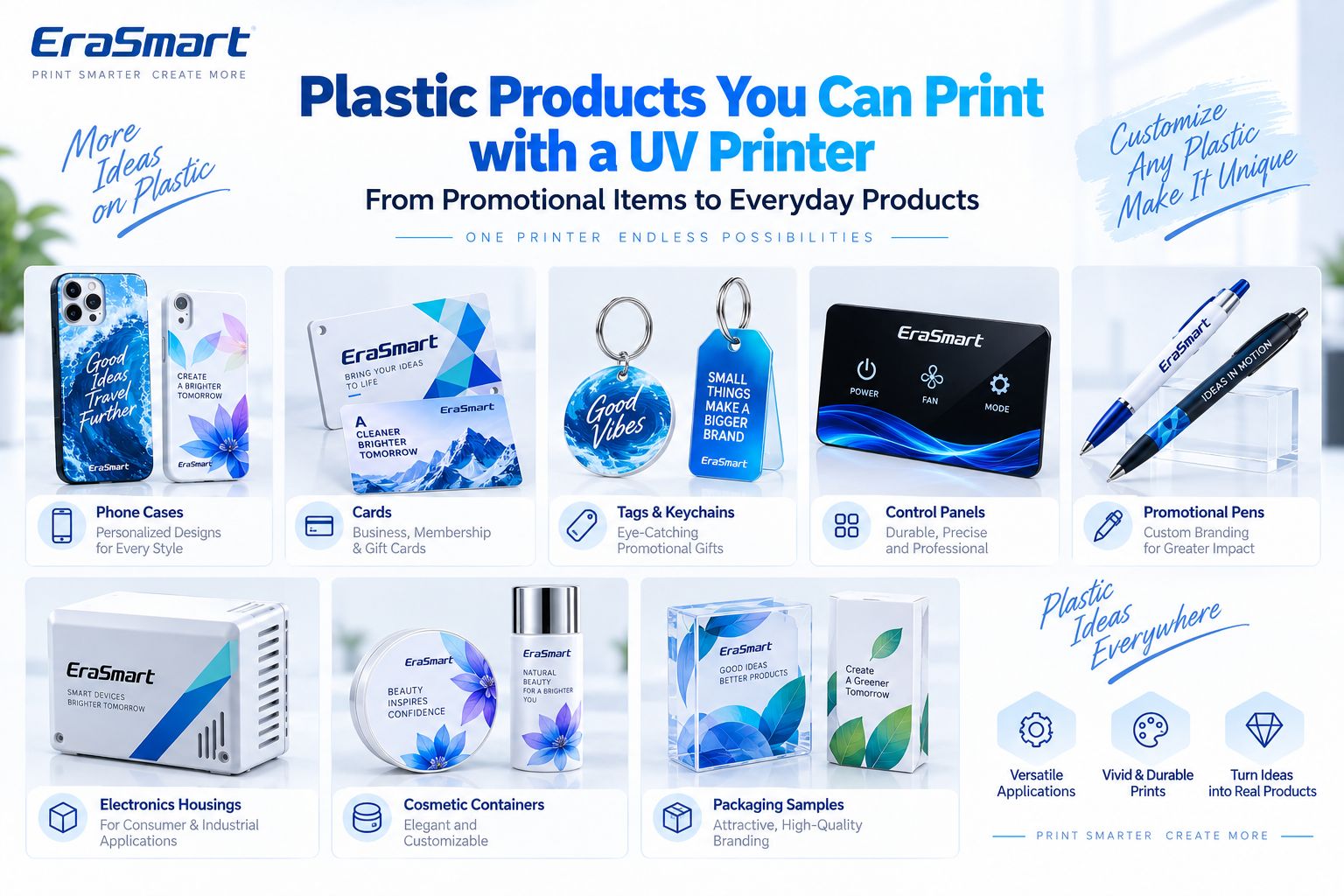
1. Phone Cases
One of the most common small-format UV applications.
Possible designs include:
- photographs
- names
- illustrations
- brand graphics
- personalized artwork
Use a jig when printing multiple cases.
2. Plastic Cards
Applications include:
- membership cards
- gift cards
- promotional cards
- identification-style products
The exact PVC or plastic card construction should be tested.
3. Tags and Keychains
Useful for:
- promotional gifts
- event merchandise
- souvenirs
- personalized products
4. Electronics Housings
Possible products include:
- small device covers
- remote housings
- equipment panels
- control components
Check whether the housing contains surface coatings or mold-release residue.
5. Control Panels
UV printing can add:
- icons
- operating instructions
- branding
- interface graphics
If the panel is part of a regulated industrial product, the final assembly must meet the applicable requirements; decorative UV printing alone does not establish compliance.
6. Promotional Products
Examples include:
- pens
- cases
- small accessories
- giveaways
- branded parts
7. Cosmetic Containers
Certain compatible containers can be customized with:
- logos
- graphics
- product branding
Curved containers may be better suited to UV DTF or an appropriate rotary workflow.
8. Packaging Samples
UV printing can be useful for:
- prototypes
- short-run samples
- marketing mockups
- product-launch packaging
9. Plastic Panels and Signs
Common materials include compatible:
- PVC
- polycarbonate
- coated plastic panels
Which EraSmart UV Printer Is Suitable for Plastic?
For small and medium flat plastic products, the EraSmart Digital Inkjet A3 UV Printer — Dual XP600 is one practical option.
Current specifications include:
| Specification | EraSmart A3 PRO |
|---|---|
| Printheads | Dual XP600 |
| Print Area | 350 × 450 mm |
| Print Height | 0–130 mm |
| Resolution | Up to 1440 dpi |
| Ink Configuration | CMYK + WW + VVVVVV |
| White Ink Circulation | Yes |
| Automatic Cleaning | Yes |
| Suction Platform | Yes |
| Height Measurement | Infrared |
| RIP | Riin / EraRip |
EraSmart currently lists PVC, TPU and phone cases among the supported materials and applications. The product page also explicitly notes that some plastics and low-surface-energy materials may perform better with coated blanks or primers.
This makes it suitable for evaluating products such as:
- phone cases
- PVC cards
- tags
- plastic panels
- small housings
- promotional products
- other flat plastic handicrafts
The important point is that the printer provides the printing platform.
Material compatibility still needs to be validated on the actual plastic.
Why Jigs Matter for Plastic Production
Plastic products are often manufactured to repeatable dimensions.
That makes them excellent candidates for jigs.
Suppose a customer orders 100 phone cases.
Instead of positioning each case manually:
- Create a fixed jig.
- Place several cases in repeatable positions.
- Lock X/Y coordinates.
- Save the RIP layout.
- Print an approved sample.
- Repeat the process.
This improves:
- registration
- production speed
- consistency
- personalization efficiency
Common Problems When UV Printing on Plastic
Ink Peels Off Easily
Check:
- polymer type
- oil
- mold-release residue
- low surface energy
- coating
- primer
- surface treatment
Do not assume the problem is DPI.
Ink Beads on the Surface
This can indicate poor wetting.
Consider:
- contamination
- low surface energy
- inappropriate substrate
- surface treatment
Colors Look Weak on Dark Plastic
Use an appropriate white underbase.
Transparent Plastic Looks Washed Out
Consider:
- White + CMYK
- selective white
- backing layer
depending on the desired appearance.
TPU Print Cracks When Bent
The issue may be ink-film flexibility rather than initial adhesion.
Test the real bending conditions.
White Ink Looks Uneven
Check:
- circulation
- nozzle condition
- RIP white settings
- printer maintenance
Product Position Changes
Use a fixture instead of placing each product by eye.
Surface Becomes Damaged During Cleaning
The cleaning method may be too aggressive for that plastic.
Always confirm chemical compatibility before production.
Safety and Application Limits
Plastic UV printing also requires application-specific judgment.
Food Contact
Do not assume standard decorative UV ink is suitable for direct food-contact surfaces.
For food packaging or containers, printing should remain within the validated design and compliance requirements of the finished product.
Children’s Products
Products intended for children may be subject to specific chemical and safety requirements.
Printing compatibility does not establish product compliance.
Medical Products
Do not treat general UV printing as automatically suitable for medical-device contact surfaces.
Flexible Products
Successful printing on TPU or another flexible polymer does not automatically mean unlimited stretch resistance.
Outdoor Use
Outdoor durability depends on:
- resin
- coating
- UV ink
- adhesion
- environmental exposure
- abrasion
Test the finished product before making outdoor lifetime claims.
How to Choose a UV Printer for Plastic Products
Before buying a printer, identify your real product mix.
What Plastic Are You Printing?
ABS, PVC and PP can require very different workflows.
Is the Product Flat?
Flat products are the natural fit for UV flatbed printing.
Is It Dark or Transparent?
This determines white ink requirements.
Is It Flexible?
If yes, test flex performance.
Is It Low Surface Energy?
PP and PE deserve extra caution.
Is It Curved?
Consider UV DTF or an appropriate rotary workflow.
Will You Print the Same Product Repeatedly?
If yes, plan for:
- jigs
- batch layouts
- saved presets
- material records
- repeatable pretreatment
Final Answer: Is UV Printing Good for Plastic?
Yes—but plastic must be treated as a family of different materials rather than one universal substrate.
ABS, PVC and some polycarbonate products can often provide workable surfaces.
PET and TPU require closer evaluation.
PP and PE are generally higher-risk materials for direct UV adhesion and may require additional pretreatment or purpose-made printable blanks.
The reliable workflow is:
Identify → Clean → Direct Test → Pretreat If Needed → Print Sample → Test Adhesion → Test Real Use → Standardize → Produce
Use:
- CMYK only on suitable white/light plastic
- White + CMYK on dark plastic
- Selective White + CMYK on transparent plastic
- Varnish for selected premium visual effects
- UV flatbed for suitable flat products
- UV DTF for certain curved or difficult-to-position products
For flat plastic customization, explore the EraSmart UV Printer range.
For curved plastic bottles, containers and irregular products, compare the EraSmart UV DTF Printer workflow.
FAQ
Can a UV printer print directly on plastic?
Yes. Many plastics can be directly UV printed, but compatibility and adhesion depend on the exact polymer, surface treatment and ink system.
What plastics are easiest to UV print?
ABS, PVC and polycarbonate are commonly workable in compatible UV-printing systems, but every finished product should still be tested.
Can you UV print on polypropylene?
Potentially, but PP is a more challenging low-surface-energy substrate and may require a validated primer or surface treatment.
Can you UV print on polyethylene?
Potentially, but PE is also a difficult adhesion substrate and should be carefully tested before production.
Can you UV print on PET?
Yes, depending on the PET surface. Some PET products benefit from corona/plasma or other high-adhesion surface treatment.
Can an EraSmart UV printer print PVC?
Yes. PVC is explicitly listed among the supported materials for the EraSmart A3 PRO.
Can an EraSmart UV printer print TPU?
Yes, TPU is also listed among the supported materials, but flexible applications should be tested under realistic bending conditions.
Do I need primer for plastic UV printing?
Not always. Primer depends on the plastic, surface energy, coating, UV ink and required adhesion.
Why does UV ink peel off plastic?
Possible causes include contamination, mold-release residue, low surface energy, incompatible coating, unsuitable pretreatment or an incompatible ink/substrate combination.
Do I need white ink on plastic?
White ink is especially useful on dark, colored and transparent plastics. White plastic may not require a full white underbase.
Can I UV print phone cases?
Yes. Phone cases are a common flatbed UV application, but the exact case material and coating should be tested.
Can I UV print plastic bottles?
For curved bottles, UV DTF or an appropriate rotary workflow may be more practical than standard flatbed direct printing.
Which EraSmart UV printer is suitable for plastic products?
The EraSmart A3 PRO Dual XP600 provides a 350 × 450 mm working area, 0–130 mm print height and CMYK + white + varnish configuration for flat personalized products.
Build a Reliable Plastic Printing Workflow
If you are evaluating a UV printer for plastic products, tell EraSmart:
- plastic type
- product dimensions
- rigid or flexible
- dark / white / transparent
- coated or uncoated
- flat or curved
- expected monthly volume
- whether white ink is required
- whether varnish is required
Our team can help you evaluate the appropriate EraSmart UV Printer or UV DTF Printer workflow for your actual plastic products.
MAY BE YOU LIKE ALSO

Copyright 2020 © EraSmart. | Sitemap