Small Size Flatbed Inkjet Printer Manufacturer

How Temperature & Humidity Affect DTF Printing | EraSmart
A DTF printer can use the same ink, PET film, powder and RIP settings two days in a row—and still behave differently if the room environment changes.
Temperature and relative humidity can influence:
- ink flow
- nozzle condition
- white ink behavior
- PET film handling
- static electricity
- adhesive powder
- curing consistency
- maintenance frequency
- overall production stability
That is why environmental control should be treated as part of the DTF printing process rather than an optional workshop detail.
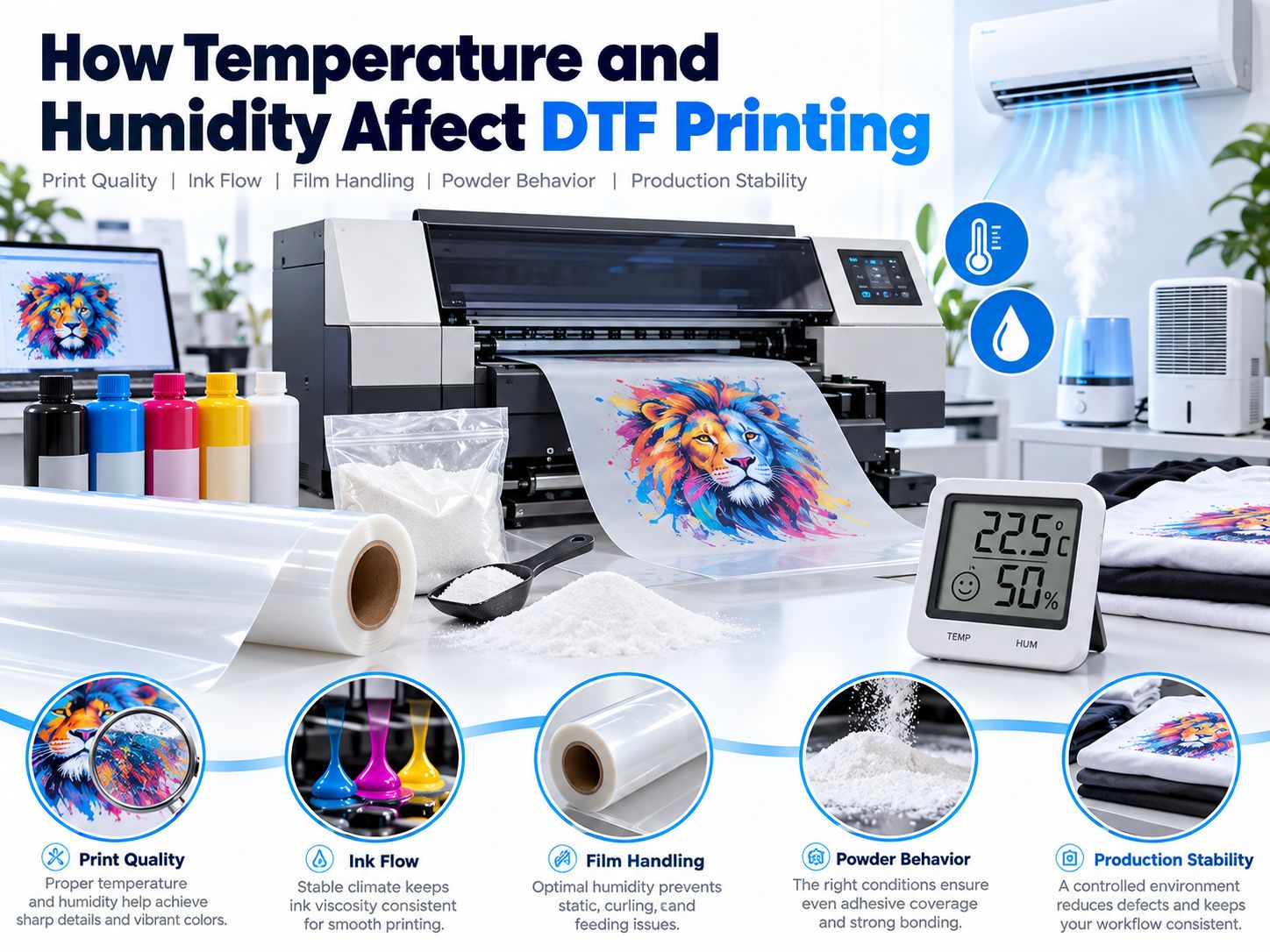
For current EraSmart DTF printer models, a typical specified operating environment is:
Temperature: 15–30°C (59–86°F)
Relative Humidity: 40–60% RH
More important than chasing one exact temperature, however, is maintaining a stable environment without large or rapid fluctuations. EraSmart’s DTF maintenance guidance likewise emphasizes stable temperature, humidity, dust control and airflow as part of maintaining reliable output.
Quick Answer: Why Do Temperature and Humidity Matter in DTF Printing?
Temperature mainly affects:
- ink viscosity
- evaporation
- nozzle condition
- material behavior
Humidity mainly affects:
- static electricity
- nozzle drying
- PET film handling
- powder moisture
- dust attraction
The four common problem zones look like this:
| Environment | What You May Notice |
|---|---|
| Too cold | Ink flow becomes less predictable; materials may behave differently |
| Too hot | Faster evaporation and greater nozzle-drying pressure |
| Too dry | Static, dust attraction, faster nozzle drying |
| Too humid | Powder moisture, clumping and film-handling problems |
| Stable environment | More repeatable printing and maintenance |
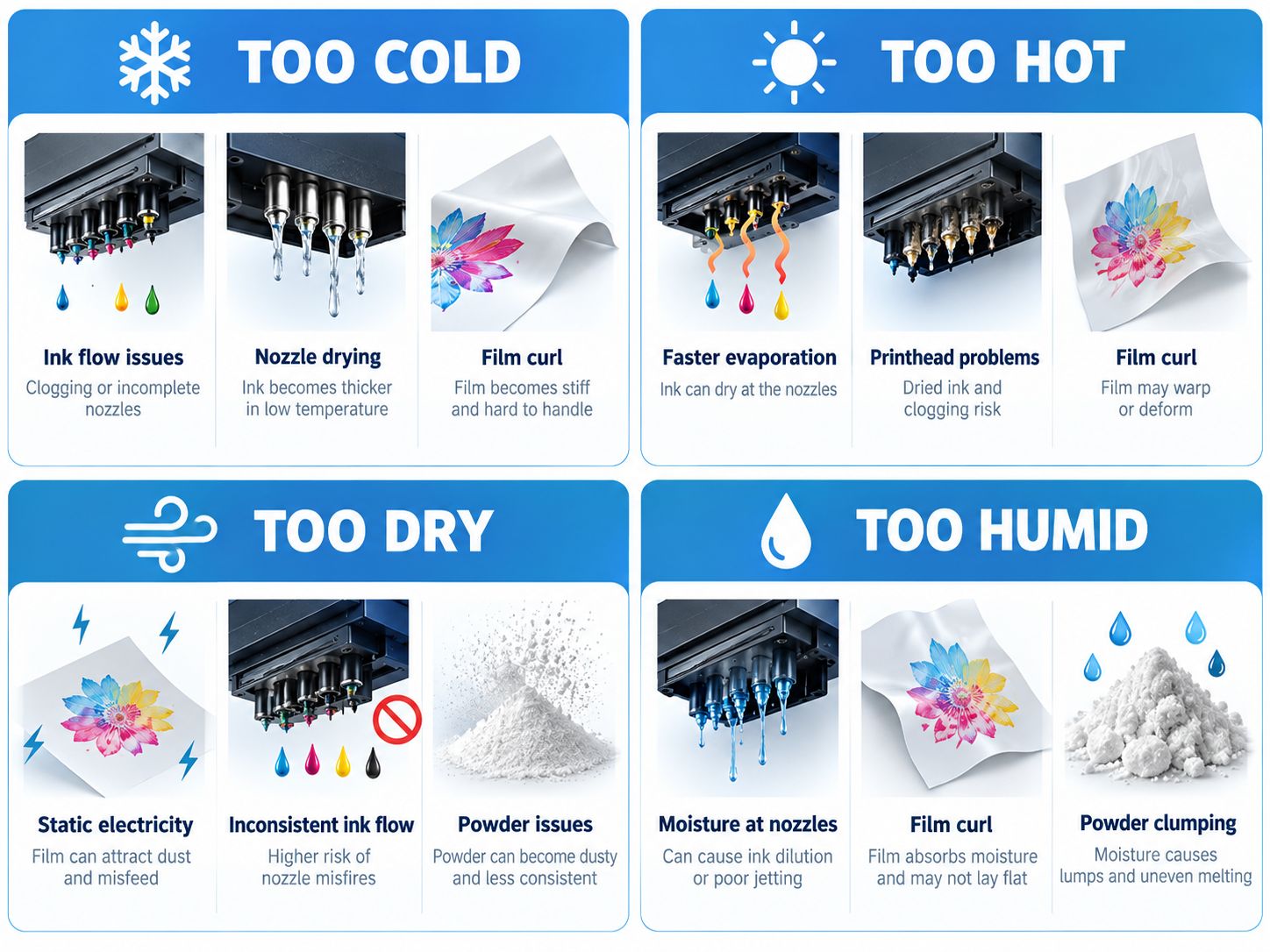
Environmental conditions are rarely the only cause of a DTF problem.
But when print quality changes without an obvious change in artwork, ink or settings, the room is one of the first things worth checking.
What Temperature and Humidity Does EraSmart Recommend?
Current EraSmart DTF product specifications commonly list:
15–30°C / 59–86°F
and:
40–60% RH
as the operating environment.
That does not mean:
Anything inside the range will behave identically.
A workshop that moves rapidly from:
18°C / 42% RH in the morning
to:
29°C / 60% RH in the afternoon
may be more difficult to keep consistent than a room that remains relatively stable throughout production.
So think about two things:
Range + Stability
not range alone.
What Is Relative Humidity?
Relative humidity, or RH, describes the amount of moisture in the air relative to what the air can hold at that temperature.
For a DTF operator, you do not need to become a climate scientist.
A simple digital thermometer / hygrometer is usually enough to monitor:
- room temperature
- RH
- daily fluctuation
Place it in the actual printing area rather than relying only on a building thermostat in another room.
How Temperature and Humidity Affect the DTF System
DTF production is not only a printer.
It is a connected system:
Ink → Printhead → PET Film → Powder → Curing → Heat Transfer
Changes in the room can influence several parts at the same time.
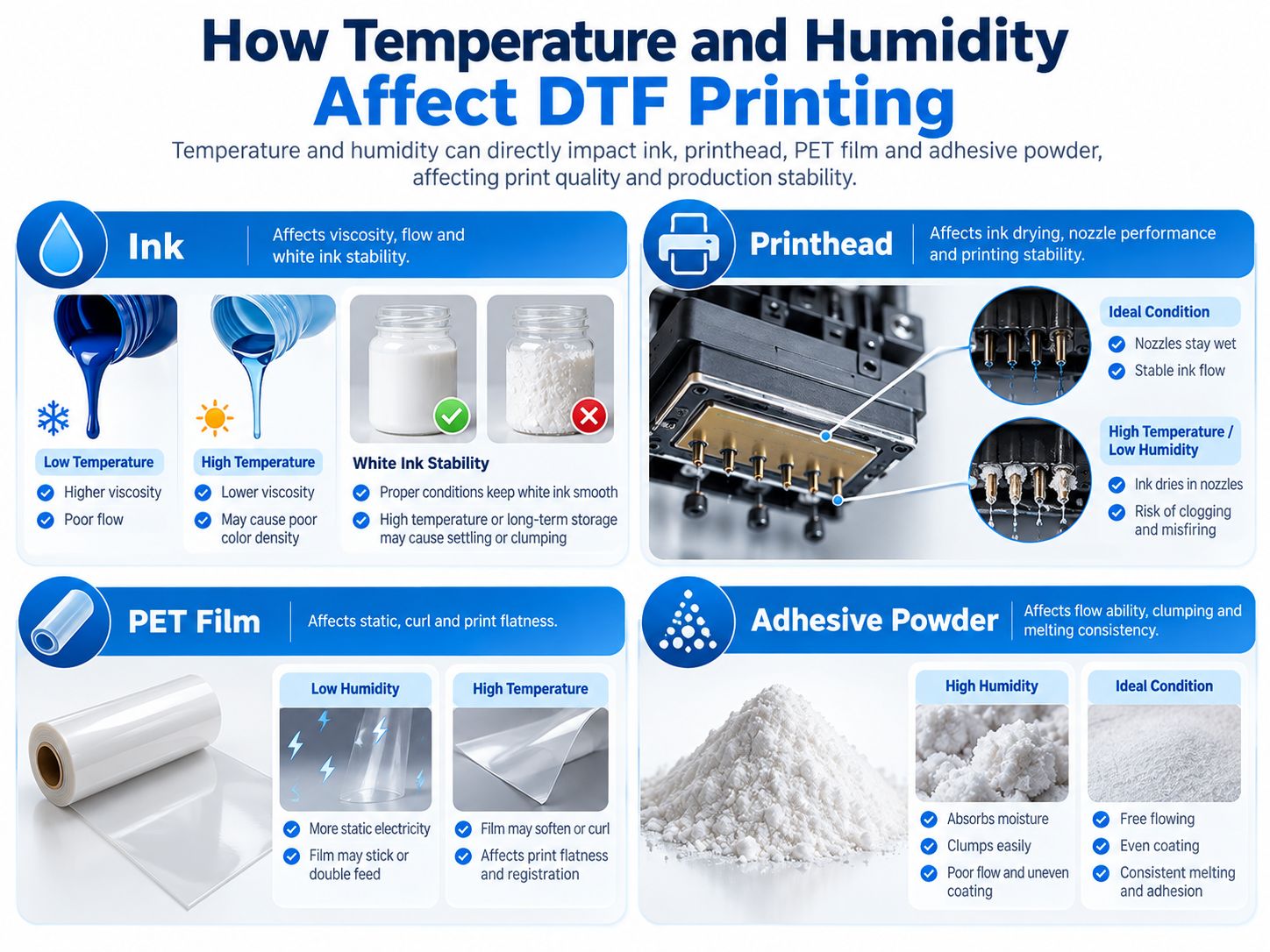
DTF Ink
Temperature can influence ink viscosity and flow behavior.
Very dry or hot conditions can also increase evaporation pressure around the nozzle area.
Printhead
The printhead operates with extremely small nozzles.
Dry conditions, direct warm airflow and poor maintenance can increase the chance of:
- nozzle drying
- misfiring
- interrupted lines
- missing nozzles
PET Film
PET transfer film can be affected by:
- static
- storage
- temperature
- humidity
- roll tension
- coating condition
Adhesive Powder
DTF powder should remain:
- dry
- free flowing
- consistent
Excess moisture can encourage clumping and inconsistent application.
How Temperature Affects DTF Ink
DTF ink is engineered to operate within a suitable temperature range.
When the room becomes significantly colder or hotter, the physical behavior of the ink can change.
What Happens When the Room Is Too Cold?
Possible effects include:
- higher ink viscosity
- less predictable ink flow
- harder nozzle recovery
- changes in white ink behavior
Do not immediately perform repeated heavy cleanings if nozzle performance changes after a major temperature drop.
First check:
- room temperature
- ink condition
- nozzle test
- capping station
- white ink circulation
A cold room can be part of the problem, but maintenance condition can be equally important.
What Happens When the Room Is Too Hot?
Higher temperature can increase evaporation.
Around the printhead, this may contribute to:
- nozzle drying
- more frequent nozzle loss
- maintenance pressure
The risk can become worse if a:
- heater
- fan
- air conditioner
- hot-air outlet
is blowing directly toward the printer.
A printer should not sit directly in the path of strong hot or cold airflow.
How Humidity Affects the Printhead
Humidity deserves special attention because ink exits the printhead through very small nozzles.
When surrounding air is very dry, moisture can leave exposed ink more quickly.
This is one reason low humidity can contribute to:
- nozzle drying
- interrupted jets
- maintenance cycles
- inconsistent nozzle checks
However:
Humidity is not the only cause of printhead clogging.
A nozzle problem can also involve:
- dried ink
- dirty capping station
- damaged wiper
- poor cap sealing
- long idle periods
- unsuitable ink
- air in the ink path
- white pigment settling
For a dedicated maintenance guide, see:
How to Prevent White Ink Clogging
and:
How Temperature and Humidity Affect White Ink
White ink requires more attention than CMYK because white pigments are heavier and naturally prone to settling.
A stable environment helps, but it does not replace:
- white ink circulation
- regular agitation where required
- nozzle checks
- capping-station maintenance
- correct idle procedures
Current EraSmart DTF printers such as the A3 MAX and A3 PRO use white ink circulation systems specifically to help manage white pigment and maintain more stable production.
If white output becomes inconsistent, check the complete system:
Environment + Ink + Circulation + Printhead + Capping Station + Maintenance
not humidity alone.
Low Humidity and Static Electricity
Static electricity is one of the most overlooked environmental problems in DTF production.
PET film is a plastic film.
In a dry environment, static can build up more easily.
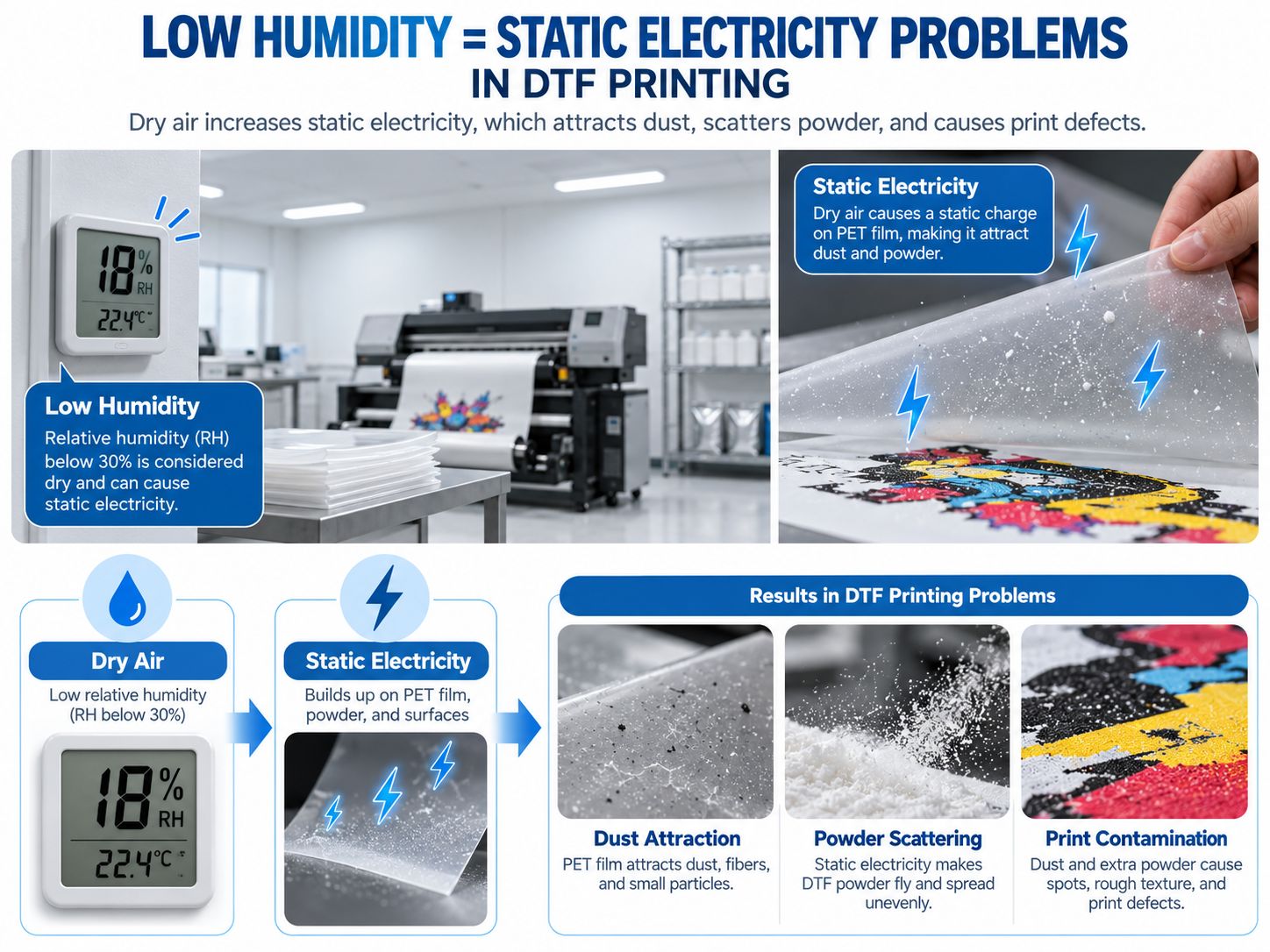
The sequence can look like this:
Dry Air → Static Charge → Film Attracts Dust / Powder → Production Defects
Static Can Attract Dust
Dust may stick to:
- film
- printer
- powder
- working surfaces
That can create:
- small contamination spots
- dirty backgrounds
- imperfections in transfers
Static Can Affect Powder
Powder may behave less predictably around charged film.
Instead of staying only where intended, fine particles may be attracted to other areas.
Possible symptoms include:
- background powder
- dirty edges
- uneven powder distribution
Static Can Affect Film Handling
Highly charged film can become more awkward to:
- feed
- stack
- separate
- handle
If these problems appear mainly during dry winter weather, measuring RH is worthwhile.
What Happens When Humidity Is Too High?
High humidity creates a different set of problems.
The biggest concern is usually moisture exposure.
DTF Powder Can Absorb Moisture
Adhesive powder should remain dry and free flowing.
Excessive humidity or poor storage can contribute to:
- clumping
- uneven powder flow
- inconsistent application
- storage degradation
If powder suddenly becomes lumpy during humid weather, do not immediately assume the powder formulation is defective.
First check:
- RH
- storage container
- whether the bag was left open
- whether old and fresh powder were mixed
PET Film Can Behave Differently
Film behavior can also change with environmental conditions.
Possible symptoms include:
- curl
- waviness
- poor flatness
- feed instability
However, humidity is only one possible factor.
Film curl can also involve:
- roll storage
- temperature
- manufacturing
- coating
- tension
- transport conditions
Treat environmental conditions as something to investigate—not an automatic diagnosis.
How Humidity Affects DTF Adhesive Powder
DTF hot-melt powder is particularly important because it forms the adhesive layer that later bonds the transfer to the garment.
A good production powder should be:
- dry
- free flowing
- evenly distributed
Moisture can make the powder:
- clump
- flow inconsistently
- accumulate unevenly
At the other extreme, a very dry room may create more static around PET film and powder.
So both directions can create production problems:
Too humid → moisture / clumping
Too dry → static / dust / uncontrolled fine powder
The goal is controlled, stable conditions.
Do Not Confuse Three Different Temperatures
This is one of the most important concepts in DTF production.
There are at least three completely different temperatures involved:
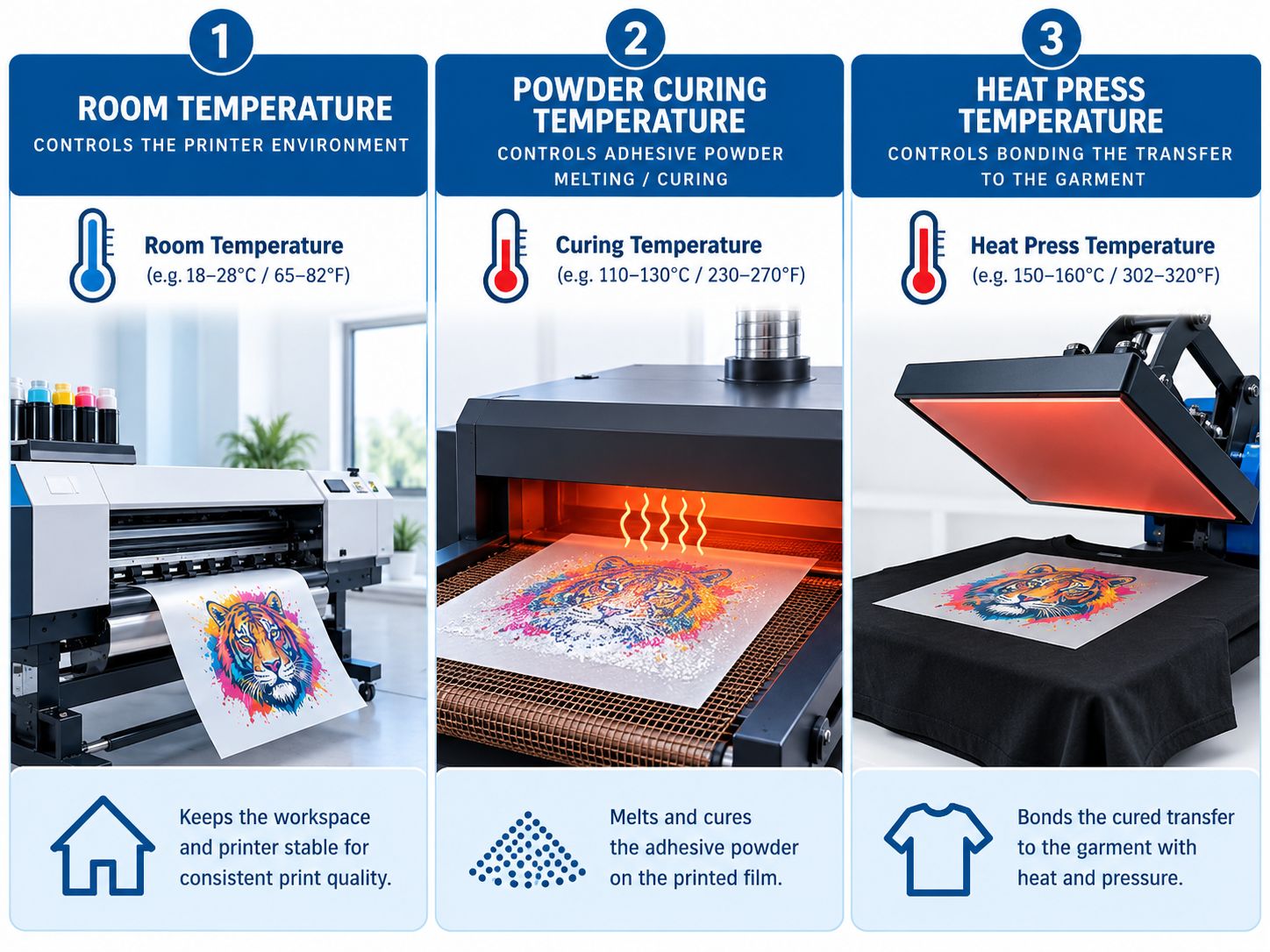
1. Print Room Temperature
This controls the working environment around:
- printer
- ink
- PET film
- powder
- operator
EraSmart DTF printers commonly specify an operating environment of 15–30°C and 40–60% RH.
2. Powder Curing Temperature
This controls how the adhesive powder melts and cures on the printed PET film.
It depends on:
- powder
- film
- curing equipment
- production speed
- supplier specifications
There is no single universal curing temperature that should be copied from another brand’s tutorial.
EraSmart’s own DTF product guidance appropriately tells operators to cure according to the film or consumable workflow rather than presenting one universal number.
3. Heat Press Temperature
This is the temperature used when transferring the cured DTF design to the garment.
It depends on:
- transfer film
- adhesive powder
- textile
- pressure
- pressing time
- peel type
Again:
room temperature does not determine your heat-press temperature.
These are three different parts of the workflow.
Seasonal DTF Printing Problems
A setup that runs smoothly in spring can begin behaving differently in winter or during a humid summer.
That does not necessarily mean the printer has suddenly developed a mechanical problem.
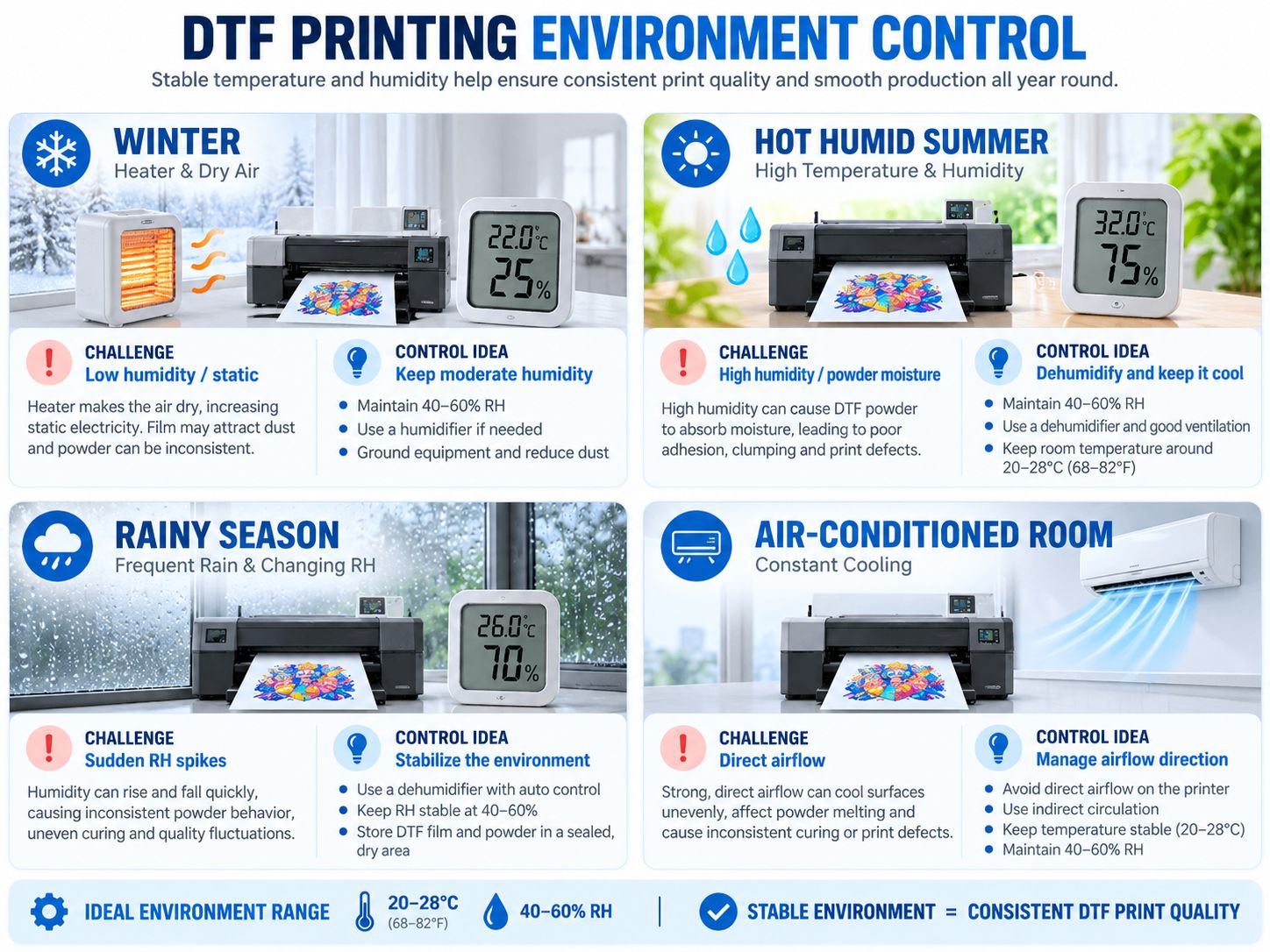
Winter
A heater may warm the room while simultaneously drying the air.
Common things to watch:
- low RH
- static
- nozzle drying
- dusty film
- direct heater airflow
Better Approach
Monitor RH and avoid pointing the heater directly at the printer.
Use a humidifier if needed, but do not place it so close that moisture or mist reaches the printer directly.
Hot, Humid Summer
Summer can bring:
- high temperature
- high humidity
- powder moisture
- film handling changes
Better Approach
Use:
- air conditioning
- dehumidification
- controlled ventilation
as appropriate.
But avoid strong cold airflow directly across the printer.
Rainy Season
During extended rain, RH can rise quickly.
A workshop that was stable yesterday may suddenly experience:
- damp powder
- higher RH
- film behavior changes
Better Approach
Monitor the room rather than assuming conditions have stayed the same.
Keep film and powder sealed when not in use.
Air-Conditioned Room
Air conditioning can be useful because it helps control temperature.
But the printer should not sit directly under a strong AC outlet.
Direct airflow may create a microenvironment around the printhead that differs from the temperature and RH measured elsewhere in the room.
How to Control a DTF Printing Room
You do not necessarily need an industrial climate-control system.
A small print shop can start with basic environmental management.
Use a Thermometer / Hygrometer
This is one of the simplest tools you can add to a DTF workshop.
Monitor:
- temperature
- relative humidity
throughout the day.
Use Air Conditioning When Necessary
Useful for controlling high room temperature.
Avoid direct airflow onto:
- printhead area
- film path
- ink system
Use a Humidifier in Dry Conditions
If RH falls too low, a humidifier can help.
But do not:
- spray mist toward the printer
- place wet equipment next to electronics
- over-humidify the room
The objective is stable room RH—not local condensation.
Use a Dehumidifier in Humid Conditions
A dehumidifier may help during:
- rainy season
- humid summer
- basement operation
- poorly ventilated rooms
Control Airflow
Do not position the printer:
- directly under AC
- beside a heater
- in front of a strong fan
- beside an open exterior door with changing airflow
Control Dust
Environmental stability also includes cleanliness.
Dust can affect:
- film
- print surface
- capping station
- printer internals
Record Environment Conditions When Problems Appear
One of the simplest troubleshooting improvements is to record temperature and RH alongside production problems.
For example:
Monday 09:00
23°C / 48% RH
Nozzle check: Normal
Monday 15:00
29°C / 61% RH
Powder started clumping
This does not prove humidity caused the problem.
But over several weeks, records can reveal useful patterns.
You can record:
- date
- time
- temperature
- RH
- ink condition
- nozzle check
- film batch
- powder batch
- symptoms
- corrective action
That is much more useful than trying to remember:
“I think it was hotter last time.”
How to Store DTF Film
PET film should be protected from:
- dust
- moisture
- extreme temperature
- direct sunlight
- damaged packaging
Keep unused film in its original or appropriate protective packaging when possible.
Allow film stored in a substantially different environment to acclimate appropriately before production rather than moving it from one extreme condition directly into the printer.
For more consumable guidance, see:
How to Store DTF Powder
Powder storage is particularly sensitive to moisture.
Good practice includes:
- reseal opened powder
- keep it dry
- avoid open containers
- keep away from humid airflow
- avoid mixing contaminated powder into fresh powder
If powder becomes obviously damp or heavily clumped, investigate storage before continuing production.
How to Store DTF Ink
DTF ink should be stored according to supplier instructions.
In general:
- keep containers sealed
- avoid direct sunlight
- avoid extreme heat
- avoid freezing conditions
- maintain a stable environment
White ink deserves additional attention because pigment settling is inherent to white pigment systems.
Storage practices cannot replace proper circulation and maintenance once ink is in the printer.
DTF Temperature and Humidity Troubleshooting Chart
Environmental checks are most useful when connected to a visible symptom.
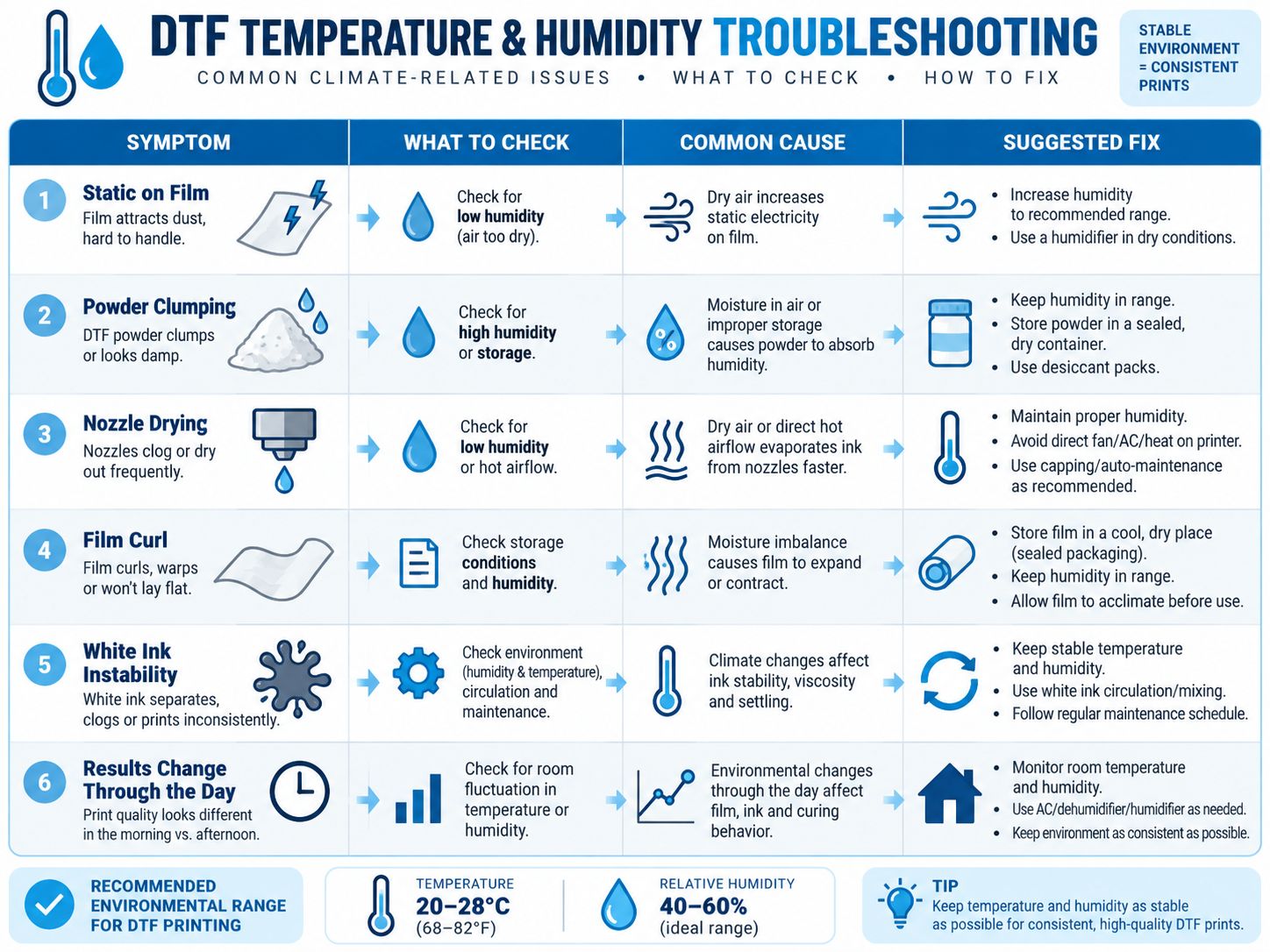
| Symptom | Environmental Factor to Check | Also Check |
|---|---|---|
| Static on PET film | Low RH | Grounding, film condition, dust |
| Powder clumping | High RH / storage moisture | Powder age, open packaging |
| Frequent nozzle drying | Low RH / hot airflow | Capping station, ink, idle time |
| Film curl | RH / temperature / storage | Film batch, roll tension |
| Powder outside printed area | Static / dry room | Powder process, film coating |
| White ink inconsistent | Temperature / RH | Circulation, settling, maintenance |
| Print changes through day | Room fluctuation | Ink, RIP, printer condition |
| Film difficult to feed | Static / curl | Media loading, tension |
| Small background specks | Dust / static | Workspace cleanliness |
The key phrase is:
factor to check
—not guaranteed cause.
DTF troubleshooting should eliminate variables systematically.
When Print Quality Changes, Check the Room Before Changing Everything Else
A common troubleshooting mistake is changing several settings at once.
For example:
- increase ink density
- clean printhead
- change RIP settings
- replace powder
- change film
all during the same troubleshooting session.
Then even if the problem disappears, you do not know what solved it.
A better sequence is:
- Check temperature and RH.
- Run a nozzle test.
- Inspect consumables.
- Check capping and maintenance condition.
- Print a controlled test.
- Change one variable at a time.
This creates useful troubleshooting data instead of guesswork.
A Simple Daily DTF Environment Checklist
Before production begins:
- Check room temperature.
- Check relative humidity.
- Confirm conditions are reasonably stable.
- Inspect PET film.
- Check powder for clumping.
- Check ink condition.
- Run a nozzle test.
- Confirm white ink circulation is operating normally.
- Make sure AC or heater airflow is not blowing directly on the printer.
- Check the workspace for excessive dust.
During production:
- Watch film behavior.
- Watch powder behavior.
- Monitor nozzle performance.
- Recheck temperature and RH if conditions change.
At the end of production:
- Seal film and powder.
- Follow printer shutdown / idle procedure.
- Clean the maintenance area as required.
- Record unusual problems.
Temperature and Humidity Are Part of Maintenance
Environmental control should not be separated from printer maintenance.
A stable room reduces unnecessary stress on:
- ink
- nozzles
- film
- powder
- workflow
But it cannot replace proper maintenance.
Even at perfect room temperature and RH, a DTF printer can still experience problems if:
- the cap is dirty
- the wiper is damaged
- white ink is poorly managed
- the printer sits idle incorrectly
- consumables are unsuitable
EraSmart’s maintenance guidance therefore treats environmental stability and daily mechanical/ink care as parts of the same reliability strategy.
Final Answer: What Is the Best Temperature and Humidity for DTF Printing?
For current EraSmart DTF printers, the specified working environment commonly falls within:
15–30°C (59–86°F)
and:
40–60% relative humidity
depending on the model.
But good environmental control is not simply about staying below or above one number.
The goal is:
Keep temperature, humidity and airflow reasonably stable so ink, printheads, PET film and powder behave predictably throughout production.
Watch for these patterns:
Too dry
→ static + dust + faster nozzle drying
Too humid
→ powder moisture + clumping + material-handling problems
Too hot
→ faster evaporation + more printhead stress
Too cold
→ ink flow and material behavior may become less predictable
And remember:
Room temperature ≠ powder curing temperature ≠ heat press temperature.
Each controls a different stage of the DTF workflow.
For more detailed production guidance, continue with:
How to Prevent White Ink Clogging
or browse the complete EraSmart DTF Printer range.
FAQ
What humidity is recommended for DTF printing?
Current EraSmart DTF printer specifications commonly recommend 40–60% RH. Keeping humidity stable inside the recommended range helps reduce problems associated with excessive dryness or moisture.
What temperature should a DTF printer room be?
EraSmart DTF printer specifications commonly list 15–30°C (59–86°F) as the operating environment.
Is low humidity bad for DTF printing?
Very dry air can increase static electricity and contribute to faster nozzle drying, dust attraction and film-handling problems.
Is high humidity bad for DTF powder?
High humidity can expose adhesive powder to more moisture, increasing the risk of clumping and inconsistent powder handling.
Why is my DTF film full of static?
Dry room conditions are one possible cause. Also check film condition, grounding, dust and the overall media-handling environment.
Can humidity clog a DTF printhead?
Low humidity can contribute to faster nozzle drying, but clogging has multiple possible causes including maintenance, capping-station condition, ink, idle time and white pigment management.
Why does my DTF powder clump?
Moisture exposure and poor storage are common things to check. Keep powder sealed and dry when not in use.
Does temperature affect DTF ink?
Yes. Temperature can affect ink viscosity, flow and evaporation behavior. Keep the printer inside the specified operating environment.
Should I use a humidifier in my DTF room?
If the room is too dry, controlled humidification may help. Do not direct mist toward the printer or create condensation.
Can I use a dehumidifier in a DTF room?
Yes, when RH is too high. The objective is to keep the room within a stable operating range rather than make it excessively dry.
Should an air conditioner blow directly on the DTF printer?
No. Strong direct airflow can create localized temperature and evaporation changes around the printer.
Does room temperature determine DTF curing temperature?
No. Room temperature controls the printing environment. Powder curing temperature depends on the powder, film and curing workflow.
Does room temperature determine heat press temperature?
No. Heat-press settings should follow the transfer film, adhesive, garment and production instructions.
Why does my DTF printing work in the morning but get worse later?
Check whether temperature or RH changes throughout the day. Also inspect ink condition, nozzle performance and material behavior before concluding that the environment is the cause.
Should I monitor temperature and humidity every day?
Yes. A simple hygrometer/thermometer and a production log can make troubleshooting much easier.
Create a More Stable DTF Production Environment
If you are setting up a home studio, POD workshop or commercial DTF production line, consider the environment at the same time you choose the printer.
Tell EraSmart:
- printer model
- average room temperature
- typical RH
- local climate
- daily production volume
- PET film format
- manual or automatic powder workflow
- common printing problems
We can help you evaluate an appropriate EraSmart DTF Printer and production workflow.
Control the environment. Maintain the printer. Standardize the consumables. Then scale production.
MAY BE YOU LIKE ALSO



Copyright 2020 © EraSmart. | Sitemap