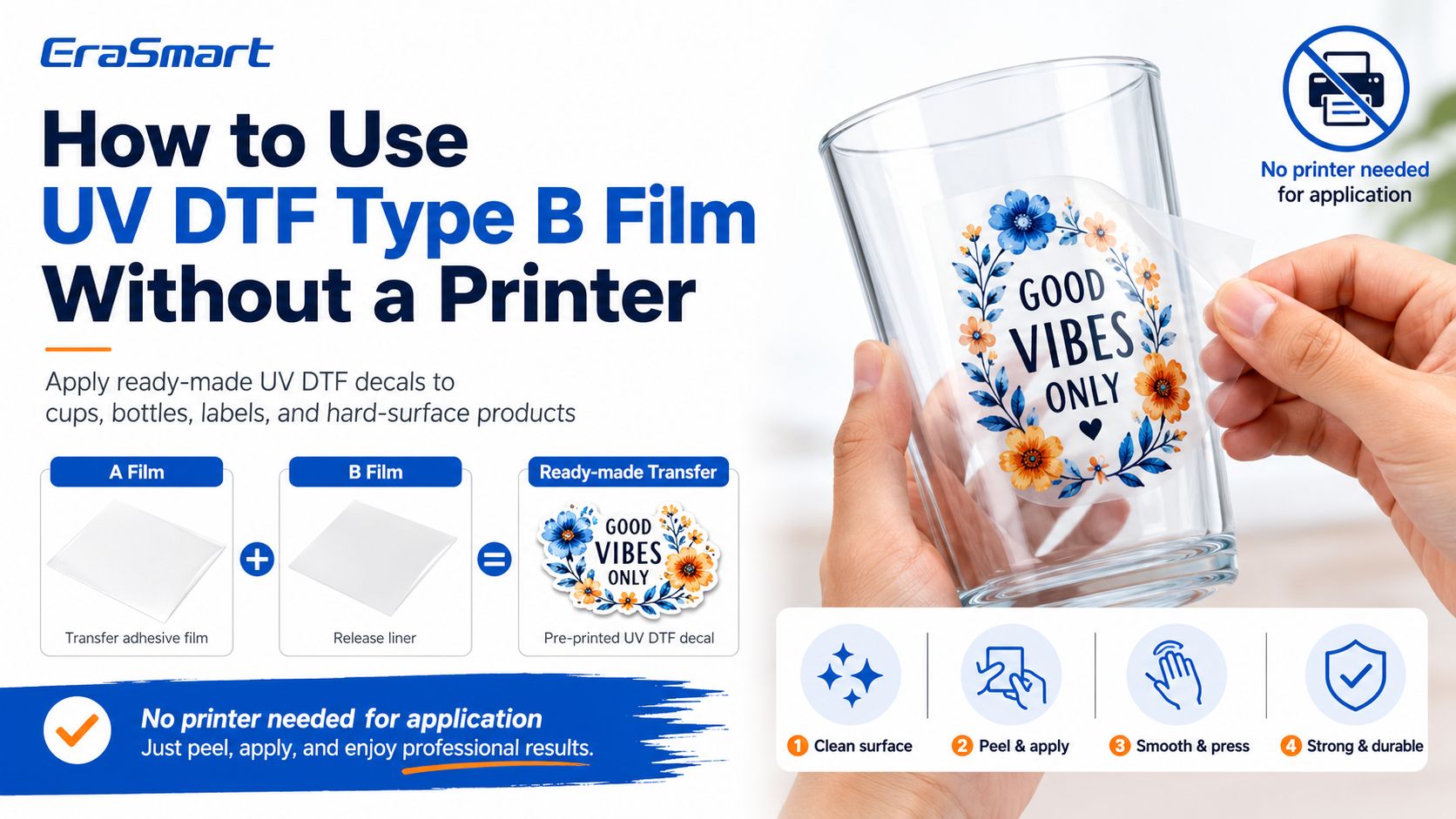
Blank UV DTF Type B film cannot create a printed design by itself. In a standard UV DTF workflow, the design is printed onto A film first. Then B film is laminated over the printed design and works as the carrier layer that helps transfer the decal onto a hard surface.
So, if you do not own a UV DTF printer, the practical solution is not to use blank Type B film alone. The practical solution is to buy pre-printed UV DTF transfers from a supplier, then apply those finished decals to your products.
If you want to understand the full film structure, EraSmart’s A/B Film for UV DTF Printing explains how A film and B film work together, why lamination matters, and why surface preparation is important for successful transfer.
Yes, but only in the right context.
You can use UV DTF transfers without owning a printer if the design is already printed and laminated. In that case, you are applying a finished UV DTF decal to a hard surface.
You cannot create a custom full-color UV DTF decal from blank Type B film alone. Type B film is not a printer, not an ink layer, and not a design generator. It is part of the transfer system.
| Situation | Can You Do It Without a Printer? | Explanation |
|---|---|---|
| Apply a ready-made UV DTF decal | Yes | The design has already been printed and laminated |
| Use blank B film to create a design | No | B film alone does not contain ink or artwork |
| Order custom transfers from a supplier | Yes | The supplier prints and laminates the design for you |
| Make your own UV DTF decals in-house | No, not without equipment | You need a UV DTF printer, UV ink, A/B film, RIP, and lamination |
| Start testing a sticker or cup wrap business | Yes | Buy finished transfers first, then upgrade when demand grows |
For beginners, this means you can test the UV DTF business model without a printer, but you cannot fully control production until you own a UV DTF printer.
UV DTF printing uses an A/B film system.
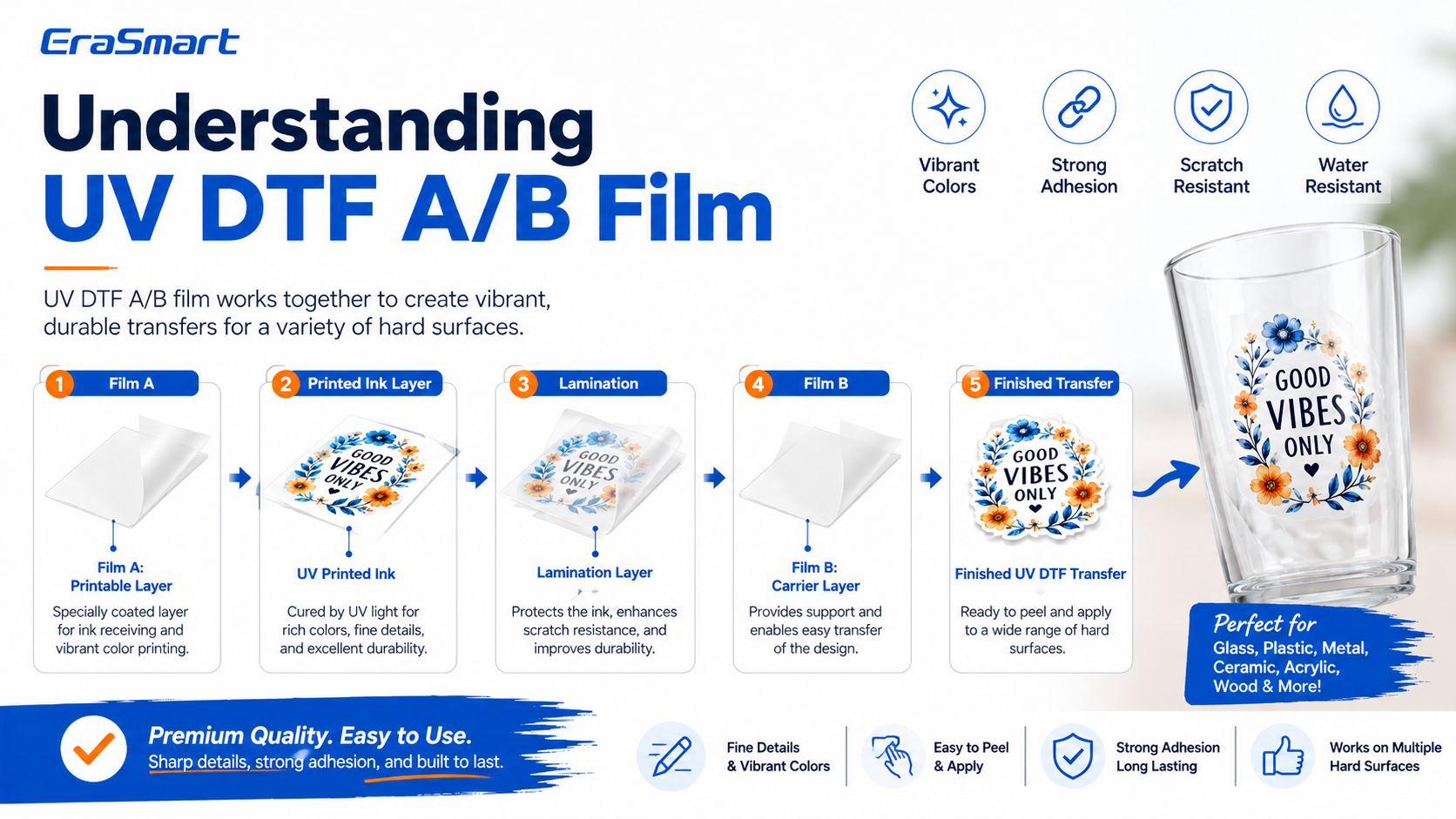
A Film is the printable film. The UV DTF printer prints CMYK, white ink, and varnish onto this film. The UV LED curing system cures the printed layers during production.
B Film is the carrier or transfer film. It is laminated onto the printed A film and helps lift, carry, and apply the printed design onto the final product surface.
In simple terms:
A film receives the printed image.
B film helps transfer the image.
The finished decal is applied to a hard surface.
After peeling, only the printed design remains on the product.
EraSmart’s UV DTF Printer workflow follows this logic: print on A film with CMYK + White + Varnish, cold-laminate with B film, cut, peel, and apply without hot-melt powder or garment heat pressing.
The confusion usually comes from how finished UV DTF transfers are sold. Some sellers call the ready-to-apply decal “Type B film” because the customer interacts with the carrier layer during application. But in production terms, the decal is not just blank B film. It is already printed, cured, laminated, and ready to transfer.
For customers, the product may look like a clear film sheet with a printed design. They peel, position, press, and remove the carrier. This feels simple, so many beginners assume the B film itself is the product.
The correct explanation is:
If it has a printed design, it is a finished UV DTF transfer.
If it is blank B film, it is only a consumable.
If you want your own design, someone must print it first.
If you want full control, you need a UV DTF printer.
This distinction helps avoid wasted materials and wrong expectations.
Using ready-made UV DTF transfers without owning a printer can be a smart first step.
It is useful if you want to:
test cup wrap demand
decorate bottles, jars, or tumblers
try premium sticker products
make small batches of gift items
test cosmetic label ideas
sell handmade product decals
create sample products
test local customer interest
learn the application process
compare surfaces before buying a machine
This is especially helpful for small businesses that are not ready to buy equipment immediately. You can start with finished transfers, sell sample products, and use real customer feedback to decide whether a UV DTF printer is worth the investment.
When you are ready to produce your own transfers, you can upgrade to an EraSmart UV DTF Printer for in-house printing, lamination, and product control.
If you buy finished UV DTF transfers, you can apply them to many clean, smooth hard surfaces.
Good product options include:
glass cups
tumblers
water bottles
acrylic panels
phone cases
laptop covers
candle jars
cosmetic bottles
perfume bottles
soap packaging
gift boxes
metal tins
ceramic mugs
plastic containers
product packaging
promotional items
UV DTF works best on smooth hard surfaces. It is not the right primary method for T-shirts, hoodies, or fabric apparel. For garments, use textile DTF instead. EraSmart’s UV DTF vs Textile DTF vs UV Flatbed guide explains this difference clearly.
You do not need a printer to apply finished UV DTF decals, but you do need proper application tools.
Useful tools include:
ready-made UV DTF transfer
clean hard-surface product
lint-free cloth
isopropyl alcohol wipe
scissors or cutter
scraper or squeegee
soft cloth
masking tape for alignment
ruler or positioning guide
gloves if needed
clean worktable
You usually do not need a heat press for standard UV DTF decal application. EraSmart’s A3 UV DTF printer workflow is described as powderless, with A/B film and no oven or heat press for standard decal transfer.

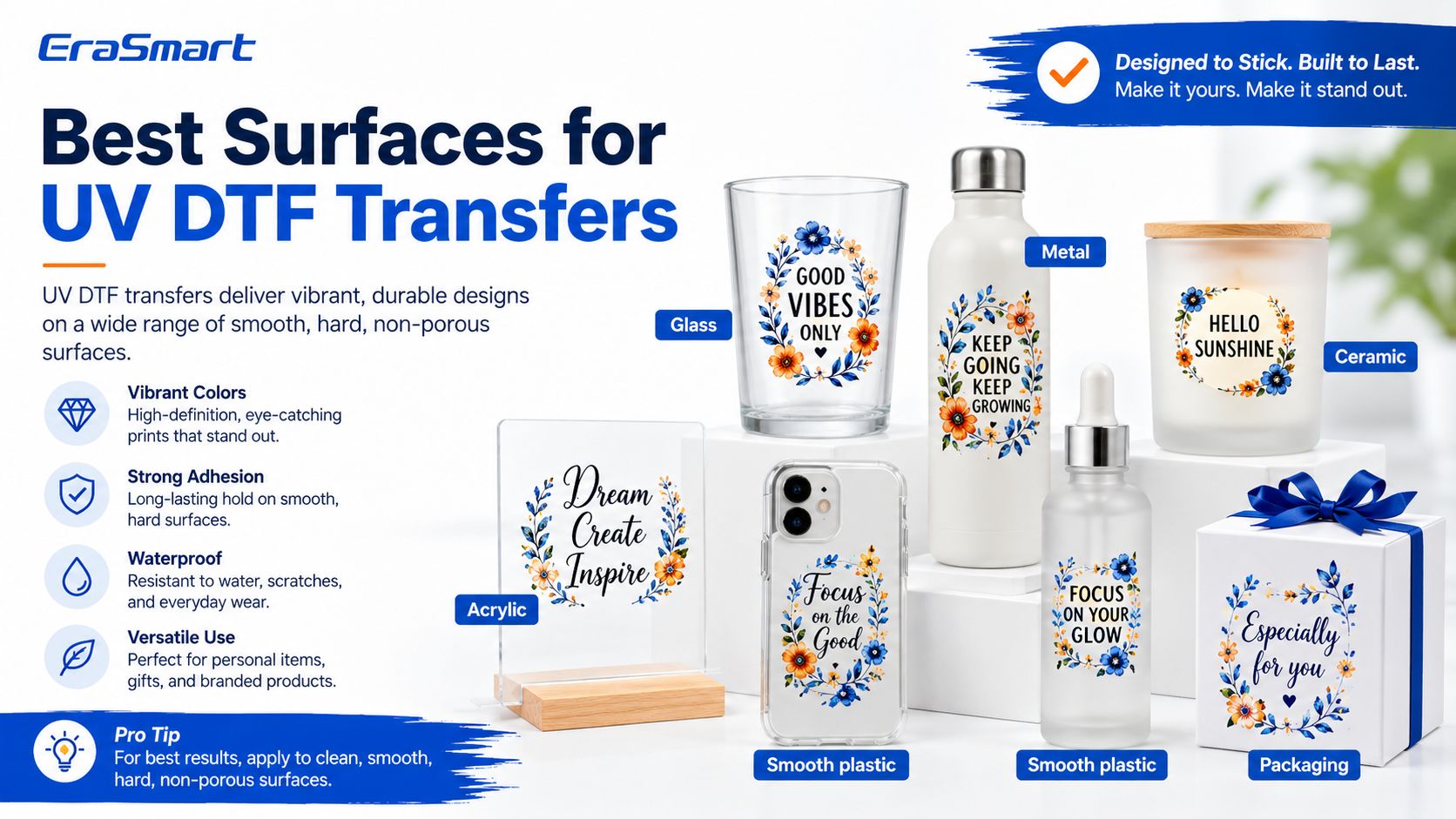
UV DTF decals work best on clean, smooth, hard surfaces.
Good surfaces include:
glass
acrylic
metal
ceramic
coated wood
smooth plastic
coated packaging
phone cases
bottles
cups
jars
Avoid applying UV DTF transfers directly to dusty, oily, wet, soft, fuzzy, highly textured, or flexible fabric surfaces. If the surface is rough or porous, adhesion may be weaker.
Surface preparation is one of the most important steps.
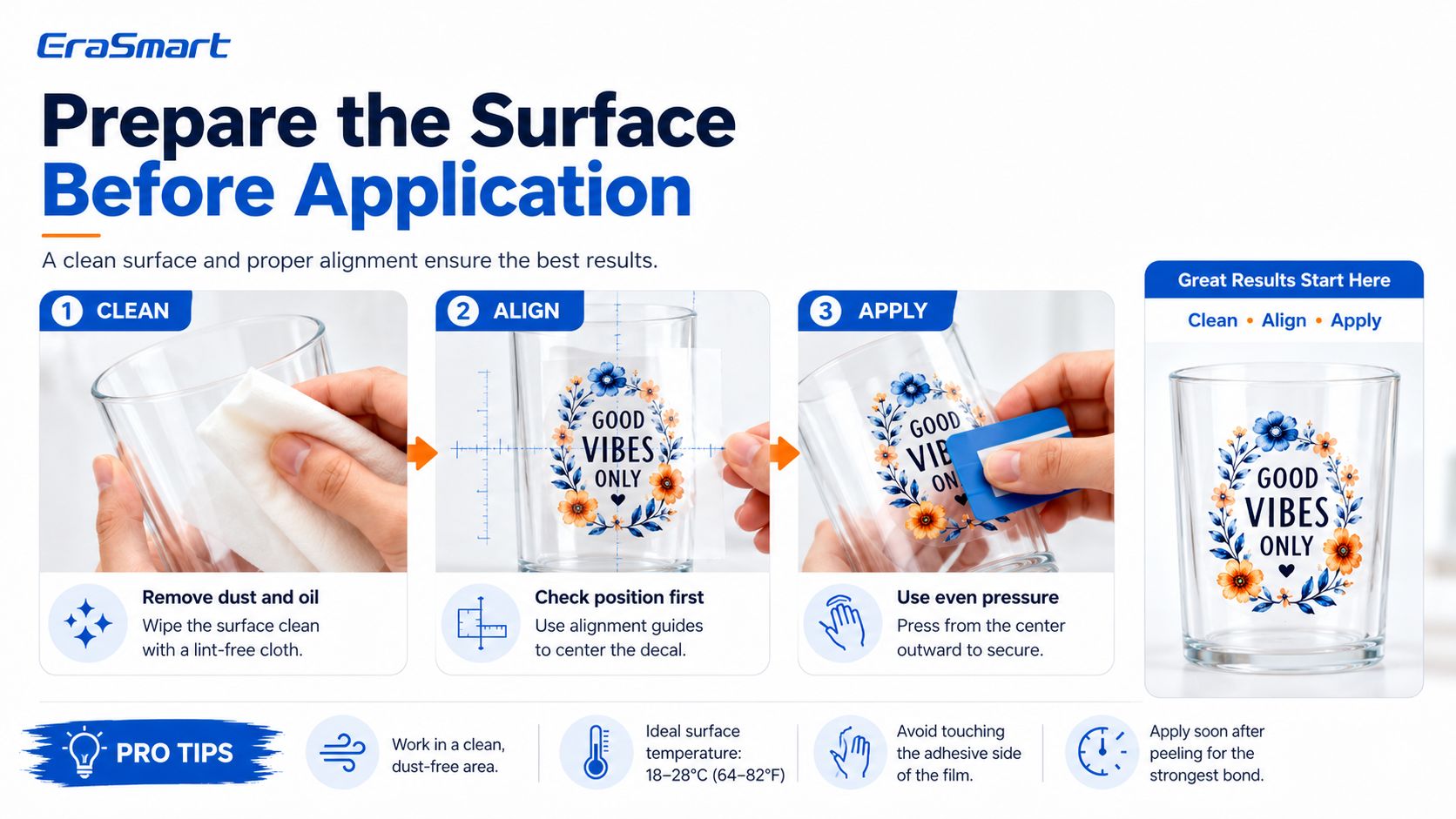
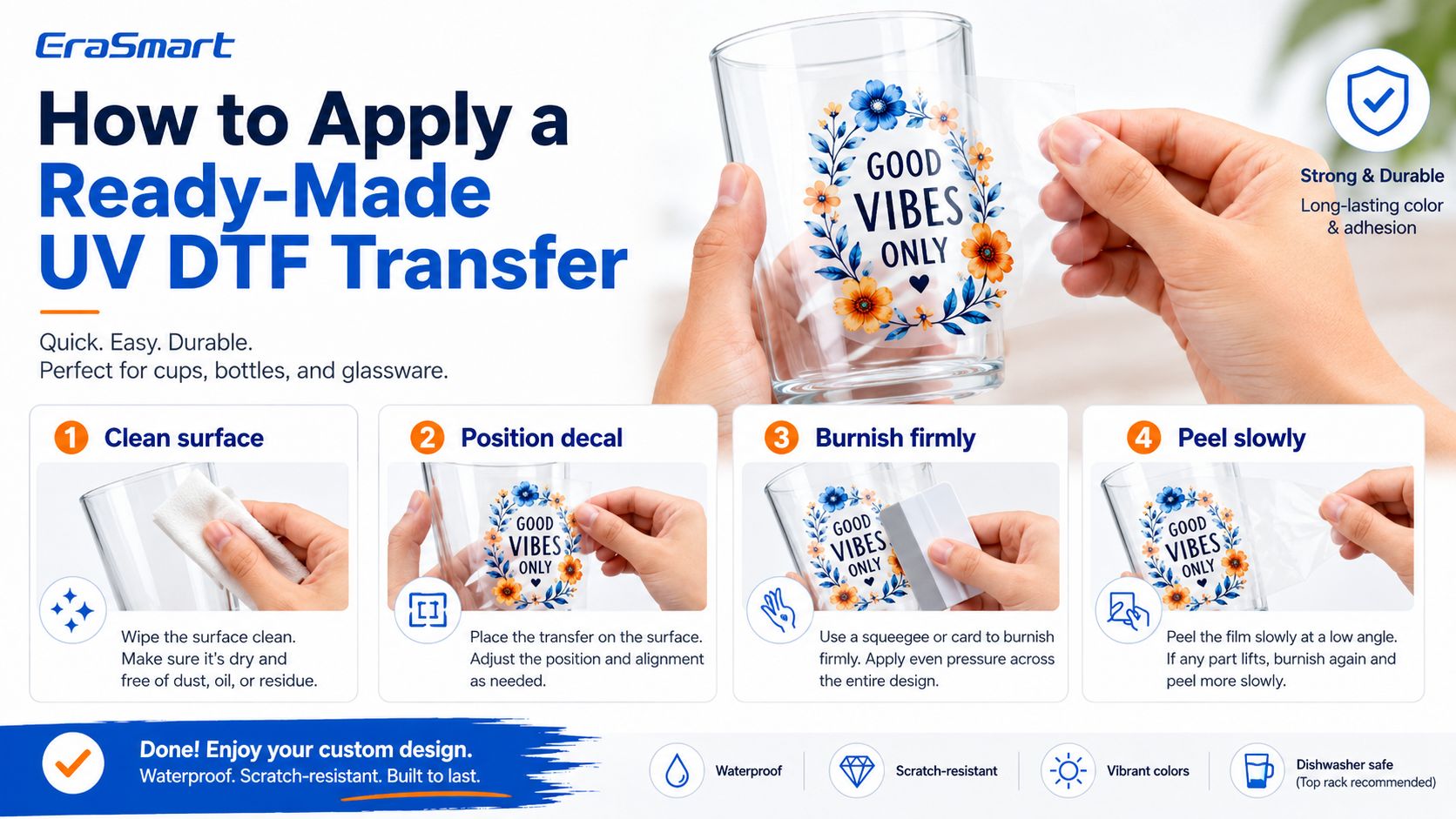
Use a lint-free cloth and isopropyl alcohol to clean the application area. Remove dust, oil, fingerprints, moisture, and packaging residue. Let the surface dry completely before applying the transfer.
Do not rush this step. Many UV DTF failures come from poor surface cleaning rather than the decal itself.
EraSmart’s A/B Film for UV DTF Printing guide also notes that oily, dusty, humid, or highly textured surfaces are common causes of transfer problems.
Cut around the finished UV DTF decal, leaving a small margin for easier handling. You do not need to cut perfectly along the design edge because only the printed area should remain after transfer.
For cup wraps, bottles, and curved surfaces, make sure the transfer size matches the product shape and does not overlap awkwardly.
Before removing the backing, place the decal over the product to check position.
For larger designs, use a ruler, tape, or alignment guide. For cup wraps, align the center first and check whether the design sits straight.
Once the adhesive touches the surface, repositioning can be difficult. Always check alignment before pressing.
Peel the backing layer slowly to expose the adhesive side of the UV DTF transfer.
If any part of the design lifts unexpectedly, lay the film back down and press again before continuing. Do not pull quickly.
Place the transfer onto the product surface carefully. Start from one side or from the center, depending on product shape.
For flat products such as acrylic panels or packaging boxes, start from one edge and press gradually.
For curved products such as cups and bottles, align the middle first, then work outward to reduce wrinkles and bubbles.
Use a scraper, squeegee, or soft cloth to press the transfer firmly.
Work from the center outward to remove air bubbles. Apply even pressure across the entire design, especially around small letters, thin lines, edges, and corners.
This step helps the printed decal bond to the surface.
Peel the top carrier film slowly at a low angle. Do not pull straight upward.
If part of the design comes up with the film, lay it back down and burnish again. Then try peeling from another corner or angle.
Slow peeling gives the decal more time to stay attached to the product surface.
After application, let the product rest before heavy handling, washing, rubbing, or packaging. This gives the adhesive layer more time to stabilize.
For products that will be handled frequently, test scratch resistance and adhesion before selling in volume.
Before selling a new product, test:
adhesion
scratch resistance
water exposure
surface compatibility
peel quality
customer handling conditions
packaging friction
curved-surface performance
Testing protects your brand and reduces customer complaints.

UV DTF transfers usually perform best on smooth hard surfaces.
| Surface | Suitability | Notes |
|---|---|---|
| Glass | Very good | Clean carefully before application |
| Acrylic | Very good | Good for signs, labels, and gifts |
| Metal | Good | Coated or smooth surfaces work better |
| Ceramic | Good | Test curved and glossy surfaces |
| Plastic | Depends | Low-surface-energy plastics need testing |
| Coated wood | Good | Raw porous wood may reduce adhesion |
| Paper packaging | Depends | Coated boxes work better than rough paper |
| Leather-like surfaces | Depends | Test texture and flexibility |
| Fabric | Not recommended | Use textile DTF for garments |
If your business focuses on stickers, labels, and cup wraps, EraSmart’s UV DTF Printer for Stickers and UV DTF Printer for Cup Wraps pages can help you match the right product direction.
Blank B film cannot create artwork. You need a printed and laminated UV DTF transfer.
If you want custom designs without a printer, order finished transfers from a print supplier. If you want full control, use a UV DTF printer.
Dust, oil, moisture, and fingerprints can weaken adhesion. Always clean the product surface before applying.
Fast peeling can pull small details away from the product. Peel slowly at a low angle.
UV DTF works best on smooth surfaces. Rough surfaces may prevent full contact between the adhesive and the product.
UV DTF decals are not the same as vinyl cut stickers. They use printed UV ink layers and a transfer film system. Application pressure, peel angle, and surface preparation matter.
UV DTF is for hard-surface decals, not garment printing. If your business is apparel-focused, choose an EraSmart DTF Printer instead.
Never assume one transfer will work perfectly on every material. Test the exact surface before taking customer orders.
Using ready-made UV DTF transfers without owning a printer has several advantages:
lower startup cost
no machine maintenance
no ink management
no RIP setup
no lamination workflow
easy product testing
good for beginners
suitable for small batches
useful for market validation
lower equipment risk
This is a smart way to learn the market before buying a machine.
However, there are also limitations:
higher cost per transfer
limited control over print quality
limited design changes
longer waiting time from suppliers
less flexibility for urgent orders
difficult to offer same-day customization
less control over white ink and varnish effects
less control over sizing and gang sheets
supplier quality affects your final product
profit margin may be lower at scale
This is why many businesses start with ready-made transfers, then upgrade to their own UV DTF printer once they understand demand.

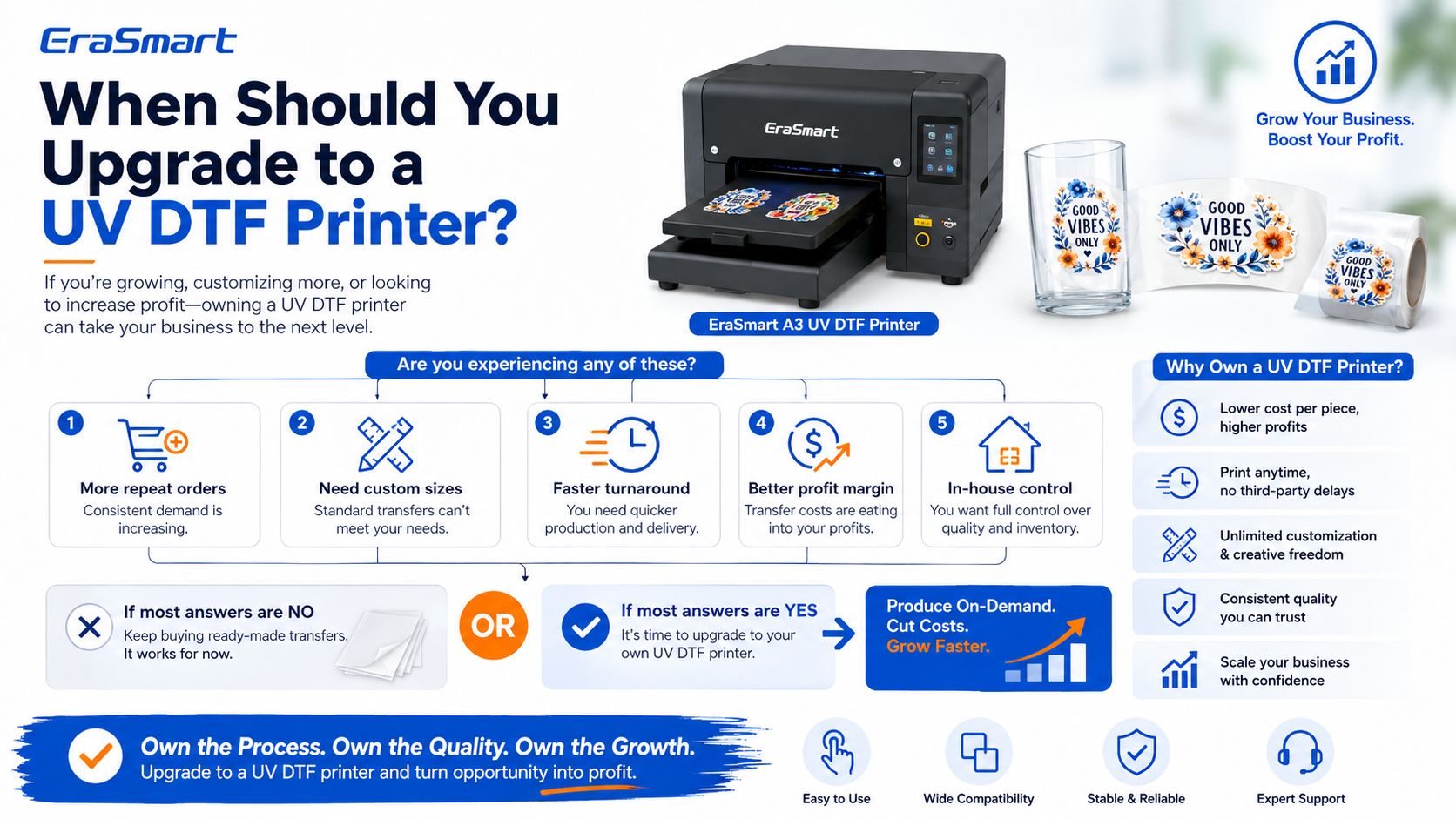
You should consider upgrading when:
you receive regular decal orders
customers ask for custom sizes
customers need fast turnaround
you want better profit margin
you want to control color and varnish effects
you want to print gang sheets efficiently
you want to sell your own transfer sheets
you want to produce cup wraps in-house
supplier lead time slows your business
your transfer cost becomes too high
At that point, an EraSmart UV DTF Printer can help you move from application-only business to full in-house production.
EraSmart’s A3 UV DTF system is designed for decals, labels, and cup wraps with A3 / 350 mm media width, CMYK + White + Varnish, up to 1440 dpi, and A/B film cold lamination.

| Business Model | Best For | Main Advantage | Main Limitation |
|---|---|---|---|
| Apply ready-made transfers | Beginners, testing, small batches | Low equipment cost | Less control and lower margin |
| Outsource custom transfers | Small brands without printer | Custom designs without machine | Supplier lead time |
| Own UV DTF printer | Growing decal businesses | Full control and better scalability | Requires equipment and workflow management |
| UV DTF + UV printer | Larger custom product studios | More product categories | Higher investment |
| UV DTF + textile DTF | Apparel and hard-goods brands | Broader product business | More training and workflow control |
If you are still comparing printing methods, read EraSmart’s UV DTF Printer vs UV Printer and UV DTF vs Textile DTF vs UV Flatbed guides before buying equipment.

If you do not have a printer yet, you can still test these product ideas:
Buy ready-made cup wrap transfers and apply them to glass cups, tumblers, mugs, or water bottles. This is a strong product category because customers like seasonal and personalized drinkware.
Small candle brands often need premium labels in low quantities. You can test finished UV DTF labels on glass candle jars.
Skincare bottles, perfume bottles, and cosmetic jars can look more professional with UV DTF decals.
Etsy sellers, craft brands, soap makers, and small gift brands often need low-MOQ custom branding.
You can apply finished UV DTF decals to blank phone cases and test small product collections.
UV DTF decals can add premium branding to gift boxes, event packaging, and boutique product packaging.
Offer small decal services to cafés, salons, gyms, gift shops, and event businesses.
Do not start with every possible decal product. Choose one niche first:
cup wraps
candle labels
cosmetic labels
phone case decals
gift box labels
small business stickers
A narrow niche makes marketing easier.
Prepare your designs and order finished UV DTF transfers from a supplier. Check size, color, finish, adhesive quality, and delivery time.
Create real samples on your target products. Take photos and videos of the application process and final result.
Before selling, test scratch resistance, water exposure, surface adhesion, packaging friction, and customer handling.
Start with low inventory. Sell finished products first, then reinvest into more transfers or equipment.
Track transfer cost, blank product cost, labor, packaging, shipping, advertising, and profit.
Once you have repeat customers and predictable demand, consider buying your own UV DTF printer.
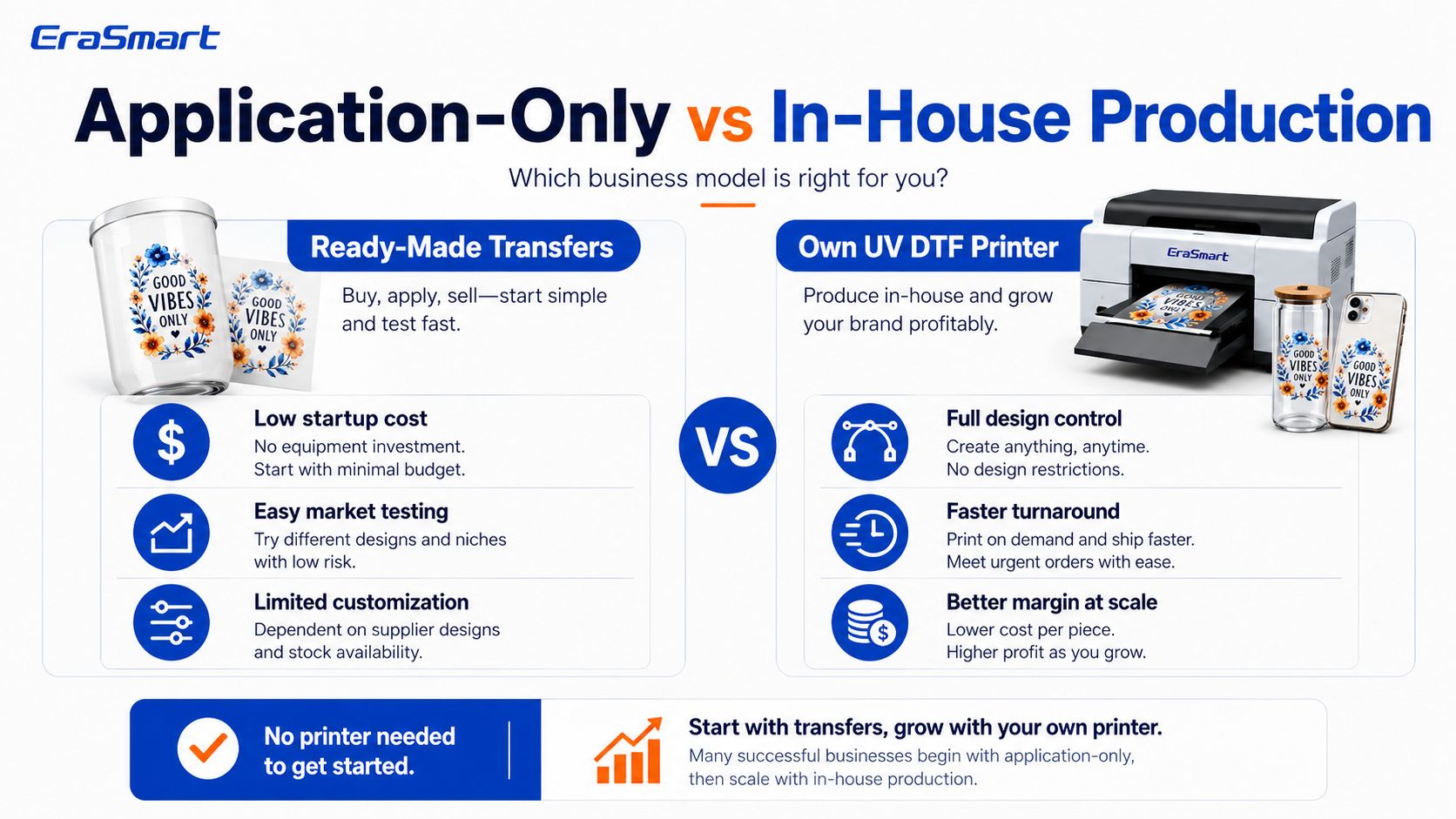
Using ready-made transfers has lower startup cost but higher per-piece cost. Owning a printer has higher startup cost but gives better long-term control and scalability.
| Cost Factor | Ready-Made Transfers | Own UV DTF Printer |
|---|---|---|
| Startup cost | Low | Higher |
| Cost per transfer | Higher | Lower at scale |
| Design flexibility | Limited by supplier | Full control |
| Turnaround time | Depends on supplier | Faster in-house |
| Quality control | Supplier-dependent | Operator-controlled |
| Custom sizes | May be limited | Flexible |
| Profit margin | Lower at volume | Better at volume |
| Best stage | Testing | Growth and production |
For many businesses, the best path is simple:
Start with ready-made UV DTF transfers to test demand. Upgrade to an EraSmart UV DTF printer when orders become regular.
Professional-grade UV DTF production for decals, labels, and cup wraps. Compact footprint, stable output, and effortless cold-transfer workflow.
| Parameter | Value |
|---|---|
| Max Media Width | A3 / 350 mm |
| Channels | CMYK + White + Varnish |
| Resolution | Up to 1440 dpi |
| Workflow | A/B UV DTF films · Cold lamination |
| Best Use | Stickers, labels, cup wraps, gadget skins |
| RIP | Riin / EraRip / Photoprint (ICC supported) |
If you are only testing the market, you can begin with ready-made UV DTF transfers. This helps you learn the application process and understand which products customers want.
If your business starts receiving repeat orders, custom size requests, or urgent production needs, it is time to consider in-house UV DTF printing.
Choose an EraSmart UV DTF Printer if your business wants to produce:
stickers
labels
cup wraps
bottle decals
cosmetic labels
candle jar labels
phone case decals
packaging decals
gadget skins
acrylic labels
premium hard-surface transfers
Choose an EraSmart DTF Printer if your business focuses on T-shirts, hoodies, uniforms, sportswear, and fabric products.
Choose an EraSmart UV Printer if your business wants to print directly onto acrylic, glass, metal, wood, phone cases, and rigid products.
uv printer
DTF printer
DTG printer
Heat press machine
Advertising printer
DTF oven
Hot Press
Carving machine
Mug heat transfer
Laminating machine
Printing INK
Cellphone case
Glass product
Cleaning fluid
Cotton swab
WhatsApp:+8618566233796
WeChat: +8618566233796
Mobile: +8618566233796
Web:www.erasmart.com
Shop:www.erasmartmall.com
WhatsApp us
Just provide a few details and we will help you get quick quotes!
Tell us your printing needs. Our team will reply within 24 hours.