
UV 프린터 ROI 계산기
UV 프린터 ROI는 기계 가격에만 국한되지 않습니다. 실제 회수율은 판매 가능한 제품, 공백 비용, 잉크 적용 범위, 흰색 잉크 및 광택제 사용량, 노동 시간, 인쇄 실패율, 월간 간접비, 워크플로가 매일 수익성 있는 주문을 계속 생산할 수 있는지 여부에 따라 달라집니다. 이 계산기를 사용하여 UV 인쇄 비용, 월간 이익 및 UV 프린터 투자를 회수하는 데 필요한 개월 수를 추정하십시오.
이 계산기는 추정에 도움이 됩니다.
월별 수익
판매 가능한 인쇄물당 비용
손익 분기
UV 프린터 ROI 입력
이 계산기는 UV 프린터 설정으로 얻을 수 있는 월별 수익과 필요한 개월 수를 추정합니다. 초기 투자금을 회수하기 위해 제품 카테고리와 판매 채널에 현실적인 수치를 사용하세요.
ROI 요약
아래 결과는 단순화된 비즈니스 모델을 보여줍니다. 이를 계획 지침으로 삼은 다음 실제 UV 제품 믹스 및 작업 흐름 현실과 비교하십시오.
UV 프린터 ROI 공식 로직
일일 판매 가능 상품 × 월 영업일 × 상품별 판매 가격
판매 가능한 상품 ¼ (1 - 인쇄 실패율)
실제 인쇄물 × (백지비용 + 잉크비용 + 인건비 + 포장비용)
월수입 - 변동비 - 월간 유지관리 - 월간 간접비
총 설정 투자금 ¼ 월 순이익
가장 중요한 5가지 수단
아크릴 간판, 상패, 명판 및 맞춤형 선물은 일반적으로 공백 비용만이 아닌 디자인 가치로 가격을 책정할 때 더 나은 성과를 냅니다.
실패한 인쇄물은 판매 가능한 모든 제품의 실제 비용을 조용히 증가시킵니다. 특히 공백이 비싼 경우에는 더욱 그렇습니다.
안정적인 일일 주문은 일반적으로 작은 잉크 절약보다 더 빠르게 투자금을 회수합니다.
지그, 템플릿 및 저장된 RIP 사전 설정은 수동 시간을 줄이고 반복성을 향상시킵니다.
적절한 UV 프린터 크기, 재료 적합성, 흰색 잉크, 광택제 및 유지 관리 워크플로우는 기계 가격보다 더 현실적인 ROI 모델을 생성합니다.
사업단계별 결과를 읽는 방법
현실적인 제품 선택과 실패한 인쇄 제어에 먼저 집중하십시오. 소형 UV 프린터는 전화 케이스, 소형 아크릴 제품, 태그 및 맞춤형 선물에 적합합니다.
일반적으로 ROI는 매장에서 표면 청소, 위치 지정, RIP 사전 설정, 흰색 잉크 설정 및 품질 검사를 표준화할 때 가장 많이 향상됩니다.
규모가 커질수록 ROI는 플랫폼 크기, 운영자 작업 흐름, 유지 관리 규율, 가동 중지 시간 및 주문 일관성에 더욱 민감해집니다.
어떤 UV 인쇄 제품이 일반적으로 ROI가 더 좋습니까?
UV 프린터 ROI는 제품 카테고리와 밀접한 관련이 있습니다. 동일한 프린터라도 판매하는 제품과 작업 흐름의 반복 정도에 따라 매우 다른 결과를 얻을 수 있습니다.
| 제품 유형 | ROI 이점 | 주요 비용 리스크 | 워크플로 팁 |
|---|---|---|---|
| 아크릴 간판 및 상 | 더 높은 인식 가치와 강력한 맞춤형 가격 잠재력 | 흰색 잉크, 바니시, 블랭크 비용 실패 | 일괄 주문 전에 흰색 베이스, 바니시 및 접착력을 테스트하십시오. |
| 전화 케이스 | 반복 가능한 제품, 좋은 개인화 수요 | 위치 오류 및 케이스 코팅 변형 | 지그와 저장된 템플릿을 사용하여 노동력을 줄입니다. |
| 금속 태그 및 명판 | B2B 라벨, 브랜딩 및 산업용 스타일 제품에 적합 | 표면 유분, 접착력, 코팅 차이 | 일관된 세척 및 샘플 테스트 작업흐름을 구축하세요. |
| 맞춤 선물 | 광범위한 제품 범위와 유연한 주문 기회 | 재료가 너무 많으면 작업 흐름이 느려질 수 있습니다. | 확장하기 전에 수익성이 높은 2~3가지 제품 유형으로 시작하세요. |
자주 묻는 질문
UV 프린터 ROI 계산기에서 가장 중요한 숫자는 무엇입니까?
일반적으로 단일 번호가 없습니다. 투자 회수는 판매 가능한 일일 생산량, 제품 마진, 인쇄 실패율, 노동 시간 및 작업 흐름이 이러한 가정을 일관되게 유지할 수 있는지 여부에 따라 달라집니다.
실패한 인쇄 속도가 왜 그렇게 중요한가요?
인쇄에 실패하면 판매 가능한 모든 주문에 대해 인쇄해야 하는 실제 제품 수가 늘어납니다. 이는 블랭크 비용, 잉크 비용, 인건비 및 생산 시간을 증가시킵니다.
UV 프린터를 선택하기 전에 ROI를 계산해야 합니까?
예. ROI는 제품 크기, 판매 가격, 주문량 및 예상 투자 회수 기간을 기준으로 A4, A3, A3 Max 또는 A2 UV 프린터가 필요한지 결정하는 데 도움이 됩니다.
흰색 잉크가 UV 프린터 ROI에 영향을 미치나요?
예. 흰색 잉크는 투명 아크릴, 어두운 휴대폰 케이스, 유리 및 컬러 인쇄물을 더 높은 가격에 판매하는 데 도움이 될 수 있지만 유지 관리가 필요하므로 비용 계획에 포함해야 합니다.
더 빠른 투자 회수가 항상 최고의 UV 프린터를 의미합니까?
항상 그런 것은 아닙니다. 빠른 계산기 결과는 여전히 실제 작업 공간, 운영자 기술, 유지 관리 능력, 주문 안정성 및 애프터 서비스 지원과 일치해야 합니다.
EraSmart 모델 경로
어떤 UV 프린터 구성을 고려해야 합니까?
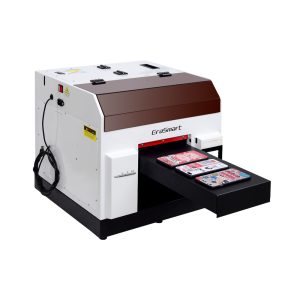
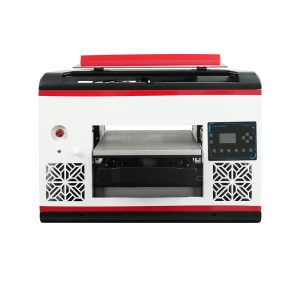
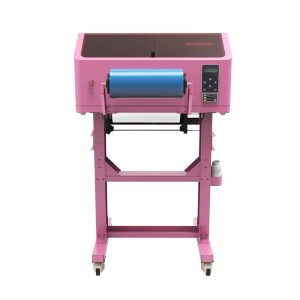
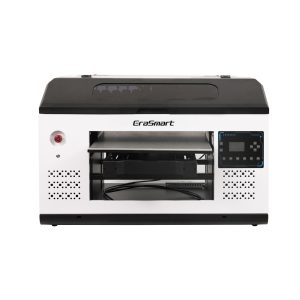
EraSmart UV 프린터를 비교할 때 대상 재료, 흰색 잉크가 필요한지 여부, 광택 효과가 제품 가치의 일부인지, 제품에 필요한 인쇄 크기를 고려하십시오.
적합한 가이드를 찾을 수 없나요? 지금 무료 기술 지원을 받으세요!
몇 가지 세부 정보 만 제공하면 빠른 인용문을 얻을 수 있도록 도와 드리겠습니다!
투자를 모델링한 후 UV 프린터와 일치시키세요
ROI는 실제 제품 카테고리, 실제 UV 프린터 크기, 실제 재료 워크플로우, 그리고 실제 주문량. 먼저 이 계산기를 사용한 다음 프린터 모델, 재료, 잉크 구성 및 유지 관리 요구 사항을 비교하십시오.
프린터 도구
DTF 오븐
핫 프레스
조각 기계
머그잔 열전달
라미네이팅 머신
소모품
인쇄 잉크
핸드폰 케이스
유리 제품
청소 유체
면봉
저희에게 연락하십시오
whatsapp : +8618566233796
WeChat : +8618566233796
모바일 : +8618566233796
편물:www.erasmart.com
가게:www.erasmartmall.com
WhatsApp에 우리
견적을 요청하십시오
몇 가지 세부 정보 만 제공하면 빠른 인용문을 얻을 수 있도록 도와 드리겠습니다!
다운론
이메일을 남겨주시고 다운로드 URL을 이메일로 보내주세요.