Small Size Flatbed Inkjet Printer Manufacturer

How to Make Money with a UV Printer: 12 Profitable Business Ideas
July 27, 2026 Blog
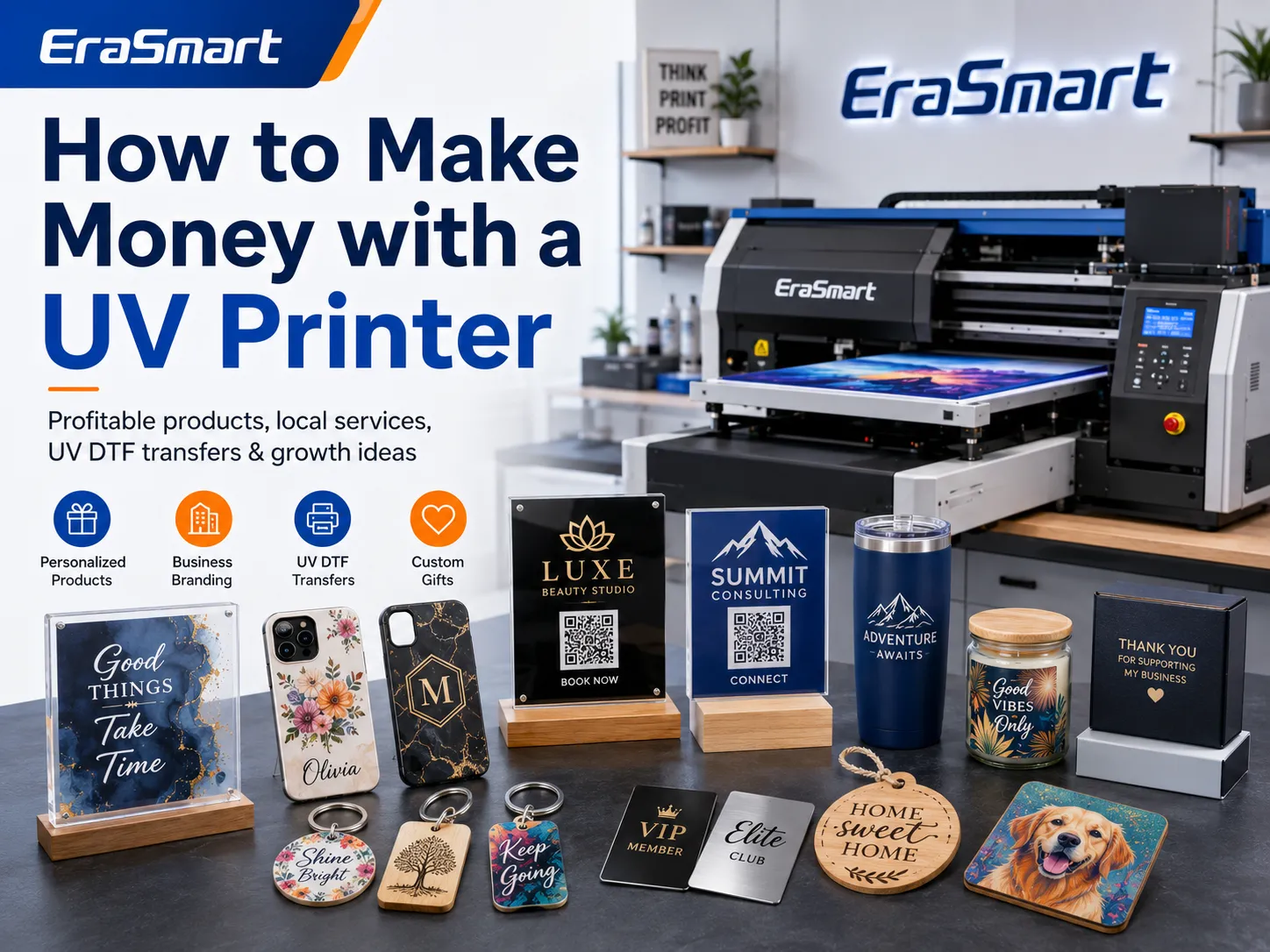
A UV printer can become the foundation of a profitable customization business, but owning the machine does not automatically create income.
A successful UV printing business needs three things:
- Products that customers already want
- A production process that controls waste and labor
- A reliable way to reach repeat buyers
UV printing is valuable because it can place full-color graphics directly onto many rigid and coated products. Depending on the printer, ink configuration and accessories, a business may produce phone cases, acrylic signs, wood gifts, metal nameplates, promotional products, packaging samples and UV DTF transfers.
The technology is especially suitable for short runs and personalized orders because designs can change from one product to the next without preparing screens or printing plates.
However, profitability depends on much more than ink cost. You must also consider:
- Blank product cost
- Design time
- Printing time
- White ink and varnish consumption
- Primer and pretreatment
- Fixtures and positioning
- Failed products
- Maintenance
- Packaging
- Selling fees
- Customer acquisition
- Shipping
This guide explains practical ways to make money with a UV printer, which products are suitable for each business model, how to calculate prices and when to expand your equipment.
How Does a UV Printer Generate Revenue?
A UV printer can create revenue in three main ways.
Selling Finished Products
You purchase blank products, print custom designs and sell the completed items.
Examples include:
- Phone cases
- Acrylic plaques
- Keychains
- Wedding signs
- Metal cards
- Wood ornaments
- Personalized gifts
This model offers more control over product presentation, packaging and retail pricing.
Providing Printing Services
Customers or other businesses supply the blank products or artwork, and you charge for printing, setup and finishing.
Examples include:
- Printing customer logos onto promotional products
- Producing small batches for local businesses
- Printing prototypes for product designers
- Adding branding to packaging samples
- Printing replacement nameplates or labels
This model can reduce the amount of blank inventory you need to hold.
Supplying Other Sellers
You produce printed parts, transfers or finished goods for designers, gift shops, sign businesses and online sellers.
Examples include:
- UV DTF transfers
- Printed acrylic blanks
- Private-label phone cases
- Custom business signs
- Printed packaging components
Wholesale and trade-printing orders may have lower margins per unit, but they can provide more consistent volume.
UV Printing Business Models at a Glance
| Business model | Typical customers | Main products | Main advantage |
|---|---|---|---|
| Personalized online store | Consumers | Gifts, phone cases and décor | Wider market reach |
| Local custom printing | Businesses and individuals | Signs, merchandise and gifts | Faster local service |
| B2B branding service | Companies and organizations | Nameplates, awards and promotional products | Repeat-order potential |
| Event customization | Weddings, parties and clubs | Favors, signs and keepsakes | Higher value through personalization |
| UV DTF transfer supply | Crafters and product sellers | Cup wraps, labels and transfers | Easy shipping and repeat orders |
| Prototype printing | Designers and startups | Packaging samples and product mockups | Urgent, high-value work |
| Wholesale production | Retailers and creators | Private-label finished products | More predictable volume |
| Training and digital products | Beginners and makers | Workshops, templates and courses | Additional non-product revenue |
A small business does not need to use every model. Starting with one product category and one customer group usually produces better results than launching a large, unfocused catalog.
1. Sell Personalized Products Online
Selling custom products through an online store is one of the most accessible UV printing business models.
Potential sales channels include:
- WooCommerce
- Shopify
- Etsy
- Amazon Handmade
- Social media shops
- Local online marketplaces
The strongest products are not necessarily the most complicated. They usually serve a clear audience or occasion.
Examples include:
- Personalized pet phone cases
- Family-name acrylic signs
- Wedding date plaques
- Custom desk nameplates
- School bag tags
- Small-business QR code signs
- Memorial photo products
- Travel-themed gifts
Instead of offering a generic “custom phone case,” create focused product collections such as:
- Pet portrait phone cases
- Wedding photo phone cases
- Company logo phone cases
- Birth-flower phone cases
- Sports club phone cases
A defined niche makes product photography, advertising and keyword targeting easier.
For additional product inspiration, see EraSmart’s guide to things to print with a UV printer.
2. Offer Local UV Printing Services
Local businesses frequently need small quantities that are inconvenient to order from a large commercial supplier.
Potential customers include:
- Cafés
- Restaurants
- Salons
- Schools
- Real estate agents
- Hotels
- Repair shops
- Sports clubs
- Photographers
- Event planners
- Construction companies
You can offer:
- Branded counter signs
- Opening-hours plaques
- QR code payment signs
- Staff nameplates
- Menu boards
- Desk signs
- Promotional gifts
- Award plates
- Small equipment labels
- Branded product samples
Local service offers several competitive advantages:
- Shorter turnaround
- In-person material approval
- Easier sample checking
- No long-distance shipping
- Small minimum quantities
- Faster reprints
Do not market only the printer. Market the problem you solve.
For example, instead of saying “UV printing available,” say:
Custom branded counter signs with low minimum quantities and fast local delivery.
That message is more specific and easier for a customer to understand.
3. Produce Custom Phone Cases
Phone cases are a practical entry product because they are small, easy to photograph and suitable for highly personalized designs.
Popular themes include:
- Pet portraits
- Family photographs
- Initials and names
- Floral artwork
- Company logos
- Travel photography
- Wedding photographs
- Zodiac designs
- School and club branding
A suitable UV printer may use:
- CMYK for full-color artwork
- White ink for dark or transparent cases
- Varnish for spot gloss and raised effects
- Fixtures for accurate positioning
Before selling phone cases, test:
- Ink adhesion
- Case material
- Camera-hole alignment
- Edge clearance
- Flexibility
- Scratch resistance
- White ink opacity
- Varnish height
Different phone-case plastics can produce different adhesion results. Test the exact blank product rather than assuming all cases behave the same way.
Businesses focused on this category can review the EraSmart phone case printer options and compare working area, print height and ink configuration.
4. Sell Acrylic Signs and Displays
Acrylic products can provide a more premium appearance than many low-cost gift items.
Potential products include:
- Wedding welcome signs
- Table numbers
- Business logo plaques
- QR code signs
- Menu displays
- Desk nameplates
- Photo blocks
- Awards
- Directional signs
- Social media signs
- Product display cards
Transparent acrylic may use a printing structure such as:
- CMYK
- White + CMYK
- CMYK + white backing
- Color + white + color
- CMYK + white + varnish
The correct layer order depends on whether the design is printed on the front or reverse side and how the customer will view it.
Acrylic products can also be combined with:
- Wooden bases
- LED light bases
- Metal standoffs
- Magnetic holders
- Decorative frames
These additions increase the perceived value without necessarily requiring a much larger print area.
5. Create Wedding and Event Products
Weddings, birthdays, corporate events and seasonal celebrations create demand for small-batch personalization.
Potential UV-printed products include:
- Welcome signs
- Table numbers
- Place cards
- Acrylic invitations
- Menu signs
- Drink tags
- Wedding favors
- Photo keepsakes
- Name plaques
- Guestbook covers
- Cake toppers
- Corporate award plates
Personalized event products are valuable because customers are buying more than a printed object. They are buying:
- Design coordination
- Matching colors
- Personal names
- A specific event date
- Short-run production
- Deadline reliability
Create coordinated packages rather than selling every item separately.
Wedding Table Package
- Table numbers
- Reserved signs
- Menu cards
- Name tags
Corporate Event Package
- Logo desk signs
- Speaker nameplates
- Award plates
- Branded gifts
Birthday Package
- Welcome sign
- Photo plaque
- Favor tags
- Personalized keepsakes
Packages simplify customer decisions and increase the average order value.
6. Produce UV DTF Transfers
UV DTF printing creates transferable graphics for hard and smooth products.
The design is printed onto a film system and later transferred onto the product without a heat press.
Potential applications include:
- Cup wraps
- Bottle labels
- Cosmetic packaging
- Candle containers
- Gift boxes
- Phone accessories
- Product branding
- Small appliance decoration
- Promotional products
A UV DTF business can sell:
- Individual transfers
- Ready-made design sheets
- Custom logo sheets
- Gang sheets
- Wholesale transfer packs
- Seasonal design collections
This model can be attractive because finished transfers are easier to store and ship than many rigid products.
However, quality depends on the complete system:
- UV ink
- White ink
- Varnish
- A film
- B film
- Lamination
- Adhesion
- Layer order
- Storage conditions
If you plan to build a transfer-focused business, review the EraSmart UV DTF printer range and the guide to A/B film.
7. Print Branded Promotional Products
Companies need branded products for:
- Trade shows
- Employee gifts
- Customer rewards
- Product launches
- Distributor meetings
- Sales kits
- Corporate events
Possible products include:
- Keychains
- Coasters
- Desk organizers
- USB cases
- Name badges
- Pens with suitable fixtures
- Power-bank covers
- Gift boxes
- Metal cards
- Acrylic awards
- Bottle openers
B2B customers often care about:
- Consistent logo color
- Clear approval samples
- Repeatability
- Delivery dates
- Packaging
- Low minimum quantities
- Reorder convenience
Keep the approved artwork, print mode, fixture position and material information for each customer. This makes repeat orders faster and more consistent.
8. Produce Product Prototypes and Packaging Samples
Designers and small brands often need one or several printed samples before ordering mass production.
A UV printer may be used to create:
- Printed packaging lids
- Cosmetic container samples
- Product labels
- Branded device covers
- Control-panel mockups
- Retail display samples
- Presentation boards
- Investor-demo products
Prototype customers are often paying for speed and flexibility rather than the lowest per-unit cost.
A prototype job may require:
- Artwork adjustment
- Color testing
- Fixture creation
- Several material samples
- Same-day or urgent delivery
- Multiple revisions
These services should be priced separately rather than treated like ordinary product printing.
Create charges for:
- File setup
- Color matching
- Fixture preparation
- Test prints
- Rush production
- Additional revisions
9. Sell Wall Art and Photo Products
UV printing can produce decorative art on:
- Acrylic
- Wood
- Metal
- Canvas
- Ceramic
- Composite panels
Potential product themes include:
- Family photographs
- Pet portraits
- Landscapes
- Abstract art
- Wedding photographs
- Memorial products
- Business wall décor
- Restaurant decoration
- Hotel room art
- Motivational signs
Different materials create different visual effects.
Acrylic
Offers depth, gloss and a modern appearance.
Wood
Allows the natural grain to remain visible and creates a warmer decorative style.
Metal
Provides a clean, contemporary finish.
Canvas
Creates a textured, traditional art appearance.
You can use the same artwork to create several price levels, such as a small wood panel, a medium acrylic plaque and a premium metal wall print.
10. Create Industrial Labels and Nameplates
UV printers are not limited to consumer gifts.
A small production business may also produce:
- Equipment labels
- Control-panel graphics
- Serial-number plates
- Warning labels
- Asset tags
- Room signs
- Door plates
- Machine identification plates
- Custom scale markings
- Product instruction panels
Potential customers include:
- Equipment manufacturers
- Electrical companies
- Laboratories
- Repair companies
- Property managers
- Small factories
- Automation businesses
Industrial applications require careful material testing.
Evaluate:
- Adhesion
- Scratch resistance
- Chemical exposure
- Outdoor use
- Heat exposure
- Cleaning agents
- Required lifespan
- Regulatory requirements
Do not describe a printed label as industrial, outdoor-safe or chemical-resistant without testing the exact ink and material combination.
11. Combine UV Printing With Laser Engraving or Cutting
UV printing can complement an existing laser, CNC, vinyl or 3D-printing business.
Examples include:
- Laser-cut acrylic signs with printed color
- Engraved wood products with printed details
- 3D-printed parts with logos and labels
- Cut metal plates with UV graphics
- Acrylic awards with printed photographs
- Printed and engraved gift boxes
- Layered signs with color and texture
Laser engraving provides depth and cutting capability. UV printing adds:
- Full color
- Photographs
- Gradients
- White ink
- Varnish
- Small text
- Variable data
Combining processes can make products more difficult to compare with mass-produced alternatives and may support higher selling prices.
Review UV printing vs laser engraving when deciding which process should handle each part of the product.
12. Supply Other Creators and Small Businesses
You do not need to build every sale directly with the final consumer.
Potential trade customers include:
- Graphic designers
- Sign shops
- Wedding planners
- Gift stores
- Photographers
- Social media sellers
- Laser engraving businesses
- Handmade-product sellers
- Marketing agencies
- Promotional-product companies
You can provide:
- White-label products
- Printed components
- UV DTF transfers
- Sample production
- Short-run contract printing
- Unbranded packaging
- Drop-shipping services
Trade customers may expect lower prices, but they may order repeatedly and require less consumer-facing marketing.
Create clear trade policies covering:
- Minimum quantities
- Artwork requirements
- Production time
- Sample approval
- Reprint responsibility
- Packaging
- Shipping
- Payment terms
Is Renting Out a UV Printer a Good Business Model?
Renting a UV printer by the hour may sound attractive, but it creates operational risks.
An inexperienced user may:
- Strike the printhead
- Load an uneven object
- Use an incompatible material
- Damage the flatbed
- Contaminate the ink system
- Interrupt maintenance routines
- Use unsafe handling practices
A safer alternative is to sell supervised production time.
You operate the machine while the customer:
- Supplies the design
- Selects the material
- Observes the process
- Pays for printing and instruction
This protects the printer while still serving makers, students and designers who want access to UV printing.
Which UV-Printed Products Are Most Profitable?
There is no universally most profitable product.
A product is more likely to be profitable when it combines:
- Low blank cost
- Short production time
- Low failure rate
- Strong perceived value
- Easy packaging
- Repeat demand
- Simple customization
- Limited direct competition
Use this framework to compare products:
| Factor | Question to ask |
|---|---|
| Customer demand | Are people already buying this product? |
| Selling price | Will buyers pay enough to cover customization? |
| Blank cost | Can the blank be sourced consistently? |
| Machine time | How long does each unit occupy the printer? |
| Setup time | Does every order require a new fixture? |
| Failure rate | How expensive is a failed print? |
| Shipping | Is the product fragile or expensive to pack? |
| Repeat orders | Can businesses or events reorder it? |
| Differentiation | Can your product avoid pure price competition? |
A low-cost keychain may produce a good percentage margin but require many sales. A large acrylic sign may generate more profit per order but require more design and customer communication.
Track profit per hour of production, not only profit per item.
How to Calculate UV Printing Costs
Your real product cost should include:
- Blank product
- CMYK ink
- White ink
- Varnish
- Primer
- Cleaning solution
- Waste ink
- Fixture cost
- Design time
- Machine setup
- Printing time
- Finishing
- Failed products
- Packaging
- Platform fees
- Payment fees
- Shipping materials
- Overhead
A practical pricing formula is:
Selling price = material cost + production labor + design labor + overhead allocation + selling fees + target profit
Do not treat design, test printing and fixture preparation as free work.
For customized orders, you may separate the price into:
- Product price
- Personalization fee
- Artwork fee
- Setup fee
- Rush fee
- Shipping fee
EraSmart’s guide on how much UV printing costs provides a broader breakdown of ink, maintenance and production costs.
How to Calculate the Break-Even Point
Before purchasing equipment, estimate how many orders are required to recover the fixed investment.
Use:
Break-even order quantity = fixed startup cost ÷ contribution margin per order
The contribution margin is the selling price remaining after direct variable costs such as:
- Blank product
- Ink
- Primer
- Packaging
- Selling fees
- Direct labor
Do not use revenue alone when estimating break-even.
A product may have a high selling price but a low contribution margin after materials, long print time and customer acquisition are included.
The EraSmart UV printer ROI calculator can help structure this evaluation.
How to Choose the Right Products
A beginner should choose products using four filters.
Material Compatibility
Confirm that the UV ink adheres to the blank.
Some products may need:
- Cleaning
- Primer
- Pretreatment
- A different ink formulation
- A different fixture
Use the UV printer materials guide to plan substrate testing.
Printer Compatibility
Check:
- Print area
- Maximum product height
- Product weight
- Flatness
- Rotary requirements
- Fixture requirements
- White ink
- Varnish
- Primer capability
Market Demand
Search local and online markets for:
- Existing sellers
- Typical product styles
- Customer reviews
- Common complaints
- Seasonal patterns
- Personalization options
Do not copy other sellers. Use their reviews to identify what customers value or dislike.
Production Efficiency
Choose products that can be produced consistently.
A product that requires twenty minutes of positioning for a two-minute print may be difficult to scale.
How to Validate a UV Printing Product Before Investing Heavily
Use a small validation process.
Step 1: Select One Customer Group
Examples include:
- Pet owners
- Wedding planners
- Local cafés
- Schools
- Small clothing brands
- Corporate gift buyers
Step 2: Create Three to Five Sample Products
Produce real samples showing:
- Different designs
- Personalization
- Material quality
- Packaging
- Premium finishing
Step 3: Test Customer Interest
Use:
- Social media posts
- Local business outreach
- Small paid advertisements
- Craft fairs
- Preorders
- Customer interviews
Step 4: Accept Small Orders
Do not purchase a large quantity of blanks until customers begin paying for the product.
Step 5: Record the Production Data
Track:
- Setup time
- Print time
- Ink consumption
- Failure rate
- Packaging time
- Selling price
- Customer questions
- Repeat-order potential
Expand only when the numbers support the decision.
How to Price Custom UV Printing
Customers are paying for more than ink.
They are also paying for:
- Personalization
- Design preparation
- Low minimum quantities
- Material sourcing
- Fast production
- Technical skill
- Quality control
- Packaging
- Convenience
Use Tiered Pricing
For example:
- One-piece custom price
- Small-batch price
- Business-order price
- Wholesale price
Charge for Complex Artwork
Create separate charges for:
- Background removal
- Logo tracing
- Photo editing
- Variable names
- Custom illustration
- 3D texture preparation
- Multiple revisions
Set a Minimum Order Value
A small order may require the same communication, design approval and setup as a larger order.
A minimum order value protects your production time.
How to Find Customers
Build a Focused Portfolio
Your portfolio should show products for the customer group you want to attract.
A wedding planner is more interested in matching signs and table numbers than random phone cases.
A local business is more interested in logo plaques, QR signs and nameplates.
Contact Local Businesses Directly
Prepare several sample products and a concise offer.
For example:
We produce short-run custom acrylic signs, QR code displays and branded desk products for local businesses, with sample approval and low minimum quantities.
Use Short Production Videos
UV printing is visually interesting.
Content ideas include:
- White ink appearing beneath color
- Varnish creating raised texture
- Before-and-after blank products
- A personalized name being printed
- Acrylic reverse printing
- A complete order being packed
Videos can support:
- TikTok
- YouTube
- Product pages
Build Product Pages Around Search Intent
Instead of one broad “custom UV printing” page, create pages for:
- Custom acrylic signs
- UV-printed phone cases
- Personalized wedding signs
- Company logo plaques
- UV DTF cup wraps
- Custom metal nameplates
Specific pages are more relevant to customers and search engines.
Ask for Repeat Orders and Referrals
After completing an order, save:
- Approved artwork
- Product model
- Print settings
- Fixture position
- Customer preferences
Make reordering easy.
Common Mistakes That Reduce Profit
Buying Too Many Blanks
Inventory can consume cash and storage space.
Stock products only after demand has been validated.
Selling Too Many Product Categories
A broad catalog increases:
- Testing
- Fixtures
- Blank inventory
- Photography
- Packaging types
- Production mistakes
Start with one or two categories.
Ignoring Fixture Time
Printing may be quick, but accurate placement can be slow.
Include fixture design and loading time in the price.
Skipping Adhesion Tests
A successful-looking print may peel after scratching, bending or cleaning.
Test every new blank.
Underpricing White Ink and Varnish
White and varnish layers may require additional passes and machine time.
Do not price them like a basic CMYK print.
Ignoring Maintenance
White ink, varnish and UV printheads require regular care.
Downtime and damaged printheads can erase the profit from many orders.
Review the EraSmart UV printer maintenance guide before planning irregular or seasonal production.
Using Copyrighted Artwork Without Permission
Do not sell unauthorized:
- Movie characters
- Sports logos
- Brand trademarks
- Celebrity artwork
- Game designs
- Copyrighted illustrations
Create original artwork, use licensed content or print customer-owned materials with appropriate permission.
Making Unrealistic Income Claims
Profit depends on:
- Product demand
- Selling price
- Conversion rate
- Production capacity
- Failed prints
- Advertising cost
- Labor
- Shipping
- Seasonality
A machine cannot guarantee a particular monthly income.
Use conservative calculations and actual order data.
When Should You Expand?
Consider expanding when:
- One product category generates consistent orders
- Your current print area limits accepted jobs
- Customers need faster turnaround
- You frequently outsource work
- Your machine runs near practical capacity
- Larger equipment would reduce labor per unit
- You have a reliable sales channel
- Maintenance and operating procedures are stable
Possible upgrades include:
- Larger UV flatbed printer
- Rotary printing attachment
- UV DTF production equipment
- Additional heat or lamination equipment
- More efficient fixtures
- Additional white and varnish channels
- Dedicated packaging workspace
- A second machine for production continuity
Do not upgrade only because a larger machine is available. Upgrade when a verified production bottleneck is limiting profitable orders.
How to Choose a UV Printer for a Business
Evaluate the following factors.
Printing Area
Choose a bed size that matches your primary products.
Do not buy a machine based only on the largest item you might print someday.
Maximum Product Height
Thicker products may require greater printhead clearance.
Check the complete product, fixture and support height.
Ink Configuration
Possible configurations include:
- CMYK
- CMYK + white
- CMYK + white + varnish
- CMYK + white + primer
White and varnish expand the product range but increase maintenance and production complexity.
Rotary Capability
A rotary attachment may be valuable for cylindrical products, but confirm:
- Supported diameter
- Product length
- Weight
- Taper limitations
- Artwork distortion
- Fixture accuracy
UV DTF Capability
Some businesses may benefit from producing both direct UV products and UV DTF transfers.
Evaluate whether the equipment and workflow genuinely support both applications.
RIP Software
RIP software controls:
- White ink
- Varnish
- Layer order
- Ink density
- Color management
- Print modes
- Variable data
Technical Support
Confirm:
- Installation
- Training
- Ink supply
- Cleaning supplies
- Spare parts
- RIP support
- Printhead availability
- Remote assistance
- Warranty terms
Review the EraSmart UV printer buying checklist before comparing machines.
A Practical UV Printing Business Roadmap
Stage 1: Choose One Niche
Select one main market, such as:
- Phone cases
- Wedding products
- Local business signs
- UV DTF transfers
- Personalized gifts
Stage 2: Produce Samples
Create professional samples and test:
- Adhesion
- Color
- White ink
- Varnish
- Packaging
- Customer response
Stage 3: Start With Paid Orders
Use preorders, local outreach or a small online catalog.
Stage 4: Document the Workflow
Record:
- Artwork settings
- Fixture position
- Print mode
- Ink layers
- Production time
- Packaging requirements
Stage 5: Improve the Best-Selling Products
Reduce setup time, improve photography and develop bundles.
Stage 6: Build Repeat Business
Target companies, event planners, retailers and other creators.
Stage 7: Expand Equipment Carefully
Upgrade only after stable orders reveal a clear bottleneck.
Final Thoughts
A UV printer can make money through personalized products, local printing services, UV DTF transfers, promotional items, prototypes, industrial labels, wall art and wholesale production.
The most reliable path is not to launch every product at once.
Start by:
- Choosing one customer group
- Selecting a small product range
- Testing materials
- Calculating the full production cost
- Producing professional samples
- Accepting small paid orders
- Recording real profit and production time
Once demand becomes consistent, you can expand into new products, larger print sizes, rotary printing or UV DTF production.
EraSmart offers compact and commercial UV printer solutions for custom phone cases, acrylic products, signs, packaging samples, gifts and other direct-to-object applications.
The right UV printer should support a proven business plan—not replace one.
MAY BE YOU LIKE ALSO

EraSmart Printer
uv printer
DTF printer
DTG printer
Heat press machine
Advertising printer
Printer tools
DTF oven
Hot Press
Carving machine
Mug heat transfer
Laminating machine
Consumables
Printing INK
Cellphone case
Glass product
Cleaning fluid
Cotton swab
Contact Us
WhatsApp:+8618566233796
WeChat: +8618566233796
Mobile: +8618566233796
Web:www.erasmart.com
Shop:www.erasmartmall.com
Copyright 2020 © EraSmart. | Sitemap
WhatsApp us
Need Printer Price?
Tell us your printing needs. Our team will reply within 24 hours.
Request A Quote
Just provide a few details and we will help you get quick quotes!