Small Size Flatbed Inkjet Printer Manufacturer

86-18566233796 [email protected]

Blog T-Shirt Printing Business Plan: Costs, Equipment & 90-Day Guide

T-Shirt Printing Business Plan: Costs, Equipment & 90-Day Guide

July 30, 2026     Blog

Starting a T-shirt printing business can be relatively simple, but building one that consistently makes money requires more than purchasing a printer and uploading several designs.

A practical business plan must answer five questions:

  1. Who will buy your shirts?

  2. What products will you sell?

  3. Which printing method fits those products?

  4. How much does each order actually cost?

  5. How will customers discover and trust your business?

New businesses often focus too heavily on equipment. They purchase a printer, heat press, blanks and consumables before confirming whether there is enough demand for the products they want to sell.

A safer approach is to validate a market first, start with a focused product range and invest in equipment gradually.

Market research and financial planning should come before major equipment purchases. The U.S. Small Business Administration similarly treats market research and a business plan as foundational steps for evaluating customers, competition and startup funding requirements.

This guide provides a practical framework for planning a T-shirt printing business, selecting a production method, calculating costs, setting prices, finding customers and deciding when to bring DTF printing in-house.

T-Shirt Printing Business Plan at a Glance

Planning areaMain decision
Target marketWho will buy your shirts?
Product rangeWhat styles, garments and order sizes will you offer?
Printing methodDTF, DTG, screen printing, HTV, sublimation or outsourcing
Startup modelHome studio, local shop, online store or trade supplier
EquipmentWhat must be purchased now and what can wait?
PricingHow will you cover products, labor, overhead and profit?
Sales channelLocal customers, online marketplaces, social media or B2B
FulfillmentHow will orders be produced, checked, packed and shipped?
Growth planWhen should production be expanded or brought in-house?

Your first business plan does not need to be a long formal document. A concise plan that reflects real customers, products and costs is more useful than an impressive document based on assumptions.

Step 1: Choose a Specific T-Shirt Market

“People who want custom shirts” is too broad to be a useful target market.

A focused business is easier to market because its products, photography, pricing and messages can be designed for a specific customer.

Potential markets include:

  • Local small businesses

  • Schools and clubs

  • Sports teams

  • Family events

  • Weddings

  • Corporate events

  • Streetwear brands

  • Fitness communities

  • Musicians and creators

  • Restaurants and cafés

  • Construction and service companies

  • Charities and fundraisers

  • Tourism and souvenir businesses

Local Business Apparel

Potential products include:

  • Staff T-shirts

  • Logo polos

  • Work shirts

  • Hoodies

  • Event apparel

  • Promotional giveaways

Advantages include repeat orders, larger quantities and fewer completely new designs.

Event and Group Shirts

Potential customers include:

  • Family reunions

  • Birthday parties

  • School events

  • Charity runs

  • Church groups

  • Corporate activities

These orders can be seasonal, but one customer may order several sizes at once.

Small Clothing Brands

A startup clothing brand may need:

  • Low minimum quantities

  • Frequent design changes

  • Premium garment options

  • Neck labels

  • Sleeve prints

  • Short production runs

  • Sampling before larger orders

This market may accept higher prices but usually expects strong print quality, consistent garment sourcing and professional branding.

Personalized Consumer Apparel

Examples include:

  • Birthday shirts

  • Pet shirts

  • Family matching shirts

  • Name and number designs

  • Photo shirts

  • Memorial apparel

These orders may involve more customer communication and artwork preparation, so design labor must be included in the price.

How to Validate a Niche

Before purchasing significant inventory, test whether customers will pay for your idea.

Use the following process:

  1. Select one audience.

  2. Create three to five product samples.

  3. Photograph the real products.

  4. Publish a focused product offer.

  5. Contact potential customers directly.

  6. Accept preorders or small paid orders.

  7. Record customer questions and objections.

  8. Expand only after receiving genuine demand.

Likes and compliments are not the same as orders.

A niche is validated when customers are willing to pay enough to cover production, labor, marketing and profit.

Step 2: Choose a Business Model

A T-shirt business can operate under several different models.

Print-on-Demand Reseller

You create designs and use an external supplier to print and ship the shirts.

Advantages:

  • Very low equipment investment

  • No blank inventory

  • No production workspace

  • Easy product testing

Limitations:

  • Lower margin

  • Less control over quality

  • Longer fulfillment chain

  • Limited garment and packaging options

This model is useful for testing designs but may not provide enough control for local or urgent orders.

Outsourced DTF Transfer Studio

You purchase ready-to-press DTF transfers and apply them with your own heat press.

You control:

  • Blank garments

  • Placement

  • Heat pressing

  • Quality inspection

  • Packaging

  • Customer service

The supplier handles:

  • DTF printing

  • White ink

  • Powder application

  • Powder curing

This is one of the most practical startup models because you can produce cotton, polyester, blended and dark-colored apparel without immediately operating a DTF printer.

The complete process is explained in Can You Start a DTF Business Without a DTF Printer?.

In-House DTF Printing

You produce transfers using your own DTF printer, ink, PET film, powder and curing equipment.

This gives you control over:

  • Transfer size

  • Gang sheet layout

  • Production timing

  • Color settings

  • White ink density

  • Urgent reprints

  • Transfer inventory

It also introduces:

  • Daily maintenance

  • White ink management

  • Consumable storage

  • Powder handling

  • Curing

  • RIP software

  • Printhead risk

  • Failed transfers

Modern DTF systems use CMYK and white ink, while white ink circulation and regular maintenance are important for stable production.

Local Custom Printing Service

Instead of building a clothing brand, you print shirts for other people and organizations.

Potential customers include:

  • Local businesses

  • Schools

  • Clubs

  • Event planners

  • Graphic designers

  • Marketing agencies

  • Clothing brands

This model may generate repeat orders because customers need replacements, new staff sizes and updated designs.

Wholesale or Trade Printing

You produce shirts or transfers for resellers.

Trade customers may expect lower per-unit prices, but they can provide:

  • Larger orders

  • Repeat production

  • Less consumer marketing

  • More predictable artwork

Clear policies are needed for minimum quantities, file quality, approvals, turnaround time and reprints.

Step 3: Select the Right Printing Method
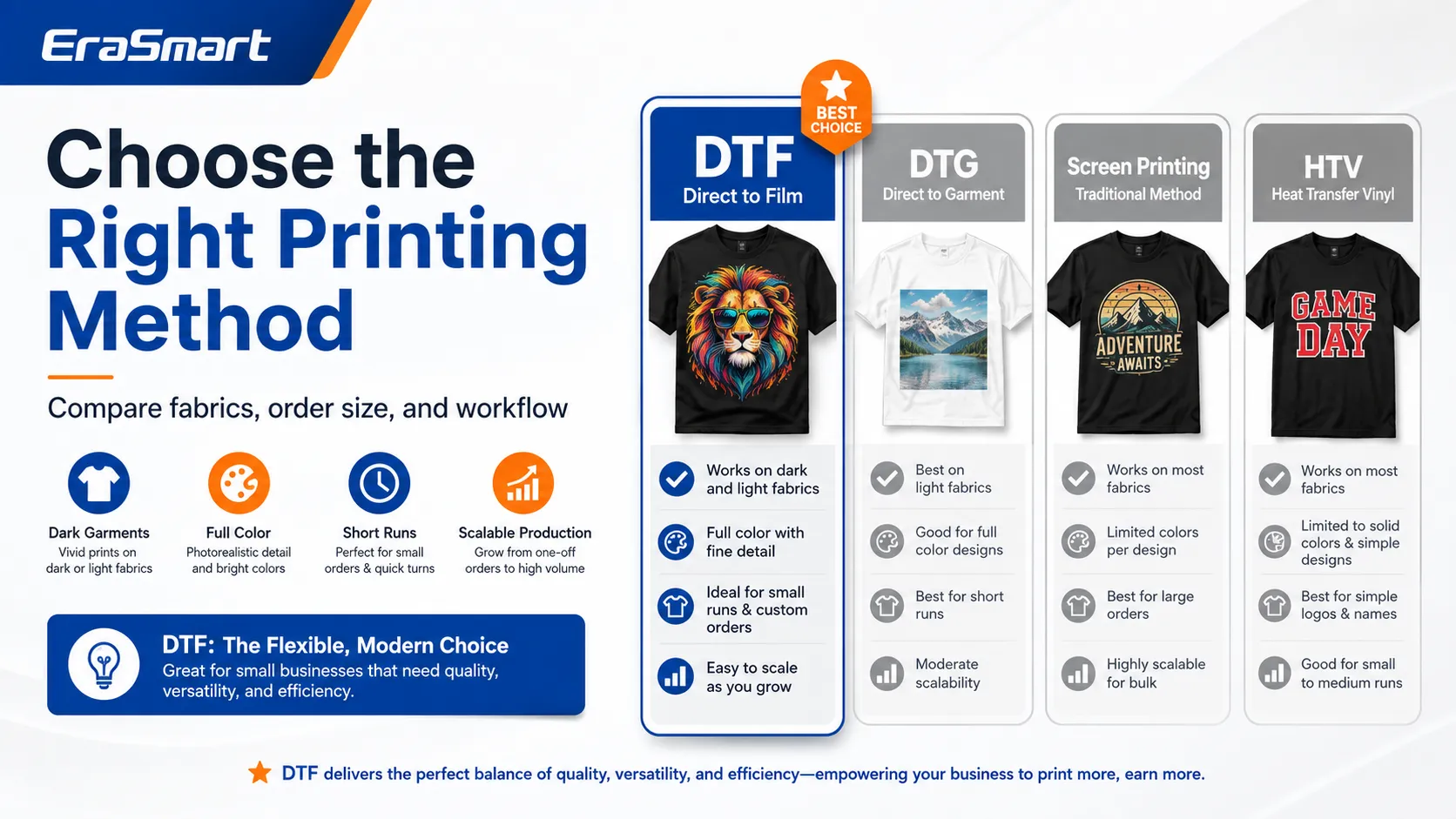
The best process depends on the garment, design, order size and production model.

T-Shirt Printing Methods Compared

MethodBest forMain advantagesMain limitations
DTFCotton, polyester, blends and dark garmentsBroad fabric range, full color, small quantitiesTransfer layer and white ink maintenance
DTGPremium cotton apparel and detailed artworkDirect printing and soft results on suitable fabricsPretreatment and fabric limitations
Screen printingRepeated designs and larger quantitiesEfficient at scale and durableSetup time and limited flexibility
HTVNames, numbers and simple graphicsEasy entry and strong specialty colorsCutting and weeding labor
SublimationLight polyester garmentsSoft print with no raised layerNot suitable for normal cotton or dark shirts
Outsourced transfersBeginners and irregular ordersLow equipment riskSupplier dependence and higher transfer cost

For a detailed comparison, see the EraSmart guide to DTF vs DTG vs screen printing vs HTV.

When DTF Is a Strong Choice

DTF is practical when you need:

  • Full-color artwork

  • Dark garments

  • Cotton and blends

  • Small or mixed quantities

  • Multiple garment colors

  • Short-run clothing brands

  • Personalized orders

  • Gang sheet production

DTF film production uses ink, a white underbase, hot-melt adhesive powder and heat transfer. It can be applied to a broader variety of textiles than a typical cotton-focused DTG workflow.

When Screen Printing Is Better

Screen printing may be more efficient when:

  • The design has a limited number of colors.

  • The same artwork is repeated many times.

  • The order quantity is high.

  • Setup cost can be spread across many units.

  • A specific screen-printed texture is preferred.

When DTG Is Better

DTG may be suitable when:

  • Premium cotton garments are the main product.

  • The artwork contains detailed gradients or photographs.

  • A softer result is required.

  • Garment pretreatment and curing can be managed consistently.

When Sublimation Is Better

Sublimation is appropriate when:

  • The shirts are white or light polyester.

  • The business focuses on sportswear.

  • The design should become part of the fabric.

  • All-over or highly breathable printing is required.

Step 4: Decide Whether to Outsource or Print In-House

Buying equipment too early is one of the most expensive startup mistakes.

Use outsourcing when:

  • Order volume is unpredictable.

  • You are still testing your niche.

  • Workspace is limited.

  • You cannot maintain a printer daily.

  • You mainly need occasional transfers.

  • Cash is better spent on samples and marketing.

Consider in-house DTF production when:

  • Transfers are ordered every week.

  • Supplier lead times delay customer orders.

  • Shipping reduces profit.

  • Urgent reprints are common.

  • You need greater color control.

  • You want to sell transfers to other businesses.

  • Stable demand can support maintenance and equipment costs.

The decision should be based on actual monthly transfer volume, not excitement about owning a machine.

Outsourcing vs In-House DTF

FactorOutsourced transfersIn-house DTF
Initial investmentLowerHigher
Printer maintenanceSupplier handles itYour responsibility
Production controlLimitedHigh
Urgent ordersDifficultEasier
Transfer costHigher per unitPotentially lower at volume
Color controlSupplier-controlledIn-house
WorkspaceMinimalPrinter, curing and powder area
Best stageTesting and early growthStable order volume

Step 5: Build a Startup Budget

Do not budget only for the printer.

A realistic T-shirt printing startup budget should include four groups.

Production Equipment

Depending on the business model:

  • Heat press

  • DTF printer

  • Curing oven

  • Powder shaker

  • Computer

  • RIP software

  • Design software

  • Cutting tools

  • Alignment tools

  • Worktable

  • Storage shelves

  • Ventilation

Consumables and Inventory

Possible items include:

  • DTF ink

  • PET film

  • Adhesive powder

  • Cleaning solution

  • Blank shirts

  • Hoodies

  • Tote bags

  • Protective paper

  • Heat-resistant tape

  • Packaging

  • Shipping labels

Business Setup

Possible expenses include:

  • Business registration

  • Domain name

  • Website

  • Online store

  • Photography

  • Sample production

  • Accounting

  • Insurance

  • Payment processing

Requirements vary by country and region, so local professional guidance may be necessary.

Working Capital

Reserve funds for:

  • Failed products

  • Reprints

  • Replacement blanks

  • Shipping delays

  • Maintenance parts

  • Advertising

  • Seasonal inventory

  • Customer refunds

  • Unexpected downtime

A business that spends its entire budget on equipment may not have enough cash left to acquire customers.

Startup Cost Worksheet

Cost itemQuantityUnit costTotal
Heat press
Printer or outsourced transfer samples
Curing equipment
Computer and software
Initial blank garments
DTF consumables
Packaging
Website and domain
Product photography
Marketing
Maintenance reserve
Working capital

Use supplier quotations and local costs rather than relying on a universal startup estimate.

Step 6: Purchase Equipment in the Right Order
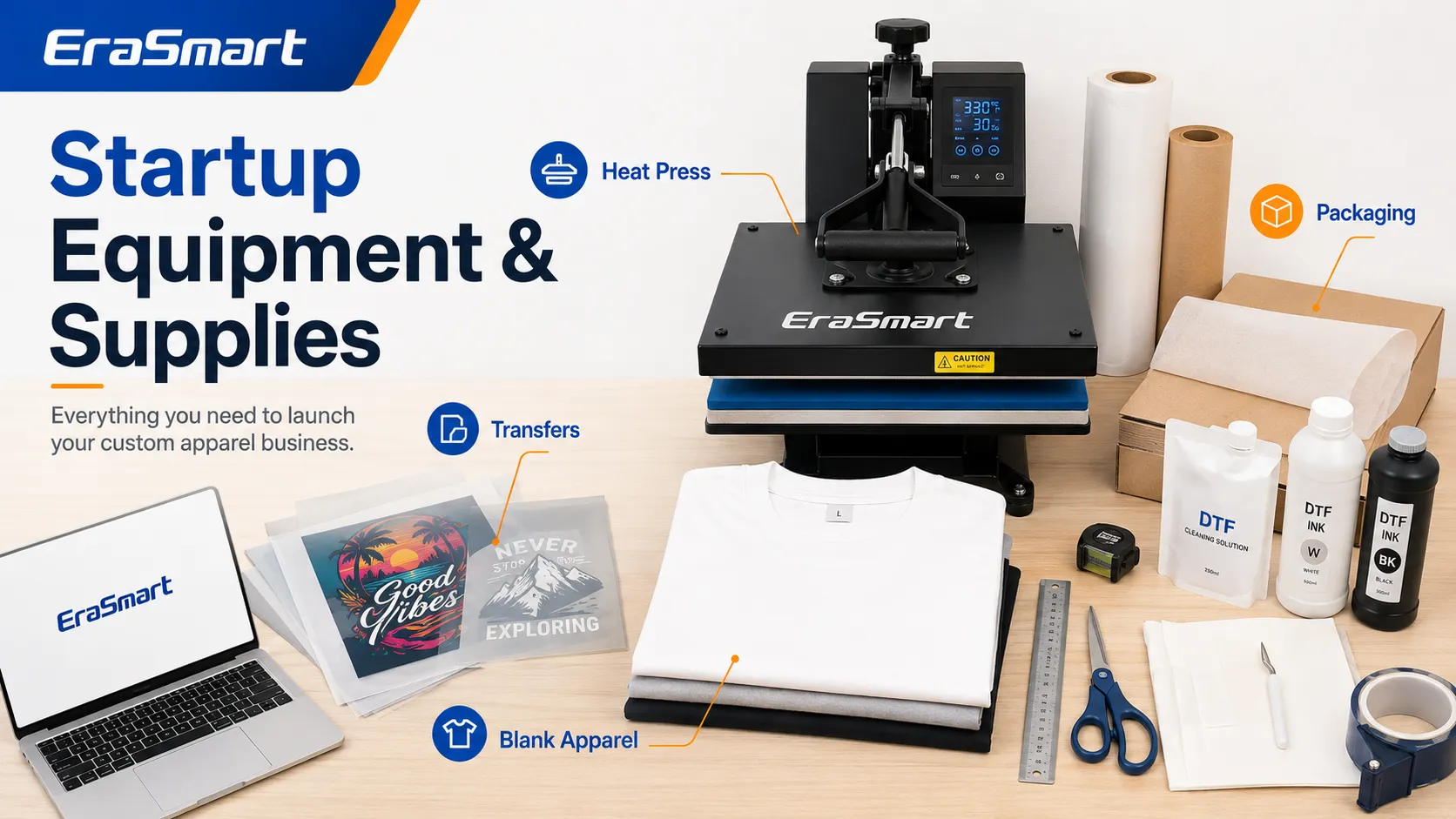
A staged purchasing plan reduces risk.

Stage 1: Minimum Launch Setup

Purchase:

  • Reliable heat press

  • Computer

  • Design software

  • Alignment ruler

  • Lint roller

  • Cutting tools

  • Protective sheets

  • Sample blanks

  • Packaging supplies

  • Outsourced DTF transfers

This setup allows you to accept paid apparel orders without operating a DTF printer.

Stage 2: Improve Production Efficiency

Add:

  • Larger or auto-open heat press

  • Additional platen sizes

  • Label printer

  • Photography lighting

  • Better garment storage

  • More sample sizes

  • Repeat-design transfer inventory

Stage 3: Bring DTF Printing In-House

Add:

  • DTF printer

  • RIP software

  • CMYK and white ink

  • PET film

  • Adhesive powder

  • Curing oven or powder shaker

  • Ventilation

  • Cleaning supplies

  • Spare maintenance components

Review the DTF printer buying checklist before comparing printer size, printhead configuration and production capacity.

Stage 4: Expand for Volume

Possible upgrades include:

  • Larger roll-fed printer

  • Automatic powder shaker and dryer

  • Additional heat press

  • Dedicated packing station

  • Improved workflow tables

  • Climate and humidity management

  • Backup production equipment

Upgrade only when an existing bottleneck is limiting profitable orders.

Step 7: Choose Blank Garments

The cheapest shirt is not always the most profitable shirt.

Customers evaluate:

  • Fit

  • Fabric weight

  • Softness

  • Shrinkage

  • Color

  • Collar quality

  • Sizing consistency

  • Wash performance

A low-cost blank that causes complaints, inconsistent sizes or poor print performance can be more expensive than a reliable mid-range garment.

Start With a Small Blank Catalog

A beginner may start with:

  • One standard T-shirt

  • One premium T-shirt

  • One hoodie

  • One tote bag

  • Several common colors

Recommended initial shirt colors often include:

  • Black

  • White

  • Navy

  • Gray

  • A limited number of seasonal colors

Avoid stocking every size and color immediately.

Test Every New Garment

Evaluate:

  • Heat resistance

  • Surface texture

  • Shrinkage

  • Dye migration

  • Press marks

  • Transfer adhesion

  • Wash performance

Record the successful settings for each garment model.

Step 8: Create a Focused Product Catalog

A small catalog is easier to manage and market.

Example launch catalog:

ProductOptions
Standard custom T-shirtFront print or left-chest logo
Premium T-shirtFull-front design
Business staff shirtLogo front and back
Event shirtBulk size mix
HoodieFront or back print
Tote bagSingle-side print

Avoid launching with dozens of unrelated products.

Each additional garment requires:

  • Size information

  • Photography

  • Pricing

  • Inventory

  • Testing

  • Product descriptions

  • Customer support

Create Product Bundles

Bundles can increase order value.

Small Business Starter Package

  • Five staff T-shirts

  • Two logo hoodies

  • One sample approval

  • Saved artwork for future reorders

Event Package

  • Group shirts

  • Mixed sizes

  • Personalized names

  • Delivery by event date

Clothing Brand Sample Package

  • Several garment styles

  • Front and back prints

  • Neck-label samples

  • Packaging test

Step 9: Prepare Artwork Correctly

Artwork quality affects every production method.

Check:

  • Final print dimensions

  • Resolution

  • Transparent background

  • Color mode

  • Fine details

  • Font licensing

  • Correct spelling

  • Customer approval

Low-resolution screenshots cannot be converted into professional artwork simply by enlarging them.

Read What Is the Best DPI for Printing? when preparing customer graphics.

Establish Artwork Fees

Create clear charges for:

  • Basic text setup

  • Background removal

  • Logo tracing

  • Color correction

  • Custom illustration

  • Multiple revisions

  • Rush artwork

Design work is part of the product cost.

Protect Intellectual Property

Do not sell unlicensed:

  • Movie characters

  • Sports logos

  • Music artwork

  • Company trademarks

  • Celebrity images

  • Game characters

  • Other creators’ illustrations

Original visual art is generally protected when it is created and fixed in a tangible form, and using another creator’s work for reproduction normally requires permission. (copyright.gov)

Ask customers to confirm that they have permission to reproduce supplied logos and designs.

Step 10: Calculate the Real Cost of Every Shirt
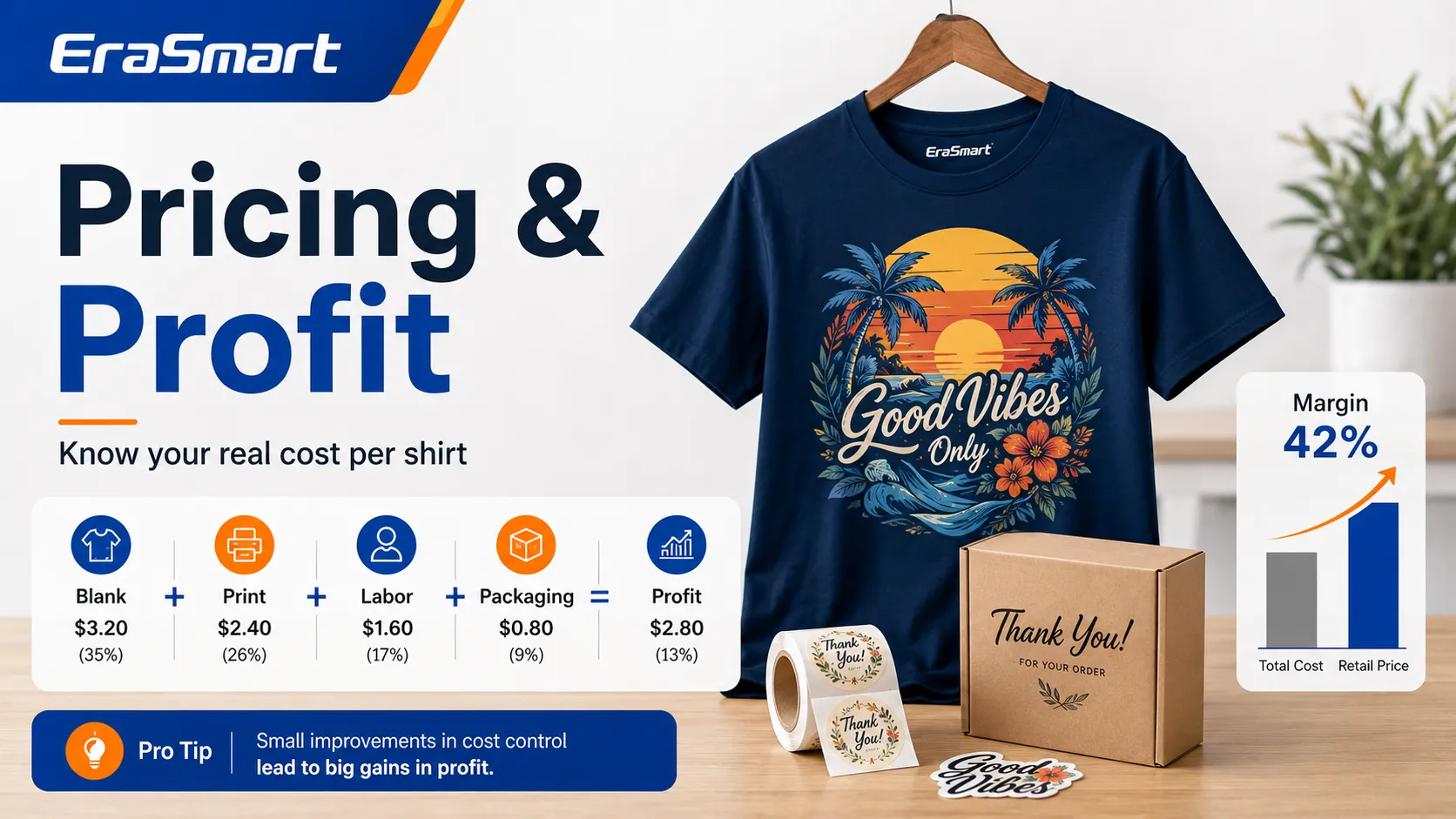
Your cost is more than the blank and transfer.

Include:

  • Blank garment

  • Transfer or ink

  • PET film

  • Adhesive powder

  • Printer cleaning

  • Heat press electricity

  • Design labor

  • Production labor

  • Failed products

  • Packaging

  • Payment fees

  • Marketplace fees

  • Advertising

  • Shipping supplies

  • Overhead

Unit Cost Formula

Unit cost = direct materials + direct labor + selling fees + overhead allocation + expected waste

Then calculate:

Selling price = unit cost + target profit

Example Cost Categories

Cost categoryExample
Blank garmentT-shirt or hoodie
PrintingTransfer, ink, film and powder
LaborDesign, pressing and inspection
PackagingBag, label and care card
FeesPayment and marketplace charges
Waste allowanceFailed transfers and garments
OverheadRent, software and utilities
MarketingAdvertising cost per sale

Do not calculate profit using revenue minus the shirt blank alone.

Step 11: Set a Pricing Structure

Use a pricing structure that reflects order complexity.

One-Off Custom Orders

Charge for:

  • Individual production

  • Personalization

  • Customer communication

  • Artwork setup

Small-Batch Orders

Offer quantity tiers, but ensure discounts come from genuine production efficiency.

Business Orders

Pricing may include:

  • Sample approval

  • Logo setup

  • Front and back printing

  • Size sorting

  • Individual packaging

  • Reorder storage

Rush Orders

Rush work may require:

  • Supplier express shipping

  • Production rescheduling

  • Overtime

  • Priority handling

Charge accordingly.

Calculate Break-Even

Use:

Break-even quantity = fixed startup cost ÷ contribution margin per order

Contribution margin is:

Selling price − variable cost

For a more detailed model, use the EraSmart DTF ROI calculator.

Step 12: Build a Repeatable Production Workflow
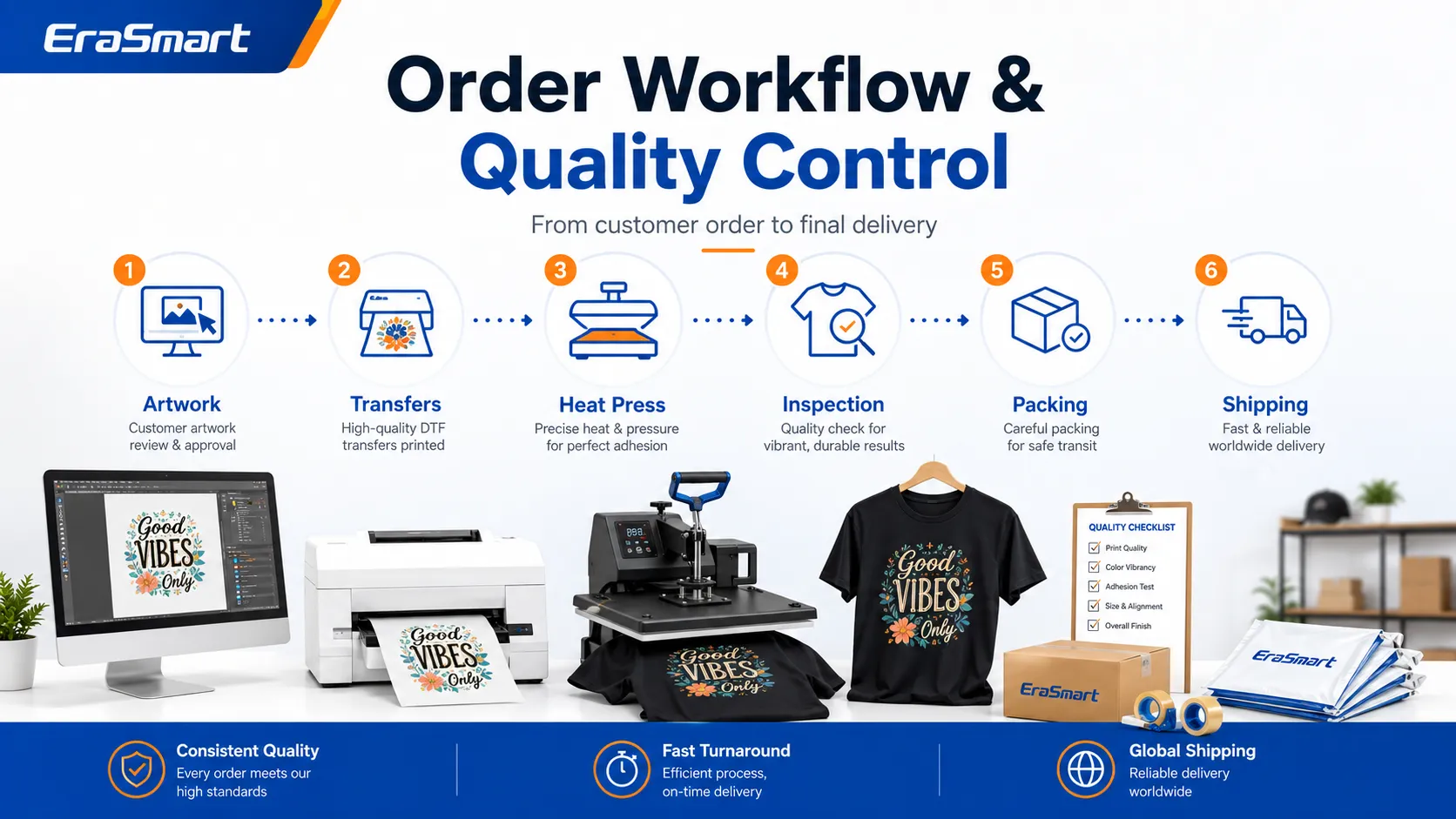
A simple DTF order workflow may include:

  1. Receive the request.

  2. Confirm garment, size and quantity.

  3. Check the artwork.

  4. Send a mockup.

  5. Obtain written approval.

  6. Collect payment or deposit.

  7. Order blanks and transfers.

  8. Inspect incoming materials.

  9. Prepare garments.

  10. Press the transfers.

  11. Complete a finishing press if required.

  12. Inspect every item.

  13. Fold and package.

  14. Ship or deliver.

  15. Save order settings for reorders.

Documenting the process reduces mistakes as order volume grows.

Quality-Control Checklist

Before packaging, check:

  • Correct garment

  • Correct size

  • Correct artwork

  • Correct placement

  • Print adhesion

  • Edge quality

  • Color

  • Press marks

  • Stains

  • Packaging label

For recurring customers, save:

  • Approved artwork

  • Print dimensions

  • Placement measurement

  • Garment model

  • Transfer supplier

  • Press settings

  • Packaging instructions

Step 14: Build a Sales Channel

Do not rely on one platform.

Potential channels include:

  • Local business outreach

  • WooCommerce

  • Shopify

  • Etsy

  • Instagram

  • TikTok

  • Facebook

  • Local marketplaces

  • Craft fairs

  • School partnerships

  • Event planners

  • Marketing agencies

Local Outreach

Create several professional samples for one industry.

For example, for restaurants:

  • Staff shirt

  • Manager hoodie

  • Promotional tote bag

  • Logo placement options

Then present a specific offer rather than a general “custom printing” service.

Online Product Pages

Create focused pages around specific customer needs:

  • Custom staff T-shirts

  • Family reunion shirts

  • School club shirts

  • Small-batch clothing brand printing

  • Custom logo hoodies

  • Event T-shirt printing

Specific pages are more relevant than one broad product page.

Social Media Content

Useful content includes:

  • Blank-to-finished transformations

  • Transfer peeling

  • Order packing

  • Print close-ups

  • Wash-test results

  • Customer reorders

  • Behind-the-scenes production

  • Design preparation

Show the product quality and buying experience, not only the machine.

Step 15: Create Customer Policies

Define policies before problems occur.

Your policies should cover:

  • Artwork approval

  • Color variation

  • Garment sizing

  • Deposits

  • Cancellations

  • Revisions

  • Production time

  • Customer-supplied garments

  • Rush orders

  • Copyright responsibility

  • Reprints

  • Returns

Customer-Supplied Garments

Printing customer-owned garments creates additional risk because the product may be:

  • Heat-sensitive

  • Previously treated

  • Damaged

  • Difficult to replace

  • Incompatible with the transfer

Create a written policy explaining testing and replacement responsibility.

Step 16: Plan Maintenance and Downtime

An in-house DTF printer must be maintained even when orders are slow.

Maintenance may include:

  • White ink circulation

  • Ink agitation

  • Nozzle checks

  • Printhead cleaning

  • Wiper cleaning

  • Capping station inspection

  • Waste ink management

  • Environmental monitoring

White pigment can settle, so printer manufacturers use circulation and scheduled maintenance functions to improve stability.

Before purchasing a printer, review the EraSmart DTF maintenance guide.

Budget for:

  • Cleaning solution

  • Dampers

  • Wipers

  • Capping stations

  • Waste containers

  • Failed prints

  • Replacement parts

  • Technical support

A 90-Day T-Shirt Printing Business Launch Plan

Days 1–15: Research and Positioning

Complete:

  • Select one target market.

  • Review local and online competitors.

  • Interview potential customers.

  • Choose the initial product range.

  • Compare printing methods.

  • Draft the startup budget.

  • Decide whether to outsource transfers.

Deliverables:

  • Target-customer profile

  • Five initial products

  • Preliminary cost sheet

  • Business name shortlist

  • Production model

Days 16–30: Samples and Testing

Complete:

  • Choose blank garments.

  • Order transfer samples.

  • Purchase the core equipment.

  • Test placement and pressing.

  • Perform wash tests.

  • Create product-care instructions.

  • Photograph finished samples.

Deliverables:

  • Tested blank catalog

  • Approved production settings

  • Product photographs

  • Pricing worksheet

  • Sample portfolio

Days 31–45: Sales Setup

Complete:

  • Register the business where required.

  • Purchase a domain.

  • Build basic product pages.

  • Configure payment methods.

  • Prepare order forms.

  • Write customer policies.

  • Set up packaging.

Deliverables:

  • Functional website or order system

  • Clear prices

  • Artwork approval process

  • Packaging system

  • Customer policies

Days 46–60: Initial Customer Acquisition

Complete:

  • Contact local businesses.

  • Publish product content.

  • Run a small preorder campaign.

  • Approach schools or clubs.

  • Request customer feedback.

  • Record every production cost.

Deliverables:

  • First paid orders

  • Customer questions

  • Actual cost data

  • Initial reviews

  • Revised pricing

Days 61–75: Improve the Workflow

Complete:

  • Identify the best-selling product.

  • Remove weak products.

  • Improve pressing and packing time.

  • Create reusable design templates.

  • Build repeat-order records.

  • Develop one product bundle.

Deliverables:

  • More focused catalog

  • Faster production process

  • Repeat-order system

  • Improved product pages

  • Better margin data

Days 76–90: Evaluate Growth

Review:

  • Number of paid orders

  • Average order value

  • Contribution margin

  • Reprint rate

  • Customer acquisition cost

  • Repeat customers

  • Monthly outsourced-transfer cost

  • Production bottlenecks

Decide whether to:

  • Continue outsourcing

  • Stock repeat transfers

  • Purchase a compact DTF printer

  • Add another heat press

  • Expand into business orders

  • Delay equipment investment

Key Performance Indicators to Track

KPIWhy it matters
Conversion rateShows whether visitors become buyers
Average order valueMeasures revenue per order
Contribution marginShows what remains after variable costs
Production timeReveals workflow efficiency
Failure rateMeasures waste and quality problems
Repeat-order rateIndicates customer satisfaction
Customer acquisition costShows marketing efficiency
On-time delivery rateMeasures reliability
Transfer cost per monthHelps evaluate in-house printing
Profit per production hourCompares product categories

Revenue alone does not show whether the business is healthy.

Common T-Shirt Business Mistakes

Buying Equipment Before Finding Customers

The printer does not create demand.

Validate products before making a large investment.

Offering Too Many Products

A broad catalog creates unnecessary:

  • Inventory

  • Testing

  • Photography

  • Pricing

  • Packaging

  • Customer questions

Start narrow and expand based on orders.

Competing Only on Price

Low pricing can attract difficult orders while leaving no margin for:

  • Mistakes

  • Artwork

  • Reprints

  • Customer service

  • Equipment maintenance

Compete through reliability, design quality, speed, small minimum quantities or niche expertise.

Ignoring Artwork Labor

Customer files often require correction.

Include design time in the price.

Using Untested Garments

Every new blank should be tested for heat resistance, adhesion and washing.

Underestimating White Ink Maintenance

A DTF printer cannot be treated like an occasional office printer.

Purchasing Copyrighted Designs

Buying an image from an unknown marketplace does not automatically provide commercial reproduction rights.

Promising Unrealistic Deadlines

Allow time for:

  • Artwork approval

  • Blank sourcing

  • Transfer production

  • Printing

  • Reprints

  • Packaging

  • Shipping

When Should You Buy a DTF Printer?

Continue outsourcing while:

  • Orders are irregular.

  • Monthly transfer cost is low.

  • You lack maintenance capacity.

  • Workspace is limited.

  • Customers accept the current turnaround time.

Consider purchasing a printer when:

  • Transfer orders are consistent.

  • Supplier lead times cause lost sales.

  • Express shipping is frequent.

  • Reprints must be produced quickly.

  • In-house printing improves contribution margin.

  • You want to sell transfers.

  • You can maintain the machine regularly.

A compact DTF printer for small business may be suitable for short-run apparel production, while larger roll-fed systems are better suited to continuous commercial output.

Final Thoughts

A successful T-shirt printing business begins with customers and a cost model—not equipment.

Start by choosing a clear market, testing a small product range and deciding whether outsourcing or in-house printing fits your current order volume.

Your first priorities should be:

  • Market validation

  • Reliable blanks

  • Consistent print quality

  • Accurate pricing

  • Professional samples

  • Clear customer policies

  • Repeatable fulfillment

  • Careful cost tracking

Outsourced DTF transfers can reduce risk during the testing stage. Once demand becomes consistent, in-house DTF production may improve speed, control and long-term margins.

EraSmart offers compact and production-level DTF printer solutions for home studios, custom apparel shops and growing transfer-production businesses.

Choose equipment based on verified orders, available workspace, maintenance capacity and realistic production goals.

Frequently Asked Questions

Is a T-shirt printing business profitable?

It can be profitable when product pricing covers materials, labor, waste, marketing, fees and overhead. Profitability depends on the niche, sales volume, production efficiency and repeat orders.

How can I start a T-shirt business with a small budget?

Start with a reliable heat press and outsourced ready-to-press DTF transfers. Purchase a printer only after demand becomes consistent.

What equipment do I need first?

A beginner generally needs a heat press, computer, design software, alignment tools, blank garments, transfers and packaging supplies.

Is DTF suitable for a small T-shirt business?

DTF is suitable for small batches, full-color designs, dark garments and several fabric types. Outsourced transfers can also be used before purchasing a printer.

Should I use DTF or screen printing?

DTF is usually more flexible for small quantities and multicolor artwork. Screen printing can become more efficient for repeated designs in larger quantities.

How many shirt designs should I launch with?

A focused collection of approximately five to ten tested designs or product options is usually easier to market than a large untested catalog.

Should I hold shirt inventory?

Keep only proven styles, colors and sizes in stock. Special garments can be ordered after receiving customer payment.

How should I price custom shirts?

Include the garment, printing, labor, design, packaging, fees, waste, overhead and target profit.

When should I bring DTF printing in-house?

Consider it when outsourced transfer costs and lead times consistently affect margins, delivery speed or accepted orders.

Can I print customer logos and copyrighted designs?

Only print designs that you created, licensed or have permission to reproduce. Ask customers to confirm their rights to supplied artwork.

Frequently Asked Questions

Can DTF print bright colors on a black shirt?

Yes. The white ink underbase provides an opaque foundation that helps CMYK colors remain visible on black fabric.

Do I need to print white ink on a black shirt?

Yes, a white underbase is normally required beneath the color image. White may also be used as a visible design color.

Should a DTF design be mirrored?

Yes. The image is normally printed in reverse because the printed side of the film faces the garment during transfer.

What temperature should I use for DTF on a black shirt?

Use the settings specified for your film, powder, ink and garment. There is no single temperature suitable for every DTF system.

Can DTF be applied to black cotton?

Yes. Black cotton T-shirts are a common DTF application.

Can DTF be applied to black polyester?

Yes, but polyester should be tested for heat sensitivity and dye migration.

Why does my DTF print look dull on black fabric?

Common causes include weak white ink, missing white nozzles, incorrect white density, poor registration or black fabric showing through the transfer.

Why is there a white outline around my design?

The white and CMYK layers may be misaligned, or the white underbase may need a small choke adjustment.

Why is my DTF transfer peeling from the shirt?

Possible causes include undercured powder, insufficient pressure, incorrect pressing settings, uneven garment surfaces or incompatible consumables.

Should I peel DTF film hot or cold?

Follow the film specification. DTF films may require hot, warm or cold peeling.

Does DTF require shirt pretreatment?

DTF film transfers generally do not require garment pretreatment.

How can I prevent dye migration on black polyester?

Test the exact garment, use a compatible lower-temperature transfer system where available, minimize unnecessary heat exposure and inspect the sample again after it has rested.


MAY BE YOU LIKE ALSO

  • EraSmart Printer

    uv printer
    DTF printer
    DTG printer
    Heat press machine
    Advertising printer

  • Printer tools

    DTF oven
    Hot Press
    Carving machine
    Mug heat transfer
    Laminating machine

  • Consumables

    Printing INK
    Cellphone case
    Glass product
    Cleaning fluid
    Cotton swab

  • Contact Us

    WhatsApp:+8618566233796
    WeChat: +8618566233796
    Mobile: +8618566233796
    Web:www.erasmart.com
    Shop:www.erasmartmall.com

  • Need Printer Price?

    Tell us your printing needs. Our team will reply within 24 hours.

    Request A Quote

    Just provide a few details and we will help you get quick quotes!