Small Size Flatbed Inkjet Printer Manufacturer

What Is Digital Printing? Types, Benefits & Uses | EraSmart
Digital printing is a printing process that uses digital files to reproduce text, graphics and images on physical materials without requiring a traditional fixed printing plate or screen for each design.
Unlike conventional processes that rely on prepared image carriers, digital printing equipment receives electronic image data and controls where ink, toner or another imaging material is applied.
This makes digital printing particularly useful for short production runs, personalized products, variable-data printing, rapid prototyping and on-demand manufacturing.
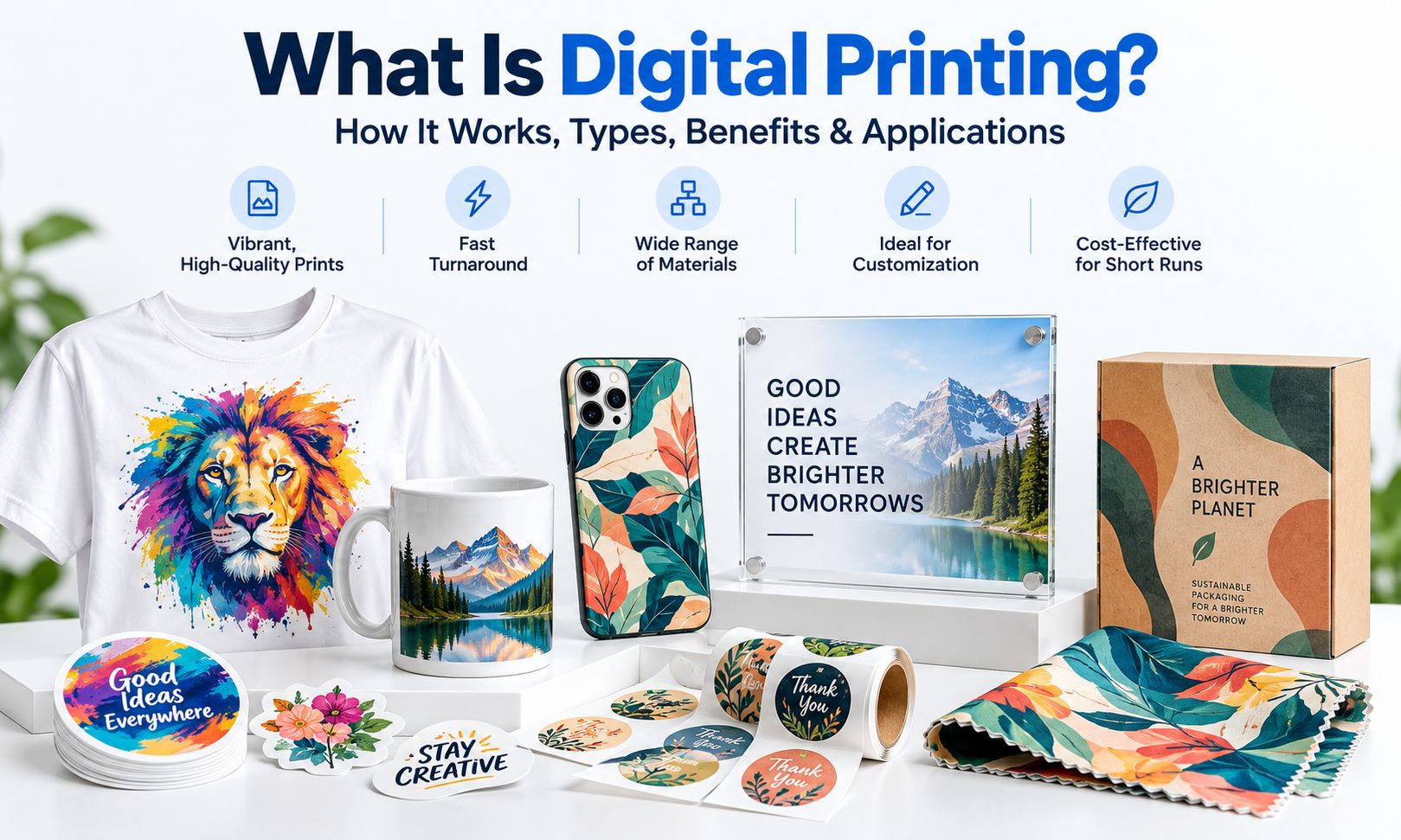
Today, digital printing extends far beyond paper.
It is used for:
- Business cards, brochures and packaging
- Custom T-shirts, hoodies and tote bags
- Personalized phone cases
- Acrylic signs and decorative panels
- Wood and metal products
- Glass and ceramic gifts
- Stickers, labels and product decals
- Custom mugs and promotional drinkware
However, digital printing is not one specific printer technology.
An office laser printer, a commercial inkjet press, a textile DTF printer and a UV flatbed printer are all examples of digitally controlled printing systems, even though they use different inks, materials and production methods.
Understanding these differences is essential when choosing the right printing process for a product or business.
In this guide, we explain how digital printing works, its major technologies, how it compares with traditional printing, and how businesses can choose between different digital printing methods.
What Is Digital Printing?
Digital printing is the process of converting electronic artwork into printed output using a digitally controlled printing system.
The image originates from a file such as a PDF, TIFF, JPEG or another supported format.
The printer then reproduces the image using an appropriate imaging system.
Depending on the technology, the printing process may involve:
- Liquid ink droplets
- Dry or liquid toner
- UV-curable ink
- Water-based textile ink
- Sublimation ink
- Heat-transfer media
- Specialized printing films
The defining characteristic is that the image can be controlled digitally rather than requiring a separate conventional printing plate or screen for each design.
What Makes Printing Digital?
Three characteristics help distinguish digital printing from many traditional printing processes.
1. Digital image control
The artwork is supplied and processed electronically.
2. No conventional fixed image plate for each design
The printing system does not require a new traditional offset plate or screen whenever the artwork changes.
3. Flexible image changes
Individual pieces can contain different:
- Names
- Photographs
- Serial numbers
- QR codes
- Logos
- Personalized graphics
This capability is often called variable data printing.
For example, a company could produce 100 personalized promotional items, each displaying a different employee name, without preparing 100 separate conventional printing plates.
Does Digital Printing Always Print Directly onto the Final Product?
No.
This is an important distinction.
Some digital technologies print directly onto the final substrate.
For example:
Digital File → UV Printer → Acrylic Panel
Other technologies use an intermediate transfer material.
For example:
Digital File → Textile DTF Film → Adhesive Powder → Heat Transfer → T-Shirt
Both processes are digital printing.
The use of transfer film does not make a process non-digital.
How Does Digital Printing Work?
Although different digital printing technologies use different physical mechanisms, most follow a similar production sequence.
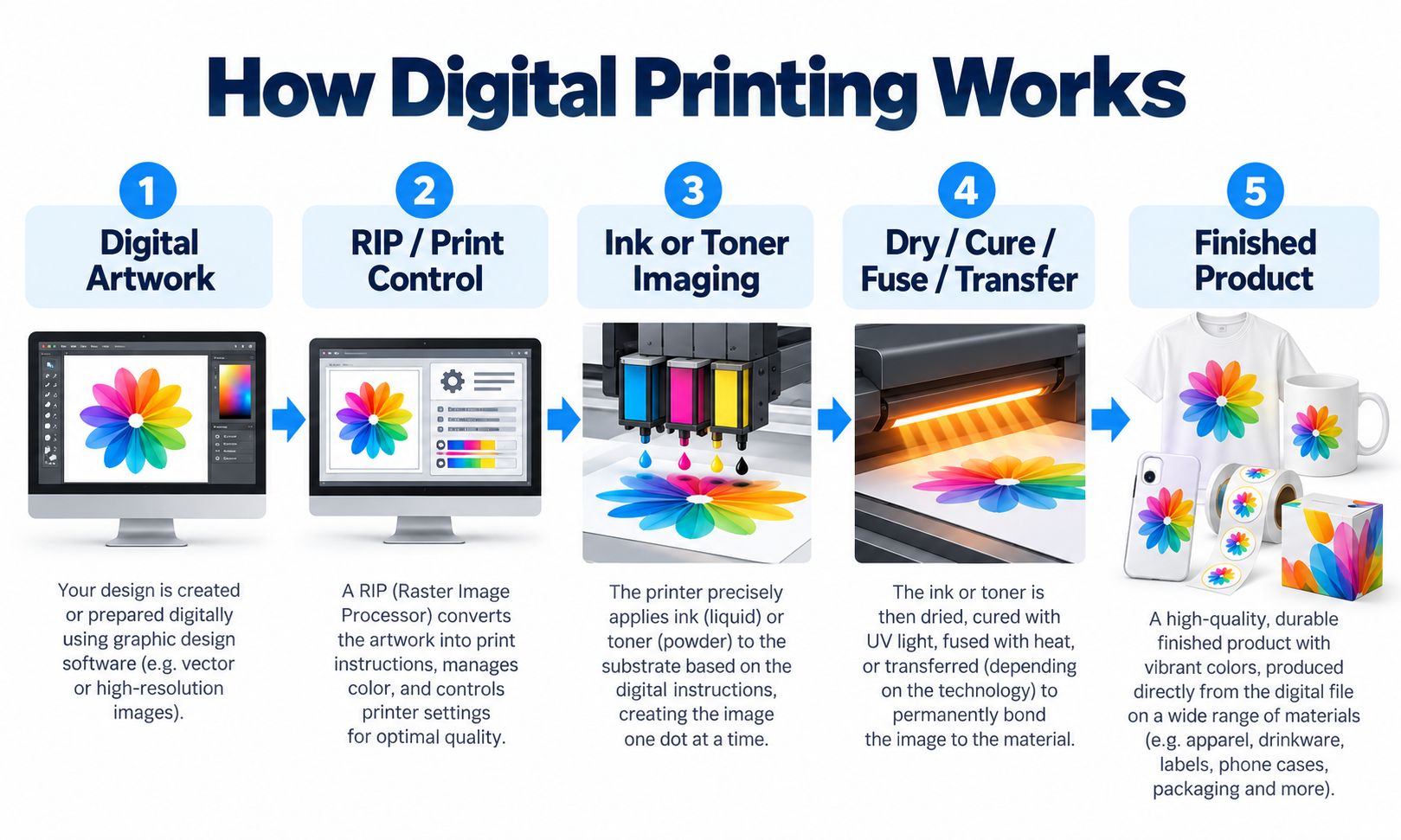
A simplified workflow is:
Digital Artwork → RIP / Print Control → Image Formation → Drying / Curing / Fusing / Transfer → Finished Product
Step 1: Prepare the Digital Artwork
Printing begins with a digital design.
The artwork may contain:
- Photographs
- Text
- Logos
- Illustrations
- Vector graphics
- Variable data
- White ink layers
- Varnish or specialty layers
The file should be prepared according to the intended output size and printing process.
For close-view raster images, approximately 300 DPI at final size is often a practical starting point, although requirements vary by application and printer.
Vector graphics are generally preferable for sharp logos, text and line artwork.
Step 2: Process the File
The design is sent to compatible printing software.
Depending on the system, this may include a RIP, or Raster Image Processor.
A RIP converts the artwork into instructions the printer can use.
It may control:
- Image positioning
- Color separation
- Ink density
- Print resolution
- Print passes
- White ink layers
- Varnish layers
- Output profiles
Commercial production requires more than simply clicking Print.
The software, ink, substrate and printer must work together.
Step 3: Create the Printed Image
The image-formation process depends on the printer technology.
An inkjet printer deposits controlled droplets of ink.
An electrophotographic printer uses an electrostatic image-formation process to transfer toner.
Both are digital processes, but their mechanisms are fundamentally different.
For an explanation of inkjet technology, read What Is an Inkjet Printer and How Does It Work?.
Step 4: Dry, Cure, Fuse or Transfer
Not every digital printing process fixes the image to the material in the same way.
| Printing Technology | Main Post-Imaging Process |
|---|---|
| Water-based Inkjet | Drying, absorption or other process-specific fixation |
| Digital Toner | Heat/pressure fusing or another toner-specific fixation process |
| UV Printing | UV curing |
| Textile DTF | Adhesive powder curing and garment heat transfer |
| UV DTF | UV curing, film lamination and adhesive transfer |
| Sublimation Transfer | Heat-driven dye transfer into a compatible polymer |
These different methods explain why printing equipment and consumables cannot simply be interchanged.
Step 5: Inspect the Finished Product
Quality control may include checking:
- Color accuracy
- Print resolution
- Image positioning
- Surface adhesion
- White ink opacity
- Transfer completeness
- Durability
- Finished dimensions
For commercial production, the final product—not only the artwork on the computer—must meet the customer’s requirements.
What Are the Main Types of Digital Printing?
The two most widely recognized digital imaging technologies are inkjet printing and electrophotographic printing.
Many familiar commercial printing methods are applications or specialized configurations built around these image-formation technologies.
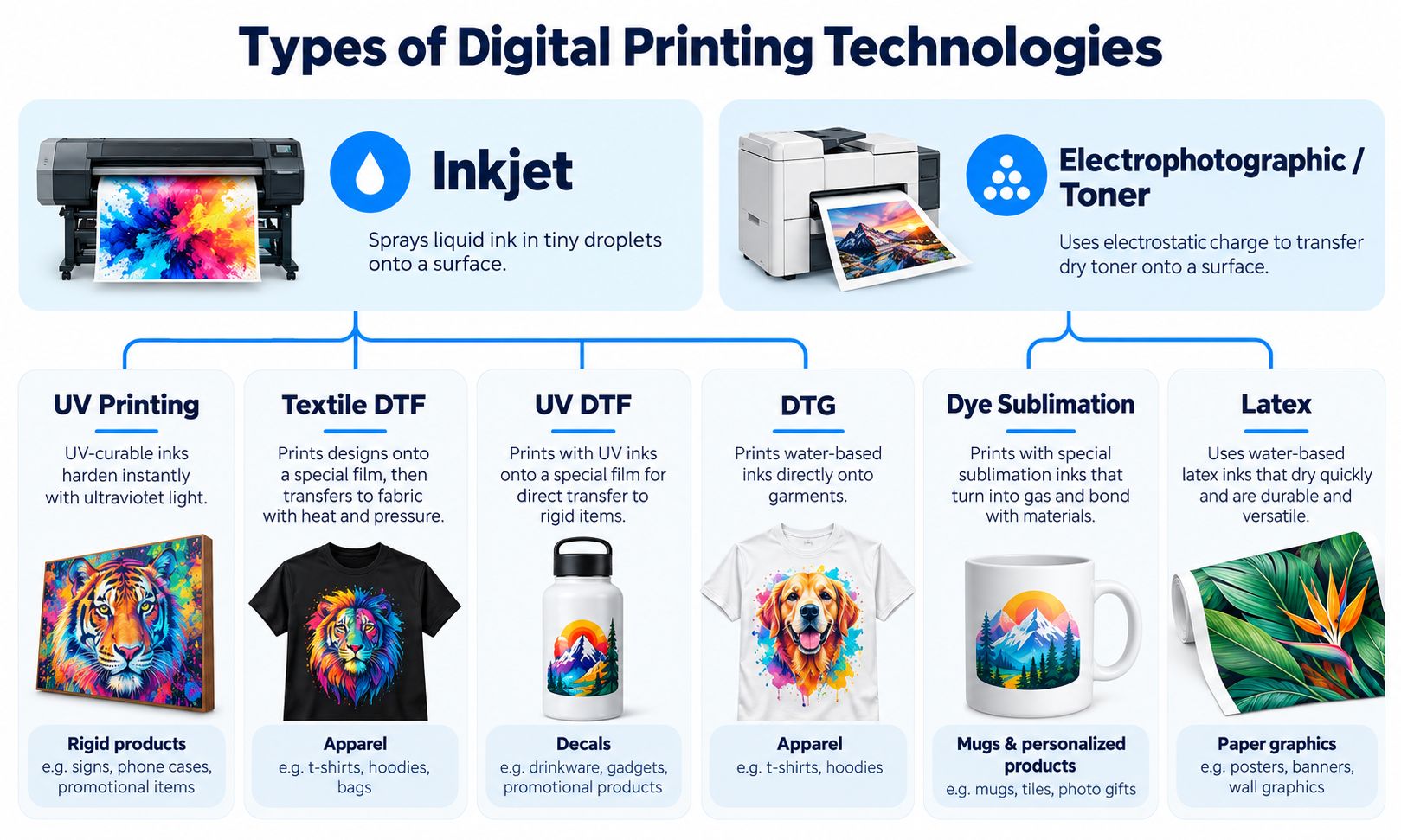
1. Inkjet Digital Printing
Inkjet printing uses microscopic nozzles to deposit precisely controlled droplets of liquid ink.
Different inkjet systems may use:
- Water-based dye ink
- Water-based pigment ink
- UV-curable ink
- Solvent or eco-solvent ink
- Latex ink
- Textile ink
- Sublimation ink
Inkjet printing is used for everything from desktop photographs to industrial product customization.
Its versatility comes from the range of available printheads, inks, equipment configurations and substrate-handling systems.
However, an inkjet printer designed for paper cannot automatically print on metal, glass or fabric.
2. Electrophotographic / Digital Toner Printing
Electrophotographic printing uses electrical charges to form an image, attract toner and transfer it onto the printing material.
Dry-toner systems generally use heat and pressure to fuse toner onto the substrate.
This technology is common in:
- Office laser printers
- Commercial digital presses
- Document printing
- Short-run brochures
- Business cards
- Personalized paper products
Liquid electrophotographic systems also exist, using their own imaging and transfer mechanisms.
This category is particularly important for digital printing of paper-based commercial products.
3. UV Digital Printing
UV printing is a specialized inkjet process that uses UV-curable ink.
After the ink is deposited, UV light initiates the curing process.
UV flatbed printing is commonly used for suitable:
- Acrylic
- Plastic
- Wood
- Metal
- Glass
- Ceramic
- Phone cases
- Signs
- Promotional products
On supported systems, white ink and varnish can provide additional visual effects.
For example, white ink can improve opacity on black acrylic, while varnish can create selected gloss or decorative texture.
UV printing still requires careful substrate preparation and adhesion testing.
Explore the EraSmart UV Printing Guide for a detailed explanation.
4. Textile DTF Printing
DTF stands for Direct to Film.
In textile DTF printing, the image is printed onto PET transfer film instead of directly onto a garment.
The transfer is then prepared using adhesive powder and curing.
Finally, a heat press transfers the design onto compatible fabric.
The workflow is:
Artwork → PET Film → CMYK + White → Adhesive Powder → Curing → Heat Press → Garment
Common applications include:
- Custom T-shirts
- Hoodies
- Uniforms
- Tote bags
- Sportswear
- Personalized clothing
Textile DTF is useful for mixed garment orders, short production runs and designs containing multiple colors.
Explore EraSmart DTF Printers.
5. UV DTF Printing
UV DTF combines UV-curable inkjet printing with a specialized film-transfer workflow.
Unlike textile DTF, it does not use conventional garment adhesive powder or a garment heat press.
The workflow typically involves:
Artwork → UV DTF Film A → UV Printing → Film B Lamination → Transfer Application
UV DTF is used for compatible hard-surface products such as:
- Bottles
- Tumblers
- Jars
- Promotional gifts
- Decorative labels
- Hard-surface decals
- Cup wraps
The graphic is printed before being applied to the final object.
This is particularly useful for certain curved or irregular products that are difficult to position under a conventional flatbed printhead.
Explore EraSmart UV DTF Printers.
6. Direct-to-Garment (DTG) Printing
DTG is another textile-oriented inkjet technology.
Instead of printing onto transfer film, the printer deposits textile ink directly onto a suitable garment.
The printed garment then undergoes the required fixation or curing process.
DTG and textile DTF are different workflows.
DTG may be useful for direct garment decoration, while DTF provides a separate film-based transfer process.
The better choice depends on garment materials, production requirements, pretreatment, finished hand feel and total operating costs.
7. Dye-Sublimation Printing
Dye sublimation is commonly used for:
- Polyester fabric
- Sublimation-coated ceramic mugs
- Coated metal photo panels
- Selected personalized gifts
In a typical small-business transfer workflow, the artwork is first printed with sublimation ink onto suitable paper.
Heat then transfers the dye into a compatible polymer material or coating.
Unlike UV printing, conventional dye sublimation does not create a separate opaque white ink underbase.
Sublimation also requires suitable substrates; an ordinary uncoated ceramic mug is not automatically compatible.
Learn more in What Is Sublimation Paper?.
8. Latex and Other Specialized Inkjet Printing
Latex printing commonly uses water-based ink formulations and controlled heating to form a durable printed layer on compatible media.
Typical applications may include:
- Posters
- Banners
- Wall graphics
- Signs
- Decorative films
Like UV and textile inkjet, latex is a specialized inkjet workflow, not a subtype of toner electrophotography.
Digital Printing Technologies at a Glance
| Technology | Imaging / Workflow | Typical Products |
|---|---|---|
| Inkjet | Liquid ink droplets | Paper, photos, signs and industrial products |
| Electrophotographic | Electrostatic imaging and toner | Documents, brochures, commercial print |
| UV Flatbed | UV-curable inkjet | Acrylic, wood, metal, phone cases |
| Textile DTF | Inkjet plus film and heat transfer | T-shirts, hoodies, fabric goods |
| UV DTF | UV inkjet plus film transfer | Cup wraps, labels, decals |
| DTG | Direct textile inkjet | Garments |
| Dye Sublimation | Dye transfer into compatible polymer | Coated mugs, polyester products |
| Latex | Specialized water-based inkjet | Signage and flexible media |
The important distinction is between the image-formation technology and the complete production workflow.
Digital Printing vs Traditional Printing: What’s the Difference?
Traditional printing technologies typically use an image carrier or printing form that must be prepared for a particular design.
Examples include:
- Offset printing plates
- Screen printing stencils
- Flexographic printing plates
Digital printing controls image formation electronically.
This difference affects setup, production flexibility and the economics of printing different quantities.
Digital Printing vs Offset Printing
Offset printing is a major conventional commercial printing process.
In offset lithography, ink is transferred from a printing plate to a rubber blanket and then onto the substrate.
Once the press has been prepared, offset printing can be highly efficient for large quantities of identical work.
Digital printing avoids conventional offset platemaking, making it attractive for smaller or frequently changing jobs.
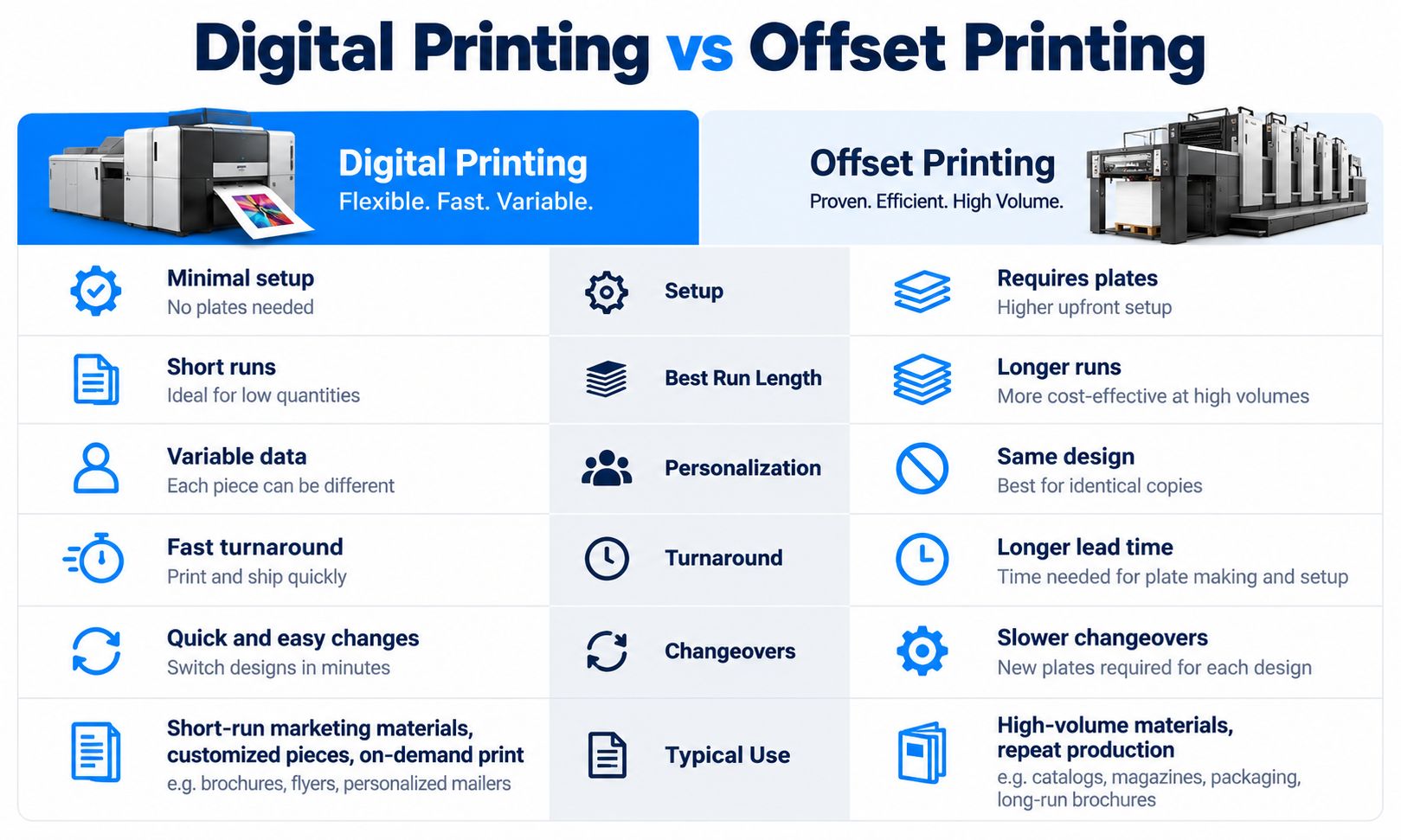
| Factor | Digital Printing | Offset Printing |
|---|---|---|
| Image Control | Digital file | Conventional printing plates |
| Initial Setup | Generally lower for short runs | Platemaking and press setup required |
| Small Quantities | Often economical | Setup cost can be significant |
| Large Quantities | Depends on equipment and cost structure | Often highly efficient |
| Personalization | Strong variable-data capability | Requires additional arrangements |
| Artwork Changes | Generally easier between impressions | May require new plates |
| Turnaround | Often faster for short jobs | Depends on setup and scheduling |
| Color Control | Profile- and device-dependent | Strong standardized commercial workflows |
| Material Options | Depends on digital press | Depends on press and substrate |
When Is Digital Printing Better?
Digital printing is often a good choice when:
- The order quantity is small.
- Every printed item is different.
- Artwork changes frequently.
- Customers need fast sampling.
- There is demand for personalized content.
- Products are manufactured on demand.
When Is Offset Printing Better?
Offset may be more economical when:
- Thousands of identical pieces are required.
- The design is stable.
- Long-run productivity is important.
- Conventional offset inks or finishes are required.
- The overall production specification favors offset equipment.
There is no universal order quantity at which offset automatically becomes cheaper than digital.
The crossover depends on equipment, material, finishing, labor, waste and the specific job.
For further background on commercial printing methods, see the University of Tennessee’s Digital Printing and Offset Printing explanations.
Digital Printing vs Screen Printing
Screen printing transfers ink through a prepared stencil or screen.
It is widely used for:
- Apparel
- Posters
- Promotional products
- Industrial graphics
For large quantities of the same design, screen printing can be highly efficient.
However, multi-color artwork generally requires appropriate screen preparation and registration.
Digital methods such as DTF are useful when businesses need:
- Multiple colors
- Photographic images
- Frequent design changes
- Personalized garments
- Smaller order quantities
Neither process is automatically best for every textile product.
Digital Printing vs Flexographic Printing
Flexography uses flexible printing plates and is widely used for packaging and labels.
It can be highly productive for large-volume repeat jobs.
Digital label and packaging printing can be more suitable for:
- Short runs
- Packaging prototypes
- Multiple product variations
- Seasonal labels
- Frequent artwork changes
The choice depends on the printing material, quantity, ink requirements and finishing process.
What Are the Advantages of Digital Printing?
Digital printing is valued for production flexibility.
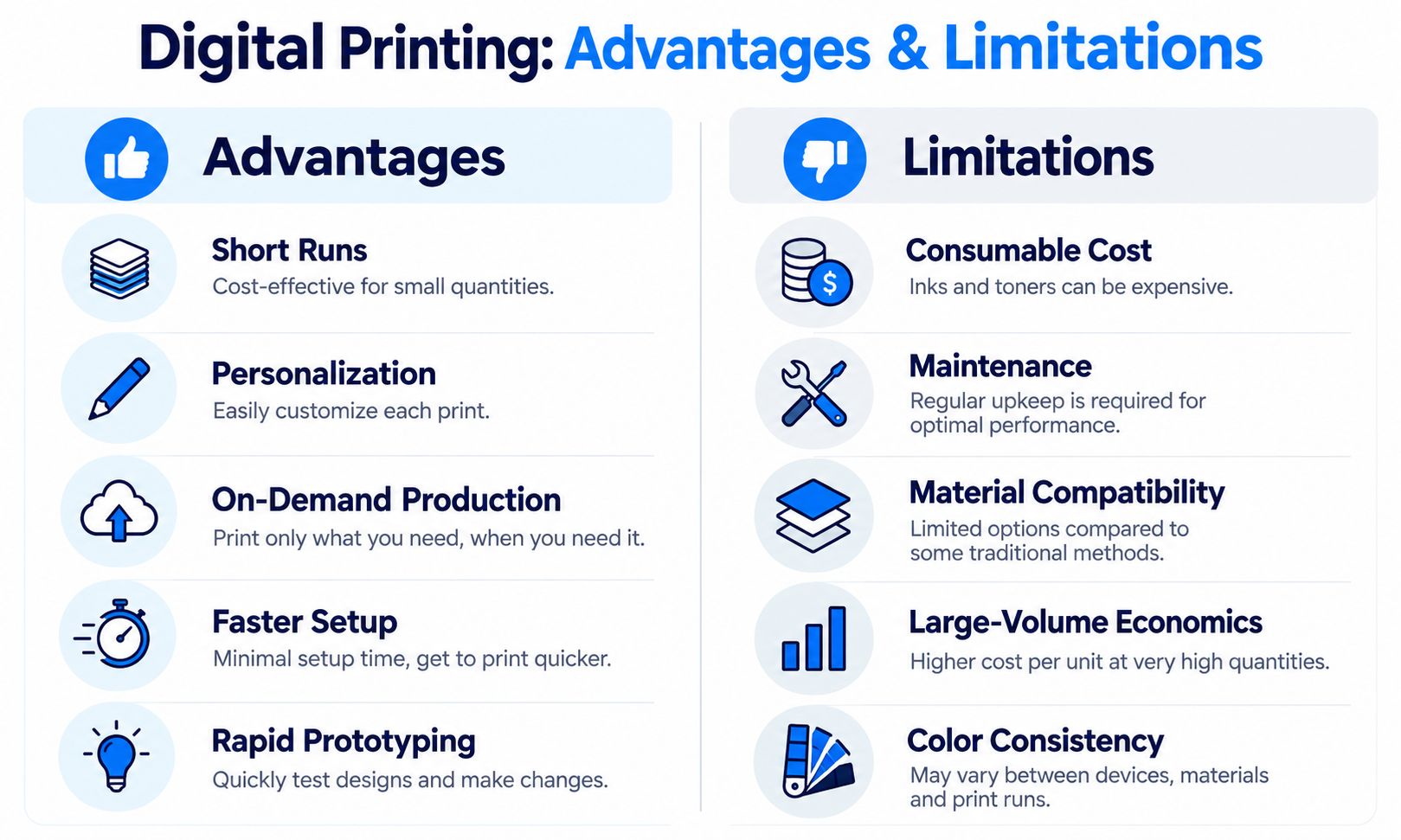
1. Short-Run Production
Digital printing can reduce the need for conventional setup and platemaking.
This can make smaller quantities economically practical.
For example, a gift shop may need only 20 personalized acrylic plaques.
Preparing conventional plates or screens for a small order may be unnecessary when a compatible digital UV printing workflow is available.
2. Personalization
Each item can contain different content.
Examples include:
- Individual names on shirts
- Different photographs on phone cases
- Unique QR codes on cards
- Custom logos on promotional gifts
Personalization is one of the most important commercial advantages of digital printing.
3. On-Demand Production
Businesses can manufacture products after receiving an order rather than holding large quantities of preprinted inventory.
This is particularly relevant for:
- Print-on-demand stores
- Customized gifts
- Local print shops
- Small apparel brands
- E-commerce sellers
However, on-demand production still requires appropriate inventory of blanks and consumables.
4. Faster Artwork Changes
Digital printing makes it easier to switch between designs.
A print shop may produce:
- One family photo mug
- Five personalized phone cases
- Ten different logo stickers
without preparing separate conventional printing plates for every image.
5. Rapid Prototyping
Digital printing is useful for product development.
Businesses can evaluate:
- Packaging graphics
- Label placement
- Brand colors
- Product prototypes
- Promotional designs
before committing to a large order.
6. Variable Data Printing
Digital systems can print changing information between impressions.
For example:
Product A — Serial 001
Product A — Serial 002
Product A — Serial 003
This is useful for selected labels, identification products and promotional applications.
The actual implementation depends on the printing software and production system.
7. Product Customization
Different digital workflows make it possible to customize a broad range of products.
That does not mean one machine can print everything.
It means businesses can select specialized equipment according to their product requirements.
What Are the Limitations of Digital Printing?
Digital printing also has practical limitations.
Understanding them helps businesses avoid choosing equipment that does not match their production needs.
Consumable Costs
Depending on the technology, production may require:
- Specialized ink
- Toner
- Printing film
- Adhesive powder
- Transfer paper
- Coated blanks
- Cleaning materials
Consumable costs can become significant at high production volumes.
Large-Volume Economics
Traditional processes such as offset and screen printing can be highly efficient for long runs of identical designs.
A digital process that works well for 20 personalized items may not provide the lowest cost for 100,000 identical pieces.
Material Compatibility
A digital printer is not universally compatible with every substrate.
UV printing on plastic, for example, depends on the polymer, coating, ink and surface preparation.
Some materials require:
- Cleaning
- Primer
- Surface treatment
- Special coatings
- Alternative ink chemistry
Compatibility must be validated on the actual production material.
Printer Maintenance
Inkjet systems require regular care.
Depending on the technology, maintenance may include:
- Nozzle checks
- Printhead cleaning
- Capping station inspection
- White ink circulation
- Media handling
- Environmental control
A printer that uses white pigment ink may require more attention than a basic office printer.
Color Consistency
Digital printing does not automatically guarantee identical color on every material.
Color appearance can depend on:
- Ink
- Print profile
- White underbase
- Material color
- Coating
- Printer condition
- Viewing light
For practical color management, see How to Print the Correct Colors.
Durability Requirements
A design that prints successfully is not necessarily durable enough for its intended use.
Different applications may require testing for:
- Adhesion
- Washing
- Flexing
- Abrasion
- Moisture
- Outdoor exposure
- Chemical contact
Always evaluate the complete finished product.
What Materials Can Be Digitally Printed?
Digital printing covers a broad range of materials because different technologies are engineered for different applications.
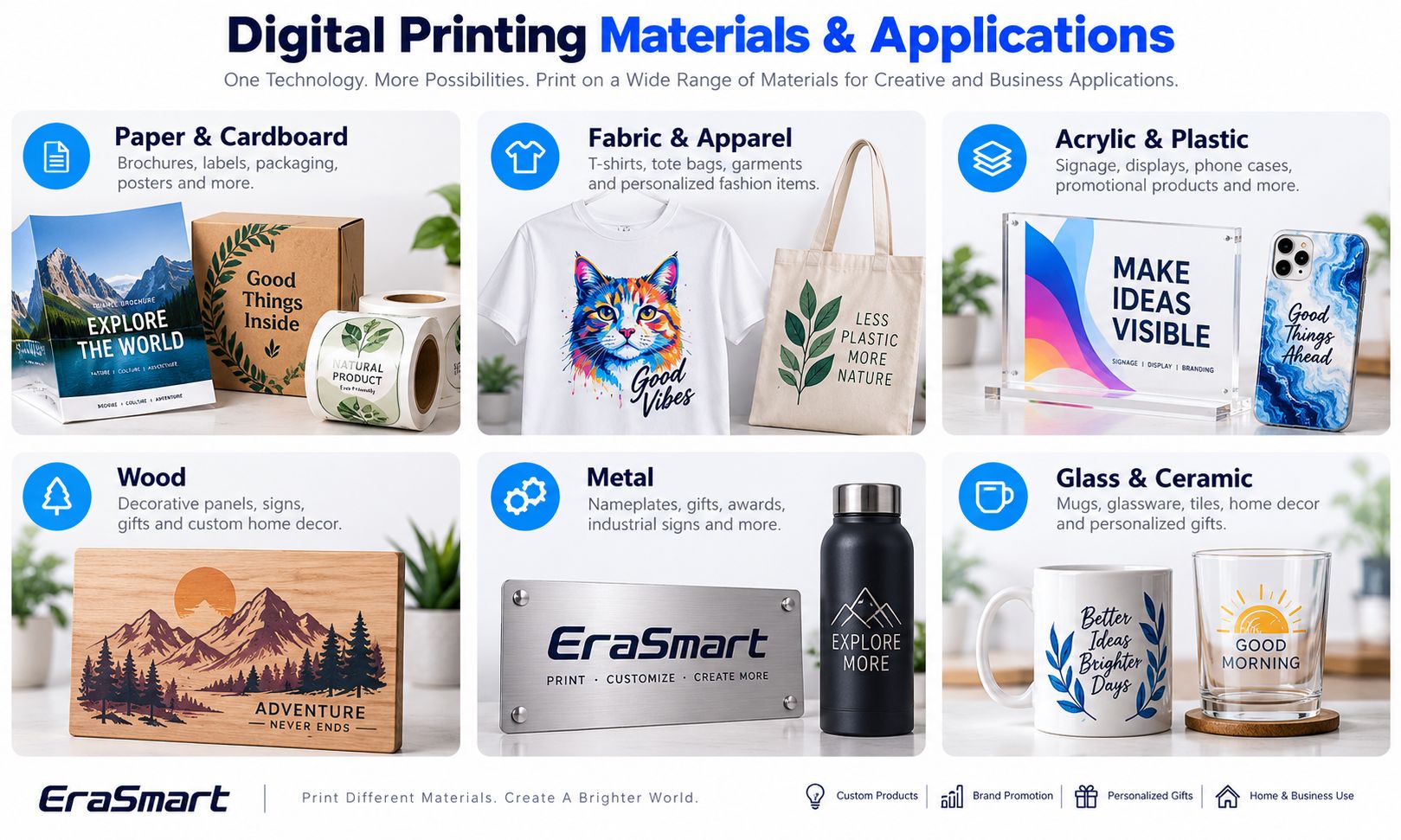
Paper and Cardboard
Common applications include:
- Business cards
- Brochures
- Books
- Labels
- Flyers
- Packaging prototypes
Production inkjet and electrophotographic systems are common technologies for paper-based commercial printing.
Fabric and Apparel
Digital textile printing may include:
- Textile DTF
- DTG
- Dye sublimation
- Other textile inkjet processes
Applications include:
- T-shirts
- Hoodies
- Sportswear
- Uniforms
- Tote bags
Fabric composition, pretreatment, ink chemistry and finishing requirements determine the suitable workflow.
Acrylic and Plastic
UV printing is frequently used for suitable rigid plastic and acrylic products.
Applications include:
- Acrylic signs
- Display panels
- Phone cases
- Nameplates
- Promotional products
Transparent acrylic can benefit from white ink backing or reverse printing.
Different plastics behave differently, so adhesion testing remains important.
Wood
UV printing can be used for suitable wood and wood-based products.
Applications include:
- Decorative signs
- Wooden plaques
- Personalized gifts
- Home décor
- Packaging samples
The natural grain, coating, porosity and surface flatness can affect the final result.
Metal
Digital UV printing can customize compatible metal surfaces.
Possible products include:
- Metal signs
- Nameplates
- Awards
- Promotional plates
- Decorative panels
Metal often requires careful cleaning and may need additional surface treatment depending on the finish.
Read UV Printing on Metal.
Glass and Ceramic
UV printing and UV DTF can be used for selected glass and ceramic applications.
Sublimation is another option for specially coated products.
Examples include:
- Decorative glass
- Ceramic tiles
- Personalized mugs
- Glass gifts
- Promotional drinkware
Food-contact and dishwasher-safety claims require application-specific testing.
Film, Vinyl and Specialty Media
Different printing technologies use different film materials.
Examples include:
- Textile DTF PET film
- UV DTF A/B film
- Printable vinyl
- Sublimation transfer paper
- Specialty inkjet media
These materials are not universally interchangeable.
Common Applications of Digital Printing
Digital printing serves both traditional commercial printing and specialized product customization.
| Application | Typical Technology |
|---|---|
| Business cards and brochures | Digital toner / production inkjet |
| Personalized T-shirts | Textile DTF / DTG |
| Polyester products | Sublimation |
| Acrylic signage | UV flatbed |
| Custom phone cases | UV flatbed |
| Wooden gifts | UV flatbed |
| Metal nameplates | UV flatbed |
| Cup wraps and hard-surface decals | UV DTF |
| Sublimation-coated photo mugs | Sublimation |
| Short-run packaging samples | Suitable digital inkjet or toner process |
The common connection is digital image control.
But the equipment, inks, materials and finishing procedures differ.
UV vs DTF vs UV DTF: Which Digital Printing Technology Should You Choose?
For custom-product businesses, UV, textile DTF and UV DTF are three important technologies.
They serve different production goals.
UV Flatbed Printing
Choose UV flatbed when you want to print directly onto compatible hard products.
Typical products include:
- Acrylic plaques
- Phone cases
- Signs
- Wooden gifts
- Flat metal products
- Packaging prototypes
Textile DTF Printing
Choose textile DTF when your primary products are garments or other compatible fabric items.
Typical products include:
- T-shirts
- Hoodies
- Uniforms
- Tote bags
UV DTF Printing
Choose UV DTF when you want to produce adhesive transfer graphics for compatible hard surfaces.
Typical products include:
- Cup wraps
- Bottle decals
- Decorative labels
- Promotional graphics
| Business Goal | Recommended Starting Technology |
|---|---|
| Custom apparel | Textile DTF |
| Direct printing on rigid products | UV Flatbed |
| Hard-surface decals and cup wraps | UV DTF |
| Paper brochures | Production Inkjet / Digital Toner |
| Sublimation-coated gifts | Dye Sublimation |
For a more detailed buying comparison, read UV Printing vs DTF Printing vs UV DTF Printing.
How to Choose the Right Digital Printing Method
The best technology depends on the product you want to manufacture—not simply the printing technology that appears most versatile.
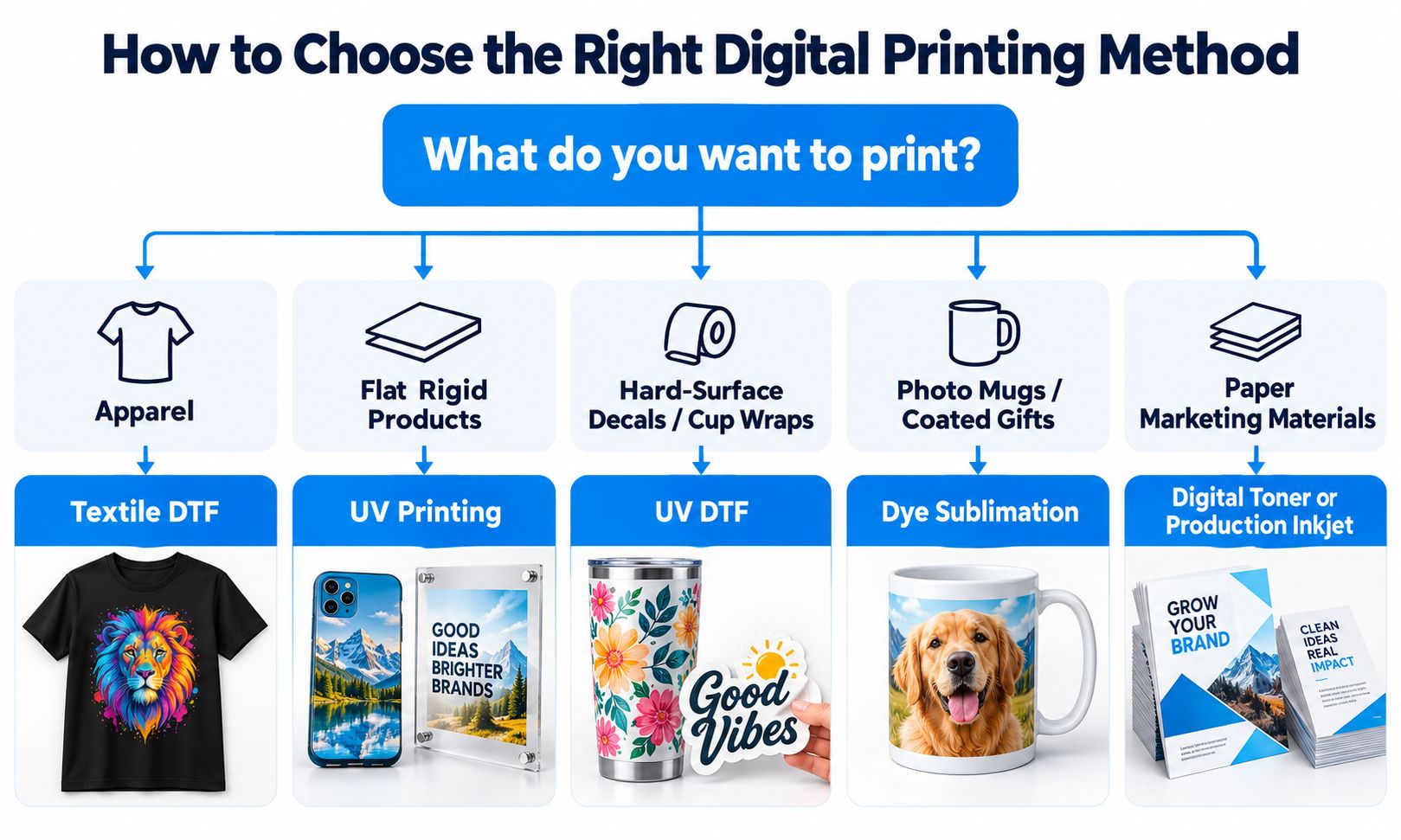
Step 1: Identify the Final Product
Start by asking:
What am I actually selling?
For example:
- T-shirts
- Acrylic signs
- Phone cases
- Bottles
- Stickers
- Paper packaging
The finished product immediately narrows the available printing methods.
Step 2: Identify the Material
Determine whether the product is made from:
- Cotton
- Polyester
- Acrylic
- Glass
- Metal
- Wood
- Plastic
- Paper
- A coated material
Do not choose a printer before confirming substrate compatibility.
Step 3: Consider Product Shape and Size
A flat acrylic panel is different from a cylindrical bottle.
A UV flatbed can be practical for the panel.
A UV DTF transfer may be more convenient for decorating a compatible curved bottle.
Direct cylindrical UV printing, by comparison, requires a suitable rotary system.
Step 4: Consider Order Quantity
Think about:
- One-off orders
- Short runs
- Mixed-design batches
- Large repeat orders
Digital printing often works well for variable designs and smaller batches, but commercial production capacity still needs to be evaluated.
Step 5: Consider Color and Special Effects
Does the product need:
- CMYK only?
- White ink?
- Transparent effects?
- Varnish?
- Full-color photographs?
- Textured finishes?
Not every digital printing system supports all of these features.
Step 6: Calculate Total Production Cost
Evaluate more than the equipment purchase price.
Consider:
Total Production Cost = Consumables + Labor + Maintenance + Equipment Allocation + Packaging + Waste + Other Relevant Overheads
The actual calculation should reflect your business model.
Step 7: Evaluate Maintenance and Workflow
Some technologies require:
- Regular ink circulation
- Powder application
- Heat pressing
- Lamination
- Surface treatment
- Specialized finishing
Choose equipment your team can operate and maintain consistently.
Step 8: Test Actual Products
Before purchasing equipment for a new business, evaluate physical samples.
Check:
- Image quality
- Material compatibility
- Durability
- Production time
- Ink consumption
- Waste
- Finished appearance
A sample that passes the intended application tests provides more useful information than a generic equipment specification alone.
Is Digital Printing Suitable for Small Businesses?
Digital printing can be a practical production method for small businesses because it supports individualized orders and a wide range of short-run applications.
Potential business models include:
Print-on-Demand Apparel
Produce custom garments after receiving customer orders.
Personalized Gift Shops
Offer products such as:
- Phone cases
- Acrylic gifts
- Name plaques
- Promotional items
Sticker and Decal Businesses
Produce customized decals for compatible hard-surface products.
Local B2B Customization
Supply small quantities of:
- Company gifts
- Branded products
- Promotional displays
- Event merchandise
E-Commerce Businesses
Sell personalized products through websites and online marketplaces.
However, profitability depends on:
- Customer demand
- Product pricing
- Consumable costs
- Equipment utilization
- Marketing
- Order fulfillment
- Maintenance
- Reprint rates
A digital printer is a production tool, not a guarantee of profit.
Businesses should validate a small product range before expanding into many unrelated applications.
Common Digital Printing Problems and How to Prevent Them
Even professional equipment can experience printing problems.
Understanding where problems originate helps reduce unnecessary reprints.
Inaccurate Colors
Possible causes:
- Incorrect color profile
- Different substrate colors
- White ink variation
- Inappropriate RIP settings
Check color management before changing several printer settings simultaneously.
Banding
Possible causes:
- Missing nozzles
- Printhead alignment
- Media feeding
- Incorrect print mode
Run diagnostic tests according to the printer’s operating procedure.
Poor Adhesion
Common in some direct-to-object printing applications.
Check:
- Substrate
- Surface contamination
- Ink compatibility
- Pretreatment
- Curing
Do not assume that simply increasing print resolution will improve adhesion.
White Ink Problems
White pigment systems require appropriate circulation, cleaning and maintenance.
Problems may include:
- Uneven opacity
- Nozzle loss
- Settling
- Inconsistent white coverage
Blurry Images
Check:
- Source resolution
- Artwork dimensions
- Printhead clearance
- Printer setup
- Media movement
Transfer Problems
Textile DTF and UV DTF use different transfer processes.
For textile DTF, check:
- Powder coverage
- Curing
- Heat press conditions
- Film
For UV DTF, check:
- A/B film
- Lamination
- Surface cleaning
- Application pressure
- Adhesion
Troubleshoot the specific production system rather than assuming all digital printing problems have the same causes.
Is Digital Printing Better for the Environment?
Digital printing can reduce some forms of waste, particularly when businesses produce only what customers order.
For example, on-demand production may reduce the need to manufacture large quantities of unwanted printed merchandise.
Digital printing can also eliminate certain conventional platemaking steps.
However, this does not mean every digital printing process is automatically environmentally preferable.
Environmental impact depends on:
- Ink chemistry
- Energy consumption
- Film and transfer materials
- Waste ink
- Cleaning supplies
- Production volume
- Packaging
- Equipment lifetime
- Finished-product durability
UV, DTF, UV DTF and other printing technologies have different consumable and waste profiles.
Environmental claims should be based on the actual process and credible supporting evidence, not on the word digital alone.
Final Answer: When Should You Choose Digital Printing?
Digital printing is a broad family of production processes that use electronic image data to control printing without preparing conventional fixed plates or screens for every design.
It is particularly valuable when businesses need:
- Short production runs
- Personalized products
- Variable artwork
- On-demand manufacturing
- Fast sampling
- Frequent design changes
Traditional printing processes may remain more economical for some large-volume standardized applications.
For custom-product businesses, the most important decision is selecting the right digital workflow.
Choose Textile DTF for compatible apparel and fabric transfers.
Choose UV Flatbed for direct printing on suitable rigid and specialty products.
Choose UV DTF for hard-surface transfer decals, cup wraps and compatible finished goods.
Choose Sublimation for appropriate polyester and specially coated products.
Choose Production Inkjet or Digital Toner for suitable paper-based commercial printing.
The right printing process should match the product, substrate, required quality and production economics.
Frequently Asked Questions
What is digital printing in simple terms?
Digital printing creates physical prints using electronically controlled image data without requiring traditional fixed printing plates or screens for each design.
How does digital printing work?
A digital file is processed by printing software, and a printer forms the image using ink, toner or a specialized process. The image is then dried, cured, fused or transferred according to the technology.
What are the main types of digital printing?
Inkjet and electrophotographic printing are two major image-formation technologies. Specialized workflows include UV printing, textile DTF, UV DTF, DTG, sublimation and latex printing.
Is inkjet printing the same as digital printing?
No. Inkjet is one major type of digital printing. Digital printing also includes electrophotographic and other digitally controlled imaging technologies.
Is UV printing a type of digital printing?
Yes. UV printing is a specialized digital inkjet process that uses UV-curable ink.
What is the difference between digital printing and offset printing?
Digital printing uses electronic image control without conventional plates for each design. Offset printing uses prepared plates and transfers ink through an intermediate blanket to the substrate.
Is digital printing cheaper than offset printing?
Digital printing is often economical for short runs and personalized work. Offset can be more efficient for long runs. Actual cost depends on the job and equipment.
What materials can be digitally printed?
Depending on the technology, digital printing can be used on paper, fabric, plastic, acrylic, wood, metal, glass, ceramic and specialized films.
Can digital printing be used on T-shirts?
Yes. Textile DTF, DTG and suitable sublimation workflows are examples of digital methods used for garment customization.
Can digital printing work on metal or glass?
Yes, with suitable technology such as compatible UV printing or UV DTF transfers. Surface preparation and adhesion testing may be necessary.
Does digital printing last as long as screen printing?
Durability depends on the ink, substrate, printing process, finishing and actual use. Neither method should be assumed universally superior.
Do digital printers require maintenance?
Yes. Maintenance varies by technology. Inkjet systems may require nozzle checks and ink-system care, while toner-based systems have different maintenance requirements.
Does digital printing require special ink?
It depends on the printer. UV ink, textile ink, sublimation ink and toner are designed for different systems and are not universally interchangeable.
Is digital printing suitable for small businesses?
It can be, especially for personalization, small-batch production and on-demand products. Profitability depends on actual demand and operating costs.
Which digital printing method is best for personalized gifts?
For flat rigid gifts, UV flatbed may be suitable. For compatible hard-surface decals and cup wraps, consider UV DTF. For textile gifts, consider textile DTF.
MAY BE YOU LIKE ALSO
Copyright 2020 © EraSmart. | Sitemap